
Short description
🚀 DeleteBlocks is an AutoCAD AutoLISP and DCL utility for deleting block definitions and their block references from a DWG drawing.
It helps CAD users inspect block names, review instance counts, filter block lists, select unused blocks, and remove unwanted block definitions faster.
The main benefit is cleaner AutoCAD drawings, reduced block clutter, faster DWG maintenance, and better drawing cleanup control.
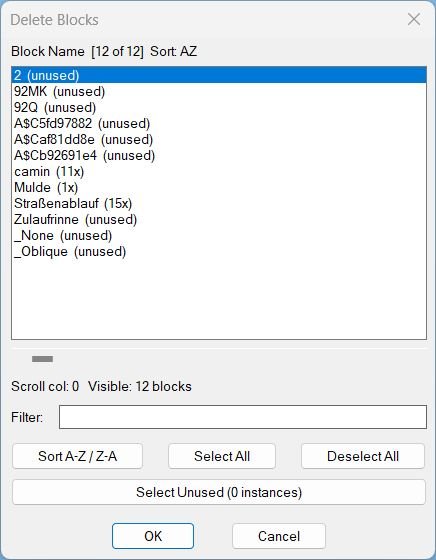
Command:
🧰 Load the LISP file with APPLOAD or by using (load "DeleteBlocks.lsp").
Run DELBLOCKS to open the DCL block deletion dialog.
The main AutoLISP entry point is c:delblocks.
The tool targets AutoCAD and AutoCAD-based platforms that support AutoLISP, Visual LISP COM, and DCL dialogs.
Description:
📘 DeleteBlocks scans the active AutoCAD drawing and builds a list of block definitions with their detected instance counts.
The user starts DELBLOCKS, reviews the generated dialog, filters block names, changes sort direction, selects one or more block definitions, and confirms deletion.
The program then removes matching block references from model space, paper space, and block definitions where possible, and attempts to delete the selected block definitions from the drawing database.
The dialog includes practical productivity features such as persistent filter text, remembered dialog size, horizontal list scrolling, visible item counts, A-Z or Z-A sorting, select all, deselect all, and a button to select zero-instance blocks for cleanup.
This AutoCAD block cleanup utility is useful for CAD managers, Civil 3D production teams, drafting technicians, and BIM or CAD coordinators who need to remove unused or unwanted block definitions from large DWG files.
Important: this is a destructive cleanup command because selected block names are deleted globally from the current drawing where the AutoCAD database allows deletion.
Helper function: (if any)
- 🚀 Command entry point –
c:delblocksbuilds the block list and launches the DCL dialog immediately. - 🔍 Block data scanner –
LM:delblocks:buildblockdatareads the block table and countsINSERTreferences for each block name. - 🧩 Effective block name support –
LM:blocknameusesEffectiveNamewhere available, which improves dynamic block name handling. - 📊 Instance count display – each row is formatted as a block name plus count, such as
BOLT (12x)orBOLT (unused). - 🔍 Filter logic –
_applyfilterfilters the block list by name usingwcmatchand case-insensitive comparison. - 🔄 Sort logic –
_checksortdirswitches the block list betweenAZandZAordering. - 📌 DCL dialog generator –
LM:delblocks:listboxwrites a temporary DCL file with a unique filename to avoid stale dialog file conflicts. - 🧠 Registry persistence –
LM:delblocks:regreadandLM:delblocks:regsavestore filter text, horizontal scroll position, sort direction, dialog width, and dialog height underHKCU\Software\LM_DelBlocks. - 🟧 Select unused helper –
_purgeunusedselects block definitions with a zero instance count so they can be removed more quickly. - 🔴 Nested block warning –
LM:delblocks:nestedmapdetects block names used inside other block definitions and prompts before deletion. - 🔒 Layer lock handling –
LM:deleteblockstemporarily unlocks locked layers, deletes matching references, deletes block definitions where possible, and restores the previous lock state. - 🧹 Undo grouping –
LM:startundoandLM:endundowrap deletion operations in an AutoCAD undo mark.
Functionalities:
- 🚀 Open block deletion manager – runs
DELBLOCKSto display a DCL list of deletable block candidates. - 🔢 Show block instance counts – displays how many references each block name has in the drawing database.
- 🔍 Filter block names – narrows the list by text so users can quickly find target block definitions.
- 🔄 Sort A-Z or Z-A – changes the block list order for faster navigation in drawings with many block definitions.
- 📌 Select multiple blocks – allows multi-select deletion from one dialog instead of running repeated command-line cleanup steps.
- 🧹 Select unused blocks – automatically selects zero-instance blocks for purge-style drawing cleanup.
- 🟧 Select all and deselect all – speeds up bulk block cleanup and review workflows.
- 📊 Horizontal scroll simulation – uses a DCL slider to inspect long block names that do not fit in the list box.
- 🔴 Nested block protection warning – warns when a selected block is used inside another block definition before proceeding.
- 🔒 Locked layer support – temporarily unlocks layers so matching block references can be deleted, then restores the layer lock state.
- 🧠 Persistent user settings – remembers the last filter, scroll position, sort direction, and dialog size between runs.
- 🧰 Temporary DCL creation – creates a unique dialog file per session and removes it after use.
- 🔴 Global block deletion – removes matching block references and attempts to delete the selected block definitions from the active DWG.
Result:
✅ The final result is a practical AutoCAD block cleanup command that centralizes block review, filtering, instance counting, unused block selection, nested block checking, and destructive block deletion in one DCL interface.
It reduces repetitive manual block cleanup work, helps users find unused or unwanted block definitions faster, improves DWG hygiene, and supports cleaner AutoCAD and Civil 3D production drawings.
Images, animations etc.
XAML code:
<ResourceDictionary
    xmlns="http://schemas.microsoft.com/winfx/2006/xaml/presentation"
    xmlns:x="http://schemas.microsoft.com/winfx/2006/xaml"
    xmlns:src="clr-namespace:Autodesk.Windows;assembly=AdWindows">

    <src:RibbonToolTip x:Key="DeleteBlocks">
        <src:RibbonToolTip.ExpandedContent>
            <StackPanel>
                <TextBlock Background="AntiqueWhite" TextAlignment="Left">
				<Bold>Function Syntax: delblocks</Bold>
<LineBreak/>
<Bold>Version: 1.0 Date: 20.06.2026 6:38:48PM</Bold>
				<LineBreak/>
				<Hyperlink>http://www.lee-mac.com/deleteblocks.html</Hyperlink>
				<LineBreak/>
short_description: |<LineBreak/>
<Bold><Run Foreground="DodgerBlue">SEO Short Description</Run></Bold><LineBreak/>
<Run Foreground="White">🚀 DeleteBlocks is an AutoCAD AutoLISP and DCL utility for deleting block definitions and their references from a DWG drawing.</Run><LineBreak/>
<Run Foreground="White">It helps CAD users inspect block names, review instance counts, filter block lists, select unused blocks, and remove unwanted block definitions faster.</Run><LineBreak/>
<Run Foreground="LimeGreen">The main benefit is cleaner AutoCAD drawings, reduced block clutter, faster DWG maintenance, and better drawing cleanup control.</Run><LineBreak/>
command: |<LineBreak/>
<Bold><Run Foreground="DodgerBlue">Main Command and Loading Method</Run></Bold><LineBreak/>
<Run Foreground="White">🧰 Load the LISP file with APPLOAD or by using (load "DeleteBlocks.lsp").</Run><LineBreak/>
<Run Foreground="White">Run DELBLOCKS to open the DCL block deletion dialog.</Run><LineBreak/>
<Run Foreground="Orange">The main AutoLISP entry point is c:delblocks.</Run><LineBreak/>
<Run Foreground="White">The target platform is AutoCAD and AutoCAD-based products that support AutoLISP, Visual LISP COM, and DCL dialogs.</Run><LineBreak/>
description: |<LineBreak/>
<Bold><Run Foreground="DodgerBlue">Detailed Description</Run></Bold><LineBreak/>
<Run Foreground="White">📘 DeleteBlocks scans the active AutoCAD drawing and builds a list of block definitions with detected instance counts.</Run><LineBreak/>
<Run Foreground="White">🔍 The user starts DELBLOCKS, reviews the generated dialog, filters block names, changes sort direction, selects one or more block definitions, and confirms deletion.</Run><LineBreak/>
<Run Foreground="White">🧹 The program removes matching block references from model space, paper space, and block definitions where possible, then attempts to delete the selected block definitions.</Run><LineBreak/>
<Run Foreground="White">🧠 The dialog remembers filter text, horizontal scroll position, sort direction, dialog width, and list height through Windows registry settings.</Run><LineBreak/>
<Run Foreground="DarkRed">🔴 Important: this is a destructive cleanup command because selected block names are deleted globally from the current drawing where AutoCAD allows deletion.</Run><LineBreak/>
helper_function: |<LineBreak/>
<Bold><Run Foreground="LimeGreen">Helper Logic</Run></Bold><LineBreak/>
<Run Foreground="White">• </Run><Bold><Run Foreground="LimeGreen">🚀 Command entry point</Run></Bold><Run Foreground="White"> - c:delblocks builds the block list and launches the DCL dialog immediately.</Run><LineBreak/>
<Run Foreground="White">• </Run><Bold><Run Foreground="LimeGreen">🔍 Block data scanner</Run></Bold><Run Foreground="White"> - LM:delblocks:buildblockdata reads the block table and counts INSERT references for each block name.</Run><LineBreak/>
<Run Foreground="White">• </Run><Bold><Run Foreground="LimeGreen">🧩 Effective block name support</Run></Bold><Run Foreground="White"> - LM:blockname uses EffectiveName where available for better dynamic block handling.</Run><LineBreak/>
<Run Foreground="White">• </Run><Bold><Run Foreground="LimeGreen">📊 Instance count display</Run></Bold><Run Foreground="White"> - Rows are displayed as block name plus count, such as BOLT (12x) or BOLT (unused).</Run><LineBreak/>
<Run Foreground="White">• </Run><Bold><Run Foreground="LimeGreen">🔍 Filter logic</Run></Bold><Run Foreground="White"> - _applyfilter filters block names with wcmatch and case-insensitive comparison.</Run><LineBreak/>
<Run Foreground="White">• </Run><Bold><Run Foreground="LimeGreen">🔄 Sort logic</Run></Bold><Run Foreground="White"> - _checksortdir switches the list between AZ and ZA ordering.</Run><LineBreak/>
<Run Foreground="White">• </Run><Bold><Run Foreground="LimeGreen">📌 DCL dialog generator</Run></Bold><Run Foreground="White"> - LM:delblocks:listbox writes a unique temporary DCL file to avoid stale dialog conflicts.</Run><LineBreak/>
<Run Foreground="White">• </Run><Bold><Run Foreground="LimeGreen">🧠 Registry persistence</Run></Bold><Run Foreground="White"> - LM:delblocks:regread and LM:delblocks:regsave store user interface settings under HKCU\Software\LM_DelBlocks.</Run><LineBreak/>
<Run Foreground="White">• </Run><Bold><Run Foreground="LimeGreen">🟧 Select unused helper</Run></Bold><Run Foreground="White"> - _purgeunused selects zero-instance block definitions for cleanup.</Run><LineBreak/>
<Run Foreground="White">• </Run><Bold><Run Foreground="LimeGreen">🔴 Nested block warning</Run></Bold><Run Foreground="White"> - LM:delblocks:nestedmap detects blocks used inside other blocks and asks before deletion.</Run><LineBreak/>
<Run Foreground="White">• </Run><Bold><Run Foreground="LimeGreen">🔒 Layer lock handling</Run></Bold><Run Foreground="White"> - LM:deleteblocks unlocks locked layers temporarily, deletes references, deletes definitions where possible, and restores locks.</Run><LineBreak/>
<Run Foreground="White">• </Run><Bold><Run Foreground="LimeGreen">🧹 Undo grouping</Run></Bold><Run Foreground="White"> - LM:startundo and LM:endundo wrap delete operations in an AutoCAD undo mark.</Run><LineBreak/>
functionalities: |<LineBreak/>
<Bold><Run Foreground="LimeGreen">Functionalities</Run></Bold><LineBreak/>
<Run Foreground="White">• </Run><Bold><Run Foreground="LimeGreen">🚀 Open block deletion manager</Run></Bold><Run Foreground="White"> - runs DELBLOCKS to display a DCL list of block deletion candidates.</Run><LineBreak/>
<Run Foreground="White">• </Run><Bold><Run Foreground="LimeGreen">🔢 Show block instance counts</Run></Bold><Run Foreground="White"> - displays how many references each block name has in the drawing database.</Run><LineBreak/>
<Run Foreground="White">• </Run><Bold><Run Foreground="LimeGreen">🔍 Filter block names</Run></Bold><Run Foreground="White"> - narrows the list by text for faster block cleanup.</Run><LineBreak/>
<Run Foreground="White">• </Run><Bold><Run Foreground="LimeGreen">🔄 Sort A-Z or Z-A</Run></Bold><Run Foreground="White"> - changes list order for large DWG block libraries.</Run><LineBreak/>
<Run Foreground="White">• </Run><Bold><Run Foreground="LimeGreen">📌 Select multiple blocks</Run></Bold><Run Foreground="White"> - allows multi-select deletion from one dialog.</Run><LineBreak/>
<Run Foreground="White">• </Run><Bold><Run Foreground="LimeGreen">🧹 Select unused blocks</Run></Bold><Run Foreground="White"> - automatically selects zero-instance blocks for purge-style cleanup.</Run><LineBreak/>
<Run Foreground="White">• </Run><Bold><Run Foreground="LimeGreen">🟧 Select all and deselect all</Run></Bold><Run Foreground="White"> - supports fast bulk review workflows.</Run><LineBreak/>
<Run Foreground="White">• </Run><Bold><Run Foreground="LimeGreen">📊 Horizontal scroll simulation</Run></Bold><Run Foreground="White"> - uses a DCL slider to inspect long block names.</Run><LineBreak/>
<Run Foreground="White">• </Run><Bold><Run Foreground="DarkRed">🔴 Nested block protection warning</Run></Bold><Run Foreground="White"> - warns when a selected block is used inside another block definition.</Run><LineBreak/>
<Run Foreground="White">• </Run><Bold><Run Foreground="LimeGreen">🔒 Locked layer support</Run></Bold><Run Foreground="White"> - temporarily unlocks layers and restores lock state after deletion.</Run><LineBreak/>
<Run Foreground="White">• </Run><Bold><Run Foreground="LimeGreen">🧠 Persistent user settings</Run></Bold><Run Foreground="White"> - remembers filter, scroll, sort direction, and dialog size.</Run><LineBreak/>
<Run Foreground="White">• </Run><Bold><Run Foreground="DarkRed">🔴 Global block deletion</Run></Bold><Run Foreground="White"> - removes matching block references and attempts to delete the selected block definitions from the active DWG.</Run><LineBreak/>
result: |<LineBreak/>
<Bold><Run Foreground="DodgerBlue">Final Result</Run></Bold><LineBreak/>
<Run Foreground="White">✅ The final result is a practical AutoCAD block cleanup command that centralizes block review, filtering, instance counting, unused block selection, nested block checking, and block deletion.</Run><LineBreak/>
<Run Foreground="LimeGreen">It reduces repetitive manual block cleanup work, improves DWG hygiene, and supports cleaner AutoCAD and Civil 3D production drawings.</Run><LineBreak/>
additional_info: |<LineBreak/>
<Bold><Run Foreground="Orange">Additional Notes</Run></Bold><LineBreak/>
<Run Foreground="White">• </Run><Bold><Run Foreground="DarkRed">🔴 Destructive behavior</Run></Bold><Run Foreground="White"> - selected block names are removed globally where possible, not only from manually selected block references.</Run><LineBreak/>
<Run Foreground="White">• </Run><Bold><Run Foreground="Orange">🔒 Undo note</Run></Bold><Run Foreground="White"> - the delete process is wrapped in an AutoCAD undo mark, but users should save or back up important drawings before bulk deletion.</Run><LineBreak/>
<Run Foreground="White">• </Run><Bold><Run Foreground="Orange">📌 Protected blocks</Run></Bold><Run Foreground="White"> - xrefs, anonymous blocks, dependent definitions, layout records, or other special definitions may be skipped or may fail to delete depending on AutoCAD rules.</Run><LineBreak/>
<Run Foreground="White">• </Run><Bold><Run Foreground="Orange">🧩 Dynamic block note</Run></Bold><Run Foreground="White"> - effective names are used where available, which is useful when counting or deleting dynamic block references.</Run><LineBreak/>
<Run Foreground="White">• </Run><Bold><Run Foreground="Orange">📘 Configuration</Run></Bold><Run Foreground="White"> - user interface settings are stored in the Windows registry under HKCU\Software\LM_DelBlocks.</Run><LineBreak/>


            </StackPanel>
        </src:RibbonToolTip.ExpandedContent>
    </src:RibbonToolTip>
<Grid>
<Image Source="Image_000.jpg" Stretch="Uniform"/>
</Grid>

 </StackPanel>
 </src:RibbonToolTip.ExpandedContent>
 </src:RibbonToolTip>
</ResourceDictionary>