
Short description
Sort / Purpose: Copy a block reference, give it a new block name, and optionally force it and its contents onto a chosen layer while optionally deleting the original reference.
• Scope: Works on a single selected block reference and creates a new block definition plus a retargeted (or copied) reference.
• Goal: Provide an interactive way to duplicate and rename blocks, with an optional “+Layer” mode to standardize content layers and an option to remove the original block reference automatically.
Command:
Command name: CopyBlockChangeLayer
How to run: Load the LISP file, then type CopyBlockChangeLayer in the command line and press Enter.
• Selection: You are prompted to select a single block reference that is not on a locked layer.
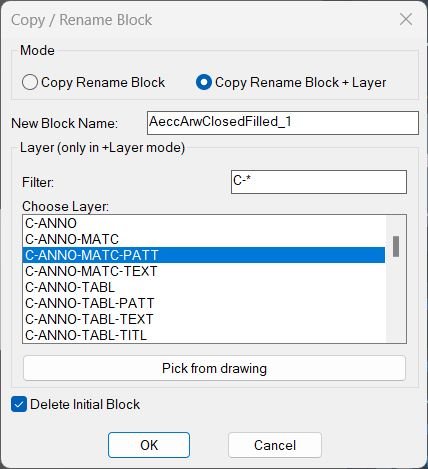
• Dialog: After selection, a dialog opens with mode selection, new block name, optional layer tools, and a “Delete Initial Block” toggle.
Description:
• Block picking: Prompts you to pick a block reference and verifies that it is an INSERT and not on a locked layer before continuing.
• Default naming: Proposes a default new block name based on the original name (Base_1, Base_2, and so on) that is guaranteed to be unique among existing blocks.
• Dialog modes: The dialog offers two modes via radio buttons: “Copy Rename Block” and “Copy Rename Block + Layer”.
• Name input: Allows you to type a custom new block name and validates it against existing block names and symbol name rules.
• Layer tools (+Layer mode): When the “Copy Rename Block + Layer” mode is active, a layer filter box, a layer list, and a “Pick from drawing” button become active so you can choose a target layer interactively.
• Delete toggle: A “Delete Initial Block” toggle (default on) controls whether the original reference is deleted after the new, renamed copy is created and retargeted.
• Definition cloning: Uses ObjectDBX to copy the original block definition to a temporary database, rename it there, and copy the renamed definition back into the active drawing as a new block.
• Reference handling: Keeps a handle to the original reference, and in copy mode creates a duplicate reference, then repoints the active (possibly copied) reference to the newly created block definition.
• Layer enforcement (+Layer mode): If a layer is chosen, sets the new block reference to that layer and optionally forces all geometry inside the new block definition to that layer and ByLayer properties.
• Original cleanup: If the “Delete Initial Block” option is enabled, the original reference is deleted, leaving only the new renamed (and possibly re-layered) reference in place.
• Error and cancel: Handles invalid names, ObjectDBX failures, and user cancellation with informative messages and clean exit.
Helper function: (if any)
Helper functions:
• LM:AcadMajorVersion: Returns the major AutoCAD version number to construct the correct ObjectDBX interface string.
• LM:CopyObjects: Wraps VLA CopyObjects to copy block definitions between the active drawing and the temporary ObjectDBX document.
• LM:ForceBlockContentsByLayer: For a given block name and layer, sets all entities in that block definition to that layer, color ByLayer, linetype ByLayer, and lineweight ByLayer.
• LM:BuildDialogAndGet: Dynamically builds the DCL file, populates the layer list, manages filter and selection, handles “Pick from drawing”, reads all user choices, and returns new name, layer, mode, and delete flag.
• LM:RenameBlockReference: Core engine called by the command; handles selection, ObjectDBX cloning and renaming, retargeting block reference, applying layer mode, and optionally deleting the original reference.
Key system and VLA calls:
• vla-get-ActiveDocument / vla-get-Blocks: Access the active drawing and its block table.
• vla-getInterfaceObject: Creates the ObjectDBX AxDbDocument used to clone and rename block definitions safely.
• vla-Copy / vla-Delete: Duplicates and optionally removes the original block reference depending on user choices.
• vlax-get-or-create-object / vlax-release-object: Manage external COM objects and ensure they are properly released.
Functionalities:
• Copy and rename in one step: Creates a new block definition, copies geometry, and assigns a new name while leaving the original definition intact.
• Two working modes: Simple “Copy Rename Block” mode, or an extended “Copy Rename Block + Layer” mode with full layer control and filtering.
• Interactive layer selection: In +Layer mode, you can filter layer names, select from a list, or pick any object in the drawing to adopt its layer.
• Content normalization: Optionally forces all entities in the new block definition to a single layer and ByLayer display properties for consistent behavior.
• Safe naming strategy: Automatically proposes a unique default name and prevents invalid or duplicate block names from being used.
• Delete original toggle: You can decide whether the original block reference is kept or automatically deleted after the new one is created and linked.
• Locked layer protection: Rejects block references placed on locked layers to avoid unintended edits in protected areas.
• Version aware: Uses the AutoCAD version to connect to the correct ObjectDBX interface for reliable operation across releases.
Result:
Result: A new block definition is created with a new name, the chosen reference is retargeted to this definition, and optionally placed on a selected layer with its contents forced ByLayer, while the original reference can be removed automatically.
• New block identity: You obtain a separate, uniquely named block that can be edited or managed independently from the original definition.
• Layer controlled copy: In +Layer mode, the new block reference and its internal geometry conform to a single layer standard, improving visibility and plotting control.
• Clean replacement: With “Delete Initial Block” enabled, the original reference is removed and replaced by the newly named copy in the same location.
• Predictable behavior: The new block reacts as expected to layer changes and ByLayer properties, making it easier to integrate into existing layer standards.
Copy code:
Images, animations etc.
Log in to download.
Log in
Log in
XAML code:
<ResourceDictionary
xmlns="http://schemas.microsoft.com/winfx/2006/xaml/presentation"
xmlns:x="http://schemas.microsoft.com/winfx/2006/xaml"
xmlns:src="clr-namespace:Autodesk.Windows;assembly=AdWindows">

<src:RibbonToolTip x:Key="CopyBlock_CB">
<src:RibbonToolTip.ExpandedContent>
<StackPanel>
<TextBlock Background="AntiqueWhite" TextAlignment="Left">
<Bold>Function Syntax: CopyBlock_CB</Bold>
<LineBreak/>
<Bold>Version: 1 Date: 09.10.2025</Bold>
<LineBreak/>
<LineBreak/>
<Hyperlink>AI+https://www.lee-mac.com/copyblock.html</Hyperlink>
<LineBreak/>

short_description: |<LineBreak/>
<Bold><Run Foreground="DodgerBlue">SEO Description</Run></Bold><LineBreak/>
<Run Foreground="White">🚀 CopyBlockChangeLayer is an AutoCAD AutoLISP and DCL utility for copying a selected block reference, creating a renamed block definition, optionally changing its layer, and optionally deleting the original block reference.</Run><LineBreak/>
<Run Foreground="LimeGreen">The main benefit is faster AutoCAD block management, cleaner DWG layer organization, reusable block variants, and fewer manual CAD cleanup steps.</Run><LineBreak/>
<LineBreak/>
command: |<LineBreak/>
<Bold><Run Foreground="DodgerBlue">Main Command and Loading Method</Run></Bold><LineBreak/>
<Run Foreground="White">🧰 Load the LISP with </Run><Bold><Run Foreground="Orange">APPLOAD</Run></Bold><Run Foreground="White"> or through the AutoCAD startup suite.</Run><LineBreak/>
<Run Foreground="White">Run </Run><Bold><Run Foreground="Orange">CopyBlockChangeLayer</Run></Bold><Run Foreground="White"> to open the Copy / Rename Block workflow.</Run><LineBreak/>
<Run Foreground="White">The main entry point is </Run><Bold><Run Foreground="Orange">c:CopyBlockChangeLayer</Run></Bold><Run Foreground="White">, which calls </Run><Bold><Run Foreground="Orange">LM:RenameBlockReference</Run></Bold><Run Foreground="White"> in copy mode.</Run><LineBreak/>
<Run Foreground="White">The target platform is AutoCAD and AutoCAD-based verticals with Visual LISP, ActiveX COM, DCL dialogs, ObjectDBX, block references, and layer tables.</Run><LineBreak/>
<LineBreak/>
description: |<LineBreak/>
<Bold><Run Foreground="DodgerBlue">Detailed Description</Run></Bold><LineBreak/>
<Run Foreground="White">📘 The program asks the user to select one block reference in the drawing.</Run><LineBreak/>
<Run Foreground="White">It proposes a new block name based on the original effective block name and an available numeric suffix.</Run><LineBreak/>
<Run Foreground="White">The DCL dialog lets the user choose </Run><Bold><Run Foreground="Orange">Copy Rename Block</Run></Bold><Run Foreground="White"> or </Run><Bold><Run Foreground="Orange">Copy Rename Block + Layer</Run></Bold><Run Foreground="White">.</Run><LineBreak/>
<Run Foreground="White">In simple mode, the selected block reference is copied, a renamed block definition is created, and the copied reference is retargeted to the new definition.</Run><LineBreak/>
<Run Foreground="White">In layer mode, the copied reference can be moved to a selected layer, and entities inside the new block definition can be forced to that same layer.</Run><LineBreak/>
<Run Foreground="White">The layer list excludes xref-dependent layers, supports filtering, and includes a Pick from drawing button to read a layer from an existing object.</Run><LineBreak/>
<Run Foreground="White">The routine uses </Run><Bold><Run Foreground="Orange">ObjectDBX</Run></Bold><Run Foreground="White"> and </Run><Bold><Run Foreground="Orange">vla-CopyObjects</Run></Bold><Run Foreground="White"> to copy, rename, and re-import block definitions.</Run><LineBreak/>
<Bold><Run Foreground="DarkRed">Important:</Run></Bold><Run Foreground="White"> the </Run><Bold><Run Foreground="DarkRed">Delete Initial Block</Run></Bold><Run Foreground="White"> toggle is enabled by default, so the original selected block reference is deleted after the copy is created unless the user disables it.</Run><LineBreak/>
<LineBreak/>
helper_function: |<LineBreak/>
<Bold><Run Foreground="LimeGreen">Helper Logic</Run></Bold><LineBreak/>
<Run Foreground="White">🚀 </Run><Bold><Run Foreground="LimeGreen">Command wrapper</Run></Bold><Run Foreground="White"> - </Run><Bold><Run Foreground="Orange">c:CopyBlockChangeLayer</Run></Bold><Run Foreground="White"> starts the tool and calls the rename-copy workflow.</Run><LineBreak/>
<Run Foreground="White">🧠 </Run><Bold><Run Foreground="LimeGreen">AutoCAD version helper</Run></Bold><Run Foreground="White"> - </Run><Bold><Run Foreground="Orange">LM:AcadMajorVersion</Run></Bold><Run Foreground="White"> reads ACADVER and builds the correct ObjectDBX interface name.</Run><LineBreak/>
<Run Foreground="White">🧩 </Run><Bold><Run Foreground="LimeGreen">Object copy engine</Run></Bold><Run Foreground="White"> - </Run><Bold><Run Foreground="Orange">LM:CopyObjects</Run></Bold><Run Foreground="White"> uses a Visual LISP safe array and vla-CopyObjects to move block definitions between databases.</Run><LineBreak/>
<Run Foreground="White">🎨 </Run><Bold><Run Foreground="LimeGreen">Block content layer cleanup</Run></Bold><Run Foreground="White"> - </Run><Bold><Run Foreground="Orange">LM:ForceBlockContentsByLayer</Run></Bold><Run Foreground="White"> sets internal block entities to the selected layer and resets color, linetype, and lineweight to ByLayer.</Run><LineBreak/>
<Run Foreground="White">📝 </Run><Bold><Run Foreground="LimeGreen">DCL dialog builder</Run></Bold><Run Foreground="White"> - </Run><Bold><Run Foreground="Orange">LM:BuildDialogAndGet</Run></Bold><Run Foreground="White"> writes the temporary Copy / Rename Block dialog with modes, name input, layer list, filter, pick-layer button, and delete toggle.</Run><LineBreak/>
<Run Foreground="White">🔍 </Run><Bold><Run Foreground="LimeGreen">Layer filtering</Run></Bold><Run Foreground="White"> - </Run><Bold><Run Foreground="Orange">update-layer-list</Run></Bold><Run Foreground="White"> filters drawing layers with wcmatch and excludes xref-dependent layer names containing the pipe character.</Run><LineBreak/>
<Run Foreground="White">📌 </Run><Bold><Run Foreground="LimeGreen">Pick layer from drawing</Run></Bold><Run Foreground="White"> - </Run><Bold><Run Foreground="Orange">entsel</Run></Bold><Run Foreground="White"> lets the user click an object and read its layer from DXF group code 8.</Run><LineBreak/>
<Run Foreground="White">🔒 </Run><Bold><Run Foreground="LimeGreen">Selection safety</Run></Bold><Run Foreground="White"> - </Run><Bold><Run Foreground="Orange">LM:RenameBlockReference</Run></Bold><Run Foreground="White"> accepts only INSERT entities and rejects locked-layer block references.</Run><LineBreak/>
<Run Foreground="White">🏷️ </Run><Bold><Run Foreground="LimeGreen">Name validation</Run></Bold><Run Foreground="White"> - </Run><Bold><Run Foreground="Orange">snvalid</Run></Bold><Run Foreground="White"> checks the proposed block name and prevents duplicate block table names.</Run><LineBreak/>
<Run Foreground="White">🔴 </Run><Bold><Run Foreground="LimeGreen">Original reference deletion</Run></Bold><Run Foreground="White"> - </Run><Bold><Run Foreground="Orange">vla-Delete</Run></Bold><Run Foreground="White"> removes the original reference when Delete Initial Block is enabled.</Run><LineBreak/>
<LineBreak/>
functionalities: |<LineBreak/>
<Bold><Run Foreground="LimeGreen">Functionalities</Run></Bold><LineBreak/>
<Run Foreground="White">🚀 </Run><Bold><Run Foreground="LimeGreen">Copy and rename a block reference</Run></Bold><Run Foreground="White"> - creates an independent renamed block definition from the selected block.</Run><LineBreak/>
<Run Foreground="White">🏷️ </Run><Bold><Run Foreground="LimeGreen">Automatic name proposal</Run></Bold><Run Foreground="White"> - suggests names such as BlockName_1, BlockName_2, and higher available suffixes.</Run><LineBreak/>
<Run Foreground="White">🧩 </Run><Bold><Run Foreground="LimeGreen">Two workflow modes</Run></Bold><Run Foreground="White"> - supports simple copy and copy with layer control.</Run><LineBreak/>
<Run Foreground="White">🎨 </Run><Bold><Run Foreground="LimeGreen">Layer assignment</Run></Bold><Run Foreground="White"> - moves the copied block reference to the chosen drawing layer.</Run><LineBreak/>
<Run Foreground="White">🔍 </Run><Bold><Run Foreground="LimeGreen">Layer filter list</Run></Bold><Run Foreground="White"> - helps users quickly find the correct AutoCAD layer in the dialog.</Run><LineBreak/>
<Run Foreground="White">📌 </Run><Bold><Run Foreground="LimeGreen">Pick layer from drawing</Run></Bold><Run Foreground="White"> - reads a layer from an existing object instead of requiring manual typing.</Run><LineBreak/>
<Run Foreground="White">🧹 </Run><Bold><Run Foreground="LimeGreen">ByLayer cleanup</Run></Bold><Run Foreground="White"> - updates new block definition contents to the chosen layer and resets display properties to ByLayer.</Run><LineBreak/>
<Run Foreground="White">🔴 </Run><Bold><Run Foreground="DarkRed">Delete initial block option</Run></Bold><Run Foreground="White"> - automatically removes the original selected block reference when enabled.</Run><LineBreak/>
<Run Foreground="White">🔒 </Run><Bold><Run Foreground="LimeGreen">Validation checks</Run></Bold><Run Foreground="White"> - rejects non-block entities, locked-layer blocks, invalid block names, and duplicate block names.</Run><LineBreak/>
<Run Foreground="White">📐 </Run><Bold><Run Foreground="LimeGreen">Reference geometry preservation</Run></Bold><Run Foreground="White"> - keeps the copied reference placement, rotation, and scale by using vla-Copy.</Run><LineBreak/>
<Run Foreground="White">🧰 </Run><Bold><Run Foreground="LimeGreen">ObjectDBX block definition workflow</Run></Bold><Run Foreground="White"> - renames the copied block definition through an ObjectDBX database.</Run><LineBreak/>
<Run Foreground="White">🟢 </Run><Bold><Run Foreground="LimeGreen">DCL interface</Run></Bold><Run Foreground="White"> - provides a compact dialog for faster AutoCAD block editing.</Run><LineBreak/>
<LineBreak/>
result: |<LineBreak/>
<Bold><Run Foreground="DodgerBlue">Final Result</Run></Bold><LineBreak/>
<Run Foreground="White">✅ The final result is a faster AutoCAD block editing workflow where one selected block reference becomes a copied and renamed independent block variant.</Run><LineBreak/>
<Run Foreground="LimeGreen">The tool improves DWG cleanup, layer standardization, CAD productivity, block library management, and drawing production consistency.</Run><LineBreak/>
<LineBreak/>
additional_info: |<LineBreak/>
<Bold><Run Foreground="DarkOrange">Important Notes and Limitations</Run></Bold><LineBreak/>
<Run Foreground="White">🔴 </Run><Bold><Run Foreground="DarkRed">Delete Initial Block</Run></Bold><Run Foreground="White"> is enabled by default and deletes the original selected block reference after the copied reference is created.</Run><LineBreak/>
<Run Foreground="White">🧩 In layer mode, the code modifies the new copied block definition contents, not the original block definition.</Run><LineBreak/>
<Run Foreground="White">📌 Xref-dependent layers are excluded from the selectable layer list.</Run><LineBreak/>
<Run Foreground="White">🧠 The code requires Visual LISP COM and AutoCAD ObjectDBX support.</Run><LineBreak/>
<Run Foreground="White">📘 The tool manages AutoCAD block references and layers; it does not modify Civil 3D ProfileView, SectionView, Alignment, bands, labels, surfaces, corridors, or styles.</Run><LineBreak/>


</TextBlock>

<Grid>
<Image Source="Copy _ Rename Block.jpg" Stretch="Uniform"/>
</Grid>
<Grid>
<Image Source="Copy _ Rename Block+Layer.jpg" Stretch="Uniform"/>
</Grid>
<Grid>
<Image Source="Copy_Rename Block+Layer_Pick_from_drawing.jpg" Stretch="Uniform"/>
</Grid>
<Grid>
<MediaElement
Source="CopyBlock.gif"
Stretch="Uniform"
Visibility="Visible"/>
</Grid>
</StackPanel>
</src:RibbonToolTip.ExpandedContent>
</src:RibbonToolTip>
</ResourceDictionary>
Additional info:
Learn more:
Open Website
Share this page:
Subscribe
Login
0 Comments
Oldest