
Short description
📍 AutoCAD AutoLISP utility for locating an inner center point or centroid from selected geometry, using a DCL dialog to choose between Center Area and Centroid workflows.
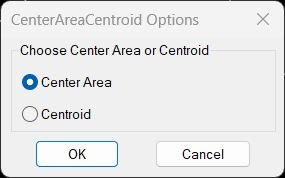
Command:
🚀 Main command: CenterAreaCentroid
📌 Center Area option: MostInnerPoint2
📌 Centroid option: get_centroid
Description:
📐 CenterAreaCentroid is an AutoCAD AutoLISP geometry utility that helps users create a point at the most inner area position of a closed shape or place a centroid label from a selected polyline-derived region. The tool opens a small DCL dialog named CenterAreaCentroid Options where the user can choose Center Area or Centroid before the calculation starts.
🎯 The Center Area workflow runs the MostInnerPoint2 routine. It asks the user to select a supported closed object, uses Visual LISP curve and offset logic, and places an AutoCAD POINT at the calculated internal position. This is useful when a user needs a practical label point inside a closed boundary, closed polyline, or planar closed spline.
🧭 The Centroid workflow runs get_centroid. It prompts for a polyline, converts it to a temporary REGION, reads the centroid through ActiveX, and inserts a TEXT label named CENTROID at the calculated location. This supports quick centroid marking for area-based CAD checks and drawing annotation.
Helper function: (if any)
🧩 writeCACDCL creates the temporary DCL dialog file.
🧩 radioCACDCL loads the dialog, stores the selected radio option, and remembers the last option during the session.
🧩 MostInnerPoint calculates an internal point for closed planar polyline or spline objects using offset and binary-search style refinement.
🧩 MostInnerPoint2 selects the source entity and creates the final POINT entity.
🧩 get_centroid converts the selected polyline to a region, reads the centroid, and places a TEXT label.
Functionalities:
✅ Dialog-based choice between Center Area and Centroid.
✅ Session memory for the last selected option using *CAC-last-option*.
✅ Temporary DCL creation with vl-filename-mktemp and load_dialog.
✅ Most-inner-point calculation for closed AcDbPolyline and planar closed AcDbSpline objects.
✅ AutoCAD POINT creation at the calculated inner point, using color index 3.
✅ Centroid extraction from a selected polyline converted to REGION.
✅ TEXT insertion at the centroid point with middle-center justification.
✅ Visual LISP ActiveX usage through vlax, vla, and curve functions.
✅ Lightweight command workflow for area labeling, centroid checking, and closed-boundary drafting support.
Result:
📌 The result is either an AutoCAD POINT placed inside the selected closed object or a CENTROID text label placed at the geometric centroid of the selected polyline-derived region. This gives CAD users a faster way to mark internal points and centroid positions without manually calculating geometry.
Images, animations etc.
Leave a Reply
You must be logged in to post a comment.