
Short description
🎛️ AutoCAD VPLAYER batch override tool for applying viewport layer overrides across selected layouts.
Command:
LayoutVPOverrides
Description:
🎛️ LayoutVPOverrides is an AutoLISP / Visual LISP utility for applying AutoCAD viewport layer overrides across multiple selected layouts.
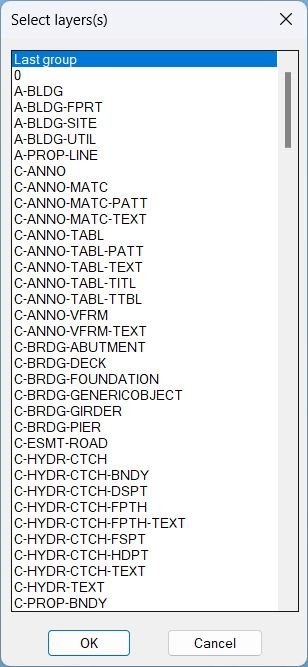
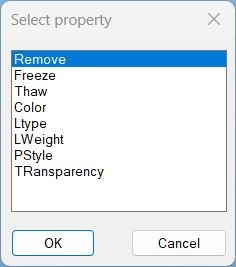
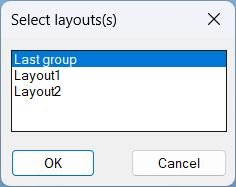
🧭 It guides the user through DCL selection lists for layer groups, layers, override property, property value, and target layouts.
📐 The command is especially useful in Civil 3D sheet sets where xref layers need consistent viewport-specific Freeze, Thaw, Color, Linetype, Lineweight, Plot Style, or Transparency settings across many layouts.
🧩 It builds a VPLAYER command sequence and applies it layout-by-layout while restoring the active layout afterward.
Helper function: (if any)
:layoutlistordered returns layouts in tab order.
:xreflistordered lists xref block names for layer-group filtering.
:layerlistordered lists drawing layers alphabetically.
:linetypelistordered lists loaded linetypes.
:plotstylelistordered reads available plot style table names from the active layout.
:truecolor-split-str converts AutoCAD TrueColor values into RGB text for VPLAYER input.
:DclList creates reusable temporary DCL selection lists with single or multiple selection.
Functionalities:
🧩 Filter layer targets by All layers, Non-Xref Layers, Last group, or selected xref layer groups.
📑 Select one or many layers for viewport override operations.
🎛️ Apply VPLAYER properties: Freeze, Thaw, Color, Ltype, LWeight, PStyle, and Transparency.
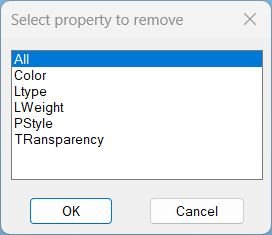
🧹 Remove viewport overrides for All, Color, Ltype, LWeight, PStyle, or Transparency.
🎨 Pick ACI or TrueColor values using AutoCAD color dialog.
📐 Apply changes across All layouts, Last group, or selected layouts.
↩️ Wrap processing in an undo mark and restore the previously active CTAB.
Result:
✅ Faster viewport override standardization across sheet sets.
✅ More consistent xref layer visibility and plotted appearance in multiple layout tabs.
✅ Reduced repetitive use of VPLAYER on each layout.
✅ Better control of viewport-specific layer freeze/thaw, color, linetype, lineweight, plot style, and transparency settings.
Images, animations etc.
XAML code:
<ResourceDictionary
xmlns="http://schemas.microsoft.com/winfx/2006/xaml/presentation"
xmlns:x="http://schemas.microsoft.com/winfx/2006/xaml"
xmlns:src="clr-namespace:Autodesk.Windows;assembly=AdWindows">

<src:RibbonToolTip x:Key="LayoutVPOverrides">
<src:RibbonToolTip.ExpandedContent>
<StackPanel>
<TextBlock Background="AntiqueWhite" TextAlignment="Left">
<Bold>Function Syntax: LayoutVPOverrides</Bold>
<LineBreak/>
<Bold>Version: 1.1 Date: 20.06.2026 6:38:55PM</Bold>
<LineBreak/>
<Hyperlink>WEB</Hyperlink>
<LineBreak/>

<Bold><Run Foreground="DodgerBlue">🎛️ Command name</Run></Bold><LineBreak/>
<Run>LayoutVPOverrides</Run><LineBreak/>
<LineBreak/>
<Bold><Run Foreground="DodgerBlue">🚀 Description</Run></Bold><LineBreak/>
<Run>LayoutVPOverrides is an AutoCAD batch tool for applying viewport layer overrides to selected layers across selected layouts using the VPLAYER workflow.</Run><LineBreak/>
<LineBreak/>
<Bold><Run Foreground="DodgerBlue">🧩 Layer selection</Run></Bold><LineBreak/>
<Run>The routine can work with All layers, Non-Xref Layers, Last group, or selected xref layer groups, then lets the user select the final layer set.</Run><LineBreak/>
<LineBreak/>
<Bold><Run Foreground="DodgerBlue">🎨 Override properties</Run></Bold><LineBreak/>
<Run>Supported operations include Freeze, Thaw, Color, Linetype, Lineweight, Plot Style, Transparency, and Remove overrides.</Run><LineBreak/>
<LineBreak/>
<Bold><Run Foreground="DodgerBlue">📐 Layout processing</Run></Bold><LineBreak/>
<Run>The user selects All layouts, Last group, or specific layouts. The command switches CTAB layout-by-layout, applies VPLAYER with _all viewports, then restores the previous layout.</Run><LineBreak/>
<LineBreak/>
<Bold><Run Foreground="DodgerBlue">✅ Result</Run></Bold><LineBreak/>
<Run>A faster and more consistent viewport override workflow for AutoCAD and Civil 3D sheet production.</Run><LineBreak/>
<LineBreak/>
<Bold><Run Foreground="DodgerBlue">⚠️ Important notes</Run></Bold><LineBreak/>
<Run>This tool changes viewport-specific layer appearance. Check selected layers, override property, value, and target layouts before running it on production drawings.</Run><LineBreak/>
<LineBreak/>
<Bold><Run Foreground="Orange">🔎 SEO keywords</Run></Bold><LineBreak/>
<Run>AutoCAD AutoLISP tool for Civil 3D productivity, drawing management, layout automation, viewport control, layer workflows, DCL dialogs, and CAD production QA: LayoutVPOverrides.</Run><LineBreak/>
<LineBreak/>
<Bold><Run Foreground="Yellow">🏷️ Tags</Run></Bold><LineBreak/>
<Run Foreground="Yellow">🏷️ AutoCAD, 🏷️ AutoLISP, 🏷️ Visual LISP, 🏷️ Civil 3D, 🏷️ Layouts, 🏷️ Viewports, 🏷️ VPLAYER, 🏷️ VP Overrides, 🏷️ Xrefs, 🏷️ Layer Management, 🏷️ Plotting, 🏷️ Sheet Production, 🏷️ CAD Automation</Run><LineBreak/>


</TextBlock>

<Grid>
<Image Source="Image_000.jpg" Stretch="Uniform"/>
</Grid>

<Grid>
<Image Source="Image_001.jpg" Stretch="Uniform"/>
</Grid>

<Grid>
<Image Source="Image_002.jpg" Stretch="Uniform"/>
</Grid>

<Grid>
<Image Source="Image_003.jpg" Stretch="Uniform"/>
</Grid>


</StackPanel>
</src:RibbonToolTip.ExpandedContent>
</src:RibbonToolTip>
</ResourceDictionary>