
Short description
🧱 LayerCreation is an AutoCAD and Civil 3D AutoLISP tool for creating or updating layers with color, linetype, lineweight, transparency, and default object settings.
🎨 It supports ACI colors, RGB true color, color books, a DCL dialog, and a reliable command-line fallback.
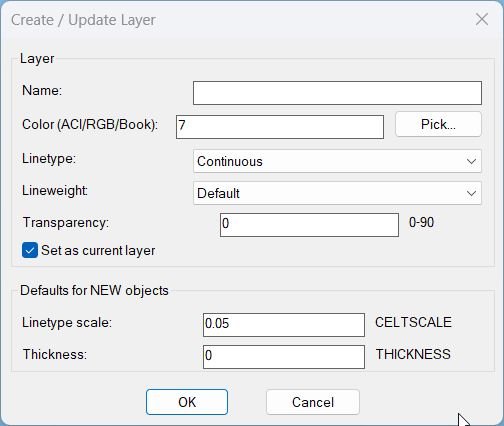
Command:
🚀 Main command: LayerCreation
⌨️ Command-line fallback: NEWLAYERCLI
🎨 Layer fields: Name, Color, Linetype, Lineweight, Transparency.
⚙️ New object defaults: CELTSCALE, CETRANSPARENCY, THICKNESS, and Set as current layer.
Description:
🧱 LayerCreation is an SEO-friendly AutoCAD layer creation and layer-standard utility for building or updating drawing layers with consistent properties.
🎨 The routine supports standard ACI colors, RGB true-color values, and color book selections, making it more flexible than a simple layer-name macro.
📐 It lets the user define linetype, lineweight, transparency, CELTSCALE, CETRANSPARENCY, THICKNESS, and whether the new layer should become current.
🧠 The dialog path uses dynamically generated DCL, while NEWLAYERCLI provides a command-line fallback if DCL is not healthy in the AutoCAD session.
📌 This is useful for CAD standards, Civil 3D layer setup, project templates, repeated layer creation, and controlled drawing initialization.
Helper function: (if any)
🧩 NL:_illegalLayerNameP validates layer names against AutoCAD-invalid characters.
🧩 NL:_getLinetypes reads available linetypes for the dialog list.
🧩 NL:_pickColor launches AutoCAD color selection and stores ACI, RGB, or color book information.
🧩 NL:_applyColorToLayer applies ACI, true color, or color book selections to the layer object.
🧩 NL:_makeOrUpdateLayer creates a new layer or updates the existing layer with selected properties.
🧩 NL:_applyDefaultsAndMaybeSetCurrent applies CELTSCALE, CETRANSPARENCY, THICKNESS, and CLAYER behavior.
🧩 NL:_runDialog builds and runs the DCL interface.
Functionalities:
✅ Create a new AutoCAD layer by name.
✅ Update an existing layer with new display and plotting properties.
✅ Select ACI, RGB true color, or color book color information.
✅ Choose linetype and lineweight from drawing data.
✅ Clamp transparency values to a safe range.
✅ Set the new or updated layer current when required.
✅ Apply object-default variables for new entities.
✅ Fall back to NEWLAYERCLI when the DCL core is unavailable.
Result:
🎯 The result is a correctly created or updated AutoCAD layer with the desired CAD-standard properties.
🟢 The user gets a direct message confirming the layer name that was created or updated.
Images, animations etc.

XAML code:
<ResourceDictionary
xmlns="http://schemas.microsoft.com/winfx/2006/xaml/presentation"
xmlns:x="http://schemas.microsoft.com/winfx/2006/xaml"
xmlns:src="clr-namespace:Autodesk.Windows;assembly=AdWindows">

<src:RibbonToolTip x:Key="LayerCreation">
<src:RibbonToolTip.ExpandedContent>
<StackPanel>
<TextBlock Background="AntiqueWhite" TextAlignment="Left">
<Bold>Function Syntax: NEWLAYERCLI / LayerCreation</Bold>
<LineBreak/>
<Bold>Version: 1.1 Date: 20.06.2026 6:38:53PM</Bold>
<LineBreak/>
<Hyperlink>AI+</Hyperlink>
<LineBreak/>
<Bold><Run Foreground="DarkBlue">LayerCreation.LSP — Operational Summary</Run></Bold><LineBreak/>
<Run>This program creates or updates an AutoCAD layer and optionally sets it as the current layer, while also setting default variables for newly created objects.</Run><LineBreak/>
<Run Foreground="DarkRed">It does not require the user to select blocks or entities.</Run><LineBreak/>
<Bold><Run Foreground="DarkBlue">How the User Runs It</Run></Bold><LineBreak/>
<Run>Available commands:</Run><LineBreak/>
<Run>• </Run><Run Foreground="DarkRed">LayerCreation</Run><Run> — preferred entry point; uses a DCL dialog when DCL core functions are available.</Run><LineBreak/>
<Run>• </Run><Run Foreground="DarkRed">NEWLAYERCLI</Run><Run> — command-line fallback that always works and supports the same key inputs.</Run><LineBreak/>
<Bold><Run Foreground="DarkBlue">What the Program Does</Run></Bold><LineBreak/>
<Run>Core objective:</Run><LineBreak/>
<Run>• Create a new layer if it does not exist, or update it if it already exists.</Run><LineBreak/>
<Run>• Apply user-specified properties: </Run><Run Foreground="DarkRed">Color</Run><Run> (ACI or RGB or Color Book), </Run><Run Foreground="DarkRed">Linetype</Run><Run>, </Run><Run Foreground="DarkRed">Lineweight</Run><Run>, and </Run><Run Foreground="DarkRed">Transparency</Run><Run>.</Run><LineBreak/>
<Run>• Optionally set the created/updated layer as the </Run><Run Foreground="DarkRed">current layer</Run><Run>.</Run><LineBreak/>
<Run>• Set drawing defaults for new objects (system variables) such as linetype scale and thickness.</Run><LineBreak/>
<Bold><Run Foreground="DarkBlue">User Inputs and Prompts</Run></Bold><LineBreak/>
<Run>LayerCreation (DCL dialog path):</Run><LineBreak/>
<Run>• Layer name (edit box).</Run><LineBreak/>
<Run>• Color entry as text (supports):</Run><LineBreak/>
<Run> • </Run><Run Foreground="DarkRed">ACI</Run><Run> like 7.</Run><LineBreak/>
<Run> • </Run><Run Foreground="DarkRed">RGB</Run><Run> like 255,255,255.</Run><LineBreak/>
<Run> • </Run><Run Foreground="DarkRed">Color Book</Run><Run> token like BOOK$COLORNAME (picked via dialog).</Run><LineBreak/>
<Run>• Color picker button </Run><Run Foreground="DarkRed">Pick...</Run><Run> to open the true color dialog (including color books when available).</Run><LineBreak/>
<Run>• Linetype selection (popup list).</Run><LineBreak/>
<Run>• Lineweight selection (popup list).</Run><LineBreak/>
<Run>• Transparency value in range </Run><Run Foreground="DarkRed">0 to 90</Run><Run>.</Run><LineBreak/>
<Run>• Toggle: </Run><Run Foreground="DarkRed">Set as current layer</Run><Run> (default checked).</Run><LineBreak/>
<Run>• Defaults for new objects:</Run><LineBreak/>
<Run> • </Run><Run Foreground="DarkRed">CELTSCALE</Run><Run> (default 0.05).</Run><LineBreak/>
<Run> • </Run><Run Foreground="DarkRed">THICKNESS</Run><Run> (default 0).</Run><LineBreak/>
<Run>NEWLAYERCLI (command line path):</Run><LineBreak/>
<Run>• Prompts for layer name until valid.</Run><LineBreak/>
<Run>• Color prompt supports </Run><Run Foreground="DarkRed">Pick</Run><Run> (default) using true color dialog and color books when available.</Run><LineBreak/>
<Run>• Prompts for transparency, CELTSCALE, thickness, set-current Yes or No.</Run><LineBreak/>
<Run>• Prompts for linetype index and lineweight index from enumerated lists.</Run><LineBreak/>
<Bold><Run Foreground="DarkBlue">Primary Functionalities (Bullet Summary)</Run></Bold><LineBreak/>
<Run>• </Run><Run Foreground="DarkRed">Validates layer names</Run><Run> and blocks illegal characters:</Run><LineBreak/>
<Run> • Disallows backslash, slash, colon, semicolon, asterisk, question mark, quotes, angle brackets, pipe, comma, equals.</Run><LineBreak/>
<Run>• </Run><Run Foreground="DarkRed">Creates or updates</Run><Run> a layer using AutoCAD command calls:</Run><LineBreak/>
<Run> • Uses </Run><Run Foreground="DarkRed">-LAYER</Run><Run> to create the layer and set linetype, lineweight, and transparency.</Run><LineBreak/>
<Run>• </Run><Run Foreground="DarkRed">Loads linetypes on demand</Run><Run> if a chosen linetype is not already in the drawing:</Run><LineBreak/>
<Run> • Uses </Run><Run Foreground="DarkRed">-LINETYPE</Run><Run> Load from acad.lin.</Run><LineBreak/>
<Run>• </Run><Run Foreground="DarkRed">Applies color</Run><Run> using TrueColor so it can support:</Run><LineBreak/>
<Run> • Index colors (ACI).</Run><LineBreak/>
<Run> • TrueColor RGB.</Run><LineBreak/>
<Run> • Color book colors via SetColorBookColor.</Run><LineBreak/>
<Run>• </Run><Run Foreground="DarkRed">Optionally sets the created layer current</Run><Run> by setting CLAYER.</Run><LineBreak/>
<Run>• </Run><Run Foreground="DarkRed">Sets drawing defaults for new objects</Run><Run> using safe setvar calls that do not abort the routine if a variable is rejected:</Run><LineBreak/>
<Run> • CELTSCALE, CETRANSPARENCY, THICKNESS.</Run><LineBreak/>
<Run>• </Run><Run Foreground="DarkRed">Provides a resilient UI strategy</Run><Run>:</Run><LineBreak/>
<Run> • Detects whether DCL core functions are healthy and automatically falls back to CLI if not.</Run><LineBreak/>
<Run> • Builds a temporary DCL file in TEMPPREFIX at runtime and deletes it after closing the dialog.</Run><LineBreak/>
<Run>• </Run><Run Foreground="DarkRed">Persists last-used color</Run><Run> so the next run starts from the prior selection.</Run><LineBreak/>
<Bold><Run Foreground="DarkBlue">Key Commands and Internal Helpers (Highlighted)</Run></Bold><LineBreak/>
<Run>Main commands:</Run><LineBreak/>
<Run>• </Run><Run Foreground="DarkRed">C:LayerCreation</Run><Run> — runs dialog if DCL is available, otherwise routes to CLI.</Run><LineBreak/>
<Run>• </Run><Run Foreground="DarkRed">C:NEWLAYERCLI</Run><Run> — always-available command-line workflow.</Run><LineBreak/>
<Run>Important AutoCAD command calls:</Run><LineBreak/>
<Run>• </Run><Run Foreground="DarkRed">.-LAYER</Run><Run> — New, Ltype, LWeight, TRansparency actions.</Run><LineBreak/>
<Run>• </Run><Run Foreground="DarkRed">.-LINETYPE</Run><Run> — Load linetype if missing.</Run><LineBreak/>
<Run>Important dialogs:</Run><LineBreak/>
<Run>• </Run><Run Foreground="DarkRed">acad_truecolordlg</Run><Run> — preferred color picker (truecolor and color books).</Run><LineBreak/>
<Run>• </Run><Run Foreground="DarkRed">acad_colordlg</Run><Run> — fallback color picker (ACI).</Run><LineBreak/>
<Run>Key helper routines:</Run><LineBreak/>
<Run>• </Run><Run Foreground="DarkRed">NL:_illegalLayerNameP</Run><Run> — validates layer names.</Run><LineBreak/>
<Run>• </Run><Run Foreground="DarkRed">NL:_getLinetypes</Run><Run> — enumerates linetypes from the drawing table.</Run><LineBreak/>
<Run>• </Run><Run Foreground="DarkRed">NL:_applyColorToLayer</Run><Run> — applies ACI or RGB or color book via VLA TrueColor.</Run><LineBreak/>
<Run>• </Run><Run Foreground="DarkRed">NL:_setvarSafe</Run><Run> — safe system-variable setter that traps errors.</Run><LineBreak/>
<Bold><Run Foreground="DarkBlue">Outputs and Side Effects</Run></Bold><LineBreak/>
<Run>Creates or updates one layer in the current drawing session and changes properties immediately.</Run><LineBreak/>
<Run>Optionally sets CLAYER to the created or updated layer.</Run><LineBreak/>
<Run>Sets or attempts to set these variables for subsequent newly created objects:</Run><LineBreak/>
<Run>• </Run><Run Foreground="DarkRed">CELTSCALE</Run><Run> default 0.05.</Run><LineBreak/>
<Run>• </Run><Run Foreground="DarkRed">CETRANSPARENCY</Run><Run> default from chosen transparency (0-90).</Run><LineBreak/>
<Run>• </Run><Run Foreground="DarkRed">THICKNESS</Run><Run> default 0.</Run><LineBreak/>
<Bold><Run Foreground="DarkBlue">Important Notes and Constraints</Run></Bold><LineBreak/>
<Run>• If DCL is not operational, the program automatically runs </Run><Run Foreground="DarkRed">NEWLAYERCLI</Run><Run> and continues without failure.</Run><LineBreak/>
<Run>• The dialog is generated dynamically to a temporary DCL file and removed after use.</Run><LineBreak/>
<Run>• Color text can be manually typed; the program parses ACI, RGB, or book tokens and applies the corresponding color method.</Run><LineBreak/>
<Run>• Transparency is clamped to a safe range (0-90) before being applied.</Run><LineBreak/>
<Run>• Linetype is ensured to be loaded before being assigned to the layer.</Run><LineBreak/>
<Run>• Uses COM via </Run><Run Foreground="DarkRed">vl-load-com</Run><Run> and VLA objects for TrueColor application.</Run><LineBreak/>


<Bold><Run Foreground="DodgerBlue">Description</Run></Bold><LineBreak/>
<Run Foreground="White">🧱 LayerCreation is an AutoCAD and Civil 3D AutoLISP tool for creating or updating layers with color, linetype, lineweight, transparency, and default object settings.</Run><LineBreak/>
<Run Foreground="White">🎨 It supports ACI colors, RGB true color, color books, a DCL dialog, and a reliable command-line fallback.</Run><LineBreak/>
<LineBreak/>
<Bold><Run Foreground="DodgerBlue">Function Syntax</Run></Bold><LineBreak/>
<Run Foreground="White">🚀 Main command: </Run><Bold><Run Foreground="Orange">LayerCreation</Run></Bold><LineBreak/>
<Run Foreground="White">⌨️ Command-line fallback: </Run><Bold><Run Foreground="Orange">NEWLAYERCLI</Run></Bold><LineBreak/>
<Run Foreground="White">🎨 Layer fields: </Run><Bold><Run Foreground="Orange">Name, Color, Linetype, Lineweight, Transparency.</Run></Bold><LineBreak/>
<Run Foreground="White">⚙️ New object defaults: </Run><Bold><Run Foreground="Orange">CELTSCALE, CETRANSPARENCY, THICKNESS, and Set as current layer.</Run></Bold><LineBreak/>
<LineBreak/>
<Bold><Run Foreground="DodgerBlue">SEO Optimized Overview</Run></Bold><LineBreak/>
<Run Foreground="White">🧱 LayerCreation is an SEO-friendly AutoCAD layer creation and layer-standard utility for building or updating drawing layers with consistent properties.</Run><LineBreak/>
<Run Foreground="White">🎨 The routine supports standard ACI colors, RGB true-color values, and color book selections, making it more flexible than a simple layer-name macro.</Run><LineBreak/>
<Run Foreground="White">📐 It lets the user define linetype, lineweight, transparency, CELTSCALE, CETRANSPARENCY, THICKNESS, and whether the new layer should become current.</Run><LineBreak/>
<Run Foreground="White">🧠 The dialog path uses dynamically generated DCL, while NEWLAYERCLI provides a command-line fallback if DCL is not healthy in the AutoCAD session.</Run><LineBreak/>
<Run Foreground="White">📌 This is useful for CAD standards, Civil 3D layer setup, project templates, repeated layer creation, and controlled drawing initialization.</Run><LineBreak/>
<LineBreak/>
<Bold><Run Foreground="LimeGreen">Primary Workflow</Run></Bold><LineBreak/>
<Run Foreground="White">1️⃣ Load the AutoLISP file in AutoCAD or Civil 3D with APPLOAD or your menu loader.</Run><LineBreak/>
<Run Foreground="White">2️⃣ Run the command shown above from the AutoCAD command line.</Run><LineBreak/>
<Run Foreground="White">3️⃣ Follow the dialog, selection prompts, or file prompts used by LayerCreation.</Run><LineBreak/>
<Run Foreground="White">4️⃣ Review the command-line report and drawing result before continuing production work.</Run><LineBreak/>
<LineBreak/>
<Bold><Run Foreground="LimeGreen">Functionalities</Run></Bold><LineBreak/>
<Run Foreground="White">✅ Create a new AutoCAD layer by name.</Run><LineBreak/>
<Run Foreground="White">✅ Update an existing layer with new display and plotting properties.</Run><LineBreak/>
<Run Foreground="White">✅ Select ACI, RGB true color, or color book color information.</Run><LineBreak/>
<Run Foreground="White">✅ Choose linetype and lineweight from drawing data.</Run><LineBreak/>
<Run Foreground="White">✅ Clamp transparency values to a safe range.</Run><LineBreak/>
<Run Foreground="White">✅ Set the new or updated layer current when required.</Run><LineBreak/>
<Run Foreground="White">✅ Apply object-default variables for new entities.</Run><LineBreak/>
<Run Foreground="White">✅ Fall back to NEWLAYERCLI when the DCL core is unavailable.</Run><LineBreak/>
<LineBreak/>
<Bold><Run Foreground="DodgerBlue">Important Functions and AutoCAD API</Run></Bold><LineBreak/>
<Run Foreground="White">🧩 NL:_illegalLayerNameP validates layer names against AutoCAD-invalid characters.</Run><LineBreak/>
<Run Foreground="White">🧩 NL:_getLinetypes reads available linetypes for the dialog list.</Run><LineBreak/>
<Run Foreground="White">🧩 NL:_pickColor launches AutoCAD color selection and stores ACI, RGB, or color book information.</Run><LineBreak/>
<Run Foreground="White">🧩 NL:_applyColorToLayer applies ACI, true color, or color book selections to the layer object.</Run><LineBreak/>
<Run Foreground="White">🧩 NL:_makeOrUpdateLayer creates a new layer or updates the existing layer with selected properties.</Run><LineBreak/>
<Run Foreground="White">🧩 NL:_applyDefaultsAndMaybeSetCurrent applies CELTSCALE, CETRANSPARENCY, THICKNESS, and CLAYER behavior.</Run><LineBreak/>
<Run Foreground="White">🧩 NL:_runDialog builds and runs the DCL interface.</Run><LineBreak/>
<LineBreak/>
<Bold><Run Foreground="LimeGreen">Result</Run></Bold><LineBreak/>
<Run Foreground="White">🎯 The result is a correctly created or updated AutoCAD layer with the desired CAD-standard properties.</Run><LineBreak/>
<Run Foreground="White">🟢 The user gets a direct message confirming the layer name that was created or updated.</Run><LineBreak/>
<LineBreak/>
<Bold><Run Foreground="DarkOrange">Operational Notes and Limitations</Run></Bold><LineBreak/>
<Run Foreground="White">⚠️ The command can overwrite properties of an existing layer with the same name.</Run><LineBreak/>
<Run Foreground="White">⚠️ Invalid layer-name characters are rejected to avoid AutoCAD table errors.</Run><LineBreak/>
<Run Foreground="White">🧠 The true color and color book behavior depends on AutoCAD's ActiveX color object support.</Run><LineBreak/>
<LineBreak/>
<Bold><Run Foreground="Yellow">Tags</Run></Bold><LineBreak/>
<Run Foreground="Yellow">🏷️ AutoCAD, 🏷️ AutoLISP, 🏷️ Civil 3D, 🏷️ Layer Creation, 🏷️ True Color, 🏷️ Color Books, 🏷️ Linetype, 🏷️ Lineweight, 🏷️ DCL Dialog</Run><LineBreak/>


</TextBlock>

<Grid>
<Image Source="Image_000.jpg" Stretch="Uniform"/>
</Grid>

<Grid>
<Image Source="Image_001.jpg" Stretch="Uniform"/>
</Grid>

</StackPanel>
</src:RibbonToolTip.ExpandedContent>
</src:RibbonToolTip>
</ResourceDictionary>
Leave a Reply
You must be logged in to post a comment.