
Short description
DCL-based AutoCAD utility for loading LIN linetype definitions and SHX shape files from selected folders, including subfolders and multiple search paths.
Command:
Lin_Shx_Loader
Description:
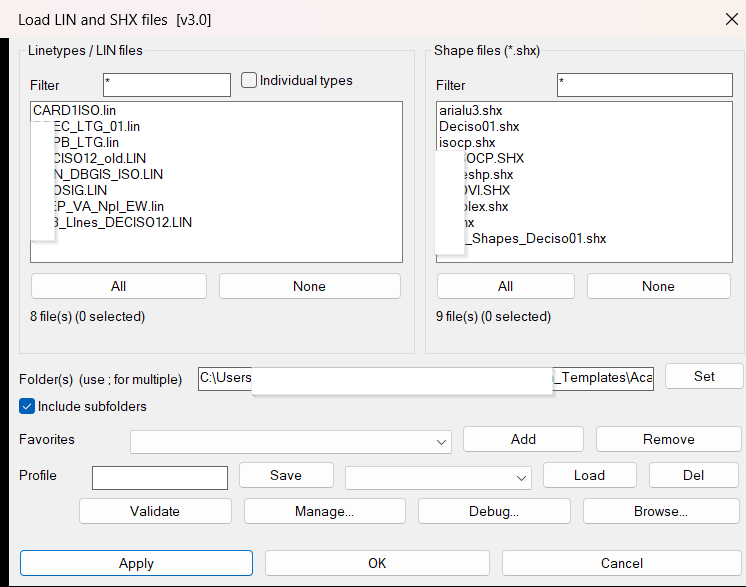
Lin_Shx_Loader opens an embedded DCL dialog for browsing, filtering, validating and loading AutoCAD linetype resources. The tool can work in LIN file mode, where complete .lin files are loaded, or in individual linetype mode, where linetype names and descriptions are parsed from all discovered LIN files and selected one by one.
The utility also handles SHX shape files, supports recursive folder scanning, allows semicolon-separated multi-folder search paths, and remembers favorites and named profiles between sessions. It is designed for CAD standards folders where many project-specific LIN and SHX resources must be loaded quickly into the current drawing.
Helper function: (if any)
DB_LS_GetFolderList normalizes the configured folder string and supports multiple semicolon-separated folders.
DB_LS_GetFilesFromFolders collects matching LIN and SHX files from all valid folders and optionally from subfolders.
DB_LS_ParseLinFile reads LIN files and extracts individual linetype names and description strings.
DB_LS_ValidateLinFile and DB_LS_RunValidation check selected LIN files for missing pattern lines, missing A definitions, unbalanced brackets and missing referenced SHX files.
DB_LS_VLA_LoadLin loads all linetypes from a LIN file using the AutoCAD ActiveX Linetypes collection.
DB_LS_VLA_LoadLinByName loads one specific linetype name from its source LIN file.
DB_LS_LoadShx loads compiled SHX shape files with the AutoCAD LOAD command.
DB_LS_ShowManageDialog lists loaded drawing linetypes and can purge selected unused linetypes.
DB_LS_SaveSettings and DB_LS_LoadSettings persist filters, folder paths, favorites, profile data and interface state with setenv/getenv.
Functionalities:
Embedded DCL interface created temporarily at runtime.
Separate LIN and SHX columns with live filters and multi-selection.
File mode for loading complete LIN files.
Individual type mode for loading selected linetype definitions parsed from LIN headers.
Live preview text showing the selected linetype description or source path.
Include subfolders option for recursive standards-library scanning.
Multi-folder input using semicolon-separated paths.
Favorites for frequently used standards folders.
Named profiles storing folder paths, filters, mode, recurse flag and selections.
Validation report for LIN syntax and missing SHX references, printed to the command line and copied to the clipboard.
Manage Loaded Linetypes dialog with filter, select all, select none and purge selected actions.
Debug report generation with folder, filter, list and environment information.
VLA-based linetype loading to avoid command-line reload prompts and false bad-definition messages.
Result:
Selected LIN linetypes and SHX shape files are loaded into the active AutoCAD drawing. The command line reports how many LIN and SHX items were loaded and how many errors occurred. Validation and debug reports can also be copied to the clipboard for troubleshooting CAD standards libraries.
Images, animations etc.
XAML code:
<ResourceDictionary
xmlns="http://schemas.microsoft.com/winfx/2006/xaml/presentation"
xmlns:x="http://schemas.microsoft.com/winfx/2006/xaml"
xmlns:src="clr-namespace:Autodesk.Windows;assembly=AdWindows">

<src:RibbonToolTip x:Key="Lin_Shx_Loader">
<src:RibbonToolTip.ExpandedContent>
<StackPanel>
<TextBlock Background="AntiqueWhite" TextAlignment="Left">
<Bold>Function Syntax: Lin_Shx_Loader</Bold>
<LineBreak/>
<Bold>Version: 1.1 Date: 20.06.2026 6:38:50PM</Bold>
<LineBreak/>
<Hyperlink>https://www.lee-mac.com/loadlinetype.html</Hyperlink>
<Hyperlink>https://help.autodesk.com/cloudhelp/2026/ITA/AutoCAD-LT-ActiveX-Reference/files/GUID-9D33266B-184F-4994-8B91-DF909F24C7F2.htm</Hyperlink>
<Hyperlink>https://help.autodesk.com/cloudhelp/2021/ENG/AutoCAD-Core/files/GUID-B372C134-AD7E-4C28-8D3B-602FF2681B57.htm</Hyperlink>
<Hyperlink>https://www.cadtutor.net/forum/topic/76175-load-linetype-without-command/?utm_source=chatgpt.com</Hyperlink>
<Hyperlink>https://www.lee-mac.com/getallfiles.html</Hyperlink>
<LineBreak/>


<Bold><Run Foreground="DodgerBlue">Description</Run></Bold><LineBreak/>
<Run>🚀 Lin_Shx_Loader is an AutoCAD AutoLISP and DCL utility for loading LIN linetype definitions and SHX shape files from CAD standards folders.</Run><LineBreak/>
<Run>It is useful when a project has many custom line types, complex linetypes, shape files, and company-specific support folders that need to be loaded into the active drawing.</Run><LineBreak/>
<LineBreak/>
<Bold><Run Foreground="Orange">Command</Run></Bold><LineBreak/>
<Run>▶ Run </Run><Bold><Run Foreground="Orange">Lin_Shx_Loader</Run></Bold><Run> in AutoCAD.</Run><LineBreak/>
<LineBreak/>
<Bold><Run Foreground="DodgerBlue">Main Workflow</Run></Bold><LineBreak/>
<Run>📁 Choose one folder or several semicolon-separated folders containing LIN and SHX resources.</Run><LineBreak/>
<Run>🔍 Filter LIN files, individual linetype names, or SHX files with the dialog filter boxes.</Run><LineBreak/>
<Run>📂 Enable </Run><Bold><Run Foreground="Orange">Include subfolders</Run></Bold><Run> to scan complete standards-folder structures.</Run><LineBreak/>
<Run>✅ Select the required LIN and SHX items, then use Apply to load and continue, or OK to load and close.</Run><LineBreak/>
<LineBreak/>
<Bold><Run Foreground="DodgerBlue">LIN Loading Modes</Run></Bold><LineBreak/>
<Run>📘 File mode loads complete .lin files from the selected folder list.</Run><LineBreak/>
<Run>🧩 Individual type mode parses every discovered LIN file and displays individual linetype definitions by name.</Run><LineBreak/>
<Run>📝 The preview line shows the selected linetype description or the selected file path, helping confirm the correct definition before loading.</Run><LineBreak/>
<LineBreak/>
<Bold><Run Foreground="DodgerBlue">SHX Support</Run></Bold><LineBreak/>
<Run>🔤 The SHX column lists compiled shape files and can load selected .shx files with the AutoCAD LOAD command.</Run><LineBreak/>
<Run>📌 This helps with complex linetypes that depend on external shape files.</Run><LineBreak/>
<LineBreak/>
<Bold><Run Foreground="DodgerBlue">Validation and Troubleshooting</Run></Bold><LineBreak/>
<Run>🧪 Validate selected LIN files before loading.</Run><LineBreak/>
<Run>⚠️ The validation report checks missing pattern lines, missing A definitions, unbalanced brackets, and missing SHX references.</Run><LineBreak/>
<Run>📋 Results are printed to the command line and copied to the clipboard for easy review.</Run><LineBreak/>
<Run>🛠️ The Debug button creates a folder, filter, list, and environment report for troubleshooting.</Run><LineBreak/>
<LineBreak/>
<Bold><Run Foreground="DodgerBlue">Profiles and Favorites</Run></Bold><LineBreak/>
<Run>⭐ Favorites store frequently used standards folders.</Run><LineBreak/>
<Run>💾 Named profiles save the current folder path, filters, individual-type mode, recursive-search state, and selections.</Run><LineBreak/>
<Run>🔄 Profiles are restored between sessions using AutoCAD environment storage.</Run><LineBreak/>
<LineBreak/>
<Bold><Run Foreground="DodgerBlue">Manage Loaded Linetypes</Run></Bold><LineBreak/>
<Run>🧹 The Manage dialog lists the linetypes already loaded in the current drawing.</Run><LineBreak/>
<Run>🔍 Filter loaded linetypes, select multiple items, and purge selected unused linetypes.</Run><LineBreak/>
<Run>⚠️ Active, referenced, standard, or protected linetypes may not be deleted by AutoCAD and will be reported as blocked or failed.</Run><LineBreak/>
<LineBreak/>
<Bold><Run Foreground="DarkRed">Important Notes</Run></Bold><LineBreak/>
<Run>⚠️ The default standards folder is stored in the *DB_LS_Folder* variable and should be updated if the support-file folder moves.</Run><LineBreak/>
<Run>⚠️ Complex linetypes still require their referenced SHX files to be available from the configured folder or AutoCAD support paths.</Run><LineBreak/>
<Run>✅ Linetype loading uses the AutoCAD ActiveX Linetypes collection, reducing command-line reload prompts and unnecessary bad-definition messages.</Run><LineBreak/>
<LineBreak/>
<Bold><Run Foreground="Yellow">Tags</Run></Bold><LineBreak/>
<Run Foreground="Yellow">🏷️ AutoCAD, 🏷️ AutoLISP, 🏷️ Civil 3D, 🏷️ Linetype Loader, 🏷️ LIN Files, 🏷️ SHX Files, 🏷️ Shape Files, 🏷️ DCL Dialog, 🏷️ Visual LISP, 🏷️ CAD Standards, 🏷️ Lin_Shx_Loader</Run><LineBreak/>


</TextBlock>

<Grid>
<Image Source="2026-07-30 06_09_10-Load LIN and SHX files  [v3.0].png" Stretch="Uniform"/>
</Grid>

</StackPanel>
</src:RibbonToolTip.ExpandedContent>
</src:RibbonToolTip>
</ResourceDictionary>