
Short description
🧩 SelectStraightEntities automatically finds and selects orthogonal LINE LWPOLYLINE and POLYLINE geometry in the current AutoCAD layout.
📐 Accepted segments must run at approximately 0 90 180 or 270 degrees and lightweight polylines must contain no bulged arc segments.
🚫 Geometry on layer PAGE_LIMIT_02 is explicitly excluded.
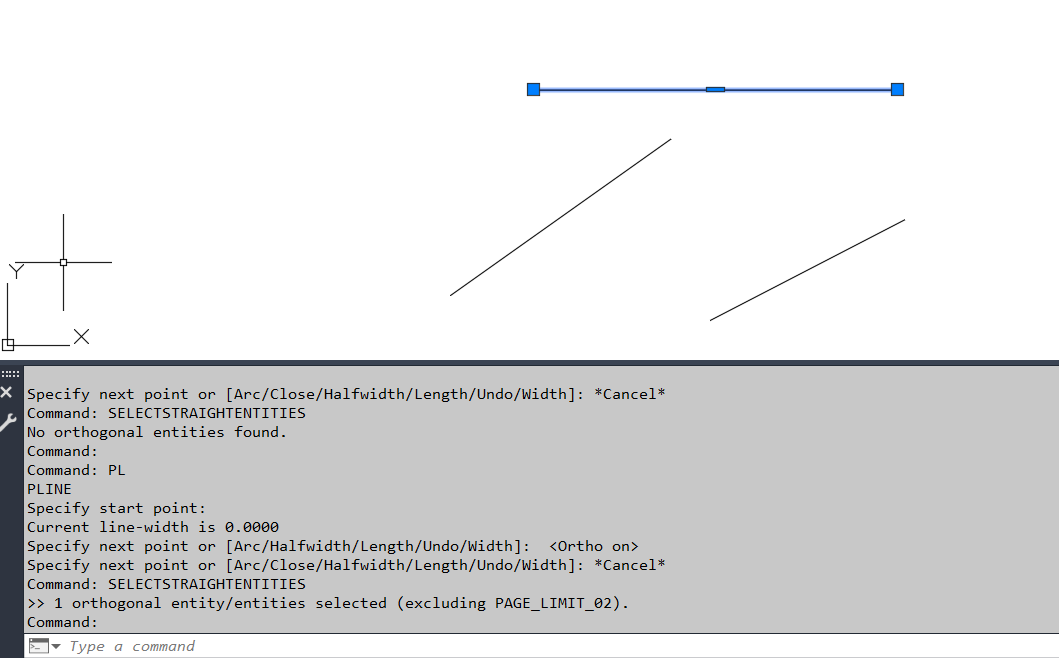
Command:
Main command: SelectStraightEntities
Description:
🌐 The routine scans the current CTAB only using global selection filters.
📏 LINE objects are accepted when their XY direction is orthogonal within a small tolerance.
📐 LWPOLYLINE and POLYLINE objects are accepted only when every checked segment is orthogonal.
⭕ Any nonzero bulge value causes the polyline to be rejected.
🚫 Objects on PAGE_LIMIT_02 are skipped regardless of geometry.
✅ All accepted entities are combined and made the active AutoCAD selection set.
Helper function: (if any)
angle-is-ortho tests XY segment angles against orthogonal directions.
lwpline-is-ortho checks polyline bulges and segment angles.
line-is-ortho checks one LINE entity.
sssetfirst activates the resulting selection set.
Functionalities:
✅ Automatic drawing scan – requires no manual object selection.
✅ Current layout filtering – uses CTAB to limit the scan.
✅ LINE detection – selects horizontal and vertical lines.
✅ LWPOLYLINE detection – selects polylines containing only horizontal and vertical straight segments.
✅ POLYLINE detection – attempts the same orthogonal test on old polyline entities.
✅ Arc exclusion – rejects polyline geometry containing nonzero bulge values.
✅ Layer exclusion – ignores PAGE_LIMIT_02.
✅ Selection handoff – leaves valid entities actively selected.
Result:
🎯 The result is an active selection containing orthogonal line and polyline geometry from the current layout except objects on PAGE_LIMIT_02.
Images, animations etc.
XAML code:
<ResourceDictionary xmlns="http://schemas.microsoft.com/winfx/2006/xaml/presentation" xmlns:src="clr-namespace:Autodesk.Windows;assembly=AdWindows" xmlns:x="http://schemas.microsoft.com/winfx/2006/xaml">
<src:RibbonToolTip x:Key="SelectStraightEntities">
<src:RibbonToolTip.ExpandedContent>
<StackPanel>
    <TextBlock Background="AntiqueWhite" TextAlignment="Left">
        <Bold>Function Syntax: SelectStraightEntities</Bold>
        <LineBreak />
        <Bold>Version: 1.0 Date: 25.03.2026 8:39:59AM</Bold>
        <LineBreak />
        <Hyperlink>N/A</Hyperlink>
        <Bold>
            <Run Foreground="DodgerBlue">Description</Run>
        </Bold>
        <LineBreak />
        <Run Foreground="White">🧩 SelectStraightEntities automatically finds and selects orthogonal LINE LWPOLYLINE and POLYLINE geometry in the current AutoCAD layout.</Run>
        <LineBreak />
        <Run Foreground="White">📐 Accepted segments must run at approximately 0 90 180 or 270 degrees and lightweight polylines must contain no bulged arc segments.</Run>
        <LineBreak />
        <Run Foreground="White">🚫 Geometry on layer PAGE_LIMIT_02 is explicitly excluded.</Run>
        <LineBreak />
        <LineBreak />
        <Bold>
            <Run Foreground="DodgerBlue">Function Syntax</Run>
        </Bold>
        <LineBreak />
        <Run Foreground="White">Main command: </Run>
        <Bold>
            <Run Foreground="Orange">SelectStraightEntities</Run>
        </Bold>
        <LineBreak />
        <LineBreak />
        <Bold>
            <Run Foreground="DodgerBlue">SEO Optimized Overview</Run>
        </Bold>
        <LineBreak />
        <Run Foreground="White">🌐 The routine scans the current CTAB only using global selection filters.</Run>
        <LineBreak />
        <Run Foreground="White">📏 LINE objects are accepted when their XY direction is orthogonal within a small tolerance.</Run>
        <LineBreak />
        <Run Foreground="White">📐 LWPOLYLINE and POLYLINE objects are accepted only when every checked segment is orthogonal.</Run>
        <LineBreak />
        <Run Foreground="White">⭕ Any nonzero bulge value causes the polyline to be rejected.</Run>
        <LineBreak />
        <Run Foreground="White">🚫 Objects on PAGE_LIMIT_02 are skipped regardless of geometry.</Run>
        <LineBreak />
        <Run Foreground="White">✅ All accepted entities are combined and made the active AutoCAD selection set.</Run>
        <LineBreak />
        <LineBreak />
        <Bold>
            <Run Foreground="LimeGreen">Primary Workflow</Run>
        </Bold>
        <LineBreak />
        <Run Foreground="White">• Run SelectStraightEntities.</Run>
        <LineBreak />
        <Run Foreground="White">• The routine scans LINE LWPOLYLINE and POLYLINE objects in the current layout.</Run>
        <LineBreak />
        <Run Foreground="White">• Each candidate is checked for orthogonal direction and excluded layer state.</Run>
        <LineBreak />
        <Run Foreground="White">• All valid objects are placed into one selection set.</Run>
        <LineBreak />
        <Run Foreground="White">• The result becomes the active AutoCAD selection.</Run>
        <LineBreak />
        <LineBreak />
        <Bold>
            <Run Foreground="LimeGreen">Functionalities</Run>
        </Bold>
        <LineBreak />
        <Run Foreground="White">✅ </Run>
        <Bold>
            <Run Foreground="LimeGreen">Automatic drawing scan</Run>
        </Bold>
        <Run Foreground="White"> - requires no manual object selection.</Run>
        <LineBreak />
        <Run Foreground="White">✅ </Run>
        <Bold>
            <Run Foreground="LimeGreen">Current layout filtering</Run>
        </Bold>
        <Run Foreground="White"> - uses CTAB to limit the scan.</Run>
        <LineBreak />
        <Run Foreground="White">✅ </Run>
        <Bold>
            <Run Foreground="LimeGreen">LINE detection</Run>
        </Bold>
        <Run Foreground="White"> - selects horizontal and vertical lines.</Run>
        <LineBreak />
        <Run Foreground="White">✅ </Run>
        <Bold>
            <Run Foreground="LimeGreen">LWPOLYLINE detection</Run>
        </Bold>
        <Run Foreground="White"> - selects polylines containing only horizontal and vertical straight segments.</Run>
        <LineBreak />
        <Run Foreground="White">✅ </Run>
        <Bold>
            <Run Foreground="LimeGreen">POLYLINE detection</Run>
        </Bold>
        <Run Foreground="White"> - attempts the same orthogonal test on old polyline entities.</Run>
        <LineBreak />
        <Run Foreground="White">✅ </Run>
        <Bold>
            <Run Foreground="LimeGreen">Arc exclusion</Run>
        </Bold>
        <Run Foreground="White"> - rejects polyline geometry containing nonzero bulge values.</Run>
        <LineBreak />
        <Run Foreground="White">✅ </Run>
        <Bold>
            <Run Foreground="LimeGreen">Layer exclusion</Run>
        </Bold>
        <Run Foreground="White"> - ignores PAGE_LIMIT_02.</Run>
        <LineBreak />
        <Run Foreground="White">✅ </Run>
        <Bold>
            <Run Foreground="LimeGreen">Selection handoff</Run>
        </Bold>
        <Run Foreground="White"> - leaves valid entities actively selected.</Run>
        <LineBreak />
        <LineBreak />
        <Bold>
            <Run Foreground="DodgerBlue">Important Commands and Aspects</Run>
        </Bold>
        <LineBreak />
        <Run Foreground="White">🧩 angle-is-ortho tests XY segment angles against orthogonal directions.</Run>
        <LineBreak />
        <Run Foreground="White">🧩 lwpline-is-ortho checks polyline bulges and segment angles.</Run>
        <LineBreak />
        <Run Foreground="White">🧩 line-is-ortho checks one LINE entity.</Run>
        <LineBreak />
        <Run Foreground="White">🧩 sssetfirst activates the resulting selection set.</Run>
        <LineBreak />
        <LineBreak />
        <Bold>
            <Run Foreground="DodgerBlue">Result</Run>
        </Bold>
        <LineBreak />
        <Run Foreground="White">🎯 The result is an active selection containing orthogonal line and polyline geometry from the current layout except objects on PAGE_LIMIT_02.</Run>
        <LineBreak />
        <LineBreak />
        <Bold>
            <Run Foreground="DarkRed">Important Notes</Run>
        </Bold>
        <LineBreak />
        <Run Foreground="White">⚠️ </Run>
        <Bold>
            <Run Foreground="DarkRed">The angle test is relative to the drawing XY coordinate system used by the source.</Run>
        </Bold>
        <LineBreak />
        <Run Foreground="White">⚠️ </Run>
        <Bold>
            <Run Foreground="DarkRed">Polyline arc segments are rejected.</Run>
        </Bold>
        <LineBreak />
        <Run Foreground="White">⚠️ </Run>
        <Bold>
            <Run Foreground="DarkRed">Only LINE LWPOLYLINE and POLYLINE entity types are scanned.</Run>
        </Bold>
        <LineBreak />
        <LineBreak />
        <Bold>
            <Run Foreground="Yellow">SEO Keywords</Run>
        </Bold>
        <LineBreak />
        <Run Foreground="Yellow">🏷️ AutoCAD, 🏷️ Civil 3D, 🏷️ AutoLISP, 🏷️ SelectStraightEntities, 🏷️ Orthogonal lines, 🏷️ Horizontal vertical, 🏷️ LWPOLYLINE, 🏷️ Selection set, 🏷️ PAGE_LIMIT_02, 🏷️ CAD cleanup</Run>
        <LineBreak />
        <LineBreak />
    </TextBlock>
    <Grid>
        <Image Source="Image_000.png" Stretch="Uniform" />
    </Grid>
</StackPanel>
</src:RibbonToolTip.ExpandedContent>
</src:RibbonToolTip>
</ResourceDictionary>