
Short description
🔢 LayoutNum is an AutoCAD and Civil 3D AutoLISP layout renumbering utility with a DCL interface, preview list, Apply, safe multi-level Undo, OK, and Cancel workflow.
📑 It helps rename selected layout tabs using starting numbers, padding width, prefix, suffix, order modes, filters, and automatic conflict resolution.
Command:
🚀 Main command: LAYOUTNUM
🔁 Alias command: _LAYOUTNUM
🔁 Alias command: LayoutNum
🧰 Load the LSP file with APPLOAD, then run the command from the AutoCAD command line.
Description:
🔢 LayoutNum is an SEO-friendly AutoCAD layout renaming and layout numbering tool for production drawings with many paper-space tabs.
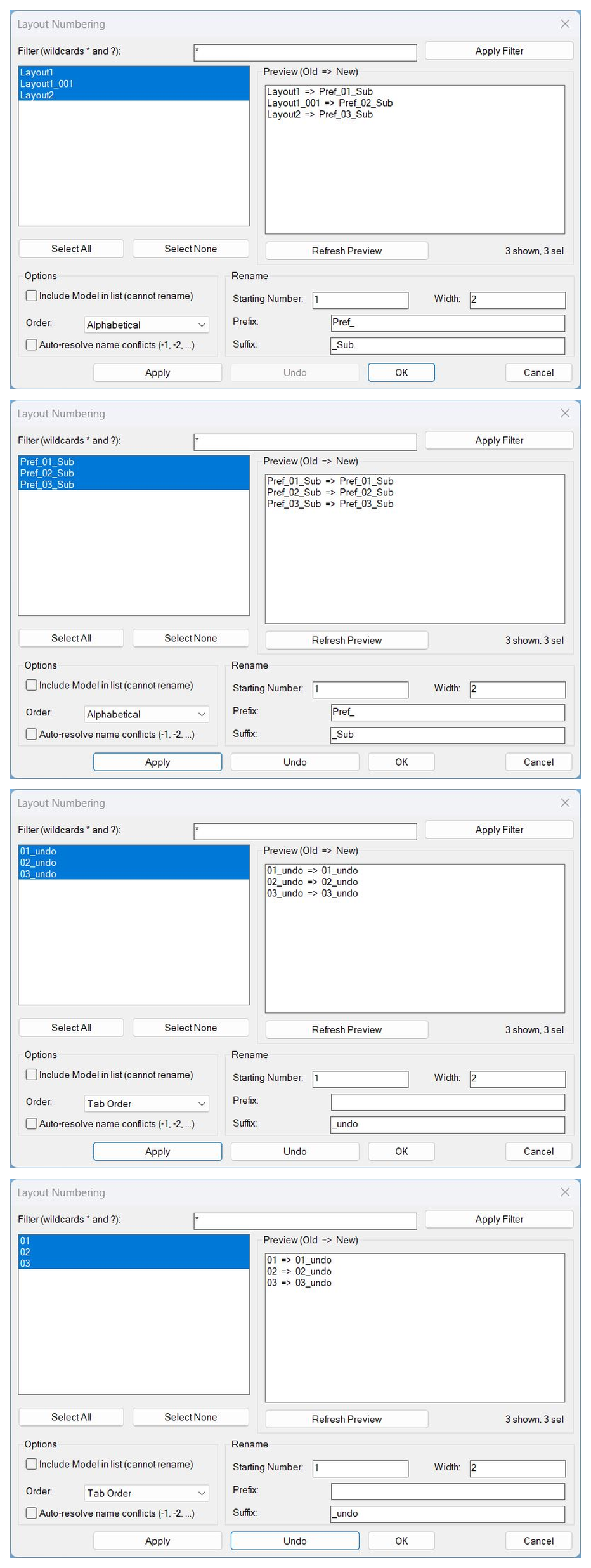
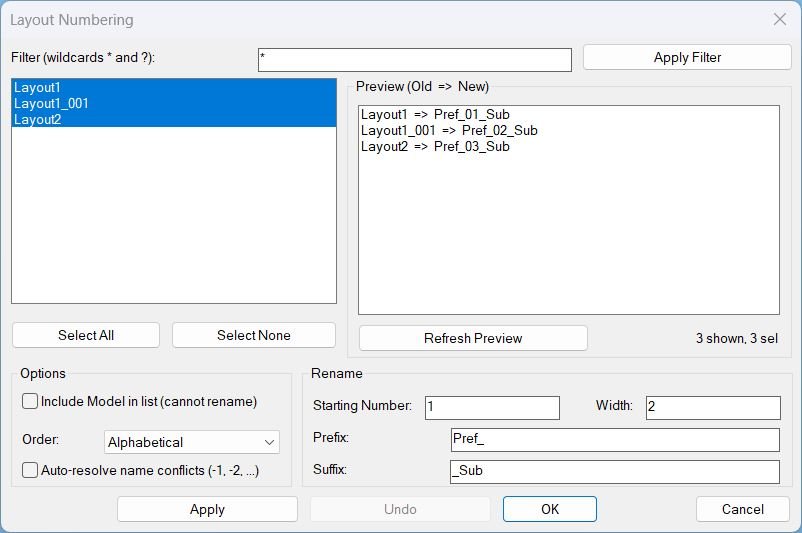
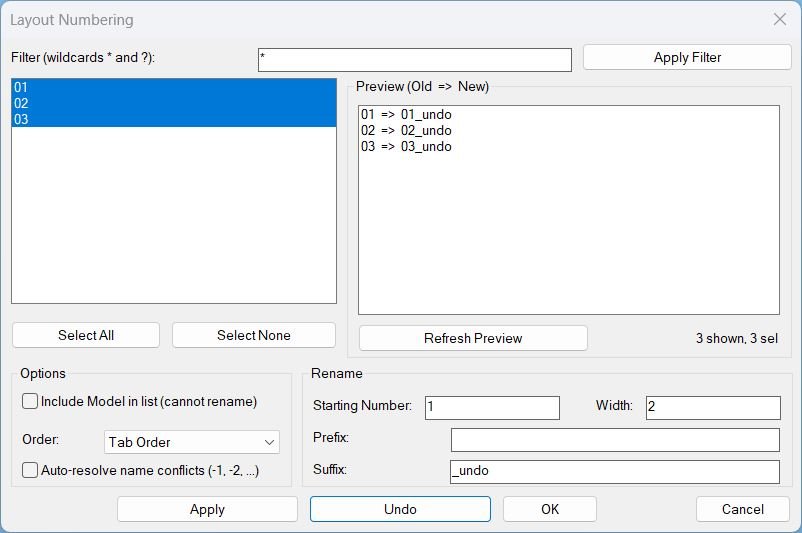
📑 The routine builds a temporary DCL dialog titled Layout Numbering with wildcard filter, multi-select layout list, preview panel showing Old to New names, Select All, Select None, Apply, Undo, OK, and Cancel.
🧮 Users define the starting number, numeric width, prefix, suffix, and order mode to generate consistent layout names for Civil 3D sheets and AutoCAD plotting tabs.
🧠 The tool supports tab-order or alphabetical processing, optional inclusion of Model for reference, automatic conflict resolution using -1, -2 style suffixes, and persistent defaults for repeated runs.
🛡️ The code intentionally avoids calling AutoCAD UNDO from DCL callbacks and instead uses a manual multi-level undo stack that restores previous layout names safely.
📌 This is useful for batch layout renaming, sheet numbering, drawing package cleanup, plan set standardization, plotting tab organization, and Civil 3D production-sheet management.
Helper function: (if any)
🧩 LayoutNum:WriteDCL dynamically creates the Layout Numbering dialog.
🧩 LayoutNum:LayoutsTabOrder collects layout objects in tab order with optional Model inclusion.
🧩 LayoutNum:SortByName sorts layout rows alphabetically when Alpha order is selected.
🧩 LayoutNum:PadNumber formats layout numbers with the requested numeric width.
🧩 LayoutNum:ComputeRenamePlan builds the Old to New preview plan from selected layouts.
🧩 LayoutNum:ResolveConflict creates an alternate name when Auto-resolve is enabled.
🧩 LayoutNum:ValidateBeforeRename prevents Model renaming, duplicate names, invalid numbers, and name conflicts.
🧩 LayoutNum:ApplyRename performs the layout renaming through vla-put-Name and records undo frames.
🧩 LayoutNum:DoUndo restores renamed layouts from the manual undo stack.
🧩 LayoutNum:Cleanup unloads the temporary dialog and deletes the DCL file.
Functionalities:
✅ Rename selected layout tabs in batch.
✅ Filter layout names with wildcard patterns using * and ?.
✅ Preview every planned rename as Old to New before applying changes.
✅ Generate names from prefix, starting number, zero-padding width, and suffix.
✅ Process selected layouts by tab order or alphabetical order.
✅ Select all filtered layouts or clear the selection quickly.
✅ Auto-resolve naming conflicts when enabled.
✅ Apply renames while keeping the dialog open.
✅ Use a safe manual multi-level undo stack instead of command-line UNDO from DCL callbacks.
✅ Remember previous dialog values for faster repeated numbering sessions.
Result:
🎯 The result is a controlled, preview-based layout renaming workflow for AutoCAD and Civil 3D drawings.
📑 Users can standardize sheet names, add project prefixes, apply numbered sequences, and repair layout naming order without manual tab-by-tab edits.
✅ LayoutNum improves CAD sheet organization, plotting consistency, and production drawing management.
Images, animations etc.
XAML code:
<ResourceDictionary
xmlns="http://schemas.microsoft.com/winfx/2006/xaml/presentation"
xmlns:x="http://schemas.microsoft.com/winfx/2006/xaml"
xmlns:src="clr-namespace:Autodesk.Windows;assembly=AdWindows">

<src:RibbonToolTip x:Key="LayoutNum">
<src:RibbonToolTip.ExpandedContent>
<StackPanel>
<TextBlock Background="AntiqueWhite" TextAlignment="Left">
<Bold>Function Syntax: LAYOUTNUM / _LAYOUTNUM / LayoutNum</Bold>
<LineBreak/>
<Bold>Version: 1.1 Date: 20.06.2026 6:38:55PM</Bold>
<LineBreak/>
<Hyperlink>AI+https://www.cadtutor.net/forum/topic/14298-tabsortlsp/</Hyperlink>
<LineBreak/>
<Bold><Foreground Color="DarkRed">LayoutNum</Foreground> — Layout Numbering and Renaming Utility</Bold><LineBreak/>
<Foreground Color="Gray">This program will prompt the user with a dialog to filter, select, preview, and rename drawing layouts (paper space tabs), using a controlled numbering scheme.</Foreground><LineBreak/>
<Bold><Foreground Color="DarkRed">How to Run</Foreground></Bold><LineBreak/>
<Foreground Color="DarkRed">Commands:</Foreground> <Foreground Color="Red">LAYOUTNUM</Foreground>, <Foreground Color="Red">_LAYOUTNUM</Foreground>, <Foreground Color="Red">LayoutNum</Foreground><LineBreak/>
<Foreground Color="Gray">Running any of these commands opens the Layout Numbering dialog.</Foreground><LineBreak/>
<Bold><Foreground Color="DarkRed">What the User Must Do</Foreground></Bold><LineBreak/>
• <Foreground Color="Gray">Optionally enter a wildcard filter using</Foreground> <Foreground Color="Red">*</Foreground> <Foreground Color="Gray">and</Foreground> <Foreground Color="Red">?</Foreground> <Foreground Color="Gray">to narrow the layout list.</Foreground><LineBreak/>
• <Foreground Color="Gray">Select one or more layouts from the list (multi-select).</Foreground><LineBreak/>
• <Foreground Color="Gray">Enter rename parameters:</Foreground> <Foreground Color="DarkRed">Starting Number</Foreground>, <Foreground Color="DarkRed">Width</Foreground>, <Foreground Color="DarkRed">Prefix</Foreground>, <Foreground Color="DarkRed">Suffix</Foreground>.<LineBreak/>
• <Foreground Color="Gray">Review the</Foreground> <Foreground Color="DarkRed">Preview (Old to New)</Foreground> <Foreground Color="Gray">before committing changes.</Foreground><LineBreak/>
<Bold><Foreground Color="DarkRed">Primary Functionalities</Foreground></Bold><LineBreak/>
• <Foreground Color="DarkRed">Filter layouts by wildcard pattern</Foreground><Foreground Color="Gray">:</Foreground> <Foreground Color="Gray">Apply Filter rebuilds the visible list using patterns such as</Foreground> <Foreground Color="Red">A*</Foreground> <Foreground Color="Gray">or</Foreground> <Foreground Color="Red">Sheet??</Foreground>.<LineBreak/>
• <Foreground Color="DarkRed">Multi-select layout targeting</Foreground><Foreground Color="Gray">:</Foreground> <Foreground Color="Gray">The list supports selecting multiple layouts for batch renaming.</Foreground><LineBreak/>
• <Foreground Color="DarkRed">Select All and Select None</Foreground><Foreground Color="Gray">:</Foreground> <Foreground Color="Gray">Quickly select every visible layout or clear the selection.</Foreground><LineBreak/>
• <Foreground Color="DarkRed">Preview before rename</Foreground><Foreground Color="Gray">:</Foreground> <Foreground Color="Gray">Shows a calculated mapping of each selected layout name to the proposed new name.</Foreground><LineBreak/>
• <Foreground Color="DarkRed">Batch rename with numbering</Foreground><Foreground Color="Gray">:</Foreground> <Foreground Color="Gray">Renames selected layouts to</Foreground> <Foreground Color="DarkRed">Prefix</Foreground><Foreground Color="Gray"> plus a sequential number plus</Foreground> <Foreground Color="DarkRed">Suffix</Foreground>.<LineBreak/>
• <Foreground Color="DarkRed">Zero padding control</Foreground><Foreground Color="Gray">:</Foreground> <Foreground Color="Gray">Width controls numeric padding, such as</Foreground> <Foreground Color="Red">01</Foreground> <Foreground Color="Gray">or</Foreground> <Foreground Color="Red">001</Foreground>.<LineBreak/>
• <Foreground Color="DarkRed">Ordering control</Foreground><Foreground Color="Gray">:</Foreground> <Foreground Color="Gray">Numbering can follow</Foreground> <Foreground Color="DarkRed">Tab Order</Foreground> <Foreground Color="Gray">or</Foreground> <Foreground Color="DarkRed">Alphabetical</Foreground> <Foreground Color="Gray">order.</Foreground><LineBreak/>
• <Foreground Color="DarkRed">Automatic conflict resolution</Foreground><Foreground Color="Gray">:</Foreground> <Foreground Color="Gray">Optionally appends</Foreground> <Foreground Color="Red">-1</Foreground><Foreground Color="Gray">,</Foreground> <Foreground Color="Red">-2</Foreground><Foreground Color="Gray">, and so on, if a generated name already exists.</Foreground><LineBreak/>
• <Foreground Color="DarkRed">Include Model option</Foreground><Foreground Color="Gray">:</Foreground> <Foreground Color="Gray">Model can be shown in the list, but it is flagged as</Foreground> <Foreground Color="Red">cannot rename</Foreground> <Foreground Color="Gray">and will block applying changes if selected.</Foreground><LineBreak/>
<Bold><Foreground Color="DarkRed">Dialog Buttons and Actions</Foreground></Bold><LineBreak/>
• <Foreground Color="Red">Apply Filter</Foreground><Foreground Color="Gray">:</Foreground> <Foreground Color="Gray">Applies the wildcard filter and refreshes the visible layout list without renaming.</Foreground><LineBreak/>
• <Foreground Color="Red">Refresh Preview</Foreground><Foreground Color="Gray">:</Foreground> <Foreground Color="Gray">Recomputes the Old to New mapping from the current selection and rename settings.</Foreground><LineBreak/>
• <Foreground Color="Red">Apply</Foreground><Foreground Color="Gray">:</Foreground> <Foreground Color="Gray">Performs the renaming immediately and keeps the dialog open.</Foreground><LineBreak/>
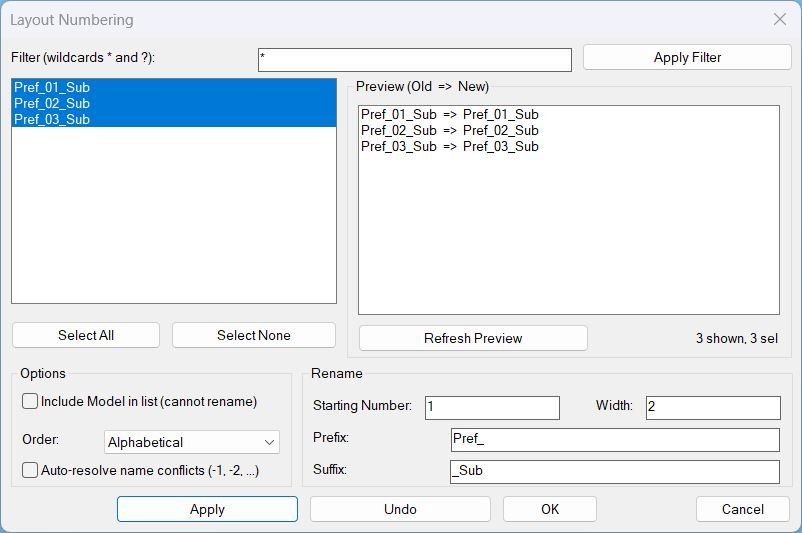
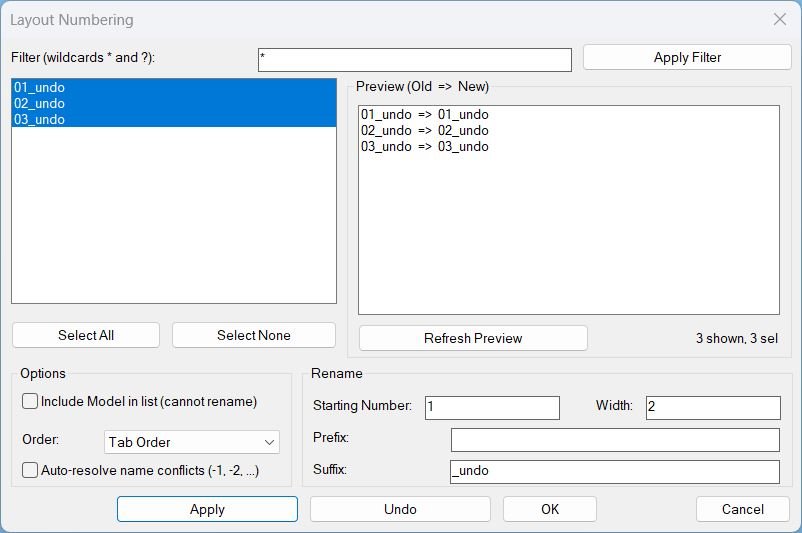
• <Foreground Color="Red">Undo</Foreground><Foreground Color="Gray">:</Foreground> <Foreground Color="Gray">Reverts the most recent Apply or OK rename operation using a safe internal rename history.</Foreground><LineBreak/>
• <Foreground Color="Red">OK</Foreground><Foreground Color="Gray">:</Foreground> <Foreground Color="Gray">Performs the renaming and closes the dialog.</Foreground><LineBreak/>
• <Foreground Color="Red">Cancel</Foreground><Foreground Color="Gray">:</Foreground> <Foreground Color="Gray">Closes the dialog without performing a new rename action.</Foreground><LineBreak/>
<Bold><Foreground Color="DarkRed">Important Behaviors and Constraints</Foreground></Bold><LineBreak/>
• <Foreground Color="Red">Model layout cannot be renamed</Foreground><Foreground Color="Gray">:</Foreground> <Foreground Color="Gray">If Model is included and selected, renaming is blocked to prevent invalid operations.</Foreground><LineBreak/>
• <Foreground Color="DarkRed">Undo is manual and safe</Foreground><Foreground Color="Gray">:</Foreground> <Foreground Color="Gray">Undo does not rely on AutoCAD UNDO command calls during the dialog, avoiding ARX exceptions.</Foreground><LineBreak/>
• <Foreground Color="DarkRed">No forced exit</Foreground><Foreground Color="Gray">:</Foreground> <Foreground Color="Gray">The dialog remains open after Apply so the user can apply multiple rename passes.</Foreground><LineBreak/>
• <Foreground Color="Gray">User settings persist between runs (filter, numbering, width, prefix, suffix, options).</Foreground><LineBreak/>
<Bold><Foreground Color="DarkRed">Typical Use Case Example</Foreground></Bold><LineBreak/>
• <Foreground Color="Gray">Filter:</Foreground> <Foreground Color="Red">*</Foreground> <Foreground Color="Gray">to show all layouts.</Foreground><LineBreak/>
• <Foreground Color="Gray">Select layouts:</Foreground> <Foreground Color="DarkRed">Layout1</Foreground> <Foreground Color="Gray">and</Foreground> <Foreground Color="DarkRed">Layout2</Foreground>.<LineBreak/>
• <Foreground Color="Gray">Set:</Foreground> <Foreground Color="DarkRed">Starting Number</Foreground> <Foreground Color="Red">1</Foreground><Foreground Color="Gray">,</Foreground> <Foreground Color="DarkRed">Width</Foreground> <Foreground Color="Red">2</Foreground><Foreground Color="Gray">,</Foreground> <Foreground Color="DarkRed">Prefix</Foreground> <Foreground Color="Red">aaa_</Foreground><Foreground Color="Gray">, Suffix blank.</Foreground><LineBreak/>
• <Foreground Color="Gray">Preview shows:</Foreground> <Foreground Color="Red">Layout1 => aaa_01</Foreground> <Foreground Color="Gray">and</Foreground> <Foreground Color="Red">Layout2 => aaa_02</Foreground>.<LineBreak/>
• <Foreground Color="Gray">Press</Foreground> <Foreground Color="Red">Apply</Foreground> <Foreground Color="Gray">to rename without closing, or</Foreground> <Foreground Color="Red">OK</Foreground> <Foreground Color="Gray">to rename and close.</Foreground><LineBreak/>


<Bold><Run Foreground="DodgerBlue">Description</Run></Bold><LineBreak/>
<Run Foreground="White">🔢 LayoutNum is an AutoCAD and Civil 3D AutoLISP layout renumbering utility with a DCL interface, preview list, Apply, safe multi-level Undo, OK, and Cancel workflow.</Run><LineBreak/>
<Run Foreground="White">📑 It helps rename selected layout tabs using starting numbers, padding width, prefix, suffix, order modes, filters, and automatic conflict resolution.</Run><LineBreak/>
<LineBreak/>
<Bold><Run Foreground="DodgerBlue">Function Syntax</Run></Bold><LineBreak/>
<Run Foreground="White">🚀 Main dialog command: </Run><Bold><Run Foreground="Orange">LAYOUTNUM</Run></Bold><LineBreak/>
<Run Foreground="White">🔁 Alias command: </Run><Bold><Run Foreground="Orange">_LAYOUTNUM</Run></Bold><LineBreak/>
<Run Foreground="White">🔁 Alias command: </Run><Bold><Run Foreground="Orange">LayoutNum</Run></Bold><LineBreak/>
<Run Foreground="White">🧰 Load the LSP with APPLOAD and run the command in AutoCAD or Civil 3D.</Run><LineBreak/>
<LineBreak/>
<Bold><Run Foreground="DodgerBlue">SEO Optimized Overview</Run></Bold><LineBreak/>
<Run Foreground="White">🔢 LayoutNum is an SEO-friendly AutoCAD layout renaming and layout numbering tool for production drawings with many paper-space tabs.</Run><LineBreak/>
<Run Foreground="White">📑 The routine builds a temporary DCL dialog titled Layout Numbering with wildcard filter, multi-select layout list, preview panel showing Old to New names, Select All, Select None, Apply, Undo, OK, and Cancel.</Run><LineBreak/>
<Run Foreground="White">🧮 Users define the starting number, numeric width, prefix, suffix, and order mode to generate consistent layout names for Civil 3D sheets and AutoCAD plotting tabs.</Run><LineBreak/>
<Run Foreground="White">🧠 The tool supports tab-order or alphabetical processing, optional inclusion of Model for reference, automatic conflict resolution using -1, -2 style suffixes, and persistent defaults for repeated runs.</Run><LineBreak/>
<Run Foreground="White">🛡️ The code intentionally avoids calling AutoCAD UNDO from DCL callbacks and instead uses a manual multi-level undo stack that restores previous layout names safely.</Run><LineBreak/>
<Run Foreground="White">📌 This is useful for batch layout renaming, sheet numbering, drawing package cleanup, plan set standardization, plotting tab organization, and Civil 3D production-sheet management.</Run><LineBreak/>
<LineBreak/>
<Bold><Run Foreground="LimeGreen">Primary Workflow</Run></Bold><LineBreak/>
<Run Foreground="White">1️⃣ Load LayoutNum into AutoCAD or Civil 3D with APPLOAD.</Run><LineBreak/>
<Run Foreground="White">2️⃣ Run LAYOUTNUM from the command line.</Run><LineBreak/>
<Run Foreground="White">3️⃣ Use the dialog or command prompts to select the target layouts, layers, viewports, or plot settings.</Run><LineBreak/>
<Run Foreground="White">4️⃣ Review the preview, status list, or command-line feedback before applying changes.</Run><LineBreak/>
<Run Foreground="White">5️⃣ Apply the operation and verify the result in the active drawing.</Run><LineBreak/>
<LineBreak/>
<Bold><Run Foreground="DodgerBlue">Main Functionalities</Run></Bold><LineBreak/>
<Run Foreground="White">✅ Rename selected layout tabs in batch.</Run><LineBreak/>
<Run Foreground="White">✅ Filter layout names with wildcard patterns using * and ?.</Run><LineBreak/>
<Run Foreground="White">✅ Preview every planned rename as Old to New before applying changes.</Run><LineBreak/>
<Run Foreground="White">✅ Generate names from prefix, starting number, zero-padding width, and suffix.</Run><LineBreak/>
<Run Foreground="White">✅ Process selected layouts by tab order or alphabetical order.</Run><LineBreak/>
<Run Foreground="White">✅ Select all filtered layouts or clear the selection quickly.</Run><LineBreak/>
<Run Foreground="White">✅ Auto-resolve naming conflicts when enabled.</Run><LineBreak/>
<Run Foreground="White">✅ Apply renames while keeping the dialog open.</Run><LineBreak/>
<Run Foreground="White">✅ Use a safe manual multi-level undo stack instead of command-line UNDO from DCL callbacks.</Run><LineBreak/>
<Run Foreground="White">✅ Remember previous dialog values for faster repeated numbering sessions.</Run><LineBreak/>
<LineBreak/>
<Bold><Run Foreground="DodgerBlue">Important Commands and Helper Functions</Run></Bold><LineBreak/>
<Run Foreground="White">🧩 LayoutNum:WriteDCL dynamically creates the Layout Numbering dialog.</Run><LineBreak/>
<Run Foreground="White">🧩 LayoutNum:LayoutsTabOrder collects layout objects in tab order with optional Model inclusion.</Run><LineBreak/>
<Run Foreground="White">🧩 LayoutNum:SortByName sorts layout rows alphabetically when Alpha order is selected.</Run><LineBreak/>
<Run Foreground="White">🧩 LayoutNum:PadNumber formats layout numbers with the requested numeric width.</Run><LineBreak/>
<Run Foreground="White">🧩 LayoutNum:ComputeRenamePlan builds the Old to New preview plan from selected layouts.</Run><LineBreak/>
<Run Foreground="White">🧩 LayoutNum:ResolveConflict creates an alternate name when Auto-resolve is enabled.</Run><LineBreak/>
<Run Foreground="White">🧩 LayoutNum:ValidateBeforeRename prevents Model renaming, duplicate names, invalid numbers, and name conflicts.</Run><LineBreak/>
<Run Foreground="White">🧩 LayoutNum:ApplyRename performs the layout renaming through vla-put-Name and records undo frames.</Run><LineBreak/>
<Run Foreground="White">🧩 LayoutNum:DoUndo restores renamed layouts from the manual undo stack.</Run><LineBreak/>
<Run Foreground="White">🧩 LayoutNum:Cleanup unloads the temporary dialog and deletes the DCL file.</Run><LineBreak/>
<LineBreak/>
<Bold><Run Foreground="LimeGreen">Practical Result</Run></Bold><LineBreak/>
<Run Foreground="White">🎯 The result is a controlled, preview-based layout renaming workflow for AutoCAD and Civil 3D drawings.</Run><LineBreak/>
<Run Foreground="White">📑 Users can standardize sheet names, add project prefixes, apply numbered sequences, and repair layout naming order without manual tab-by-tab edits.</Run><LineBreak/>
<Run Foreground="White">✅ LayoutNum improves CAD sheet organization, plotting consistency, and production drawing management.</Run><LineBreak/>
<LineBreak/>
<Bold><Run Foreground="DarkRed">Important Notes</Run></Bold><LineBreak/>
<Run Foreground="White">⚠️ The tool changes real layout tab names in the active drawing.</Run><LineBreak/>
<Run Foreground="White">⚠️ Model can be displayed for reference but cannot be renamed.</Run><LineBreak/>
<Run Foreground="White">⚠️ Without Auto-resolve, duplicate generated names or existing-name conflicts block the operation.</Run><LineBreak/>
<Run Foreground="White">⚠️ Testing on a backup drawing is recommended before renaming large drawing packages.</Run><LineBreak/>
<Run Foreground="White">⚠️ Layout name rules are still governed by AutoCAD; invalid names may be rejected by vla-put-Name.</Run><LineBreak/>
<LineBreak/>
<Bold><Run Foreground="Yellow">Tags</Run></Bold><LineBreak/>
<Run Foreground="Yellow">🏷️ AutoCAD, 🏷️ Civil 3D, 🏷️ AutoLISP, 🏷️ Visual LISP, 🏷️ DCL dialog, 🏷️ CAD automation, 🏷️ CAD productivity, 🏷️ Layout renaming, 🏷️ Layout numbering, 🏷️ Batch rename, 🏷️ Sheet numbering, 🏷️ Paper space, 🏷️ Layout tabs, 🏷️ Plot tabs, 🏷️ Layout preview, 🏷️ Safe undo, 🏷️ vla-put-Name, 🏷️ LAYOUTNUM</Run><LineBreak/>


</TextBlock>

<Grid>
<Image Source="Image_000.jpg" Stretch="Uniform"/>
</Grid>

<Grid>
<Image Source="Image_001.jpg" Stretch="Uniform"/>
</Grid>

<Grid>
<Image Source="Image_002.jpg" Stretch="Uniform"/>
</Grid>

<Grid>
<Image Source="Image_003.jpg" Stretch="Uniform"/>
</Grid>

</StackPanel>
</src:RibbonToolTip.ExpandedContent>
</src:RibbonToolTip>
</ResourceDictionary>
Leave a Reply
You must be logged in to post a comment.