
Short description
🧩 LoadRecent is an AutoCAD AutoLISP DCL manager for finding reviewing loading running editing and promoting recently created LSP files from a predefined @try development folder.
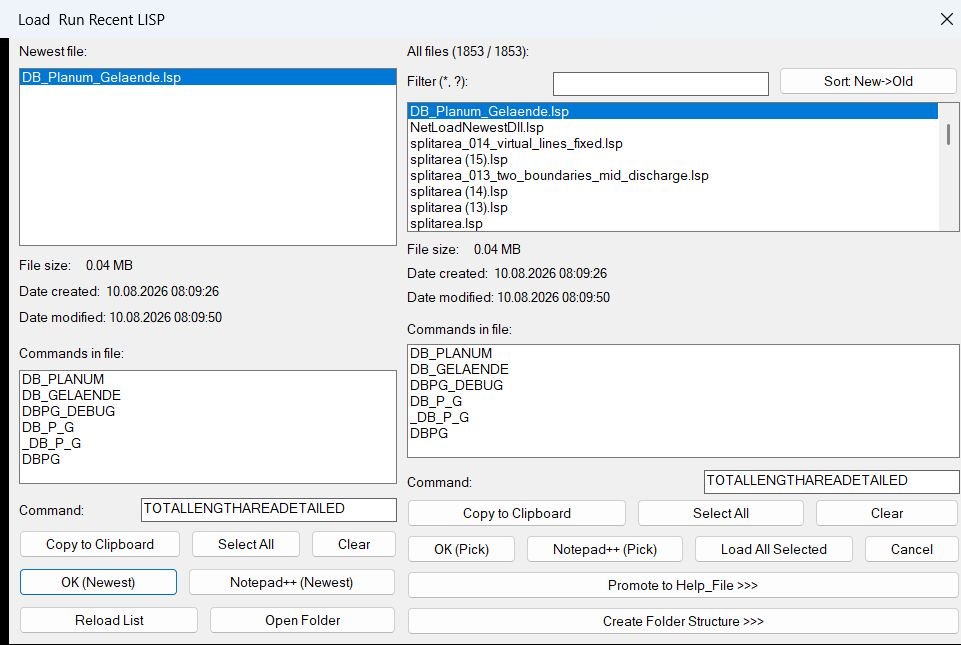
🎛️ The interface separates the newest LISP file from the complete file list and displays file size creation date modification date and detected commands.
📦 Version 06 also adds promotion into the Help_File menu structure with optional source deletion loader registration and timestamped loader backup.
Command:
Main command: LOADRECENT
Alternate command: LOADRECENT_DCL
Description:
🧩 LoadRecent is an AutoCAD AutoLISP DCL manager for finding reviewing loading running editing and promoting recently created LSP files from a predefined @try development folder.
🎛️ The interface separates the newest LISP file from the complete file list and displays file size creation date modification date and detected commands.
📦 Version 06 also adds promotion into the Help_File menu structure with optional source deletion loader registration and timestamped loader backup.
Helper function: (if any)
Functionalities:
✅ Newest file view – highlights the most recent LSP from the configured @try development folder.
✅ Complete file browser – shows all discovered LSP files with metadata.
✅ Wildcard filtering – supports star and question mark file name patterns.
✅ Sort control – switches between newest first and alphabetical file ordering.
✅ Today marker – marks files created on the current date.
✅ Command extraction – detects DEFUN C commands from each LSP source.
✅ Multi command selection – supports selecting and copying multiple detected commands.
✅ Clipboard integration – copies commands through an HTML clipboard object with PowerShell and clip fallbacks.
✅ Notepad++ integration – opens the newest or selected LSP for editing.
✅ Load and run workflow – loads the chosen source and executes the selected command.
✅ Promote to Help_File – moves or copies a development LSP into the structured production menu tree.
✅ Automatic menu discovery – scans AutoCAD and Civil 3D *_menu folders for promotion targets.
✅ Loader registration – can insert the promoted path under the matching bookmark in @LoadAllLisp2.lsp.
✅ Loader backup – can create a timestamped backup before modifying the loader.
✅ Persistent last command – stores the last used command in LR_config.ini.
Result:
🎯 LoadRecent provides the described AutoCAD or Civil 3D workflow.
📌 The generated SEO description is based on the supplied source code or project files.
Images, animations etc.
XAML code:
<ResourceDictionary
 xmlns="http://schemas.microsoft.com/winfx/2006/xaml/presentation"
 xmlns:x="http://schemas.microsoft.com/winfx/2006/xaml"
 xmlns:src="clr-namespace:Autodesk.Windows;assembly=AdWindows">

 <src:RibbonToolTip x:Key="LoadRecent">
 <src:RibbonToolTip.ExpandedContent>
 <StackPanel>
 <TextBlock Background="AntiqueWhite" TextAlignment="Left">
<Bold>Function Syntax:  LOADRECENT / LOADRECENT_DCL</Bold>
<LineBreak/>
<Bold>Version: 1.0 Date: 20.06.2026 6:38:56PM</Bold>
<LineBreak/>
<Bold>Version: 1.0 Date: 11.08.2026 3:21:19PM</Bold>
<LineBreak/>
<Hyperlink>N/A</Hyperlink>
<LineBreak/>

<Bold><Run Foreground="DodgerBlue">Description</Run></Bold><LineBreak/>
<Run Foreground="White">🧩 LoadRecent is an AutoCAD AutoLISP DCL manager for finding reviewing loading running editing and promoting recently created LSP files from a predefined @try development folder.</Run><LineBreak/>
<Run Foreground="White">🎛️ The interface separates the newest LISP file from the complete file list and displays file size creation date modification date and detected commands.</Run><LineBreak/>
<Run Foreground="White">📦 Version 06 also adds promotion into the Help_File menu structure with optional source deletion loader registration and timestamped loader backup.</Run><LineBreak/>
<LineBreak/>
<Bold><Run Foreground="DodgerBlue">Function Syntax</Run></Bold><LineBreak/>
<Run Foreground="White">Main command: </Run><Bold><Run Foreground="Orange">LOADRECENT</Run></Bold><LineBreak/>
<Run Foreground="White">Alternate command: </Run><Bold><Run Foreground="Orange">LOADRECENT_DCL</Run></Bold><LineBreak/>
<LineBreak/>
<Bold><Run Foreground="LimeGreen">Primary Workflow</Run></Bold><LineBreak/>
<Run Foreground="White">1. Run LOADRECENT or LOADRECENT_DCL.</Run><LineBreak/>
<Run Foreground="White">2. The @try directory is scanned for LSP files and metadata.</Run><LineBreak/>
<Run Foreground="White">3. Review the newest file in the left pane or filter and select files from the complete list on the right.</Run><LineBreak/>
<Run Foreground="White">4. Inspect detected DEFUN C commands and optionally select multiple commands.</Run><LineBreak/>
<Run Foreground="White">5. Copy commands to the clipboard open the LSP in Notepad++ or load and run the chosen file and command.</Run><LineBreak/>
<Run Foreground="White">6. Use Reload List after source files change.</Run><LineBreak/>
<Run Foreground="White">7. Use Promote to Help_File to choose a target menu folder and destination.</Run><LineBreak/>
<Run Foreground="White">8. In the confirmation dialog choose whether to delete the @try source register the promoted path in @LoadAllLisp2.lsp and create a loader backup.</Run><LineBreak/>
<LineBreak/>
<Bold><Run Foreground="LimeGreen">Functionalities</Run></Bold><LineBreak/>
<Run Foreground="White">✅ </Run><Bold><Run Foreground="LimeGreen">Newest file view</Run></Bold><Run Foreground="White"> - highlights the most recent LSP from the configured @try development folder.</Run><LineBreak/>
<Run Foreground="White">✅ </Run><Bold><Run Foreground="LimeGreen">Complete file browser</Run></Bold><Run Foreground="White"> - shows all discovered LSP files with metadata.</Run><LineBreak/>
<Run Foreground="White">✅ </Run><Bold><Run Foreground="LimeGreen">Wildcard filtering</Run></Bold><Run Foreground="White"> - supports star and question mark file name patterns.</Run><LineBreak/>
<Run Foreground="White">✅ </Run><Bold><Run Foreground="LimeGreen">Sort control</Run></Bold><Run Foreground="White"> - switches between newest first and alphabetical file ordering.</Run><LineBreak/>
<Run Foreground="White">✅ </Run><Bold><Run Foreground="LimeGreen">Today marker</Run></Bold><Run Foreground="White"> - marks files created on the current date.</Run><LineBreak/>
<Run Foreground="White">✅ </Run><Bold><Run Foreground="LimeGreen">Command extraction</Run></Bold><Run Foreground="White"> - detects DEFUN C commands from each LSP source.</Run><LineBreak/>
<Run Foreground="White">✅ </Run><Bold><Run Foreground="LimeGreen">Multi command selection</Run></Bold><Run Foreground="White"> - supports selecting and copying multiple detected commands.</Run><LineBreak/>
<Run Foreground="White">✅ </Run><Bold><Run Foreground="LimeGreen">Clipboard integration</Run></Bold><Run Foreground="White"> - copies commands through an HTML clipboard object with PowerShell and clip fallbacks.</Run><LineBreak/>
<Run Foreground="White">✅ </Run><Bold><Run Foreground="LimeGreen">Notepad++ integration</Run></Bold><Run Foreground="White"> - opens the newest or selected LSP for editing.</Run><LineBreak/>
<Run Foreground="White">✅ </Run><Bold><Run Foreground="LimeGreen">Load and run workflow</Run></Bold><Run Foreground="White"> - loads the chosen source and executes the selected command.</Run><LineBreak/>
<Run Foreground="White">✅ </Run><Bold><Run Foreground="LimeGreen">Promote to Help_File</Run></Bold><Run Foreground="White"> - moves or copies a development LSP into the structured production menu tree.</Run><LineBreak/>
<Run Foreground="White">✅ </Run><Bold><Run Foreground="LimeGreen">Automatic menu discovery</Run></Bold><Run Foreground="White"> - scans AutoCAD and Civil 3D *_menu folders for promotion targets.</Run><LineBreak/>
<Run Foreground="White">✅ </Run><Bold><Run Foreground="LimeGreen">Loader registration</Run></Bold><Run Foreground="White"> - can insert the promoted path under the matching bookmark in @LoadAllLisp2.lsp.</Run><LineBreak/>
<Run Foreground="White">✅ </Run><Bold><Run Foreground="LimeGreen">Loader backup</Run></Bold><Run Foreground="White"> - can create a timestamped backup before modifying the loader.</Run><LineBreak/>
<Run Foreground="White">✅ </Run><Bold><Run Foreground="LimeGreen">Persistent last command</Run></Bold><Run Foreground="White"> - stores the last used command in LR_config.ini.</Run><LineBreak/>
<LineBreak/>
<Bold><Run Foreground="DarkRed">Important Notes</Run></Bold><LineBreak/>
<Run Foreground="White">⚠️ </Run><Bold><Run Foreground="DarkRed">The @try Help_File and @LoadAllLisp2.lsp paths are hard coded for the current CAD library.</Run></Bold><LineBreak/>
<Run Foreground="White">⚠️ </Run><Bold><Run Foreground="DarkRed">Source deletion during promotion is optional and is unchecked by default.</Run></Bold><LineBreak/>
<Run Foreground="White">⚠️ </Run><Bold><Run Foreground="DarkRed">Loader registration is checked by default in the version 06 confirmation dialog.</Run></Bold><LineBreak/>
<Run Foreground="White">⚠️ </Run><Bold><Run Foreground="DarkRed">Loader backup before registration is checked by default.</Run></Bold><LineBreak/>
<Run Foreground="White">⚠️ </Run><Bold><Run Foreground="DarkRed">The loader registration logic skips a promoted UNC path when that path is already present.</Run></Bold><LineBreak/>
<LineBreak/>
<Bold><Run Foreground="Yellow">SEO Keywords</Run></Bold><LineBreak/>
<Run Foreground="Yellow">🏷️ AutoCAD  🏷️ Civil 3D  🏷️ AutoLISP  🏷️ LoadRecent  🏷️ LISP manager  🏷️ LISP loader  🏷️ LISP runner  🏷️ Notepad++  🏷️ Wildcard filter  🏷️ LISP promotion  🏷️ Help_File  🏷️ Loader registration  🏷️ Clipboard  🏷️ DCL  🏷️ CAD development</Run><LineBreak/>

</TextBlock>

<Grid>
<Image Source="Image_000.jpg" Stretch="Uniform"/>
</Grid>


 <!-- Use MediaElement for GIF (static first frame) and Image as fallback -->
</StackPanel>
 </src:RibbonToolTip.ExpandedContent>
 </src:RibbonToolTip>

 </ResourceDictionary>
Leave a Reply
You must be logged in to post a comment.