
Short description
🧩 CheckParens is an AutoCAD AutoLISP validation tool for checking opening and closing parenthesis balance in a selected LSP source file.
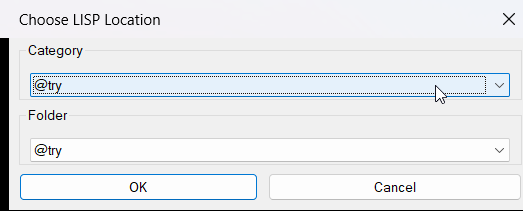
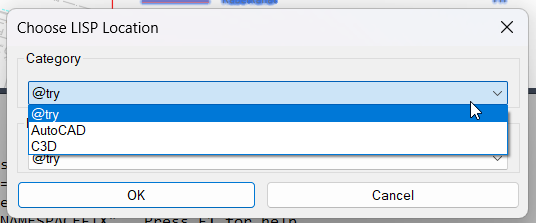
🎛️ A DCL folder chooser lets the user select between @try AutoCAD and Civil 3D categories before choosing the LISP file.
🔎 The scanner ignores semicolon comments outside strings and counts parentheses outside quoted strings to identify an early extra closing parenthesis and the final balance.
Command:
Main command: CHECKPARENS
Description:
🧩 CheckParens is an AutoCAD AutoLISP validation tool for checking opening and closing parenthesis balance in a selected LSP source file.
🎛️ A DCL folder chooser lets the user select between @try AutoCAD and Civil 3D categories before choosing the LISP file.
🔎 The scanner ignores semicolon comments outside strings and counts parentheses outside quoted strings to identify an early extra closing parenthesis and the final balance.
Helper function: (if any)
Functionalities:
✅ Category selection – provides @try AutoCAD and Civil 3D source categories.
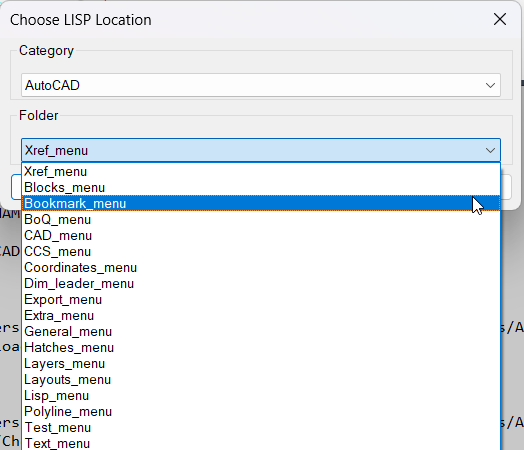
✅ Menu folder selection – lists predefined AutoCAD and Civil 3D menu folders.
✅ DCL interface – creates a temporary folder selection dialog.
✅ Comment aware scan – ignores semicolon comments that begin outside quoted strings.
✅ String aware scan – does not count parentheses located inside quoted strings.
✅ Early extra parenthesis detection – reports the first source line where balance becomes negative.
✅ Final balance report – prints the final parenthesis count which should be zero for a balanced file.
Result:
🎯 CheckParens provides the described AutoCAD or Civil 3D workflow.
📌 The generated SEO description is based on the supplied source code or project files.
Images, animations etc.
XAML code:
<ResourceDictionary
xmlns="http://schemas.microsoft.com/winfx/2006/xaml/presentation"
xmlns:x="http://schemas.microsoft.com/winfx/2006/xaml"
xmlns:src="clr-namespace:Autodesk.Windows;assembly=AdWindows">

<src:RibbonToolTip x:Key="CheckParens">
<src:RibbonToolTip.ExpandedContent>
<StackPanel>
<TextBlock Background="AntiqueWhite" TextAlignment="Left">
<Bold>Function Syntax: CHECKPARENS</Bold>
<LineBreak/>
<Bold>Version: 1.0 Date: 20.06.2026 6:38:56PM</Bold>
<LineBreak/>
<Bold>Version: 1.0 Date: 11.08.2026 3:34:03PM</Bold>
<LineBreak/>
<Hyperlink>WEB</Hyperlink>
<LineBreak/>

<Bold><Run Foreground="DodgerBlue">Description</Run></Bold><LineBreak/>
<Run Foreground="White">🧩 CheckParens is an AutoCAD AutoLISP validation tool for checking opening and closing parenthesis balance in a selected LSP source file.</Run><LineBreak/>
<Run Foreground="White">🎛️ A DCL folder chooser lets the user select between @try AutoCAD and Civil 3D categories before choosing the LISP file.</Run><LineBreak/>
<Run Foreground="White">🔎 The scanner ignores semicolon comments outside strings and counts parentheses outside quoted strings to identify an early extra closing parenthesis and the final balance.</Run><LineBreak/>
<Bold><Run Foreground="DodgerBlue">Function Syntax</Run></Bold><LineBreak/>
<Run Foreground="White">Main command: </Run><Bold><Run Foreground="Orange">CHECKPARENS</Run></Bold><LineBreak/>
<Bold><Run Foreground="LimeGreen">Primary Workflow</Run></Bold><LineBreak/>
<Run Foreground="White">1. Run CHECKPARENS from AutoCAD.</Run><LineBreak/>
<Run Foreground="White">2. Choose the source category using the DCL dialog.</Run><LineBreak/>
<Run Foreground="White">3. Choose the relevant menu folder when AutoCAD or Civil 3D is selected.</Run><LineBreak/>
<Run Foreground="White">4. Select the LSP file through the file dialog.</Run><LineBreak/>
<Run Foreground="White">5. The routine strips comments that begin outside quoted strings.</Run><LineBreak/>
<Run Foreground="White">6. Opening and closing parentheses outside strings are counted.</Run><LineBreak/>
<Run Foreground="White">7. AutoCAD reports the first extra closing parenthesis line when found and the final parenthesis balance.</Run><LineBreak/>
<Bold><Run Foreground="LimeGreen">Functionalities</Run></Bold><LineBreak/>
<Run Foreground="White">✅ </Run><Bold><Run Foreground="LimeGreen">Category selection</Run></Bold><Run Foreground="White"> - provides @try AutoCAD and Civil 3D source categories.</Run><LineBreak/>
<Run Foreground="White">✅ </Run><Bold><Run Foreground="LimeGreen">Menu folder selection</Run></Bold><Run Foreground="White"> - lists predefined AutoCAD and Civil 3D menu folders.</Run><LineBreak/>
<Run Foreground="White">✅ </Run><Bold><Run Foreground="LimeGreen">DCL interface</Run></Bold><Run Foreground="White"> - creates a temporary folder selection dialog.</Run><LineBreak/>
<Run Foreground="White">✅ </Run><Bold><Run Foreground="LimeGreen">Comment aware scan</Run></Bold><Run Foreground="White"> - ignores semicolon comments that begin outside quoted strings.</Run><LineBreak/>
<Run Foreground="White">✅ </Run><Bold><Run Foreground="LimeGreen">String aware scan</Run></Bold><Run Foreground="White"> - does not count parentheses located inside quoted strings.</Run><LineBreak/>
<Run Foreground="White">✅ </Run><Bold><Run Foreground="LimeGreen">Early extra parenthesis detection</Run></Bold><Run Foreground="White"> - reports the first source line where balance becomes negative.</Run><LineBreak/>
<Run Foreground="White">✅ </Run><Bold><Run Foreground="LimeGreen">Final balance report</Run></Bold><Run Foreground="White"> - prints the final parenthesis count which should be zero for a balanced file.</Run><LineBreak/>
<Bold><Run Foreground="DarkRed">Important Notes</Run></Bold><LineBreak/>
<Run Foreground="White">⚠️ </Run><Bold><Run Foreground="DarkRed">The configured source root paths are hard coded.</Run></Bold><LineBreak/>
<Run Foreground="White">⚠️ </Run><Bold><Run Foreground="DarkRed">The routine checks parenthesis balance only and does not fully validate AutoLISP syntax or runtime behavior.</Run></Bold><LineBreak/>
<Run Foreground="White">⚠️ </Run><Bold><Run Foreground="DarkRed">The string handling toggles on each quotation mark and does not implement a complete escaped quote parser.</Run></Bold><LineBreak/>
<Run Foreground="White">⚠️ </Run><Bold><Run Foreground="DarkRed">The selected LISP source file is read only and is not modified.</Run></Bold><LineBreak/>
<Bold><Run Foreground="Yellow">SEO Keywords</Run></Bold><LineBreak/>
<Run Foreground="Yellow">🏷️ AutoCAD  🏷️ Civil 3D  🏷️ AutoLISP  🏷️ LISP validator  🏷️ Parenthesis checker  🏷️ DCL  🏷️ Syntax diagnostics  🏷️ LSP checker  🏷️ AutoCAD troubleshooting  🏷️ CAD diagnostics</Run><LineBreak/>

</TextBlock>

<Grid>
<Image Source="Image_000.png" Stretch="Uniform"/>
</Grid>

<Grid>
<Image Source="Image_001.png" Stretch="Uniform"/>
</Grid>

<Grid>
<Image Source="Image_002.png" Stretch="Uniform"/>
</Grid>

</StackPanel>
</src:RibbonToolTip.ExpandedContent>
</src:RibbonToolTip>
</ResourceDictionary>
Leave a Reply
You must be logged in to post a comment.