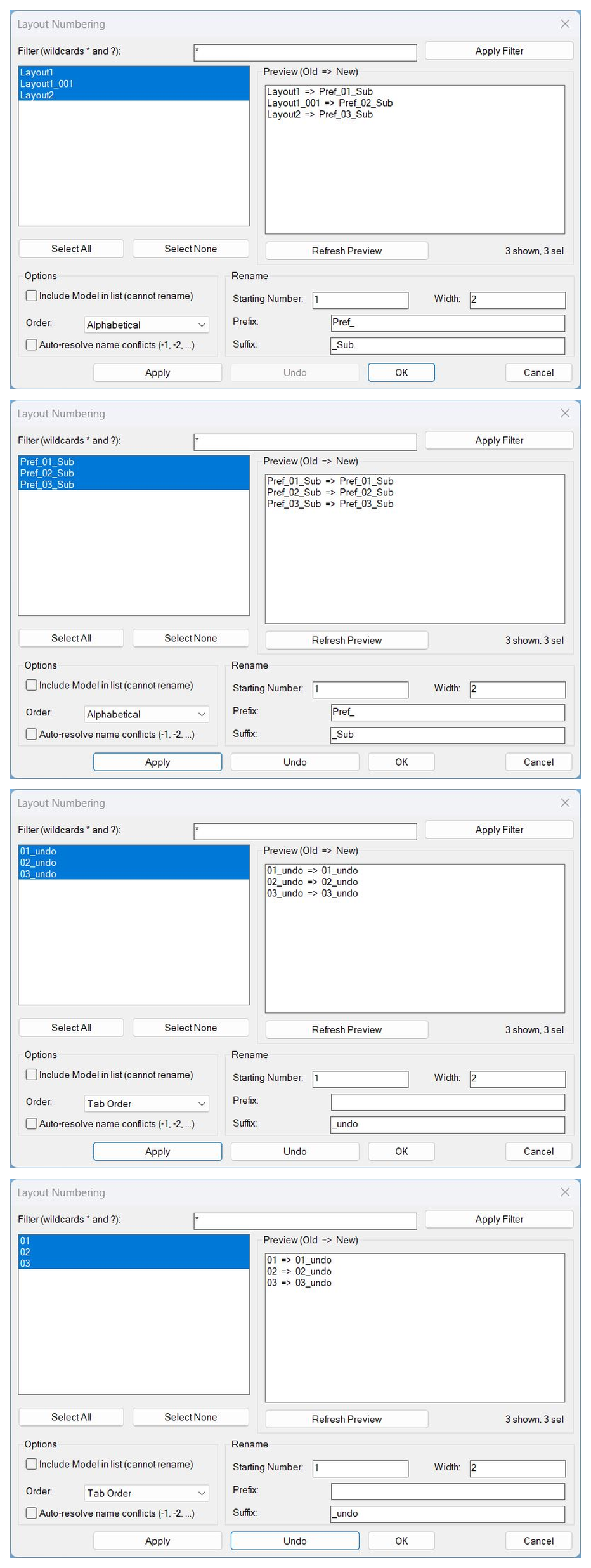
Short description
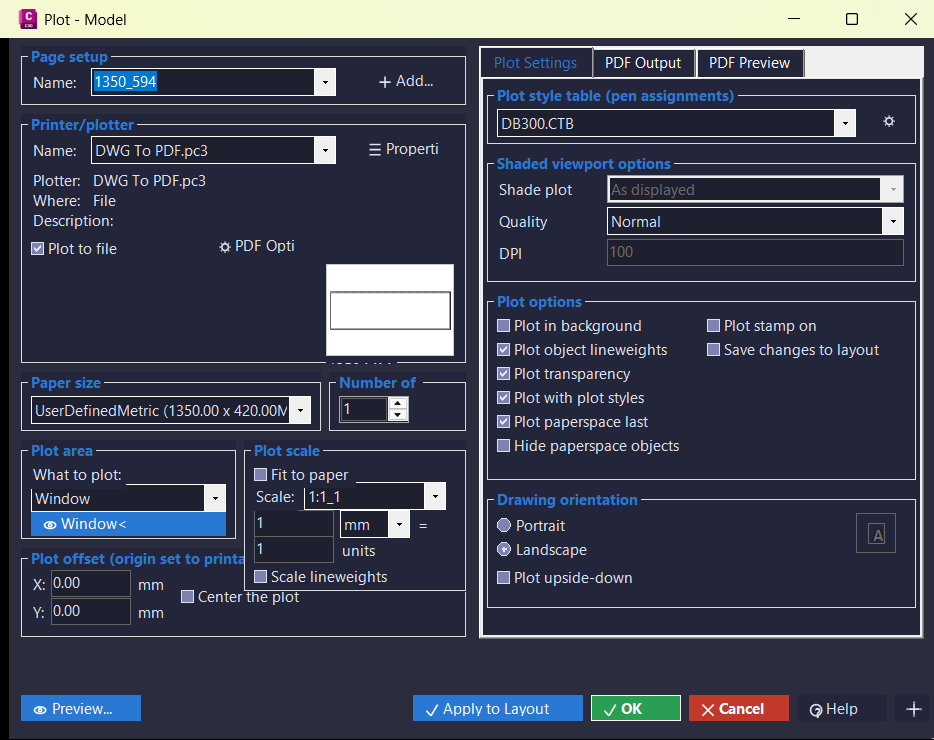
🖨️ PlotExtra is an AutoCAD and Civil 3D .NET plotting interface that recreates and extends the plot dialog workflow with a styled WinForms UI. 📐 It includes layout preview, page setup controls, PDF project management, logging, and reusable C3D themed controls.
Command:
🚀 Main command: PLOTEXTRA018
🧾 Log command: PLOTEXTRALOG
🧰 Opens a Civil 3D styled .NET plot dialog with preview, logging, PDF/project settings, and plot configuration controls.
Description:
🖨️ PlotExtra is an SEO-friendly AutoCAD .NET plugin for improving layout plotting, page setup control, PDF output preparation, and plot preview workflows.
📐 The project captures layout geometry for a lightweight preview panel and exposes a custom plot dialog modeled after AutoCAD plot settings.
🧾 A dedicated log viewer command helps diagnose plot dialog actions, preview capture issues, and workflow status during testing.
🗂️ PDF project and age-tier configuration forms support project-based output management and visual organization of recently modified PDF files.
🎯 This is useful for Civil 3D plotting, AutoCAD sheet production, PDF export workflows, custom plot automation, and C# plugin UI development.
Helper function: (if any)
🧩 Commands.cs registers the plot dialog command and the PLOTEXTRALOG viewer command.
🧩 PlotDialogForm.cs contains the main WinForms plot interface and plot setting controls.
🧩 PreviewControl.cs renders sampled layout geometry in a reusable GDI+ preview panel.
🧩 PlotService.cs captures layout geometry and supports preview preparation.
🧩 Logger.cs records runtime messages for troubleshooting and workflow review.
🧩 PdfProjectConfig and PdfTierConfig store project output paths and file-age display tiers.
🧩 C3DTheme and ButtonIconFactory provide a consistent Civil 3D styled interface with reusable icons.
Functionalities:
✅ 🖨️ Open a custom plot dialog from AutoCAD using a .NET command.
✅ 📐 Show a paper/layout preview based on captured drawing geometry.
✅ 🧾 Open a modeless log viewer with save and clear actions.
✅ 🗂️ Manage PDF project locations and project-specific plotting folders.
✅ 🎨 Use C3D dark/light palettes, compact buttons, and generated icons for consistent UI styling.
✅ ⚙️ Centralize build naming through project properties so command and assembly names follow the build number.
✅ 🧪 Provide a foundation for wiring UI fields to AutoCAD PlotSettings and PlotEngine logic.
Result:
🎯 The result is a structured plotting workspace for AutoCAD and Civil 3D that supports preview, logging, project PDF settings, and future plot automation.
🧰 PlotExtra helps replace scattered manual plot setup steps with a single CAD-oriented interface designed for production sheet workflows.
✅ The project is especially useful as a C#/.NET template for custom plot tools, Civil 3D UI styling, and layout preview utilities.
Images, animations etc.
XAML code:
<ResourceDictionary
xmlns="http://schemas.microsoft.com/winfx/2006/xaml/presentation"
xmlns:x="http://schemas.microsoft.com/winfx/2006/xaml"
xmlns:src="clr-namespace:Autodesk.Windows;assembly=AdWindows">

<src:RibbonToolTip x:Key="PLOTEXTRALOG">
<src:RibbonToolTip.ExpandedContent>
<StackPanel>
<TextBlock Background="AntiqueWhite" TextAlignment="Left">
<Bold>Function Syntax: PLOTEXTRALOG</Bold>
<LineBreak/>
<Bold>Version: 1.0 Date: 15.07.2026 11:27:53AM</Bold>
<LineBreak/>
<Hyperlink>N/A</Hyperlink>
<LineBreak/>

<Bold><Run Foreground="DodgerBlue">🚀 Command Name</Run></Bold><LineBreak/>
<Run Foreground="White">🧩 Type </Run><Bold><Run Foreground="Orange">PLOTEXTRA018</Run></Bold><Run Foreground="White"> at the AutoCAD command line.</Run><LineBreak/>
<Run Foreground="White">🧩 Type </Run><Bold><Run Foreground="Orange">PLOTEXTRALOG</Run></Bold><Run Foreground="White"> at the AutoCAD command line.</Run><LineBreak/>
<Bold><Run Foreground="DodgerBlue">🧭 SEO Optimized Description</Run></Bold><LineBreak/>
<Run Foreground="White">🖨️ PlotExtra is an SEO-friendly AutoCAD .NET plugin for improving layout plotting, page setup control, PDF output preparation, and plot preview workflows.</Run><LineBreak/>
<Run Foreground="White">📐 The project captures layout geometry for a lightweight preview panel and exposes a custom plot dialog modeled after AutoCAD plot settings.</Run><LineBreak/>
<Run Foreground="White">🧾 A dedicated log viewer command helps diagnose plot dialog actions, preview capture issues, and workflow status during testing.</Run><LineBreak/>
<Run Foreground="White">🗂️ PDF project and age-tier configuration forms support project-based output management and visual organization of recently modified PDF files.</Run><LineBreak/>
<Run Foreground="White">🎯 This is useful for Civil 3D plotting, AutoCAD sheet production, PDF export workflows, custom plot automation, and C# plugin UI development.</Run><LineBreak/>
<Bold><Run Foreground="LimeGreen">🧰 Main Workflow</Run></Bold><LineBreak/>
<Run Foreground="White">1️⃣ NETLOAD the PlotExtra build DLL in AutoCAD or Civil 3D.</Run><LineBreak/>
<Run Foreground="White">2️⃣ Run PLOTEXTRA018 to open the custom plot dialog.</Run><LineBreak/>
<Run Foreground="White">3️⃣ Review page setup, device, paper, plot area, PDF, and preview information.</Run><LineBreak/>
<Run Foreground="White">4️⃣ Use PLOTEXTRALOG to inspect runtime messages and preview diagnostics.</Run><LineBreak/>
<Run Foreground="White">5️⃣ Adjust project/PDF settings and continue the plotting workflow.</Run><LineBreak/>
<Bold><Run Foreground="LimeGreen">✅ Functionalities</Run></Bold><LineBreak/>
<Run Foreground="White">✅ 🖨️ Open a custom plot dialog from AutoCAD using a .NET command.</Run><LineBreak/>
<Run Foreground="White">✅ 📐 Show a paper/layout preview based on captured drawing geometry.</Run><LineBreak/>
<Run Foreground="White">✅ 🧾 Open a modeless log viewer with save and clear actions.</Run><LineBreak/>
<Run Foreground="White">✅ 🗂️ Manage PDF project locations and project-specific plotting folders.</Run><LineBreak/>
<Run Foreground="White">✅ 🎨 Use C3D dark/light palettes, compact buttons, and generated icons for consistent UI styling.</Run><LineBreak/>
<Run Foreground="White">✅ ⚙️ Centralize build naming through project properties so command and assembly names follow the build number.</Run><LineBreak/>
<Run Foreground="White">✅ 🧪 Provide a foundation for wiring UI fields to AutoCAD PlotSettings and PlotEngine logic.</Run><LineBreak/>
<Bold><Run Foreground="DodgerBlue">🧩 Important Commands and Helper Functions</Run></Bold><LineBreak/>
<Run Foreground="White">🧩 Commands.cs registers the plot dialog command and the PLOTEXTRALOG viewer command.</Run><LineBreak/>
<Run Foreground="White">🧩 PlotDialogForm.cs contains the main WinForms plot interface and plot setting controls.</Run><LineBreak/>
<Run Foreground="White">🧩 PreviewControl.cs renders sampled layout geometry in a reusable GDI+ preview panel.</Run><LineBreak/>
<Run Foreground="White">🧩 PlotService.cs captures layout geometry and supports preview preparation.</Run><LineBreak/>
<Run Foreground="White">🧩 Logger.cs records runtime messages for troubleshooting and workflow review.</Run><LineBreak/>
<Run Foreground="White">🧩 PdfProjectConfig and PdfTierConfig store project output paths and file-age display tiers.</Run><LineBreak/>
<Run Foreground="White">🧩 C3DTheme and ButtonIconFactory provide a consistent Civil 3D styled interface with reusable icons.</Run><LineBreak/>
<Bold><Run Foreground="DodgerBlue">🎯 Practical Result</Run></Bold><LineBreak/>
<Run Foreground="White">🎯 The result is a structured plotting workspace for AutoCAD and Civil 3D that supports preview, logging, project PDF settings, and future plot automation.</Run><LineBreak/>
<Run Foreground="White">🧰 PlotExtra helps replace scattered manual plot setup steps with a single CAD-oriented interface designed for production sheet workflows.</Run><LineBreak/>
<Run Foreground="White">✅ The project is especially useful as a C#/.NET template for custom plot tools, Civil 3D UI styling, and layout preview utilities.</Run><LineBreak/>
<Bold><Run Foreground="DarkRed">⚠️ Important Notes</Run></Bold><LineBreak/>
<Run Foreground="White">⚠️ The attached project is build 018; the generated command name is derived from the PlotExtra command prefix and build number.</Run><LineBreak/>
<Run Foreground="White">⚠️ Some plot execution logic appears structured as a UI/preview foundation and may require final PlotSettings/PlotEngine wiring for real plotting in every environment.</Run><LineBreak/>
<Run Foreground="White">⚠️ AutoCAD .NET plugins must be built against compatible x64 AutoCAD/Civil 3D assemblies before NETLOAD.</Run><LineBreak/>
<Bold><Run Foreground="Yellow">🏷️ Tags</Run></Bold><LineBreak/>
<Run Foreground="Yellow">🏷️ AutoCAD, 🏷️ Civil 3D, 🏷️ .NET, 🏷️ C#, 🏷️ AutoCAD Plugin, 🏷️ Plot Dialog, 🏷️ Plot Settings, 🏷️ PDF Plotting, 🏷️ Layout Preview, 🏷️ WinForms, 🏷️ PlotExtra, 🏷️ PLOTEXTRA018, 🏷️ PLOTEXTRALOG, 🏷️ CAD Automation, 🏷️ Sheet Production, 🏷️ C3D Theme</Run><LineBreak/>


</TextBlock>

<Grid>
<Image Source="Image_000.png" Stretch="Uniform"/>
</Grid>

</StackPanel>
</src:RibbonToolTip.ExpandedContent>
</src:RibbonToolTip>
</ResourceDictionary>
C# code:
// ===== FILE: Properties\BuildInfo.generated.cs =====
// <auto-generated> regenerated on every build from BQ_Build. Do not edit by hand. </auto-generated>
namespace PlotExtra
{
internal static class BuildInfo
{
public const string BuildNumber = "018";
public const string ProjectBase = "PlotExtra";
public const string AssemblyBaseName = "PlotExtra_018";
public const string CommandName = "PLOTEXTRA_018";
}
}
// ===== FILE: Logging\Logger.cs =====
using System;
using System.Collections.Generic;
using System.IO;
using System.Text;
namespace PlotExtra.Logging
{
/// <summary>
/// Severity levels for log entries. Kept as a simple enum rather than a
/// full logging framework dependency, so the project stays self-contained.
/// </summary>
public enum LogLevel
{
INFO,
WARN,
ERROR,
DEBUG
}
/// <summary>
/// Immutable record of a single log line, formatted the way it will be
/// displayed, e.g.:
/// 05:29:43 [INFO] [PvSplitApi] SplitDataLines.Add(Double rawStation, Double datum)
/// </summary>
public sealed class LogEntry
{
public DateTime Timestamp { get; }
public LogLevel Level { get; }
public string Source { get; }
public string Message { get; }
public LogEntry(DateTime timestamp, LogLevel level, string source, string message)
{
Timestamp = timestamp;
Level = level;
Source = source;
Message = message;
}
public override string ToString()
{
return string.Format(
"{0:HH:mm:ss} [{1,-5}] [{2}] {3}",
Timestamp, Level, Source, Message);
}
}
/// <summary>
/// Process-wide log buffer. Any part of the app (command handlers, the
/// preview control, the plot engine, etc.) can call Logger.Info/Warn/Error
/// and the LogViewerForm (or any other subscriber) is notified live via
/// the EntryAdded event. The buffer itself can be persisted to disk with
/// SaveToFile so successive NETLOAD sessions can be diffed/improved.
/// </summary>
public static class Logger
{
private static readonly object _sync = new object();
private static readonly List<LogEntry> _entries = new List<LogEntry>();
/// <summary>Raised on every new entry. Subscribers must marshal to their own UI thread if needed.</summary>
public static event EventHandler<LogEntry> EntryAdded;
public static IReadOnlyList<LogEntry> Entries
{
get { lock (_sync) { return _entries.ToArray(); } }
}
public static void Info(string source, string message) => Write(LogLevel.INFO, source, message);
public static void Warn(string source, string message) => Write(LogLevel.WARN, source, message);
public static void Error(string source, string message) => Write(LogLevel.ERROR, source, message);
public static void Debug(string source, string message) => Write(LogLevel.DEBUG, source, message);
public static void Write(LogLevel level, string source, string message)
{
var entry = new LogEntry(DateTime.Now, level, source, message);
lock (_sync)
{
_entries.Add(entry);
}
EntryAdded?.Invoke(null, entry);
}
public static void Clear()
{
lock (_sync) { _entries.Clear(); }
}
/// <summary>
/// Persists the current buffer to a text file (append mode), so that
/// logs from multiple test sessions can be kept and compared to feed
/// back into improving the plotting logic (e.g. SplitDataLines).
/// </summary>
public static string SaveToFile(string directory = null)
{
directory = directory ?? Path.Combine(
Environment.GetFolderPath(Environment.SpecialFolder.ApplicationData),
"PlotExtra", "Logs");
Directory.CreateDirectory(directory);
string fileName = string.Format("PlotExtra_log_{0:yyyy-MM-dd}.txt", DateTime.Now);
string fullPath = Path.Combine(directory, fileName);
var sb = new StringBuilder();
lock (_sync)
{
foreach (var e in _entries)
sb.AppendLine(e.ToString());
}
File.AppendAllText(fullPath, sb.ToString(), Encoding.UTF8);
return fullPath;
}
}
}
// ===== FILE: Core\PdfTierConfig.cs =====
using System;
using System.Collections.Generic;
using System.ComponentModel;
using System.Drawing;
using System.IO;
using System.Linq;
using System.Text;
using System.Text.RegularExpressions;
using PlotExtra.Logging;
namespace PlotExtra.Core
{
/// <summary>
/// One age bracket: files modified within MaxAgeDays of "now" get this
/// background/foreground color in the PDF file list. MaxAgeDays == null
/// means "everything older than the previous tier" (the catch-all last
/// tier). Ported field-for-field from PDF_Project.py's DEFAULT_TIERS.
/// </summary>
public class PdfTier : INotifyPropertyChanged
{
private int? _maxAgeDays;
private string _tag;
private string _bgColorHex;
private string _fgColorHex;
/// <summary>Days since last-modified; null = no upper bound (last/catch-all tier).</summary>
public int? MaxAgeDays
{
get => _maxAgeDays;
set { _maxAgeDays = value; OnChanged(nameof(MaxAgeDays)); }
}
public string Tag
{
get => _tag;
set { _tag = value; OnChanged(nameof(Tag)); }
}
/// <summary>Background color, e.g. "#28a745".</summary>
public string BgColorHex
{
get => _bgColorHex;
set { _bgColorHex = value; OnChanged(nameof(BgColorHex)); }
}
/// <summary>Foreground/text color, e.g. "white"; empty means "use the list's default text color".</summary>
public string FgColorHex
{
get => _fgColorHex;
set { _fgColorHex = value; OnChanged(nameof(FgColorHex)); }
}
public event PropertyChangedEventHandler PropertyChanged;
private void OnChanged(string prop) => PropertyChanged?.Invoke(this, new PropertyChangedEventArgs(prop));
public PdfTier() { }
public PdfTier(int? maxAgeDays, string tag, string bg, string fg)
{
_maxAgeDays = maxAgeDays; _tag = tag; _bgColorHex = bg; _fgColorHex = fg;
}
public PdfTier Clone() => new PdfTier(MaxAgeDays, Tag, BgColorHex, FgColorHex);
public Color BgColor => ParseColor(BgColorHex, Color.White);
public Color FgColor => ParseColor(FgColorHex, Color.Black);
private static Color ParseColor(string hexOrName, Color fallback)
{
if (string.IsNullOrWhiteSpace(hexOrName)) return fallback;
try
{
return hexOrName.StartsWith("#", StringComparison.Ordinal)
? ColorTranslator.FromHtml(hexOrName)
: Color.FromName(hexOrName);
}
catch
{
return fallback;
}
}
}
/// <summary>Loads/saves the tier list, seeded with PDF_Project.py's exact DEFAULT_TIERS on first run.</summary>
public static class PdfTierStore
{
private const string Source = "PdfTierStore";
private static string ConfigPath => Path.Combine(
Environment.GetFolderPath(Environment.SpecialFolder.ApplicationData),
"PlotExtra", "pdf_tiers.json");
private static List<PdfTier> DefaultTiers() => new List<PdfTier>
{
new PdfTier(1, "tier1", "#28a745", "white"),
new PdfTier(3, "tier2", "#74c365", ""),
new PdfTier(7, "tier3", "#98fb98", ""),
new PdfTier(30, "tier4", "#c1fcc1", ""),
new PdfTier(null, "tier5", "#e6ffe6", ""),
};
public static List<PdfTier> Load()
{
try
{
if (File.Exists(ConfigPath))
{
var loaded = Deserialize(File.ReadAllText(ConfigPath, Encoding.UTF8));
if (loaded != null && loaded.Count > 0) return loaded;
}
}
catch (Exception ex)
{
Logger.Warn(Source, "Could not read " + ConfigPath + ": " + ex.Message + " - using built-in defaults.");
}
var defaults = DefaultTiers();
Save(defaults);
return defaults;
}
public static void Save(List<PdfTier> tiers)
{
try
{
string dir = Path.GetDirectoryName(ConfigPath);
if (!string.IsNullOrEmpty(dir)) Directory.CreateDirectory(dir);
File.WriteAllText(ConfigPath, Serialize(tiers), Encoding.UTF8);
Logger.Info(Source, "Saved " + tiers.Count + " tier(s) to " + ConfigPath);
}
catch (Exception ex)
{
Logger.Error(Source, "Could not save " + ConfigPath + ": " + ex.Message);
}
}
/// <summary>Returns the first tier whose MaxAgeDays >= ageInDays, or the last (catch-all) tier.</summary>
public static PdfTier ForAge(List<PdfTier> tiers, double ageInDays)
{
foreach (var t in tiers)
if (t.MaxAgeDays.HasValue && ageInDays <= t.MaxAgeDays.Value)
return t;
return tiers.Count > 0 ? tiers[tiers.Count - 1] : null;
}
private static readonly Regex ObjectPattern = new Regex(@"\{(?<body>[^{}]*)\}", RegexOptions.Singleline);
private static readonly Regex PairPattern = new Regex(
"\"(?<key>(?:[^\"\\\\]|\\\\.)+)\"\\s*:\\s*(?:\"(?<sval>(?:[^\"\\\\]|\\\\.)*)\"|(?<nval>null|-?\\d+))",
RegexOptions.Singleline);
private static string Serialize(List<PdfTier> tiers)
{
var sb = new StringBuilder("[\n");
for (int i = 0; i < tiers.Count; i++)
{
var t = tiers[i];
sb.Append(" { \"maxAgeDays\": ").Append(t.MaxAgeDays.HasValue ? t.MaxAgeDays.Value.ToString() : "null")
.Append(", \"tag\": ").Append(Quote(t.Tag))
.Append(", \"bg\": ").Append(Quote(t.BgColorHex))
.Append(", \"fg\": ").Append(Quote(t.FgColorHex))
.Append(" }");
if (i < tiers.Count - 1) sb.Append(",");
sb.Append("\n");
}
sb.Append("]\n");
return sb.ToString();
}
private static List<PdfTier> Deserialize(string json)
{
var result = new List<PdfTier>();
foreach (Match objMatch in ObjectPattern.Matches(json))
{
string body = objMatch.Groups["body"].Value;
int? maxAge = null;
string tag = null, bg = "", fg = "";
foreach (Match pair in PairPattern.Matches(body))
{
string key = pair.Groups["key"].Value;
string sval = pair.Groups["sval"].Success ? Unescape(pair.Groups["sval"].Value) : null;
string nval = pair.Groups["nval"].Success ? pair.Groups["nval"].Value : null;
switch (key)
{
case "maxAgeDays": maxAge = (nval == null || nval == "null") ? (int?)null : int.Parse(nval); break;
case "tag": tag = sval; break;
case "bg": bg = sval ?? ""; break;
case "fg": fg = sval ?? ""; break;
}
}
if (tag != null) result.Add(new PdfTier(maxAge, tag, bg, fg));
}
return result;
}
private static string Quote(string s)
{
s = s ?? "";
var sb = new StringBuilder("\"");
foreach (char c in s)
{
if (c == '\\') sb.Append("\\\\");
else if (c == '"') sb.Append("\\\"");
else sb.Append(c);
}
sb.Append("\"");
return sb.ToString();
}
private static string Unescape(string s) => s.Replace("\\\"", "\"").Replace("\\\\", "\\");
}
}
// ===== FILE: Core\PdfProjectConfig.cs =====
using System;
using System.Collections.Generic;
using System.ComponentModel;
using System.IO;
using System.Linq;
using System.Text;
using System.Text.RegularExpressions;
using PlotExtra.Logging;
namespace PlotExtra.Core
{
/// <summary>
/// One project entry: a display name plus one or more named output
/// locations (e.g. "_pdf", "_EW"), ported from the LOCAL_DIRS dicts in
/// PDF_Project.py's DEFAULT_SP_CONFIG - Beu and Tp in particular have
/// exactly this shape (Tp: both "_pdf" and an "_EW" hydraulics-calc
/// folder). Most projects only need a single location, so the simple
/// CRUD grid (PdfProjectManagerForm) only edits <see cref="Path"/>,
/// which reads/writes the "_pdf" entry - multi-location projects are
/// seeded once from the data below and edited by hand in the JSON file
/// if their extra folders ever move.
/// </summary>
public class PdfProject : INotifyPropertyChanged
{
private string _name;
public string Name
{
get => _name;
set { _name = value; OnChanged(nameof(Name)); }
}
/// <summary>Label (e.g. "_pdf", "_EW") -> folder path.</summary>
[Browsable(false)]
public Dictionary<string, string> Locations { get; set; } = new Dictionary<string, string>();
/// <summary>The primary/default location ("_pdf" if present, else the first one). Bound by the simple CRUD grid.</summary>
[Browsable(true)]
public string Path
{
get => Locations.TryGetValue("_pdf", out var p) ? p : Locations.Values.FirstOrDefault() ?? "";
set => Locations["_pdf"] = value;
}
public event PropertyChangedEventHandler PropertyChanged;
private void OnChanged(string prop) => PropertyChanged?.Invoke(this, new PropertyChangedEventArgs(prop));
public PdfProject() { }
public PdfProject(string name, string path)
{
_name = name;
Locations["_pdf"] = path;
}
public PdfProject(string name, Dictionary<string, string> locations)
{
_name = name;
Locations = new Dictionary<string, string>(locations);
}
public PdfProject Clone()
{
var clone = new PdfProject(Name, new Dictionary<string, string>(Locations));
return clone;
}
public override string ToString() => Name;
}
/// <summary>
/// Loads/saves the project list as a small JSON sidecar under the
/// user's AppData folder, seeded on first run with the same projects
/// (and, where PDF_Project.py's DEFAULT_SP_CONFIG defined more than one
/// LOCAL_DIRS entry, the same multiple named locations) it ships with.
/// Also provides the "Create Today Folder" helper (a dated yyyyMMdd
/// subfolder under whichever location is selected).
/// </summary>
public static class PdfProjectStore
{
private const string Source = "PdfProjectStore";
private static string ConfigPath => System.IO.Path.Combine(
Environment.GetFolderPath(Environment.SpecialFolder.ApplicationData),
"PlotExtra", "pdf_projects.json");
/// <summary>
/// Ported from PDF_Project.py's DEFAULT_PROJECTS (single-location
/// projects) merged with DEFAULT_SP_CONFIG's LOCAL_DIRS (multi-location
/// projects: Beu, Bis, Tp_EP, Npl, Fal, La each also have their real
/// second/third folder where DEFAULT_SP_CONFIG defined one).
/// </summary>
private static List<PdfProject> DefaultProjects() => new List<PdfProject>
{
new PdfProject("Beu", new Dictionary<string, string>
{
["_pdf"] = @"C:\Users\mateid\OneDrive - DB E.C.O. Group\Lucru\P_B001595P_Beu\EP\_pdf",
}),
new PdfProject("Tp_EP", new Dictionary<string, string>
{
["_pdf"] = @"C:\Users\mateid\OneDrive - DB E.C.O. Group\Lucru\P_B001595P_Tp\EP\_pdf",
["_EW"] = @"C:\Users\mateid\OneDrive - DB E.C.O. Group\Lucru\P_B001595P_Tp\EP\EW\hydarulische_berechnung",
}),
new PdfProject("Tp_GP", @"C:\Users\mateid\OneDrive - DB E.C.O. Group\Lucru\P_B001595P_Tp\GP\_pdf"),
new PdfProject("Npl", new Dictionary<string, string>
{
["_pdf"] = @"C:\Users\mateid\OneDrive - DB E.C.O. Group\Lucru\P_B001595P_Npl\EP\_pdf",
["_EW"] = @"C:\Users\mateid\OneDrive - DB E.C.O. Group\Lucru\P_B001595P_Npl\EP\EW\hydarulische_berechnung",
}),
new PdfProject("Bis", new Dictionary<string, string>
{
["_pdf"] = @"C:\Users\mateid\OneDrive - DB E.C.O. Group\Lucru\P_B001595P_Bis\EP\_pdf",
}),
new PdfProject("La", new Dictionary<string, string>
{
["_pdf"] = @"C:\Users\mateid\OneDrive - DB E.C.O. Group\Lucru\P_B001595P_La\EP\_pdf",
["_EW"] = @"C:\Users\mateid\OneDrive - DB E.C.O. Group\Lucru\P_B001595P_La\EP\EW\Hydarulische_berechnung",
}),
new PdfProject("Fal", new Dictionary<string, string>
{
["_pdf"] = @"C:\Users\mateid\OneDrive - DB E.C.O. Group\Lucru\P_B001595P\EP\_pdf",
["_EW"] = @"C:\Users\mateid\OneDrive - DB E.C.O. Group\Lucru\P_B001595P\EP\Entwässerung\Frankfurter_Allee",
}),
new PdfProject("Riedbahn", @"C:\Users\mateid\OneDrive - DB E.C.O. Group\Lucru\P-KA02545P_Riedbahn_MA_Gleisern\EP\_pdf"),
new PdfProject("SIs", @"C:\Users\mateid\OneDrive - DB E.C.O. Group\Lucru\P-B004278P_NVT_Nord\GUw_Sls\EP\_pdf"),
};
public static List<PdfProject> Load()
{
try
{
if (File.Exists(ConfigPath))
{
string json = File.ReadAllText(ConfigPath, Encoding.UTF8);
var loaded = MiniJson.DeserializeProjects(json);
if (loaded != null && loaded.Count > 0)
return loaded;
}
}
catch (Exception ex)
{
Logger.Warn(Source, "Could not read " + ConfigPath + ": " + ex.Message + " - using built-in defaults.");
}
var defaults = DefaultProjects();
Save(defaults);
return defaults;
}
public static void Save(List<PdfProject> projects)
{
try
{
string dir = System.IO.Path.GetDirectoryName(ConfigPath);
if (!string.IsNullOrEmpty(dir))
Directory.CreateDirectory(dir);
File.WriteAllText(ConfigPath, MiniJson.SerializeProjects(projects), Encoding.UTF8);
Logger.Info(Source, "Saved " + projects.Count + " project(s) to " + ConfigPath);
}
catch (Exception ex)
{
Logger.Error(Source, "Could not save " + ConfigPath + ": " + ex.Message);
}
}
/// <summary>
/// Creates (or reuses) a dated subfolder under the given location
/// path, e.g. "...\_pdf\20260709", and returns its full path.
/// </summary>
public static string CreateTodayFolder(string locationPath)
{
if (string.IsNullOrWhiteSpace(locationPath))
throw new ArgumentException("This project/location has no configured path.");
string todayFolder = System.IO.Path.Combine(locationPath, DateTime.Now.ToString("yyyyMMdd"));
Directory.CreateDirectory(todayFolder);
Logger.Info(Source, "Today folder ready: " + todayFolder);
return todayFolder;
}
}
/// <summary>
/// Tiny regex-based JSON reader/writer for the one shape this project
/// needs - a flat array of objects, each with a "name" string and any
/// number of "loc_<label>" string fields (one per entry in
/// PdfProject.Locations, e.g. "loc__pdf", "loc__EW") - so the project
/// doesn't need a Newtonsoft.Json / System.Text.Json package reference
/// just for this. Kept deliberately flat (no nested JSON objects) so a
/// simple regex pass is enough, no recursive-descent parser needed.
/// Old-format files (plain "name"/"path", no "loc_" prefix) still load
/// correctly - "path" is treated as the "_pdf" location.
/// </summary>
internal static class MiniJson
{
// One object's worth of "key": "value" pairs, values may contain escaped quotes/backslashes.
private static readonly Regex ObjectPattern = new Regex(@"\{(?<body>[^{}]*)\}", RegexOptions.Singleline);
private static readonly Regex PairPattern = new Regex(
"\"(?<key>(?:[^\"\\\\]|\\\\.)+)\"\\s*:\\s*\"(?<val>(?:[^\"\\\\]|\\\\.)*)\"", RegexOptions.Singleline);
public static string SerializeProjects(List<PdfProject> projects)
{
var sb = new StringBuilder();
sb.Append("[\n");
for (int i = 0; i < projects.Count; i++)
{
var p = projects[i];
sb.Append(" { \"name\": ").Append(Quote(p.Name));
foreach (var kvp in p.Locations)
sb.Append(", \"loc_").Append(kvp.Key).Append("\": ").Append(Quote(kvp.Value));
sb.Append(" }");
if (i < projects.Count - 1) sb.Append(",");
sb.Append("\n");
}
sb.Append("]\n");
return sb.ToString();
}
public static List<PdfProject> DeserializeProjects(string json)
{
var result = new List<PdfProject>();
foreach (Match objMatch in ObjectPattern.Matches(json))
{
string body = objMatch.Groups["body"].Value;
string name = null;
string legacyPath = null;
var locations = new Dictionary<string, string>();
foreach (Match pair in PairPattern.Matches(body))
{
string key = Unescape(pair.Groups["key"].Value);
string val = Unescape(pair.Groups["val"].Value);
if (key == "name") name = val;
else if (key == "path") legacyPath = val;
else if (key.StartsWith("loc_", StringComparison.Ordinal))
locations[key.Substring(4)] = val;
}
if (string.IsNullOrEmpty(name)) continue;
if (locations.Count == 0 && legacyPath != null) locations["_pdf"] = legacyPath;
result.Add(new PdfProject(name, locations));
}
return result;
}
private static string Quote(string s)
{
if (s == null) s = "";
var sb = new StringBuilder("\"");
foreach (char c in s)
{
switch (c)
{
case '\\': sb.Append("\\\\"); break;
case '"': sb.Append("\\\""); break;
case '\n': sb.Append("\\n"); break;
case '\r': break;
case '\t': sb.Append("\\t"); break;
default: sb.Append(c); break;
}
}
sb.Append("\"");
return sb.ToString();
}
private static string Unescape(string s)
{
return s.Replace("\\\"", "\"").Replace("\\n", "\n").Replace("\\t", "\t").Replace("\\\\", "\\");
}
}
}
// ===== FILE: UI\PdfTierEditorForm.cs =====
using System;
using System.Collections.Generic;
using System.ComponentModel;
using System.Drawing;
using System.Windows.Forms;
using PlotExtra.Core;
namespace PlotExtra.UI
{
/// <summary>
/// Edit the age-tier brackets used to color-code the PDF file list by
/// how recently each file was modified (ported concept from
/// PDF_Project.py's tier editor - "Configure age tier colours").
/// Colors are edited as hex text (e.g. "#28a745") rather than a full
/// color-picker button-per-row, to keep this at the same scope as
/// PdfProjectManagerForm.
/// </summary>
public class PdfTierEditorForm : Form
{
private readonly List<PdfTier> _target;
private readonly BindingList<PdfTier> _working;
private readonly DataGridView _grid;
public PdfTierEditorForm(List<PdfTier> tiers)
{
_target = tiers;
_working = new BindingList<PdfTier>();
foreach (var t in tiers) _working.Add(t.Clone());
Text = "Configure Age Tier Colours";
FormBorderStyle = FormBorderStyle.Sizable;
MaximizeBox = true;
MinimizeBox = true;
StartPosition = FormStartPosition.CenterParent;
Size = new Size(560, 380);
var hint = new Label
{
Dock = DockStyle.Top,
Height = 40,
Padding = new Padding(8),
Text = "Files this many days old (or newer) get this row's colors in the PDF preview list. " +
"Leave the last row's \"Max age (days)\" blank for the catch-all \"everything older\" tier.",
AutoSize = false,
};
var layout = new TableLayoutPanel { Dock = DockStyle.Fill, RowCount = 3, ColumnCount = 1 };
layout.RowStyles.Add(new RowStyle(SizeType.Percent, 100));
layout.RowStyles.Add(new RowStyle(SizeType.AutoSize));
layout.RowStyles.Add(new RowStyle(SizeType.AutoSize));
_grid = new DataGridView
{
Dock = DockStyle.Fill,
DataSource = _working,
AutoGenerateColumns = true,
AllowUserToAddRows = false,
RowHeadersVisible = false,
AutoSizeColumnsMode = DataGridViewAutoSizeColumnsMode.Fill,
};
layout.Controls.Add(_grid, 0, 0);
var rowButtons = new FlowLayoutPanel { AutoSize = true, Padding = new Padding(4) };
var add = Theme.CreateButton("Add tier", AppIcon.Add, 100);
var del = Theme.CreateButton("Delete", AppIcon.Delete, 90);
C3DTheme.Role(add, C3DTheme.RoleRefresh);
C3DTheme.Role(del, C3DTheme.RoleDanger);
add.Click += (s, e) => _working.Insert(Math.Max(0, _working.Count - 1), new PdfTier(7, "custom", "#cccccc", ""));
del.Click += (s, e) => { int i = _grid.CurrentRow?.Index ?? -1; if (i >= 0) _working.RemoveAt(i); };
rowButtons.Controls.AddRange(new Control[] { add, del });
layout.Controls.Add(rowButtons, 0, 1);
var okRow = new FlowLayoutPanel { AutoSize = true, Padding = new Padding(4), FlowDirection = FlowDirection.RightToLeft };
var cancelBtn = Theme.CreateButton("Cancel", AppIcon.Cancel, 90);
var okBtn = Theme.CreateButton("OK", AppIcon.Ok, 90);
cancelBtn.DialogResult = DialogResult.Cancel;
C3DTheme.Role(cancelBtn, C3DTheme.RoleDanger);
C3DTheme.Role(okBtn, C3DTheme.RolePrimary);
okBtn.Click += (s, e) => CommitAndClose();
okRow.Controls.Add(cancelBtn);
okRow.Controls.Add(okBtn);
layout.Controls.Add(okRow, 0, 2);
Controls.Add(layout);
Controls.Add(hint);
AcceptButton = okBtn;
CancelButton = cancelBtn;
C3DTheme.Apply(this, C3DPalette.Dark);
}
private void CommitAndClose()
{
_target.Clear();
foreach (var t in _working) _target.Add(t);
PdfTierStore.Save(_target);
DialogResult = DialogResult.OK;
Close();
}
}
}
// ===== FILE: UI\C3DTheme.cs =====
using System;
using System.Windows.Forms;
using System.Drawing;
namespace PlotExtra.UI
{
/// <summary>
/// Palette + fonts, ported field-for-field from ParallelPipesNet's
/// C3DTheme.cs (itself ported from C3D_UI_Style_Template.py's
/// C3D_DARK / C3D_LIGHT dicts and FONT dict), so PlotExtra's dialogs
/// match the rest of the C3D toolset visually.
/// </summary>
public class C3DPalette
{
public Color Bg, Panel, Border, HeaderBg, Bg2, Bg3, Fg, Muted, Accent, TextW,
SelBg, SelFg, CodeBg, CodeFg, Entry, Blue, Green, Red, Orange, Purple, Grey, Reload;
public static C3DPalette Dark { get; } = new C3DPalette
{
Bg = FromHex("#2b2d3e"),
Panel = FromHex("#23253a"),
Border = FromHex("#3e4060"),
HeaderBg = FromHex("#1e2030"),
Bg2 = FromHex("#23253a"),
Bg3 = FromHex("#1e2030"),
Fg = FromHex("#dde1f0"),
Muted = FromHex("#7a7f9a"),
Accent = FromHex("#2979d4"),
TextW = FromHex("#ffffff"),
SelBg = FromHex("#3a5fa0"),
SelFg = FromHex("#ffffff"),
CodeBg = FromHex("#1e2030"),
CodeFg = FromHex("#dde1f0"),
Entry = FromHex("#1e2030"),
Blue = FromHex("#2979d4"),
Green = FromHex("#2a9e52"),
Red = FromHex("#c0392b"),
Orange = FromHex("#e06c2a"),
Purple = FromHex("#7c4dbd"),
Grey = FromHex("#3e4060"),
Reload = FromHex("#4a5070"),
};
public static C3DPalette Light { get; } = new C3DPalette
{
Bg = FromHex("#ffffff"),
Panel = FromHex("#f6f8fa"),
Border = FromHex("#d0d7de"),
HeaderBg = FromHex("#f6f8fa"),
Bg2 = FromHex("#f6f8fa"),
Bg3 = FromHex("#eaeef2"),
Fg = FromHex("#1f2328"),
Muted = FromHex("#57606a"),
Accent = FromHex("#0969da"),
TextW = FromHex("#ffffff"),
SelBg = FromHex("#0969da"),
SelFg = FromHex("#ffffff"),
CodeBg = FromHex("#f6f8fa"),
CodeFg = FromHex("#1f2328"),
Entry = FromHex("#ffffff"),
Blue = FromHex("#0969da"),
Green = FromHex("#2a9e52"),
Red = FromHex("#c0392b"),
Orange = FromHex("#e06c2a"),
Purple = FromHex("#7c4dbd"),
Grey = FromHex("#d0d7de"),
Reload = FromHex("#afb8c1"),
};
private static Color FromHex(string hex) => ColorTranslator.FromHtml(hex);
}
public static class C3DFonts
{
public static readonly Font Normal = new Font("Segoe UI", 9f);
public static readonly Font Small = new Font("Segoe UI", 8f);
public static readonly Font Title = new Font("Segoe UI", 10f, FontStyle.Bold);
public static readonly Font Button = new Font("Segoe UI", 9f);
public static readonly Font ButtonBold = new Font("Segoe UI", 9f, FontStyle.Bold);
public static readonly Font Code = new Font("Consolas", 9.5f);
public static readonly Font CodeBig = new Font("Consolas", 10.5f);
}
/// <summary>
/// Recursive, role-based theming for WinForms controls (ported from
/// ParallelPipesNet.UI.C3DTheme). A control's "role" is read from
/// Control.Tag as a string, e.g. button.Tag = "primary".
/// </summary>
public static class C3DTheme
{
public const string RoleHeader = "header";
public const string RoleHeaderTitle = "header_title";
public const string RoleHeaderPath = "header_path";
public const string RoleMuted = "muted";
public const string RolePrimary = "primary";
public const string RoleRefresh = "refresh";
public const string RoleDanger = "danger";
public const string RoleWarn = "warn";
public const string RoleNeutral = "neutral";
public const string RolePurple = "purple";
public const string RoleReload = "reload";
public static Color Lighten(Color c, int amount = 22)
{
int r = Math.Min(255, c.R + amount);
int g = Math.Min(255, c.G + amount);
int b = Math.Min(255, c.B + amount);
return Color.FromArgb(c.A, r, g, b);
}
/// <summary>Attaches a role string to a control. Returns the same control for chaining.</summary>
public static T Role<T>(T control, string roleName) where T : Control
{
control.Tag = roleName;
return control;
}
public static string GetRole(Control c) => c.Tag as string ?? string.Empty;
/// <summary>Recursively applies the palette to a control tree.</summary>
public static void Apply(Control root, C3DPalette C)
{
string roleName = GetRole(root);
try
{
switch (root)
{
case TabControl tc:
tc.BackColor = C.Panel;
StyleTabControl(tc, C);
break;
case Button btn:
StyleButton(btn, roleName, C);
break;
case CheckBox cb:
cb.BackColor = C.Panel;
cb.ForeColor = C.Fg;
cb.Font = C3DFonts.Normal;
cb.FlatStyle = FlatStyle.Flat;
break;
case RadioButton rb:
rb.BackColor = C.Panel;
rb.ForeColor = C.Fg;
rb.Font = C3DFonts.Normal;
rb.FlatStyle = FlatStyle.Flat;
break;
case ComboBox combo:
combo.BackColor = C.Entry;
combo.ForeColor = C.Fg;
combo.FlatStyle = FlatStyle.Flat;
combo.Font = C3DFonts.Normal;
break;
case NumericUpDown num:
num.BackColor = C.Entry;
num.ForeColor = C.Fg;
num.Font = C3DFonts.Normal;
num.BorderStyle = BorderStyle.FixedSingle;
break;
case TextBox tb:
tb.BackColor = C.Entry;
tb.ForeColor = C.Fg;
tb.BorderStyle = BorderStyle.FixedSingle;
tb.Font = C3DFonts.Normal;
break;
case ListBox lb:
lb.BackColor = C.CodeBg;
lb.ForeColor = C.CodeFg;
lb.BorderStyle = BorderStyle.FixedSingle;
lb.Font = C3DFonts.Code;
break;
case DataGridView grid:
StyleGrid(grid, C);
break;
case GroupBox gb:
gb.BackColor = C.Panel;
gb.ForeColor = C.Accent;
gb.Font = C3DFonts.ButtonBold;
break;
case Label lbl:
StyleLabel(lbl, roleName, C);
break;
case PreviewControl _:
// Keeps its own white paper / hatched-margin drawing colors -
// it derives from Control, so exclude it here or it would get
// repainted with the generic panel background below.
break;
case Panel pnl:
pnl.BackColor = roleName == RoleHeader ? C.HeaderBg : C.Panel;
break;
case Form frm:
frm.BackColor = C.Bg;
break;
default:
if (root is TableLayoutPanel || root is FlowLayoutPanel)
root.BackColor = C.Panel;
break;
}
}
catch
{
// Best-effort styling - a control that doesn't support one of these
// properties shouldn't abort theming the rest of the tree.
}
foreach (Control child in root.Controls)
Apply(child, C);
}
private static void StyleLabel(Label lbl, string roleName, C3DPalette C)
{
switch (roleName)
{
case RoleHeaderTitle:
lbl.BackColor = C.HeaderBg;
lbl.ForeColor = C.TextW;
lbl.Font = C3DFonts.Title;
break;
case RoleHeaderPath:
lbl.BackColor = C.HeaderBg;
lbl.ForeColor = C.Muted;
lbl.Font = C3DFonts.Small;
break;
case RoleMuted:
case "hint":
lbl.BackColor = C.Panel;
lbl.ForeColor = C.Muted;
lbl.Font = C3DFonts.Small;
break;
default:
lbl.BackColor = C.Panel;
lbl.ForeColor = C.Fg;
lbl.Font = C3DFonts.Normal;
break;
}
}
/// <summary>One of neutral / primary / refresh / danger / warn.</summary>
public static Button StyleButton(Button button, string roleName, C3DPalette C)
{
roleName = string.IsNullOrEmpty(roleName) ? RoleNeutral : roleName.ToLowerInvariant();
button.FlatStyle = FlatStyle.Flat;
button.FlatAppearance.BorderSize = 0;
button.Cursor = Cursors.Hand;
button.Padding = new Padding(6, 2, 6, 2);
button.UseVisualStyleBackColor = false;
switch (roleName)
{
case RolePrimary:
case "ok":
case "success":
button.BackColor = C.Green;
button.ForeColor = C.TextW;
button.Font = C3DFonts.ButtonBold;
button.FlatAppearance.MouseOverBackColor = Lighten(C.Green);
button.FlatAppearance.MouseDownBackColor = Lighten(C.Green, 10);
break;
case RoleRefresh:
case "info":
case "blue":
button.BackColor = C.Blue;
button.ForeColor = C.TextW;
button.FlatAppearance.MouseOverBackColor = Lighten(C.Blue);
button.FlatAppearance.MouseDownBackColor = Lighten(C.Blue, 10);
break;
case RoleDanger:
case "delete":
case "revert":
button.BackColor = C.Red;
button.ForeColor = C.TextW;
button.Font = C3DFonts.ButtonBold;
button.FlatAppearance.MouseOverBackColor = Lighten(C.Red);
button.FlatAppearance.MouseDownBackColor = Lighten(C.Red, 10);
break;
case RoleWarn:
case "warning":
button.BackColor = C.Orange;
button.ForeColor = C.TextW;
button.FlatAppearance.MouseOverBackColor = Lighten(C.Orange);
button.FlatAppearance.MouseDownBackColor = Lighten(C.Orange, 10);
break;
case RolePurple:
button.BackColor = C.Purple;
button.ForeColor = C.TextW;
button.FlatAppearance.MouseOverBackColor = Lighten(C.Purple);
button.FlatAppearance.MouseDownBackColor = Lighten(C.Purple, 10);
break;
case RoleReload:
button.BackColor = C.Reload;
button.ForeColor = C.TextW;
button.FlatAppearance.MouseOverBackColor = Lighten(C.Reload);
button.FlatAppearance.MouseDownBackColor = Lighten(C.Reload, 10);
break;
default:
button.BackColor = C.Panel;
button.ForeColor = C.Fg;
button.FlatAppearance.MouseOverBackColor = C.Border;
button.FlatAppearance.MouseDownBackColor = Lighten(C.Border, 10);
break;
}
// Re-tint the icon (if this button was created via Theme.CreateButton)
// to match the foreground color just chosen above, instead of leaving
// it at ButtonIconFactory's default dark-gray - which reads poorly on
// the green/blue/orange role backgrounds.
if (Theme.TryGetIcon(button, out AppIcon icon))
button.Image = ButtonIconFactory.Get(icon, 16, button.ForeColor);
return button;
}
private static void StyleGrid(DataGridView grid, C3DPalette C)
{
grid.BackgroundColor = C.CodeBg;
grid.ForeColor = C.Fg;
grid.GridColor = C.Border;
grid.BorderStyle = BorderStyle.FixedSingle;
grid.EnableHeadersVisualStyles = false;
grid.ColumnHeadersDefaultCellStyle.BackColor = C.Bg2;
grid.ColumnHeadersDefaultCellStyle.ForeColor = C.Fg;
grid.ColumnHeadersDefaultCellStyle.Font = C3DFonts.ButtonBold;
grid.DefaultCellStyle.BackColor = C.CodeBg;
grid.DefaultCellStyle.ForeColor = C.CodeFg;
grid.DefaultCellStyle.SelectionBackColor = C.SelBg;
grid.DefaultCellStyle.SelectionForeColor = C.SelFg;
grid.DefaultCellStyle.Font = C3DFonts.Normal;
grid.RowHeadersDefaultCellStyle.BackColor = C.Bg2;
grid.AlternatingRowsDefaultCellStyle.BackColor = C.Panel;
}
/// <summary>
/// Owner-draws the TabControl's tab strip - standard WinForms
/// TabControl ignores BackColor for the native tab strip, so this is
/// the only reliable way to theme it.
/// </summary>
public static void StyleTabControl(TabControl tc, C3DPalette C)
{
tc.DrawMode = TabDrawMode.OwnerDrawFixed;
tc.Padding = new Point(14, 5);
tc.DrawItem += (s, e) =>
{
var page = tc.TabPages[e.Index];
bool selected = e.Index == tc.SelectedIndex;
var tabRect = tc.GetTabRect(e.Index);
using (var bg = new SolidBrush(selected ? C.Panel : C.Bg2))
e.Graphics.FillRectangle(bg, tabRect);
var textColor = selected ? C.Accent : C.TextW;
TextRenderer.DrawText(e.Graphics, page.Text, C3DFonts.Normal, tabRect, textColor,
TextFormatFlags.HorizontalCenter | TextFormatFlags.VerticalCenter);
};
tc.SelectedIndexChanged += (s, e) => tc.Invalidate();
}
}
}
// ===== FILE: UI\ButtonIconFactory.cs =====
using System;
using System.Collections.Generic;
using System.Drawing;
using System.Drawing.Drawing2D;
namespace PlotExtra.UI
{
/// <summary>Enumerates every icon the app needs on a button.</summary>
public enum AppIcon
{
Save,
Reload,
Open,
Add,
Delete,
Apply,
Cancel,
Settings,
Warning,
Export,
Import,
Copy,
Move,
Up,
Down,
Ok,
Help,
Preview,
Properties
}
/// <summary>
/// Generates small (16x16 by default) bitmap icons entirely in code with
/// GDI+. This avoids emoji / Unicode glyphs in Button.Text (which render
/// inconsistently across Windows font/emoji-font versions) and avoids
/// needing an external image/resource pipeline.
/// Icons are cached per (icon, size, color) the first time they're requested.
/// </summary>
public static class ButtonIconFactory
{
private static readonly Dictionary<string, Bitmap> _cache = new Dictionary<string, Bitmap>();
public static Bitmap Get(AppIcon icon, int size = 16, Color? color = null)
{
Color c = color ?? Color.FromArgb(64, 64, 64);
string key = icon + "_" + size + "_" + c.ToArgb();
if (_cache.TryGetValue(key, out var cached))
return cached;
var bmp = new Bitmap(size, size);
using (var g = Graphics.FromImage(bmp))
{
g.SmoothingMode = SmoothingMode.AntiAlias;
g.PixelOffsetMode = PixelOffsetMode.HighQuality;
g.Clear(Color.Transparent);
using (var pen = new Pen(c, Math.Max(1f, size / 10f)))
using (var brush = new SolidBrush(c))
{
Draw(icon, g, pen, brush, size);
}
}
_cache[key] = bmp;
return bmp;
}
private static void Draw(AppIcon icon, Graphics g, Pen pen, SolidBrush brush, int s)
{
float m = s * 0.15f; // margin
float w = s - 2 * m; // usable width
switch (icon)
{
case AppIcon.Save:
// floppy disk outline
g.DrawRectangle(pen, m, m, w, w);
g.FillRectangle(brush, m + w * 0.2f, m, w * 0.6f, w * 0.35f);
g.DrawRectangle(pen, m + w * 0.15f, m + w * 0.55f, w * 0.7f, w * 0.35f);
break;
case AppIcon.Reload:
// circular arrow
g.DrawArc(pen, m, m, w, w, -30, 270);
DrawArrowHead(g, brush, new PointF(m + w, m + w * 0.5f), 225, s * 0.22f);
break;
case AppIcon.Open:
// folder
g.DrawLine(pen, m, m + w * 0.25f, m + w * 0.4f, m + w * 0.25f);
g.DrawLine(pen, m + w * 0.4f, m + w * 0.25f, m + w * 0.5f, m + w * 0.4f);
g.DrawRectangle(pen, m, m + w * 0.4f, w, w * 0.5f);
break;
case AppIcon.Add:
g.DrawLine(pen, m + w / 2f, m, m + w / 2f, m + w);
g.DrawLine(pen, m, m + w / 2f, m + w, m + w / 2f);
break;
case AppIcon.Delete:
g.DrawRectangle(pen, m + w * 0.15f, m + w * 0.2f, w * 0.7f, w * 0.75f);
g.DrawLine(pen, m, m + w * 0.2f, m + w, m + w * 0.2f);
g.DrawLine(pen, m + w * 0.35f, m, m + w * 0.65f, m);
break;
case AppIcon.Apply:
case AppIcon.Ok:
g.DrawLine(pen, m, m + w * 0.55f, m + w * 0.4f, m + w);
g.DrawLine(pen, m + w * 0.4f, m + w, m + w, m);
break;
case AppIcon.Cancel:
g.DrawLine(pen, m, m, m + w, m + w);
g.DrawLine(pen, m + w, m, m, m + w);
break;
case AppIcon.Settings:
// gear-ish: circle with ticks
g.DrawEllipse(pen, m + w * 0.2f, m + w * 0.2f, w * 0.6f, w * 0.6f);
for (int i = 0; i < 8; i++)
{
double a = i * Math.PI / 4;
float cx = m + w / 2f, cy = m + w / 2f;
float r1 = w * 0.4f, r2 = w * 0.5f;
g.DrawLine(pen,
(float)(cx + r1 * Math.Cos(a)), (float)(cy + r1 * Math.Sin(a)),
(float)(cx + r2 * Math.Cos(a)), (float)(cy + r2 * Math.Sin(a)));
}
break;
case AppIcon.Warning:
var tri = new[]
{
new PointF(m + w / 2f, m),
new PointF(m, m + w),
new PointF(m + w, m + w)
};
using (var wp = new Pen(Color.FromArgb(200, 150, 0), pen.Width))
g.DrawPolygon(wp, tri);
using (var wb = new SolidBrush(Color.FromArgb(200, 150, 0)))
{
g.FillRectangle(wb, m + w * 0.46f, m + w * 0.35f, w * 0.08f, w * 0.3f);
g.FillEllipse(wb, m + w * 0.44f, m + w * 0.75f, w * 0.12f, w * 0.12f);
}
break;
case AppIcon.Export:
g.DrawRectangle(pen, m, m + w * 0.35f, w * 0.65f, w * 0.65f);
g.DrawLine(pen, m + w * 0.55f, m, m + w, m);
g.DrawLine(pen, m + w, m, m + w, m + w * 0.45f);
g.DrawLine(pen, m + w * 0.55f, m + w * 0.45f, m + w, m);
break;
case AppIcon.Import:
g.DrawRectangle(pen, m, m, w * 0.65f, w * 0.65f);
g.DrawLine(pen, m + w * 0.55f, m + w * 0.55f, m + w, m + w);
g.DrawLine(pen, m + w * 0.6f, m + w, m + w, m + w);
g.DrawLine(pen, m + w, m + w * 0.6f, m + w, m + w);
break;
case AppIcon.Copy:
g.DrawRectangle(pen, m, m + w * 0.25f, w * 0.65f, w * 0.65f);
g.DrawRectangle(pen, m + w * 0.3f, m, w * 0.65f, w * 0.65f);
break;
case AppIcon.Move:
g.DrawLine(pen, m + w / 2f, m, m + w / 2f, m + w);
g.DrawLine(pen, m, m + w / 2f, m + w, m + w / 2f);
DrawArrowHead(g, brush, new PointF(m + w / 2f, m), 270, s * 0.14f);
DrawArrowHead(g, brush, new PointF(m + w / 2f, m + w), 90, s * 0.14f);
DrawArrowHead(g, brush, new PointF(m, m + w / 2f), 180, s * 0.14f);
DrawArrowHead(g, brush, new PointF(m + w, m + w / 2f), 0, s * 0.14f);
break;
case AppIcon.Up:
g.DrawLine(pen, m + w / 2f, m + w, m + w / 2f, m);
DrawArrowHead(g, brush, new PointF(m + w / 2f, m), 270, s * 0.22f);
break;
case AppIcon.Down:
g.DrawLine(pen, m + w / 2f, m, m + w / 2f, m + w);
DrawArrowHead(g, brush, new PointF(m + w / 2f, m + w), 90, s * 0.22f);
break;
case AppIcon.Help:
g.DrawEllipse(pen, m, m, w, w);
using (var f = new Font("Segoe UI", s * 0.5f, System.Drawing.FontStyle.Bold))
g.DrawString("?", f, brush, m + w * 0.22f, m + w * 0.05f);
break;
case AppIcon.Preview:
g.DrawEllipse(pen, m, m + w * 0.2f, w, w * 0.6f);
g.DrawEllipse(pen, m + w * 0.35f, m + w * 0.35f, w * 0.3f, w * 0.3f);
break;
case AppIcon.Properties:
for (int i = 0; i < 3; i++)
{
float y = m + i * (w / 2.2f);
g.DrawLine(pen, m, y, m + w, y);
}
break;
}
}
private static void DrawArrowHead(Graphics g, SolidBrush brush, PointF tip, float angleDeg, float size)
{
double a = angleDeg * Math.PI / 180.0;
double a1 = a + 2.5, a2 = a - 2.5;
var p1 = new PointF(tip.X - (float)(size * Math.Cos(a1)), tip.Y - (float)(size * Math.Sin(a1)));
var p2 = new PointF(tip.X - (float)(size * Math.Cos(a2)), tip.Y - (float)(size * Math.Sin(a2)));
g.FillPolygon(brush, new[] { tip, p1, p2 });
}
}
}
// ===== FILE: UI\PlotDialogForm.cs =====
using System;
using System.Collections.Generic;
using System.Diagnostics;
using System.Drawing;
using System.Globalization;
using System.IO;
using System.Linq;
using System.Text;
using System.Windows.Forms;
using DrawingFont = System.Drawing.Font;
using WinFormsFlowDirection = System.Windows.Forms.FlowDirection;
using Autodesk.AutoCAD.ApplicationServices;
using Autodesk.AutoCAD.DatabaseServices;
using Autodesk.AutoCAD.EditorInput;
using Autodesk.AutoCAD.Geometry;
using Autodesk.AutoCAD.PlottingServices;
using PlotExtra.Core;
using PlotExtra.Logging;
using PlotExtra.Cad;
// Both Autodesk.AutoCAD.ApplicationServices and System.Windows.Forms declare
// a type named "Application" - alias the AutoCAD one so it's unambiguous.
using AcadApp = Autodesk.AutoCAD.ApplicationServices.Application;
namespace PlotExtra.UI
{
/// <summary>
/// Replica of the AutoCAD / Civil 3D "Plot" dialog. Every field maps 1:1
/// onto a PLOTSETTINGS-equivalent value so the dialog can later be wired
/// to Autodesk.AutoCAD.DatabaseServices.PlotSettings /
/// Autodesk.AutoCAD.PlottingServices.PlotEngine for a real plot.
/// For now this focuses on faithfully reproducing the UI + behaviour
/// requested (preview thumbnail, collapsible right panel, logging).
/// </summary>
public class PlotDialogForm : Form
{
// ---- Page setup -------------------------------------------------
private ComboBox _cboPageSetup;
private Button _btnAddPageSetup;
// ---- Printer / plotter -------------------------------------------
private ComboBox _cboPrinter;
private Button _btnProperties;
private Label _lblPlotterValue;
private Label _lblWhereValue;
private Label _lblDescriptionValue;
private CheckBox _chkPlotToFile;
private Button _btnPdfOptions;
private PreviewControl _paperPreview;
private string _browseFolder;
private ListBox _lstPdfFiles;
private Label _lblPaperPreviewCaption;
// ---- Plot style table --------------------------------------------
private ComboBox _cboPlotStyleTable;
private Button _btnEditPlotStyle;
// ---- Shaded viewport options --------------------------------------
private ComboBox _cboShadePlot;
private ComboBox _cboQuality;
private TextBox _txtDpi;
// ---- Paper size / copies ------------------------------------------
private ComboBox _cboPaperSize;
private NumericUpDown _numCopies;
// ---- Plot area / Plot scale ---------------------------------------
private ComboBox _cboWhatToPlot;
private Button _btnWindowPick;
private CheckBox _chkFitToPaper;
private ComboBox _cboScale;
private TextBox _txtScaleMm;
private ComboBox _cboScaleUnitLabel; // "mm ="
private TextBox _txtScaleUnits;
private CheckBox _chkScaleLineweights;
// ---- Plot offset ----------------------------------------------------
private TextBox _txtOffsetX;
private TextBox _txtOffsetY;
private CheckBox _chkCenterPlot;
// ---- Plot options checkboxes ----------------------------------------
private CheckBox _chkPlotInBackground;
private CheckBox _chkPlotObjectLineweights;
private CheckBox _chkPlotTransparency;
private CheckBox _chkPlotWithPlotStyles;
private CheckBox _chkPlotPaperspaceLast;
private CheckBox _chkHidePaperspaceObjects;
private CheckBox _chkPlotStampOn;
private CheckBox _chkSaveChangesToLayout;
// ---- Drawing orientation ----------------------------------------------
private RadioButton _radPortrait;
private RadioButton _radLandscape;
private CheckBox _chkPlotUpsideDown;
// ---- Bottom buttons -------------------------------------------------
private Button _btnPreview;
private Button _btnApplyToLayout;
private Button _btnOk;
private Button _btnCancel;
private Button _btnHelp;
private Button _btnCollapse;
private Panel _rightPanel;
private TabControl _rightTabs;
private bool _rightPanelCollapsed;
// ---- PDF Output tab -------------------------------------------------
private System.Collections.Generic.List<PdfProject> _projects;
private ComboBox _cboProject;
private ComboBox _cboLocation;
private Label _lblProjectPath;
private Button _btnCreateTodayFolder;
private Button _btnOpenTodayFolder;
private Label _lblTodayFolder;
private CheckBox _chkSaveDirectlyToFolder;
private string _todayFolder;
private System.Collections.Generic.List<PdfTier> _tiers;
private readonly System.Collections.Generic.List<string> _recentFolders = new System.Collections.Generic.List<string>();
private readonly string _tcExePath = ResolveTcExe();
private Button _btnOpenInTc;
private Button _btnRecent;
private static readonly string[] TcPaths =
{
@"C:\Users\mateid\OneDrive - DB E.C.O. Group\totalcmd\TOTALCMD64.EXE",
@"C:\Program Files\Total Commander\TOTALCMD64.EXE",
@"C:\Program Files\Total Commander\TOTALCMD.EXE",
@"C:\TotalCMD\TOTALCMD64.EXE",
@"C:\Program Files (x86)\Total Commander\TOTALCMD.EXE",
};
/// <summary>
/// Cached after the first resolve. Previously this probed every
/// candidate path (including a OneDrive path, which can stall if
/// that folder isn't locally synced) fresh on *every* dialog open -
/// one more small contributor to "the program is taking longer to
/// load" alongside the device/style-sheet re-query above.
/// </summary>
private static string _cachedTcExePath;
private static bool _tcExeResolved;
private static string ResolveTcExe()
{
if (_tcExeResolved) return _cachedTcExePath;
foreach (var p in TcPaths)
{
if (File.Exists(p))
{
_cachedTcExePath = p;
break;
}
}
_tcExeResolved = true;
return _cachedTcExePath;
}
private readonly string _layoutName;
private Point2d? _windowMin;
private Point2d? _windowMax;
private double _paperWidthMm = 1350.0;
private double _paperHeightMm = 594.0;
private readonly System.Collections.Generic.List<string> _paperSizeCanonicalNames = new System.Collections.Generic.List<string>();
public PlotDialogForm(string layoutName)
{
_layoutName = layoutName ?? "Layout1";
BuildLayout();
WireDefaults();
Logger.Info("PlotDialogForm", "Opened for layout '" + _layoutName + "'.");
}
// =====================================================================
// LAYOUT
// =====================================================================
private void BuildLayout()
{
SuspendLayout();
Text = "Plot - " + _layoutName;
FormBorderStyle = FormBorderStyle.Sizable;
MaximizeBox = true;
MinimizeBox = true;
StartPosition = FormStartPosition.CenterParent;
ClientSize = new Size(900, 700);
MinimumSize = new Size(950, 740);
Font = Theme.DefaultFont;
int leftX = 12;
int rightX = 470;
int colWidth = 445;
var grpPageSetup = BuildPageSetupGroup(leftX, 8, colWidth);
var grpPrinter = BuildPrinterGroup(leftX, grpPageSetup.Bottom + 8, colWidth);
var grpPaperSize = BuildPaperSizeGroup(leftX, grpPrinter.Bottom + 8, 300);
var grpCopies = BuildCopiesGroup(grpPaperSize.Right + 8, grpPrinter.Bottom + 8, colWidth - grpPaperSize.Width - 8);
var grpPlotArea = BuildPlotAreaGroup(leftX, grpPaperSize.Bottom + 8, 215);
var grpPlotScale = BuildPlotScaleGroup(grpPlotArea.Right + 8, grpPaperSize.Bottom + 8, colWidth - grpPlotArea.Width - 8);
var grpOffset = BuildPlotOffsetGroup(leftX, grpPlotArea.Bottom + 8, colWidth);
Controls.Add(grpPageSetup);
Controls.Add(grpPrinter);
Controls.Add(grpPaperSize);
Controls.Add(grpCopies);
Controls.Add(grpPlotArea);
Controls.Add(grpPlotScale);
Controls.Add(grpOffset);
// Right panel wraps everything on the right so it can collapse as one unit.
_rightPanel = new Panel
{
Location = new Point(rightX, 8),
Size = new Size(colWidth, grpOffset.Bottom - 8),
BorderStyle = BorderStyle.None,
Anchor = AnchorStyles.Top | AnchorStyles.Right | AnchorStyles.Bottom,
};
_rightTabs = new TabControl { Dock = DockStyle.Fill };
int innerWidth = colWidth - 16;
var tabSettings = new TabPage("Plot Settings");
var grpStyleTable = BuildPlotStyleGroup(4, 6, innerWidth);
var grpShaded = BuildShadedViewportGroup(4, grpStyleTable.Bottom + 8, innerWidth);
var grpPlotOptions = BuildPlotOptionsGroup(4, grpShaded.Bottom + 8, innerWidth);
var grpOrientation = BuildOrientationGroup(4, grpPlotOptions.Bottom + 8, innerWidth);
tabSettings.Controls.Add(grpStyleTable);
tabSettings.Controls.Add(grpShaded);
tabSettings.Controls.Add(grpPlotOptions);
tabSettings.Controls.Add(grpOrientation);
var tabPdfOutput = new TabPage("PDF Output");
tabPdfOutput.Controls.Add(BuildPdfOutputTab(innerWidth));
var tabPdfPreview = new TabPage("PDF Preview");
tabPdfPreview.Controls.Add(BuildPdfPreviewTab(innerWidth));
_rightTabs.TabPages.Add(tabSettings);
_rightTabs.TabPages.Add(tabPdfOutput);
_rightTabs.TabPages.Add(tabPdfPreview);
_rightPanel.Controls.Add(_rightTabs);
Controls.Add(_rightPanel);
BuildBottomBar();
ApplyRoles();
C3DTheme.Apply(this, C3DPalette.Dark);
// The mini paper preview keeps a white "paper" look regardless of the
// dark chrome everywhere else - re-assert it after theming runs.
_paperPreview.PaperColor = Color.White;
// The window is now user-resizable (min/max buttons, drag-to-resize) -
// keep the bottom action bar pinned to the bottom-right as the window
// is resized or maximized, instead of only recalculating on the
// "collapse right panel" toggle like before.
Resize += (s, e) =>
{
if (WindowState != FormWindowState.Minimized)
RepositionBottomBar();
};
ResumeLayout(false);
}
/// <summary>Tags every button with a C3DTheme role so C3DTheme.Apply colors it consistently with the rest of the C3D toolset.</summary>
private void ApplyRoles()
{
C3DTheme.Role(_btnOk, C3DTheme.RolePrimary);
C3DTheme.Role(_btnApplyToLayout, C3DTheme.RoleRefresh);
C3DTheme.Role(_btnPreview, C3DTheme.RoleRefresh);
C3DTheme.Role(_btnCancel, C3DTheme.RoleDanger);
C3DTheme.Role(_btnHelp, C3DTheme.RoleNeutral);
C3DTheme.Role(_btnCollapse, C3DTheme.RoleNeutral);
C3DTheme.Role(_btnAddPageSetup, C3DTheme.RoleNeutral);
C3DTheme.Role(_btnProperties, C3DTheme.RoleNeutral);
C3DTheme.Role(_btnPdfOptions, C3DTheme.RoleNeutral);
C3DTheme.Role(_btnEditPlotStyle, C3DTheme.RoleNeutral);
C3DTheme.Role(_btnWindowPick, C3DTheme.RoleRefresh);
C3DTheme.Role(_btnCreateTodayFolder, C3DTheme.RoleRefresh);
C3DTheme.Role(_btnOpenTodayFolder, C3DTheme.RoleNeutral);
}
private GroupBox BuildPageSetupGroup(int x, int y, int width)
{
var grp = Theme.CreateGroup("Page setup", width, 60);
grp.Location = new Point(x, y);
var lbl = new Label { Text = "Name:", Location = new Point(10, 26), AutoSize = true };
_cboPageSetup = new ComboBox
{
Location = new Point(70, 22),
Width = width - 200,
DropDownStyle = ComboBoxStyle.DropDown
};
_cboPageSetup.Items.AddRange(new object[] { "<Select page setup to apply>", "1350_594" });
_cboPageSetup.SelectedIndex = 1;
_btnAddPageSetup = Theme.CreateButton("Add...", AppIcon.Add, 90);
_btnAddPageSetup.Location = new Point(width - 100, 21);
_btnAddPageSetup.Click += (s, e) => Logger.Info("PlotDialogForm", "Add page setup requested.");
grp.Controls.Add(lbl);
grp.Controls.Add(_cboPageSetup);
grp.Controls.Add(_btnAddPageSetup);
return grp;
}
private GroupBox BuildPrinterGroup(int x, int y, int width)
{
var grp = Theme.CreateGroup("Printer/plotter", width, 250);
grp.Location = new Point(x, y);
var lblName = new Label { Text = "Name:", Location = new Point(10, 26), AutoSize = true };
_cboPrinter = new ComboBox
{
Location = new Point(70, 22),
Width = width - 200,
DropDownStyle = ComboBoxStyle.DropDownList
};
_cboPrinter.Items.AddRange(new object[] { "DWG To PDF.pc3", "None", "DWFx ePlot (XPS Compatible).pc3" });
_cboPrinter.SelectedIndex = 0;
_cboPrinter.SelectedIndexChanged += (s, e) => { UpdatePrinterInfo(); PopulateRealPaperSizeList(); };
_btnProperties = Theme.CreateButton("Properties...", AppIcon.Properties, 100);
_btnProperties.Location = new Point(width - 110, 21);
_btnProperties.Click += (s, e) => OpenPlotterManager();
var lblPlotterCap = new Label { Text = "Plotter:", Location = new Point(10, 56), AutoSize = true };
_lblPlotterValue = new Label { Location = new Point(70, 56), AutoSize = true };
var lblWhereCap = new Label { Text = "Where:", Location = new Point(10, 76), AutoSize = true };
_lblWhereValue = new Label { Location = new Point(70, 76), AutoSize = true };
var lblDescCap = new Label { Text = "Description:", Location = new Point(10, 96), AutoSize = true };
_lblDescriptionValue = new Label { Location = new Point(90, 96), AutoSize = true, MaximumSize = new Size(width - 260, 0) };
_chkPlotToFile = new CheckBox { Text = "Plot to file", Location = new Point(10, 122), AutoSize = true, Checked = true };
_btnPdfOptions = Theme.CreateButton("PDF Options...", AppIcon.Settings, 110);
_btnPdfOptions.Location = new Point(width - 260, 118);
_btnPdfOptions.Click += (s, e) => Logger.Info("PlotDialogForm", "PDF Options dialog requested.");
// Small paper preview thumbnail, top-right of the group (mirrors the real dialog).
_paperPreview = new PreviewControl
{
Location = new Point(width - 140, 150),
Size = new Size(128, 92)
};
_lblPaperPreviewCaption = new Label
{
Text = "1350 MM",
Location = new Point(width - 140, 244),
AutoSize = true
};
grp.Controls.Add(lblName);
grp.Controls.Add(_cboPrinter);
grp.Controls.Add(_btnProperties);
grp.Controls.Add(lblPlotterCap);
grp.Controls.Add(_lblPlotterValue);
grp.Controls.Add(lblWhereCap);
grp.Controls.Add(_lblWhereValue);
grp.Controls.Add(lblDescCap);
grp.Controls.Add(_lblDescriptionValue);
grp.Controls.Add(_chkPlotToFile);
grp.Controls.Add(_btnPdfOptions);
grp.Controls.Add(_paperPreview);
grp.Controls.Add(_lblPaperPreviewCaption);
UpdatePrinterInfo();
return grp;
}
private void UpdatePrinterInfo()
{
string name = _cboPrinter?.SelectedItem as string ?? "";
_lblPlotterValue.Text = name;
// A fully accurate "Plotter:" driver description and "Where:" port
// would need Autodesk.AutoCAD.PlottingServices.PlotConfig.Load(name),
// which this build doesn't call (kept out deliberately - several
// other PlottingServices signatures guessed earlier in this project
// turned out wrong against the real SDK, so this sticks to a simple,
// safe heuristic instead of another unverified API call).
_lblWhereValue.Text = LooksLikeFileBasedDevice(name) ? "File" : "Port";
_lblDescriptionValue.Text = "";
}
private static bool LooksLikeFileBasedDevice(string deviceName)
{
if (string.IsNullOrEmpty(deviceName)) return false;
return deviceName.EndsWith(".pc3", StringComparison.OrdinalIgnoreCase)
|| deviceName.IndexOf("PDF", StringComparison.OrdinalIgnoreCase) >= 0
|| deviceName.IndexOf("DWF", StringComparison.OrdinalIgnoreCase) >= 0
|| deviceName.IndexOf("Publish", StringComparison.OrdinalIgnoreCase) >= 0;
}
/// <summary>
/// Replaces the small hardcoded placeholder lists for Printer/plotter
/// and Plot style table with the real ones installed on this machine
/// (PlotSettingsValidator.GetPlotDeviceList() /
/// GetPlotStyleSheetList()), same as the native Plot dialog shows.
/// Falls back to the existing placeholder entries if anything about
/// this fails - never leaves the combos empty.
/// </summary>
/// <summary>
/// Real device/style-sheet lists barely ever change mid-session, but
/// querying them (PlotSettingsValidator.GetPlotDeviceList /
/// GetPlotStyleSheetList) re-enumerates every installed PC3/CTB file
/// from disk each time - this was previously re-run in full on
/// *every* dialog open, which is most of what made the dialog feel
/// slower to open the more PC3/CTB files were installed. Cached
/// once per NETLOAD; PopulateRealDeviceAndStyleLists(forceRefresh:
/// true) can still force a re-query if a device/style is
/// installed/removed mid-session.
/// </summary>
private static List<string> _cachedDevices;
private static List<string> _cachedStyleSheets;
/// <summary>
/// Replaces the small hardcoded placeholder lists for Printer/plotter
/// and Plot style table with the real ones installed on this machine
/// (PlotSettingsValidator.GetPlotDeviceList() /
/// GetPlotStyleSheetList()), same as the native Plot dialog shows.
/// Falls back to the existing placeholder entries if anything about
/// this fails - never leaves the combos empty.
/// </summary>
private void PopulateRealDeviceAndStyleLists(bool forceRefresh = false)
{
try
{
PlotSettingsValidator psv = PlotSettingsValidator.Current;
bool devicesFromCache = !forceRefresh && _cachedDevices != null;
if (forceRefresh || _cachedDevices == null)
{
var fresh = psv.GetPlotDeviceList();
if (fresh != null && fresh.Count > 0)
_cachedDevices = fresh.Cast<string>().ToList();
}
var devices = _cachedDevices;
if (devices != null && devices.Count > 0)
{
string previous = _cboPrinter.SelectedItem as string;
_cboPrinter.Items.Clear();
foreach (string d in devices) _cboPrinter.Items.Add(d);
int idx = previous != null ? _cboPrinter.Items.IndexOf(previous) : -1;
if (idx < 0) idx = _cboPrinter.Items.IndexOf("DWG To PDF.pc3");
_cboPrinter.SelectedIndex = idx >= 0 ? idx : 0;
Logger.Info("PlotDialogForm", "Loaded " + devices.Count + " real plot device(s)" + (devicesFromCache ? " (cached)" : "") + ".");
}
if (forceRefresh || _cachedStyleSheets == null)
{
var fresh = psv.GetPlotStyleSheetList();
if (fresh != null && fresh.Count > 0)
_cachedStyleSheets = fresh.Cast<string>().ToList();
}
var styleSheets = _cachedStyleSheets;
if (styleSheets != null && styleSheets.Count > 0)
{
_cboPlotStyleTable.Items.Clear();
_cboPlotStyleTable.Items.Add("None");
foreach (string sheet in styleSheets) _cboPlotStyleTable.Items.Add(sheet);
int idx = _cboPlotStyleTable.Items.IndexOf("DB300.CTB");
_cboPlotStyleTable.SelectedIndex = idx >= 0 ? idx : 0;
Logger.Info("PlotDialogForm", "Loaded " + styleSheets.Count + " real plot style table(s).");
}
}
catch (Exception ex)
{
Logger.Warn("PlotDialogForm",
"Could not query the real device/plot-style-table lists (keeping the built-in placeholder entries): " + ex.Message);
}
PopulateRealPaperSizeList();
}
/// <summary>
/// Replaces the single hardcoded "_1350.00 x 594.00mm" paper size
/// entry with the real canonical media list for the currently
/// selected device (PlotSettingsValidator.GetCanonicalMediaNameList),
/// the same PlotSettingsValidator/PlotSettings calls already used
/// (and confirmed to compile) in Cad/PlotService.cs - reused here
/// rather than the parameter-less device/style-sheet calls above,
/// which are new and unverified against your SDK.
/// </summary>
private void PopulateRealPaperSizeList()
{
string device = _cboPrinter.SelectedItem as string;
if (string.IsNullOrEmpty(device)) return;
try
{
PlotSettingsValidator psv = PlotSettingsValidator.Current;
PlotSettings ps = new PlotSettings(false);
psv.SetPlotConfigurationName(ps, device, null);
psv.RefreshLists(ps);
var media = psv.GetCanonicalMediaNameList(ps);
if (media == null || media.Count == 0) return;
_cboPaperSize.Items.Clear();
_paperSizeCanonicalNames.Clear();
foreach (string canonicalName in media)
{
// Canonical names look like "ISO_full_bleed_A4_(210.00_x_297.00_MM)" -
// the native dialog displays the same string with underscores turned
// into spaces, e.g. "ISO full bleed A4 (210.00 x 297.00 MM)".
_cboPaperSize.Items.Add(canonicalName.Replace('_', ' '));
_paperSizeCanonicalNames.Add(canonicalName);
}
_cboPaperSize.SelectedIndex = 0;
Logger.Info("PlotDialogForm", "Loaded " + media.Count + " real paper size(s) for '" + device + "'.");
}
catch (Exception ex)
{
Logger.Warn("PlotDialogForm", "Could not query real paper sizes for '" + device + "' (keeping placeholder): " + ex.Message);
}
}
/// <summary>Reads the actual width/height (mm) of whichever paper size is now selected, so PaperWidthMm/PaperHeightMm and the previews reflect it.</summary>
private void ApplySelectedPaperSizeDimensions()
{
int idx = _cboPaperSize.SelectedIndex;
string device = _cboPrinter.SelectedItem as string;
if (idx < 0 || idx >= _paperSizeCanonicalNames.Count || string.IsNullOrEmpty(device))
{
RefreshMiniPreview();
return;
}
try
{
PlotSettingsValidator psv = PlotSettingsValidator.Current;
PlotSettings ps = new PlotSettings(false);
psv.SetPlotConfigurationName(ps, device, null);
psv.RefreshLists(ps);
psv.SetCanonicalMediaName(ps, _paperSizeCanonicalNames[idx]);
Point2d size = ps.PlotPaperSize; // X = width mm, Y = height mm
_paperWidthMm = size.X;
_paperHeightMm = size.Y;
}
catch (Exception ex)
{
Logger.Warn("PlotDialogForm", "Could not read paper size dimensions: " + ex.Message);
}
RefreshMiniPreview();
}
/// <summary>
/// The native AutoCAD "Properties..." button opens a Plotter
/// Configuration Editor dialog that isn't exposed through the
/// public ObjectARX managed API. The closest real, working
/// equivalent is AutoCAD's own Plotter Manager (the PLOTTERMANAGER
/// command), which opens an Explorer window of the installed PC3
/// files - double-clicking one there launches the same editor the
/// native Properties... button would have shown.
/// </summary>
private void OpenPlotterManager()
{
Document doc = AcadApp.DocumentManager.MdiActiveDocument;
if (doc == null) return;
doc.SendStringToExecute("_.PLOTTERMANAGER \n", true, false, false);
Logger.Info("PlotDialogForm",
"Opened Plotter Manager - double-click the selected device's PC3 there to edit its properties.");
}
/// <summary>
/// The small button next to "Plot style table (pen assignments)"
/// opens AutoCAD's Plot Style Manager (the STYLESMANAGER command),
/// an Explorer window of the installed CTB/STB files - double-
/// clicking the one currently selected in the combo there launches
/// the real Plot Style Table Editor, the same one the native
/// dialog's own edit button opens. Same reasoning as
/// OpenPlotterManager: the real editor dialog isn't exposed through
/// the public managed API, so this is the closest genuine working
/// equivalent rather than a re-implementation of it.
/// </summary>
private void OpenPlotStyleManager()
{
Document doc = AcadApp.DocumentManager.MdiActiveDocument;
if (doc == null) return;
doc.SendStringToExecute("_.STYLESMANAGER \n", true, false, false);
Logger.Info("PlotDialogForm",
"Opened Plot Style Manager - double-click '" + (SelectedPlotStyleTable ?? "the selected table") + "' there to edit it.");
}
/// <summary>
/// "Apply to Layout" writes the dialog's current settings onto the
/// layout's own PlotSettings without plotting anything and without
/// closing the dialog - matching the native button. Previously this
/// only wrote a log line and never touched the layout at all.
/// </summary>
private void ApplyToLayout()
{
bool ok = PlotService.ApplyToLayout(this, _layoutName, out string error);
if (ok)
{
Logger.Info("PlotDialogForm", "Settings applied to layout '" + _layoutName + "'.");
MessageBox.Show(this, "Plot settings applied to layout '" + _layoutName + "'.",
"Apply to Layout", MessageBoxButtons.OK, MessageBoxIcon.Information);
}
else
{
Logger.Error("PlotDialogForm", "Could not apply settings to layout '" + _layoutName + "': " + error);
MessageBox.Show(this, "Could not apply settings to layout '" + _layoutName + "'.\n\n" + error,
"Apply to Layout", MessageBoxButtons.OK, MessageBoxIcon.Warning);
}
}
private GroupBox BuildPaperSizeGroup(int x, int y, int width)
{
var grp = Theme.CreateGroup("Paper size", width, 60);
grp.Location = new Point(x, y);
_cboPaperSize = new ComboBox
{
Location = new Point(10, 24),
Width = width - 20,
DropDownStyle = ComboBoxStyle.DropDownList
};
_cboPaperSize.Items.Add("_1350.00 x 594.00mm");
_cboPaperSize.SelectedIndex = 0;
_cboPaperSize.SelectedIndexChanged += (s, e) => ApplySelectedPaperSizeDimensions();
grp.Controls.Add(_cboPaperSize);
return grp;
}
private GroupBox BuildCopiesGroup(int x, int y, int width)
{
var grp = Theme.CreateGroup("Number of copies", width, 60);
grp.Location = new Point(x, y);
_numCopies = new NumericUpDown
{
Location = new Point(10, 24),
Width = 70,
Minimum = 1,
Maximum = 100,
Value = 1
};
grp.Controls.Add(_numCopies);
return grp;
}
private GroupBox BuildPlotAreaGroup(int x, int y, int width)
{
var grp = Theme.CreateGroup("Plot area", width, 90);
grp.Location = new Point(x, y);
var lbl = new Label { Text = "What to plot:", Location = new Point(10, 24), AutoSize = true };
_cboWhatToPlot = new ComboBox
{
Location = new Point(10, 44),
Width = width - 20,
DropDownStyle = ComboBoxStyle.DropDownList
};
_cboWhatToPlot.Items.AddRange(new object[] { "Layout", "Extents", "Display", "View", "Window" });
_cboWhatToPlot.SelectedItem = "Window";
_btnWindowPick = Theme.CreateButton("Window<", AppIcon.Preview, width - 20);
_btnWindowPick.Location = new Point(10, 70);
_btnWindowPick.Click += (s, e) => PickWindow();
grp.Height = 100;
grp.Controls.Add(lbl);
grp.Controls.Add(_cboWhatToPlot);
grp.Controls.Add(_btnWindowPick);
return grp;
}
private GroupBox BuildPlotScaleGroup(int x, int y, int width)
{
var grp = Theme.CreateGroup("Plot scale", width, 100);
grp.Location = new Point(x, y);
_chkFitToPaper = new CheckBox { Text = "Fit to paper", Location = new Point(10, 22), AutoSize = true };
_chkFitToPaper.CheckedChanged += (s, e) => RefreshMiniPreview();
var lblScale = new Label { Text = "Scale:", Location = new Point(10, 46), AutoSize = true };
_cboScale = new ComboBox
{
Location = new Point(60, 42),
Width = width - 80,
DropDownStyle = ComboBoxStyle.DropDownList
};
_cboScale.Items.AddRange(new object[] { "1:1_1", "1:2", "1:5", "1:10", "1:20", "1:50", "1:100", "Custom" });
_cboScale.SelectedIndex = 0;
_txtScaleMm = new TextBox { Location = new Point(10, 70), Width = 80, Text = "1" };
_cboScaleUnitLabel = new ComboBox
{
Location = new Point(96, 70),
Width = 70,
DropDownStyle = ComboBoxStyle.DropDownList
};
_cboScaleUnitLabel.Items.AddRange(new object[] { "mm", "cm", "m", "in", "ft" });
_cboScaleUnitLabel.SelectedIndex = 0;
var lblEquals = new Label { Text = "=", Location = new Point(172, 74), AutoSize = true };
_txtScaleUnits = new TextBox { Location = new Point(10, 96), Width = 80, Text = "1" };
var lblUnits = new Label { Text = "units", Location = new Point(96, 100), AutoSize = true };
_chkScaleLineweights = new CheckBox { Text = "Scale lineweights", Location = new Point(10, 124), AutoSize = true };
grp.Height = 152;
grp.Controls.Add(_chkFitToPaper);
grp.Controls.Add(lblScale);
grp.Controls.Add(_cboScale);
grp.Controls.Add(_txtScaleMm);
grp.Controls.Add(_cboScaleUnitLabel);
grp.Controls.Add(lblEquals);
grp.Controls.Add(_txtScaleUnits);
grp.Controls.Add(lblUnits);
grp.Controls.Add(_chkScaleLineweights);
return grp;
}
private GroupBox BuildPlotOffsetGroup(int x, int y, int width)
{
var grp = Theme.CreateGroup("Plot offset (origin set to printable area)", width, 90);
grp.Location = new Point(x, y);
var lblX = new Label { Text = "X:", Location = new Point(10, 26), AutoSize = true };
_txtOffsetX = new TextBox { Location = new Point(30, 22), Width = 80, Text = "0.00" };
_txtOffsetX.TextChanged += (s, e) => RefreshMiniPreview();
var lblXUnit = new Label { Text = "mm", Location = new Point(115, 26), AutoSize = true };
var lblY = new Label { Text = "Y:", Location = new Point(10, 54), AutoSize = true };
_txtOffsetY = new TextBox { Location = new Point(30, 50), Width = 80, Text = "0.00" };
_txtOffsetY.TextChanged += (s, e) => RefreshMiniPreview();
var lblYUnit = new Label { Text = "mm", Location = new Point(115, 54), AutoSize = true };
_chkCenterPlot = new CheckBox { Text = "Center the plot", Location = new Point(160, 36), AutoSize = true };
_chkCenterPlot.CheckedChanged += (s, e) =>
{
_txtOffsetX.Enabled = _txtOffsetY.Enabled = !_chkCenterPlot.Checked;
RefreshMiniPreview();
};
grp.Controls.Add(lblX);
grp.Controls.Add(_txtOffsetX);
grp.Controls.Add(lblXUnit);
grp.Controls.Add(lblY);
grp.Controls.Add(_txtOffsetY);
grp.Controls.Add(lblYUnit);
grp.Controls.Add(_chkCenterPlot);
return grp;
}
private GroupBox BuildPlotStyleGroup(int x, int y, int width)
{
var grp = Theme.CreateGroup("Plot style table (pen assignments)", width, 60);
grp.Location = new Point(x, y);
_cboPlotStyleTable = new ComboBox
{
Location = new Point(10, 24),
Width = width - 70,
DropDownStyle = ComboBoxStyle.DropDownList
};
_cboPlotStyleTable.Items.AddRange(new object[] { "None", "DB300.CTB", "Monochrome.ctb", "acad.ctb" });
_cboPlotStyleTable.SelectedItem = "DB300.CTB";
var btnEdit = Theme.CreateButton("", AppIcon.Settings, 34);
btnEdit.Location = new Point(width - 46, 22);
btnEdit.Click += (s, e) => OpenPlotStyleManager();
_btnEditPlotStyle = btnEdit;
grp.Controls.Add(_cboPlotStyleTable);
grp.Controls.Add(_btnEditPlotStyle);
return grp;
}
private GroupBox BuildShadedViewportGroup(int x, int y, int width)
{
var grp = Theme.CreateGroup("Shaded viewport options", width, 130);
grp.Location = new Point(x, y);
var lblShade = new Label { Text = "Shade plot", Location = new Point(10, 26), AutoSize = true };
_cboShadePlot = new ComboBox
{
Location = new Point(120, 22),
Width = width - 132,
DropDownStyle = ComboBoxStyle.DropDownList,
Enabled = false
};
_cboShadePlot.Items.AddRange(new object[] { "As displayed", "Wireframe", "Hidden", "Realistic", "Conceptual" });
_cboShadePlot.SelectedIndex = 0;
var lblQuality = new Label { Text = "Quality", Location = new Point(10, 58), AutoSize = true };
_cboQuality = new ComboBox
{
Location = new Point(120, 54),
Width = width - 132,
DropDownStyle = ComboBoxStyle.DropDownList
};
_cboQuality.Items.AddRange(new object[] { "Draft", "Low", "Medium", "High", "Presentation", "Normal" });
_cboQuality.SelectedItem = "Normal";
_cboQuality.SelectedIndexChanged += (s, e) =>
_txtDpi.Enabled = string.Equals(_cboQuality.SelectedItem as string, "Custom", StringComparison.OrdinalIgnoreCase);
var lblDpi = new Label { Text = "DPI", Location = new Point(10, 90), AutoSize = true };
_txtDpi = new TextBox
{
Location = new Point(120, 86),
Width = width - 132,
Text = "100",
Enabled = false
};
grp.Controls.Add(lblShade);
grp.Controls.Add(_cboShadePlot);
grp.Controls.Add(lblQuality);
grp.Controls.Add(_cboQuality);
grp.Controls.Add(lblDpi);
grp.Controls.Add(_txtDpi);
return grp;
}
private GroupBox BuildPlotOptionsGroup(int x, int y, int width)
{
var grp = Theme.CreateGroup("Plot options", width, 190);
grp.Location = new Point(x, y);
_chkPlotInBackground = new CheckBox { Text = "Plot in background", Location = new Point(10, 22), AutoSize = true };
_chkPlotObjectLineweights = new CheckBox { Text = "Plot object lineweights", Location = new Point(10, 46), AutoSize = true, Checked = true };
_chkPlotTransparency = new CheckBox { Text = "Plot transparency", Location = new Point(10, 70), AutoSize = true, Checked = true };
_chkPlotWithPlotStyles = new CheckBox { Text = "Plot with plot styles", Location = new Point(10, 94), AutoSize = true, Checked = true };
_chkPlotPaperspaceLast = new CheckBox { Text = "Plot paperspace last", Location = new Point(10, 118), AutoSize = true, Checked = true };
_chkHidePaperspaceObjects = new CheckBox { Text = "Hide paperspace objects", Location = new Point(10, 142), AutoSize = true };
_chkPlotStampOn = new CheckBox { Text = "Plot stamp on", Location = new Point(220, 22), AutoSize = true };
_chkSaveChangesToLayout = new CheckBox { Text = "Save changes to layout", Location = new Point(220, 46), AutoSize = true };
grp.Controls.Add(_chkPlotInBackground);
grp.Controls.Add(_chkPlotObjectLineweights);
grp.Controls.Add(_chkPlotTransparency);
grp.Controls.Add(_chkPlotWithPlotStyles);
grp.Controls.Add(_chkPlotPaperspaceLast);
grp.Controls.Add(_chkHidePaperspaceObjects);
grp.Controls.Add(_chkPlotStampOn);
grp.Controls.Add(_chkSaveChangesToLayout);
return grp;
}
private GroupBox BuildOrientationGroup(int x, int y, int width)
{
var grp = Theme.CreateGroup("Drawing orientation", width, 120);
grp.Location = new Point(x, y);
_radPortrait = new RadioButton { Text = "Portrait", Location = new Point(10, 24), AutoSize = true };
_radLandscape = new RadioButton { Text = "Landscape", Location = new Point(10, 48), AutoSize = true, Checked = true };
_chkPlotUpsideDown = new CheckBox { Text = "Plot upside-down", Location = new Point(10, 76), AutoSize = true };
_radPortrait.CheckedChanged += (s, e) => RefreshMiniPreview();
_radLandscape.CheckedChanged += (s, e) => RefreshMiniPreview();
_chkPlotUpsideDown.CheckedChanged += (s, e) => RefreshMiniPreview();
var orientationIcon = new PictureBox
{
Location = new Point(width - 60, 24),
Size = new Size(40, 40),
BorderStyle = BorderStyle.FixedSingle,
Image = BuildOrientationGlyph(),
SizeMode = PictureBoxSizeMode.CenterImage
};
grp.Controls.Add(_radPortrait);
grp.Controls.Add(_radLandscape);
grp.Controls.Add(_chkPlotUpsideDown);
grp.Controls.Add(orientationIcon);
return grp;
}
private static Bitmap BuildOrientationGlyph()
{
var bmp = new Bitmap(24, 24);
using (var g = Graphics.FromImage(bmp))
{
g.Clear(Color.Transparent);
using (var pen = new Pen(Color.DimGray, 1.5f))
g.DrawRectangle(pen, 4, 2, 16, 20);
using (var font = new DrawingFont("Segoe UI", 9f, FontStyle.Bold))
using (var brush = new SolidBrush(Color.DimGray))
g.DrawString("A", font, brush, 7, 4);
}
return bmp;
}
/// <summary>
/// "PDF Output" tab: pick one of the configured projects (ported from
/// PDF_Project.py's DEFAULT_PROJECTS/DEFAULT_SP_CONFIG - some, like
/// Beu and Tp_EP, have more than one named output location), create
/// a dated (yyyyMMdd) output subfolder under the selected one with
/// one click, preview the PDFs already there, and optionally have
/// PlotService save straight into that folder instead of prompting
/// with a Save As dialog every time.
/// </summary>
/// <summary>
/// "PDF Preview" tab: browse the PDF file/folder structure already
/// output for the currently selected project/location (from the
/// "PDF Output" tab) - subfolders and PDFs, double-click to enter a
/// folder or open a file. This is a distinct concept from the
/// "Preview..." button at the bottom of the dialog: that one is
/// about previewing *this plot* via AutoCAD/Civil 3D's own engine;
/// this tab is about what's already sitting in the project's output
/// folder. (An earlier revision conflated the two - putting a
/// rendered sketch of the drawing here instead - that's been
/// corrected back to browsing the actual PDF structure.)
/// </summary>
private Panel BuildPdfPreviewTab(int width)
{
var panel = new Panel { Dock = DockStyle.Fill };
var toolbar = new FlowLayoutPanel
{
Dock = DockStyle.Top,
Height = 40,
Padding = new Padding(4, 4, 4, 4),
FlowDirection = WinFormsFlowDirection.LeftToRight,
};
var btnRefreshPreview = Theme.CreateButton("Refresh", AppIcon.Reload, 100);
C3DTheme.Role(btnRefreshPreview, C3DTheme.RoleRefresh);
btnRefreshPreview.Click += (s, e) => RefreshPdfFileList();
toolbar.Controls.Add(btnRefreshPreview);
var lblFiles = new Label
{
Text = "PDFs for the project/location selected on the PDF Output tab (double-click to open/enter):",
Dock = DockStyle.Top,
Height = 24,
Padding = new Padding(4, 4, 0, 0),
};
_lstPdfFiles = new ListBox
{
Dock = DockStyle.Fill,
DrawMode = DrawMode.OwnerDrawFixed,
};
_lstPdfFiles.DrawItem += LstPdfFiles_DrawItem;
_lstPdfFiles.DoubleClick += (s, e) => HandlePdfListActivate();
// Dock.Fill added before the Dock.Top labels/toolbar - see the note
// in BuildPdfOutputTab for why that order matters in WinForms.
panel.Controls.Add(_lstPdfFiles);
panel.Controls.Add(lblFiles);
panel.Controls.Add(toolbar);
return panel;
}
private Panel BuildPdfOutputTab(int width)
{
_projects = PdfProjectStore.Load();
_tiers = PdfTierStore.Load();
var panel = new Panel { Location = new Point(0, 0), Size = new Size(width + 20, 560), AutoScroll = true };
// ---- Toolbar (ported from PDF_Project.py's toolbar row) -----------------
var toolbar = new FlowLayoutPanel
{
Location = new Point(4, 2),
Size = new Size(width, 66),
FlowDirection = WinFormsFlowDirection.LeftToRight,
WrapContents = true,
};
var btnTiers = Theme.CreateButton("Tiers", AppIcon.Settings, 80);
C3DTheme.Role(btnTiers, C3DTheme.RoleNeutral);
btnTiers.Click += (s, e) => OpenTierEditor();
var btnRoot = Theme.CreateButton("Root", AppIcon.Open, 80);
C3DTheme.Role(btnRoot, C3DTheme.RoleNeutral);
// Opens in the already-running Total Commander session (the "/O"
// switch reuses the current session instead of starting a new
// one) when TC is available, same as "Open in TC" does for the
// recent subfolder - falls back to Explorer otherwise.
btnRoot.Click += (s, e) =>
{
string path = CurrentLocationPath();
if (_tcExePath != null) OpenInTc(path);
else OpenInExplorer(path);
};
var btnRecentFolder = Theme.CreateButton("Recent Folder", AppIcon.Open, 130);
C3DTheme.Role(btnRecentFolder, C3DTheme.RolePrimary);
btnRecentFolder.Click += (s, e) => OpenRecentFolder(useTc: false);
_btnOpenInTc = Theme.CreateButton("Open in TC", AppIcon.Open, 110);
C3DTheme.Role(_btnOpenInTc, C3DTheme.RolePurple);
_btnOpenInTc.Enabled = _tcExePath != null;
_btnOpenInTc.Click += (s, e) => OpenRecentFolder(useTc: true);
_btnRecent = Theme.CreateButton("Recent \u25BE", AppIcon.Reload, 100);
C3DTheme.Role(_btnRecent, C3DTheme.RoleReload);
_btnRecent.Click += (s, e) => ShowRecentMenu();
var btnCsv = Theme.CreateButton("CSV", AppIcon.Export, 80);
C3DTheme.Role(btnCsv, C3DTheme.RoleNeutral);
btnCsv.Click += (s, e) => ExportCsv();
var btnNewFilesCsv = Theme.CreateButton("New Files CSV", AppIcon.Export, 150);
C3DTheme.Role(btnNewFilesCsv, C3DTheme.RoleNeutral);
btnNewFilesCsv.Click += (s, e) => ExportNewFilesCsv();
var btnRefreshToolbar = Theme.CreateButton("Refresh", AppIcon.Reload, 100);
C3DTheme.Role(btnRefreshToolbar, C3DTheme.RoleRefresh);
btnRefreshToolbar.Click += (s, e) => RefreshPdfFileList();
toolbar.Controls.AddRange(new Control[]
{
btnTiers, btnRoot, btnRecentFolder, _btnOpenInTc, _btnRecent, btnCsv, btnNewFilesCsv, btnRefreshToolbar
});
// ---- Project / location / today-folder group ----------------------------
var grp = Theme.CreateGroup("Project output folder", width, 258);
grp.Location = new Point(4, toolbar.Bottom + 4);
var lblProject = new Label { Text = "Project:", Location = new Point(10, 28), AutoSize = true };
_cboProject = new ComboBox
{
Location = new Point(80, 24),
Width = width - 180,
DropDownStyle = ComboBoxStyle.DropDownList
};
RefreshProjectCombo();
_cboProject.SelectedIndexChanged += (s, e) => { RefreshLocationCombo(); UpdateProjectPathLabel(); };
var btnManage = Theme.CreateButton("Manage...", AppIcon.Settings, 90);
btnManage.Location = new Point(width - 96, 23);
btnManage.Click += (s, e) => OpenProjectManager();
var lblLocationCap = new Label { Text = "Location:", Location = new Point(10, 58), AutoSize = true };
_cboLocation = new ComboBox
{
Location = new Point(80, 54),
Width = width - 96,
DropDownStyle = ComboBoxStyle.DropDownList
};
_cboLocation.SelectedIndexChanged += (s, e) => UpdateProjectPathLabel();
var lblPathCap = new Label { Text = "Path:", Location = new Point(10, 86), AutoSize = true };
_lblProjectPath = new Label
{
Location = new Point(80, 86),
AutoSize = false,
Size = new Size(width - 96, 34),
};
_btnCreateTodayFolder = Theme.CreateButton("Create Today Folder", AppIcon.Add, 170);
_btnCreateTodayFolder.Location = new Point(10, 128);
_btnCreateTodayFolder.Click += (s, e) => CreateTodayFolder();
_btnOpenTodayFolder = Theme.CreateButton("Open Folder", AppIcon.Open, 110);
C3DTheme.Role(_btnOpenTodayFolder, C3DTheme.RolePrimary);
_btnOpenTodayFolder.Location = new Point(190, 128);
_btnOpenTodayFolder.Enabled = false;
_btnOpenTodayFolder.Click += (s, e) => OpenInExplorer(!string.IsNullOrEmpty(_todayFolder) ? _todayFolder : CurrentLocationPath());
var lblTodayCap = new Label { Text = "Today folder:", Location = new Point(10, 164), AutoSize = true };
_lblTodayFolder = new Label
{
Text = "(not created yet)",
Location = new Point(10, 184),
AutoSize = false,
Size = new Size(width - 20, 34),
};
_chkSaveDirectlyToFolder = new CheckBox
{
Text = "Save PDF directly to this folder (skip Save As dialog)",
Location = new Point(10, 224),
AutoSize = true
};
grp.Controls.Add(lblProject);
grp.Controls.Add(_cboProject);
grp.Controls.Add(btnManage);
grp.Controls.Add(lblLocationCap);
grp.Controls.Add(_cboLocation);
grp.Controls.Add(lblPathCap);
grp.Controls.Add(_lblProjectPath);
grp.Controls.Add(_btnCreateTodayFolder);
grp.Controls.Add(_btnOpenTodayFolder);
grp.Controls.Add(lblTodayCap);
grp.Controls.Add(_lblTodayFolder);
grp.Controls.Add(_chkSaveDirectlyToFolder);
panel.Controls.Add(toolbar);
panel.Controls.Add(grp);
panel.Height = grp.Bottom + 12;
RefreshLocationCombo();
UpdateProjectPathLabel();
return panel;
}
private void RefreshProjectCombo()
{
string previous = _cboProject.SelectedItem as PdfProject != null ? ((PdfProject)_cboProject.SelectedItem).Name : null;
_cboProject.Items.Clear();
foreach (var p in _projects)
_cboProject.Items.Add(p);
if (_cboProject.Items.Count > 0)
{
int idx = previous != null ? _projects.FindIndex(p => p.Name == previous) : -1;
_cboProject.SelectedIndex = idx >= 0 ? idx : 0;
}
}
/// <summary>Repopulates the Location combo from the selected project's Locations dictionary (e.g. Beu: just "_pdf"; Tp_EP: "_pdf" and "_EW").</summary>
private void RefreshLocationCombo()
{
if (_cboLocation == null) return;
var proj = _cboProject.SelectedItem as PdfProject;
_cboLocation.Items.Clear();
if (proj == null || proj.Locations.Count == 0)
{
_cboLocation.Enabled = false;
return;
}
foreach (var label in proj.Locations.Keys)
_cboLocation.Items.Add(label);
_cboLocation.Enabled = proj.Locations.Count > 1;
int pdfIdx = proj.Locations.Keys.ToList().IndexOf("_pdf");
_cboLocation.SelectedIndex = pdfIdx >= 0 ? pdfIdx : 0;
}
/// <summary>The folder path for whatever project/location is currently selected.</summary>
private string CurrentLocationPath()
{
var proj = _cboProject.SelectedItem as PdfProject;
if (proj == null) return null;
string label = _cboLocation?.SelectedItem as string;
if (label != null && proj.Locations.TryGetValue(label, out var p)) return p;
return proj.Path;
}
private void UpdateProjectPathLabel()
{
string path = CurrentLocationPath();
_lblProjectPath.Text = path ?? "(no project/location selected)";
if (_btnOpenTodayFolder != null)
_btnOpenTodayFolder.Enabled = !string.IsNullOrEmpty(_todayFolder) || Directory.Exists(path);
_browseFolder = null; // re-anchor browsing at the new project/location's root
RefreshPdfFileList();
}
private void OpenProjectManager()
{
using (var mgr = new PdfProjectManagerForm(_projects))
{
if (mgr.ShowDialog(this) == DialogResult.OK)
{
RefreshProjectCombo();
RefreshLocationCombo();
Logger.Info("PlotDialogForm", "Project list updated (" + _projects.Count + " project(s)).");
}
}
}
private void CreateTodayFolder()
{
string locationPath = CurrentLocationPath();
if (string.IsNullOrWhiteSpace(locationPath))
{
MessageBox.Show(this, "Select a project/location with a configured path first (use Manage... to set one).",
"No project path", MessageBoxButtons.OK, MessageBoxIcon.Warning);
return;
}
var proj = _cboProject.SelectedItem as PdfProject;
try
{
_todayFolder = PdfProjectStore.CreateTodayFolder(locationPath);
_lblTodayFolder.Text = _todayFolder;
_btnOpenTodayFolder.Enabled = true;
_browseFolder = _todayFolder;
Logger.Info("PlotDialogForm", "Today folder ready for '" + proj?.Name + "': " + _todayFolder);
RefreshPdfFileList();
}
catch (Exception ex)
{
_todayFolder = null;
_lblTodayFolder.Text = "(failed - see log)";
_btnOpenTodayFolder.Enabled = false;
Logger.Error("PlotDialogForm", "Could not create today folder for '" + proj?.Name + "': " + ex.Message);
MessageBox.Show(this, "Could not create the folder:\n" + ex.Message,
"Create Today Folder", MessageBoxButtons.OK, MessageBoxIcon.Error);
}
}
/// <summary>Marker for the "go up one level" row.</summary>
private const string UpMarker = ".. (up one level)";
/// <summary>Prefix marking a subfolder row so it's visually and programmatically distinct from a PDF file row.</summary>
private const string DirPrefix = "\u25B8 ";
private string RootFolder() => !string.IsNullOrEmpty(_todayFolder) ? _todayFolder : CurrentLocationPath();
private static bool SamePath(string a, string b)
{
if (string.IsNullOrEmpty(a) || string.IsNullOrEmpty(b)) return string.Equals(a, b, StringComparison.OrdinalIgnoreCase);
try
{
return string.Equals(
System.IO.Path.GetFullPath(a).TrimEnd('\\'),
System.IO.Path.GetFullPath(b).TrimEnd('\\'),
StringComparison.OrdinalIgnoreCase);
}
catch { return string.Equals(a, b, StringComparison.OrdinalIgnoreCase); }
}
/// <summary>
/// Lists both the PDFs and the subfolders of the folder currently
/// being browsed on the "PDF Preview" tab (root defaults to the
/// today folder if one exists, else the raw project/location
/// folder). Double-click a subfolder row (or the Up row) to
/// navigate.
/// </summary>
private void RefreshPdfFileList()
{
if (_lstPdfFiles == null) return;
if (string.IsNullOrEmpty(_browseFolder) || !Directory.Exists(_browseFolder))
_browseFolder = RootFolder();
_lstPdfFiles.Items.Clear();
string folder = _browseFolder;
if (string.IsNullOrEmpty(folder) || !Directory.Exists(folder))
return;
try
{
string root = RootFolder();
if (!string.IsNullOrEmpty(root) && !SamePath(folder, root))
_lstPdfFiles.Items.Add(UpMarker);
foreach (var dir in Directory.GetDirectories(folder)
.OrderBy(d => System.IO.Path.GetFileName(d), StringComparer.OrdinalIgnoreCase))
_lstPdfFiles.Items.Add(DirPrefix + System.IO.Path.GetFileName(dir));
foreach (var file in Directory.GetFiles(folder, "*.pdf").OrderByDescending(f => File.GetLastWriteTime(f)))
_lstPdfFiles.Items.Add(System.IO.Path.GetFileName(file));
}
catch (Exception ex)
{
Logger.Warn("PlotDialogForm", "Could not list " + folder + ": " + ex.Message);
}
}
/// <summary>Double-click dispatcher for the PDF list: navigates for the Up row / a folder row, opens the file otherwise.</summary>
private void HandlePdfListActivate()
{
string name = _lstPdfFiles.SelectedItem as string;
if (string.IsNullOrEmpty(name)) return;
if (name == UpMarker)
{
string parent = System.IO.Path.GetDirectoryName((_browseFolder ?? "").TrimEnd('\\'));
_browseFolder = !string.IsNullOrEmpty(parent) ? parent : RootFolder();
RefreshPdfFileList();
return;
}
if (name.StartsWith(DirPrefix, StringComparison.Ordinal))
{
_browseFolder = System.IO.Path.Combine(_browseFolder ?? "", name.Substring(DirPrefix.Length));
RefreshPdfFileList();
return;
}
OpenSelectedPdf();
}
private void OpenSelectedPdf()
{
string name = _lstPdfFiles.SelectedItem as string;
if (string.IsNullOrEmpty(name) || name == UpMarker || name.StartsWith(DirPrefix, StringComparison.Ordinal)) return;
string fullPath = System.IO.Path.Combine(_browseFolder ?? "", name);
if (!File.Exists(fullPath)) return;
try
{
Process.Start(new ProcessStartInfo(fullPath) { UseShellExecute = true });
Logger.Info("PlotDialogForm", "Opened PDF: " + fullPath);
}
catch (Exception ex)
{
Logger.Warn("PlotDialogForm", "Could not open " + fullPath + ": " + ex.Message);
}
}
/// <summary>Colors each row of the PDF file list by the file's age, per the configured tiers (ported concept from PDF_Project.py's age-tier system).</summary>
private void LstPdfFiles_DrawItem(object sender, DrawItemEventArgs e)
{
if (e.Index < 0) return;
string name = _lstPdfFiles.Items[e.Index] as string;
bool isNav = name == UpMarker || (name != null && name.StartsWith(DirPrefix, StringComparison.Ordinal));
string full = isNav ? null : System.IO.Path.Combine(_browseFolder ?? "", name ?? "");
Color bg = Color.White;
Color fg = isNav ? Color.SteelBlue : Color.Black;
if (!isNav && _tiers != null && _tiers.Count > 0 && File.Exists(full))
{
double ageDays = (DateTime.Now - File.GetLastWriteTime(full)).TotalDays;
var tier = PdfTierStore.ForAge(_tiers, ageDays);
if (tier != null)
{
bg = tier.BgColor;
fg = string.IsNullOrEmpty(tier.FgColorHex) ? Color.Black : tier.FgColor;
}
}
bool selected = (e.State & DrawItemState.Selected) == DrawItemState.Selected;
Color drawBg = selected ? C3DPalette.Dark.SelBg : bg;
Color drawFg = selected ? C3DPalette.Dark.SelFg : fg;
using (var backBrush = new SolidBrush(drawBg))
e.Graphics.FillRectangle(backBrush, e.Bounds);
DrawingFont font = isNav ? C3DFonts.ButtonBold : _lstPdfFiles.Font;
using (var textBrush = new SolidBrush(drawFg))
e.Graphics.DrawString(name, font, textBrush, e.Bounds);
e.DrawFocusRectangle();
}
// =====================================================================
// TOOLBAR (ported from PDF_Project.py: Tiers, Root, Recent Folder,
// Open in TC, Recent, CSV, New Files CSV, Refresh)
// =====================================================================
private void OpenTierEditor()
{
using (var editor = new PdfTierEditorForm(_tiers))
{
if (editor.ShowDialog(this) == DialogResult.OK)
{
_lstPdfFiles?.Invalidate();
Logger.Info("PlotDialogForm", "Age tier colours updated (" + _tiers.Count + " tier(s)).");
}
}
}
private void OpenInExplorer(string path)
{
if (string.IsNullOrEmpty(path) || !Directory.Exists(path))
{
Logger.Warn("PlotDialogForm", "Folder not found: " + path);
return;
}
try
{
Process.Start("explorer.exe", "\"" + path + "\"");
PushRecent(path);
}
catch (Exception ex)
{
Logger.Warn("PlotDialogForm", "Could not open " + path + ": " + ex.Message);
}
}
private void OpenInTc(string path)
{
if (_tcExePath == null)
{
MessageBox.Show(this, "Total Commander not found. Expected:\n" + TcPaths[0] +
"\n\nEdit TcPaths in PlotDialogForm.cs.", "TC Not Found", MessageBoxButtons.OK, MessageBoxIcon.Warning);
return;
}
if (string.IsNullOrEmpty(path) || !Directory.Exists(path))
{
Logger.Warn("PlotDialogForm", "Folder not found: " + path);
return;
}
try
{
Process.Start(_tcExePath, "/O /T /L=\"" + path + "\"");
PushRecent(path);
Logger.Info("PlotDialogForm", "Opened in Total Commander: " + path);
}
catch (Exception ex)
{
Logger.Warn("PlotDialogForm", "Could not open Total Commander: " + ex.Message);
}
}
/// <summary>Finds the subfolder with the most recent last-write time under basePath (matches PDF_Project.py's _recent_subfolder: newest by mtime, not by name).</summary>
private static string FindMostRecentSubfolder(string basePath)
{
if (string.IsNullOrEmpty(basePath) || !Directory.Exists(basePath)) return null;
try
{
return Directory.GetDirectories(basePath)
.OrderByDescending(d => Directory.GetLastWriteTime(d))
.FirstOrDefault();
}
catch
{
return null;
}
}
private void OpenRecentFolder(bool useTc)
{
string basePath = CurrentLocationPath();
string latest = FindMostRecentSubfolder(basePath);
if (latest == null)
{
MessageBox.Show(this, "No subfolders found under:\n" + basePath, "Recent Folder",
MessageBoxButtons.OK, MessageBoxIcon.Information);
return;
}
if (useTc) OpenInTc(latest);
else OpenInExplorer(latest);
}
private void PushRecent(string path)
{
_recentFolders.Remove(path);
_recentFolders.Insert(0, path);
if (_recentFolders.Count > 8)
_recentFolders.RemoveRange(8, _recentFolders.Count - 8);
}
private void ShowRecentMenu()
{
var menu = new ContextMenuStrip();
if (_recentFolders.Count == 0)
{
menu.Items.Add("(no recent folders)").Enabled = false;
}
else
{
foreach (var folder in _recentFolders)
{
string captured = folder;
menu.Items.Add(folder, null, (s, e) => OpenInExplorer(captured));
}
menu.Items.Add(new ToolStripSeparator());
menu.Items.Add("Clear history", null, (s, e) => _recentFolders.Clear());
}
menu.Show(_btnRecent, new Point(0, _btnRecent.Height));
}
private static string CsvEscape(string s)
{
s = s ?? "";
return (s.IndexOf(',') >= 0 || s.IndexOf('"') >= 0 || s.IndexOf('\n') >= 0)
? "\"" + s.Replace("\"", "\"\"") + "\""
: s;
}
/// <summary>Ported from PDF_Project.py's export_csv - same column order (Project, Filename, Modified, Created, Subfolder/Location, Full Path). Scans the folder tree directly (recursively) now that there's no browsable list to read selections from.</summary>
private void ExportCsv()
{
string folder = RootFolder();
if (string.IsNullOrEmpty(folder) || !Directory.Exists(folder))
{
MessageBox.Show(this, "Select a project/location first.", "CSV Export", MessageBoxButtons.OK, MessageBoxIcon.Warning);
return;
}
using (var sfd = new SaveFileDialog { Filter = "CSV Files (*.csv)|*.csv", DefaultExt = "csv" })
{
if (sfd.ShowDialog(this) != DialogResult.OK) return;
try
{
var proj = _cboProject.SelectedItem as PdfProject;
string location = _cboLocation?.SelectedItem as string ?? "";
var sb = new StringBuilder();
sb.AppendLine("Project,Filename,Modified,Created,Location,Full Path");
foreach (var full in Directory.GetFiles(folder, "*.pdf", SearchOption.AllDirectories)
.OrderByDescending(f => File.GetLastWriteTime(f)))
{
string name = System.IO.Path.GetFileName(full);
DateTime mod = File.GetLastWriteTime(full);
DateTime crea = File.GetCreationTime(full);
sb.AppendLine(string.Join(",",
CsvEscape(proj?.Name), CsvEscape(name),
CsvEscape(mod.ToString("yyyy-MM-dd HH:mm")), CsvEscape(crea.ToString("yyyy-MM-dd HH:mm")),
CsvEscape(location), CsvEscape(full)));
}
File.WriteAllText(sfd.FileName, sb.ToString(), new UTF8Encoding(true));
Logger.Info("PlotDialogForm", "Exported CSV: " + sfd.FileName);
MessageBox.Show(this, "Exported: " + sfd.FileName, "CSV Export", MessageBoxButtons.OK, MessageBoxIcon.Information);
}
catch (Exception ex)
{
Logger.Error("PlotDialogForm", "CSV export failed: " + ex.Message);
MessageBox.Show(this, "Export failed:\n" + ex.Message, "CSV Export", MessageBoxButtons.OK, MessageBoxIcon.Error);
}
}
}
/// <summary>Ported from PDF_Project.py's export_new_files_csv - a small date-cutoff prompt, then the same CSV columns filtered to files modified on/after that date.</summary>
private void ExportNewFilesCsv()
{
string folder = RootFolder();
if (string.IsNullOrEmpty(folder) || !Directory.Exists(folder))
{
MessageBox.Show(this, "Select a project/location with an existing folder first.", "New Files CSV", MessageBoxButtons.OK, MessageBoxIcon.Warning);
return;
}
using (var dlg = new Form
{
Text = "Export New Files Since...",
FormBorderStyle = FormBorderStyle.Sizable,
StartPosition = FormStartPosition.CenterParent,
ClientSize = new Size(320, 150),
MaximizeBox = true,
MinimizeBox = true,
})
{
var lbl = new Label { Text = "Show files modified on/after:", Location = new Point(15, 15), AutoSize = true };
var dtp = new DateTimePicker { Location = new Point(15, 40), Width = 180, Format = DateTimePickerFormat.Short, Value = DateTime.Now };
var btnExport = Theme.CreateButton("Export", AppIcon.Export, 90);
var btnCancel = Theme.CreateButton("Cancel", AppIcon.Cancel, 90);
C3DTheme.Role(btnExport, C3DTheme.RolePrimary);
C3DTheme.Role(btnCancel, C3DTheme.RoleDanger);
btnExport.Location = new Point(15, 90);
btnCancel.Location = new Point(115, 90);
btnExport.DialogResult = DialogResult.OK;
btnCancel.DialogResult = DialogResult.Cancel;
dlg.Controls.Add(lbl);
dlg.Controls.Add(dtp);
dlg.Controls.Add(btnExport);
dlg.Controls.Add(btnCancel);
dlg.AcceptButton = btnExport;
dlg.CancelButton = btnCancel;
C3DTheme.Apply(dlg, C3DPalette.Dark);
if (dlg.ShowDialog(this) != DialogResult.OK) return;
DateTime cutoff = dtp.Value.Date;
List<string> matches;
try
{
matches = Directory.GetFiles(folder, "*.pdf")
.Where(f => File.GetLastWriteTime(f).Date >= cutoff)
.ToList();
}
catch (Exception ex)
{
Logger.Error("PlotDialogForm", "Could not scan " + folder + ": " + ex.Message);
return;
}
if (matches.Count == 0)
{
MessageBox.Show(this, "No PDFs modified on/after " + cutoff.ToShortDateString() + ".",
"Nothing Found", MessageBoxButtons.OK, MessageBoxIcon.Information);
return;
}
using (var sfd = new SaveFileDialog
{
Filter = "CSV Files (*.csv)|*.csv",
FileName = "new_since_" + cutoff.ToString("yyyy-MM-dd") + ".csv",
})
{
if (sfd.ShowDialog(this) != DialogResult.OK) return;
try
{
var proj = _cboProject.SelectedItem as PdfProject;
string location = _cboLocation?.SelectedItem as string ?? "";
var sb = new StringBuilder();
sb.AppendLine("Project,Filename,Modified,Created,Location,Full Path");
foreach (var full in matches)
{
sb.AppendLine(string.Join(",",
CsvEscape(proj?.Name), CsvEscape(System.IO.Path.GetFileName(full)),
CsvEscape(File.GetLastWriteTime(full).ToString("yyyy-MM-dd HH:mm")),
CsvEscape(File.GetCreationTime(full).ToString("yyyy-MM-dd HH:mm")),
CsvEscape(location), CsvEscape(full)));
}
File.WriteAllText(sfd.FileName, sb.ToString(), new UTF8Encoding(true));
Logger.Info("PlotDialogForm", "Exported " + matches.Count + " new file(s) to " + sfd.FileName);
MessageBox.Show(this, "Exported " + matches.Count + " file(s).\n" + sfd.FileName,
"Done", MessageBoxButtons.OK, MessageBoxIcon.Information);
}
catch (Exception ex)
{
Logger.Error("PlotDialogForm", "CSV export failed: " + ex.Message);
MessageBox.Show(this, "Export failed:\n" + ex.Message, "New Files CSV", MessageBoxButtons.OK, MessageBoxIcon.Error);
}
}
}
}
private void BuildBottomBar()
{
int barY = ClientSize.Height - 44;
_btnPreview = Theme.CreateButton("Preview...", AppIcon.Preview, 120);
_btnPreview.Click += (s, e) => ShowPreview();
_btnApplyToLayout = Theme.CreateButton("Apply to Layout", AppIcon.Apply, 170);
_btnApplyToLayout.Click += (s, e) => ApplyToLayout();
_btnOk = Theme.CreateButton("OK", AppIcon.Ok, 90);
_btnOk.DialogResult = DialogResult.OK;
_btnOk.Click += (s, e) => Logger.Info("PlotDialogForm", "Plot confirmed for layout '" + _layoutName + "'.");
_btnCancel = Theme.CreateButton("Cancel", AppIcon.Cancel, 100);
_btnCancel.DialogResult = DialogResult.Cancel;
_btnCancel.Click += (s, e) => Logger.Info("PlotDialogForm", "Plot dialog cancelled.");
_btnHelp = Theme.CreateButton("Help", AppIcon.Help, 90);
_btnHelp.Click += (s, e) => Logger.Info("PlotDialogForm", "Help requested.");
_btnCollapse = Theme.CreateButton("", AppIcon.Move, 34);
_btnCollapse.Click += (s, e) => ToggleRightPanel();
AcceptButton = _btnOk;
CancelButton = _btnCancel;
Controls.Add(_btnPreview);
Controls.Add(_btnApplyToLayout);
Controls.Add(_btnOk);
Controls.Add(_btnCancel);
Controls.Add(_btnHelp);
Controls.Add(_btnCollapse);
RepositionBottomBar();
}
private void ToggleRightPanel()
{
_rightPanelCollapsed = !_rightPanelCollapsed;
int collapsedWidth = ClientSize.Width - _rightPanel.Left - 12;
if (_rightPanelCollapsed)
{
ClientSize = new Size(_rightPanel.Left + 12, ClientSize.Height);
}
else
{
ClientSize = new Size(_rightPanel.Left + _rightPanel.Width + 12, ClientSize.Height);
}
RepositionBottomBar();
Logger.Debug("PlotDialogForm", "Right panel " + (_rightPanelCollapsed ? "collapsed." : "expanded."));
}
/// <summary>
/// Right-to-left stack off each button's real (now-generous) width,
/// rather than the previous hardcoded offsets - those offsets
/// assumed narrower buttons than "Apply to Layout"/"Cancel" actually
/// need to show their full label without clipping, and didn't
/// account for the window now being resizable (this recalculates
/// from the *current* ClientSize, called again on every Resize).
/// </summary>
private void RepositionBottomBar()
{
int barY = ClientSize.Height - 44;
const int gap = 8, rightMargin = 12;
_btnPreview.Location = new Point(12, barY);
int x = ClientSize.Width - rightMargin;
x -= _btnCollapse.Width; _btnCollapse.Location = new Point(x, barY); x -= gap;
x -= _btnHelp.Width; _btnHelp.Location = new Point(x, barY); x -= gap;
x -= _btnCancel.Width; _btnCancel.Location = new Point(x, barY); x -= gap;
x -= _btnOk.Width; _btnOk.Location = new Point(x, barY); x -= gap;
x -= _btnApplyToLayout.Width; _btnApplyToLayout.Location = new Point(x, barY);
}
/// <summary>
/// Same interaction as the native AutoCAD Plot dialog's "Window<"
/// button: the dialog hides itself, two points are picked directly
/// in the drawing editor, then the dialog reappears with the picked
/// extents recorded. This works from a modal dialog shown via
/// Application.ShowModalDialog because that call pumps a nested
/// message loop, which is what lets Editor.GetPoint/GetCorner run
/// while the dialog is technically still "open".
/// </summary>
private void PickWindow()
{
Document doc = AcadApp.DocumentManager.MdiActiveDocument;
if (doc == null)
return;
Hide();
try
{
Editor ed = doc.Editor;
PromptPointOptions ppo1 = new PromptPointOptions("\nSpecify first corner: ");
PromptPointResult ppr1 = ed.GetPoint(ppo1);
if (ppr1.Status != PromptStatus.OK)
{
Logger.Info("PlotDialogForm", "Window pick cancelled.");
return;
}
PromptCornerOptions ppo2 = new PromptCornerOptions("\nSpecify opposite corner: ", ppr1.Value);
PromptPointResult ppr2 = ed.GetCorner(ppo2);
if (ppr2.Status != PromptStatus.OK)
{
Logger.Info("PlotDialogForm", "Window pick cancelled.");
return;
}
double minX = Math.Min(ppr1.Value.X, ppr2.Value.X);
double minY = Math.Min(ppr1.Value.Y, ppr2.Value.Y);
double maxX = Math.Max(ppr1.Value.X, ppr2.Value.X);
double maxY = Math.Max(ppr1.Value.Y, ppr2.Value.Y);
_windowMin = new Point2d(minX, minY);
_windowMax = new Point2d(maxX, maxY);
_cboWhatToPlot.SelectedItem = "Window";
Logger.Info("PlotDialogForm", string.Format(
"Window picked: ({0:0.###}, {1:0.###}) - ({2:0.###}, {3:0.###})", minX, minY, maxX, maxY));
}
finally
{
Show();
}
}
// =====================================================================
// PUBLIC SETTINGS SURFACE - read by PlotService.ExecutePlot(...)
// =====================================================================
public string SelectedPrinterName => _cboPrinter.SelectedItem as string;
public string SelectedPlotStyleTable => _cboPlotStyleTable.SelectedItem as string;
public string WhatToPlot => _cboWhatToPlot.SelectedItem as string;
public bool PlotToFile => _chkPlotToFile.Checked;
public bool CenterPlot => _chkCenterPlot.Checked;
public bool FitToPaper => _chkFitToPaper.Checked;
public bool Landscape => _radLandscape.Checked;
public bool UpsideDown => _chkPlotUpsideDown.Checked;
public bool PlotObjectLineweights => _chkPlotObjectLineweights.Checked;
public bool PlotTransparency => _chkPlotTransparency.Checked;
public bool PlotWithPlotStyles => _chkPlotWithPlotStyles.Checked;
public bool HideOrShadedPaperspaceObjects => _chkHidePaperspaceObjects.Checked;
public bool HasWindowSelection => _windowMin.HasValue && _windowMax.HasValue;
public Point2d? WindowMin => _windowMin;
public Point2d? WindowMax => _windowMax;
public double OffsetX => ParseInvariant(_txtOffsetX.Text);
public double OffsetY => ParseInvariant(_txtOffsetY.Text);
/// <summary>Physical paper width in mm, parsed from the paper size combo (falls back to the 1350mm sample).</summary>
public double PaperWidthMm => _paperWidthMm;
/// <summary>Physical paper height in mm, parsed from the paper size combo (falls back to the 594mm sample).</summary>
public double PaperHeightMm => _paperHeightMm;
/// <summary>Custom scale numerator, e.g. "1" in "1 mm = 1 units". Returns 0 when a named standard scale is selected instead.</summary>
public double ScaleNumerator => string.Equals(_cboScale.SelectedItem as string, "Custom", StringComparison.OrdinalIgnoreCase)
? ParseInvariant(_txtScaleMm.Text)
: 0;
/// <summary>Custom scale denominator (drawing units per the numerator). Returns 0 when a named standard scale is selected instead.</summary>
public double ScaleDenominator => string.Equals(_cboScale.SelectedItem as string, "Custom", StringComparison.OrdinalIgnoreCase)
? ParseInvariant(_txtScaleUnits.Text)
: 0;
/// <summary>The folder created via "Create Today Folder" on the PDF Output tab, or null if none has been created yet this session.</summary>
public string PdfOutputFolder => _todayFolder;
/// <summary>Whether PlotService should save straight into PdfOutputFolder instead of showing a Save As dialog.</summary>
public bool SaveDirectlyToProjectFolder => _chkSaveDirectlyToFolder != null && _chkSaveDirectlyToFolder.Checked;
private static double ParseInvariant(string text)
{
return double.TryParse(text, NumberStyles.Float, CultureInfo.InvariantCulture, out double v) ? v : 0;
}
private void WireDefaults()
{
_paperPreview.SetWorldBounds(1350, 594);
RefreshMiniPreview();
PopulateRealDeviceAndStyleLists();
}
/// <summary>
/// Recomputes the plot-area rectangle shown in the small paper
/// preview thumbnail from the current Fit to paper / Center / Offset
/// / Orientation settings, and repaints it. Previously the thumbnail
/// was seeded once with a hardcoded rectangle and never updated
/// again, so it visually disagreed with the dialog as soon as any of
/// those settings changed - this keeps it live.
/// </summary>
private void RefreshMiniPreview()
{
if (_paperPreview == null) return;
double paperW = PaperWidthMm;
double paperH = PaperHeightMm;
if (!Landscape)
{
double tmp = paperW; paperW = paperH; paperH = tmp;
}
double margin = Math.Min(paperW, paperH) * 0.01;
double plotW = paperW - 2 * margin;
double plotH = paperH - 2 * margin;
double offX = CenterPlot ? (paperW - plotW) / 2.0 : Math.Max(0, OffsetX);
double offY = CenterPlot ? (paperH - plotH) / 2.0 : Math.Max(0, OffsetY);
var plotArea = new RectangleF((float)offX, (float)offY, (float)plotW, (float)plotH);
_paperPreview.SetWorldBounds((float)paperW, (float)paperH);
_paperPreview.SetPlotArea(plotArea);
}
/// <summary>
/// "Preview..." triggers AutoCAD/Civil 3D's own real plot preview -
/// distinct from the "PDF Preview" tab, which browses the project's
/// already-output PDF files rather than previewing this plot.
///
/// History worth knowing before touching this again: driving
/// <c>PlotFactory.CreatePreviewEngine</c> directly showed nothing;
/// <c>Editor.Command("_.PREVIEW")</c> hung Civil 3D outright and was
/// reverted. What's used here - staging settings via
/// <see cref="PlotService.ApplyToLayout"/> then running the real
/// <c>_.PREVIEW</c> command via <c>SendStringToExecute</c> - is the
/// one approach confirmed to actually work, with one known,
/// unavoidable quirk: <c>SendStringToExecute</c> queues the command
/// rather than running it immediately, and this PLOTEXTRA command is
/// still "active" while this dialog is open, so AutoCAD only
/// processes it once this dialog is closed (OK/Cancel/Esc) - not
/// instantly. Without warning, that delay was mistaken for "Cancel
/// is plotting" once it fired. So: tell the person up front instead.
/// </summary>
private void ShowPreview()
{
Document doc = AcadApp.DocumentManager.MdiActiveDocument;
if (doc == null) return;
if (PlotFactory.ProcessPlotState != ProcessPlotState.NotPlotting)
{
MessageBox.Show(this,
"A plot/preview already appears to be in progress (ProcessPlotState = "
+ PlotFactory.ProcessPlotState + ").\n\nIf nothing is visibly open, closing and " +
"reopening this drawing (or restarting Civil 3D) is the only reliable way to clear it.",
"Preview", MessageBoxButtons.OK, MessageBoxIcon.Warning);
return;
}
bool applied = PlotService.ApplyToLayout(this, _layoutName, out string error);
if (!applied)
{
MessageBox.Show(this, "Could not stage settings for preview:\n\n" + error,
"Preview", MessageBoxButtons.OK, MessageBoxIcon.Warning);
return;
}
try
{
string current = LayoutManager.Current.CurrentLayout;
if (!string.Equals(current, _layoutName, StringComparison.OrdinalIgnoreCase))
LayoutManager.Current.CurrentLayout = _layoutName;
doc.SendStringToExecute("_.PREVIEW \n", true, false, false);
Logger.Info("PlotDialogForm", "Native preview (PREVIEW command) requested for layout '" + _layoutName + "'.");
MessageBox.Show(this,
"The real AutoCAD/Civil 3D preview has been requested for layout '" + _layoutName + "'.\n\n" +
"It will appear once this Plot dialog is closed (OK, Cancel, or Esc) - AutoCAD only " +
"processes it once this command finishes, not while this dialog is still open. " +
"That's expected, not an error - keep adjusting settings and close the dialog " +
"whenever you're ready to see it.",
"Preview requested", MessageBoxButtons.OK, MessageBoxIcon.Information);
}
catch (Autodesk.AutoCAD.Runtime.Exception ex)
{
Logger.Error("PlotDialogForm", "AutoCAD API error while requesting preview: " + ex.Message);
MessageBox.Show(this, "Could not request preview:\n\n" + ex.Message, "Preview", MessageBoxButtons.OK, MessageBoxIcon.Error);
}
catch (Exception ex)
{
Logger.Error("PlotDialogForm", "Unexpected error while requesting preview: " + ex.Message);
MessageBox.Show(this, "Could not request preview:\n\n" + ex.Message, "Preview", MessageBoxButtons.OK, MessageBoxIcon.Error);
}
}
/// <summary>Feeds sampled world-space polylines (e.g. from Curve/Polyline entities) into the small paper preview thumbnail.</summary>
public void SetPreviewGeometry(System.Collections.Generic.IEnumerable<System.Collections.Generic.IEnumerable<PointF>> polylines)
{
_paperPreview.SetGeometry(polylines ?? System.Linq.Enumerable.Empty<System.Collections.Generic.IEnumerable<PointF>>());
}
}
}
// ===== FILE: UI\LogViewerForm.cs =====
using System;
using System.Drawing;
using System.Windows.Forms;
using PlotExtra.Logging;
namespace PlotExtra.UI
{
/// <summary>
/// Live view of Logger entries. Demonstrates the reusable "stays open
/// alongside AutoCAD" form pattern:
/// - FormBorderStyle.SizableToolWindow: small title bar, no taskbar
/// entry, stays above the AutoCAD main window.
/// - ProcessCmdKey swallows Escape so pressing Esc while focus is in
/// the AutoCAD viewport (or this form) doesn't close the dialog
/// accidentally mid-command.
/// - Shown via Application.ShowModelessDialog from Commands.cs, so it
/// can stay open while the user switches between Model Space and
/// Paper Space freely.
/// </summary>
public class LogViewerForm : Form
{
private readonly ListBox _list;
private readonly Button _btnSave;
private readonly Button _btnClear;
private readonly Label _status;
public LogViewerForm()
{
Text = "PlotExtra - Log";
FormBorderStyle = FormBorderStyle.Sizable;
MaximizeBox = true;
MinimizeBox = true;
StartPosition = FormStartPosition.Manual;
ShowInTaskbar = false;
TopMost = true;
MinimumSize = new Size(420, 220);
Size = new Size(520, 320);
_list = new ListBox
{
Dock = DockStyle.Fill,
Font = new Font("Consolas", 8.5f),
HorizontalScrollbar = true,
IntegralHeight = false
};
var buttonPanel = new FlowLayoutPanel
{
Dock = DockStyle.Bottom,
Height = 34,
FlowDirection = FlowDirection.LeftToRight,
Padding = new Padding(4)
};
_btnSave = Theme.CreateButton("Save log", AppIcon.Save, 100);
_btnSave.Click += (s, e) => SaveLog();
_btnClear = Theme.CreateButton("Clear", AppIcon.Delete, 90);
_btnClear.Click += (s, e) => { Logger.Clear(); _list.Items.Clear(); };
buttonPanel.Controls.Add(_btnSave);
buttonPanel.Controls.Add(_btnClear);
_status = new Label
{
Dock = DockStyle.Bottom,
Height = 20,
TextAlign = ContentAlignment.MiddleLeft,
Padding = new Padding(4, 0, 0, 0),
ForeColor = Color.DimGray
};
Controls.Add(_list);
Controls.Add(buttonPanel);
Controls.Add(_status);
foreach (var entry in Logger.Entries)
_list.Items.Add(entry.ToString());
ScrollToEnd();
Logger.EntryAdded += Logger_EntryAdded;
FormClosed += (s, e) => Logger.EntryAdded -= Logger_EntryAdded;
C3DTheme.Role(_btnSave, C3DTheme.RoleRefresh);
C3DTheme.Role(_btnClear, C3DTheme.RoleDanger);
C3DTheme.Apply(this, C3DPalette.Dark);
}
private void Logger_EntryAdded(object sender, LogEntry e)
{
if (IsDisposed) return;
if (InvokeRequired)
{
BeginInvoke(new Action(() => AppendEntry(e)));
}
else
{
AppendEntry(e);
}
}
private void AppendEntry(LogEntry e)
{
_list.Items.Add(e.ToString());
ScrollToEnd();
}
private void ScrollToEnd()
{
if (_list.Items.Count > 0)
_list.TopIndex = _list.Items.Count - 1;
}
private void SaveLog()
{
string path = Logger.SaveToFile();
_status.Text = "Saved to " + path;
Logger.Info("LogViewer", "Log appended to " + path);
}
/// <summary>
/// Swallows Escape so it doesn't propagate and close this modeless
/// tool window while the user is mid-command in the AutoCAD editor.
/// </summary>
protected override bool ProcessCmdKey(ref Message msg, Keys keyData)
{
const int WM_KEYDOWN = 0x100;
if (msg.Msg == WM_KEYDOWN && keyData == Keys.Escape)
return true; // handled, do not close / do not bubble up
return base.ProcessCmdKey(ref msg, keyData);
}
}
}
// ===== FILE: UI\PdfProjectManagerForm.cs =====
using System;
using System.Collections.Generic;
using System.ComponentModel;
using System.Drawing;
using System.Windows.Forms;
using PlotExtra.Core;
namespace PlotExtra.UI
{
/// <summary>
/// Add/edit/delete the project (name -> PDF output folder) list used by
/// the Plot dialog's "PDF Output" tab. Same directly-editable
/// DataGridView + BindingList<T> pattern as ParallelPipesNet's
/// ProfileManagerForm.
/// </summary>
public class PdfProjectManagerForm : Form
{
private readonly List<PdfProject> _target;
private readonly BindingList<PdfProject> _working;
private readonly DataGridView _grid;
public PdfProjectManagerForm(List<PdfProject> projects)
{
_target = projects;
_working = new BindingList<PdfProject>();
foreach (var p in projects) _working.Add(p.Clone());
Text = "Manage PDF Projects";
FormBorderStyle = FormBorderStyle.Sizable;
MaximizeBox = true;
MinimizeBox = true;
StartPosition = FormStartPosition.CenterParent;
Size = new Size(720, 420);
var layout = new TableLayoutPanel { Dock = DockStyle.Fill, RowCount = 3, ColumnCount = 1 };
layout.RowStyles.Add(new RowStyle(SizeType.Percent, 100));
layout.RowStyles.Add(new RowStyle(SizeType.AutoSize));
layout.RowStyles.Add(new RowStyle(SizeType.AutoSize));
Controls.Add(layout);
_grid = new DataGridView
{
Dock = DockStyle.Fill,
DataSource = _working,
AutoGenerateColumns = true,
AllowUserToAddRows = false,
RowHeadersVisible = false,
AutoSizeColumnsMode = DataGridViewAutoSizeColumnsMode.Fill,
};
layout.Controls.Add(_grid, 0, 0);
var browseRow = new FlowLayoutPanel { AutoSize = true, Padding = new Padding(4) };
var add = Theme.CreateButton("Add", AppIcon.Add, 90);
var browse = Theme.CreateButton("Browse path...", AppIcon.Open, 130);
var del = Theme.CreateButton("Delete", AppIcon.Delete, 90);
C3DTheme.Role(add, C3DTheme.RoleRefresh);
C3DTheme.Role(browse, C3DTheme.RoleNeutral);
C3DTheme.Role(del, C3DTheme.RoleDanger);
add.Click += (s, e) =>
{
_working.Add(new PdfProject("New project", ""));
_grid.CurrentCell = _grid.Rows[_working.Count - 1].Cells[0];
};
browse.Click += (s, e) =>
{
int i = SelectedIndex();
if (i < 0) return;
using (var fbd = new FolderBrowserDialog { Description = "Select the PDF output folder for this project" })
{
if (fbd.ShowDialog() == DialogResult.OK)
_working[i].Path = fbd.SelectedPath;
}
};
del.Click += (s, e) => { int i = SelectedIndex(); if (i >= 0) _working.RemoveAt(i); };
browseRow.Controls.AddRange(new Control[] { add, browse, del });
layout.Controls.Add(browseRow, 0, 1);
var okRow = new FlowLayoutPanel { AutoSize = true, Padding = new Padding(4), FlowDirection = FlowDirection.RightToLeft };
var cancelBtn = Theme.CreateButton("Cancel", AppIcon.Cancel, 90);
var okBtn = Theme.CreateButton("OK", AppIcon.Ok, 90);
cancelBtn.DialogResult = DialogResult.Cancel;
C3DTheme.Role(cancelBtn, C3DTheme.RoleDanger);
C3DTheme.Role(okBtn, C3DTheme.RolePrimary);
okBtn.Click += (s, e) => CommitAndClose();
okRow.Controls.Add(cancelBtn);
okRow.Controls.Add(okBtn);
layout.Controls.Add(okRow, 0, 2);
AcceptButton = okBtn;
CancelButton = cancelBtn;
C3DTheme.Apply(this, C3DPalette.Dark);
}
private int SelectedIndex() => _grid.CurrentRow?.Index ?? -1;
private void CommitAndClose()
{
_target.Clear();
foreach (var p in _working) _target.Add(p);
PdfProjectStore.Save(_target);
DialogResult = DialogResult.OK;
Close();
}
}
}
// ===== FILE: UI\PreviewControl.cs =====
using System;
using System.Collections.Generic;
using System.Drawing;
using System.Drawing.Drawing2D;
using System.Windows.Forms;
namespace PlotExtra.UI
{
/// <summary>
/// Small self-contained preview panel, the same pattern used for the
/// tiny paper-size preview in the top-right of the real AutoCAD Plot
/// dialog. Fully decoupled from AutoCAD drawing APIs: callers hand it
/// world-space geometry (already sampled from Curve/Polyline entities),
/// and it takes care of the world -> panel-pixel transform and drawing.
///
/// Reuse pattern for another project:
/// 1. During entity selection, sample points into world space, e.g.
/// var pts = new List<PointF>();
/// for (double p = 0; p <= curve.EndParam; p += step)
/// pts.Add(ToPointF(curve.GetPointAtParameter(p)));
/// // or for a Polyline: poly.GetPoint2dAt(i) per vertex
/// 2. previewControl.SetGeometry(new[] { pts });
/// 3. previewControl.Invalidate();
/// No AutoCAD API is touched after step 1 - everything below this
/// point is plain GDI+ / WinForms and can be copy-pasted as-is.
/// </summary>
public class PreviewControl : Control
{
private RectangleF _worldBounds = new RectangleF(0, 0, 100, 100);
private RectangleF _plotAreaWorld = RectangleF.Empty;
private readonly List<PointF[]> _polylines = new List<PointF[]>();
public Color PaperColor { get; set; } = Color.White;
public Color HatchColor { get; set; } = Color.FromArgb(90, 90, 90);
public Color GeometryColor { get; set; } = Color.FromArgb(30, 30, 30);
public PreviewControl()
{
SetStyle(ControlStyles.AllPaintingInWmPaint | ControlStyles.UserPaint |
ControlStyles.OptimizedDoubleBuffer | ControlStyles.ResizeRedraw, true);
BackColor = Color.White;
}
/// <summary>World-space bounds of the full paper (e.g. 1350 x 594 mm).</summary>
public void SetWorldBounds(float width, float height)
{
_worldBounds = new RectangleF(0, 0, width, height);
Invalidate();
}
/// <summary>World-space rectangle representing the actual plottable / printable area (drawn hatched, like the real dialog).</summary>
public void SetPlotArea(RectangleF plotAreaWorld)
{
_plotAreaWorld = plotAreaWorld;
Invalidate();
}
/// <summary>Replaces the collected geometry (e.g. sampled curves/polylines) shown in the preview.</summary>
public void SetGeometry(IEnumerable<IEnumerable<PointF>> polylines)
{
_polylines.Clear();
foreach (var line in polylines)
{
var arr = new List<PointF>(line).ToArray();
if (arr.Length >= 2)
_polylines.Add(arr);
}
Invalidate();
}
private const int PreviewPadding = 4;
/// <summary>Computes the uniform scale that fits the world bounds into the panel, preserving aspect ratio.</summary>
private float GetScale()
{
if (_worldBounds.Width <= 0 || _worldBounds.Height <= 0) return 1f;
float sx = (Width - 2 * PreviewPadding) / _worldBounds.Width;
float sy = (Height - 2 * PreviewPadding) / _worldBounds.Height;
return Math.Min(sx, sy);
}
/// <summary>
/// World -> panel-pixel transform. Previously this only offset by a
/// fixed preview padding from the top-left corner, so whenever the panel's
/// aspect ratio didn't match the paper's (the normal case - most
/// paper sizes are far wider/taller than the preview panel), the
/// leftover space from the aspect-fit ended up entirely on the
/// right/bottom instead of split evenly - which is exactly what
/// produced the lopsided hatch margin (thick on one edge, invisible
/// on the other three) in the reported screenshot. This now
/// centers the fitted paper in the panel on both axes, matching the
/// standard "scale = Min(panelW/worldW, panelH/worldH)" preview
/// pattern used elsewhere in the project.
/// </summary>
private PointF WorldToPanel(PointF world, float scale)
{
float drawW = _worldBounds.Width * scale;
float drawH = _worldBounds.Height * scale;
float padX = PreviewPadding + (Width - 2 * PreviewPadding - drawW) / 2f;
float padY = PreviewPadding + (Height - 2 * PreviewPadding - drawH) / 2f;
// Flip Y: world Y-up -> panel Y-down.
float px = padX + (world.X - _worldBounds.X) * scale;
float py = padY + (_worldBounds.Height - (world.Y - _worldBounds.Y)) * scale;
return new PointF(px, py);
}
protected override void OnPaint(PaintEventArgs e)
{
base.OnPaint(e);
var g = e.Graphics;
g.SmoothingMode = SmoothingMode.AntiAlias;
using (var border = new Pen(Theme.PanelBorder))
g.DrawRectangle(border, 0, 0, Width - 1, Height - 1);
float scale = GetScale();
// Paper rectangle (white sheet)
var paperTL = WorldToPanel(new PointF(_worldBounds.X, _worldBounds.Y + _worldBounds.Height), scale);
var paperBR = WorldToPanel(new PointF(_worldBounds.X + _worldBounds.Width, _worldBounds.Y), scale);
var paperRect = RectangleF.FromLTRB(paperTL.X, paperTL.Y, paperBR.X, paperBR.Y);
using (var paperBrush = new SolidBrush(PaperColor))
g.FillRectangle(paperBrush, paperRect);
using (var paperPen = new Pen(Color.Black))
g.DrawRectangle(paperPen, paperRect.X, paperRect.Y, paperRect.Width, paperRect.Height);
// Hatched margin outside the printable/plot area (matches the diagonal
// hatch shown around the paper preview in the real AutoCAD dialog).
if (!_plotAreaWorld.IsEmpty)
{
var pTL = WorldToPanel(new PointF(_plotAreaWorld.X, _plotAreaWorld.Y + _plotAreaWorld.Height), scale);
var pBR = WorldToPanel(new PointF(_plotAreaWorld.X + _plotAreaWorld.Width, _plotAreaWorld.Y), scale);
var plotRect = RectangleF.FromLTRB(pTL.X, pTL.Y, pBR.X, pBR.Y);
using (var hatchBrush = new HatchBrush(HatchStyle.BackwardDiagonal, HatchColor, PaperColor))
using (var region = new Region(paperRect))
{
region.Exclude(plotRect);
g.FillRegion(hatchBrush, region);
}
using (var plotPen = new Pen(Color.DimGray))
g.DrawRectangle(plotPen, plotRect.X, plotRect.Y, plotRect.Width, plotRect.Height);
}
// Collected geometry (sampled curves / polylines)
using (var geomPen = new Pen(GeometryColor, 1f))
{
foreach (var line in _polylines)
{
var panelPts = new PointF[line.Length];
for (int i = 0; i < line.Length; i++)
panelPts[i] = WorldToPanel(line[i], scale);
if (panelPts.Length >= 2)
g.DrawLines(geomPen, panelPts);
}
}
}
}
}
// ===== FILE: UI\Theme.cs =====
using System.Drawing;
using System.Windows.Forms;
namespace PlotExtra.UI
{
/// <summary>
/// Central place for visual styling. Call Theme.StyleButton(...) instead
/// of setting Button.Image/TextImageRelation/ImageAlign on each call
/// site individually - that way every button in the project (existing
/// and future) automatically gets a real icon instead of an emoji glyph
/// in Button.Text.
/// </summary>
public static class Theme
{
public static readonly Color PanelBorder = Color.FromArgb(200, 200, 200);
public static readonly Color GroupHeader = Color.FromArgb(40, 40, 40);
public static readonly Font DefaultFont = new Font("Segoe UI", 9f);
// Remembers which AppIcon a button was created with, so C3DTheme.StyleButton
// (applied afterwards, when roles/colors are known) can regenerate the icon
// in a color that contrasts with the final button background - a dark-gray
// icon on a green/blue/red role button would otherwise be hard to read.
private static readonly System.Collections.Generic.Dictionary<Button, AppIcon> _iconOf =
new System.Collections.Generic.Dictionary<Button, AppIcon>();
public static bool TryGetIcon(Button button, out AppIcon icon) => _iconOf.TryGetValue(button, out icon);
/// <summary>
/// Applies a generated icon + consistent layout to a button.
/// Text.Trim() is used verbatim (e.g. "Save", not "?? Save") -
/// the icon communicates the affordance, the text stays clean.
/// </summary>
public static Button StyleButton(Button button, AppIcon icon, int minWidth = 96)
{
button.Image = ButtonIconFactory.Get(icon, 16);
button.TextImageRelation = TextImageRelation.ImageBeforeText;
button.ImageAlign = ContentAlignment.MiddleLeft;
button.TextAlign = ContentAlignment.MiddleCenter;
button.Padding = new Padding(8, 0, 4, 0);
button.Font = DefaultFont;
button.UseVisualStyleBackColor = true;
_iconOf[button] = icon;
if (button.Width < minWidth)
button.Width = minWidth;
return button;
}
/// <summary>Convenience overload for buttons created inline.</summary>
public static Button CreateButton(string text, AppIcon icon, int width = 96, int height = 26)
{
var b = new Button
{
Text = text,
Width = width,
Height = height
};
StyleButton(b, icon, width);
return b;
}
public static GroupBox CreateGroup(string title, int width, int height)
{
return new GroupBox
{
Text = title,
Width = width,
Height = height,
Font = DefaultFont
};
}
}
}
// ===== FILE: Cad\PlotService.cs =====
using System;
using System.Collections.Generic;
using System.IO;
using System.Linq;
using System.Drawing;
using System.Text;
using Autodesk.AutoCAD.ApplicationServices;
using Autodesk.AutoCAD.DatabaseServices;
using Autodesk.AutoCAD.Geometry;
using Autodesk.AutoCAD.PlottingServices;
using PlotExtra.Logging;
using PlotExtra.UI;
using AcPointF = System.Drawing.PointF;
namespace PlotExtra.Cad
{
/// <summary>
/// Executes an actual plot through the AutoCAD plotting pipeline
/// (PlotSettingsValidator / PlotInfo / PlotInfoValidator / PlotEngine),
/// using the values captured by <see cref="PlotDialogForm"/>. This is
/// the same pipeline the native PLOT command drives - the dialog is a
/// UI in front of it, not a separate printing mechanism.
/// </summary>
public static class PlotService
{
private const string Source = "PlotService";
/// <summary>
/// Runs a single-sheet plot of <paramref name="layoutName"/> using the
/// settings currently selected on <paramref name="form"/>.
/// Returns true on success; check Logger for details either way.
/// </summary>
public static bool ExecutePlot(PlotDialogForm form, string layoutName)
{
Document doc = Application.DocumentManager.MdiActiveDocument;
if (doc == null)
{
Logger.Error(Source, "No active document - cannot plot.");
return false;
}
if (PlotFactory.ProcessPlotState != ProcessPlotState.NotPlotting)
{
Logger.Warn(Source, "A plot is already in progress. Try again once it finishes.");
return false;
}
Database db = doc.Database;
using (doc.LockDocument())
using (Transaction tr = db.TransactionManager.StartTransaction())
{
try
{
DBDictionary layoutDict = (DBDictionary)tr.GetObject(db.LayoutDictionaryId, OpenMode.ForRead);
if (!layoutDict.Contains(layoutName))
{
Logger.Error(Source, "Layout '" + layoutName + "' not found.");
return false;
}
Layout layout = (Layout)tr.GetObject((ObjectId)layoutDict[layoutName], OpenMode.ForRead);
PlotInfo plotInfo = new PlotInfo { Layout = layout.ObjectId };
PlotSettings plotSettings = new PlotSettings(layout.ModelType);
plotSettings.CopyFrom(layout);
PlotSettingsValidator psv = PlotSettingsValidator.Current;
ApplyFormSettings(psv, plotSettings, form, layout);
plotInfo.OverrideSettings = plotSettings;
PlotInfoValidator piv = new PlotInfoValidator
{
MediaMatchingPolicy = MatchingPolicy.MatchEnabled
};
piv.Validate(plotInfo);
string outputPath = ResolveOutputPath(form, layoutName, plotSettings);
if (form.PlotToFile && outputPath == null)
{
Logger.Info(Source, "Plot cancelled by user (no output file chosen).");
return false;
}
RunEngine(doc, plotInfo, outputPath);
tr.Commit();
Logger.Info(Source, "Plot completed for layout '" + layoutName + "'."
+ (outputPath != null ? " Output: " + outputPath : " Sent to device."));
return true;
}
catch (Autodesk.AutoCAD.Runtime.Exception ex)
{
Logger.Error(Source, "AutoCAD API error while plotting: " + ex.Message);
return false;
}
catch (Exception ex)
{
Logger.Error(Source, "Unexpected error while plotting: " + ex.Message);
return false;
}
}
}
/// <summary>
/// "Apply to Layout" in the native dialog writes the current dialog
/// settings onto the layout's own PlotSettings and does nothing
/// else - no plot, no dialog close. This reuses the exact same
/// <see cref="ApplyFormSettings"/> logic <see cref="ExecutePlot"/>
/// already uses, just persisting the result back onto the layout
/// instead of handing it to PlotInfo/PlotEngine.
/// </summary>
public static bool ApplyToLayout(PlotDialogForm form, string layoutName, out string error)
{
error = null;
Document doc = Application.DocumentManager.MdiActiveDocument;
if (doc == null)
{
error = "No active document - cannot apply settings to a layout.";
Logger.Error(Source, error);
return false;
}
Database db = doc.Database;
using (doc.LockDocument())
using (Transaction tr = db.TransactionManager.StartTransaction())
{
try
{
DBDictionary layoutDict = (DBDictionary)tr.GetObject(db.LayoutDictionaryId, OpenMode.ForRead);
if (!layoutDict.Contains(layoutName))
{
error = "Layout '" + layoutName + "' not found.";
Logger.Error(Source, error);
return false;
}
Layout layout = (Layout)tr.GetObject((ObjectId)layoutDict[layoutName], OpenMode.ForWrite);
PlotSettings plotSettings = new PlotSettings(layout.ModelType);
plotSettings.CopyFrom(layout);
PlotSettingsValidator psv = PlotSettingsValidator.Current;
ApplyFormSettings(psv, plotSettings, form, layout);
layout.CopyFrom(plotSettings);
tr.Commit();
Logger.Info(Source, "Plot settings applied to layout '" + layoutName + "' (not plotted).");
return true;
}
catch (Autodesk.AutoCAD.Runtime.Exception ex)
{
// ErrorStatus is the actual diagnostic here (e.g. eLockViolation
// if a previous queued command, like a still-settling PREVIEW,
// hasn't released the document yet) - surfacing it directly
// instead of only "see the Log Viewer" so the real cause is
// visible on the first failure, not the third guess.
error = "AutoCAD API error (" + ex.ErrorStatus + "): " + ex.Message;
Logger.Error(Source, "AutoCAD API error while applying settings to layout: " + ex.Message + " [" + ex.ErrorStatus + "]");
return false;
}
catch (Exception ex)
{
error = "Unexpected error: " + ex.Message;
Logger.Error(Source, "Unexpected error while applying settings to layout: " + ex.Message);
return false;
}
}
}
private static void ApplyFormSettings(PlotSettingsValidator psv, PlotSettings ps, PlotDialogForm form, Layout layout)
{
// ---- Device -----------------------------------------------------
string deviceName = form.SelectedPrinterName;
if (!string.IsNullOrEmpty(deviceName))
{
psv.SetPlotConfigurationName(ps, deviceName, null);
Logger.Debug(Source, "PlotSettingsValidator.SetPlotConfigurationName(\"" + deviceName + "\")");
}
psv.RefreshLists(ps);
// ---- Paper size --------------------------------------------------
string mediaName = FindClosestMediaName(psv, ps, form.PaperWidthMm, form.PaperHeightMm);
if (mediaName != null)
{
psv.SetCanonicalMediaName(ps, mediaName);
Logger.Debug(Source, "PlotSettingsValidator.SetCanonicalMediaName(\"" + mediaName + "\")");
}
// ---- Plot area / window ------------------------------------------
string whatToPlot = form.WhatToPlot;
if (string.Equals(whatToPlot, "Window", StringComparison.OrdinalIgnoreCase) && form.HasWindowSelection)
{
psv.SetPlotType(ps, Autodesk.AutoCAD.DatabaseServices.PlotType.Window);
psv.SetPlotWindowArea(ps, new Extents2d(
form.WindowMin.Value.X, form.WindowMin.Value.Y,
form.WindowMax.Value.X, form.WindowMax.Value.Y));
Logger.Debug(Source, "PlotSettingsValidator.SetPlotWindowArea(" + form.WindowMin + " , " + form.WindowMax + ")");
}
else if (string.Equals(whatToPlot, "Extents", StringComparison.OrdinalIgnoreCase))
{
psv.SetPlotType(ps, Autodesk.AutoCAD.DatabaseServices.PlotType.Extents);
}
else if (string.Equals(whatToPlot, "Display", StringComparison.OrdinalIgnoreCase))
{
psv.SetPlotType(ps, Autodesk.AutoCAD.DatabaseServices.PlotType.Display);
}
else
{
psv.SetPlotType(ps, Autodesk.AutoCAD.DatabaseServices.PlotType.Layout);
}
// ---- Scale --------------------------------------------------------
if (form.FitToPaper)
{
psv.SetUseStandardScale(ps, true);
psv.SetStdScaleType(ps, StdScaleType.ScaleToFit);
Logger.Debug(Source, "PlotSettingsValidator.SetStdScaleType(ScaleToFit)");
}
else if (form.ScaleNumerator > 0 && form.ScaleDenominator > 0)
{
psv.SetUseStandardScale(ps, false);
psv.SetCustomPrintScale(ps, new CustomScale(form.ScaleNumerator, form.ScaleDenominator));
Logger.Debug(Source, string.Format(
"PlotSettingsValidator.SetCustomPrintScale({0}:{1})", form.ScaleNumerator, form.ScaleDenominator));
}
// ---- Offset / centering --------------------------------------------
if (form.CenterPlot)
{
// AutoCAD has no direct "center" setter; approximate by leaving
// offset at (0,0) and relying on the ScaleToFit/media match, or
// compute the centering offset yourself against the paper size
// if you need exact native-dialog centering behaviour.
psv.SetPlotOrigin(ps, new Point2d(0, 0));
}
else
{
psv.SetPlotOrigin(ps, new Point2d(form.OffsetX, form.OffsetY));
}
// ---- Orientation ----------------------------------------------------
// PlotRotation is relative to the *media's own natural shape*, not an
// absolute "portrait vs landscape" flag. For media that's naturally
// already wider than it is tall (e.g. this project's custom
// UserDefinedMetric 1350x420mm sheet), Degrees000 already looks
// landscape and Degrees090 rotates it INTO a portrait-looking result -
// the opposite of what you'd want for standard portrait-natured media
// like A-size/ISO paper. Blindly forcing Degrees090 whenever "Landscape"
// was checked (the previous code) only worked for naturally-portrait
// media, and produced exactly the reported bug (Landscape selected,
// Portrait-looking output) for this naturally-landscape custom sheet.
bool mediaIsNaturallyWide = form.PaperWidthMm >= form.PaperHeightMm;
PlotRotation rotation;
if (form.Landscape)
rotation = mediaIsNaturallyWide ? PlotRotation.Degrees000 : PlotRotation.Degrees090;
else
rotation = mediaIsNaturallyWide ? PlotRotation.Degrees090 : PlotRotation.Degrees000;
if (form.UpsideDown)
{
rotation = rotation == PlotRotation.Degrees000 ? PlotRotation.Degrees180
: rotation == PlotRotation.Degrees090 ? PlotRotation.Degrees270
: rotation == PlotRotation.Degrees180 ? PlotRotation.Degrees000
: PlotRotation.Degrees090;
}
psv.SetPlotRotation(ps, rotation);
Logger.Debug(Source, "PlotSettingsValidator.SetPlotRotation(" + rotation + ") - media "
+ (mediaIsNaturallyWide ? "naturally wide" : "naturally tall")
+ ", form.Landscape=" + form.Landscape + ", form.UpsideDown=" + form.UpsideDown);
// ---- Plot style table ------------------------------------------------
string ctb = form.SelectedPlotStyleTable;
if (!string.IsNullOrEmpty(ctb) && !string.Equals(ctb, "None", StringComparison.OrdinalIgnoreCase))
{
psv.SetCurrentStyleSheet(ps, ctb);
Logger.Debug(Source, "PlotSettingsValidator.SetCurrentStyleSheet(\"" + ctb + "\")");
}
// ---- Misc plot options ------------------------------------------------
ps.PlotHidden = form.HideOrShadedPaperspaceObjects;
ps.PrintLineweights = form.PlotObjectLineweights;
ps.PlotTransparency = form.PlotTransparency;
ps.PlotPlotStyles = form.PlotWithPlotStyles;
// Deliberately not setting a "PlotViewportBorders"-style flag here:
// there's no corresponding checkbox in the dialog for it, and its
// exact availability differs between PlotSettings (layout-level)
// and Viewport (per-viewport) depending on SDK version - add it
// explicitly against your installed API if/when you need it.
}
/// <summary>
/// Picks the closest registered canonical media name to the requested
/// physical size, since PlotSettingsValidator works off device-reported
/// names (e.g. "ISO_full_bleed_A0_(841.00_x_1189.00_MM)") rather than
/// raw width/height.
/// </summary>
private static string FindClosestMediaName(PlotSettingsValidator psv, PlotSettings ps, double widthMm, double heightMm)
{
if (widthMm <= 0 || heightMm <= 0)
return null;
var mediaNames = psv.GetCanonicalMediaNameList(ps);
string best = null;
double bestDelta = double.MaxValue;
foreach (string name in mediaNames)
{
psv.SetCanonicalMediaName(ps, name);
var locale = ps.PlotPaperSize; // Point2d: X = paper width, Y = paper height (in the paper's current units)
double delta = Math.Abs(locale.X - widthMm) + Math.Abs(locale.Y - heightMm);
if (delta < bestDelta)
{
bestDelta = delta;
best = name;
}
}
return best;
}
private static string ResolveOutputPath(PlotDialogForm form, string layoutName, PlotSettings ps)
{
if (!form.PlotToFile)
return null;
if (form.SaveDirectlyToProjectFolder && !string.IsNullOrEmpty(form.PdfOutputFolder))
{
string autoPath = BuildNonCollidingPath(form.PdfOutputFolder, layoutName);
Logger.Info(Source, "Saving directly to project folder (Save As dialog skipped): " + autoPath);
return autoPath;
}
using (var sfd = new System.Windows.Forms.SaveFileDialog
{
Title = "Specify PDF File Name",
Filter = "PDF Files (*.pdf)|*.pdf|All Files (*.*)|*.*",
InitialDirectory = !string.IsNullOrEmpty(form.PdfOutputFolder) ? form.PdfOutputFolder : null,
FileName = layoutName + ".pdf"
})
{
return sfd.ShowDialog() == System.Windows.Forms.DialogResult.OK ? sfd.FileName : null;
}
}
/// <summary>Appends " (2)", " (3)", ... to the filename if layoutName.pdf already exists in folder, so a direct save never silently overwrites a previous plot.</summary>
private static string BuildNonCollidingPath(string folder, string layoutName)
{
string candidate = System.IO.Path.Combine(folder, layoutName + ".pdf");
int n = 2;
while (File.Exists(candidate))
{
candidate = System.IO.Path.Combine(folder, layoutName + " (" + n + ").pdf");
n++;
}
return candidate;
}
/// <summary>
/// Samples real drawing geometry so the "Preview..." popup and the
/// small thumbnail show actual line-work instead of an empty sheet
/// of paper (previously <see cref="PlotDialogForm.SetPreviewGeometry"/>
/// existed but nothing ever called it, so both previews were always
/// blank - the bug reported as "preview is not working").
///
/// For the Model layout, entities are sampled directly in WCS. For a
/// paper-space layout, entities placed directly on the sheet (title
/// block, borders, viewport frames) are sampled as-is, and for each
/// enabled Viewport a best-effort transform of its model-space
/// content is added too.
///
/// Honesty note: the viewport model-space transform below only
/// handles the common top-down/plan-view case (translate + uniform
/// scale by <see cref="Autodesk.AutoCAD.DatabaseServices.Viewport.CustomScale"/>,
/// plus twist). Viewports looking down a 3D view direction, or with
/// perspective on, will come out visually wrong - this is a
/// preview approximation for "does the sheet look about right",
/// not the real plot engine, and every viewport is wrapped in its
/// own try/catch so one bad viewport can't blank the rest.
/// </summary>
public static List<List<AcPointF>> CaptureLayoutGeometry(Document doc, string layoutName, int maxEntities = 6000)
{
var result = new List<List<AcPointF>>();
if (doc == null) return result;
Database db = doc.Database;
try
{
using (Transaction tr = db.TransactionManager.StartTransaction())
{
DBDictionary layoutDict = (DBDictionary)tr.GetObject(db.LayoutDictionaryId, OpenMode.ForRead);
if (!layoutDict.Contains(layoutName))
{
tr.Commit();
return result;
}
Layout layout = (Layout)tr.GetObject((ObjectId)layoutDict[layoutName], OpenMode.ForRead);
BlockTableRecord btr = (BlockTableRecord)tr.GetObject(layout.BlockTableRecordId, OpenMode.ForRead);
bool isModelLayout = layout.LayoutName.Equals("Model", StringComparison.OrdinalIgnoreCase);
BlockTableRecord modelSpace = null;
if (!isModelLayout)
{
BlockTable bt = (BlockTable)tr.GetObject(db.BlockTableId, OpenMode.ForRead);
modelSpace = (BlockTableRecord)tr.GetObject(bt[BlockTableRecord.ModelSpace], OpenMode.ForRead);
}
foreach (ObjectId id in btr)
{
if (result.Count >= maxEntities) break;
Entity ent;
try { ent = tr.GetObject(id, OpenMode.ForRead) as Entity; }
catch { continue; }
if (ent == null || !ent.Visible) continue;
var viewport = ent as Autodesk.AutoCAD.DatabaseServices.Viewport;
if (!isModelLayout && viewport != null && viewport.Number > 1)
{
SampleViewportFrame(viewport, result);
if (viewport.On && modelSpace != null)
{
try { SampleViewportContent(tr, viewport, modelSpace, result, maxEntities); }
catch (Exception ex)
{
Logger.Warn(Source, "Could not sample viewport #" + viewport.Number + " content for preview: " + ex.Message);
}
}
continue;
}
SampleEntity(tr, ent, result);
}
tr.Commit();
}
}
catch (Exception ex)
{
Logger.Warn(Source, "Preview geometry capture failed (showing an empty sheet instead): " + ex.Message);
}
return result;
}
private static void SampleViewportFrame(Autodesk.AutoCAD.DatabaseServices.Viewport vp, List<List<AcPointF>> result)
{
double w = vp.Width, h = vp.Height;
Point3d c = vp.CenterPoint;
result.Add(new List<AcPointF>
{
new AcPointF((float)(c.X - w / 2), (float)(c.Y - h / 2)),
new AcPointF((float)(c.X + w / 2), (float)(c.Y - h / 2)),
new AcPointF((float)(c.X + w / 2), (float)(c.Y + h / 2)),
new AcPointF((float)(c.X - w / 2), (float)(c.Y + h / 2)),
new AcPointF((float)(c.X - w / 2), (float)(c.Y - h / 2)),
});
}
private static void SampleViewportContent(Transaction tr, Autodesk.AutoCAD.DatabaseServices.Viewport vp,
BlockTableRecord modelSpace, List<List<AcPointF>> result, int maxEntities)
{
double scale = vp.CustomScale > 0 ? vp.CustomScale : 1.0;
Point2d viewCenter = vp.ViewCenter; // WCS X/Y at the middle of what the viewport shows
Point3d vpCenter = vp.CenterPoint; // paper-space location of that same point
double twist = vp.TwistAngle;
double cosT = Math.Cos(-twist), sinT = Math.Sin(-twist);
AcPointF ToPaper(Point3d wcs)
{
double dx = (wcs.X - viewCenter.X) * scale;
double dy = (wcs.Y - viewCenter.Y) * scale;
double px = vpCenter.X + dx * cosT - dy * sinT;
double py = vpCenter.Y + dx * sinT + dy * cosT;
return new AcPointF((float)px, (float)py);
}
foreach (ObjectId id in modelSpace)
{
if (result.Count >= maxEntities) break;
Entity ent;
try { ent = tr.GetObject(id, OpenMode.ForRead) as Entity; }
catch { continue; }
if (ent == null || !ent.Visible) continue;
var raw = new List<List<AcPointF>>();
SampleEntity(tr, ent, raw);
foreach (var line in raw)
result.Add(line.Select(p => ToPaper(new Point3d(p.X, p.Y, 0))).ToList());
}
}
/// <summary>
/// Turns one entity into zero or more world-space polylines using
/// the exact "Curve.GetPointAtParameter / Polyline.GetPoint(2/3)dAt"
/// sampling approach already documented as the intended pattern in
/// PreviewControl's own header comment - this just actually wires
/// it up. Anything not explicitly handled falls back to its
/// bounding-box rectangle so it still shows up as *something*
/// rather than being silently dropped.
/// </summary>
private static void SampleEntity(Transaction tr, Entity ent, List<List<AcPointF>> result)
{
try
{
switch (ent)
{
case Line line:
result.Add(new List<AcPointF> { ToPointF(line.StartPoint), ToPointF(line.EndPoint) });
return;
case Autodesk.AutoCAD.DatabaseServices.Polyline poly:
{
var pts = new List<AcPointF>();
for (int i = 0; i < poly.NumberOfVertices; i++)
pts.Add(ToPointF(poly.GetPoint3dAt(i)));
if (poly.Closed && pts.Count > 0) pts.Add(pts[0]);
result.Add(pts);
return;
}
case Polyline2d poly2d:
{
var pts = new List<AcPointF>();
foreach (ObjectId vId in poly2d)
{
if (tr.GetObject(vId, OpenMode.ForRead) is Vertex2d vtx)
pts.Add(ToPointF(vtx.Position));
}
result.Add(pts);
return;
}
case Circle circle:
result.Add(SampleCurve(circle, 0, 2 * Math.PI, 48));
return;
case Arc arc:
result.Add(SampleCurve(arc, arc.StartAngle, arc.EndAngle, 32));
return;
case Curve curve:
try
{
result.Add(SampleCurveByParam(curve, 32));
return;
}
catch { /* fall through to bbox */ }
break;
}
// Fallback for everything else (text, blocks, dimensions, hatches, ...):
// draw the bounding box so the entity is at least represented.
Extents3d ext = ent.GeometricExtents;
result.Add(new List<AcPointF>
{
new AcPointF((float)ext.MinPoint.X, (float)ext.MinPoint.Y),
new AcPointF((float)ext.MaxPoint.X, (float)ext.MinPoint.Y),
new AcPointF((float)ext.MaxPoint.X, (float)ext.MaxPoint.Y),
new AcPointF((float)ext.MinPoint.X, (float)ext.MaxPoint.Y),
new AcPointF((float)ext.MinPoint.X, (float)ext.MinPoint.Y),
});
}
catch
{
// No extents (e.g. empty/degenerate entity) - just skip it,
// never let one bad entity blank the whole preview.
}
}
private static List<AcPointF> SampleCurve(Curve curve, double startAngle, double endAngle, int steps)
{
var pts = new List<AcPointF>();
if (endAngle < startAngle) endAngle += 2 * Math.PI;
for (int i = 0; i <= steps; i++)
{
double ang = startAngle + (endAngle - startAngle) * i / steps;
try { pts.Add(ToPointF(curve.GetPointAtParameter(ang))); }
catch { /* skip a bad sample point rather than aborting the whole curve */ }
}
return pts;
}
private static List<AcPointF> SampleCurveByParam(Curve curve, int steps)
{
var pts = new List<AcPointF>();
double startParam = curve.StartParam;
double endParam = curve.EndParam;
for (int i = 0; i <= steps; i++)
{
double p = startParam + (endParam - startParam) * i / steps;
pts.Add(ToPointF(curve.GetPointAtParameter(p)));
}
return pts;
}
private static AcPointF ToPointF(Point3d p) => new AcPointF((float)p.X, (float)p.Y);
private static void RunEngine(Document doc, PlotInfo plotInfo, string outputPath)
{
using (PlotEngine engine = PlotFactory.CreatePublishEngine())
{
engine.BeginPlot(null, null);
// Note: per the standard Autodesk plotting sample pattern, the
// 5th argument here is passed as a fixed "true" regardless of
// whether the target is a file (PDF) or a physical/virtual
// device - it is not a preview-vs-real-plot switch in practice.
engine.BeginDocument(
plotInfo,
doc.Name,
null,
1,
true,
outputPath);
PlotPageInfo pageInfo = new PlotPageInfo();
engine.BeginPage(pageInfo, plotInfo, true, null);
engine.BeginGenerateGraphics(null);
engine.EndGenerateGraphics(null);
engine.EndPage(null);
engine.EndDocument(null);
engine.EndPlot(null);
}
}
}
}
// ===== FILE: Cad\ViewportHighlighter.cs =====
using System;
using Autodesk.AutoCAD.ApplicationServices;
using Autodesk.AutoCAD.DatabaseServices;
using Autodesk.AutoCAD.EditorInput;
using PlotExtra.Logging;
namespace PlotExtra.Cad
{
/// <summary>
/// Highlights an entity in the current AutoCAD viewport by setting it as
/// the implied (grip) selection and forcing a screen refresh.
///
/// Reuse pattern for another project - wire this to a grid's selection:
/// dataGridView1.SelectionChanged += (s, e) =>
/// {
/// if (dataGridView1.CurrentRow?.Tag is ObjectId id)
/// ViewportHighlighter.Highlight(id);
/// };
///
/// This must run on the AutoCAD main (document) thread. It does so
/// naturally as long as it is invoked from a WinForms event handler on a
/// modeless dialog shown via Application.ShowModelessDialog - no explicit
/// marshalling is required in that case.
/// </summary>
public static class ViewportHighlighter
{
public static void Highlight(ObjectId objectId)
{
if (objectId.IsNull || objectId.IsErased)
return;
Document doc = Application.DocumentManager.MdiActiveDocument;
if (doc == null)
return;
try
{
doc.Editor.SetImpliedSelection(new[] { objectId });
doc.Editor.UpdateScreen();
}
catch (Autodesk.AutoCAD.Runtime.Exception ex)
{
Logger.Warn("ViewportHighlighter", "Could not highlight entity: " + ex.Message);
}
}
public static void HighlightMultiple(ObjectId[] objectIds)
{
Document doc = Application.DocumentManager.MdiActiveDocument;
if (doc == null || objectIds == null || objectIds.Length == 0)
return;
try
{
doc.Editor.SetImpliedSelection(objectIds);
doc.Editor.UpdateScreen();
}
catch (Autodesk.AutoCAD.Runtime.Exception ex)
{
Logger.Warn("ViewportHighlighter", "Could not highlight entities: " + ex.Message);
}
}
public static void ClearHighlight()
{
Document doc = Application.DocumentManager.MdiActiveDocument;
if (doc == null)
return;
try
{
doc.Editor.SetImpliedSelection(Array.Empty<ObjectId>());
doc.Editor.UpdateScreen();
}
catch (Autodesk.AutoCAD.Runtime.Exception ex)
{
Logger.Warn("ViewportHighlighter", "Could not clear highlight: " + ex.Message);
}
}
}
}
// ===== FILE: Commands.cs =====
using System;
using System.IO;
using System.Reflection;
using System.Windows.Forms;
using Autodesk.AutoCAD.ApplicationServices;
using Autodesk.AutoCAD.EditorInput;
using Autodesk.AutoCAD.Runtime;
using PlotExtra.Cad;
using PlotExtra.Logging;
using PlotExtra.UI;
// Both Autodesk.AutoCAD.ApplicationServices and System.Windows.Forms declare
// a type named "Application" - alias the AutoCAD one so every reference
// below is unambiguous without having to drop the System.Windows.Forms using.
using AcadApp = Autodesk.AutoCAD.ApplicationServices.Application;
[assembly: ExtensionApplication(typeof(PlotExtra.PlotExtraApplication))]
[assembly: CommandClass(typeof(PlotExtra.Commands))]
namespace PlotExtra
{
/// <summary>
/// Runs once per NETLOAD. Prints a version banner to the AutoCAD command
/// line in the form:
/// 1.0.001_09.07.2026_14.32.07
/// where "001" is BuildInfo.BuildNumber (from BQ_Build in the .csproj)
/// and the timestamp is the DLL's own last-write time, i.e. effectively
/// its build/creation time - so every NETLOAD makes it obvious exactly
/// which build is active, which matters when several ProjectName_0NN
/// test builds are loaded side by side in the same session.
/// </summary>
public class PlotExtraApplication : IExtensionApplication
{
public void Initialize()
{
Document doc = AcadApp.DocumentManager.MdiActiveDocument;
Editor ed = doc?.Editor;
string version = BuildVersionString();
string message = string.Format(
"\nPlotExtra {0} loaded. Command: {1}",
version, BuildInfo.CommandName);
ed?.WriteMessage(message);
Logger.Info("PlotExtraApplication", message.Trim());
}
public void Terminate()
{
Logger.Info("PlotExtraApplication", "Unloading PlotExtra " + BuildInfo.AssemblyBaseName + ".");
}
private static string BuildVersionString()
{
Assembly asm = Assembly.GetExecutingAssembly();
Version v = asm.GetName().Version; // 1.0.1.0 -> major.minor used, build number comes from BuildInfo
DateTime created;
try
{
created = File.GetLastWriteTime(asm.Location);
}
catch
{
created = DateTime.Now;
}
return string.Format(
"{0}.{1}.{2}_{3:dd.MM.yyyy}_{3:HH.mm.ss}",
v.Major, v.Minor, BuildInfo.BuildNumber, created);
}
}
public class Commands
{
private static LogViewerForm _logViewer;
/// <summary>
/// Main entry point. Command name is derived entirely from BQ_Build
/// in the .csproj via the generated BuildInfo.CommandName constant -
/// nothing here needs to change when the build number is bumped.
/// </summary>
[CommandMethod(BuildInfo.CommandName)]
public void ShowPlotExtraDialog()
{
Document doc = AcadApp.DocumentManager.MdiActiveDocument;
if (doc == null)
return;
string layoutName = Autodesk.AutoCAD.DatabaseServices.LayoutManager.Current.CurrentLayout;
Logger.Info(BuildInfo.CommandName, "Command invoked on layout '" + layoutName + "'.");
using (var form = new PlotDialogForm(layoutName))
{
try
{
var geometry = PlotService.CaptureLayoutGeometry(doc, layoutName);
form.SetPreviewGeometry(geometry);
}
catch (System.Exception ex)
{
Logger.Warn(BuildInfo.CommandName, "Could not capture preview geometry (preview will show an empty sheet): " + ex.Message);
}
var result = AcadApp.ShowModalDialog(form);
Logger.Info(BuildInfo.CommandName, "Dialog closed with result: " + result);
if (result == DialogResult.OK)
{
bool ok = PlotService.ExecutePlot(form, layoutName);
Logger.Info(BuildInfo.CommandName, ok
? "Plot finished successfully."
: "Plot did not complete - see preceding log entries.");
}
}
}
/// <summary>
/// Opens (or brings to front) the modeless log window, demonstrating
/// the SizableToolWindow / Escape-swallow reusable pattern.
/// </summary>
[CommandMethod("PLOTEXTRALOG")]
public void ShowLogViewer()
{
if (_logViewer == null || _logViewer.IsDisposed)
{
_logViewer = new LogViewerForm();
AcadApp.ShowModelessDialog(_logViewer);
}
else
{
_logViewer.Activate();
}
}
}
}
// ===== FILE: Properties\AssemblyInfo.cs =====
using System.Reflection;
using System.Runtime.InteropServices;
[assembly: AssemblyTitle("PlotExtra")]
[assembly: AssemblyDescription("Custom Plot dialog replica for AutoCAD Civil3D")]
[assembly: AssemblyConfiguration("")]
[assembly: AssemblyCompany("DB E.C.O. Group")]
[assembly: AssemblyProduct("PlotExtra")]
[assembly: AssemblyCopyright("Copyright 2026")]
[assembly: AssemblyTrademark("")]
[assembly: AssemblyCulture("")]
[assembly: ComVisible(false)]
[assembly: Guid("a1b2c3d4-e5f6-4a1b-9c2d-000000000001")]
// Major.Minor.Build.Revision
// Build (3rd part) is bumped manually here to stay in sync with BQ_Build in the .csproj.
[assembly: AssemblyVersion("1.0.18.0")]
[assembly: AssemblyFileVersion("1.0.18.0")]