
Short description
🧱 RenameLayer is an SEO-friendly AutoCAD and Civil 3D AutoLISP utility for batch renaming local drawing layers through a custom DCL dialog.
🔎 It combines layer filtering, multi-select layer processing, prefix and suffix insertion, string removal, find-and-replace logic, optional ALL CAPS conversion, and Auto Merge handling in one production-ready layer management workflow.
🛠️ The tool is useful for CAD standards cleanup, Civil 3D layer normalization, imported drawing cleanup, DWG organization, and controlled layer renaming without manually using the Layer Properties Manager one layer at a time.
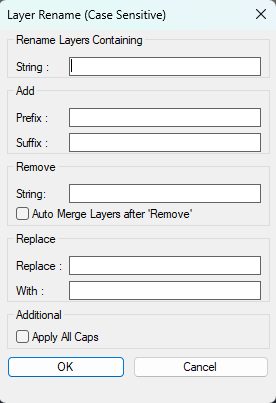
Command:
🚀 Main command: RenameLayer
🧩 Internal helpers: RL:SafeStr, RL:BuildList, RL:IdxToNames, RL:Replace, RL:ExecuteRename, RL:WriteDCL
🪟 Dialog title: Layer Rename v3.5
📄 Temporary DCL file: RL_Temp.dcl created under the AutoCAD ROAMABLEROOTPREFIX Support folder.
Description:
🧱 RenameLayer is an AutoCAD layer renaming tool designed for fast, controlled, repeatable layer name editing in production drawings.
🔎 The routine scans the active drawing layer table and builds a filtered list of local layers, excluding layer 0 and xref-dependent layers that contain the xref separator character |.
🪟 A custom DCL dialog provides a searchable multi-select layer list, filter box, Add controls, Remove controls, Replace controls, ALL CAPS conversion, Auto Merge option, Apply button, OK button, and Cancel button.
🧰 CAD users can add prefixes, add suffixes, remove unwanted text strings, replace old layer name fragments with new strings, or use wildcard-style replacement patterns to restructure layer names.
🔁 The Apply button performs the rename operation and reopens the dialog workflow, making it practical to apply multiple rename passes without restarting the command.
✅ If no layers are selected in the list, the tool processes all currently visible filtered layers, allowing quick batch rename operations after using the Search filter.
🔀 When Auto Merge is enabled and the target layer name already exists, the routine uses the AutoCAD LAYMRG workflow to merge the source layer into the destination layer instead of failing the rename.
🧠 The rename operation is wrapped inside an AutoCAD undo mark so the user can roll back the complete rename or merge pass as a single grouped action.
📌 This is especially useful for CAD standards migration, client layer naming conversions, imported DWG cleanup, Civil 3D production drawings, survey layer cleanup, xref layer normalization, and office template maintenance.
Helper function: (if any)
🧩 RL:SafeStr converts nil values and empty states into safe strings so dialog fields and rename operations do not crash when a box is blank.
🧩 RL:BuildList reads the active drawing Layers collection, excludes layer 0 and xref layers, applies the Search filter, sorts the results alphabetically, and returns the layer names for the DCL list box.
🧩 RL:IdxToNames converts the selected DCL list indices back into real layer names so multi-select layer processing can be executed reliably.
🧩 RL:Replace applies the Old/New replacement logic and supports wildcard-based patterns with * so parts of the original layer name can be preserved while prefixes or suffixes are changed.
🧩 RL:ExecuteRename performs the actual rename workflow: remove string, replace string, add prefix, add suffix, optionally convert to ALL CAPS, optionally merge into an existing target layer, or rename to a new target layer.
🧩 RL:WriteDCL writes the temporary DCL dialog definition with the filter area, layer list, Add group, Remove group, Replace group, toggle options, Apply button, OK button, and Cancel button.
🧩 C:RenameLayer controls the main dialog loop, stores current field values between filter/apply refreshes, cleans placeholder items, executes the rename pass, unloads the dialog, and deletes the temporary DCL file at the end.
Functionalities:
🔎 Search/filter drawing layers by name before renaming.
🧱 Exclude xref layers automatically, preventing accidental renaming of xref-dependent layer names.
🧱 Exclude layer 0 automatically, protecting the default AutoCAD base layer from batch rename operations.
🧾 Multi-select one or more layers from the dialog list.
📋 Process all filtered visible layers when no specific list selection is made.
➕ Add a prefix to selected or filtered layer names.
➕ Add a suffix to selected or filtered layer names.
🧹 Remove a text string from selected layer names.
🔄 Replace an old text fragment with a new text fragment.
✳️ Use wildcard-style replacement with * to preserve the middle part of a matching layer name while changing fixed prefixes or suffixes.
🔠 Convert renamed layers to ALL CAPS for strict CAD standards.
🔀 Auto Merge matching layers into an existing destination layer with LAYMRG when the target layer already exists.
🪟 Use Apply to execute one rename pass and continue working in the dialog.
✅ Use OK to execute the final rename pass and close the dialog.
↩️ Group rename and merge actions inside an AutoCAD undo mark for controlled rollback.
🧽 Delete the temporary DCL file after the routine finishes.
Result:
✅ The selected layers, or all currently filtered visible layers, are renamed according to the configured prefix, suffix, remove, replace, and capitalization rules.
✅ Existing destination layers can be merged automatically when Auto Merge is enabled.
✅ The drawing layer table becomes cleaner, more standardized, and easier to manage.
✅ Civil 3D and AutoCAD users can standardize large sets of layers faster than manual renaming through the Layer Properties Manager.
✅ The DCL interface preserves dialog values during filter and apply operations, making iterative rename cleanup more practical.
Images, animations etc.
XAML code:
<ResourceDictionary
 xmlns="http://schemas.microsoft.com/winfx/2006/xaml/presentation"
 xmlns:x="http://schemas.microsoft.com/winfx/2006/xaml"
 xmlns:src="clr-namespace:Autodesk.Windows;assembly=AdWindows">

 <src:RibbonToolTip x:Key="RenameLayer">
 <src:RibbonToolTip.ExpandedContent>
 <StackPanel>
 <TextBlock Background="AntiqueWhite" TextAlignment="Left">
<Bold>Function Syntax: RenameLayer</Bold>
<LineBreak/>
<Bold>Version: 1.1 Date: 20.06.2026 6:38:54PM</Bold>
<LineBreak/>
<Hyperlink>AI+https://www.cadtutor.net/forum/topic/68804-layer-rename-lisp-routine-issue/</Hyperlink>
<LineBreak/>
<TextBlock TextWrapping="Wrap" Foreground="Black">
<Bold>Command name</Bold><LineBreak/>
<Run>RenameLayer (type </Run><Run Foreground="DarkRed">RenameLayer</Run><Run> at the AutoCAD command line)</Run><LineBreak/>
<Bold>Description</Bold><LineBreak/>
<Run>This routine opens a custom dialog that lets the user </Run><Run Foreground="DarkRed">batch rename layers</Run><Run> based on search, remove, replace, prefix, suffix, optional </Run><Run Foreground="DarkRed">all-caps conversion</Run><Run>, and optional </Run><Run Foreground="DarkRed">auto-merge</Run><Run> behavior.</Run><LineBreak/>
<Bold>Prerequisites</Bold><LineBreak/>
<Run>• Requires Visual LISP COM support via </Run><Run Foreground="DarkRed">(vl-load-com)</Run><Run>.</Run><LineBreak/>
<Run>• Uses Express Tools functions such as </Run><Run Foreground="DarkRed">acet-ui-progress</Run><Run> and </Run><Run Foreground="DarkRed">acet-str-replace</Run><Run>, so Express Tools should be available.</Run><LineBreak/>
<Bold>User interaction</Bold><LineBreak/>
<Run>• The user interacts with a </Run><Run Foreground="DarkRed">DCL dialog</Run><Run> named LayerRename.</Run><LineBreak/>
<Run>• The dialog collects criteria such as:</Run><LineBreak/>
<Run>  • Text to search for in layer names.</Run><LineBreak/>
<Run>  • Prefix and suffix to add.</Run><LineBreak/>
<Run>  • String to remove.</Run><LineBreak/>
<Run>  • Replace and With strings.</Run><LineBreak/>
<Run>  • Toggle for </Run><Run Foreground="DarkRed">Apply All Caps</Run><Run>.</Run><LineBreak/>
<Run>  • Toggle for </Run><Run Foreground="DarkRed">Auto Merge Layers after Remove</Run><Run>.</Run><LineBreak/>
<Run>• The user clicks </Run><Run Foreground="DarkRed">OK</Run><Run> to execute, or </Run><Run Foreground="DarkRed">Cancel</Run><Run> to exit without changes.</Run><LineBreak/>
<Bold>High-level workflow</Bold><LineBreak/>
<Run>• Creates a temporary DCL file (LayerRename.dcl) using </Run><Run Foreground="DarkRed">vl-filename-mktemp</Run><Run> and writes the dialog definition to disk.</Run><LineBreak/>
<Run>• Loads and displays the dialog using </Run><Run Foreground="DarkRed">load_dialog</Run><Run>, </Run><Run Foreground="DarkRed">new_dialog</Run><Run>, and </Run><Run Foreground="DarkRed">start_dialog</Run><Run>.</Run><LineBreak/>
<Run>• Reads user input via multiple </Run><Run Foreground="DarkRed">action_tile</Run><Run> callbacks.</Run><LineBreak/>
<Run>• Builds a list of drawing layers via </Run><Run Foreground="DarkRed">ai_table</Run><Run> and filters them:</Run><LineBreak/>
<Run>  • Excludes layer </Run><Run Foreground="DarkRed">0</Run><Run>.</Run><LineBreak/>
<Run>  • If a search string is provided, selects only layers containing that string.</Run><LineBreak/>
<Run>• Shows a progress meter using </Run><Run Foreground="DarkRed">acet-ui-progress</Run><Run>.</Run><LineBreak/>
<Run>• For each target layer, computes a new name by applying the enabled transformations in sequence.</Run><LineBreak/>
<Run>• Renames layers using AutoCAD command calls via </Run><Run Foreground="DarkRed">vl-cmdf</Run><Run> to </Run><Run Foreground="DarkRed">-rename</Run><Run> and optionally </Run><Run Foreground="DarkRed">-laymrg</Run><Run>.</Run><LineBreak/>
<Run>• Wraps changes in a single undo group using </Run><Run Foreground="DarkRed">vla-StartUndoMark</Run><Run> and </Run><Run Foreground="DarkRed">vla-EndUndoMark</Run><Run>.</Run><LineBreak/>
<Run>• Cleans up by deleting the temporary DCL file and restoring system variables.</Run><LineBreak/>
<Bold>Functionalities</Bold><LineBreak/>
<Run>• Filters layers by a user-provided substring (or processes all layers except 0 if no substring is given).</Run><LineBreak/>
<Run>• Adds a </Run><Run Foreground="DarkRed">prefix</Run><Run> to the layer name.</Run><LineBreak/>
<Run>• Adds a </Run><Run Foreground="DarkRed">suffix</Run><Run> to the layer name.</Run><LineBreak/>
<Run>• Removes an arbitrary substring from the layer name using </Run><Run Foreground="DarkRed">vl-string-subst</Run><Run>.</Run><LineBreak/>
<Run>• Replaces one substring with another using </Run><Run Foreground="DarkRed">acet-str-replace</Run><Run>.</Run><LineBreak/>
<Run>• Optionally converts the final name to </Run><Run Foreground="DarkRed">all caps</Run><Run> (Apply All Caps toggle).</Run><LineBreak/>
<Run>• Optionally performs </Run><Run Foreground="DarkRed">layer merge</Run><Run> when the computed name already exists, using </Run><Run Foreground="DarkRed">-laymrg</Run><Run>.</Run><LineBreak/>
<Bold>Transformation order used to build the new layer name</Bold><LineBreak/>
<Run>• Starting name is the current layer name from the filtered list.</Run><LineBreak/>
<Run>• If Remove String is set, remove that substring first.</Run><LineBreak/>
<Run>• If Replace fields are set, apply Replace to With next.</Run><LineBreak/>
<Run>• If Prefix is set, add prefix next.</Run><LineBreak/>
<Run>• If Suffix is set, add suffix last.</Run><LineBreak/>
<Run>• If Apply All Caps is enabled, convert to uppercase at rename time.</Run><LineBreak/>
<Bold>Validation and safeguards</Bold><LineBreak/>
<Run>• Replace fields validation: if the user fills only one of Replace or With, it shows an alert and restarts the command.</Run><LineBreak/>
<Run>• If no matching layers are found for the search text, it alerts </Run><Run Foreground="DarkRed">No Matching Text Found</Run><Run> and restarts.</Run><LineBreak/>
<Run>• Excludes layer </Run><Run Foreground="DarkRed">0</Run><Run> from processing.</Run><LineBreak/>
<Run>• Uses an internal error handler to restore settings and delete the temporary DCL file on failure or cancel.</Run><LineBreak/>
<Bold>Important commands and calls highlighted</Bold><LineBreak/>
<Run>• <Run Foreground="DarkRed">LRN_dialog</Run> — writes the DCL dialog definition to a temporary file.</Run><LineBreak/>
<Run>• <Run Foreground="DarkRed">load_dialog</Run> and <Run Foreground="DarkRed">new_dialog</Run> — loads the DCL and instantiates the dialog.</Run><LineBreak/>
<Run>• <Run Foreground="DarkRed">action_tile</Run> — captures user inputs from dialog controls.</Run><LineBreak/>
<Run>• <Run Foreground="DarkRed">ai_table</Run> — retrieves layer names from the drawing layer table.</Run><LineBreak/>
<Run>• <Run Foreground="DarkRed">acet-ui-progress</Run> — displays progress during layer processing.</Run><LineBreak/>
<Run>• <Run Foreground="DarkRed">vl-cmdf "-rename" "la"</Run> — renames layers programmatically.</Run><LineBreak/>
<Run>• <Run Foreground="DarkRed">vl-cmdf "-laymrg"</Run> — merges layers when enabled and when the destination layer exists.</Run><LineBreak/>
<Run>• <Run Foreground="DarkRed">vla-StartUndoMark</Run> and <Run Foreground="DarkRed">vla-EndUndoMark</Run> — wraps the operation in a single undo step.</Run><LineBreak/>
<Bold>Operational notes and limitations</Bold><LineBreak/>
<Run>• If Auto Merge is enabled and the target name already exists, the routine attempts to merge the source layer into the destination layer using </Run><Run Foreground="DarkRed">-laymrg</Run><Run>.</Run><LineBreak/>
<Run>• If Auto Merge is disabled, and the target name already exists, the routine will not merge; it relies on rename behavior and existence checks to decide the path.</Run><LineBreak/>
<Run>• The dialog label indicates case sensitivity; however, the search uses </Run><Run Foreground="DarkRed">vl-string-search</Run><Run> which is case-sensitive, and the Apply All Caps toggle affects the final rename casing.</Run><LineBreak/>
<Run>• The routine creates and deletes a temporary DCL file each run; if file permissions restrict temp file creation, the dialog cannot load.</Run><LineBreak/>


<Bold><Run Foreground="DodgerBlue">Description</Run></Bold><LineBreak/>
<Run Foreground="White">🧱 RenameLayer is an AutoCAD and Civil 3D AutoLISP utility for batch renaming local drawing layers through a custom DCL dialog.</Run><LineBreak/>
<Run Foreground="LimeGreen">🔎 The tool is SEO-focused for AutoCAD layer management, Civil 3D layer cleanup, DWG standardization, layer renaming, batch rename workflows, and CAD production cleanup.</Run><LineBreak/>
<LineBreak/>

<Bold><Run Foreground="DodgerBlue">Function Syntax</Run></Bold><LineBreak/>
<Run Foreground="White">🚀 Main command: </Run><Bold><Run Foreground="Orange">RenameLayer</Run></Bold><LineBreak/>
<Run Foreground="White">🪟 Dialog title: </Run><Bold><Run Foreground="Orange">Layer Rename v3.5</Run></Bold><LineBreak/>
<Run Foreground="White">📄 Temporary DCL file: </Run><Bold><Run Foreground="Orange">RL_Temp.dcl</Run></Bold><Run Foreground="White"> in the AutoCAD roaming Support folder.</Run><LineBreak/>
<LineBreak/>

<Bold><Run Foreground="DodgerBlue">SEO Optimized Overview</Run></Bold><LineBreak/>
<Run Foreground="White">🧱 This AutoCAD layer rename tool helps users standardize drawing layer names without editing each layer manually in the Layer Properties Manager.</Run><LineBreak/>
<Run Foreground="White">🔎 The routine reads the active drawing layer table, builds a sorted layer list, and allows the user to filter layer names before applying rename actions.</Run><LineBreak/>
<Run Foreground="White">🧹 It supports common CAD cleanup operations such as adding prefixes, adding suffixes, removing unwanted text, replacing old strings, converting names to ALL CAPS, and merging layers when needed.</Run><LineBreak/>
<Run Foreground="White">📌 The workflow is useful for Civil 3D drawings, AutoCAD template cleanup, imported DWG layer cleanup, client CAD standards migration, xref cleanup preparation, and production drafting standards.</Run><LineBreak/>
<LineBreak/>

<Bold><Run Foreground="DodgerBlue">Dialog Workflow</Run></Bold><LineBreak/>
<Run Foreground="White">🪟 The command creates a temporary DCL dialog named </Run><Bold><Run Foreground="Orange">LayerRename</Run></Bold><Run Foreground="White">.</Run><LineBreak/>
<Run Foreground="White">🔍 The Search field filters visible layer names using wildcard matching around the typed text.</Run><LineBreak/>
<Run Foreground="White">📋 The multi-select layer list lets the user choose individual layers for the rename operation.</Run><LineBreak/>
<Run Foreground="White">✅ If no layer is selected, the tool processes all currently visible filtered layers.</Run><LineBreak/>
<Run Foreground="White">🔁 The Apply button runs the current rename pass and keeps the dialog workflow active for additional cleanup passes.</Run><LineBreak/>
<Run Foreground="White">🚪 The OK button applies the final settings and exits the dialog.</Run><LineBreak/>
<LineBreak/>

<Bold><Run Foreground="DodgerBlue">Layer Rename Controls</Run></Bold><LineBreak/>
<Run Foreground="White">➕ Prefix: adds text before each selected layer name.</Run><LineBreak/>
<Run Foreground="White">➕ Suffix: adds text after each selected layer name.</Run><LineBreak/>
<Run Foreground="White">🧹 Remove String: removes a defined string from each selected layer name.</Run><LineBreak/>
<Run Foreground="White">🔄 Replace Old/New: replaces one layer name fragment with another layer name fragment.</Run><LineBreak/>
<Run Foreground="White">✳️ Wildcard replacement: supports </Run><Bold><Run Foreground="Orange">*</Run></Bold><Run Foreground="White"> patterns so fixed prefixes or suffixes can be changed while preserving the variable middle part of the layer name.</Run><LineBreak/>
<Run Foreground="White">🔠 ALL CAPS: converts final renamed layers to uppercase for strict CAD standards.</Run><LineBreak/>
<Run Foreground="White">🔀 Auto Merge: merges into an existing target layer when the generated destination layer already exists.</Run><LineBreak/>
<LineBreak/>

<Bold><Run Foreground="DodgerBlue">Important AutoCAD Commands and API Calls</Run></Bold><LineBreak/>
<Run Foreground="White">🧩 </Run><Bold><Run Foreground="Orange">vla-get-layers</Run></Bold><Run Foreground="White"> reads the Layers collection from the active drawing.</Run><LineBreak/>
<Run Foreground="White">🧩 </Run><Bold><Run Foreground="Orange">wcmatch</Run></Bold><Run Foreground="White"> performs wildcard matching for layer filtering and pattern replacement.</Run><LineBreak/>
<Run Foreground="White">🧩 </Run><Bold><Run Foreground="Orange">vl-string-subst</Run></Bold><Run Foreground="White"> removes or replaces strings inside layer names.</Run><LineBreak/>
<Run Foreground="White">🧩 </Run><Bold><Run Foreground="Orange">_.RENAME _LA</Run></Bold><Run Foreground="White"> renames a layer when the new destination layer does not already exist.</Run><LineBreak/>
<Run Foreground="White">🧩 </Run><Bold><Run Foreground="Orange">_.LAYMRG</Run></Bold><Run Foreground="White"> merges the source layer into an existing destination layer when Auto Merge is enabled.</Run><LineBreak/>
<Run Foreground="White">🧩 </Run><Bold><Run Foreground="Orange">vla-startundomark</Run></Bold><Run Foreground="White"> and </Run><Bold><Run Foreground="Orange">vla-endundomark</Run></Bold><Run Foreground="White"> group the rename operation into one undoable action.</Run><LineBreak/>
<LineBreak/>

<Bold><Run Foreground="DodgerBlue">Internal Helper Functions</Run></Bold><LineBreak/>
<Run Foreground="White">🧩 </Run><Bold><Run Foreground="Orange">RL:SafeStr</Run></Bold><Run Foreground="White"> safely converts nil values and blank dialog values to usable strings.</Run><LineBreak/>
<Run Foreground="White">🧩 </Run><Bold><Run Foreground="Orange">RL:BuildList</Run></Bold><Run Foreground="White"> builds the filtered layer list, excluding layer 0 and xref-dependent layers containing </Run><Bold><Run Foreground="Orange">|</Run></Bold><Run Foreground="White">.</Run><LineBreak/>
<Run Foreground="White">🧩 </Run><Bold><Run Foreground="Orange">RL:IdxToNames</Run></Bold><Run Foreground="White"> converts selected DCL list indices back into real layer names.</Run><LineBreak/>
<Run Foreground="White">🧩 </Run><Bold><Run Foreground="Orange">RL:Replace</Run></Bold><Run Foreground="White"> performs direct replacement and wildcard-style layer name replacement.</Run><LineBreak/>
<Run Foreground="White">🧩 </Run><Bold><Run Foreground="Orange">RL:ExecuteRename</Run></Bold><Run Foreground="White"> applies remove, replace, prefix, suffix, ALL CAPS, rename, and Auto Merge logic.</Run><LineBreak/>
<Run Foreground="White">🧩 </Run><Bold><Run Foreground="Orange">RL:WriteDCL</Run></Bold><Run Foreground="White"> writes the temporary DCL interface used by the command.</Run><LineBreak/>
<LineBreak/>

<Bold><Run Foreground="DodgerBlue">Functionalities</Run></Bold><LineBreak/>
<Run Foreground="White">✅ Batch rename multiple AutoCAD layers from a DCL dialog.</Run><LineBreak/>
<Run Foreground="White">✅ Search and filter layer names before applying changes.</Run><LineBreak/>
<Run Foreground="White">✅ Rename selected layers or all currently filtered visible layers.</Run><LineBreak/>
<Run Foreground="White">✅ Add layer name prefixes for office, discipline, phase, or project naming standards.</Run><LineBreak/>
<Run Foreground="White">✅ Add layer name suffixes for status, revision, project phase, or workflow classification.</Run><LineBreak/>
<Run Foreground="White">✅ Remove obsolete layer name fragments from imported or legacy drawings.</Run><LineBreak/>
<Run Foreground="White">✅ Replace old layer standards with new naming conventions.</Run><LineBreak/>
<Run Foreground="White">✅ Convert final layer names to uppercase for strict DWG standards.</Run><LineBreak/>
<Run Foreground="White">✅ Merge matching layer names automatically when destination layers already exist.</Run><LineBreak/>
<Run Foreground="White">✅ Keep xref-dependent layers protected by excluding names with the xref separator.</Run><LineBreak/>
<LineBreak/>

<Bold><Run Foreground="DodgerBlue">Result</Run></Bold><LineBreak/>
<Run Foreground="LimeGreen">✅ The drawing layer table is renamed, cleaned, standardized, and easier to manage.</Run><LineBreak/>
<Run Foreground="LimeGreen">✅ Large layer cleanup tasks can be completed faster than manual layer-by-layer editing.</Run><LineBreak/>
<Run Foreground="LimeGreen">✅ CAD standards migration becomes easier for AutoCAD and Civil 3D production drawings.</Run><LineBreak/>
<Run Foreground="LimeGreen">✅ The Apply workflow allows iterative cleanup without restarting the command every time.</Run><LineBreak/>
<LineBreak/>

<Bold><Run Foreground="DarkRed">Important Notes</Run></Bold><LineBreak/>
<Run Foreground="White">⚠️ This tool changes layer names in the active drawing.</Run><LineBreak/>
<Run Foreground="White">⚠️ Auto Merge uses </Run><Bold><Run Foreground="Orange">LAYMRG</Run></Bold><Run Foreground="White">, so objects from the source layer may be moved into an existing target layer.</Run><LineBreak/>
<Run Foreground="White">⚠️ Review broad filters carefully before clicking Apply, especially on production drawings.</Run><LineBreak/>
<Run Foreground="White">⚠️ Xref-dependent layers are intentionally skipped; edit them in the source xref drawing if required.</Run><LineBreak/>
<Run Foreground="White">🧠 Recommended workflow: save the DWG, filter layer names, run a small controlled batch, review results, then continue with larger cleanup operations.</Run><LineBreak/>
<LineBreak/>

<Bold><Run Foreground="Yellow">Tags</Run></Bold><LineBreak/>
<Run Foreground="Yellow">🏷️ AutoCAD, 🏷️ AutoLISP, 🏷️ Civil 3D, 🏷️ Layer Management, 🏷️ Rename Layers, 🏷️ Layer Rename, 🏷️ DCL Dialog, 🏷️ Batch Rename, 🏷️ Layer Filter, 🏷️ LAYMRG, 🏷️ CAD Standards, 🏷️ CAD Automation</Run><LineBreak/>


</TextBlock>

 <!-- Use MediaElement for GIF (static first frame) and Image as fallback -->
<Grid>
<Image Source="RenameLayer.png" Stretch="Uniform"/>
</Grid>


 </StackPanel>
 </src:RibbonToolTip.ExpandedContent>
 </src:RibbonToolTip>
</ResourceDictionary>
Leave a Reply
You must be logged in to post a comment.