
Short description
🧹 DeleteLayerByFilter is an AutoCAD and Civil 3D AutoLISP utility for finding, exporting, and deleting layers by multiple wildcard filter patterns.
🛡️ The tool uses a DCL dialog with protected layer patterns, confirmation prompts, preset filters, inverse matching, and export options so CAD users can clean drawings more safely and systematically.
Command:
🚀 Main command: DeleteLayerByFilter
🧰 List-based command: LayDelByList
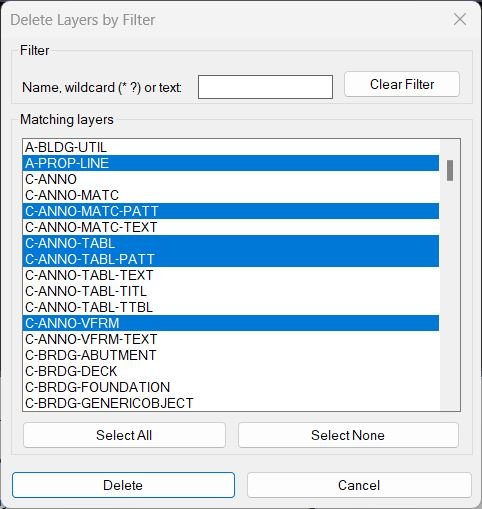
🖥️ The DeleteLayerByFilter dialog provides five layer filter boxes, Apply Filters, Clear All Filters, Civil_3D_Layers, Architecture, Survey, Structural presets, Save Preset, Load Preset, Export Selected, Export Displayed, Export All Matching, Delete Selected, Delete All Matching, and Cancel.
Description:
🧹 DeleteLayerByFilter is an SEO-friendly AutoCAD layer cleanup tool for deleting unwanted layers through controlled wildcard matching.
🔎 The routine scans the active drawing layer table, applies up to five filter strings combined by OR logic, and displays the matching layer names in a multi-select DCL list box.
🔁 The inverse filter mode can show layers that do not match the current filters, which is useful for checking non-standard layer names or isolating unexpected CAD standards.
🛡️ Built-in protected layer patterns prevent deletion of critical layers such as 0, DEFPOINTS, xref layers, text layers, dimension layers, Civil 3D surface layers, COGO point layers, alignments, profiles, sections, corridors, pipe networks, structures, parcels, viewports, and xref-related layers.
📤 Export functions allow the user to write selected, displayed, or all matching layer names to a TXT file before deleting anything.
🧠 The embedded DCL is written line by line to a temporary .dcl file, avoiding AutoLISP string-length loading errors while keeping the tool as a single-file LISP application.
⚠️ Because this tool deletes drawing layers, it includes confirmation before destructive operations and reports deleted, protected, and failed layer names.
Helper function: (if any)
🧩 DLBF-WriteDcl writes the embedded DeleteLayerByFilter dialog to a temporary DCL file at runtime.
🧩 DLBF-GetAllLayers reads all layer names from the active drawing Layers collection.
🧩 DLBF-Patternize prepares filter input so plain text and wildcard patterns can both be used.
🧩 DLBF-BuildPatList builds the active pattern list from the five DCL filter boxes.
🧩 DLBF-FilterLayersOR filters drawing layers using OR logic and optional inverse matching.
🧩 DLBF-TakeForDclList limits the displayed list by maximum item count and character count to protect DCL list capacity.
🧩 DLBF-IsProtectedLayer checks layer names against protected wildcard patterns before deletion.
🧩 DLBF-WriteLayerListToFile exports selected, displayed, or all matching layer names to a TXT report.
🧩 DLBF-WritePresetFile and DLBF-ReadPresetFile save and load .dlbf layer filter presets.
🧩 DLBF-LayDel deletes layers using the AutoCAD -LAYDEL command with international and fallback option strings.
🧩 DLBF-VLA-Delete attempts layer deletion through the AutoCAD ActiveX Layers collection when command-based deletion is not enough.
🧩 DLBF-DeleteLayers coordinates protected layer skipping, deletion attempts, failed layer tracking, and final result reporting.
🧩 DLBF-ShowDialog opens the filter manager, connects DCL action tiles, and controls export or delete workflow modes.
Functionalities:
✅ 🔎 Filter layers by up to five wildcard-compatible search boxes.
✅ 🔁 Combine filters by OR logic or enable inverse mode to show layers that do not match.
✅ 🧭 Use quick preset buttons for Civil 3D, Architecture, Survey, and Structural layer naming conventions.
✅ 💾 Save and reload custom layer filter presets as .dlbf files.
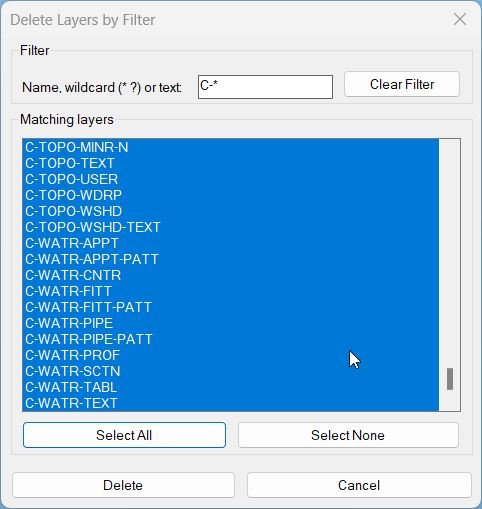
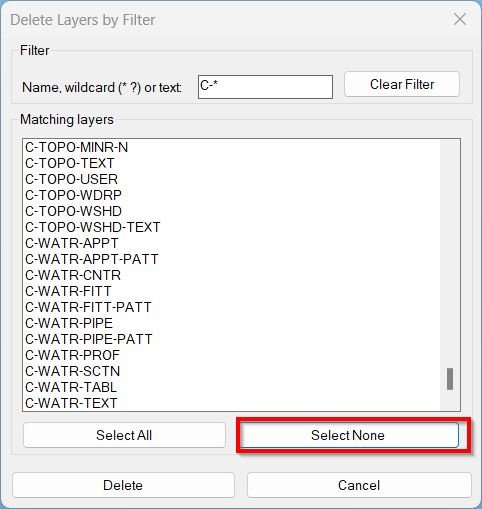
✅ 📋 Select all displayed layers or clear the current DCL list selection.
✅ 📤 Export selected layers, displayed layers, or all matching layers to a TXT file.
✅ 🛡️ Skip protected layers automatically even when they match the filter or are selected.
✅ ⚠️ Ask for confirmation before deleting selected layers or all matching layers.
✅ 🧹 Delete layers using both -LAYDEL and ActiveX deletion fallback.
✅ 📊 Report how many layers were deleted, skipped as protected, or failed.
✅ 🧰 Use LayDelByList to delete layer names from a predefined LAYLIST variable.
✅ 🧱 Protect xref-dependent layers and key Civil 3D object layers from accidental removal.
✅ 🧠 Avoid large DCL list crashes by limiting list item count and total list text size.
Result:
🎯 The result is a safer and faster layer cleanup workflow for AutoCAD and Civil 3D production drawings.
🧹 Users can isolate non-standard, imported, temporary, discipline-specific, or project-specific layers, export the list for review, and delete only the approved targets.
🛡️ Protected layer rules reduce the risk of deleting essential Civil 3D, xref, annotation, dimension, viewport, and default drawing layers.
📌 DeleteLayerByFilter is especially useful for cleaning consultant DWGs, external reference drawings, survey files, architecture backgrounds, structural backgrounds, and drawings with excessive unused or duplicated layer naming.
Images, animations etc.
XAML code:
<ResourceDictionary
xmlns="http://schemas.microsoft.com/winfx/2006/xaml/presentation"
xmlns:x="http://schemas.microsoft.com/winfx/2006/xaml"
xmlns:src="clr-namespace:Autodesk.Windows;assembly=AdWindows">

<src:RibbonToolTip x:Key="DeleteLayerByFilter">
<src:RibbonToolTip.ExpandedContent>
<StackPanel>
<TextBlock Background="AntiqueWhite" TextAlignment="Left">
<Bold>Function Syntax: DeleteLayerByFilter / LayDelByList</Bold>
<LineBreak/>
<Bold>Version: 1 Date: 17.08.2025</Bold>
<LineBreak/>
<Bold>Version: 2 Date: 20.06.2026 6:38:52PM</Bold>
<LineBreak/>
<Hyperlink>N/A</Hyperlink>
<LineBreak/>
<Bold>Important details and safeguards</Bold><LineBreak/>
• The dialog hides xref dependent layers and reserved layers <Run Foreground="darkred">0</Run> and <Run Foreground="darkred">Defpoints</Run>. <LineBreak/>
• Deletion is driven by Express Tools <Run Foreground="darkred">-LAYDEL</Run> which removes all objects on those layers similar to the native workflow. <LineBreak/>
• If Express Tools is not present the code attempts a normal API delete which only succeeds for empty layers. <LineBreak/>
• The command does not rename layers and does not move objects elsewhere. It deletes contents on the selected layers as part of the layer removal process. <LineBreak/>

<Bold>Why this is helpful</Bold><LineBreak/>
• Speeds up cleaning drawings by batching multiple layer deletions with a safe discoverable UI. <LineBreak/>
• Reduces repetitive command line input while keeping the exact same confirmation logic as manual <Run Foreground="darkred">-LAYDEL</Run>. <LineBreak/>

<Bold>UI elements at a glance</Bold><LineBreak/>
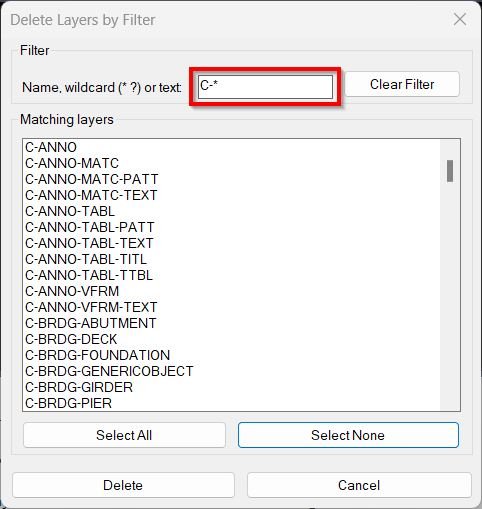
• <Run Foreground="darkred">Filter</Run> edit box that accepts text or wildcards. <LineBreak/>
• <Run Foreground="darkred">Matching layers</Run> list box with multi select support. <LineBreak/>
• Buttons: <Run Foreground="darkred">Clear Filter</Run> then <Run Foreground="darkred">Select All</Run> then <Run Foreground="darkred">Select None</Run> then <Run Foreground="darkred">Delete</Run> then <Run Foreground="darkred">Cancel</Run>. <LineBreak/>

<Bold>Commands provided</Bold><LineBreak/>
• <Run Foreground="darkred">DeleteLayerByFilter</Run> — opens the dialog and deletes layers selected in the UI. <LineBreak/>
• <Run Foreground="darkred">LayDelByList</Run> — deletes all layers listed in the variable <Run Foreground="darkred">LAYLIST</Run>. <LineBreak/>

<Bold>Requirements and notes</Bold><LineBreak/>
• Requires Express Tools for full functionality because <Run Foreground="darkred">-LAYDEL</Run> is part of Express Tools. <LineBreak/>
• Works in localized environments by trying underscored and plain command options for <Run Foreground="darkred">-LAYDEL</Run>. <LineBreak/>
• Use with care. Deleting layers via <Run Foreground="darkred">-LAYDEL</Run> is destructive and cannot be undone once the undo chain is broken. Consider saving a backup before use. <LineBreak/>

<Bold>Typical workflow</Bold><LineBreak/>

Type <Run Foreground="darkred">DeleteLayerByFilter</Run>. <LineBreak/>

Type a filter such as <Run Foreground="darkred">A-*</Run> then select desired layers then click <Run Foreground="darkred">Delete</Run>. <LineBreak/>

Read the command line summary to confirm how many layers were deleted and which failed if any. <LineBreak/>

<Bold>List mode example</Bold><LineBreak/>
<Run Foreground="darkred">(setq LAYLIST '("V-GENL-SURV-ANNO" "V-TOPO-BREAKLINE" "V-BSS-SURV-PT" "V-CTRL-SURV-PT"))</Run> <LineBreak/>
<Run Foreground="darkred">(LayDelByList)</Run> <LineBreak/>

<Bold><Run Foreground="DodgerBlue">Description</Run></Bold><LineBreak/>
<Run Foreground="White">🧹 DeleteLayerByFilter is an AutoCAD and Civil 3D AutoLISP utility for filtering, exporting, and deleting drawing layers through a controlled DCL dialog.</Run><LineBreak/>
<Run Foreground="LimeGreen">🛡️ The routine focuses on safer layer cleanup by combining wildcard filters, protected layer patterns, preset filters, export reports, and confirmation prompts before destructive operations.</Run><LineBreak/>
<LineBreak/>

<Bold><Run Foreground="DodgerBlue">Function Syntax</Run></Bold><LineBreak/>
<Run Foreground="White">🚀 Main command: </Run><Bold><Run Foreground="Orange">DeleteLayerByFilter</Run></Bold><LineBreak/>
<Run Foreground="White">🧰 List-based command: </Run><Bold><Run Foreground="Orange">LayDelByList</Run></Bold><LineBreak/>
<LineBreak/>

<Bold><Run Foreground="DodgerBlue">SEO Optimized Overview</Run></Bold><LineBreak/>
<Run Foreground="White">🔎 This AutoCAD layer filter and layer delete tool scans all layers in the active drawing and displays matching names in a multi-select DCL list.</Run><LineBreak/>
<Run Foreground="White">🧩 The dialog contains five filter boxes combined by </Run><Bold><Run Foreground="Orange">OR</Run></Bold><Run Foreground="White"> logic, making it useful for Civil 3D layer cleanup, consultant DWG cleanup, xref background cleanup, and CAD standard correction.</Run><LineBreak/>
<Run Foreground="White">🔁 The </Run><Bold><Run Foreground="Orange">Inverse filter</Run></Bold><Run Foreground="White"> option shows layers that do not match the filters, helping users find unexpected or non-standard layer names.</Run><LineBreak/>
<Run Foreground="White">🛡️ Protected patterns prevent accidental deletion of key layers such as </Run><Bold><Run Foreground="Orange">0</Run></Bold><Run Foreground="White">, </Run><Bold><Run Foreground="Orange">DEFPOINTS</Run></Bold><Run Foreground="White">, xref layers, annotation layers, dimension layers, Civil 3D surface layers, point layers, alignments, profiles, corridors, pipe networks, structures, parcels, and viewports.</Run><LineBreak/>
<Run Foreground="White">📤 The tool can export selected, displayed, or all matching layer names to a TXT file before deleting anything.</Run><LineBreak/>
<LineBreak/>

<Bold><Run Foreground="LimeGreen">Primary Workflow</Run></Bold><LineBreak/>
<Run Foreground="White">1️⃣ Run </Run><Bold><Run Foreground="Orange">DeleteLayerByFilter</Run></Bold><Run Foreground="White"> in the AutoCAD command line.</Run><LineBreak/>
<Run Foreground="White">2️⃣ Enter one or more layer filters or use a preset such as </Run><Bold><Run Foreground="Orange">Civil_3D_Layers</Run></Bold><Run Foreground="White">, </Run><Bold><Run Foreground="Orange">Architecture</Run></Bold><Run Foreground="White">, </Run><Bold><Run Foreground="Orange">Survey</Run></Bold><Run Foreground="White">, or </Run><Bold><Run Foreground="Orange">Structural</Run></Bold><Run Foreground="White">.</Run><LineBreak/>
<Run Foreground="White">3️⃣ Click </Run><Bold><Run Foreground="Orange">Apply Filters</Run></Bold><Run Foreground="White"> to rebuild the matching layer list.</Run><LineBreak/>
<Run Foreground="White">4️⃣ Review the results, select specific layers, or export the list to TXT for checking.</Run><LineBreak/>
<Run Foreground="White">5️⃣ Use </Run><Bold><Run Foreground="DarkRed">Delete Selected</Run></Bold><Run Foreground="White"> or </Run><Bold><Run Foreground="DarkRed">Delete All Matching</Run></Bold><Run Foreground="White"> only after confirming that the matched layers are correct.</Run><LineBreak/>
<LineBreak/>

<Bold><Run Foreground="LimeGreen">Functionalities</Run></Bold><LineBreak/>
<Run Foreground="White">✅ </Run><Bold><Run Foreground="LimeGreen">Five layer filter boxes</Run></Bold><Run Foreground="White"> - filter drawing layers by multiple wildcard-compatible names.</Run><LineBreak/>
<Run Foreground="White">✅ </Run><Bold><Run Foreground="LimeGreen">OR filter logic</Run></Bold><Run Foreground="White"> - show layers matching any of the active filters.</Run><LineBreak/>
<Run Foreground="White">✅ </Run><Bold><Run Foreground="LimeGreen">Inverse matching</Run></Bold><Run Foreground="White"> - show layers not matching the current filter set.</Run><LineBreak/>
<Run Foreground="White">✅ </Run><Bold><Run Foreground="LimeGreen">Preset layer filters</Run></Bold><Run Foreground="White"> - quick buttons for Civil 3D, Architecture, Survey, and Structural workflows.</Run><LineBreak/>
<Run Foreground="White">✅ </Run><Bold><Run Foreground="LimeGreen">Preset save and load</Run></Bold><Run Foreground="White"> - stores reusable filter configurations as </Run><Bold><Run Foreground="Orange">.dlbf</Run></Bold><Run Foreground="White"> files.</Run><LineBreak/>
<Run Foreground="White">✅ </Run><Bold><Run Foreground="LimeGreen">Layer list export</Run></Bold><Run Foreground="White"> - exports selected, displayed, or all matching layer names to TXT.</Run><LineBreak/>
<Run Foreground="White">✅ </Run><Bold><Run Foreground="LimeGreen">Protected layer system</Run></Bold><Run Foreground="White"> - skips default, xref, annotation, dimension, viewport, and Civil 3D object layers.</Run><LineBreak/>
<Run Foreground="White">✅ </Run><Bold><Run Foreground="LimeGreen">Delete fallback logic</Run></Bold><Run Foreground="White"> - tries </Run><Bold><Run Foreground="Orange">-LAYDEL</Run></Bold><Run Foreground="White"> first and then uses ActiveX layer deletion as a fallback.</Run><LineBreak/>
<Run Foreground="White">✅ </Run><Bold><Run Foreground="LimeGreen">Capacity protection</Run></Bold><Run Foreground="White"> - limits DCL list size to avoid oversized dialog lists in drawings with many layers.</Run><LineBreak/>
<LineBreak/>

<Bold><Run Foreground="DodgerBlue">Key Commands and Helper Functions</Run></Bold><LineBreak/>
<Run Foreground="White">🚀 </Run><Bold><Run Foreground="Orange">C:DeleteLayerByFilter</Run></Bold><Run Foreground="White"> - opens the layer cleanup dialog.</Run><LineBreak/>
<Run Foreground="White">🧰 </Run><Bold><Run Foreground="Orange">C:LayDelByList</Run></Bold><Run Foreground="White"> - deletes layers from a predefined </Run><Bold><Run Foreground="Orange">LAYLIST</Run></Bold><Run Foreground="White"> variable while respecting protected patterns.</Run><LineBreak/>
<Run Foreground="White">🧩 </Run><Bold><Run Foreground="Orange">DLBF-FilterLayersOR</Run></Bold><Run Foreground="White"> - applies the active filter pattern list to all layer names.</Run><LineBreak/>
<Run Foreground="White">🧩 </Run><Bold><Run Foreground="Orange">DLBF-IsProtectedLayer</Run></Bold><Run Foreground="White"> - checks if a layer must be skipped for safety.</Run><LineBreak/>
<Run Foreground="White">🧩 </Run><Bold><Run Foreground="Orange">DLBF-WriteLayerListToFile</Run></Bold><Run Foreground="White"> - exports layer audit results to a TXT file.</Run><LineBreak/>
<Run Foreground="White">🧩 </Run><Bold><Run Foreground="Orange">DLBF-LayDel</Run></Bold><Run Foreground="White"> - deletes layers through the AutoCAD </Run><Bold><Run Foreground="Orange">-LAYDEL</Run></Bold><Run Foreground="White"> command.</Run><LineBreak/>
<Run Foreground="White">🧩 </Run><Bold><Run Foreground="Orange">DLBF-VLA-Delete</Run></Bold><Run Foreground="White"> - attempts deletion through the ActiveX Layers collection.</Run><LineBreak/>
<LineBreak/>

<Bold><Run Foreground="DodgerBlue">Practical Result</Run></Bold><LineBreak/>
<Run Foreground="White">🎯 The final result is a controlled AutoCAD layer cleanup workflow that helps CAD users remove unwanted layers while preserving essential Civil 3D, xref, annotation, and viewport layers.</Run><LineBreak/>
<Run Foreground="LimeGreen">📌 DeleteLayerByFilter is useful for consultant DWG cleanup, imported drawing cleanup, survey background cleanup, architecture or structural xref cleanup, and production drawing standardization.</Run><LineBreak/>
<LineBreak/>

<Bold><Run Foreground="DarkRed">Important Notes</Run></Bold><LineBreak/>
<Run Foreground="White">⚠️ This tool can delete layers from the active drawing; save or back up the DWG before testing broad filters.</Run><LineBreak/>
<Run Foreground="White">⚠️ Broad wildcards can match many layers because all five filters are combined by OR logic.</Run><LineBreak/>
<Run Foreground="White">⚠️ Protected layers are skipped, but layers in use, locked layers, current layers, or layers controlled by xrefs may still fail to delete.</Run><LineBreak/>
<Run Foreground="White">⚠️ Export the matching layer list first when cleaning important project drawings.</Run><LineBreak/>
<LineBreak/>

<Bold><Run Foreground="Yellow">Tags</Run></Bold><LineBreak/>
<Run Foreground="Yellow">🏷️ AutoCAD, 🏷️ Civil 3D, 🏷️ AutoLISP, 🏷️ Visual LISP, 🏷️ Layer cleanup, 🏷️ Delete layers, 🏷️ Layer filter, 🏷️ LAYDEL, 🏷️ DCL dialog, 🏷️ Layer manager, 🏷️ CAD standards, 🏷️ Protected layers, 🏷️ Xref layers, 🏷️ Layer export, 🏷️ Filter presets, 🏷️ Drawing cleanup, 🏷️ CAD automation, 🏷️ Production drawings</Run><LineBreak/>


</TextBlock>

<Grid>
<Image Source="Image_000.jpg" Stretch="Uniform"/>
</Grid>

<Grid>
<Image Source="Image_001.jpg" Stretch="Uniform"/>
</Grid>

<Grid>
<Image Source="Image_002.jpg" Stretch="Uniform"/>
</Grid>

<Grid>
<Image Source="Image_003.jpg" Stretch="Uniform"/>
</Grid>

</StackPanel>
</src:RibbonToolTip.ExpandedContent>
</src:RibbonToolTip>


<src:RibbonToolTip x:Key="DeleteLayerByFilter_1">
<src:RibbonToolTip.ExpandedContent>
<StackPanel>
<TextBlock Background="AntiqueWhite" TextAlignment="Left">
<Bold>Function Syntax: DeleteLayerByFilter</Bold>
<LineBreak/>
<Bold>Version: 1 Date: 17.08.2025</Bold>
<LineBreak/>
<Hyperlink>N/A</Hyperlink>
<LineBreak/>
<Bold>Important details and safeguards</Bold><LineBreak/>
• The dialog hides xref dependent layers and reserved layers <Run Foreground="darkred">0</Run> and <Run Foreground="darkred">Defpoints</Run>. <LineBreak/>
• Deletion is driven by Express Tools <Run Foreground="darkred">-LAYDEL</Run> which removes all objects on those layers similar to the native workflow. <LineBreak/>
• If Express Tools is not present the code attempts a normal API delete which only succeeds for empty layers. <LineBreak/>
• The command does not rename layers and does not move objects elsewhere. It deletes contents on the selected layers as part of the layer removal process. <LineBreak/>

<Bold>Why this is helpful</Bold><LineBreak/>
• Speeds up cleaning drawings by batching multiple layer deletions with a safe discoverable UI. <LineBreak/>
• Reduces repetitive command line input while keeping the exact same confirmation logic as manual <Run Foreground="darkred">-LAYDEL</Run>. <LineBreak/>

<Bold>UI elements at a glance</Bold><LineBreak/>
• <Run Foreground="darkred">Filter</Run> edit box that accepts text or wildcards. <LineBreak/>
• <Run Foreground="darkred">Matching layers</Run> list box with multi select support. <LineBreak/>
• Buttons: <Run Foreground="darkred">Clear Filter</Run> then <Run Foreground="darkred">Select All</Run> then <Run Foreground="darkred">Select None</Run> then <Run Foreground="darkred">Delete</Run> then <Run Foreground="darkred">Cancel</Run>. <LineBreak/>

<Bold>Commands provided</Bold><LineBreak/>
• <Run Foreground="darkred">DeleteLayerByFilter</Run> — opens the dialog and deletes layers selected in the UI. <LineBreak/>
• <Run Foreground="darkred">LayDelByList</Run> — deletes all layers listed in the variable <Run Foreground="darkred">LAYLIST</Run>. <LineBreak/>

<Bold>Requirements and notes</Bold><LineBreak/>
• Requires Express Tools for full functionality because <Run Foreground="darkred">-LAYDEL</Run> is part of Express Tools. <LineBreak/>
• Works in localized environments by trying underscored and plain command options for <Run Foreground="darkred">-LAYDEL</Run>. <LineBreak/>
• Use with care. Deleting layers via <Run Foreground="darkred">-LAYDEL</Run> is destructive and cannot be undone once the undo chain is broken. Consider saving a backup before use. <LineBreak/>

<Bold>Typical workflow</Bold><LineBreak/>

Type <Run Foreground="darkred">DeleteLayerByFilter</Run>. <LineBreak/>

Type a filter such as <Run Foreground="darkred">A-*</Run> then select desired layers then click <Run Foreground="darkred">Delete</Run>. <LineBreak/>

Read the command line summary to confirm how many layers were deleted and which failed if any. <LineBreak/>

<Bold>List mode example</Bold><LineBreak/>
<Run Foreground="darkred">(setq LAYLIST '("V-GENL-SURV-ANNO" "V-TOPO-BREAKLINE" "V-BSS-SURV-PT" "V-CTRL-SURV-PT"))</Run> <LineBreak/>
<Run Foreground="darkred">(LayDelByList)</Run> <LineBreak/>


</TextBlock>

<Grid>
<Image Source="DeleteLayerByFilter_003.jpg" Stretch="Uniform"/>
</Grid>
<Grid>
<Image Source="DeleteLayerByFilter_000.jpg" Stretch="Uniform"/>
</Grid>
<Grid>
<Image Source="DeleteLayerByFilter_001.jpg" Stretch="Uniform"/>
</Grid>
<Grid>
<Image Source="DeleteLayerByFilter_002.jpg" Stretch="Uniform"/>
</Grid>

<Grid>
<MediaElement
 Source="GIF"
 Stretch="Uniform"
 Visibility="Visible"/>
 </Grid>

</StackPanel>
</src:RibbonToolTip.ExpandedContent>
</src:RibbonToolTip>


</ResourceDictionary>
Leave a Reply
You must be logged in to post a comment.