
Short description
📋 DuplicateToSelectedLayer is an AutoCAD and Civil 3D AutoLISP utility for copying selected entities to a chosen existing local layer.
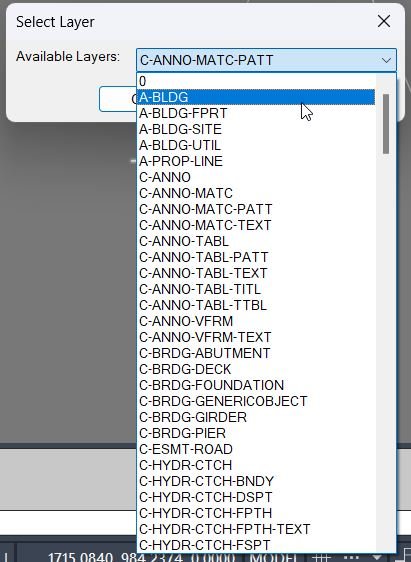
🧩 It uses a temporary DCL layer picker, ignores xref-prefixed layers, remembers the last selected target layer, and brings the copied objects to the front.
Command:
🚀 Main command: DuplicateToSelectedLayer
📋 Select entities first inside the command, choose the destination layer from the DCL list, then the routine creates same-position duplicates.
🧠 The last chosen target layer is persisted with the DuplicateToLayer_LastLayer environment variable.
Description:
📋 DuplicateToSelectedLayer is an SEO-friendly AutoCAD layer copy tool for duplicating existing drawing objects onto another layer without moving their geometry.
🧱 The routine collects a selection set with ssget, shows only non-xref layers in a sorted DCL popup list, and then copies the selected entities using zero displacement.
🎯 After the copy operation, the new entities are moved to the chosen layer with CHPROP, sent to the front using DRAWORDER, and left selected for immediate review.
📌 This is useful for Civil 3D production drawings, CAD layer cleanup, visual alternatives, temporary design copies, layer standardization, and controlled duplication workflows.
Helper function: (if any)
🧩 Temporary DCL generation creates the Select Target Layer dialog at runtime and deletes the DCL file after use.
🧩 The layer enumeration loop reads the AutoCAD Layers collection and filters out names containing the xref separator |.
🧩 getenv and setenv remember the previous target layer across command runs.
🧩 ssget, COPY, CHPROP, DRAWORDER, and sssetfirst are combined into one repeatable production workflow.
Functionalities:
✅ Duplicate one or many selected objects without changing their insertion position or geometry.
✅ Choose the target layer from a compact DCL list of local drawing layers.
✅ Exclude xref layers so copies are assigned only to editable local layers.
✅ Preserve the user’s current layer by restoring CLAYER after the operation.
✅ Bring the duplicated entities to the front for immediate visibility.
✅ Select the duplicated entities at the end for direct editing, verification, or undo workflow.
Result:
🎯 The result is a clean same-position duplicate set on the selected layer, useful for AutoCAD layer management and drawing production.
🟢 The command reports how many entities were duplicated and names the destination layer.
Images, animations etc.


XAML code:
<ResourceDictionary
xmlns="http://schemas.microsoft.com/winfx/2006/xaml/presentation"
xmlns:x="http://schemas.microsoft.com/winfx/2006/xaml"
xmlns:src="clr-namespace:Autodesk.Windows;assembly=AdWindows">

<src:RibbonToolTip x:Key="DuplicateToSelectedLayer">
<src:RibbonToolTip.ExpandedContent>
<StackPanel>
<TextBlock Background="AntiqueWhite" TextAlignment="Left">
<Bold>Function Syntax: DuplicateToSelectedLayer / DuplicateToSelectedLayer_Xref</Bold>
<LineBreak/>
<Bold>Version: 1.1 Date: 20.06.2026 6:38:53PM</Bold>
<LineBreak/>
<Hyperlink>N/A</Hyperlink>
<LineBreak/>
<Bold>Command name</Bold><LineBreak/>
<Run>DuplicateToSelectedLayer (type </Run><Run Foreground="DarkRed">DuplicateToSelectedLayer</Run><Run> at the AutoCAD command line)</Run><LineBreak/>
<Bold>Description</Bold><LineBreak/>
<Run>This routine lets the user select one or more entities, choose a </Run><Run Foreground="DarkRed">target layer</Run><Run> from a dialog, then duplicates the entities onto that layer, applies draw order so the new copies are </Run><Run Foreground="DarkRed">brought to front</Run><Run>, and leaves the duplicated objects as the current selection for immediate follow-on operations.</Run><LineBreak/>
<Bold>User interaction</Bold><LineBreak/>
<Run>• The user is prompted to </Run><Run Foreground="DarkRed">select entities to duplicate</Run><Run> using any normal selection method.</Run><LineBreak/>
<Run>• A dialog titled </Run><Run Foreground="DarkRed">Select Target Layer</Run><Run> opens with a dropdown list of available layers.</Run><LineBreak/>
<Run>• The user clicks </Run><Run Foreground="DarkRed">OK</Run><Run> to run the duplication or </Run><Run Foreground="DarkRed">Cancel</Run><Run> to exit.</Run><LineBreak/>
<Bold>High-level workflow</Bold><LineBreak/>
<Run>• Reads the last used target layer from the environment variable </Run><Run Foreground="DarkRed">DuplicateToLayer_LastLayer</Run><Run>.</Run><LineBreak/>
<Run>• Builds a list of all drawing layers, excluding xref layers whose names match </Run><Run Foreground="DarkRed">*|*</Run><Run>.</Run><LineBreak/>
<Run>• Writes a temporary DCL file for the layer-selection dialog and loads it using </Run><Run Foreground="DarkRed">load_dialog</Run><Run> and </Run><Run Foreground="DarkRed">new_dialog</Run><Run>.</Run><LineBreak/>
<Run>• Populates the dropdown list with sorted layer names.</Run><LineBreak/>
<Run>• Sets the dropdown default selection to the last used layer when available.</Run><LineBreak/>
<Run>• On OK:</Run><LineBreak/>
<Run>  • Stores the chosen layer back to </Run><Run Foreground="DarkRed">DuplicateToLayer_LastLayer</Run><Run> for next time.</Run><LineBreak/>
<Run>  • Temporarily sets </Run><Run Foreground="DarkRed">CLAYER</Run><Run> to the chosen layer.</Run><LineBreak/>
<Run>  • Runs the AutoCAD </Run><Run Foreground="DarkRed">COPY</Run><Run> command on the selection set with zero displacement (0,0 to 0,0), producing duplicates in place.</Run><LineBreak/>
<Run>  • Retrieves the newly created entities via </Run><Run Foreground="DarkRed">ssget "_P"</Run><Run> (previous selection set).</Run><LineBreak/>
<Run>  • Forces the copied entities to the chosen layer using </Run><Run Foreground="DarkRed">CHPROP</Run><Run> with the LA option.</Run><LineBreak/>
<Run>  • Brings the copied entities to the front using </Run><Run Foreground="DarkRed">DRAWORDER</Run><Run> with Front.</Run><LineBreak/>
<Run>  • Makes the copied entities the active selection using </Run><Run Foreground="DarkRed">sssetfirst</Run><Run>.</Run><LineBreak/>
<Run>  • Restores the original current layer.</Run><LineBreak/>
<Bold>Functionalities</Bold><LineBreak/>
<Run>• Duplicates any selected entities </Run><Run Foreground="DarkRed">in place</Run><Run> (no movement) using COPY with zero displacement.</Run><LineBreak/>
<Run>• Lets the user choose the destination layer from a dialog dropdown.</Run><LineBreak/>
<Run>• Excludes xref layers from the destination list using the name pattern </Run><Run Foreground="DarkRed">*|*</Run><Run>.</Run><LineBreak/>
<Run>• Remembers the last chosen destination layer across sessions using </Run><Run Foreground="DarkRed">getenv</Run><Run> and </Run><Run Foreground="DarkRed">setenv</Run><Run>.</Run><LineBreak/>
<Run>• Moves the duplicated entities onto the chosen layer using CHPROP.</Run><LineBreak/>
<Run>• Changes draw order so duplicates are </Run><Run Foreground="DarkRed">front-most</Run><Run>.</Run><LineBreak/>
<Run>• Leaves the duplicated entities selected for immediate follow-up editing.</Run><LineBreak/>
<Bold>Important commands and calls highlighted</Bold><LineBreak/>
<Run>• <Run Foreground="DarkRed">ssget</Run> — collects the initial entity selection set.</Run><LineBreak/>
<Run>• <Run Foreground="DarkRed">vlax-for</Run> over Layers — enumerates layer names from the drawing.</Run><LineBreak/>
<Run>• <Run Foreground="DarkRed">wcmatch "*|*"</Run> — filters out xref layers from the target layer list.</Run><LineBreak/>
<Run>• <Run Foreground="DarkRed">getenv</Run> and <Run Foreground="DarkRed">setenv</Run> — persists the last used layer choice.</Run><LineBreak/>
<Run>• <Run Foreground="DarkRed">load_dialog</Run> and <Run Foreground="DarkRed">new_dialog</Run> — loads the temporary DCL dialog.</Run><LineBreak/>
<Run>• <Run Foreground="DarkRed">COPY</Run> — duplicates entities with zero displacement.</Run><LineBreak/>
<Run>• <Run Foreground="DarkRed">ssget "_P"</Run> — retrieves the newly copied entities as the previous selection set.</Run><LineBreak/>
<Run>• <Run Foreground="DarkRed">CHPROP</Run> with LA — assigns the new copies to the target layer.</Run><LineBreak/>
<Run>• <Run Foreground="DarkRed">DRAWORDER</Run> Front — brings duplicates to the front.</Run><LineBreak/>
<Run>• <Run Foreground="DarkRed">sssetfirst</Run> — makes the duplicated entities the active selection.</Run><LineBreak/>
<Run>• <Run Foreground="DarkRed">setvar "CLAYER"</Run> — temporarily switches and then restores the current layer.</Run><LineBreak/>
<Bold>Outputs and messages</Bold><LineBreak/>
<Run>• If nothing is selected initially: prints </Run><Run Foreground="DarkRed">No objects selected</Run><Run>.</Run><LineBreak/>
<Run>• If the dialog cannot load: prints </Run><Run Foreground="DarkRed">Unable to load dialog</Run><Run>.</Run><LineBreak/>
<Run>• If cancelled in the dialog: prints </Run><Run Foreground="DarkRed">Operation cancelled</Run><Run>.</Run><LineBreak/>
<Run>• On success: prints the number of duplicated entities and confirms the target layer name, and indicates that the duplicates were brought to front.</Run><LineBreak/>
<Bold>Operational notes and limitations</Bold><LineBreak/>
<Run>• The routine uses AutoCAD commands (COPY, CHPROP, DRAWORDER) rather than entmakex, so it depends on command availability and user command settings.</Run><LineBreak/>
<Run>• COPY is executed with base point 0,0 and displacement 0,0, so duplicates are created directly on top of the originals.</Run><LineBreak/>
<Run>• The copied entities are identified using </Run><Run Foreground="DarkRed">ssget "_P"</Run><Run>; if another command changes the previous selection unexpectedly, the captured set may differ.</Run><LineBreak/>
<Run>• Xref layers are excluded only by name pattern; non-xref layers containing a pipe character could also be excluded.</Run><LineBreak/>


<Bold><Run Foreground="DodgerBlue">Description</Run></Bold><LineBreak/>
<Run Foreground="White">📋 DuplicateToSelectedLayer is an AutoCAD and Civil 3D AutoLISP utility for copying selected entities to a chosen existing local layer.</Run><LineBreak/>
<Run Foreground="White">🧩 It uses a temporary DCL layer picker, ignores xref-prefixed layers, remembers the last selected target layer, and brings the copied objects to the front.</Run><LineBreak/>
<LineBreak/>
<Bold><Run Foreground="DodgerBlue">Function Syntax</Run></Bold><LineBreak/>
<Run Foreground="White">🚀 Main command: </Run><Bold><Run Foreground="Orange">DuplicateToSelectedLayer</Run></Bold><LineBreak/>
<Run Foreground="White">📋 Select entities first inside the command, choose the destination layer from the DCL list, then the routine creates same-position duplicates.</Run><LineBreak/>
<Run Foreground="White">🧠 The last chosen target layer is persisted with the DuplicateToLayer_LastLayer environment variable.</Run><LineBreak/>
<LineBreak/>
<Bold><Run Foreground="DodgerBlue">SEO Optimized Overview</Run></Bold><LineBreak/>
<Run Foreground="White">📋 DuplicateToSelectedLayer is an SEO-friendly AutoCAD layer copy tool for duplicating existing drawing objects onto another layer without moving their geometry.</Run><LineBreak/>
<Run Foreground="White">🧱 The routine collects a selection set with ssget, shows only non-xref layers in a sorted DCL popup list, and then copies the selected entities using zero displacement.</Run><LineBreak/>
<Run Foreground="White">🎯 After the copy operation, the new entities are moved to the chosen layer with CHPROP, sent to the front using DRAWORDER, and left selected for immediate review.</Run><LineBreak/>
<Run Foreground="White">📌 This is useful for Civil 3D production drawings, CAD layer cleanup, visual alternatives, temporary design copies, layer standardization, and controlled duplication workflows.</Run><LineBreak/>
<LineBreak/>
<Bold><Run Foreground="LimeGreen">Primary Workflow</Run></Bold><LineBreak/>
<Run Foreground="White">1️⃣ Load the AutoLISP file in AutoCAD or Civil 3D with APPLOAD or your menu loader.</Run><LineBreak/>
<Run Foreground="White">2️⃣ Run the command shown above from the AutoCAD command line.</Run><LineBreak/>
<Run Foreground="White">3️⃣ Follow the dialog, selection prompts, or file prompts used by DuplicateToSelectedLayer.</Run><LineBreak/>
<Run Foreground="White">4️⃣ Review the command-line report and drawing result before continuing production work.</Run><LineBreak/>
<LineBreak/>
<Bold><Run Foreground="LimeGreen">Functionalities</Run></Bold><LineBreak/>
<Run Foreground="White">✅ Duplicate one or many selected objects without changing their insertion position or geometry.</Run><LineBreak/>
<Run Foreground="White">✅ Choose the target layer from a compact DCL list of local drawing layers.</Run><LineBreak/>
<Run Foreground="White">✅ Exclude xref layers so copies are assigned only to editable local layers.</Run><LineBreak/>
<Run Foreground="White">✅ Preserve the user's current layer by restoring CLAYER after the operation.</Run><LineBreak/>
<Run Foreground="White">✅ Bring the duplicated entities to the front for immediate visibility.</Run><LineBreak/>
<Run Foreground="White">✅ Select the duplicated entities at the end for direct editing, verification, or undo workflow.</Run><LineBreak/>
<LineBreak/>
<Bold><Run Foreground="DodgerBlue">Important Functions and AutoCAD API</Run></Bold><LineBreak/>
<Run Foreground="White">🧩 Temporary DCL generation creates the Select Target Layer dialog at runtime and deletes the DCL file after use.</Run><LineBreak/>
<Run Foreground="White">🧩 The layer enumeration loop reads the AutoCAD Layers collection and filters out names containing the xref separator |.</Run><LineBreak/>
<Run Foreground="White">🧩 getenv and setenv remember the previous target layer across command runs.</Run><LineBreak/>
<Run Foreground="White">🧩 ssget, COPY, CHPROP, DRAWORDER, and sssetfirst are combined into one repeatable production workflow.</Run><LineBreak/>
<LineBreak/>
<Bold><Run Foreground="LimeGreen">Result</Run></Bold><LineBreak/>
<Run Foreground="White">🎯 The result is a clean same-position duplicate set on the selected layer, useful for AutoCAD layer management and drawing production.</Run><LineBreak/>
<Run Foreground="White">🟢 The command reports how many entities were duplicated and names the destination layer.</Run><LineBreak/>
<LineBreak/>
<Bold><Run Foreground="DarkOrange">Operational Notes and Limitations</Run></Bold><LineBreak/>
<Run Foreground="White">⚠️ The routine changes the drawing by creating new entities and changing their layer assignment.</Run><LineBreak/>
<Run Foreground="White">⚠️ The destination layer must already exist because the DCL lists existing local layers only.</Run><LineBreak/>
<Run Foreground="White">🧠 Xref layers are intentionally hidden from the target list to avoid assigning copies to external-reference layer names.</Run><LineBreak/>
<LineBreak/>
<Bold><Run Foreground="Yellow">Tags</Run></Bold><LineBreak/>
<Run Foreground="Yellow">🏷️ AutoCAD, 🏷️ AutoLISP, 🏷️ Civil 3D, 🏷️ Layer Management, 🏷️ Duplicate Objects, 🏷️ DCL Dialog, 🏷️ CAD Automation, 🏷️ Drawing Cleanup</Run><LineBreak/>


</TextBlock>

<Grid>
<Image Source="Image_000.jpg" Stretch="Uniform"/>
</Grid>

<Grid>
<Image Source="Image_001.jpg" Stretch="Uniform"/>
</Grid>

<Grid>
<Image Source="Image_002.jpg" Stretch="Uniform"/>
</Grid>

<Grid>
<Image Source="Image_003.jpg" Stretch="Uniform"/>
</Grid>

<Grid>
<Image Source="Image_004.jpg" Stretch="Uniform"/>
</Grid>

</StackPanel>
</src:RibbonToolTip.ExpandedContent>
</src:RibbonToolTip>
</ResourceDictionary>
Leave a Reply
You must be logged in to post a comment.