
Short description
🧩 CopySelection v8 is an AutoCAD and Civil 3D AutoLISP curve duplication and transformation utility for creating new polyline geometry from selected portions of one or multiple source curves.
🎛️ Its DCL interface combines curve selection layer assignment rotation translation repeated offsets endpoint extension optional parallel closing optional centerline creation Apply Undo OK Cancel and model space interaction.
📐 Supported source curves include LWPOLYLINE LINE ARC and legacy POLYLINE entities.
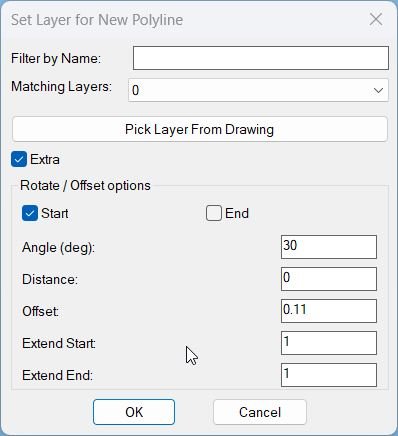
Command:
Main command: CopySelection
Alias: CSEL
Description:
📍 The user first selects one or more supported curves and then specifies two points that define the source segment to duplicate.
🎯 The curve nearest the first picked point becomes the reference curve and the same picked start and end locations are projected onto every selected curve.
🧬 LINE ARC and legacy POLYLINE source geometry is converted temporarily into lightweight polyline form so the requested segment can be reconstructed.
🎛️ The new geometry can remain on the source layer or be assigned to another non Xref layer selected from a filtered layer list or picked from the drawing.
🔄 Extra mode can rotate the copied segment by a user defined angle around the selected start or end reference and move it laterally by a user defined distance.
📐 Extra 02 performs the extended and shifted workflow without rotation.
➡️ Start plus Left and End plus Right control the rotation reference and side orientation used by the transformation workflow.
📏 Extend Start and Extend End can lengthen the created lightweight polyline before the optional offset copies are generated.
📚 Offset presets include Profile_003 Profile_002 I Profile_002 II Profile_002 III Profile_002 IIIa and Profile_002 IV values together with a manually editable offset distance.
🔢 Offset Count can create up to twenty additional parallel copies.
🔗 CloseParallelPolylines can process created polylines in pairs by adding endpoint connectors and joining them through PEDIT.
➗ Create centerline polyline can generate an additional centerline between paired created polylines when the close workflow is enabled.
💾 The routine stores many last used settings with setenv and stores the DCL window position with setcfg.
Helper function: (if any)
CS:MakeTempLW converts supported source geometry into temporary lightweight polyline form.
CS:MakeGeometry reconstructs and transforms the requested segment.
CS:MakeAllGeometry applies the same operation to every selected curve.
CS:CloseParFromList closes created polyline pairs and optionally generates a centerline.
PPO-CreateCenterline contains the centerline construction logic.
LM:LWVertices and bulge helpers preserve straight and curved lightweight polyline segment geometry.
Functionalities:
✅ Multiple curve selection – supports processing several selected curves with one pair of reference points.
✅ Segment extraction – duplicates only the portion between the two projected reference points.
✅ LINE and ARC conversion – creates temporary lightweight polyline representations for supported non polyline curves.
✅ Legacy POLYLINE conversion – uses CONVERTPOLY Light on a temporary copy before segment generation.
✅ Layer filtering – filters the available non Xref drawing layers by name.
✅ Pick layer from drawing – reads the layer from a selected drawing object.
✅ Use source layer – creates each duplicated segment on its original source layer.
✅ Rotation workflow – supports user defined angular rotation in Extra mode.
✅ No rotation workflow – Extra 02 applies the transformation logic without angular rotation.
✅ Lateral movement – moves created geometry by a user defined perpendicular distance.
✅ Repeated offsets – creates multiple additional copies using the selected offset spacing.
✅ Offset presets – provides Profile_003 and cable channel related preset widths.
✅ Endpoint extension – supports independent Start and End extension distances.
✅ Parallel polyline closing – adds endpoint connectors and joins created pairs.
✅ Optional centerline – creates a centerline for paired created polylines.
✅ Apply and Undo – supports iterative generation and rollback while keeping the tool active.
✅ Model space interaction – temporarily closes the dialog so the user can pan zoom or navigate.
✅ Persistent settings – remembers layer filters transform values options and dialog position.
Result:
🎯 The result is one or more newly created lightweight polyline segments derived from the selected source curve portions.
📐 Depending on the selected options the result can also include rotated shifted extended repeated offset closed parallel and centerline geometry.
🧰 The tool is suitable for repeatable corridor utility cable protection and parallel geometry construction workflows.
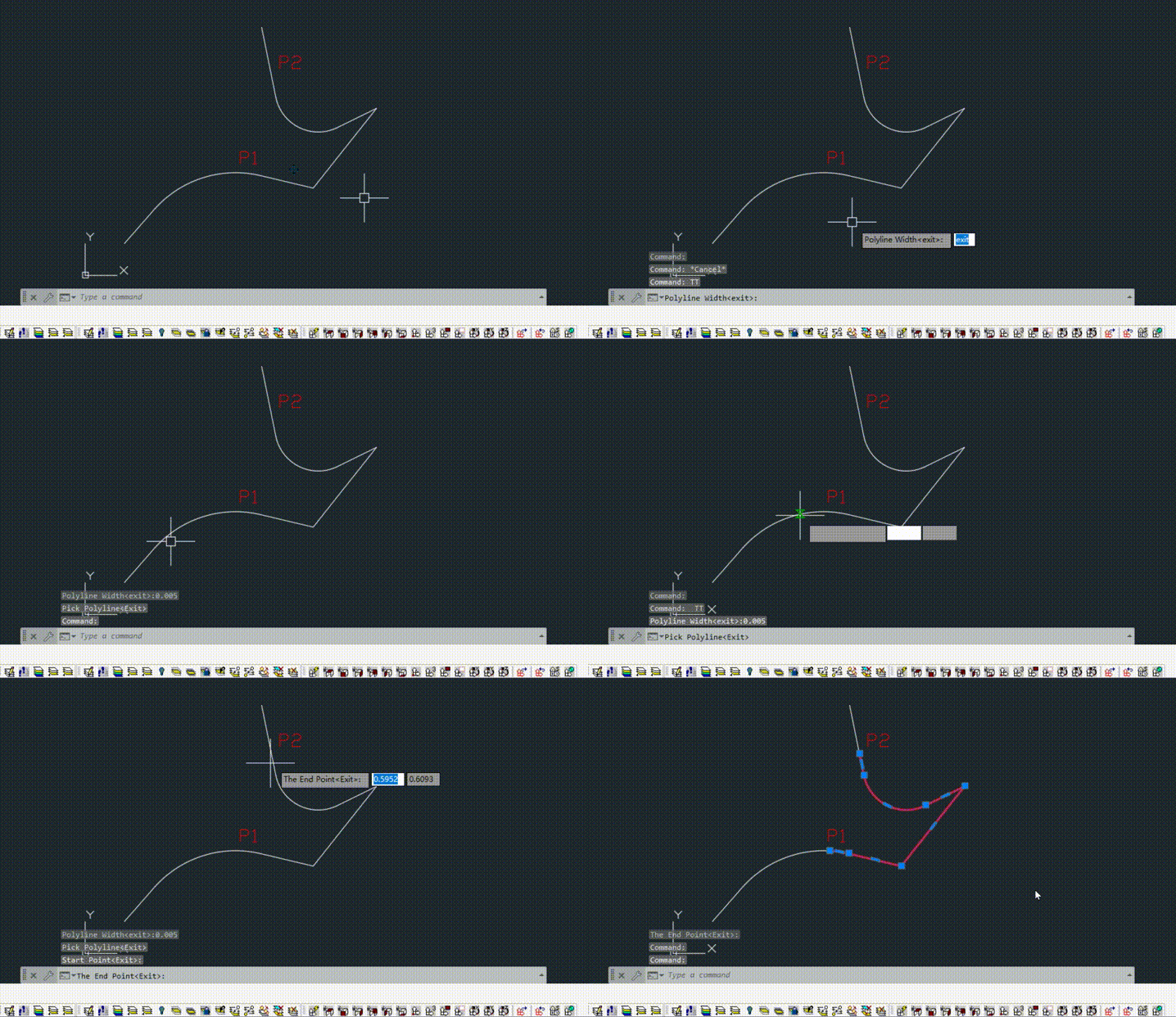
Images, animations etc.
XAML code:
<ResourceDictionary
xmlns="http://schemas.microsoft.com/winfx/2006/xaml/presentation"
xmlns:x="http://schemas.microsoft.com/winfx/2006/xaml"
xmlns:src="clr-namespace:Autodesk.Windows;assembly=AdWindows">

<src:RibbonToolTip x:Key="CopySelection">
<src:RibbonToolTip.ExpandedContent>
<StackPanel>
<TextBlock Background="AntiqueWhite" TextAlignment="Left">
<Bold>Function Syntax: CopySelection / csel</Bold>
<LineBreak/>
<Bold>Version: 1.0 Date: 30.06.2026 3:16:02PM</Bold>
<LineBreak/>
<Hyperlink>AI + https://www.theswamp.org/index.php?topic=59415.0</Hyperlink>
<LineBreak/>


<Bold><Run Foreground="DodgerBlue">Description</Run></Bold><LineBreak/>
<Run Foreground="White">🧩 CopySelection v8 is an AutoCAD and Civil 3D AutoLISP curve duplication and transformation utility for creating new polyline geometry from selected portions of one or multiple source curves.</Run><LineBreak/>
<Run Foreground="White">🎛️ Its DCL interface combines curve selection layer assignment rotation translation repeated offsets endpoint extension optional parallel closing optional centerline creation Apply Undo OK Cancel and model space interaction.</Run><LineBreak/>
<Run Foreground="White">📐 Supported source curves include LWPOLYLINE LINE ARC and legacy POLYLINE entities.</Run><LineBreak/>
<LineBreak/>
<Bold><Run Foreground="DodgerBlue">Function Syntax</Run></Bold><LineBreak/>
<Run Foreground="White">Main command: </Run><Bold><Run Foreground="Orange">CopySelection</Run></Bold><LineBreak/>
<Run Foreground="White">Alias: </Run><Bold><Run Foreground="Orange">CSEL</Run></Bold><LineBreak/>
<LineBreak/>
<Bold><Run Foreground="DodgerBlue">SEO Optimized Overview</Run></Bold><LineBreak/>
<Run Foreground="White">📍 The user first selects one or more supported curves and then specifies two points that define the source segment to duplicate.</Run><LineBreak/>
<Run Foreground="White">🎯 The curve nearest the first picked point becomes the reference curve and the same picked start and end locations are projected onto every selected curve.</Run><LineBreak/>
<Run Foreground="White">🧬 LINE ARC and legacy POLYLINE source geometry is converted temporarily into lightweight polyline form so the requested segment can be reconstructed.</Run><LineBreak/>
<Run Foreground="White">🎛️ The new geometry can remain on the source layer or be assigned to another non Xref layer selected from a filtered layer list or picked from the drawing.</Run><LineBreak/>
<Run Foreground="White">🔄 Extra mode can rotate the copied segment by a user defined angle around the selected start or end reference and move it laterally by a user defined distance.</Run><LineBreak/>
<Run Foreground="White">📐 Extra 02 performs the extended and shifted workflow without rotation.</Run><LineBreak/>
<Run Foreground="White">➡️ Start plus Left and End plus Right control the rotation reference and side orientation used by the transformation workflow.</Run><LineBreak/>
<Run Foreground="White">📏 Extend Start and Extend End can lengthen the created lightweight polyline before the optional offset copies are generated.</Run><LineBreak/>
<Run Foreground="White">📚 Offset presets include DN110 KK I KK II KK III KK IIIa and KK IV values together with a manually editable offset distance.</Run><LineBreak/>
<Run Foreground="White">🔢 Offset Count can create up to twenty additional parallel copies.</Run><LineBreak/>
<Run Foreground="White">🔗 CloseParallelPolylines can process created polylines in pairs by adding endpoint connectors and joining them through PEDIT.</Run><LineBreak/>
<Run Foreground="White">➗ Create centerline polyline can generate an additional centerline between paired created polylines when the close workflow is enabled.</Run><LineBreak/>
<Run Foreground="White">💾 The routine stores many last used settings with setenv and stores the DCL window position with setcfg.</Run><LineBreak/>
<LineBreak/>
<Bold><Run Foreground="LimeGreen">Primary Workflow</Run></Bold><LineBreak/>
<Run Foreground="White">• Run CopySelection or CSEL.</Run><LineBreak/>
<Run Foreground="White">• Click Select Curves and Points and select one or more supported source curves.</Run><LineBreak/>
<Run Foreground="White">• Specify the first and second points defining the source curve segment.</Run><LineBreak/>
<Run Foreground="White">• Choose source layer or select another target layer.</Run><LineBreak/>
<Run Foreground="White">• Configure Extra or Extra 02 rotation distance offset count start extension end extension closing and centerline options.</Run><LineBreak/>
<Run Foreground="White">• Use Apply to generate geometry and keep the dialog workflow active.</Run><LineBreak/>
<Run Foreground="White">• Use Undo to reverse the previous Apply result.</Run><LineBreak/>
<Run Foreground="White">• Use Interact to temporarily hide the dialog for pan zoom and model space navigation.</Run><LineBreak/>
<Run Foreground="White">• Use OK to create the final result and close the command.</Run><LineBreak/>
<LineBreak/>
<Bold><Run Foreground="LimeGreen">Functionalities</Run></Bold><LineBreak/>
<Run Foreground="White">✅ </Run><Bold><Run Foreground="LimeGreen">Multiple curve selection</Run></Bold><Run Foreground="White"> - supports processing several selected curves with one pair of reference points.</Run><LineBreak/>
<Run Foreground="White">✅ </Run><Bold><Run Foreground="LimeGreen">Segment extraction</Run></Bold><Run Foreground="White"> - duplicates only the portion between the two projected reference points.</Run><LineBreak/>
<Run Foreground="White">✅ </Run><Bold><Run Foreground="LimeGreen">LINE and ARC conversion</Run></Bold><Run Foreground="White"> - creates temporary lightweight polyline representations for supported non polyline curves.</Run><LineBreak/>
<Run Foreground="White">✅ </Run><Bold><Run Foreground="LimeGreen">Legacy POLYLINE conversion</Run></Bold><Run Foreground="White"> - uses CONVERTPOLY Light on a temporary copy before segment generation.</Run><LineBreak/>
<Run Foreground="White">✅ </Run><Bold><Run Foreground="LimeGreen">Layer filtering</Run></Bold><Run Foreground="White"> - filters the available non Xref drawing layers by name.</Run><LineBreak/>
<Run Foreground="White">✅ </Run><Bold><Run Foreground="LimeGreen">Pick layer from drawing</Run></Bold><Run Foreground="White"> - reads the layer from a selected drawing object.</Run><LineBreak/>
<Run Foreground="White">✅ </Run><Bold><Run Foreground="LimeGreen">Use source layer</Run></Bold><Run Foreground="White"> - creates each duplicated segment on its original source layer.</Run><LineBreak/>
<Run Foreground="White">✅ </Run><Bold><Run Foreground="LimeGreen">Rotation workflow</Run></Bold><Run Foreground="White"> - supports user defined angular rotation in Extra mode.</Run><LineBreak/>
<Run Foreground="White">✅ </Run><Bold><Run Foreground="LimeGreen">No rotation workflow</Run></Bold><Run Foreground="White"> - Extra 02 applies the transformation logic without angular rotation.</Run><LineBreak/>
<Run Foreground="White">✅ </Run><Bold><Run Foreground="LimeGreen">Lateral movement</Run></Bold><Run Foreground="White"> - moves created geometry by a user defined perpendicular distance.</Run><LineBreak/>
<Run Foreground="White">✅ </Run><Bold><Run Foreground="LimeGreen">Repeated offsets</Run></Bold><Run Foreground="White"> - creates multiple additional copies using the selected offset spacing.</Run><LineBreak/>
<Run Foreground="White">✅ </Run><Bold><Run Foreground="LimeGreen">Offset presets</Run></Bold><Run Foreground="White"> - provides DN and cable channel related preset widths.</Run><LineBreak/>
<Run Foreground="White">✅ </Run><Bold><Run Foreground="LimeGreen">Endpoint extension</Run></Bold><Run Foreground="White"> - supports independent Start and End extension distances.</Run><LineBreak/>
<Run Foreground="White">✅ </Run><Bold><Run Foreground="LimeGreen">Parallel polyline closing</Run></Bold><Run Foreground="White"> - adds endpoint connectors and joins created pairs.</Run><LineBreak/>
<Run Foreground="White">✅ </Run><Bold><Run Foreground="LimeGreen">Optional centerline</Run></Bold><Run Foreground="White"> - creates a centerline for paired created polylines.</Run><LineBreak/>
<Run Foreground="White">✅ </Run><Bold><Run Foreground="LimeGreen">Apply and Undo</Run></Bold><Run Foreground="White"> - supports iterative generation and rollback while keeping the tool active.</Run><LineBreak/>
<Run Foreground="White">✅ </Run><Bold><Run Foreground="LimeGreen">Model space interaction</Run></Bold><Run Foreground="White"> - temporarily closes the dialog so the user can pan zoom or navigate.</Run><LineBreak/>
<Run Foreground="White">✅ </Run><Bold><Run Foreground="LimeGreen">Persistent settings</Run></Bold><Run Foreground="White"> - remembers layer filters transform values options and dialog position.</Run><LineBreak/>
<LineBreak/>
<Bold><Run Foreground="DodgerBlue">Important Commands and Aspects</Run></Bold><LineBreak/>
<Run Foreground="White">🧩 CS:MakeTempLW converts supported source geometry into temporary lightweight polyline form.</Run><LineBreak/>
<Run Foreground="White">🧩 CS:MakeGeometry reconstructs and transforms the requested segment.</Run><LineBreak/>
<Run Foreground="White">🧩 CS:MakeAllGeometry applies the same operation to every selected curve.</Run><LineBreak/>
<Run Foreground="White">🧩 CS:CloseParFromList closes created polyline pairs and optionally generates a centerline.</Run><LineBreak/>
<Run Foreground="White">🧩 PPO-CreateCenterline contains the centerline construction logic.</Run><LineBreak/>
<Run Foreground="White">🧩 LM:LWVertices and bulge helpers preserve straight and curved lightweight polyline segment geometry.</Run><LineBreak/>
<LineBreak/>
<Bold><Run Foreground="DodgerBlue">Result</Run></Bold><LineBreak/>
<Run Foreground="White">🎯 The result is one or more newly created lightweight polyline segments derived from the selected source curve portions.</Run><LineBreak/>
<Run Foreground="White">📐 Depending on the selected options the result can also include rotated shifted extended repeated offset closed parallel and centerline geometry.</Run><LineBreak/>
<Run Foreground="White">🧰 The tool is suitable for repeatable corridor utility cable protection and parallel geometry construction workflows.</Run><LineBreak/>
<LineBreak/>
<Bold><Run Foreground="DarkRed">Important Notes</Run></Bold><LineBreak/>
<Run Foreground="White">⚠️ </Run><Bold><Run Foreground="DarkRed">Offset Count is limited to a maximum of twenty copies by the current source.</Run></Bold><LineBreak/>
<Run Foreground="White">⚠️ </Run><Bold><Run Foreground="DarkRed">CloseParallelPolylines processes created entities in pairs and only performs the close logic when both members are AcDbPolyline objects.</Run></Bold><LineBreak/>
<Run Foreground="White">⚠️ </Run><Bold><Run Foreground="DarkRed">The centerline option is used by the parallel closing workflow rather than as an independent command.</Run></Bold><LineBreak/>
<Run Foreground="White">⚠️ </Run><Bold><Run Foreground="DarkRed">The source reports CopySelection v8 when loaded.</Run></Bold><LineBreak/>
<LineBreak/>
<Bold><Run Foreground="Yellow">SEO Keywords</Run></Bold><LineBreak/>
<Run Foreground="Yellow">🏷️ AutoCAD, 🏷️ Civil 3D, 🏷️ AutoLISP, 🏷️ CopySelection, 🏷️ CSEL, 🏷️ Polyline copy, 🏷️ Curve segment copy, 🏷️ Parallel offset, 🏷️ Polyline extension, 🏷️ Polyline rotation, 🏷️ Layer assignment, 🏷️ Close parallel polylines, 🏷️ Centerline, 🏷️ DCL, 🏷️ CAD automation</Run><LineBreak/>


<Bold>Description</Bold><LineBreak/>
This AutoLISP program defines the command <Run Foreground="Red">CopySelection</Run>. It prompts the user to select a <Run Foreground="DarkRed">source LWPOLYLINE</Run> and two points on that polyline, then creates a <Run Foreground="DarkRed">new polyline segment</Run> corresponding to the portion between those two points. A DCL dialog lets the user choose the destination layer and optional geometry transformations, including <Run Foreground="DarkRed">extend</Run>, <Run Foreground="DarkRed">rotate</Run>, <Run Foreground="DarkRed">move</Run>, <Run Foreground="DarkRed">parallel offsets</Run>, and an optional post-process to <Run Foreground="DarkRed">close parallel polylines</Run> (and optionally generate a <Run Foreground="DarkRed">centerline</Run>). The dialog supports <Run Foreground="Red">Apply</Run> and <Run Foreground="Red">Undo</Run> actions for iterative creation, and persists settings between runs via <Run Foreground="DarkRed">environment variables</Run>.<LineBreak/>
<Bold>Primary user workflow</Bold><LineBreak/>
- The user runs <Run Foreground="Red">CopySelection</Run>.<LineBreak/>
- The user selects a <Run Foreground="DarkRed">source LWPolyline</Run> in the drawing.<LineBreak/>
- The user specifies a <Run Foreground="DarkRed">first point</Run> and a <Run Foreground="DarkRed">second point</Run>; both are projected to the nearest points on the source polyline so the two points define a polyline segment by station along the curve.<LineBreak/>
- A dialog opens titled Set Layer for New Polyline, allowing configuration of layer and optional extra operations.<LineBreak/>
- The user can:<LineBreak/>
  - Click <Run Foreground="Red">Apply</Run> to generate geometry and keep the dialog open for further iterations.<LineBreak/>
  - Click <Run Foreground="Red">Undo</Run> to undo the last Apply step.<LineBreak/>
  - Click <Run Foreground="Red">OK</Run> to generate geometry once and close the dialog.<LineBreak/>
  - Click <Run Foreground="Red">Cancel</Run> to exit without further changes.<LineBreak/>
<Bold>What the routine creates</Bold><LineBreak/>
- A new entity of type <Run Foreground="DarkRed">LWPOLYLINE</Run> representing the portion of the selected source polyline between the two chosen points.<LineBreak/>
- Optionally, additional parallel copies of that new polyline can be created based on offset settings, with a capped count to avoid excessive output.<LineBreak/>
- Optionally, if CloseParallelPolylines is enabled, the routine may add connecting lines and then join objects to form a closed-like boundary from pairs of created polylines, and optionally generate a centerline between each parallel pair.<LineBreak/>
<Bold>Key functionalities</Bold><LineBreak/>
• <Run Foreground="DarkRed">Extract a sub-segment from an LWPolyline</Run>:<LineBreak/>
  - Uses curve parameters at the nearest points to isolate the vertex range between point P and point Q.<LineBreak/>
  - Preserves bulge information and widths by reconstructing the polyline vertex list between the parametric stations.<LineBreak/>
  - Builds a new LWPOLYLINE with <Run Foreground="Red">entmakex</Run>, and places it on the selected destination layer.<LineBreak/>
• <Run Foreground="DarkRed">Layer selection with filtering</Run>:<LineBreak/>
  - Builds a list of all non-xref-dependent layers (layers without the pipe character).<LineBreak/>
  - Provides a filter edit box and a popup list of matching layers.<LineBreak/>
  - Provides <Run Foreground="Red">Pick Layer From Drawing</Run> to read the layer of a selected object and reuse it as the chosen layer.<LineBreak/>
  - Provides <Run Foreground="DarkRed">Use Source Layer</Run> to force output to the layer of the selected source polyline and disable layer selection controls.<LineBreak/>
• <Run Foreground="DarkRed">Extra geometry processing</Run> controlled by the <Run Foreground="Red">Extra</Run> toggle:<LineBreak/>
  - <Run Foreground="DarkRed">Extend start and end</Run> for the new LWPOLYLINE using a bulge-aware polyline extension routine.<LineBreak/>
  - <Run Foreground="DarkRed">Rotate</Run> the new polyline around either the start or end point, by an angle in degrees.<LineBreak/>
  - <Run Foreground="DarkRed">Translate</Run> the polyline perpendicular to its direction (left or right) by a distance value.<LineBreak/>
  - <Run Foreground="DarkRed">Create multiple parallel copies</Run> by repeatedly copying and moving the entity by the offset step, up to an enforced limit.<LineBreak/>
• <Run Foreground="DarkRed">Offset presets</Run> via popup list:<LineBreak/>
  - Selecting a preset updates the Offset edit box to a predefined numeric value, allowing quick standard spacing selection.<LineBreak/>
• <Run Foreground="DarkRed">Apply / Undo iterative loop</Run>:<LineBreak/>
  - <Run Foreground="Red">Apply</Run> creates geometry once, regenerates the drawing, optionally runs parallel closing, then reopens the dialog for continued work.<LineBreak/>
  - <Run Foreground="Red">Undo</Run> executes UNDO Back to revert the last created geometry step.<LineBreak/>
• <Run Foreground="DarkRed">Close parallel polylines and optional centerline</Run>:<LineBreak/>
  - When enabled, created entities are processed in pairs: for each pair of open polylines, the routine can optionally create a centerline, then connects corresponding endpoints with two new LINE entities and uses <Run Foreground="Red">PEDIT</Run> multiple join to form one joined object.<LineBreak/>
  - Centerline generation uses loft and intersect operations and may use Express Tools flattening when available, otherwise it falls back to a move-flatten method.<LineBreak/>
<Bold>Dialog controls and what they affect</Bold><LineBreak/>
- <Run Foreground="Red">Filter by Name</Run>: filters the layer list by wildcard matching.<LineBreak/>
- <Run Foreground="Red">Matching Layers</Run>: popup list used to select the output layer (disabled if Use Source Layer is enabled).<LineBreak/>
- <Run Foreground="Red">Use Source Layer</Run>: forces layername to the source polyline layer and disables manual layer selection and pick-layer button.<LineBreak/>
- <Run Foreground="Red">Pick Layer From Drawing</Run>: temporarily closes the dialog so the user can click an entity; its layer becomes the selected layer for next dialog cycle.<LineBreak/>
- <Run Foreground="Red">Extra</Run>: enables or disables all rotate, move, extend, offset, and closing options as a group.<LineBreak/>
- Rotate group:<LineBreak/>
  - <Run Foreground="Red">Start</Run> or <Run Foreground="Red">End</Run>: sets the rotation base point (P or Q).<LineBreak/>
  - <Run Foreground="Red">Angle (deg)</Run>: rotation angle applied to the new entity.<LineBreak/>
- Side group:<LineBreak/>
  - <Run Foreground="Red">Left</Run> or <Run Foreground="Red">Right</Run>: controls direction of perpendicular translation and direction of repeated offsets.<LineBreak/>
  - <Run Foreground="Red">Distance</Run>: translation magnitude perpendicular to the polyline direction.<LineBreak/>
- Offset group:<LineBreak/>
  - <Run Foreground="Red">Offset</Run>: spacing step for additional copies of the new polyline.<LineBreak/>
  - <Run Foreground="Red">Offset Count</Run>: number of additional copies to create, constrained to a maximum of 20.<LineBreak/>
  - <Run Foreground="Red">Offsettype</Run>: preset selector that writes predefined values into Offset.<LineBreak/>
- Extension group:<LineBreak/>
  - <Run Foreground="Red">Extend Start</Run>, <Run Foreground="Red">Extend End</Run>: applies bulge-aware extension to the created polyline.<LineBreak/>
- Closing and centerline group:<LineBreak/>
  - <Run Foreground="Red">CloseParallelPolylines</Run>: triggers the post-process that connects endpoints and joins objects.<LineBreak/>
  - <Run Foreground="Red">Create centerline polyline</Run>: controls whether a centerline is attempted between each pair of parallels when closing is enabled.<LineBreak/>
- Action buttons:<LineBreak/>
  - <Run Foreground="Red">Apply</Run>: create now, keep dialog open.<LineBreak/>
  - <Run Foreground="Red">Undo</Run>: undo last Apply step.<LineBreak/>
  - <Run Foreground="Red">OK</Run>: create once and exit.<LineBreak/>
  - <Run Foreground="Red">Cancel</Run>: exit without creating further geometry.<LineBreak/>
<Bold>Persistence and defaults</Bold><LineBreak/>
- Settings are persisted using <Run Foreground="DarkRed">setenv</Run> and restored using <Run Foreground="DarkRed">getenv</Run> under keys such as:<LineBreak/>
  - <Run Foreground="DarkRed">PLDUPE_LastLayer</Run>, <Run Foreground="DarkRed">PLDUPE_LastFilter</Run>, <Run Foreground="DarkRed">PLDUPE_UseSourceLayer</Run>.<LineBreak/>
  - <Run Foreground="DarkRed">PLDUPE_LastAngle</Run>, <Run Foreground="DarkRed">PLDUPE_LastDistance</Run>, <Run Foreground="DarkRed">PLDUPE_LastOffset</Run>, <Run Foreground="DarkRed">PLDUPE_LastOffCount</Run>.<LineBreak/>
  - <Run Foreground="DarkRed">PLDUPE_LastExtS</Run>, <Run Foreground="DarkRed">PLDUPE_LastExtE</Run>, <Run Foreground="DarkRed">PLDUPE_LastExtra</Run>.<LineBreak/>
  - <Run Foreground="DarkRed">PLDUPE_LastRot</Run>, <Run Foreground="DarkRed">PLDUPE_LastSide</Run>, <Run Foreground="DarkRed">PLDUPE_CloseParallel</Run>, <Run Foreground="DarkRed">PLDUPE_Centerline</Run>.<LineBreak/>
- Centerline option also references a global default variable <Run Foreground="DarkRed">*PPO_Centerline*</Run>, defaulting to true if not previously defined or persisted as disabled.<LineBreak/>
<Bold>Important commands and internal functions</Bold><LineBreak/>
- Command entry point: <Run Foreground="Red">c:CopySelection</Run>.<LineBreak/>
- Geometry creation core: <Run Foreground="Red">CS:MakeGeometry</Run> which constructs the new polyline and optional extra transformations and offsets.<LineBreak/>
- Bulge-aware extension for LWPOLYLINE: <Run Foreground="Red">CS:ExtendEntity</Run> calling <Run Foreground="Red">LM:dex:extendpoly</Run> and <Run Foreground="Red">LM:lwvertices</Run>.<LineBreak/>
- Close-parallel post-process: <Run Foreground="Red">CS:CloseParFromList</Run> which optionally calls <Run Foreground="Red">PPO-CreateCenterline</Run> and then performs PEDIT join operations.<LineBreak/>
- Centerline generator: <Run Foreground="DarkRed">PPO-CreateCenterline</Run> uses AutoCAD commands <Run Foreground="Red">OFFSET</Run>, <Run Foreground="Red">MOVE</Run>, <Run Foreground="Red">LOFT</Run>, <Run Foreground="Red">INTERSECT</Run>, and <Run Foreground="Red">JOIN</Run> and may rely on Express Tools for flattening.<LineBreak/>
- Dialog helpers: <Run Foreground="Red">update-layer-list</Run>, <Run Foreground="Red">CS:read-values</Run>, <Run Foreground="Red">set-extra-mode</Run>, <Run Foreground="Red">CS:set-layer-mode</Run>.<LineBreak/>
<Bold>Notable constraints and validations</Bold><LineBreak/>
- The routine requires the selected object to be <Run Foreground="DarkRed">LWPOLYLINE</Run>; otherwise it exits immediately after selection validation.<LineBreak/>
- The two points must be distinct when projected onto the curve; otherwise the user is re-prompted until they are different.<LineBreak/>
- Offset Count is clamped to the range <Run Foreground="DarkRed">0 to 20</Run> to limit the number of generated copies.<LineBreak/>
- Centerline creation has strict checks for UCS, view direction, AutoCAD version, and polyline elevation and normal; if checks fail, centerline is skipped while the rest of the workflow can continue.<LineBreak/>
- The closing operation is wrapped in <Run Foreground="DarkRed">vl-catch-all-apply</Run> so failures do not terminate the main dialog loop; instead a warning is printed.<LineBreak/>


</TextBlock>

<Grid>
<Image Source="Image_000.jpg" Stretch="Uniform"/>
</Grid>

<Grid>
<MediaElement
 Source="Animation_000.gif"
 Stretch="Uniform"
 Visibility="Visible"/>
 </Grid>

</StackPanel>
</src:RibbonToolTip.ExpandedContent>
</src:RibbonToolTip>
</ResourceDictionary>
Leave a Reply
You must be logged in to post a comment.