
Short description
🚀 FixLineTextOverlap is an AutoCAD AutoLISP utility that cleans congested drawings by spacing overlapping vertical lines and nearby TEXT or MTEXT labels along a controlled rail. It creates readable crank-style line step-outs, repositions annotations consistently, and helps CAD users improve plan clarity without manually moving every object.
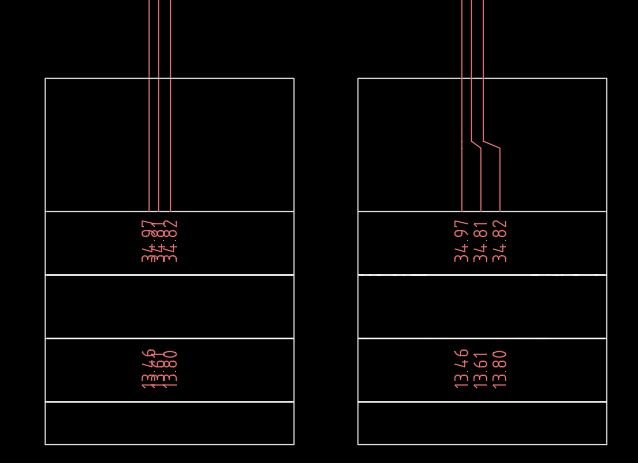
Command:
🧰 Main commands: FixLineTextOverlap, Line_Overlap, Text_Overlap, and Line_Overlap_Text_Overlap.
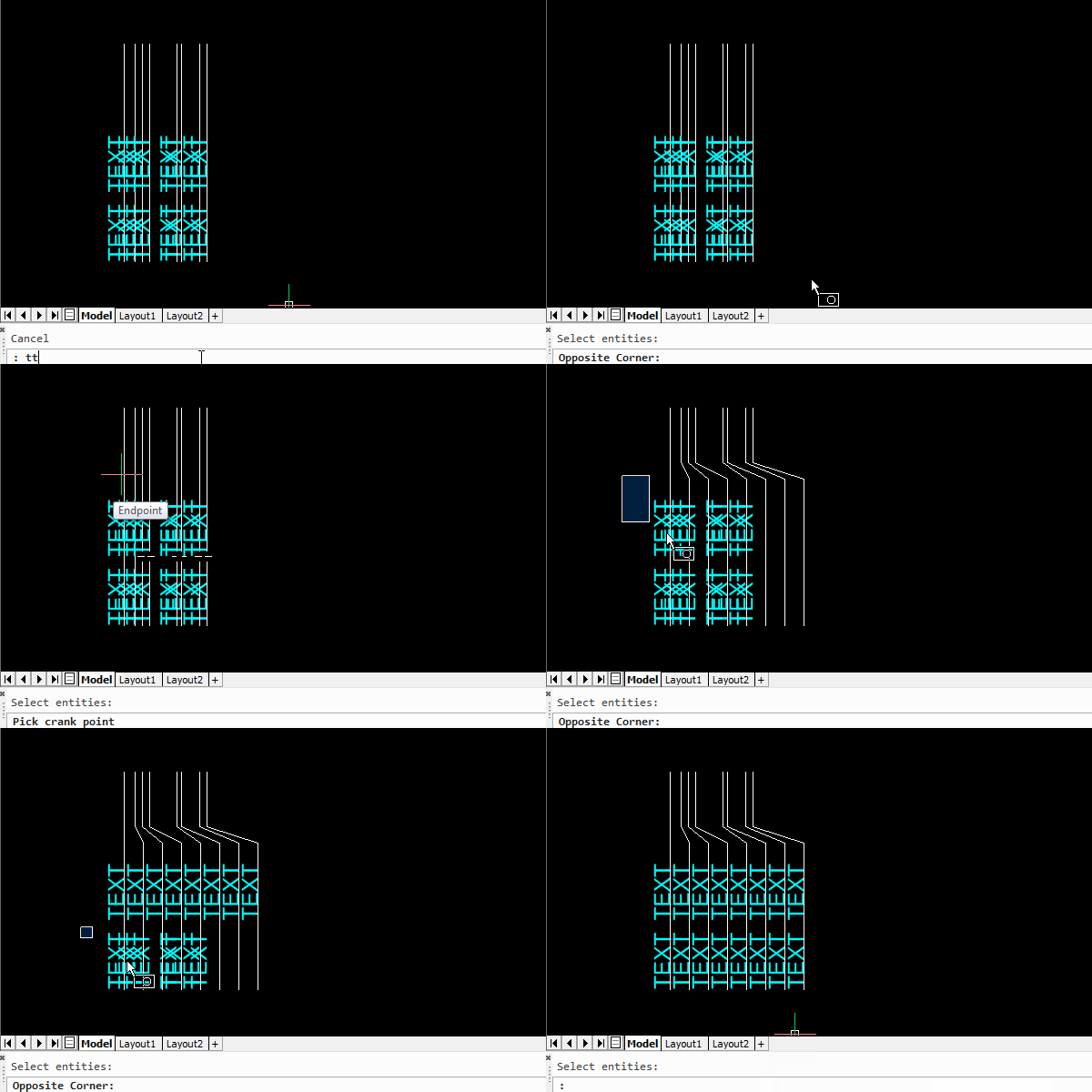
🔴 FixLineTextOverlap runs the complete workflow: first it spaces selected vertical LINE entities, then it spaces related TEXT and MTEXT using the same rail and spacing settings.
🔴 Line_Overlap spaces vertical lines along a picked crank point and replaces the original lines with clean stepped lightweight polylines.
🔴 Text_Overlap aligns and spaces TEXT and MTEXT labels along a chosen vertical rail, reusing the last rail from Line_Overlap when available.
🔴 Line_Overlap_Text_Overlap is a convenience alias that runs both operations in sequence.
Description:
📘 FixLineTextOverlap is designed for AutoCAD drawings where vertical service lines, schematic connections, utility labels, or annotation groups overlap horizontally and become difficult to read. The program arranges selected vertical LINE objects around a picked crank point, then optionally applies the same spacing logic to nearby text so the geometry and labels remain coordinated.
🔍 The workflow starts by selecting vertical LINE entities and picking a crank point. The picked point defines the reference Y level and the rail X location used for the step-out arrangement. The code calculates a default spacing from the current drawing text size, then allows the user to override it for line spacing.
🧠 After line cleanup, the text workflow can select TEXT and MTEXT entities and use the same spacing and rail position. Text is grouped by Y row, split to the left and right side of the rail, anchored at the nearest item, and stepped away in equal intervals to remove overlap while preserving row readability.
📐 For lines, the routine creates LWPOLYLINE crank geometry using entmakex, deletes the original LINE entities, and keeps the output on the source layer. For text, it updates insertion points through entmod and entupd while respecting TEXT justification and MTEXT insertion behavior.
🛡️ The tool wraps edits in an AutoCAD UNDO group so the complete line and text cleanup operation can be reverted in one step.
Helper function: (if any)
🔧 Key helper logic:
• ++rarify enforces minimum spacing between consecutive X positions while preserving order.
• getRec extracts TEXT and MTEXT insertion data and detects left or right justification.
• setIP writes updated insertion points back to TEXT or MTEXT using OCS and WCS transformation.
• group-by-y groups text by horizontal row using a tolerance based on TEXTSIZE.
• order-side identifies the nearest item to the rail and orders the remaining labels outward.
• place-side moves text in controlled spacing increments on the left or right side of the rail.
• _RunLine_Overlap_Text_Overlap runs the line cleanup and text cleanup as a combined command.
Functionalities:
🚀 Selects vertical LINE entities and creates clean crank-style LWPOLYLINE step-outs.
📏 Computes a practical default spacing from 1.25 times the current AutoCAD TEXTSIZE.
🎯 Lets the user pick a crank point that defines the Y level and rail position for spacing.
🔄 Uses shared spacing and rail memory so Text_Overlap can reuse the last Line_Overlap settings.
🧩 Groups TEXT and MTEXT by Y row to avoid mixing annotations from different horizontal bands.
📌 Splits text into left and right sides of the rail, anchors the nearest item, and steps the rest outward.
📝 Supports both TEXT and MTEXT with proper insertion point handling.
🔧 Respects TEXT justification by editing DXF point code 10 for left-justified text and code 11 for right-justified text when needed.
🌐 Uses trans to move between OCS, UCS, and WCS safely during text edits.
🧱 Preserves the source layer for created crank polylines.
↩️ Wraps edits in an AutoCAD UNDO group for fast rollback.
⚠️ Reports empty selections or unsupported cases instead of silently failing.
Result:
✅ The result is a cleaner AutoCAD drawing where overlapping vertical LINE entities are replaced by readable step-out polylines and related TEXT or MTEXT labels are spaced along a consistent vertical rail.
✅ The drawing becomes easier to read, easier to plot, and easier to review because linework and annotations no longer occupy the same horizontal positions.
Images, animations etc.
Leave a Reply
You must be logged in to post a comment.