
Short description
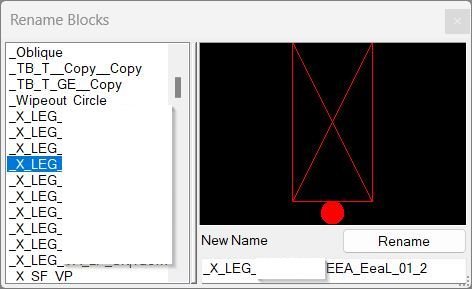
RenameBlockPreview is an AutoCAD and Civil 3D AutoLISP utility for renaming block definitions through a clean DCL dialog with live filtering, duplicate-name protection, a selected-block preview indicator, and remembered dialog settings.
Command:
RenBlocks
Description:
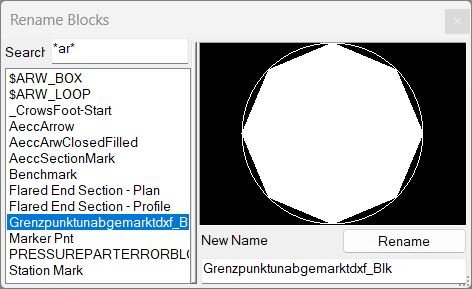
RenameBlockPreview provides a dialog-based block rename workflow for AutoCAD drawings. The command RenBlocks opens a temporary self-contained DCL interface, lists valid block definitions from the active drawing, lets the user search by partial text, select a block, enter a new name, and apply the rename safely.
The tool is designed for CAD users who manage large drawings with many reusable blocks and need a faster alternative to manual block-table inspection. It filters out anonymous blocks, xref-nested blocks, Model Space, and Paper Space records so the list focuses on real rename candidates.
The routine includes a duplicate-name guard before writing the new block name. If another block definition already uses the requested name, the rename is blocked and the user is asked to choose a different name.
Helper function: (if any)
RB:CfgGet and RB:CfgSet read and write persistent settings under AppData/RenBlocks.
RB:WriteDCL generates the temporary Rename Block DCL dialog.
RB:Keep-p filters invalid or unwanted block names.
RB:Names collects and sorts matching block definitions.
RB:Fill populates the list box.
RB:ImgClear and RB:ImgShow control the DCL image-tile selection indicator.
RB:OnSearch updates the block list when the filter changes.
RB:OnSelect writes the selected block name into the rename field.
RB:OnRename validates and applies the new block definition name.
Functionalities:
🚀 Launch the RenBlocks command to open the Rename Block DCL dialog.
🔍 Filter block names with a remembered search field.
🧱 Display only rename-ready block definitions by excluding anonymous, xref-nested, Model Space, and Paper Space records.
🟢 Show a DCL image-tile indicator when a block is selected.
✏️ Rename the selected block definition directly from the dialog.
🔒 Prevent duplicate block names before applying the rename.
🔄 Refresh the block list after a successful rename.
💾 Remember the last filter and dialog position using session variables and AutoCAD CFG storage.
🧹 Create and delete a unique temporary DCL file at runtime.
Result:
✅ The result is a faster block renaming workflow for AutoCAD and Civil 3D users. The selected block definition is renamed safely, the list refreshes after the change, and the last filter remains available for the next session.
Images, animations etc.
XAML code:
<ResourceDictionary
xmlns="http://schemas.microsoft.com/winfx/2006/xaml/presentation"
xmlns:x="http://schemas.microsoft.com/winfx/2006/xaml"
xmlns:src="clr-namespace:Autodesk.Windows;assembly=AdWindows">

<src:RibbonToolTip x:Key="RenameBlockPreview">
<src:RibbonToolTip.ExpandedContent>
<StackPanel>
<TextBlock Background="AntiqueWhite" TextAlignment="Left">
<Bold>Function Syntax: RenBlocks</Bold>
<LineBreak/>
<Bold>Version: 1.1 Date: 20.06.2026 6:38:49PM</Bold>
<LineBreak/>
<Hyperlink>https://www.theswamp.org/index.php?topic=42378.15</Hyperlink>
<LineBreak/>


<TextBlock TextWrapping="Wrap" Foreground="White" Background="Black">
<Bold><Run Foreground="DodgerBlue">🚀 Function Syntax: RenameBlockPreview</Run></Bold><LineBreak/>
<Bold><Run Foreground="DodgerBlue">Command:</Run></Bold> <Bold><Run Foreground="Orange">RenBlocks</Run></Bold><LineBreak/>
<Bold><Run Foreground="DodgerBlue">Version:</Run></Bold> <Run Foreground="White">v5 AutoLISP DCL block rename utility</Run><LineBreak/>
<Bold><Run Foreground="DodgerBlue">Description</Run></Bold><LineBreak/>
<Run Foreground="White">RenameBlockPreview is an SEO-friendly AutoCAD and Civil 3D AutoLISP utility for renaming block definitions through a clean dialog interface.</Run><LineBreak/>
<Run Foreground="White">The </Run><Bold><Run Foreground="Orange">RenBlocks</Run></Bold><Run Foreground="White"> command opens a self-contained DCL dialog where users can search, select, preview-indicate, and rename drawing blocks without manually browsing the block table.</Run><LineBreak/>
<Run Foreground="White">It is useful for CAD managers, Civil 3D production teams, drafting technicians, and AutoCAD users who manage drawings with many block definitions.</Run><LineBreak/>
<Bold><Run Foreground="LimeGreen">Functionalities</Run></Bold><LineBreak/>
<Run Foreground="White">🔍 </Run><Bold><Run Foreground="LimeGreen">Search block definitions</Run></Bold><Run Foreground="White"> - filters the block list in real time using the Search field.</Run><LineBreak/>
<Run Foreground="White">🧱 </Run><Bold><Run Foreground="LimeGreen">Clean block list</Run></Bold><Run Foreground="White"> - excludes anonymous blocks, xref-nested blocks, Model Space records, and Paper Space records.</Run><LineBreak/>
<Run Foreground="White">🟢 </Run><Bold><Run Foreground="LimeGreen">Preview indicator</Run></Bold><Run Foreground="White"> - uses a DCL image tile as a visual confirmation when a block is selected.</Run><LineBreak/>
<Run Foreground="White">✏️ </Run><Bold><Run Foreground="LimeGreen">Rename selected block</Run></Bold><Run Foreground="White"> - applies a new name to the selected block definition from the dialog.</Run><LineBreak/>
<Run Foreground="White">🔒 </Run><Bold><Run Foreground="LimeGreen">Duplicate-name protection</Run></Bold><Run Foreground="White"> - checks whether the target block name already exists before renaming.</Run><LineBreak/>
<Run Foreground="White">🔄 </Run><Bold><Run Foreground="LimeGreen">List refresh after rename</Run></Bold><Run Foreground="White"> - updates the displayed block list immediately after a successful rename.</Run><LineBreak/>
<Run Foreground="White">💾 </Run><Bold><Run Foreground="LimeGreen">Persistent filter memory</Run></Bold><Run Foreground="White"> - remembers the last search filter with session variables and AutoCAD CFG storage.</Run><LineBreak/>
<Run Foreground="White">📌 </Run><Bold><Run Foreground="LimeGreen">Dialog position memory</Run></Bold><Run Foreground="White"> - reuses saved dialog coordinates when available.</Run><LineBreak/>
<Run Foreground="White">🧹 </Run><Bold><Run Foreground="LimeGreen">Self-cleaning temporary DCL</Run></Bold><Run Foreground="White"> - writes a unique DCL file at runtime and deletes it when finished.</Run><LineBreak/>
<Bold><Run Foreground="DodgerBlue">Important Commands and Helper Functions</Run></Bold><LineBreak/>
<Run Foreground="White">• </Run><Bold><Run Foreground="Orange">RenBlocks</Run></Bold><Run Foreground="White"> - main command that launches the Rename Block dialog.</Run><LineBreak/>
<Run Foreground="White">• </Run><Bold><Run Foreground="Orange">RB:WriteDCL</Run></Bold><Run Foreground="White"> - generates the temporary DCL dialog file.</Run><LineBreak/>
<Run Foreground="White">• </Run><Bold><Run Foreground="Orange">RB:Names</Run></Bold><Run Foreground="White"> - collects and sorts matching block names.</Run><LineBreak/>
<Run Foreground="White">• </Run><Bold><Run Foreground="Orange">RB:Keep-p</Run></Bold><Run Foreground="White"> - filters anonymous, xref, model space, and paper space block records.</Run><LineBreak/>
<Run Foreground="White">• </Run><Bold><Run Foreground="Orange">RB:OnSearch</Run></Bold><Run Foreground="White"> - refreshes the list when the search field changes.</Run><LineBreak/>
<Run Foreground="White">• </Run><Bold><Run Foreground="Orange">RB:OnRename</Run></Bold><Run Foreground="White"> - validates and performs the block rename.</Run><LineBreak/>
<Bold><Run Foreground="DodgerBlue">Typical Workflow</Run></Bold><LineBreak/>
<Run Foreground="White">1. Type </Run><Bold><Run Foreground="Orange">RenBlocks</Run></Bold><Run Foreground="White"> in the AutoCAD command line.</Run><LineBreak/>
<Run Foreground="White">2. Use the Search box to filter the list of block definitions.</Run><LineBreak/>
<Run Foreground="White">3. Select a block from the list and confirm the selected-block indicator.</Run><LineBreak/>
<Run Foreground="White">4. Type the new block name in the New name field.</Run><LineBreak/>
<Run Foreground="White">5. Press Rename to apply the change and refresh the list.</Run><LineBreak/>
<Bold><Run Foreground="DarkRed">Notes and Limitations</Run></Bold><LineBreak/>
<Run Foreground="White">⚠️ This routine renames the block definition, therefore all references using that definition are affected.</Run><LineBreak/>
<Run Foreground="White">⚠️ The DCL image tile is a selected-block indicator and does not render full block geometry.</Run><LineBreak/>
<Run Foreground="White">⚠️ Anonymous blocks, xref-nested blocks, Model Space, and Paper Space records are intentionally skipped.</Run><LineBreak/>
<Run Foreground="White">⚠️ Requires AutoCAD Visual LISP ActiveX support through </Run><Bold><Run Foreground="Orange">vlax-get-acad-object</Run></Bold><Run Foreground="White"> and related functions.</Run><LineBreak/>
<Bold><Run Foreground="Gold">Tags</Run></Bold><LineBreak/>
<Run Foreground="Gold">🏷️ AutoCAD, 🏷️ AutoLISP, 🏷️ Civil 3D, 🏷️ Rename Block, 🏷️ Block Manager, 🏷️ DCL Dialog, 🏷️ CAD Productivity</Run><LineBreak/>
</TextBlock>

<Grid>
<Image Source="Image_000.jpg" Stretch="Uniform"/>
</Grid>

<Grid>
<Image Source="Image_001.jpg" Stretch="Uniform"/>
</Grid>


</TextBlock>
</StackPanel>
</src:RibbonToolTip.ExpandedContent>
</src:RibbonToolTip>
</ResourceDictionary>
Leave a Reply
You must be logged in to post a comment.