Short description
🔁 RenameBlockList is an AutoCAD AutoLISP batch block renaming utility that renames multiple block definitions from a dialog using wildcard filters, rename rules, prefix rules, suffix rules, and a preview workflow before applying changes.
Command:
RenameBlockList
Description:
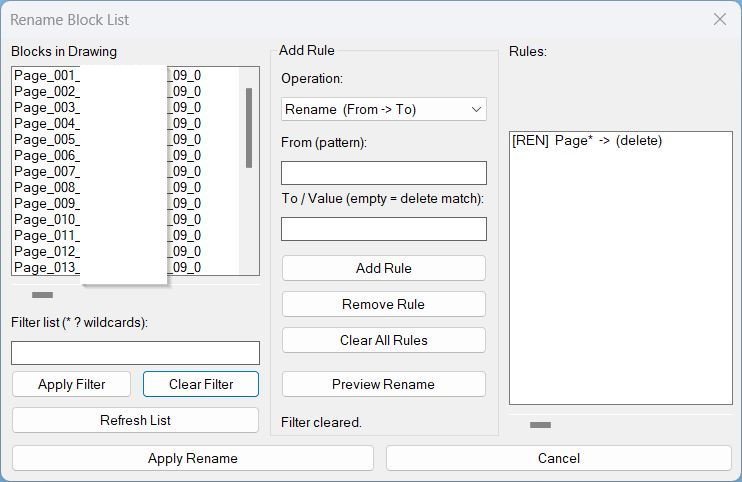
🧩 RenameBlockList provides a practical AutoCAD block management dialog for renaming many block definitions in one controlled operation. The tool scans the active drawing for editable block names, displays them in a DCL list, and lets the user filter block names with AutoCAD wildcard patterns such as * and ?.
🔍 The utility supports three rule modes: Rename, Add Prefix, and Add Suffix. Rename mode can replace matched text, remove matched text when the replacement value is empty, and correctly handles mid-string patterns such as *word*. Prefix and suffix modes add consistent naming standards to all currently visible filtered blocks.
🧠 The workflow is designed for CAD managers and production users who need to clean block naming, standardize imported block libraries, remove unwanted text fragments, or add project-specific naming prefixes and suffixes without manually renaming each block through the standard AutoCAD rename dialog.
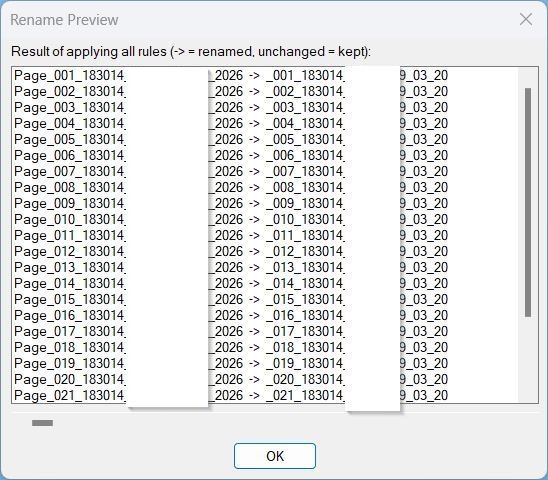
📋 Before applying changes, the Preview Rename button opens a result dialog showing the old name and the proposed new name. The final Apply Rename action works only on the filtered visible block list, which provides an extra safety layer for targeted batch updates.
Helper function: (if any)
🧰 Main helper functions include RBL:GetBlockNames for collecting valid drawing block names, RBL:FilterNames for wildcard filtering, RBL:ApplyRule for rename/prefix/suffix logic, RBL:BuildPreview for proposed rename output, RBL:RenameBlock for safe block-table renaming, RBL:ShowPreview for the preview dialog, and RBL:HScroll for horizontal list scrolling in long block names.
Functionalities:
🔁 Batch renames AutoCAD block definitions through a DCL dialog.
🔍 Filters the visible block list with wildcard patterns using * and ?.
🧩 Supports Rename, Add Prefix, and Add Suffix operations.
✂️ Allows matched text deletion by leaving the replacement value empty in Rename mode.
📋 Opens a preview dialog before applying renames.
👁️ Applies rename rules only to currently filtered visible blocks.
🧠 Preserves rule, filter, operation mode, From value, and To value during the AutoCAD session using global variables.
↔️ Includes horizontal scroll sliders for long block lists and long rule descriptions.
🛡️ Skips invalid block names and existing target names instead of overwriting them.
📊 Prints renamed and skipped counts to the AutoCAD command line after processing.
Result:
✅ The result is a cleaner and more standardized AutoCAD drawing with block definitions renamed in bulk according to user-defined rules. It is useful for CAD cleanup, block library normalization, imported DWG correction, BIM/CAD production standards, and discipline-specific block naming workflows.
Images, animations etc.
XAML code:
<ResourceDictionary
xmlns="http://schemas.microsoft.com/winfx/2006/xaml/presentation"
xmlns:x="http://schemas.microsoft.com/winfx/2006/xaml"
xmlns:src="clr-namespace:Autodesk.Windows;assembly=AdWindows">

<src:RibbonToolTip x:Key="RenameBlockList">
<src:RibbonToolTip.ExpandedContent>
<StackPanel>
<TextBlock Background="AntiqueWhite" TextAlignment="Left">
<Bold>Function Syntax: RenameBlockList</Bold>
<LineBreak/>
<Bold>Version: 1.1 Date: 20.06.2026 6:38:49PM</Bold>
<LineBreak/>
<Hyperlink>N/A</Hyperlink>
<LineBreak/>


<Bold><Run Foreground="DodgerBlue">Description</Run></Bold><LineBreak/>
<Run Foreground="White">🔁 </Run><Bold><Run Foreground="Orange">RenameBlockList</Run></Bold><Run Foreground="White"> is an AutoCAD AutoLISP batch block renaming utility for cleaning and standardizing block definition names through a visual DCL dialog.</Run><LineBreak/>
<Run Foreground="White">🧩 The tool scans the active drawing, lists editable block names, supports wildcard filtering, builds rename rules, previews proposed results, and applies changes only to the currently visible filtered block list.</Run><LineBreak/>
<Run Foreground="LimeGreen">✅ It is useful for CAD managers, Civil 3D production teams, drafting technicians, and AutoCAD users who need controlled block cleanup without manually renaming each block one by one.</Run><LineBreak/>
<LineBreak/>

<Bold><Run Foreground="DodgerBlue">Command</Run></Bold><LineBreak/>
<Run Foreground="White">🚀 Run </Run><Bold><Run Foreground="Orange">RenameBlockList</Run></Bold><Run Foreground="White"> in the AutoCAD command line to open the Rename Block List dialog.</Run><LineBreak/>
<LineBreak/>

<Bold><Run Foreground="DodgerBlue">Main Workflow</Run></Bold><LineBreak/>
<Run Foreground="White">1️⃣ The command opens a DCL dialog titled </Run><Bold><Run Foreground="Orange">Rename Block List</Run></Bold><Run Foreground="White">.</Run><LineBreak/>
<Run Foreground="White">2️⃣ The left list shows block definitions available in the drawing.</Run><LineBreak/>
<Run Foreground="White">3️⃣ The filter field narrows the list using wildcard patterns such as </Run><Bold><Run Foreground="Orange">*</Run></Bold><Run Foreground="White"> and </Run><Bold><Run Foreground="Orange">?</Run></Bold><Run Foreground="White">.</Run><LineBreak/>
<Run Foreground="White">4️⃣ The user adds rename rules using Rename, Add Prefix, or Add Suffix mode.</Run><LineBreak/>
<Run Foreground="White">5️⃣ The Preview Rename button shows the proposed old-name to new-name result before applying.</Run><LineBreak/>
<Run Foreground="White">6️⃣ Apply Rename renames only the filtered visible blocks and reports renamed and skipped counts.</Run><LineBreak/>
<LineBreak/>

<Bold><Run Foreground="LimeGreen">Functionalities</Run></Bold><LineBreak/>
<Run Foreground="White">🔍 </Run><Bold><Run Foreground="LimeGreen">Wildcard block filtering</Run></Bold><Run Foreground="White"> - quickly filters block names with AutoCAD-style </Run><Bold><Run Foreground="Orange">*</Run></Bold><Run Foreground="White"> and </Run><Bold><Run Foreground="Orange">?</Run></Bold><Run Foreground="White"> patterns.</Run><LineBreak/>
<Run Foreground="White">🔁 </Run><Bold><Run Foreground="LimeGreen">Rename rule mode</Run></Bold><Run Foreground="White"> - replaces matched text in block names and supports mid-string patterns like </Run><Bold><Run Foreground="Orange">*word*</Run></Bold><Run Foreground="White">.</Run><LineBreak/>
<Run Foreground="White">✂️ </Run><Bold><Run Foreground="LimeGreen">Delete matched text</Run></Bold><Run Foreground="White"> - leaves the replacement field empty to remove the matched text fragment from block names.</Run><LineBreak/>
<Run Foreground="White">➕ </Run><Bold><Run Foreground="LimeGreen">Add prefix</Run></Bold><Run Foreground="White"> - applies a consistent prefix to filtered block definitions.</Run><LineBreak/>
<Run Foreground="White">🏁 </Run><Bold><Run Foreground="LimeGreen">Add suffix</Run></Bold><Run Foreground="White"> - appends a consistent suffix to filtered block definitions.</Run><LineBreak/>
<Run Foreground="White">📋 </Run><Bold><Run Foreground="LimeGreen">Preview rename dialog</Run></Bold><Run Foreground="White"> - checks proposed results before changing the drawing database.</Run><LineBreak/>
<Run Foreground="White">👁️ </Run><Bold><Run Foreground="LimeGreen">Visible-only apply logic</Run></Bold><Run Foreground="White"> - applies rename rules only to blocks currently shown by the active filter.</Run><LineBreak/>
<Run Foreground="White">↔️ </Run><Bold><Run Foreground="LimeGreen">Horizontal scroll sliders</Run></Bold><Run Foreground="White"> - improves readability for long block names and long rule strings.</Run><LineBreak/>
<Run Foreground="White">💾 </Run><Bold><Run Foreground="LimeGreen">Session memory</Run></Bold><Run Foreground="White"> - keeps the last rules, filter, operation mode, From value, and To value during the current AutoCAD session.</Run><LineBreak/>
<Run Foreground="White">🛡️ </Run><Bold><Run Foreground="LimeGreen">Safe skip behavior</Run></Bold><Run Foreground="White"> - skips invalid new names and existing target block names instead of overwriting definitions.</Run><LineBreak/>
<LineBreak/>

<Bold><Run Foreground="DodgerBlue">Important AutoLISP Functions</Run></Bold><LineBreak/>
<Run Foreground="White">🧰 </Run><Bold><Run Foreground="Orange">RBL:GetBlockNames</Run></Bold><Run Foreground="White"> collects editable block names from the active drawing.</Run><LineBreak/>
<Run Foreground="White">🧰 </Run><Bold><Run Foreground="Orange">RBL:FilterNames</Run></Bold><Run Foreground="White"> filters names using wildcard logic.</Run><LineBreak/>
<Run Foreground="White">🧰 </Run><Bold><Run Foreground="Orange">RBL:ApplyRule</Run></Bold><Run Foreground="White"> calculates the proposed new block name from the selected rule.</Run><LineBreak/>
<Run Foreground="White">🧰 </Run><Bold><Run Foreground="Orange">RBL:BuildPreview</Run></Bold><Run Foreground="White"> creates old-name to new-name preview rows.</Run><LineBreak/>
<Run Foreground="White">🧰 </Run><Bold><Run Foreground="Orange">RBL:RenameBlock</Run></Bold><Run Foreground="White"> performs the final block-table rename operation.</Run><LineBreak/>
<LineBreak/>

<Bold><Run Foreground="DodgerBlue">Practical Result</Run></Bold><LineBreak/>
<Run Foreground="White">✅ RenameBlockList creates a faster AutoCAD block cleanup workflow for standardizing block libraries, correcting imported DWG block names, removing unwanted naming fragments, and applying consistent CAD naming conventions.</Run><LineBreak/>
<LineBreak/>

<Bold><Run Foreground="DarkRed">Important Note</Run></Bold><LineBreak/>
<Run Foreground="White">⚠️ This tool renames block definitions globally in the active drawing. All references using a renamed definition will use the updated block name. Create a backup before running large batch rename operations.</Run><LineBreak/>
<LineBreak/>

<Bold><Run Foreground="Yellow">Tags</Run></Bold><LineBreak/>
<Run Foreground="Yellow">🏷️ AutoCAD, 🏷️ AutoLISP, 🏷️ Civil 3D, 🏷️ Block Rename, 🏷️ Rename Block List, 🏷️ DCL Dialog, 🏷️ Wildcard Filter, 🏷️ Batch Rename, 🏷️ Prefix Suffix, 🏷️ Block Management</Run><LineBreak/>


</TextBlock>

<Grid>
<Image Source="Image_000.jpg" Stretch="Uniform"/>
</Grid>

<Grid>
<Image Source="Image_001.jpg" Stretch="Uniform"/>
</Grid>


</StackPanel>
</src:RibbonToolTip.ExpandedContent>
</src:RibbonToolTip>
</ResourceDictionary>