
Short description
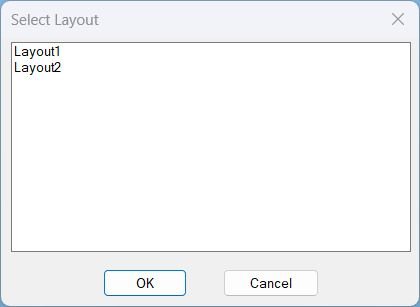
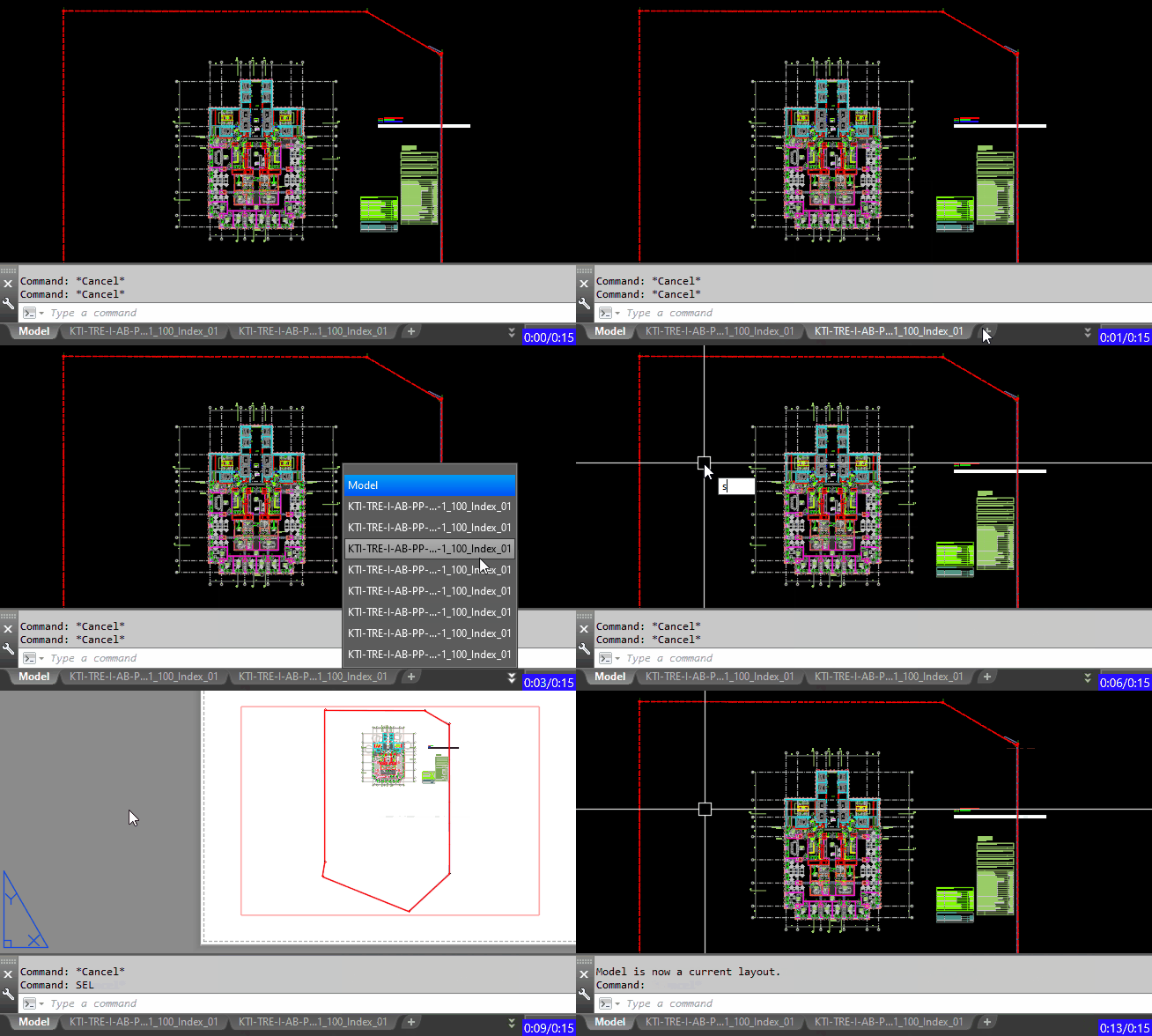
📑 SelectLayout is an AutoCAD and Civil 3D AutoLISP layout selector that displays all paper space layouts in a DCL dialog. ⚡ It helps users jump directly to the required layout tab without scrolling through many tabs manually.
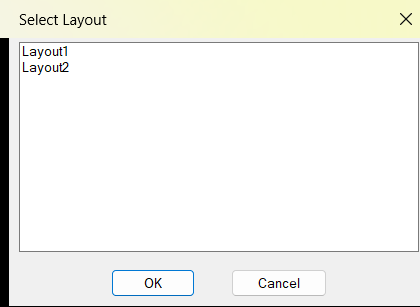
Command:
🚀 Main command: SelectLayout
🧰 Opens a DCL list of paper space layouts and switches AutoCAD to the selected layout tab.
Description:
📑 SelectLayout is an SEO-friendly AutoCAD layout navigation tool for drawings with many paper space tabs.
🧰 The command reads the Layouts collection, excludes Model, builds a temporary DCL list box, and lets the user select one layout by name.
🚀 After confirmation, the routine runs AutoCAD layout switching logic to make the selected layout current.
🎯 This is useful for Civil 3D sheet sets, large drawing packages, layout-heavy DWG files, and fast paper space navigation.
Helper function: (if any)
🧩 vla-get-Layouts reads the layouts collection from the active document.
🧩 vlax-for collects layout names while skipping Model space.
🧩 vl-filename-mktemp creates the temporary DCL dialog file.
🧩 start_list and add_list populate the layout list box.
🧩 action_tile captures the selected layout when OK is pressed.
Functionalities:
✅ 📑 List all paper space layouts in a compact dialog.
✅ 🚫 Exclude Model space from the selectable tab list.
✅ 🖱️ Let the user pick a layout by name instead of scrolling tabs.
✅ 🔄 Switch the current drawing to the selected layout.
✅ 🧹 Create the interface dynamically without needing a separate DCL file.
Result:
🎯 The result is faster layout navigation in AutoCAD and Civil 3D drawings.
📑 Users can jump to a required layout tab directly, which is especially helpful in drawings with many sheets or long tab names.
✅ SelectLayout improves CAD productivity by reducing manual tab searching.
Images, animations etc.
XAML code:
<ResourceDictionary
    xmlns="http://schemas.microsoft.com/winfx/2006/xaml/presentation"
    xmlns:x="http://schemas.microsoft.com/winfx/2006/xaml"
    xmlns:src="clr-namespace:Autodesk.Windows;assembly=AdWindows">

    <src:RibbonToolTip x:Key="SelectLayout">
        <src:RibbonToolTip.ExpandedContent>
            <StackPanel>
                <TextBlock Background="AntiqueWhite" TextAlignment="Left">
				<Bold>Function Syntax: SelectLayout</Bold>
<LineBreak/>
<Bold>Version: 1.0 Date: 20.06.2026 6:38:55PM</Bold>
				<LineBreak/>
				<Hyperlink>AI + https://autolisps.blogspot.com/p/easyselectlayout.html</Hyperlink>
				<LineBreak/>

<Bold><Run Foreground="DodgerBlue">🚀 Command Name</Run></Bold><LineBreak/>
<Run Foreground="White">🧩 Type </Run><Bold><Run Foreground="Orange">SelectLayout</Run></Bold><Run Foreground="White"> at the AutoCAD command line.</Run><LineBreak/>
<Bold><Run Foreground="DodgerBlue">🧭 SEO Optimized Description</Run></Bold><LineBreak/>
<Run Foreground="White">📑 SelectLayout is an SEO-friendly AutoCAD layout navigation tool for drawings with many paper space tabs.</Run><LineBreak/>
<Run Foreground="White">🧰 The command reads the Layouts collection, excludes Model, builds a temporary DCL list box, and lets the user select one layout by name.</Run><LineBreak/>
<Run Foreground="White">🚀 After confirmation, the routine runs AutoCAD layout switching logic to make the selected layout current.</Run><LineBreak/>
<Run Foreground="White">🎯 This is useful for Civil 3D sheet sets, large drawing packages, layout-heavy DWG files, and fast paper space navigation.</Run><LineBreak/>
<Bold><Run Foreground="LimeGreen">🧰 Main Workflow</Run></Bold><LineBreak/>
<Run Foreground="White">1️⃣ Run SelectLayout.</Run><LineBreak/>
<Run Foreground="White">2️⃣ Pick a paper space layout from the DCL list.</Run><LineBreak/>
<Run Foreground="White">3️⃣ Press OK to switch the active drawing to that layout tab.</Run><LineBreak/>
<Bold><Run Foreground="LimeGreen">✅ Functionalities</Run></Bold><LineBreak/>
<Run Foreground="White">✅ 📑 List all paper space layouts in a compact dialog.</Run><LineBreak/>
<Run Foreground="White">✅ 🚫 Exclude Model space from the selectable tab list.</Run><LineBreak/>
<Run Foreground="White">✅ 🖱️ Let the user pick a layout by name instead of scrolling tabs.</Run><LineBreak/>
<Run Foreground="White">✅ 🔄 Switch the current drawing to the selected layout.</Run><LineBreak/>
<Run Foreground="White">✅ 🧹 Create the interface dynamically without needing a separate DCL file.</Run><LineBreak/>
<Bold><Run Foreground="DodgerBlue">🧩 Important Commands and Helper Functions</Run></Bold><LineBreak/>
<Run Foreground="White">🧩 vla-get-Layouts reads the layouts collection from the active document.</Run><LineBreak/>
<Run Foreground="White">🧩 vlax-for collects layout names while skipping Model space.</Run><LineBreak/>
<Run Foreground="White">🧩 vl-filename-mktemp creates the temporary DCL dialog file.</Run><LineBreak/>
<Run Foreground="White">🧩 start_list and add_list populate the layout list box.</Run><LineBreak/>
<Run Foreground="White">🧩 action_tile captures the selected layout when OK is pressed.</Run><LineBreak/>
<Bold><Run Foreground="DodgerBlue">🎯 Practical Result</Run></Bold><LineBreak/>
<Run Foreground="White">🎯 The result is faster layout navigation in AutoCAD and Civil 3D drawings.</Run><LineBreak/>
<Run Foreground="White">📑 Users can jump to a required layout tab directly, which is especially helpful in drawings with many sheets or long tab names.</Run><LineBreak/>
<Run Foreground="White">✅ SelectLayout improves CAD productivity by reducing manual tab searching.</Run><LineBreak/>
<Bold><Run Foreground="DarkRed">⚠️ Important Notes</Run></Bold><LineBreak/>
<Run Foreground="White">⚠️ The routine depends on Visual LISP ActiveX access to read the Layouts collection.</Run><LineBreak/>
<Run Foreground="White">⚠️ The command switches the active layout but does not modify layout content.</Run><LineBreak/>
<Run Foreground="White">⚠️ If the DCL file cannot be loaded, the routine alerts the user and stops.</Run><LineBreak/>
<Bold><Run Foreground="Yellow">🏷️ Tags</Run></Bold><LineBreak/>
<Run Foreground="Yellow">🏷️ AutoCAD, 🏷️ Civil 3D, 🏷️ AutoLISP, 🏷️ Visual LISP, 🏷️ Layout Selector, 🏷️ Layout Tabs, 🏷️ Paper Space, 🏷️ DCL Dialog, 🏷️ CAD Navigation, 🏷️ Sheet Navigation, 🏷️ SelectLayout, 🏷️ Layout Manager, 🏷️ CAD Productivity</Run><LineBreak/>


</TextBlock>

<Grid>
<Image Source="Image_000.png" Stretch="Uniform"/>
</Grid>

<Grid>
<Image Source="Image_001.jpg" Stretch="Uniform"/>
</Grid>

<Grid>
<MediaElement
 Source="Animation_000.gif"
 Stretch="Uniform"
 Visibility="Visible"/>
 </Grid>

</TextBlock>

                <!-- Use MediaElement for GIF (static first frame) and Image as fallback -->
</StackPanel>
        </src:RibbonToolTip.ExpandedContent>
    </src:RibbonToolTip>
</ResourceDictionary>
Leave a Reply
You must be logged in to post a comment.