
Short description
🚀 InsertBlockFilterScale is an AutoCAD and Civil 3D AutoLISP block insertion utility that helps users quickly filter, preview, copy, and insert existing block definitions from the active DWG.
It provides a DCL-based block browser with wildcard filtering, multi-select insertion, scale control, rotation control, block preview, and saved user settings for faster CAD drafting workflows.
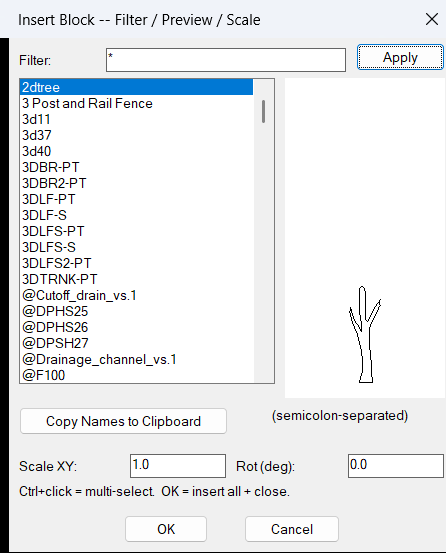
Command:
🧰 Load the LISP file with APPLOAD or another AutoCAD AutoLISP loading method, then run InsertBlockFilterScale.
The implemented command function is c:InsertBlockFilterScale.
The diagnostic command is IBB-DEBUG, implemented as c:IBB-DEBUG, and it prints the internal debug log to the AutoCAD command line.
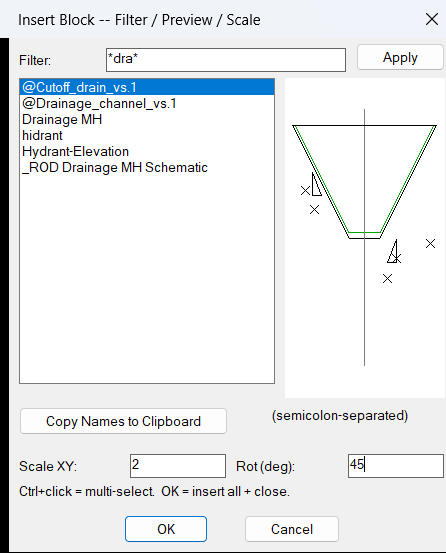
The command opens a generated DCL dialog named ibb_dlg with a filter field, block list, image preview, copy button, scale input, and rotation input.
Target platform: AutoCAD and Civil 3D with Visual LISP COM support through vl-load-com.
Description:
📘 InsertBlockFilterScale scans the active drawing block table and lists available block definitions that can be inserted into the drawing.
The tool excludes anonymous block names, xref block definitions, and externally referenced block names containing a pipe character, so the user works mainly with normal local block definitions.
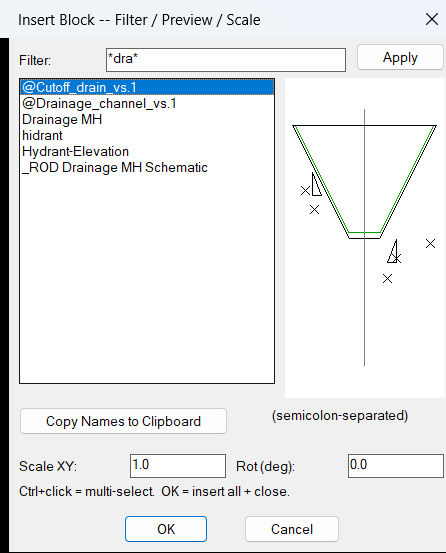
The user can type a block-name filter, select one or multiple block names, preview the selected block definition, define an XY scale, define a rotation angle in degrees, and insert the selected blocks by picking insertion points in the drawing.
The block preview is drawn directly in the DCL image tile using simplified vector geometry from the block definition, with layer color resolution for ByLayer entities and a visible fallback for ByBlock entities.
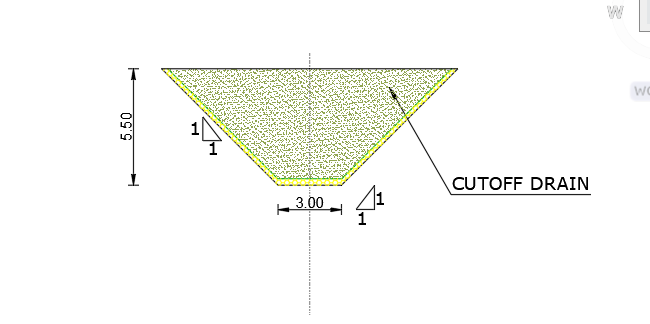
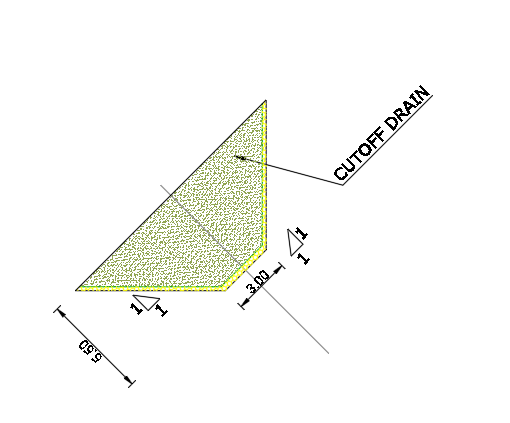
When the user inserts a block, the routine transforms the picked UCS point into WCS, adjusts the rotation by the current UCS direction, and inserts the block into model space with vla-insertblock.
This makes the utility useful for AutoCAD block libraries, Civil 3D production drawings, title block drafting, detail insertion, standard symbol placement, CAD cleanup, and block management workflows.
Helper function: (if any)
- 🚀 Command entry point –
c:InsertBlockFilterScaleloads settings, builds the block list, writes the temporary DCL file, opens the dialog, and processes insert or copy actions. - 🔍 Block filter engine –
ibb:filtersupports normal text filtering, wildcard patterns with*and?, and comma-basedwcmatchOR-style filtering. - 📌 Block list collector – the routine scans
vla-get-blocksand excludes anonymous blocks, xref definitions, and pipe-named external reference blocks. - 📐 Preview bounding box builder –
ibb:block-bboxcalculates a simple preview extent from block definition geometry before drawing the tile preview. - 🎨 DCL preview renderer –
ibb:preview-block,ibb:draw-entity,ibb:map-pt, andibb:vidraw block geometry inside the DCL image tile usingstart_image,fill_image,vector_image, andend_image. - 🔢 Multi-select support –
ibb:parse-sel,ibb:sel-names-from-raw,ibb:names->str, andibb:restore-selpreserve selected block names across filter changes. - 📝 Clipboard helper –
ibb:copy-to-clipboarduses a multi-tier strategy withhtmlfileCOM, PowerShellSet-Clipboard, andclip.exefallback. - 📍 UCS-aware insertion –
ibb:do-inserttransforms the user-picked point withtrans, adjusts rotation by the current UCS angle, and inserts the block usingvla-insertblock. - 🔐 Persistent settings –
ibb:cfg-read,ibb:cfg-write, andibb:savestore the filter, scale, rotation, selected names, and dialog position inInsertBlockFilterScale.cfg. - 🧰 Debug logging –
ibb:log,ibb:log-clear,ibb:log-print, andIBB-DEBUGhelp diagnose preview, selection, clipboard, and insert behavior.
Functionalities:
- 🚀 Open a block insertion browser – launches a practical DCL interface for browsing block definitions in the active AutoCAD or Civil 3D drawing.
- 🔍 Filter block names quickly – supports text filters and wildcard search patterns to find the required block without scrolling through long block tables.
- 🧩 Preview block geometry – shows a simplified CAD-style preview of the selected block definition inside the dialog.
- 🔢 Multi-select block insertion – allows several block names to be selected and inserted in one command session.
- 📐 Scale and rotate inserted blocks – applies the user-entered XY scale and rotation angle during insertion.
- 📍 Pick insertion points interactively – prompts for a drawing point for each selected block and places each block exactly from the user workflow.
- 🧭 Respect current UCS orientation – converts the picked UCS point to WCS and adds UCS rotation to the inserted block rotation.
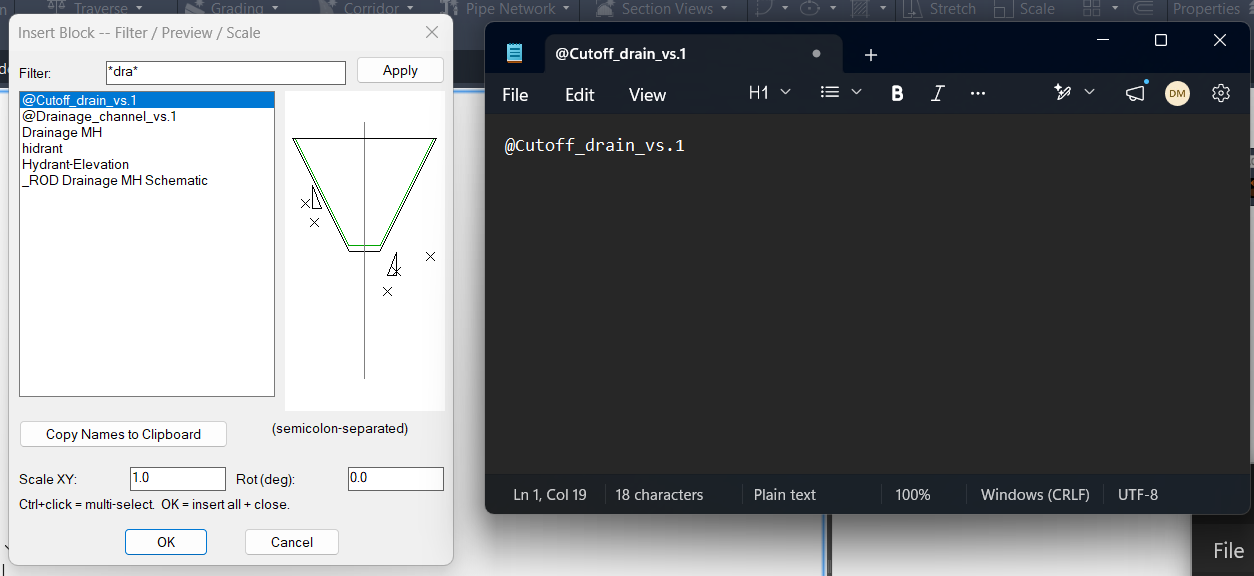
- 📋 Copy selected block names – copies selected block names to the Windows clipboard as a semicolon-separated list.
- 🔐 Remember user preferences – stores filter text, scale, rotation, selected block names, and dialog position for later sessions.
- 🧰 Print debug diagnostics – uses
IBB-DEBUGto display internal log messages for troubleshooting.
Result:
✅ The final result is a faster AutoCAD and Civil 3D block insertion workflow where users can search existing blocks, preview geometry, insert multiple symbols, apply scale and rotation, and reuse saved settings.
It reduces repetitive block browsing, improves CAD drafting productivity, supports standard block library usage, and makes DWG block insertion more controlled and efficient.
Images, animations etc.
XAML code:
<ResourceDictionary
xmlns="http://schemas.microsoft.com/winfx/2006/xaml/presentation"
xmlns:x="http://schemas.microsoft.com/winfx/2006/xaml"
xmlns:src="clr-namespace:Autodesk.Windows;assembly=AdWindows">

<src:RibbonToolTip x:Key="Test">
<src:RibbonToolTip.ExpandedContent>
<StackPanel>
<TextBlock Background="AntiqueWhite" TextAlignment="Left">
<Bold>Function Syntax: Command</Bold>
<LineBreak/>
<Bold>Version: 1.0 Date:</Bold>
<LineBreak/>
<LineBreak/>
<Hyperlink>N/A</Hyperlink>
<LineBreak/>

id: ibb7q2
short_description: |
<Bold><Run Foreground="DodgerBlue">SEO Description</Run></Bold><LineBreak/>
<Run Foreground="White">🚀 InsertBlockFilterScale is an AutoCAD and Civil 3D AutoLISP block insertion utility for filtering, previewing, copying, and inserting existing DWG block definitions.</Run><LineBreak/>
<Run Foreground="White">It provides a DCL-based block browser with wildcard filtering, multi-select support, block preview, scale input, rotation input, and persistent settings.</Run><LineBreak/>
<Run Foreground="LimeGreen">The main benefit is faster block insertion, easier CAD symbol placement, better DWG block management, and improved AutoCAD Civil 3D drafting productivity.</Run><LineBreak/>
<LineBreak/>
command: |
<Bold><Run Foreground="DodgerBlue">Main Command and Loading Method</Run></Bold><LineBreak/>
<Run Foreground="White">🧰 Load the LISP file with </Run><Bold><Run Foreground="Orange">APPLOAD</Run></Bold><Run Foreground="White"> or another AutoCAD AutoLISP loading method.</Run><LineBreak/>
<Run Foreground="White">Run </Run><Bold><Run Foreground="Orange">InsertBlockFilterScale</Run></Bold><Run Foreground="White"> to open the block filter, preview, scale, and insertion dialog.</Run><LineBreak/>
<Run Foreground="White">The implemented command function is </Run><Bold><Run Foreground="Orange">c:InsertBlockFilterScale</Run></Bold><Run Foreground="White">.</Run><LineBreak/>
<Run Foreground="White">Run </Run><Bold><Run Foreground="Orange">IBB-DEBUG</Run></Bold><Run Foreground="White"> to print the internal debug log to the AutoCAD command line.</Run><LineBreak/>
<Run Foreground="White">The target platform is AutoCAD and Civil 3D with Visual LISP COM support.</Run><LineBreak/>
<LineBreak/>
description: |
<Bold><Run Foreground="DodgerBlue">Detailed Description</Run></Bold><LineBreak/>
<Run Foreground="White">📘 This AutoLISP routine scans the active drawing block table and displays insertable local block definitions in a generated DCL dialog.</Run><LineBreak/>
<Run Foreground="White">🔍 The tool excludes anonymous blocks, external reference blocks, and pipe-named xref blocks so users work with normal local block definitions.</Run><LineBreak/>
<Run Foreground="White">🧩 The user can filter block names, select one or multiple blocks, preview the current block definition, and define a scale and rotation before insertion.</Run><LineBreak/>
<Run Foreground="White">📍 For each selected block, the routine prompts for an insertion point and inserts the block into model space using </Run><Bold><Run Foreground="Orange">vla-insertblock</Run></Bold><Run Foreground="White">.</Run><LineBreak/>
<Run Foreground="White">🧭 The command transforms the picked UCS point to WCS and adjusts the insertion rotation by the current UCS angle.</Run><LineBreak/>
<Run Foreground="LimeGreen">This is useful for AutoCAD block libraries, Civil 3D production drawings, standard symbol placement, detail insertion, CAD cleanup, and DWG drafting automation.</Run><LineBreak/>
<LineBreak/>
helper_function: |
<Bold><Run Foreground="LimeGreen">Helper Logic</Run></Bold><LineBreak/>
<Run Foreground="White">🚀 </Run><Bold><Run Foreground="LimeGreen">Command entry point</Run></Bold><Run Foreground="White"> - </Run><Bold><Run Foreground="Orange">c:InsertBlockFilterScale</Run></Bold><Run Foreground="White"> loads settings, builds the block list, writes the temporary DCL file, opens the dialog, and processes insert or copy actions.</Run><LineBreak/>
<Run Foreground="White">🔍 </Run><Bold><Run Foreground="LimeGreen">Block filter engine</Run></Bold><Run Foreground="White"> - </Run><Bold><Run Foreground="Orange">ibb:filter</Run></Bold><Run Foreground="White"> supports normal text filters, wildcard patterns with </Run><Bold><Run Foreground="Orange">*</Run></Bold><Run Foreground="White"> and </Run><Bold><Run Foreground="Orange">?</Run></Bold><Run Foreground="White">, and comma-based matching through </Run><Bold><Run Foreground="Orange">wcmatch</Run></Bold><Run Foreground="White">.</Run><LineBreak/>
<Run Foreground="White">📌 </Run><Bold><Run Foreground="LimeGreen">Block table scanner</Run></Bold><Run Foreground="White"> - the routine reads </Run><Bold><Run Foreground="Orange">vla-get-blocks</Run></Bold><Run Foreground="White"> and skips anonymous, xref, and pipe-named block definitions.</Run><LineBreak/>
<Run Foreground="White">📐 </Run><Bold><Run Foreground="LimeGreen">Preview bounding box logic</Run></Bold><Run Foreground="White"> - </Run><Bold><Run Foreground="Orange">ibb:block-bbox</Run></Bold><Run Foreground="White"> calculates preview extents from block definition entities.</Run><LineBreak/>
<Run Foreground="White">🎨 </Run><Bold><Run Foreground="LimeGreen">DCL preview renderer</Run></Bold><Run Foreground="White"> - </Run><Bold><Run Foreground="Orange">ibb:preview-block</Run></Bold><Run Foreground="White"> and </Run><Bold><Run Foreground="Orange">ibb:draw-entity</Run></Bold><Run Foreground="White"> draw simplified geometry with </Run><Bold><Run Foreground="Orange">start_image</Run></Bold><Run Foreground="White">, </Run><Bold><Run Foreground="Orange">fill_image</Run></Bold><Run Foreground="White">, </Run><Bold><Run Foreground="Orange">vector_image</Run></Bold><Run Foreground="White">, and </Run><Bold><Run Foreground="Orange">end_image</Run></Bold><Run Foreground="White">.</Run><LineBreak/>
<Run Foreground="White">🔢 </Run><Bold><Run Foreground="LimeGreen">Multi-select helpers</Run></Bold><Run Foreground="White"> - </Run><Bold><Run Foreground="Orange">ibb:parse-sel</Run></Bold><Run Foreground="White">, </Run><Bold><Run Foreground="Orange">ibb:sel-names-from-raw</Run></Bold><Run Foreground="White">, and </Run><Bold><Run Foreground="Orange">ibb:restore-sel</Run></Bold><Run Foreground="White"> preserve selected block names during filtering.</Run><LineBreak/>
<Run Foreground="White">📋 </Run><Bold><Run Foreground="LimeGreen">Clipboard helper</Run></Bold><Run Foreground="White"> - </Run><Bold><Run Foreground="Orange">ibb:copy-to-clipboard</Run></Bold><Run Foreground="White"> uses </Run><Bold><Run Foreground="Orange">htmlfile</Run></Bold><Run Foreground="White"> COM, PowerShell </Run><Bold><Run Foreground="Orange">Set-Clipboard</Run></Bold><Run Foreground="White">, and </Run><Bold><Run Foreground="Orange">clip.exe</Run></Bold><Run Foreground="White"> fallback.</Run><LineBreak/>
<Run Foreground="White">📍 </Run><Bold><Run Foreground="LimeGreen">UCS-aware insertion</Run></Bold><Run Foreground="White"> - </Run><Bold><Run Foreground="Orange">ibb:do-insert</Run></Bold><Run Foreground="White"> transforms the point with </Run><Bold><Run Foreground="Orange">trans</Run></Bold><Run Foreground="White"> and inserts the block with </Run><Bold><Run Foreground="Orange">vla-insertblock</Run></Bold><Run Foreground="White">.</Run><LineBreak/>
<Run Foreground="White">🔐 </Run><Bold><Run Foreground="LimeGreen">Settings persistence</Run></Bold><Run Foreground="White"> - </Run><Bold><Run Foreground="Orange">ibb:cfg-read</Run></Bold><Run Foreground="White">, </Run><Bold><Run Foreground="Orange">ibb:cfg-write</Run></Bold><Run Foreground="White">, and </Run><Bold><Run Foreground="Orange">ibb:save</Run></Bold><Run Foreground="White"> store filter, scale, rotation, selected names, and dialog position.</Run><LineBreak/>
<LineBreak/>
functionalities: |
<Bold><Run Foreground="LimeGreen">Functionalities</Run></Bold><LineBreak/>
<Run Foreground="White">🚀 </Run><Bold><Run Foreground="LimeGreen">Open a block browser</Run></Bold><Run Foreground="White"> - launches a compact DCL interface for searching and inserting blocks from the active drawing.</Run><LineBreak/>
<Run Foreground="White">🔍 </Run><Bold><Run Foreground="LimeGreen">Filter block names</Run></Bold><Run Foreground="White"> - quickly finds block definitions using plain text or wildcard patterns.</Run><LineBreak/>
<Run Foreground="White">🧩 </Run><Bold><Run Foreground="LimeGreen">Preview selected block</Run></Bold><Run Foreground="White"> - displays a simplified geometry preview before insertion.</Run><LineBreak/>
<Run Foreground="White">🔢 </Run><Bold><Run Foreground="LimeGreen">Insert multiple blocks</Run></Bold><Run Foreground="White"> - supports multi-select and prompts for an insertion point for each selected block name.</Run><LineBreak/>
<Run Foreground="White">📐 </Run><Bold><Run Foreground="LimeGreen">Apply scale and rotation</Run></Bold><Run Foreground="White"> - uses user-entered scale and rotation values for inserted block references.</Run><LineBreak/>
<Run Foreground="White">🧭 </Run><Bold><Run Foreground="LimeGreen">Use current UCS orientation</Run></Bold><Run Foreground="White"> - converts the picked point to WCS and accounts for UCS rotation.</Run><LineBreak/>
<Run Foreground="White">📋 </Run><Bold><Run Foreground="LimeGreen">Copy block names</Run></Bold><Run Foreground="White"> - copies selected block names to the Windows clipboard as a semicolon-separated list.</Run><LineBreak/>
<Run Foreground="White">🔐 </Run><Bold><Run Foreground="LimeGreen">Save workflow settings</Run></Bold><Run Foreground="White"> - remembers filter, scale, rotation, selected names, and dialog location.</Run><LineBreak/>
<Run Foreground="White">🧰 </Run><Bold><Run Foreground="LimeGreen">Debug diagnostics</Run></Bold><Run Foreground="White"> - prints internal log messages with </Run><Bold><Run Foreground="Orange">IBB-DEBUG</Run></Bold><Run Foreground="White">.</Run><LineBreak/>
<LineBreak/>
result: |
<Bold><Run Foreground="DodgerBlue">Final Result</Run></Bold><LineBreak/>
<Run Foreground="White">✅ The final result is a productivity-focused AutoCAD and Civil 3D block insertion tool for searching, previewing, copying, and inserting local block definitions.</Run><LineBreak/>
<Run Foreground="LimeGreen">It reduces repetitive block browsing, improves CAD symbol placement, supports DWG block library workflows, and makes drafting faster and more controlled.</Run><LineBreak/>
<LineBreak/>
additional_info: |
<Bold><Run Foreground="DarkRed">Important Notes and Limitations</Run></Bold><LineBreak/>
<Run Foreground="White">🟧 Blocks are inserted into </Run><Bold><Run Foreground="Orange">ModelSpace</Run></Bold><Run Foreground="White"> through </Run><Bold><Run Foreground="Orange">vla-get-modelspace</Run></Bold><Run Foreground="White">.</Run><LineBreak/>
<Run Foreground="White">📐 The entered scale is applied to X and Y, while Z scale is fixed at </Run><Bold><Run Foreground="Orange">1.0</Run></Bold><Run Foreground="White">.</Run><LineBreak/>
<Run Foreground="White">🔍 Anonymous blocks, xref block definitions, and pipe-named reference blocks are skipped intentionally.</Run><LineBreak/>
<Run Foreground="White">🎨 The DCL image preview is simplified and does not replace AutoCAD native graphics display.</Run><LineBreak/>
<Run Foreground="White">🏷️ The code does not include a custom block attribute editing workflow after insertion.</Run><LineBreak/>
<Run Foreground="White">🔐 Settings are stored in </Run><Bold><Run Foreground="Orange">%APPDATA%\InsertBlockFilterScale.cfg</Run></Bold><Run Foreground="White"> or the AutoCAD temp folder fallback.</Run><LineBreak/>


</TextBlock>

<Grid>
<Image Source="PNG" Stretch="Uniform"/>
</Grid>

<Grid>
<MediaElement
 Source="GIF"
 Stretch="Uniform"
 Visibility="Visible"/>
 </Grid>

</StackPanel>
</src:RibbonToolTip.ExpandedContent>
</src:RibbonToolTip>
</ResourceDictionary>