
Short description
🚀 ExplodeBlocks is an AutoCAD and Civil 3D AutoLISP utility for exploding difficult block references that standard AutoCAD EXPLODE may refuse, including protected block definitions and non-uniformly scaled blocks.
It helps CAD users convert selected INSERT block references into editable drawing geometry for cleanup, editing, coordination, and DWG production workflows.
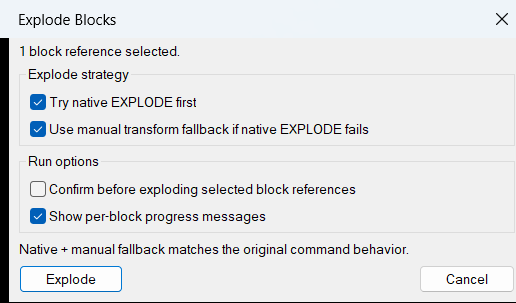
Command:
🧰 Load the LISP file with APPLOAD or another AutoCAD AutoLISP loading method, then run ExplodeBlocks.
The implemented command function is c:ExplodeBlocks.
The file header mentions XB as a command concept, but this uploaded code defines ExplodeBlocks as the actual callable command unless a separate alias is added.
The command prompts the user to select block references using ssget with an INSERT selection filter, then processes each selected block reference in sequence.
Target platform: AutoCAD and Civil 3D with Visual LISP COM support through vl-load-com.
Description:
📘 ExplodeBlocks is designed for CAD drawings where normal block explosion is blocked by settings or complicated by non-uniform scale.
The user runs ExplodeBlocks, selects one or more block references, and the LISP attempts to explode each selected object.
For standard cases, the routine temporarily enables the block definition Explodable property, runs the native AutoCAD ._EXPLODE command, then restores the original explode setting.
If the native explode attempt fails, the routine uses a manual transformation workflow: it reads the block reference insertion point, scale factors, and rotation, builds a transformation matrix, copies entities from the block definition, applies the full block transform, and deletes the original block reference.
This makes the tool useful for AutoCAD DWG cleanup, Civil 3D plan production, external reference preparation, block editing, drawing standardization, and converting protected or non-uniformly scaled blocks into direct geometry.
The routine is especially useful when users need editable geometry from block references that cannot be exploded cleanly with the standard AutoCAD command.
Helper function: (if any)
- 🚀 Command entry point –
c:ExplodeBlocksstarts the workflow, prompts for block references, counts successful and failed operations, and reports the final result. - 🔍 Block-only selection filter –
ssgetwith((0 . "INSERT"))keeps the operation focused on block references and avoids processing unrelated entities. - 🔒 Explodable property override –
_try-native-explodeopens the block definition, temporarily setsExplodableto true, runs._EXPLODE, and restores the previous setting. - 🧠 Fallback transform workflow –
_manual-explodeis used when native explode fails, especially for non-uniformly scaled block references. - 📐 Insertion matrix builder –
_blkref-matrixcreates a 4×4 transform from insertion point, X scale, Y scale, Z scale, and rotation. - 🧩 Block definition lookup –
_blkdef-from-refgets the source block table record from the selected block reference name. - 🔄 Manual object copying – the routine attempts to copy entities from the block definition and applies
vla-TransformBywithvlax-tmatrix. - 🧹 Reference cleanup – after the manual copy and transform succeeds, the original block reference is deleted with
vla-delete. - 📊 Processing feedback – the command prints per-block messages and final totals for exploded and failed block references.
Functionalities:
- 🚀 Explode hard-to-edit blocks – converts selected block references into editable AutoCAD geometry.
- 🔒 Bypass blocked explode settings – temporarily enables the block definition
Explodableproperty and restores it after the explode attempt. - 📐 Handle non-uniform block scale – uses a manual transformation fallback when AutoCAD native explode cannot handle the selected block reference.
- 🧩 Process multiple blocks – supports batch selection and processes every selected
INSERTreference in one run. - 🔄 Use native explode first – relies on AutoCAD
._EXPLODEwhen possible for normal block reference behavior. - 🧠 Fallback to copied block definition geometry – copies definition entities and transforms them into drawing coordinates if native explode fails.
- 🧹 Delete original block references – removes the original block after the manual explode replacement is created.
- 🔍 Report success and failure counts – gives the user clear command-line feedback after the batch operation.
- 📌 Support nested block workflows – can expose nested block references one level at a time depending on the contents of the block definition.
Result:
✅ The final result is a practical AutoCAD and Civil 3D block cleanup tool that helps users explode protected, difficult, or non-uniformly scaled block references into editable geometry.
It reduces manual block troubleshooting, improves DWG editing productivity, supports drawing cleanup, and helps CAD users prepare block-based drawings for editing, coordination, export, and quality control.
Images, animations etc.
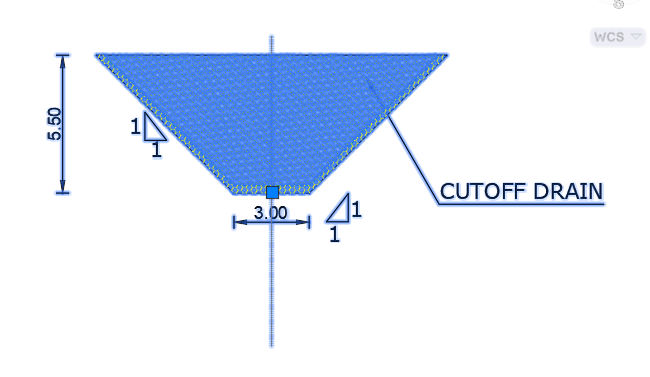
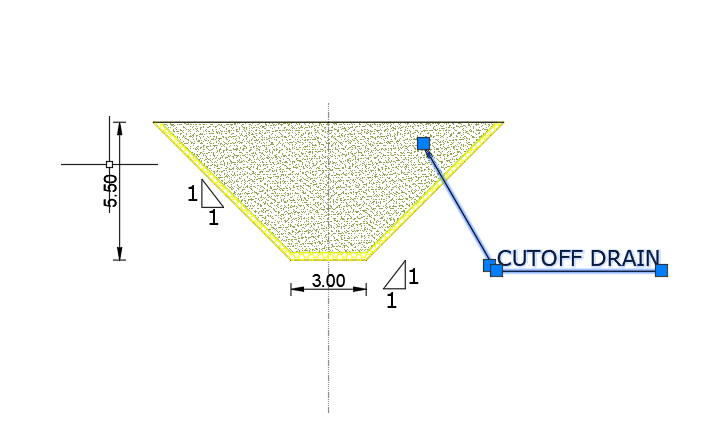
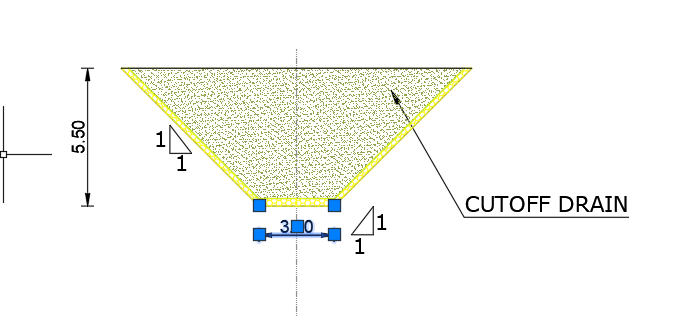
XAML code:
<ResourceDictionary
xmlns="http://schemas.microsoft.com/winfx/2006/xaml/presentation"
xmlns:x="http://schemas.microsoft.com/winfx/2006/xaml"
xmlns:src="clr-namespace:Autodesk.Windows;assembly=AdWindows">

<src:RibbonToolTip x:Key="ExplodeBlocks">
<src:RibbonToolTip.ExpandedContent>
<StackPanel>
<TextBlock Background="AntiqueWhite" TextAlignment="Left">
<Bold>Function Syntax: ExplodeBlocks</Bold>
<LineBreak/>
<Bold>Version: 1.1 Date: 27.06.2026 19:50:35</Bold>
<LineBreak/>
<Bold>Version: 1.2 Date: 20.06.2026 6:38:48PM</Bold>
<LineBreak/>
<Hyperlink>WEB</Hyperlink>
<LineBreak/>

id: xbp9e2
short_description: |
<Bold><Run Foreground="DodgerBlue">SEO Description</Run></Bold><LineBreak/>
<Run Foreground="White">🚀 ExplodeBlocks is an AutoCAD and Civil 3D AutoLISP utility for exploding difficult block references that standard AutoCAD EXPLODE may refuse.</Run><LineBreak/>
<Run Foreground="White">It targets protected block definitions, non-uniformly scaled block references, nested block workflows, and block cleanup tasks.</Run><LineBreak/>
<Run Foreground="LimeGreen">The main benefit is faster DWG cleanup, easier block editing, better CAD production control, and fewer manual explode workarounds.</Run><LineBreak/>
command: |
<Bold><Run Foreground="DodgerBlue">Main Command and Loading Method</Run></Bold><LineBreak/>
<Run Foreground="White">🧰 Load the LISP file with </Run><Bold><Run Foreground="Orange">APPLOAD</Run></Bold><Run Foreground="White"> or another AutoCAD AutoLISP loading method.</Run><LineBreak/>
<Run Foreground="White">Run </Run><Bold><Run Foreground="Orange">ExplodeBlocks</Run></Bold><Run Foreground="White"> to start the block explosion workflow.</Run><LineBreak/>
<Run Foreground="White">The implemented AutoLISP command function is </Run><Bold><Run Foreground="Orange">c:ExplodeBlocks</Run></Bold><Run Foreground="White">.</Run><LineBreak/>
<Run Foreground="White">The file header mentions </Run><Bold><Run Foreground="Orange">XB</Run></Bold><Run Foreground="White"> as a command concept, but the uploaded code does not define </Run><Bold><Run Foreground="Orange">c:XB</Run></Bold><Run Foreground="White">.</Run><LineBreak/>
<Run Foreground="White">The target platform is AutoCAD and Civil 3D with Visual LISP COM support.</Run><LineBreak/>
description: |
<Bold><Run Foreground="DodgerBlue">Detailed Description</Run></Bold><LineBreak/>
<Run Foreground="White">📘 This AutoLISP routine processes selected block references and tries to convert them into editable AutoCAD geometry.</Run><LineBreak/>
<Run Foreground="White">🔍 The user selects block references through a filtered selection set that accepts only </Run><Bold><Run Foreground="Orange">INSERT</Run></Bold><Run Foreground="White"> objects.</Run><LineBreak/>
<Run Foreground="White">🔒 For normal cases, the routine temporarily enables the block definition </Run><Bold><Run Foreground="Orange">Explodable</Run></Bold><Run Foreground="White"> property, runs native AutoCAD </Run><Bold><Run Foreground="Orange">._EXPLODE</Run></Bold><Run Foreground="White">, and restores the previous setting.</Run><LineBreak/>
<Run Foreground="White">📐 When native explode fails, the routine builds an insertion transformation from the block insertion point, rotation, and scale factors.</Run><LineBreak/>
<Run Foreground="White">🧩 It then attempts to copy entities from the block definition, transform them into drawing coordinates, and delete the original block reference.</Run><LineBreak/>
<Run Foreground="LimeGreen">This is useful for AutoCAD drawing cleanup, Civil 3D production drawings, block editing, DWG standardization, and geometry preparation.</Run><LineBreak/>
helper_function: |
<Bold><Run Foreground="LimeGreen">Helper Logic</Run></Bold><LineBreak/>
<Run Foreground="White">🚀 </Run><Bold><Run Foreground="LimeGreen">Command entry point</Run></Bold><Run Foreground="White"> - </Run><Bold><Run Foreground="Orange">c:ExplodeBlocks</Run></Bold><Run Foreground="White"> starts the workflow and processes each selected block reference.</Run><LineBreak/>
<Run Foreground="White">🔍 </Run><Bold><Run Foreground="LimeGreen">Selection filter</Run></Bold><Run Foreground="White"> - </Run><Bold><Run Foreground="Orange">ssget</Run></Bold><Run Foreground="White"> with </Run><Bold><Run Foreground="Orange">INSERT</Run></Bold><Run Foreground="White"> limits the operation to block references.</Run><LineBreak/>
<Run Foreground="White">🔒 </Run><Bold><Run Foreground="LimeGreen">Native explode helper</Run></Bold><Run Foreground="White"> - </Run><Bold><Run Foreground="Orange">_try-native-explode</Run></Bold><Run Foreground="White"> temporarily changes the block definition </Run><Bold><Run Foreground="Orange">Explodable</Run></Bold><Run Foreground="White"> property and runs </Run><Bold><Run Foreground="Orange">._EXPLODE</Run></Bold><Run Foreground="White">.</Run><LineBreak/>
<Run Foreground="White">📐 </Run><Bold><Run Foreground="LimeGreen">Matrix builder</Run></Bold><Run Foreground="White"> - </Run><Bold><Run Foreground="Orange">_blkref-matrix</Run></Bold><Run Foreground="White"> builds a 4x4 transform from insertion point, scale, and rotation.</Run><LineBreak/>
<Run Foreground="White">🧩 </Run><Bold><Run Foreground="LimeGreen">Block definition resolver</Run></Bold><Run Foreground="White"> - </Run><Bold><Run Foreground="Orange">_blkdef-from-ref</Run></Bold><Run Foreground="White"> finds the matching block definition for the selected reference.</Run><LineBreak/>
<Run Foreground="White">🔄 </Run><Bold><Run Foreground="LimeGreen">Manual fallback</Run></Bold><Run Foreground="White"> - </Run><Bold><Run Foreground="Orange">_manual-explode</Run></Bold><Run Foreground="White"> copies definition entities, applies </Run><Bold><Run Foreground="Orange">vla-TransformBy</Run></Bold><Run Foreground="White">, and deletes the original reference.</Run><LineBreak/>
<Run Foreground="White">📊 </Run><Bold><Run Foreground="LimeGreen">Batch status reporting</Run></Bold><Run Foreground="White"> - the routine prints exploded and failed counts at the end of the command.</Run><LineBreak/>
functionalities: |
<Bold><Run Foreground="LimeGreen">Functionalities</Run></Bold><LineBreak/>
<Run Foreground="White">🚀 </Run><Bold><Run Foreground="LimeGreen">Explode selected blocks</Run></Bold><Run Foreground="White"> - converts selected block references into editable AutoCAD geometry.</Run><LineBreak/>
<Run Foreground="White">🔒 </Run><Bold><Run Foreground="LimeGreen">Handle protected explode settings</Run></Bold><Run Foreground="White"> - temporarily enables blocked explode behavior on the block definition.</Run><LineBreak/>
<Run Foreground="White">📐 </Run><Bold><Run Foreground="LimeGreen">Support non-uniform scale fallback</Run></Bold><Run Foreground="White"> - uses manual transformed copies when native explode fails.</Run><LineBreak/>
<Run Foreground="White">🧩 </Run><Bold><Run Foreground="LimeGreen">Batch process multiple block references</Run></Bold><Run Foreground="White"> - processes every selected </Run><Bold><Run Foreground="Orange">INSERT</Run></Bold><Run Foreground="White"> in one run.</Run><LineBreak/>
<Run Foreground="White">🔄 </Run><Bold><Run Foreground="LimeGreen">Use native AutoCAD explode first</Run></Bold><Run Foreground="White"> - preserves the standard AutoCAD workflow where possible.</Run><LineBreak/>
<Run Foreground="White">🧹 </Run><Bold><Run Foreground="DarkRed">Delete original reference after manual fallback</Run></Bold><Run Foreground="White"> - removes the selected block reference after replacement geometry is created.</Run><LineBreak/>
<Run Foreground="White">📌 </Run><Bold><Run Foreground="LimeGreen">Support nested block cleanup</Run></Bold><Run Foreground="White"> - can expose nested blocks one level at a time depending on the block definition.</Run><LineBreak/>
<Run Foreground="White">📊 </Run><Bold><Run Foreground="LimeGreen">Report operation result</Run></Bold><Run Foreground="White"> - prints success and failure counts in the AutoCAD command line.</Run><LineBreak/>
result: |
<Bold><Run Foreground="DodgerBlue">Final Result</Run></Bold><LineBreak/>
<Run Foreground="White">✅ The final result is a productivity-focused AutoCAD and Civil 3D block explosion utility for difficult, protected, or non-uniformly scaled block references.</Run><LineBreak/>
<Run Foreground="LimeGreen">It helps reduce manual troubleshooting, improves DWG cleanup, supports faster block editing, and prepares drawing geometry for production, export, coordination, and quality control.</Run><LineBreak/>
additional_info: |
<Bold><Run Foreground="DarkRed">Important Notes and Limitations</Run></Bold><LineBreak/>
<Run Foreground="White">🔴 The manual fallback can erase the original selected block reference after copied geometry is created.</Run><LineBreak/>
<Run Foreground="White">📌 The implemented command is </Run><Bold><Run Foreground="Orange">ExplodeBlocks</Run></Bold><Run Foreground="White">, while </Run><Bold><Run Foreground="Orange">XB</Run></Bold><Run Foreground="White"> is mentioned only in the header comment.</Run><LineBreak/>
<Run Foreground="White">🟧 The manual fallback adds copied definition geometry to </Run><Bold><Run Foreground="Orange">ModelSpace</Run></Bold><Run Foreground="White">, so paper-space use should be checked carefully.</Run><LineBreak/>
<Run Foreground="White">🏷️ Attribute values may not be preserved by the manual fallback because it copies block definition entities rather than reference-specific attribute values.</Run><LineBreak/>
<Run Foreground="White">🔄 Nested blocks may require additional runs because the routine can work one level at a time.</Run><LineBreak/>
<Run Foreground="White">🧰 The code requires Visual LISP COM functions such as </Run><Bold><Run Foreground="Orange">vlax-get-acad-object</Run></Bold><Run Foreground="White">, </Run><Bold><Run Foreground="Orange">vla-TransformBy</Run></Bold><Run Foreground="White">, and </Run><Bold><Run Foreground="Orange">vlax-tmatrix</Run></Bold><Run Foreground="White">.</Run><LineBreak/>


</TextBlock>

<Grid>
<Image Source="Image_000.png" Stretch="Uniform"/>
</Grid>

<Grid>
<Image Source="Image_001.png" Stretch="Uniform"/>
</Grid>

<Grid>
<Image Source="Image_002.png" Stretch="Uniform"/>
</Grid>

<Grid>
<Image Source="Image_003.png" Stretch="Uniform"/>
</Grid>

<Grid>
<Image Source="Image_004.png" Stretch="Uniform"/>
</Grid>

</StackPanel>
</src:RibbonToolTip.ExpandedContent>
</src:RibbonToolTip>
</ResourceDictionary>