
Short description
🚀 DeleteObjectFromBlock is an AutoCAD AutoLISP and DCL utility for extracting or deleting nested objects from block definitions directly from the drawing editor. It helps CAD users clean block content, move nested geometry back to model space, and remove unwanted block definition entities faster while keeping a controlled undo workflow.
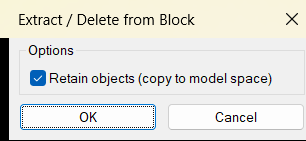
Command:
🧰 Load the LISP file with APPLOAD or by using (load "DeleteObjectFromBlock.lsp") in AutoCAD.
Run ExtractFromBlock to open the shared extraction dialog and pick nested block objects.
Run DeleteObjectFromBlock to open the same dialog and remove nested block objects from a selected block definition.
The target platform is AutoCAD and AutoCAD based vertical products using AutoLISP, Visual LISP COM, DCL dialogs, nested entity selection, and ActiveX database editing.
Description:
📘 This AutoLISP program provides a compact block cleanup workflow for AutoCAD users who need to extract or remove individual nested objects from inside a block reference without opening the Block Editor manually.
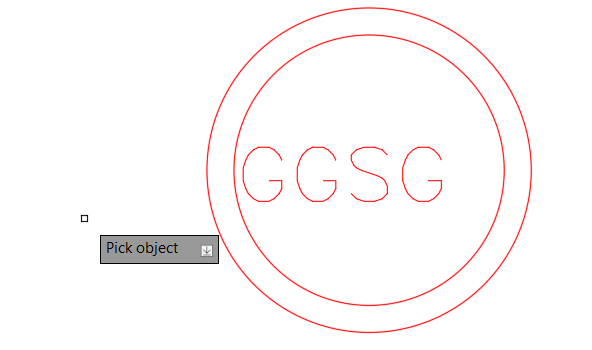
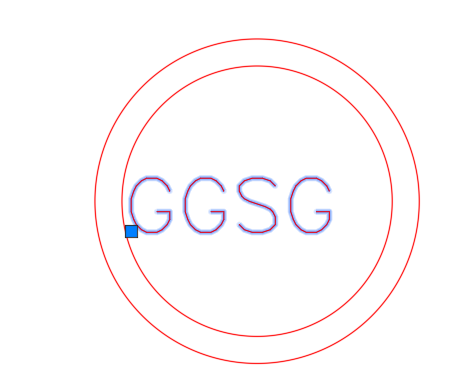
The user starts ExtractFromBlock or DeleteObjectFromBlock, chooses whether to retain objects by copying them to model space, and then picks nested geometry inside block references with nentselp.
When Retain objects is enabled, the selected nested object is copied into model space, transformed with the nested selection matrix, assigned to a cleaned local layer name, and then deleted from the source block definition.
When Retain objects is disabled, the selected nested object is deleted only from the block definition without creating a model space copy.
This tool is useful for AutoCAD block cleanup, nested object extraction, block definition editing, symbol repair, DWG maintenance, drawing simplification, and CAD production cleanup.
Important: the program edits the source block definition, so all block references that use the same definition may change after the selected nested object is removed.
Helper function: (if any)
- 🧩 Shared DCL dialog builder –
EFB:WriteDCLwrites a temporary DCL file for the extraction and delete options, so the tool can run without a permanent external DCL dependency. - 🧰 Dialog control workflow –
EFB:ShowDialogloads the generated dialog, sets Retain objects on by default, returns1for copy and remove, returns0for delete only, and returnsnilon cancel. - 🔍 Nested entity picker –
EFB:PickLoopusesnentselpso the user can pick objects inside a block reference instead of selecting only the outerINSERT. - 🔒 Block safety checks – the pick loop rejects attributes, xrefs, layout blocks, non-nested picks, and invalid nested block paths before changing the drawing.
- 📐 Matrix-based extraction –
EFB:ProcessEntityrecreates the selected nested object withentmakexand usesvla-transformbywith thenentselptransformation matrix so the copied geometry lands in the correct world position. - 🏷️ Layer cleanup logic – the code strips xref-style layer prefixes containing
|, creates a local layer when needed, and copies layer properties from the original layer when available. - 🧹 Source object removal – after extraction or delete-only processing, the original nested object is removed with
vla-Delete, which updates the block definition. - 🔄 Undo grouping and regeneration –
vla-StartUndoMark,vla-EndUndoMark, andvla-Regengroup the operation and refresh the AutoCAD viewport after each processed object.
Functionalities:
- 🚀 Extract nested block objects – copies a picked object from inside a block into model space and removes it from the block definition.
- 🔴 Delete nested block objects – removes unwanted internal block geometry without creating a copy in model space.
- 🧠 Shared command workflow –
ExtractFromBlockandDeleteObjectFromBlockuse the same dialog and pick loop for consistent behavior. - 📌 Retain objects toggle – lets the user choose between copy and remove or delete only before picking nested geometry.
- 🔍 Interactive pick loop – repeatedly asks the user to pick nested objects and ends cleanly when the user presses Enter.
- 📐 Accurate object placement – applies the nested transformation matrix so extracted geometry is placed correctly in model space.
- 🏷️ Layer preservation and cleanup – keeps extracted objects on a clean local layer and can copy color, linetype, and lineweight settings.
- 🔒 Xref and layout protection – avoids editing xref blocks and layout definitions, reducing the risk of invalid database edits.
- 🧹 Block definition cleanup – removes unnecessary internal objects from reusable blocks, helping reduce DWG clutter.
- 🧰 Temporary DCL interface – generates and deletes the DCL file automatically from the Windows TEMP folder.
- 🔄 Undo-aware editing – wraps the pick session in an AutoCAD undo mark for easier rollback.
Result:
✅ The final result is a practical AutoCAD block editing and cleanup tool that lets users extract useful nested geometry from block definitions or delete unwanted internal objects with fewer manual steps. It improves DWG cleanup, block maintenance, CAD production speed, and drawing quality control by combining a simple DCL interface with direct nested entity selection and automated block definition editing.
Images, animations etc.

XAML code:
<ResourceDictionary
xmlns="http://schemas.microsoft.com/winfx/2006/xaml/presentation"
xmlns:x="http://schemas.microsoft.com/winfx/2006/xaml"
xmlns:src="clr-namespace:Autodesk.Windows;assembly=AdWindows">

<src:RibbonToolTip x:Key="DeleteObjectFromBlock">
<src:RibbonToolTip.ExpandedContent>
<StackPanel>
<TextBlock Background="AntiqueWhite" TextAlignment="Left">
<Bold>Function Syntax: ExtractFromBlock / DeleteObjectFromBlock</Bold>
<LineBreak/>
<Bold>Version: 1.0 Date: 20.06.2026 6:38:48PM</Bold>
<LineBreak/>
<Hyperlink>N/A</Hyperlink>
<LineBreak/>

short_description: |
<Bold><Run Foreground="DodgerBlue">SEO Short Description</Run></Bold><LineBreak/>
<Run Foreground="White">🚀 DeleteObjectFromBlock is an AutoCAD AutoLISP and DCL utility for extracting or deleting nested objects from block definitions directly from the drawing editor.</Run><LineBreak/>
<Run Foreground="LimeGreen">It helps CAD users clean block content, move nested geometry back to model space, and remove unwanted block definition entities faster while keeping a controlled undo workflow.</Run><LineBreak/>
command: |
<Bold><Run Foreground="DodgerBlue">Main Commands and Loading Method</Run></Bold><LineBreak/>
<Run Foreground="White">🧰 Load the LISP file with </Run><Bold><Run Foreground="Orange">APPLOAD</Run></Bold><Run Foreground="White"> or with </Run><Bold><Run Foreground="Orange">(load "DeleteObjectFromBlock.lsp")</Run></Bold><Run Foreground="White">.</Run><LineBreak/>
<Run Foreground="White">Run </Run><Bold><Run Foreground="Orange">ExtractFromBlock</Run></Bold><Run Foreground="White"> to open the shared extraction dialog and pick nested block objects.</Run><LineBreak/>
<Run Foreground="White">Run </Run><Bold><Run Foreground="Orange">DeleteObjectFromBlock</Run></Bold><Run Foreground="White"> to open the same dialog and remove nested block objects from a selected block definition.</Run><LineBreak/>
<Run Foreground="White">The target platform is AutoCAD and AutoCAD based vertical products using AutoLISP, Visual LISP COM, DCL dialogs, nested entity selection, and ActiveX database editing.</Run><LineBreak/>
description: |
<Bold><Run Foreground="DodgerBlue">Detailed Description</Run></Bold><LineBreak/>
<Run Foreground="White">📘 This AutoLISP program provides a compact block cleanup workflow for AutoCAD users who need to extract or remove individual nested objects from inside a block reference without opening the Block Editor manually.</Run><LineBreak/>
<Run Foreground="White">The user starts </Run><Bold><Run Foreground="Orange">ExtractFromBlock</Run></Bold><Run Foreground="White"> or </Run><Bold><Run Foreground="Orange">DeleteObjectFromBlock</Run></Bold><Run Foreground="White">, chooses whether to retain objects by copying them to model space, and then picks nested geometry inside block references with </Run><Bold><Run Foreground="Orange">nentselp</Run></Bold><Run Foreground="White">.</Run><LineBreak/>
<Run Foreground="White">When </Run><Bold><Run Foreground="LimeGreen">Retain objects</Run></Bold><Run Foreground="White"> is enabled, the selected nested object is copied into model space, transformed with the nested selection matrix, assigned to a cleaned local layer name, and then deleted from the source block definition.</Run><LineBreak/>
<Run Foreground="White">When </Run><Bold><Run Foreground="DarkRed">Retain objects</Run></Bold><Run Foreground="White"> is disabled, the selected nested object is deleted only from the block definition without creating a model space copy.</Run><LineBreak/>
<Run Foreground="White">This tool is useful for AutoCAD block cleanup, nested object extraction, block definition editing, symbol repair, DWG maintenance, drawing simplification, and CAD production cleanup.</Run><LineBreak/>
<Bold><Run Foreground="DarkRed">Important:</Run></Bold><Run Foreground="White"> the program edits the source block definition, so all block references that use the same definition may change after the selected nested object is removed.</Run><LineBreak/>
helper_function: |
<Bold><Run Foreground="LimeGreen">Helper Logic</Run></Bold><LineBreak/>
<Run Foreground="White">🧩 </Run><Bold><Run Foreground="LimeGreen">Shared DCL dialog builder</Run></Bold><Run Foreground="White"> - </Run><Bold><Run Foreground="Orange">EFB:WriteDCL</Run></Bold><Run Foreground="White"> writes a temporary DCL file for the extraction and delete options.</Run><LineBreak/>
<Run Foreground="White">🧰 </Run><Bold><Run Foreground="LimeGreen">Dialog control workflow</Run></Bold><Run Foreground="White"> - </Run><Bold><Run Foreground="Orange">EFB:ShowDialog</Run></Bold><Run Foreground="White"> loads the generated dialog, sets Retain objects on by default, and returns the selected mode.</Run><LineBreak/>
<Run Foreground="White">🔍 </Run><Bold><Run Foreground="LimeGreen">Nested entity picker</Run></Bold><Run Foreground="White"> - </Run><Bold><Run Foreground="Orange">EFB:PickLoop</Run></Bold><Run Foreground="White"> uses </Run><Bold><Run Foreground="Orange">nentselp</Run></Bold><Run Foreground="White"> so the user can pick objects inside a block reference.</Run><LineBreak/>
<Run Foreground="White">🔒 </Run><Bold><Run Foreground="LimeGreen">Block safety checks</Run></Bold><Run Foreground="White"> - the pick loop rejects attributes, xrefs, layout blocks, non-nested picks, and invalid nested block paths.</Run><LineBreak/>
<Run Foreground="White">📐 </Run><Bold><Run Foreground="LimeGreen">Matrix-based extraction</Run></Bold><Run Foreground="White"> - </Run><Bold><Run Foreground="Orange">EFB:ProcessEntity</Run></Bold><Run Foreground="White"> recreates the selected object with </Run><Bold><Run Foreground="Orange">entmakex</Run></Bold><Run Foreground="White"> and transforms it with </Run><Bold><Run Foreground="Orange">vla-transformby</Run></Bold><Run Foreground="White">.</Run><LineBreak/>
<Run Foreground="White">🏷️ </Run><Bold><Run Foreground="LimeGreen">Layer cleanup logic</Run></Bold><Run Foreground="White"> - the code strips xref-style layer prefixes, creates a local layer when needed, and copies color, linetype, and lineweight settings.</Run><LineBreak/>
<Run Foreground="White">🧹 </Run><Bold><Run Foreground="DarkRed">Source object removal</Run></Bold><Run Foreground="White"> - after extraction or delete-only processing, the original nested object is removed with </Run><Bold><Run Foreground="Orange">vla-Delete</Run></Bold><Run Foreground="White">.</Run><LineBreak/>
<Run Foreground="White">🔄 </Run><Bold><Run Foreground="LimeGreen">Undo grouping and regeneration</Run></Bold><Run Foreground="White"> - </Run><Bold><Run Foreground="Orange">vla-StartUndoMark</Run></Bold><Run Foreground="White">, </Run><Bold><Run Foreground="Orange">vla-EndUndoMark</Run></Bold><Run Foreground="White">, and </Run><Bold><Run Foreground="Orange">vla-Regen</Run></Bold><Run Foreground="White"> group and refresh the operation.</Run><LineBreak/>
functionalities: |
<Bold><Run Foreground="LimeGreen">Functionalities</Run></Bold><LineBreak/>
<Run Foreground="White">🚀 </Run><Bold><Run Foreground="LimeGreen">Extract nested block objects</Run></Bold><Run Foreground="White"> - copies a picked object from inside a block into model space and removes it from the block definition.</Run><LineBreak/>
<Run Foreground="White">🔴 </Run><Bold><Run Foreground="DarkRed">Delete nested block objects</Run></Bold><Run Foreground="White"> - removes unwanted internal block geometry without creating a copy in model space.</Run><LineBreak/>
<Run Foreground="White">🧠 </Run><Bold><Run Foreground="LimeGreen">Shared command workflow</Run></Bold><Run Foreground="White"> - </Run><Bold><Run Foreground="Orange">ExtractFromBlock</Run></Bold><Run Foreground="White"> and </Run><Bold><Run Foreground="Orange">DeleteObjectFromBlock</Run></Bold><Run Foreground="White"> use the same dialog and pick loop.</Run><LineBreak/>
<Run Foreground="White">📌 </Run><Bold><Run Foreground="LimeGreen">Retain objects toggle</Run></Bold><Run Foreground="White"> - lets the user choose between copy and remove or delete only before picking nested geometry.</Run><LineBreak/>
<Run Foreground="White">🔍 </Run><Bold><Run Foreground="LimeGreen">Interactive pick loop</Run></Bold><Run Foreground="White"> - repeatedly asks the user to pick nested objects and ends when the user presses Enter.</Run><LineBreak/>
<Run Foreground="White">📐 </Run><Bold><Run Foreground="LimeGreen">Accurate object placement</Run></Bold><Run Foreground="White"> - applies the nested transformation matrix so extracted geometry is placed correctly in model space.</Run><LineBreak/>
<Run Foreground="White">🏷️ </Run><Bold><Run Foreground="LimeGreen">Layer preservation and cleanup</Run></Bold><Run Foreground="White"> - keeps extracted objects on a clean local layer and can copy color, linetype, and lineweight settings.</Run><LineBreak/>
<Run Foreground="White">🔒 </Run><Bold><Run Foreground="LimeGreen">Xref and layout protection</Run></Bold><Run Foreground="White"> - avoids editing xref blocks and layout definitions.</Run><LineBreak/>
<Run Foreground="White">🧹 </Run><Bold><Run Foreground="LimeGreen">Block definition cleanup</Run></Bold><Run Foreground="White"> - removes unnecessary internal objects from reusable blocks to reduce DWG clutter.</Run><LineBreak/>
<Run Foreground="White">🧰 </Run><Bold><Run Foreground="LimeGreen">Temporary DCL interface</Run></Bold><Run Foreground="White"> - generates and deletes the DCL file automatically from the Windows TEMP folder.</Run><LineBreak/>
<Run Foreground="White">🔄 </Run><Bold><Run Foreground="LimeGreen">Undo-aware editing</Run></Bold><Run Foreground="White"> - wraps the pick session in an AutoCAD undo mark for easier rollback.</Run><LineBreak/>
result: |
<Bold><Run Foreground="DodgerBlue">Final Result</Run></Bold><LineBreak/>
<Run Foreground="White">✅ The final result is a practical AutoCAD block editing and cleanup tool that lets users extract useful nested geometry from block definitions or delete unwanted internal objects with fewer manual steps.</Run><LineBreak/>
<Run Foreground="LimeGreen">It improves DWG cleanup, block maintenance, CAD production speed, and drawing quality control by combining a simple DCL interface with direct nested entity selection and automated block definition editing.</Run><LineBreak/>
additional_info: |
<Bold><Run Foreground="DodgerBlue">Additional Info and Limitations</Run></Bold><LineBreak/>
<Run Foreground="White">🔴 </Run><Bold><Run Foreground="DarkRed">Destructive behavior:</Run></Bold><Run Foreground="White"> removing a nested object edits the block definition, so every reference of that block definition may be affected.</Run><LineBreak/>
<Run Foreground="White">🔒 </Run><Bold><Run Foreground="DarkRed">Attribute limitation:</Run></Bold><Run Foreground="White"> the program rejects </Run><Bold><Run Foreground="Orange">ATTRIB</Run></Bold><Run Foreground="White"> objects and does not extract block attributes.</Run><LineBreak/>
<Run Foreground="White">📌 </Run><Bold><Run Foreground="DarkOrange">Selection limitation:</Run></Bold><Run Foreground="White"> the user must pick a nested object inside a valid non-xref and non-layout block reference.</Run><LineBreak/>
<Run Foreground="White">🧩 </Run><Bold><Run Foreground="DarkOrange">Copy limitation:</Run></Bold><Run Foreground="White"> extraction uses </Run><Bold><Run Foreground="Orange">entmakex</Run></Bold><Run Foreground="White">, so unsupported entity data may fail and will be skipped.</Run><LineBreak/>
<Run Foreground="White">🧰 </Run><Bold><Run Foreground="LimeGreen">Configuration note:</Run></Bold><Run Foreground="White"> the DCL file is generated dynamically in the Windows TEMP folder and deleted after the dialog closes.</Run><LineBreak/>
</TextBlock>

<Grid>
<Image Source="Image_000.png" Stretch="Uniform"/>
</Grid>

<Grid>
<Image Source="Image_001.png" Stretch="Uniform"/>
</Grid>

<Grid>
<Image Source="Image_002.png" Stretch="Uniform"/>
</Grid>

<Grid>
<Image Source="Image_003.png" Stretch="Uniform"/>
</Grid>

</StackPanel>
</src:RibbonToolTip.ExpandedContent>
</src:RibbonToolTip>
</ResourceDictionary>