
Short description
🚀 CreateMultipleRectangleBlocks is an AutoCAD and Civil 3D AutoLISP DCL utility for creating repeated page rectangles and converting drawing content into organized page block definitions. It helps CAD users automate sheet-area selection, page block creation, rectangle layout preview, and batch block generation directly inside the active DWG.
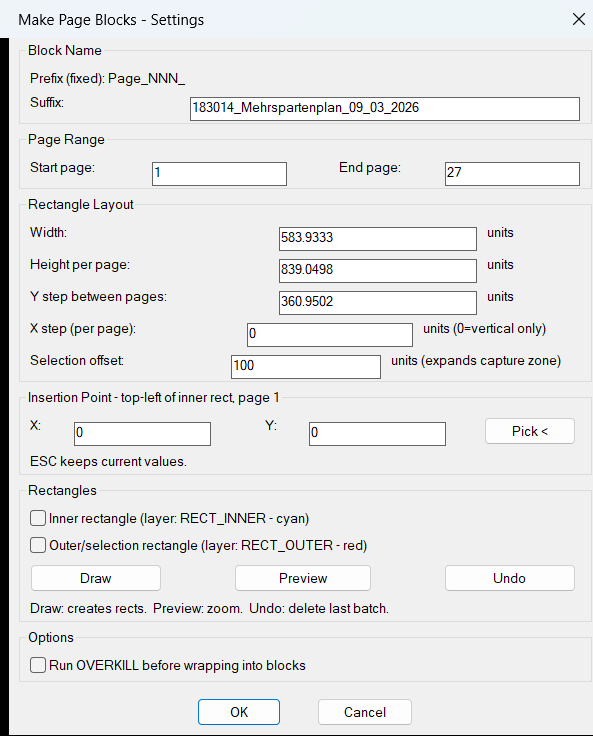
Command:
🧰 Load the AutoLISP file with APPLOAD or LOAD, then run CreateMultipleRectangleBlocks in AutoCAD or Civil 3D.
📌 The command opens a DCL dialog named Make Page Blocks – Settings where the user defines the block suffix, page range, rectangle width, rectangle height, vertical spacing, horizontal step, selection offset, insertion coordinates, rectangle drawing options, and optional OVERKILL processing.
🎯 Target platform: AutoCAD and Civil 3D, using AutoLISP, Visual LISP ActiveX calls, DCL dialog controls, entmake, vla-ZoomWindow, and AutoCAD block table creation.
Description:
📘 CreateMultipleRectangleBlocks automates a repetitive AutoCAD and Civil 3D drafting workflow where several page areas must be framed, previewed, collected, and converted into separate block definitions.
The user runs CreateMultipleRectangleBlocks, enters a page range such as page 1 to page 27, defines a suffix for the generated block names, and sets the rectangular page dimensions. The tool can draw inner rectangles on RECT_INNER and outer selection rectangles on RECT_OUTER, preview the drawn area by zooming to the calculated bounding box, and undo the last rectangle batch with AutoCAD UNDO BACK.
After the user accepts the dialog, the routine calculates every page origin from the top-left insertion point, page height, Y step, and optional X step. It then scans the active drawing entities, assigns objects to page zones based on their Y coordinate, and creates page block definitions named with the format Page_NNN_suffix. For every non-empty page zone, the routine creates a block definition at the page origin, copies matching entities into the block, inserts the block reference, and deletes the original source entities that were wrapped into the block.
This is useful for AutoCAD production drawings, Civil 3D sheet preparation, plan extraction, page packaging, drawing cleanup, and workflows where repeated rectangular areas need to become reusable block references.
Helper function: (if any)
- 🧠 Dialog value parser –
MPB:parse-real,MPB:parse-int,MPB:read-tiles, andMPB:restore-tilesread and restore DCL input values for page ranges, rectangle sizes, spacing, offsets, insertion points, and checkbox options. - 🏷️ Block naming system –
MPB:zpadformats page numbers as three digits so generated block names follow the predictable formatPage_001_suffix,Page_002_suffix, and higher values. - 🎨 Layer automation –
MPB:ensure-layercreatesRECT_INNERandRECT_OUTERlayers with predefined AutoCAD color indexes when preview rectangles are drawn. - 📐 Rectangle builder –
MPB:entmake-rectcreates closedLWPOLYLINErectangles usingentmake, placing them on the selected inner or outer rectangle layer. - 🔍 Zoom and preview logic –
MPB:do-zoomandMPB:do-previewusevla-ZoomWindowwith a small padding factor to zoom to the last drawn rectangle batch. - ↩️ Undo-safe drawing batch –
MPB:exec-drawcreates an AutoCADUNDO MARKbefore drawing rectangles, whileMPB:exec-undocallsUNDO BACKto remove the last rectangle batch. - 📊 Entity collection engine –
MPB:collect-allbuilds page zones from calculated origins, scans drawing entities withentnext, ignoresVIEWPORTandSEQEND, and assigns entities to pages using their first Y coordinate. - 🧹 Optional cleanup –
MPB:make-blockcan run AutoCAD-OVERKILLon the selected page entity set before the objects are wrapped into a block definition. - 🧩 Block creation workflow –
MPB:make-blockcreates theBLOCKrecord, copies source entity DXF data while removing database-specific handles and owner data, createsENDBLK, inserts the new block, and erases the original entities. - 🔐 DCL loop control – the main command uses
action_tilereturn codes so Pick, Draw, and Undo can dismiss and reopen the dialog safely while preserving user settings.
Functionalities:
- 🚀 Create page block definitions – converts repeated drawing page zones into AutoCAD block references for cleaner DWG organization.
- 📐 Draw inner and outer rectangles – creates visual page frames and selection zones on dedicated layers
RECT_INNERandRECT_OUTER. - 🔢 Batch page range processing – generates multiple pages from a start and end number, making it suitable for large drawing sets and repeated sheet layouts.
- 🏷️ Automatic block naming – creates predictable block names using
Page_NNN_suffixso exported or managed page blocks are easy to identify. - 📌 Pick insertion point – allows the user to select the top-left origin of page 1 directly from the drawing.
- 🔍 Preview rectangle layout – zooms to the calculated rectangle area so the user can verify the layout before final block creation.
- ↩️ Undo last rectangle batch – uses AutoCAD undo marks to remove the last drawn preview rectangles quickly.
- 🧹 Optional OVERKILL cleanup – can remove duplicate or overlapping geometry before wrapping page entities into blocks.
- 🧩 Wrap entities into blocks – copies matching drawing entities into each block definition and replaces the source content with a block insert.
- 📊 Command-line progress report – prints collection counts, skipped blocks, empty blocks, and created block results for review and quality control.
- 🎯 Civil 3D production support – helps organize AutoCAD and Civil 3D drawing content into reusable page-based block references for drafting, cleanup, and deliverable preparation.
Result:
✅ The final result is a faster AutoCAD and Civil 3D workflow for creating repeated page rectangles, collecting drawing geometry by page zone, and generating organized block references with consistent names. The tool reduces manual window selection, speeds up block creation, improves DWG structure, and supports more reliable drawing cleanup and production sheet management.
Images, animations etc.
XAML code:
<ResourceDictionary
xmlns="http://schemas.microsoft.com/winfx/2006/xaml/presentation"
xmlns:x="http://schemas.microsoft.com/winfx/2006/xaml"
xmlns:src="clr-namespace:Autodesk.Windows;assembly=AdWindows">

<src:RibbonToolTip x:Key="CreateMultipleRectangleBlocks">
<src:RibbonToolTip.ExpandedContent>
<StackPanel>
<TextBlock Background="AntiqueWhite" TextAlignment="Left">
<Bold>Function Syntax: CPAGES_BBB / CreateMultipleRectangleBlocks</Bold>
<LineBreak/>
<Bold>Version: 1.0 Date: 20.06.2026 6:38:48PM</Bold>
<LineBreak/>
<Hyperlink>N/A</Hyperlink>
<LineBreak/>


short_description: |
<Bold><Run Foreground="DodgerBlue">SEO Description</Run></Bold><LineBreak/>
<Run Foreground="White">🚀 CreateMultipleRectangleBlocks is an AutoCAD and Civil 3D AutoLISP DCL tool for repeated page rectangle layout and page block creation.</Run><LineBreak/>
<Run Foreground="LimeGreen">It helps CAD users automate page zones, generate rectangle guides, collect drawing entities, and create organized block references inside the active DWG.</Run><LineBreak/>
<LineBreak/>
command: |
<Bold><Run Foreground="DodgerBlue">Main Command and Loading Method</Run></Bold><LineBreak/>
<Run Foreground="White">🧰 Load the LISP with </Run><Bold><Run Foreground="Orange">APPLOAD</Run></Bold><Run Foreground="White"> or </Run><Bold><Run Foreground="Orange">LOAD</Run></Bold><Run Foreground="White">.</Run><LineBreak/>
<Run Foreground="White">Run </Run><Bold><Run Foreground="Orange">CreateMultipleRectangleBlocks</Run></Bold><Run Foreground="White"> to open the DCL dialog named Make Page Blocks - Settings.</Run><LineBreak/>
<Run Foreground="White">Target platform: AutoCAD and Civil 3D using AutoLISP, Visual LISP ActiveX, DCL, </Run><Bold><Run Foreground="Orange">entmake</Run></Bold><Run Foreground="White">, and </Run><Bold><Run Foreground="Orange">vla-ZoomWindow</Run></Bold><Run Foreground="White">.</Run><LineBreak/>
<LineBreak/>
description: |
<Bold><Run Foreground="DodgerBlue">Detailed Description</Run></Bold><LineBreak/>
<Run Foreground="White">📘 The program creates repeated rectangular page zones and can convert the entities inside each zone into a separate AutoCAD block.</Run><LineBreak/>
<Run Foreground="White">📐 The user enters a suffix, page start, page end, rectangle width, rectangle height, Y step, X step, selection offset, and insertion point.</Run><LineBreak/>
<Run Foreground="White">🎨 Optional inner rectangles are drawn on </Run><Bold><Run Foreground="Orange">RECT_INNER</Run></Bold><Run Foreground="White"> and optional outer selection rectangles are drawn on </Run><Bold><Run Foreground="Orange">RECT_OUTER</Run></Bold><Run Foreground="White">.</Run><LineBreak/>
<Run Foreground="White">🔍 The Preview button zooms to the last drawn rectangle batch, and the Undo button removes the last batch with AutoCAD undo logic.</Run><LineBreak/>
<Run Foreground="White">🧩 After OK, the routine collects drawing entities per page zone and creates block definitions named </Run><Bold><Run Foreground="Orange">Page_NNN_suffix</Run></Bold><Run Foreground="White">.</Run><LineBreak/>
<Run Foreground="LimeGreen">This is useful for AutoCAD and Civil 3D sheet extraction, page packaging, plan cleanup, block automation, and DWG production workflows.</Run><LineBreak/>
<LineBreak/>
helper_function: |
<Bold><Run Foreground="LimeGreen">Helper Logic</Run></Bold><LineBreak/>
<Run Foreground="White">🧠 </Run><Bold><Run Foreground="LimeGreen">Dialog value parsing</Run></Bold><Run Foreground="White"> - MPB:parse-real, MPB:parse-int, MPB:read-tiles, and MPB:restore-tiles read and restore DCL settings.</Run><LineBreak/>
<Run Foreground="White">🏷️ </Run><Bold><Run Foreground="LimeGreen">Block naming</Run></Bold><Run Foreground="White"> - MPB:zpad creates three-digit page numbers for Page_001, Page_002, and higher block names.</Run><LineBreak/>
<Run Foreground="White">🎨 </Run><Bold><Run Foreground="LimeGreen">Layer creation</Run></Bold><Run Foreground="White"> - MPB:ensure-layer creates RECT_INNER and RECT_OUTER if they do not already exist.</Run><LineBreak/>
<Run Foreground="White">📐 </Run><Bold><Run Foreground="LimeGreen">Rectangle entity creation</Run></Bold><Run Foreground="White"> - MPB:entmake-rect builds closed LWPOLYLINE rectangles with entmake.</Run><LineBreak/>
<Run Foreground="White">🔍 </Run><Bold><Run Foreground="LimeGreen">Zoom preview</Run></Bold><Run Foreground="White"> - MPB:do-zoom and MPB:do-preview use vla-ZoomWindow to inspect the rectangle batch.</Run><LineBreak/>
<Run Foreground="White">↩️ </Run><Bold><Run Foreground="LimeGreen">Undo batch handling</Run></Bold><Run Foreground="White"> - MPB:exec-draw creates an UNDO MARK and MPB:exec-undo runs UNDO BACK.</Run><LineBreak/>
<Run Foreground="White">📊 </Run><Bold><Run Foreground="LimeGreen">Entity collection</Run></Bold><Run Foreground="White"> - MPB:collect-all scans drawing entities and assigns them to page zones using their first Y coordinate.</Run><LineBreak/>
<Run Foreground="White">🧹 </Run><Bold><Run Foreground="LimeGreen">Optional cleanup</Run></Bold><Run Foreground="White"> - MPB:make-block can run -OVERKILL before creating the block definition.</Run><LineBreak/>
<Run Foreground="White">🧩 </Run><Bold><Run Foreground="LimeGreen">Block generation</Run></Bold><Run Foreground="White"> - MPB:make-block creates the block, inserts it, and erases the original wrapped entities.</Run><LineBreak/>
<LineBreak/>
functionalities: |
<Bold><Run Foreground="LimeGreen">Functionalities</Run></Bold><LineBreak/>
<Run Foreground="White">🚀 </Run><Bold><Run Foreground="LimeGreen">Create page blocks</Run></Bold><Run Foreground="White"> - turns repeated page zones into organized AutoCAD block references.</Run><LineBreak/>
<Run Foreground="White">📐 </Run><Bold><Run Foreground="LimeGreen">Draw rectangle guides</Run></Bold><Run Foreground="White"> - creates inner and outer page rectangles on dedicated layers.</Run><LineBreak/>
<Run Foreground="White">🔢 </Run><Bold><Run Foreground="LimeGreen">Batch page range processing</Run></Bold><Run Foreground="White"> - processes many pages in one command run.</Run><LineBreak/>
<Run Foreground="White">🏷️ </Run><Bold><Run Foreground="LimeGreen">Automatic naming</Run></Bold><Run Foreground="White"> - uses Page_NNN_suffix for predictable block naming.</Run><LineBreak/>
<Run Foreground="White">📌 </Run><Bold><Run Foreground="LimeGreen">Pick insertion point</Run></Bold><Run Foreground="White"> - lets the user define the top-left point of page 1 in the drawing.</Run><LineBreak/>
<Run Foreground="White">🔍 </Run><Bold><Run Foreground="LimeGreen">Preview and zoom</Run></Bold><Run Foreground="White"> - zooms to the rectangle batch before final block creation.</Run><LineBreak/>
<Run Foreground="White">↩️ </Run><Bold><Run Foreground="LimeGreen">Undo rectangle batch</Run></Bold><Run Foreground="White"> - removes the last drawn rectangle batch quickly.</Run><LineBreak/>
<Run Foreground="White">🧹 </Run><Bold><Run Foreground="LimeGreen">Optional OVERKILL</Run></Bold><Run Foreground="White"> - cleans duplicate geometry before block wrapping.</Run><LineBreak/>
<Run Foreground="White">📊 </Run><Bold><Run Foreground="LimeGreen">Progress reporting</Run></Bold><Run Foreground="White"> - prints entity counts, empty pages, skipped blocks, and created blocks.</Run><LineBreak/>
<LineBreak/>
result: |
<Bold><Run Foreground="DodgerBlue">Final Result</Run></Bold><LineBreak/>
<Run Foreground="White">✅ The final result is a faster AutoCAD and Civil 3D workflow for drawing repeated page rectangles, collecting page-zone geometry, and converting that geometry into reusable block definitions.</Run><LineBreak/>
<Run Foreground="LimeGreen">The tool reduces manual selection work, improves drawing organization, supports sheet-based cleanup, and creates consistent page block references.</Run><LineBreak/>
<LineBreak/>
additional_info: |
<Bold><Run Foreground="DarkRed">Important Notes and Limitations</Run></Bold><LineBreak/>
<Run Foreground="White">🔴 The command is destructive for collected geometry because source entities are erased after they are copied into a created block.</Run><LineBreak/>
<Run Foreground="White">🟧 Existing block names are skipped and are not overwritten.</Run><LineBreak/>
<Run Foreground="White">📌 Entity assignment is based on the first Y coordinate, not full boundary intersection testing.</Run><LineBreak/>
<Run Foreground="White">🛠️ The uploaded code contains </Run><Bold><Run Foreground="Orange">(*i*mpb-xstep*)</Run></Bold><Run Foreground="White"> in the draw loop. If undefined, it should likely be </Run><Bold><Run Foreground="Orange">(* i *mpb-xstep*)</Run></Bold><Run Foreground="White">.</Run><LineBreak/>


</TextBlock>

<Grid>
<Image Source="Image_000.png" Stretch="Uniform"/>
</Grid>

</StackPanel>
</src:RibbonToolTip.ExpandedContent>
</src:RibbonToolTip>
</ResourceDictionary>