
Short description
🚀 XRNET is an AutoCAD and Civil 3D .NET Framework plugin designed for fast DWG xref and raster image reference management. It helps CAD users inspect, reload, unload, detach, validate, preview, export, repair, and apply external references directly from the active drawing. The main benefit is faster drawing cleanup, better xref control, fewer missing reference problems, and improved AutoCAD Civil 3D production workflow.
Command:
🧰 Load the plugin with
NETLOAD by selecting XRNET.dll. The main command is XRNET, which opens the main modeless xref management window inside AutoCAD or Civil 3D. Additional commands include XRSPLIT for the native xref splitter interface, XRPREDEFINEDFOLDERS for saved project folder shortcuts, and XRSAVELOG for exporting the operation log. The target platform is AutoCAD and Civil 3D x64 using a C# .NET Framework 4.8 plugin.
Description:
📘 This project is a C# .NET plugin for AutoCAD and Civil 3D that focuses on external reference management. After the user loads
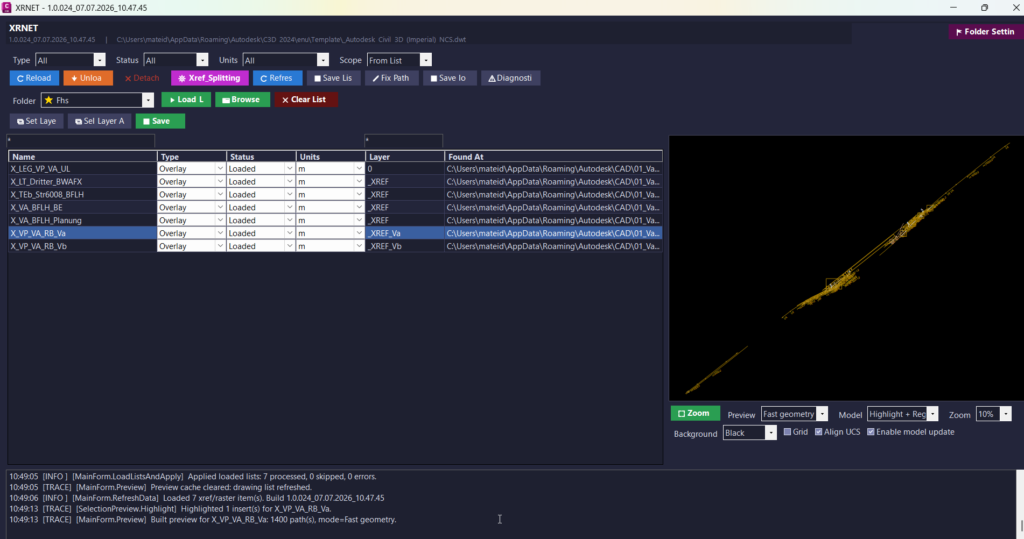
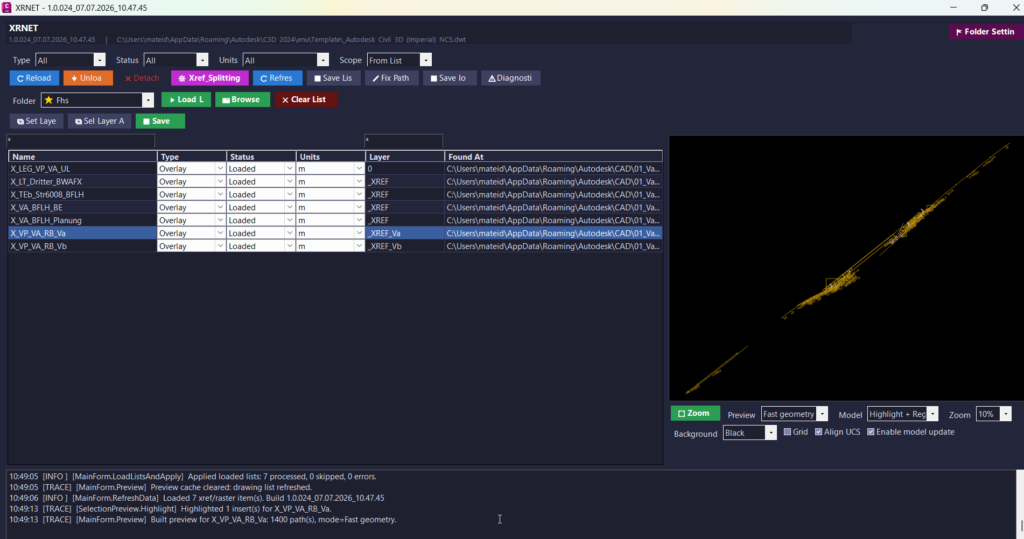
🔍 The program displays the reference name, xref type, load status, drawing units, layer, and source file path in a practical WinForms grid. This allows the user to quickly understand which external references are loaded, unloaded, missing, attached, overlaid, raster-based, or path-related.
🧠 The user can select one or multiple references, filter the list, inspect file paths, preview selected geometry, reload references, unload references, detach references, set xref layers, save reference lists, repair paths, export CSV data, and generate diagnostic logs.
📊 The
📌 Important code note: this plugin does not edit Civil 3D
XRNET.dll and runs XRNET, the tool scans the active DWG and collects detected DWG xrefs and raster image references.
🔍 The program displays the reference name, xref type, load status, drawing units, layer, and source file path in a practical WinForms grid. This allows the user to quickly understand which external references are loaded, unloaded, missing, attached, overlaid, raster-based, or path-related.
🧠 The user can select one or multiple references, filter the list, inspect file paths, preview selected geometry, reload references, unload references, detach references, set xref layers, save reference lists, repair paths, export CSV data, and generate diagnostic logs.
📊 The
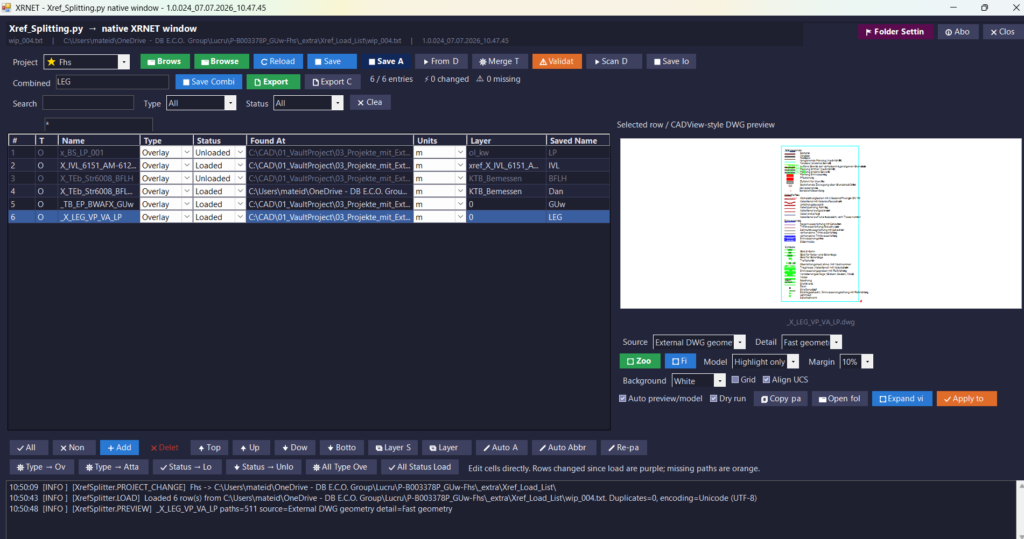
XRSPLIT command opens a dedicated xref splitter workflow. This tool can load xref list TXT files, import references from the current drawing, validate missing paths, scan folders for matching DWG files, merge list files, export selected rows, generate xref layer names, create abbreviations, re-path entries, reorder rows, and apply selected xref records back to the active DWG.
📌 Important code note: this plugin does not edit Civil 3D
ProfileView, SectionView, Alignment, bands, labels, or Civil 3D styles. Its actual purpose is AutoCAD and Civil 3D xref management, raster reference management, DWG dependency cleanup, preview, export, and path validation.
Helper function: (if any)
- 🚀 Command registration system –
Commands.csregistersXRNET,XRSPLIT,XRPREDEFINEDFOLDERS, andXRSAVELOGas AutoCAD commands for direct command-line access. - 🔍 Xref scanning engine –
XrefRepository.CollectAll()scans the active drawing database and collects DWG xrefs, raster images, reference status, type, units, layer, path, and related object data. - 🔄 Reload and unload logic –
XrefOperations.Reload()andXrefOperations.Unload()update selected drawing references or temporarily unload them to improve drawing performance and reference control. - 🔴 Detach logic –
XrefOperations.Detach()removes selected DWG xrefs or raster image references when the drawing needs cleanup or dependency reduction. - 📌 Apply list workflow –
XrefOperations.ApplyEntries()applies prepared xref records to the active drawing and restores important AutoCAD system variables after processing. - 🧩 Attach and type conversion –
ApplyDwgEntry(),AttachXrefAtOrigin(), andChangeTypeIfNeeded()attach missing references and convert xrefs betweenOverlayandAttachedwhere supported. - 🧹 Layer automation –
LayerUtil.EnsureLayer()andXrefOperations.SetLayer()create or reuse organized layers and move selected references onto clean xref layers. - 📊 List file input and output –
XrefListIO.ReadFile(),XrefListIO.SaveFile(),XrefListIO.ScanFile(), andXrefListIO.MergeByName()support repeatable xref list workflows. - 🧠 Xref splitter engine –
XrefSplitterEnginevalidates, merges, scans, abbreviates, re-paths, exports, and applies xref splitter entries for structured project reference management. - 📐 Preview builder –
PreviewBuilder.Build()andPreviewBuilder.BuildExternalDwgFile()generate CAD-style preview geometry from the active drawing or an external DWG file. - 🎨 Preview display control –
XrefPreviewControldisplays geometry, labels, filled areas, grid lines, background presets, zoom, pan, fit view, and empty-preview messages. - 🏷️ Preview color and visibility logic –
PreviewColorUtil.ResolveColor(),PreviewColorUtil.ResolveLineWeight100mm(), andPreviewColorUtil.IsVisible()improve CAD-like preview display behavior. - 🔐 Settings and diagnostics –
AppSettings,UiSettingsStore,RuntimeInfo, andAppLogstore predefined folders, UI settings, startup information, logs, and diagnostics under%APPDATA%\XRNET\. - 🟧 WinForms icon system –
ButtonIconFactory.csandC3DTheme.StyleButton()assign real bitmap icons throughButton.Imagefor reliable button icons in WinForms.
Functionalities:
- 🚀 Open XRNET xref manager – run
XRNETto open a modeless xref control panel inside AutoCAD or Civil 3D. - 🔍 Scan active DWG references – lists DWG xrefs and raster images with name, type, status, units, layer, and resolved path.
- 🔄 Reload selected references – refreshes selected xrefs and raster images so the drawing uses updated external files.
- 🟧 Unload selected references – unloads xrefs or hides raster images while keeping the reference structure available.
- 🔴 Detach selected references – removes unwanted DWG xrefs or raster images from the active drawing.
- 📌 Attach missing list entries – applies saved xref list entries and attaches missing DWG files at origin.
- 🧩 Convert xref type – changes references between
OverlayandAttachedwhere the code can preserve placement. - 🧹 Set organized xref layers – moves references onto clean layers such as generated
xref_namelayers. - 📊 Load and save xref lists – reads and writes TXT reference lists for repeatable project workflows.
- 📤 Export CSV reports – exports selected xref splitter rows for review, documentation, or coordination.
- 🧠 Fix and validate paths – detects missing paths, blank paths, and path problems, then supports folder-based repair workflows.
- 📐 Preview selected references – displays selected DWG geometry or raster-related preview data before applying changes.
- 🔢 Zoom, pan, fit, grid, and UCS options – improves visual inspection with practical CAD-style preview controls.
- 📝 Edit xref splitter rows – adds, deletes, reorders, validates, edits, and applies xref list entries.
- 🏷️ Generate layers and abbreviations – creates practical layer names and short names for organized xref split lists.
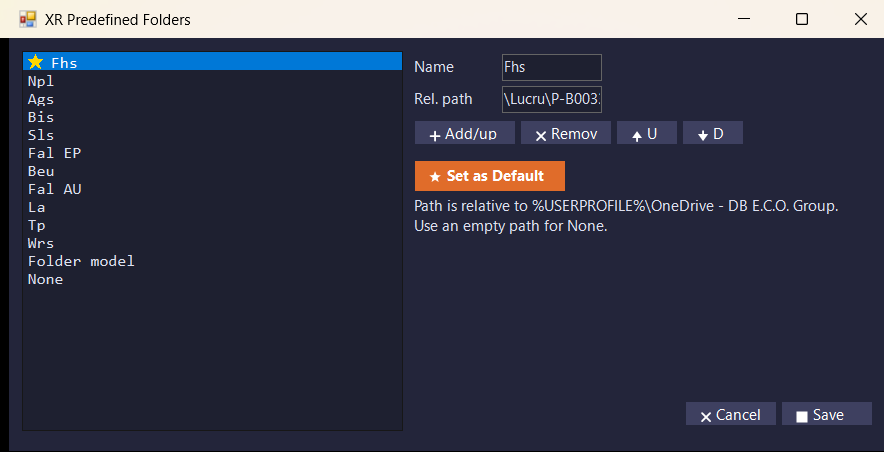
- 📘 Manage predefined folders – stores project folder shortcuts for faster file selection and relative path workflows.
- 🔒 Use dry-run mode – checks apply actions before modifying the active drawing.
- 🧰 Save logs and diagnostics – exports operation logs and diagnostic information for troubleshooting.
- 🎨 Use reliable WinForms icons – displays generated bitmap button icons instead of unsupported color emoji text rendering.
Result:
✅ The final result is a productivity-focused AutoCAD and Civil 3D xref management plugin that centralizes DWG xrefs, raster images, file paths, reference status, preview, export, diagnostics, and cleanup actions in one interface. It reduces repetitive manual work, improves external reference quality control, helps detect missing or incorrect paths, supports faster project setup, improves drawing organization, and gives CAD users a more reliable workflow for managing complex Civil 3D and AutoCAD drawings.
Images, animations etc.


Additional info:
Based on / Source code:
Open Website
Share this page:
Subscribe
Login
0 Comments
Oldest
Categories: AutoCAD_Lips
Categories: AutoCAD_Lips