
Short description
🧩 AddPoint2Group.LSP is a Civil 3D AutoLISP point group management utility that helps users add selected COGO points to a point group, move points between point groups, create new target groups, and rename existing point groups from a simple DCL dialog. The tool improves Civil 3D productivity by reducing manual point group editing and making point organization faster, cleaner, and more controlled.
Command:
📌 Main command:
🧰 Loading method: load
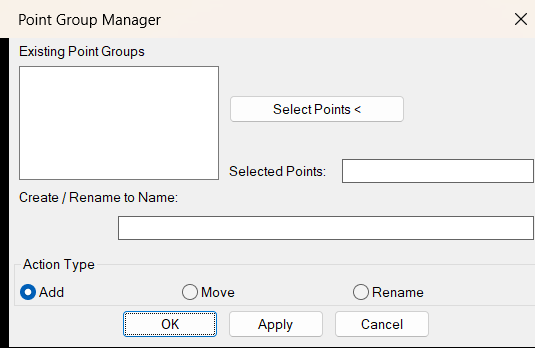
🪟 The command opens a temporary DCL dialog named
📍 The user selects Civil 3D COGO points with
➕
🔄
🏷️
✅
🎯 Target platform: Autodesk Civil 3D with AutoLISP, Visual LISP COM, and the Civil 3D COM interface through
AddToPG.🧰 Loading method: load
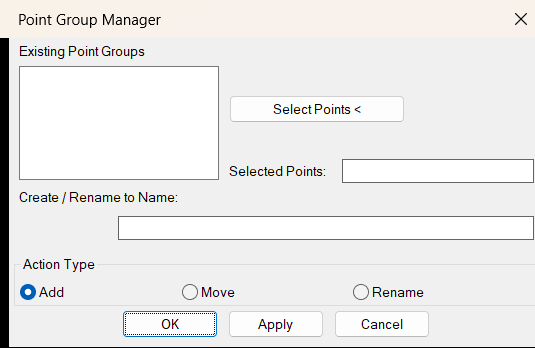
AddPoint2Group.LSP in Autodesk Civil 3D using APPLOAD, then run AddToPG from the command line.🪟 The command opens a temporary DCL dialog named
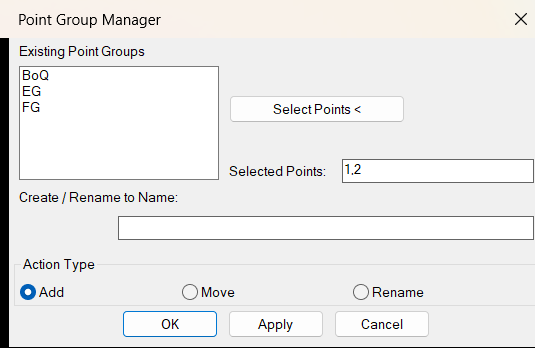
Point Group Manager.📍 The user selects Civil 3D COGO points with
Select Points <.➕
Add adds selected point numbers to the target point group.🔄
Move removes selected point numbers from other explicitly numbered point groups and adds them to the target group.🏷️
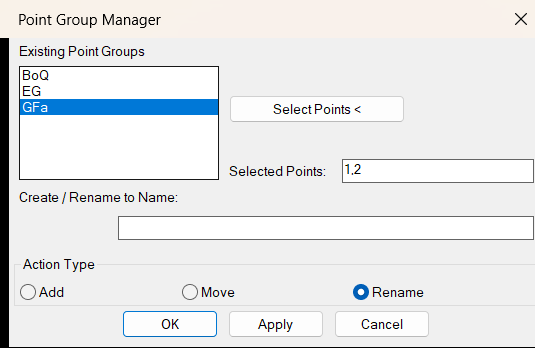
Rename renames the selected Civil 3D point group.✅
Apply performs the selected operation while keeping the dialog open.🎯 Target platform: Autodesk Civil 3D with AutoLISP, Visual LISP COM, and the Civil 3D COM interface through
AeccXUiLand.AeccApplication.
Description:
🧠 This AutoLISP routine is designed for Civil 3D users who need a faster way to manage COGO point group membership. Instead of manually editing point group properties and typing point numbers, the user can select Civil 3D points directly in the drawing and then add or move them to a selected point group from a dialog interface.
The workflow starts with the command
The
This tool is useful for survey processing, Civil 3D point cleanup, construction staking drawings, existing conditions organization, topographic survey workflows, utility mapping, and CAD production drawings where COGO points need to be grouped quickly and consistently. It does not create new COGO points and does not directly edit
The workflow starts with the command
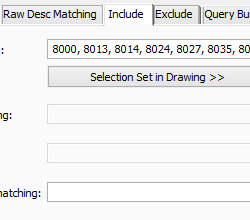
AddToPG. The program opens a DCL dialog called Point Group Manager, lists existing Civil 3D point groups, and allows the user to select COGO points from the drawing. The selected point numbers are shown in the dialog as a comma-separated list, making it easier to confirm what will be added, moved, or managed.The
Add action appends selected point numbers to the target point group by editing the group QueryBuilder.IncludeNumbers property. The Move action removes the selected point numbers from other point groups where they are explicitly included by number, then adds those points to the target point group. The Rename action changes the name of a selected Civil 3D point group using the Civil 3D COM API.This tool is useful for survey processing, Civil 3D point cleanup, construction staking drawings, existing conditions organization, topographic survey workflows, utility mapping, and CAD production drawings where COGO points need to be grouped quickly and consistently. It does not create new COGO points and does not directly edit
ProfileView, SectionView, Alignment, corridor models, labels, bands, styles, or export tables. Its purpose is focused on Civil 3D COGO point group management.
Helper function: (if any)
- 🧠 Civil 3D document connection —
OP:c3ddocconnects to the active Civil 3D document usingAeccXUiLand.AeccApplicationand registry-based Civil 3D version detection. - 📋 Collection name extraction —
CollectionNames->listreads names from Civil 3D object collections, especially the point group collection. - 📊 Dialog list refresh —
UpdateListfills the DCL list box with available Civil 3D point groups. - 🆕 Create or retrieve point group —
addorgetitemandAddPointGroupcreate a new point group when needed or retrieve an existing one by name. - 🔍 Point group lookup —
GetPointGroupfinds an existing Civil 3D point group selected by the user. - 🔒 Membership check —
ContainsPointchecks whether a selected point number is already contained in the target point group before adding it. - 📝 QueryBuilder access —
GetQueryBuilderretrieves the point group query builder object used to editIncludeNumbers. - ➕ Add point number to group —
AddPointToGroupappends a COGO point number toQueryBuilder.IncludeNumberswhen the point is not already included. - 📍 Interactive point selection —
SelectPoints->ListusesssgetwithAECC_COGO_POINTfiltering and returns the selected Civil 3D point numbers. - 🧩 Point group list filtering —
getPointGroupNamesretrieves Civil 3D point group names and removes_All Pointsfrom the editable list. - 🔢 String splitting helper —
StringSplitbreaks comma-separated point number strings into list values for cleanup operations. - 🧹 Remove numbers from IncludeNumbers —
RemoveNumbersFromStringremoves selected point numbers from another point group include list during the Move operation. - 🪟 Temporary DCL creation —
createDialogwrites thePoint Group ManagerDCL interface to a temporary file at runtime.
Functionalities:
- 📌 Select Civil 3D COGO points — the user selects existing
AECC_COGO_POINTobjects directly from the drawing. - 🔢 Extract selected point numbers — the routine reads the
Numberproperty from each selected COGO point and displays the selected numbers in the dialog. - 🧩 Browse existing point groups — the dialog lists Civil 3D point groups and excludes
_All Pointsfrom editable operations. - ➕ Add points to a group — selected point numbers are appended to the target point group
IncludeNumbersquery. - 🆕 Create a new target point group — when the user enters a new group name instead of selecting an existing group, the routine can create the point group automatically.
- 🔄 Move points to another point group — selected point numbers are removed from other point groups that explicitly include them by number, then added to the target group.
- 🏷️ Rename point groups — the selected Civil 3D point group can be renamed from the same dialog interface.
- ✅ Apply without closing — the
Applybutton lets the user run the selected operation and continue managing additional points or groups. - 📘 OK to finish — the
OKbutton runs the selected operation and closes the dialog when finished. - 🔒 Avoid duplicate explicit additions — the routine checks whether a point is already contained in the target point group before appending the number.
- 🧹 Clean explicit point number lists — Move mode edits comma-separated
IncludeNumberslists to remove selected numbers from other groups. - 🪟 Dynamic DCL interface — the dialog is generated automatically, so the command does not require a separate permanent DCL file.
- 🔐 Important limitation — this routine manages point group membership only. It does not create new COGO points, edit point coordinates, change point styles, or modify point labels directly.
- 🔴 Move limitation — points are removed only from groups where they are explicitly listed in
QueryBuilder.IncludeNumbers. Points included through other point group rules may still appear in those groups. - 🔴 Platform limitation — this script requires Autodesk Civil 3D and is not intended for plain AutoCAD without the Civil 3D COM interface.
Result:
📘 The final result is a faster Civil 3D point group management workflow. Users can select COGO points in the drawing, add them to an existing or new point group, move them between explicitly numbered point groups, rename point groups, and repeat operations with the Apply button. This improves productivity, reduces manual point group editing, supports cleaner survey point organization, and helps Civil 3D users manage production drawings with fewer repetitive steps.
Images, animations etc.
XAML code:
<ResourceDictionary xmlns="http://schemas.microsoft.com/winfx/2006/xaml/presentation" xmlns:x="http://schemas.microsoft.com/winfx/2006/xaml" xmlns:src="clr-namespace:Autodesk.Windows;assembly=AdWindows"> <src:RibbonToolTip x:Key="AddPoint2Group"> <src:RibbonToolTip.ExpandedContent> <StackPanel> <TextBlock Background="AntiqueWhite" TextAlignment="Left"> <Bold>Function Syntax: AddToPG</Bold> <LineBreak/> <Hyperlink>https://justopie.github.io/blog/2016/01/how-to-add-a-point-to-a-point-group-with-autolisp-wrap-up/</Hyperlink> <LineBreak/> <Bold>Description</Bold><LineBreak/> This AutoLISP routine is an interactive Civil 3D point group manager for adding, moving, and renaming Civil 3D COGO point groups.<LineBreak/> The program requires the user to select existing Civil 3D COGO points from the drawing and then choose a target point group from a dialog.<LineBreak/> The main command is <Bold><Run Foreground="DarkRed">AddToPG</Run></Bold>.<LineBreak/> The tool works by editing Civil 3D point group query settings, especially the <Run Foreground="DarkRed">IncludeNumbers</Run> property of the point group <Run Foreground="DarkRed">QueryBuilder</Run>.<LineBreak/> <LineBreak/> <Bold>Main Command</Bold><LineBreak/> • <Bold><Run Foreground="DarkRed">AddToPG</Run></Bold> starts the Civil 3D point group manager dialog.<LineBreak/> <LineBreak/> <Bold>Loading Method</Bold><LineBreak/> • Load the file <Bold><Run Foreground="DarkRed">AddPoint2Group.LSP</Run></Bold> in Civil 3D using <Bold><Run Foreground="DarkRed">APPLOAD</Run></Bold>.<LineBreak/> • Run <Bold><Run Foreground="DarkRed">AddToPG</Run></Bold> from the Civil 3D command line.<LineBreak/> <LineBreak/> <Bold>User Workflow</Bold><LineBreak/> • The user runs <Bold><Run Foreground="DarkRed">AddToPG</Run></Bold>.<LineBreak/> • The program opens a temporary DCL dialog named <Bold><Run Foreground="DarkRed">Point Group Manager</Run></Bold>.<LineBreak/> • The dialog displays the existing Civil 3D point groups, excluding <Run Foreground="DarkRed">_All Points</Run>.<LineBreak/> • The user clicks <Bold><Run Foreground="DarkRed">Select Points <</Run></Bold> to temporarily hide the dialog and select Civil 3D COGO points on screen.<LineBreak/> • The program filters the selection to <Run Foreground="DarkRed">AECC_COGO_POINT</Run> objects only.<LineBreak/> • The selected point numbers are displayed in the <Run Foreground="DarkRed">Selected Points</Run> field as a comma-separated list.<LineBreak/> • The user chooses an action type: <Bold><Run Foreground="DarkRed">Add</Run></Bold>, <Bold><Run Foreground="DarkRed">Move</Run></Bold>, or <Bold><Run Foreground="DarkRed">Rename</Run></Bold>.<LineBreak/> • For Add or Move, the user selects an existing point group or types a new point group name.<LineBreak/> • For Rename, the user selects an existing point group and enters the new group name.<LineBreak/> • The user clicks <Bold><Run Foreground="DarkRed">Apply</Run></Bold> to perform the action and keep the dialog open.<LineBreak/> • The user clicks <Bold><Run Foreground="DarkRed">OK</Run></Bold> to perform the action and close the dialog.<LineBreak/> • The user clicks <Bold><Run Foreground="DarkRed">Cancel</Run></Bold> to close the dialog without continuing.<LineBreak/> <LineBreak/> <Bold>Functionalities</Bold><LineBreak/> • <Bold>📌 Civil 3D Point Selection</Bold> — the routine uses <Run Foreground="DarkRed">ssget</Run> with the filter <Run Foreground="DarkRed">AECC_COGO_POINT</Run>, so it only accepts Civil 3D COGO point objects.<LineBreak/> • <Bold>📋 Point Number Extraction</Bold> — the program reads the <Run Foreground="DarkRed">Number</Run> property from each selected COGO point.<LineBreak/> • <Bold>🧩 Existing Point Group Browser</Bold> — the dialog lists available Civil 3D point groups so the user can choose the target group visually.<LineBreak/> • <Bold>➕ Add Points to Group</Bold> — the routine adds selected point numbers to the selected or newly created point group.<LineBreak/> • <Bold>🔄 Move Points Between Groups</Bold> — the routine removes the selected point numbers from other point groups and then adds them to the target point group.<LineBreak/> • <Bold>🏷️ Rename Point Group</Bold> — the routine can rename a selected Civil 3D point group using <Run Foreground="DarkRed">vla-put-name</Run>.<LineBreak/> • <Bold>🆕 Create Target Group When Needed</Bold> — if the user enters a new point group name, the routine can create the group using <Run Foreground="DarkRed">vla-add</Run>.<LineBreak/> • <Bold>🔒 Duplicate Membership Check</Bold> — before appending a point number, the routine checks whether the point is already contained in the target point group.<LineBreak/> • <Bold>📝 IncludeNumbers Editing</Bold> — the routine updates the Civil 3D point group <Run Foreground="DarkRed">QueryBuilder.IncludeNumbers</Run> string.<LineBreak/> • <Bold>🧹 Remove Point Numbers from Other Groups</Bold> — during Move mode, the routine removes selected point numbers from other point groups that explicitly list them in <Run Foreground="DarkRed">IncludeNumbers</Run>.<LineBreak/> • <Bold>🪟 Temporary DCL Dialog</Bold> — the dialog is generated dynamically by the LISP code, so a separate permanent DCL file is not required.<LineBreak/> • <Bold>✅ Apply Without Closing</Bold> — the <Run Foreground="DarkRed">Apply</Run> button runs the selected operation and keeps the dialog open for additional edits.<LineBreak/> <LineBreak/> <Bold>Important Helper Logic</Bold><LineBreak/> • <Run Foreground="DarkRed">OP:c3ddoc</Run> connects to the active Civil 3D document through <Run Foreground="DarkRed">AeccXUiLand.AeccApplication</Run>.<LineBreak/> • <Run Foreground="DarkRed">CollectionNames->list</Run> extracts point group names from the Civil 3D point group collection.<LineBreak/> • <Run Foreground="DarkRed">UpdateList</Run> fills the dialog list box with point group names.<LineBreak/> • <Run Foreground="DarkRed">AddPointGroup</Run> creates a point group or retrieves it if it already exists.<LineBreak/> • <Run Foreground="DarkRed">GetPointGroup</Run> retrieves an existing Civil 3D point group by name.<LineBreak/> • <Run Foreground="DarkRed">ContainsPoint</Run> checks whether a point number is already part of a point group.<LineBreak/> • <Run Foreground="DarkRed">GetQueryBuilder</Run> returns the Civil 3D point group query builder object.<LineBreak/> • <Run Foreground="DarkRed">AddPointToGroup</Run> appends the point number to <Run Foreground="DarkRed">IncludeNumbers</Run> when the point is not already included.<LineBreak/> • <Run Foreground="DarkRed">SelectPoints->List</Run> lets the user select Civil 3D points and returns their point numbers.<LineBreak/> • <Run Foreground="DarkRed">StringSplit</Run> splits comma-separated point number strings.<LineBreak/> • <Run Foreground="DarkRed">RemoveNumbersFromString</Run> removes selected point numbers from an existing <Run Foreground="DarkRed">IncludeNumbers</Run> list.<LineBreak/> • <Run Foreground="DarkRed">createDialog</Run> writes the temporary DCL interface used by the command.<LineBreak/> <LineBreak/> <Bold>Important Code Notes</Bold><LineBreak/> • <Run Foreground="Red">This routine requires Autodesk Civil 3D because it uses Civil 3D COM objects and COGO point group APIs.</Run><LineBreak/> • <Run Foreground="Red">The tool does not create new COGO points. It manages existing Civil 3D COGO points and their point group membership.</Run><LineBreak/> • <Run Foreground="Red">Move mode removes point numbers only from point groups where those points are explicitly listed in QueryBuilder.IncludeNumbers.</Run><LineBreak/> • <Run Foreground="Red">Move mode may not remove points from groups that include points through other query rules such as raw description, elevation, name, style, or other point group filters.</Run><LineBreak/> • <Run Foreground="Red">The _All Points group is intentionally excluded from the editable point group list.</Run><LineBreak/> • <Run Foreground="Red">The file header mentions a 2026 version history date, which appears to be a future or custom revision date and should be checked if version tracking matters.</Run><LineBreak/> • <Run Foreground="Red">The helper function CollectionProperty->list is defined but does not appear to be used by the main workflow.</Run><LineBreak/> <LineBreak/> <Bold>Final Result</Bold><LineBreak/> The final result is a faster Civil 3D point group management workflow.<LineBreak/> Users can select COGO points directly from the drawing, add them to a point group, move them between explicitly numbered point groups, create a new target group, rename an existing group, and repeat operations using the Apply button.<LineBreak/> This improves productivity, reduces manual point group editing, supports cleaner Civil 3D drawing organization, and makes survey point management faster and more controlled.<LineBreak/> </TextBlock> <!-- Use MediaElement for GIF (static first frame) and Image as fallback --> <Grid> <Image Source="addpoints.png" Stretch="Uniform"/> </Grid> </StackPanel> </src:RibbonToolTip.ExpandedContent> </src:RibbonToolTip> </ResourceDictionary>
Additional info:
Learn more:
Open Website