
Short description
AutoCAD LISP utility for listing loaded Xrefs in a dialog, filtering them with wildcards, and zooming directly to the selected Xref extents.
Command:
ZOOMXREF, SELECTXREF
Description:
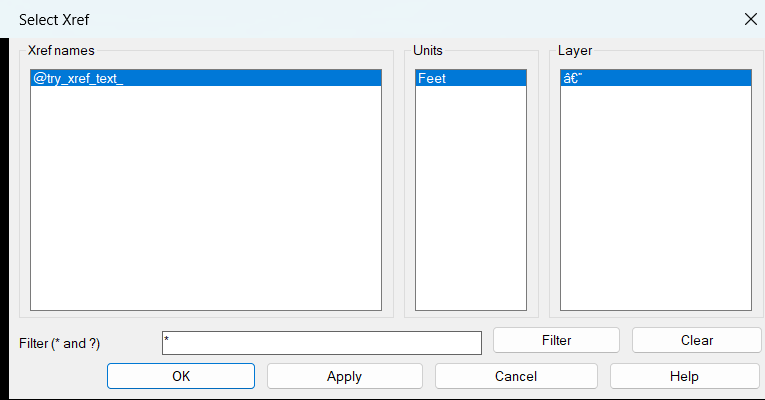
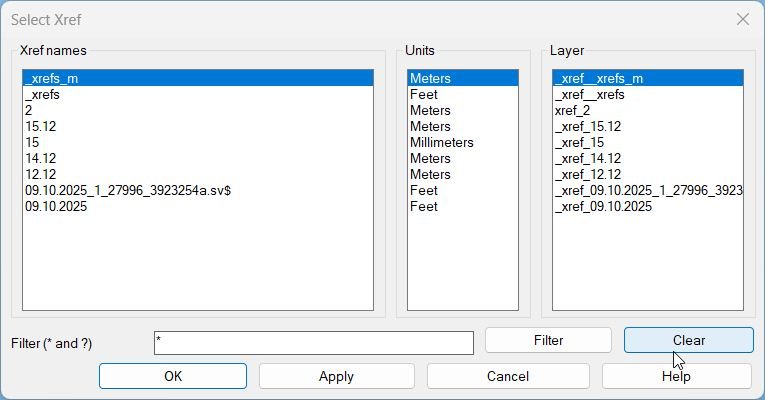
ZoomXref is an AutoCAD AutoLISP and ActiveX utility that helps users find and zoom to Xrefs quickly from a clean DCL dialog. The tool scans Xref block definitions, displays each Xref name, shows the block table insert units, summarizes the model-space insert layer, and lets the user filter the list live using wildcard patterns such as * and ?. The selected Xref is zoomed by collecting its model-space INSERT references, calculating their bounding box, and calling ActiveX ZoomWindow using the lower-left and upper-right extents.
The command is useful for CAD production drawings that contain many external references, partial references, discipline backgrounds, survey files, layout bases, or coordination models. It provides a faster workflow than manually searching the drawing, opening the external reference palette, or zooming by selection.
Helper function: (if any)
zx:pair, zx:pt3, zx:nth, zx:parse-int, zx:up, zx:wmatch, zx:unit-str, zx:safe-get-units, zx:ss-xref-refs, zx:xref-layer-summary, zx:make-dcl-file, zx:alert-help, zx:get-xref-items, zx:filter-items, zx:ss-bbox, zx:zoom-ll-ur, zx:fill-lists, zx:filter-apply, zx:apply-zoom
Functionalities:
• Scans the active drawing block table for Xref block definitions.
• Displays Xref names in a generated DCL dialog.
• Shows readable unit names such as Meters, Millimeters, Feet, Inches, and Unitless.
• Summarizes the layer used by model-space Xref inserts, including Multiple when inserts use more than one layer.
• Supports live wildcard filtering with * and ?.
• Keeps name, units, and layer list selections synchronized.
• Uses Apply to zoom without closing the dialog.
• Uses OK to zoom and close the dialog.
• Computes the combined lower-left and upper-right bounding box of selected Xref references.
• Uses pure ActiveX ZoomWindow rather than command-line ZOOM or vl-cmdf.
• Provides a SELECTXREF alias that launches the same workflow.
• Creates the DCL interface temporarily and deletes the temporary DCL file after use.
Result:
The result is a faster AutoCAD Xref navigation workflow. Users can find an external reference by name, confirm its units and layer context, then zoom immediately to the selected Xref extents without manually hunting through the drawing.
Images, animations etc.
XAML code:
<ResourceDictionary
xmlns="http://schemas.microsoft.com/winfx/2006/xaml/presentation"
xmlns:x="http://schemas.microsoft.com/winfx/2006/xaml"
xmlns:src="clr-namespace:Autodesk.Windows;assembly=AdWindows">

<src:RibbonToolTip x:Key="ZoomXref">
<src:RibbonToolTip.ExpandedContent>
<StackPanel>
<TextBlock Background="AntiqueWhite" TextAlignment="Left">
<Bold>Function Syntax: ZOOMXREF / SELECTXREF</Bold>
<LineBreak/>
<Bold>Version: 1.0 Date: 20.06.2026 6:39:04PM</Bold>
<LineBreak/>
<Hyperlink>N/A</Hyperlink>
<LineBreak/>


<Bold><Run Foreground="DodgerBlue">Function Syntax: ZoomXref</Run></Bold><LineBreak/>
<Bold><Run Foreground="Orange">Command Name:</Run></Bold> <Bold><Run Foreground="DarkRed">ZOOMXREF</Run></Bold><Run Foreground="White">, </Run><Bold><Run Foreground="DarkRed">SELECTXREF</Run></Bold><LineBreak/>
<Bold><Run Foreground="DodgerBlue">SEO Friendly Description</Run></Bold><LineBreak/>
<Run Foreground="White">🚀 </Run><Bold><Run Foreground="Orange">ZoomXref</Run></Bold><Run Foreground="White"> is an AutoCAD LISP utility for quickly finding, filtering, selecting, and zooming to loaded external references in complex DWG drawings.</Run><LineBreak/>
<Run Foreground="White">🔍 The tool opens a clean DCL dialog that lists Xref names together with their detected drawing units and model-space insert layer information.</Run><LineBreak/>
<Run Foreground="White">📌 It is designed for AutoCAD users, Civil 3D production teams, CAD coordinators, and CAD managers who work with many Xrefs, base drawings, survey references, background files, and coordination models.</Run><LineBreak/>
<Bold><Run Foreground="LimeGreen">Main Workflow</Run></Bold><LineBreak/>
<Run Foreground="White">🧰 Run </Run><Bold><Run Foreground="Orange">ZOOMXREF</Run></Bold><Run Foreground="White"> in the AutoCAD command line to open the Xref selection dialog.</Run><LineBreak/>
<Run Foreground="White">🔄 The alias </Run><Bold><Run Foreground="Orange">SELECTXREF</Run></Bold><Run Foreground="White"> launches the same dialog workflow.</Run><LineBreak/>
<Run Foreground="White">📊 The dialog displays three synchronized lists: Xref name, insert units, and layer summary.</Run><LineBreak/>
<Run Foreground="White">🔍 Type wildcard filters using </Run><Bold><Run Foreground="Orange">*</Run></Bold><Run Foreground="White"> and </Run><Bold><Run Foreground="Orange">?</Run></Bold><Run Foreground="White"> to locate matching Xrefs while typing.</Run><LineBreak/>
<Run Foreground="White">📐 Press </Run><Bold><Run Foreground="LimeGreen">Apply</Run></Bold><Run Foreground="White"> to zoom to the selected Xref without closing the dialog, or press </Run><Bold><Run Foreground="LimeGreen">OK</Run></Bold><Run Foreground="White"> to zoom and close.</Run><LineBreak/>
<Bold><Run Foreground="LimeGreen">Functionalities</Run></Bold><LineBreak/>
<Run Foreground="White">✅ </Run><Bold><Run Foreground="LimeGreen">Xref scanner</Run></Bold><Run Foreground="White"> - searches the active drawing block table for Xref block definitions.</Run><LineBreak/>
<Run Foreground="White">✅ </Run><Bold><Run Foreground="LimeGreen">Live wildcard filter</Run></Bold><Run Foreground="White"> - supports case-insensitive patterns with </Run><Bold><Run Foreground="Orange">*</Run></Bold><Run Foreground="White"> and </Run><Bold><Run Foreground="Orange">?</Run></Bold><Run Foreground="White">.</Run><LineBreak/>
<Run Foreground="White">✅ </Run><Bold><Run Foreground="LimeGreen">Units column</Run></Bold><Run Foreground="White"> - converts Xref block table unit values into readable labels such as Meters, Millimeters, Feet, Inches, and Unitless.</Run><LineBreak/>
<Run Foreground="White">✅ </Run><Bold><Run Foreground="LimeGreen">Layer column</Run></Bold><Run Foreground="White"> - reports the layer of model-space Xref inserts or shows Multiple when the same Xref is inserted on several layers.</Run><LineBreak/>
<Run Foreground="White">✅ </Run><Bold><Run Foreground="LimeGreen">Exact bounding-box zoom</Run></Bold><Run Foreground="White"> - calculates lower-left and upper-right extents from Xref INSERT objects and zooms with ActiveX </Run><Bold><Run Foreground="Orange">ZoomWindow</Run></Bold><Run Foreground="White">.</Run><LineBreak/>
<Run Foreground="White">✅ </Run><Bold><Run Foreground="LimeGreen">No command-line zoom dependency</Run></Bold><Run Foreground="White"> - uses pure ActiveX logic instead of AutoCAD command calls or </Run><Bold><Run Foreground="Orange">vl-cmdf</Run></Bold><Run Foreground="White">.</Run><LineBreak/>
<Run Foreground="White">✅ </Run><Bold><Run Foreground="LimeGreen">Temporary DCL interface</Run></Bold><Run Foreground="White"> - creates the dialog file at runtime and deletes it after use.</Run><LineBreak/>
<Bold><Run Foreground="DodgerBlue">Helper Functions</Run></Bold><LineBreak/>
<Run Foreground="White">🧠 Includes helpers for wildcard matching, unit conversion, Xref insert selection, layer summary, DCL creation, list synchronization, bounding-box calculation, and ActiveX zoom execution.</Run><LineBreak/>
<Run Foreground="White">Key helpers include </Run><Bold><Run Foreground="Orange">zx:get-xref-items</Run></Bold><Run Foreground="White">, </Run><Bold><Run Foreground="Orange">zx:filter-items</Run></Bold><Run Foreground="White">, </Run><Bold><Run Foreground="Orange">zx:ss-bbox</Run></Bold><Run Foreground="White">, </Run><Bold><Run Foreground="Orange">zx:zoom-ll-ur</Run></Bold><Run Foreground="White">, and </Run><Bold><Run Foreground="Orange">zx:apply-zoom</Run></Bold><Run Foreground="White">.</Run><LineBreak/>
<Bold><Run Foreground="DodgerBlue">Result</Run></Bold><LineBreak/>
<Run Foreground="White">📌 The result is a faster AutoCAD Xref navigation workflow that helps users locate referenced drawings, verify unit and layer context, and zoom directly to the selected reference extents.</Run><LineBreak/>
<Run Foreground="LimeGreen">This improves CAD coordination, drawing review, external reference checking, Civil 3D production navigation, and large-project DWG management.</Run><LineBreak/>
<Bold><Run Foreground="DarkRed">Important Notes</Run></Bold><LineBreak/>
<Run Foreground="White">🔒 ZoomXref is read-only. It does not modify Xref files, block definitions, layers, or drawing geometry.</Run><LineBreak/>
<Run Foreground="White">⚠️ The zoom target is based on model-space Xref INSERT references and uses the exact lower-left to upper-right extents without padding.</Run><LineBreak/>
<Run Foreground="White">⚠️ If no Xrefs are found, or if the selected Xref has no model-space inserts, the command reports the condition instead of changing the drawing.</Run><LineBreak/>


</TextBlock>

<Grid>
<Image Source="Image_000.png" Stretch="Uniform"/>
</Grid>

<Grid>
<Image Source="Image_001.png" Stretch="Uniform"/>
</Grid>

<Grid>
<Image Source="Image_002.jpg" Stretch="Uniform"/>
</Grid>

</StackPanel>
</src:RibbonToolTip.ExpandedContent>
</src:RibbonToolTip>
</ResourceDictionary>