
Short description
🔗📂 Move all AutoCAD XREF block references onto clean XREF layers using either one shared _XREF layer or individual 0-XREF_ layers.
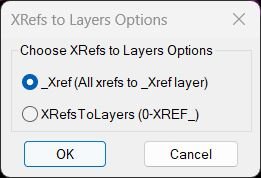
Command:
🚀 Primary command: XRefs2LayersOptions
🔘 Option 1: XRefsTo_Xref / X2_XREF — moves all detected XREF inserts to one layer named _XREF.
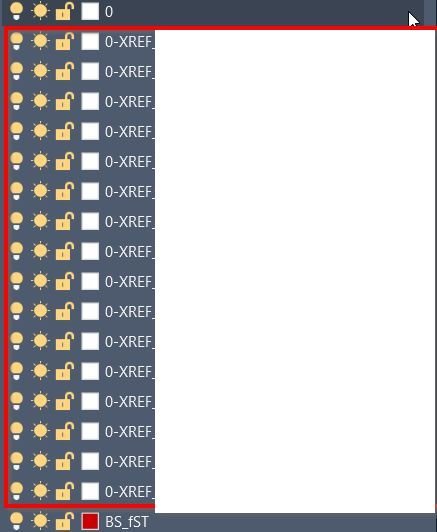
📂 Option 2: XRefsToLayers / X2L — moves each XREF insert to its own layer using the 0-XREF_ prefix.
🪟 Dialog helper: radioX2LDCL creates a small DCL option dialog for choosing the workflow.
Description:
🔗 XRefs2Layers is an AutoCAD AutoLISP utility for organizing external reference inserts by layer.
📂 The tool scans the current drawing for XREF block definitions, ignores names matching *TBLOCK*, finds matching INSERT references, and moves those references to controlled XREF layers.
🧭 The user can run a dialog-based workflow with XRefs2LayersOptions or run direct commands for a specific mode. One mode places every XREF on a shared _XREF layer, while the other mode creates separate 0-XREF_ layers for clearer drawing management.
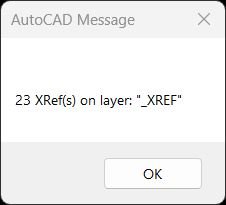
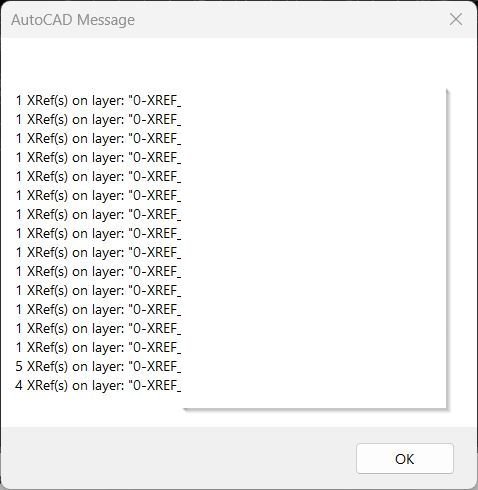
🛡️ The routine uses ActiveX layer handling, undo marks, locked-layer recovery logic, and a final alert report showing how many XREFs were moved to each target layer.
Helper function: (if any)
🪟 writeX2LDCL — writes the temporary DCL dialog for the two XREF layer options.
🔘 radioX2LDCL — loads the DCL, remembers the last selected option, and returns the selected workflow.
🧭 XRefs2LayersOptions — main option selector that launches the selected XREF layer command.
📂 XRefsToLayers / X2L — creates or uses 0-XREF_ layers and moves each XREF to its matching named layer.
🔗 XRefsTo_Xref / X2_XREF — creates or uses the shared _XREF layer and moves all XREF inserts there.
🛡️ Error handlers — close undo marks safely and report unexpected errors without interrupting normal cancel behavior.
Functionalities:
🔗 XREF detection — scans AutoCAD Blocks collection for definitions where IsXRef is true.
🧹 TBLOCK exclusion — skips XREF names matching *TBLOCK* to avoid processing title-block style references.
🪟 DCL option dialog — provides a simple radio-button interface for choosing the layer organization mode.
📂 Per-XREF layer mode — moves XREF inserts to uppercase layers named with the 0-XREF_ prefix.
🟦 Shared layer mode — moves all XREF inserts to one standard _XREF layer.
🧱 Layer auto-create — creates missing destination layers automatically.
🔐 Locked-layer handling — temporarily unlocks the current layer when required so the XREF can be moved.
↩️ Undo mark support — wraps processing in an undo mark for safer drawing edits.
📊 Move report — displays a summary alert showing counts by target layer.
⚙️ Session memory — remembers the last selected radio option during the active AutoCAD session.
🚫 Zero-XREF warning — alerts the user when no XREFs are found in the drawing.
Result:
✅ The result is a cleaner AutoCAD drawing where XREF references are organized on predictable layers.
📂 CAD teams can quickly isolate, freeze, lock, audit, or plot XREF content by using either one shared _XREF layer or separate 0-XREF_ layers.
📊 The final alert gives immediate feedback about how many XREF references were moved to each layer.
Images, animations etc.
XAML code:
<ResourceDictionary
xmlns="http://schemas.microsoft.com/winfx/2006/xaml/presentation"
xmlns:x="http://schemas.microsoft.com/winfx/2006/xaml"
xmlns:src="clr-namespace:Autodesk.Windows;assembly=AdWindows">
<src:RibbonToolTip x:Key="XRefs2Layers">
<src:RibbonToolTip.ExpandedContent>
<StackPanel>
<TextBlock Background="AntiqueWhite" TextAlignment="Left">
<Bold>Function Syntax: XRefs2LayersOptions / X2L / XRefsToLayers / X2_XREF / XRefsTo_Xref</Bold>
<LineBreak/>
<Bold>Version: 1.0 Date: 20.06.2026 6:39:04PM</Bold>
<LineBreak/>
<Hyperlink>AI+https://www.cadtutor.net/forum/topic/20566-xrefstolayerslsp-move-xrefs-to-corresponding-layers/</Hyperlink>
<LineBreak/>
<Bold><Run Foreground="DodgerBlue">Function Syntax: XRefs2Layers</Run></Bold><LineBreak/>
<Bold><Run Foreground="Orange">Version: 1.0</Run></Bold><LineBreak/>
<LineBreak/>
<Bold><Run Foreground="DodgerBlue">🔗 SEO Friendly Description</Run></Bold><LineBreak/>
<Run Foreground="White">🔗 XRefs2Layers is an AutoCAD AutoLISP tool for organizing external references by moving XREF insert references onto clean, predictable XREF layers.</Run><LineBreak/>
<Run Foreground="LimeGreen">📂 It improves CAD layer management, XREF visibility control, drawing cleanup, Civil 3D production organization, and DWG audit workflows.</Run><LineBreak/>
<Run Foreground="White">🪟 The command includes a DCL option dialog so the user can choose between a shared XREF layer workflow and a per-XREF layer workflow.</Run><LineBreak/>
<LineBreak/>
<Bold><Run Foreground="DodgerBlue">🚀 Main Commands</Run></Bold><LineBreak/>
<Run Foreground="White">🪟 Run </Run><Bold><Run Foreground="Orange">XRefs2LayersOptions</Run></Bold><Run Foreground="White"> to open the option dialog.</Run><LineBreak/>
<Run Foreground="White">📂 Run </Run><Bold><Run Foreground="Orange">XRefsToLayers</Run></Bold><Run Foreground="White"> or </Run><Bold><Run Foreground="Orange">X2L</Run></Bold><Run Foreground="White"> to move each XREF to its own </Run><Bold><Run Foreground="LimeGreen">0-XREF_<XREF name></Run></Bold><Run Foreground="White"> layer.</Run><LineBreak/>
<Run Foreground="White">🟦 Run </Run><Bold><Run Foreground="Orange">XRefsTo_Xref</Run></Bold><Run Foreground="White"> or </Run><Bold><Run Foreground="Orange">X2_XREF</Run></Bold><Run Foreground="White"> to move all detected XREF inserts to one shared </Run><Bold><Run Foreground="LimeGreen">_XREF</Run></Bold><Run Foreground="White"> layer.</Run><LineBreak/>
<LineBreak/>
<Bold><Run Foreground="LimeGreen">🧩 Functionalities</Run></Bold><LineBreak/>
<Run Foreground="White">🔍 </Run><Bold><Run Foreground="LimeGreen">XREF scan</Run></Bold><Run Foreground="White"> - scans the AutoCAD Blocks collection and detects block definitions where </Run><Bold><Run Foreground="Orange">IsXRef</Run></Bold><Run Foreground="White"> is true.</Run><LineBreak/>
<Run Foreground="White">🧹 </Run><Bold><Run Foreground="LimeGreen">TBLOCK exclusion</Run></Bold><Run Foreground="White"> - ignores XREF names matching </Run><Bold><Run Foreground="Orange">*TBLOCK*</Run></Bold><Run Foreground="White"> to avoid processing title-block style references.</Run><LineBreak/>
<Run Foreground="White">🪟 </Run><Bold><Run Foreground="LimeGreen">Dialog selection</Run></Bold><Run Foreground="White"> - creates a temporary DCL window with radio buttons for choosing the target layer method.</Run><LineBreak/>
<Run Foreground="White">📂 </Run><Bold><Run Foreground="LimeGreen">Per-XREF layer mode</Run></Bold><Run Foreground="White"> - creates organized layers using the </Run><Bold><Run Foreground="Orange">0-XREF_</Run></Bold><Run Foreground="White"> prefix and the XREF name.</Run><LineBreak/>
<Run Foreground="White">🟦 </Run><Bold><Run Foreground="LimeGreen">Shared layer mode</Run></Bold><Run Foreground="White"> - places every detected XREF insert on the common </Run><Bold><Run Foreground="Orange">_XREF</Run></Bold><Run Foreground="White"> layer.</Run><LineBreak/>
<Run Foreground="White">🧱 </Run><Bold><Run Foreground="LimeGreen">Automatic layer creation</Run></Bold><Run Foreground="White"> - creates missing destination layers before moving the XREF insert references.</Run><LineBreak/>
<Run Foreground="White">🔐 </Run><Bold><Run Foreground="LimeGreen">Locked-layer recovery</Run></Bold><Run Foreground="White"> - temporarily unlocks the current layer when a layer change fails because of a locked layer state.</Run><LineBreak/>
<Run Foreground="White">↩️ </Run><Bold><Run Foreground="LimeGreen">Undo mark support</Run></Bold><Run Foreground="White"> - wraps edits in an AutoCAD undo mark for safer production use.</Run><LineBreak/>
<Run Foreground="White">📊 </Run><Bold><Run Foreground="LimeGreen">Result report</Run></Bold><Run Foreground="White"> - displays an alert summary with the number of XREF inserts moved to each layer.</Run><LineBreak/>
<Run Foreground="White">⚙️ </Run><Bold><Run Foreground="LimeGreen">Session memory</Run></Bold><Run Foreground="White"> - remembers the last selected option while the AutoCAD session remains open.</Run><LineBreak/>
<LineBreak/>
<Bold><Run Foreground="DodgerBlue">✅ Practical Result</Run></Bold><LineBreak/>
<Run Foreground="White">✅ The drawing becomes easier to manage because all XREF inserts are placed on predictable layers for visibility control, plotting, locking, freezing, and CAD standard review.</Run><LineBreak/>
<Run Foreground="LimeGreen">📌 This is useful for AutoCAD users, Civil 3D teams, CAD managers, drafting technicians, and production environments with many external references.</Run><LineBreak/>
<LineBreak/>
<Bold><Run Foreground="DarkRed">⚠️ Important Notes</Run></Bold><LineBreak/>
<Run Foreground="White">⚠️ The routine changes the layer assignment of XREF INSERT references in the active drawing.</Run><LineBreak/>
<Run Foreground="White">⚠️ It does not modify the external source DWG files referenced by the XREFs.</Run><LineBreak/>
<Run Foreground="White">⚠️ The per-XREF workflow can lock created XREF layers when the lock prompt is confirmed.</Run><LineBreak/>
<Run Foreground="White">⚠️ Review project CAD standards before running this tool on production drawings.</Run><LineBreak/>
</TextBlock>
<Grid>
<Image Source="Image_000.jpg" Stretch="Uniform"/>
</Grid>
<Grid>
<Image Source="Image_001.jpg" Stretch="Uniform"/>
</Grid>
<Grid>
<Image Source="Image_002.jpg" Stretch="Uniform"/>
</Grid>
<Grid>
<Image Source="Image_003.jpg" Stretch="Uniform"/>
</Grid>
</StackPanel>
</src:RibbonToolTip.ExpandedContent>
</src:RibbonToolTip>
</ResourceDictionary>