
Short description
🧭 AutoCAD and Civil 3D .NET tool for managing XREF draw order with a modeless WinForms dialog, live preview, Apply and Undo, saved xref order presets, folder favorites, xref reload/unload controls, layer updates, and diagnostic logging.
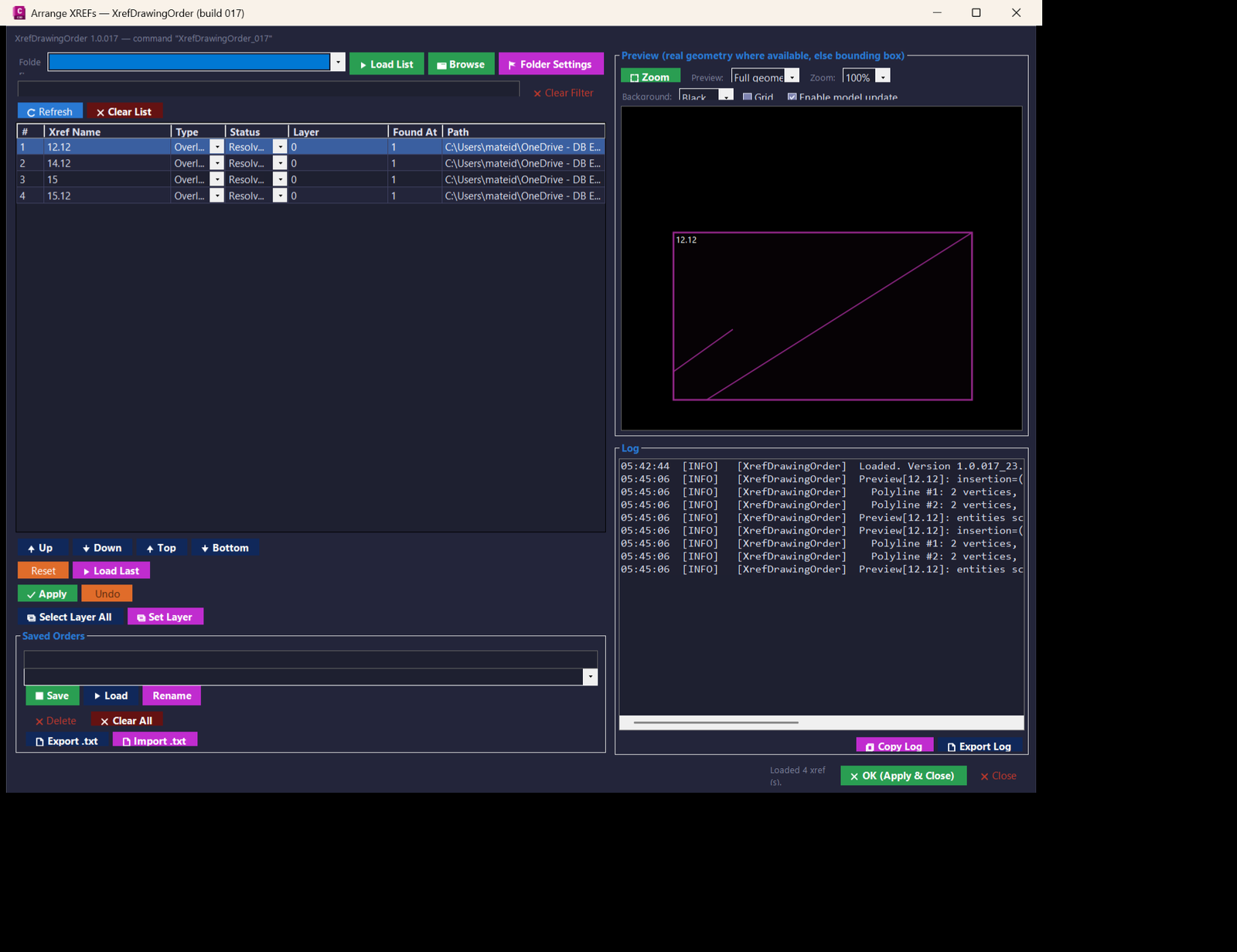
Command:
🧰 Main commands:
– XrefDrawingOrder_017 — opens the full XREF Drawing Order manager for build 017.
– XRDO_017 — short command alias for the same modeless dialog.
🚀 Loading workflow:
– Build or locate XrefDrawingOrder_017.dll.
– Load it with NETLOAD in AutoCAD or Civil 3D.
– Run XrefDrawingOrder_017 or XRDO_017 from the command line.
Description:
🧭 XrefDrawingOrder is an AutoCAD and Civil 3D xref draw order management plugin designed for drawings that contain many external references. It replaces repetitive manual DRAWORDER work with a searchable, reorderable, modeless WinForms interface.
📌 The tool scans the active drawing database for XREF block table records, lists their name, attach or overlay type, status, layer, instance count, and saved path, then allows the user to arrange the front-to-back display order from a central dialog.
🎯 It is useful for CAD managers, Civil 3D production teams, infrastructure designers, railway design users, corridor plan creators, and AutoCAD users who need cleaner xref stacking, faster xref visibility control, and repeatable drawing-order standards across project drawings.
🧩 Version 017 adds stronger preview diagnostics for selected xrefs, including insertion point, rotation, X and Y scale, transformed local coordinates, entity counts, and segment tracing for Line, Polyline, Circle, and Arc geometry. This helps diagnose difficult preview cases where a rotated or scaled xref appears incorrectly in the preview panel.
🖼️ The preview panel supports bounding-box visualization, selected-xref focus, mouse-wheel zoom, grid display, background switching, fast versus full preview mode, and fallback behavior when real geometry extraction is not available.
💾 The plugin can store the last used order in the drawing Named Objects Dictionary and can also save named order presets in the user AppData folder, making common xref display arrangements reusable between AutoCAD sessions.
⚙️ Xref ordering is applied safely from the modeless dialog by queuing AutoCAD DRAWORDER commands through Document.SendStringToExecute. The command sequence builds handle-based selection sets so each xref instance is targeted directly and selection-set race conditions are avoided.
Helper function: (if any)
📦 Main project modules:
– Commands.cs — AutoCAD plugin entry point, initialization banner, NETLOAD command registration, command aliases XrefDrawingOrder_017 and XRDO_017.
– MainForm.cs — dialog behavior, refresh logic, filtering, xref status operations, Apply, Undo, saved orders, folder favorites, preview coordination, logging, copy actions, and selected xref tools.
– MainForm.Layout.cs — responsive WinForms layout, themed controls, grid setup, context menu wiring, drag and drop ordering, preview toolbar, saved order controls, and log panel.
– XrefOrderService.cs — AutoCAD database access, xref enumeration, metadata collection, reload, unload, detach, attach or overlay conversion, layer updates, draw order application, NOD persistence, preview segment extraction, and AppData file persistence.
– PreviewPanel.cs — custom double-buffered drawing preview for xref bounding boxes and extracted geometry segments with zoom, focus, grid, and black or white background support.
– ListReorder.cs — pure list manipulation helper for Up, Down, Top, Bottom, and drag-to-index multi-selection movement.
– FolderFavoritesDialog.cs — folder favorite editor for import/export starting directories.
– TextPromptDialog.cs — compact prompt dialog used for renamed saved orders and layer edits.
– ButtonIconFactory.cs — generated 16 by 16 button icons without external image dependencies.
– C3DTheme.cs — dark AutoCAD/Civil 3D style theme, button roles, and control styling.
– Logger.cs — timestamped session log plus persistent log file under %APPDATA%\XrefDrawingOrder.
– XrefDrawingOrder_017.csproj — .NET Framework 4.8 x64 project file, AutoCAD 2024 managed references, and build-number generated command naming.
Functionalities:
🔍 Search and filter xrefs — filters the grid by xref name so large drawings remain manageable.
📊 Full xref metadata grid — displays order number, xref name, attach or overlay type, load status, layer, instance count, and source path.
↕️ Reorder front-to-back stack — moves selected xrefs Up, Down, Top, Bottom, or by drag and drop while preserving multi-selection order.
🚀 Apply draw order — applies the arranged xref order back into AutoCAD using queued DRAWORDER operations.
↩️ One-level Undo — restores the previous applied xref order when the last Apply needs to be reversed.
💾 Save and load named orders — stores reusable xref stacking presets by name in the user profile.
📥 Import and export order TXT — shares xref order lists as plain text files for project standards, backups, and reuse.
🧠 Drawing-level last-order memory — stores the last used order in the drawing Named Objects Dictionary under XREFDRAWORDER_ORDERS.
🖼️ Live preview panel — shows xref extents and available real geometry for visual checking before applying changes.
🔎 Zoom to selected xref — focuses the AutoCAD viewport and the preview panel on the selected xref.
🟦 Preview modes — supports Fast preview using extents and Full geometry preview where linework extraction is available.
🧮 Preview diagnostics — logs insertion, rotation, scale, local coordinates, transformed coordinates, entity counts, and skipped entities for selected xrefs.
🧱 Xref status control — reloads, unloads, or detaches selected xrefs from the same interface.
🔗 Attach or overlay conversion — converts xref reference type when the selected reference needs a different dependency behavior.
🏷️ Set xref layer — updates the layer of one or more xref block references.
📁 Folder favorites — stores commonly used folders for import and export workflows.
📋 Copy names and paths — copies selected xref names or file paths to the clipboard.
📝 Persistent logs — displays live log output and supports copying or exporting diagnostic messages.
🖥️ Adaptive dialog sizing — opens at a screen-aware size for laptop and larger monitor workflows.
🎨 Civil 3D styled UI — uses a dark themed interface with consistent functional button colors and generated icons.
Result:
✅ The result is a controlled, repeatable AutoCAD xref draw order workflow. Users can inspect every external reference, reorder the visual stacking, save standard xref arrangements, preview the result, apply the order, and undo the last applied change without relying on repeated manual DRAWORDER picks.
🚦 In production drawings, this helps keep base maps, corridors, utilities, surveys, construction plans, labels, and discipline-specific xrefs visually organized and easier to audit.
Images, animations etc.