
Short description
Sort / Purpose: Interactive Xref management tool for AutoCAD that saves, reloads, and bulk-edits Xref state via a dialog, while preserving the current UCS and view for bulk actions. • Type of tool: Dialog-driven Xref control command with filters, selection, zoom-to-xref, save/load list, and batch operations. • Scope: Works on all Xrefs in the current drawing, or only the user-selected subset (selection defaults to all). • Goal: Quickly standardize Xref configuration (Type + Found At + Units + Layer) and reapply it reliably across sessions without disrupting the user’s working context.
Command:
Command:
- UnReloadDetachSelectedXrefs — Opens the main dialog window.
- UI buttons — Execute actions and return to the dialog; the dialog closes only via OK or Cancel.
(UnReloadDetachSelectedXrefs)
Description:
Description:
- Core concept: The tool treats the Xref setup as a reusable “profile” stored in a text list file and re-applies it deterministically.
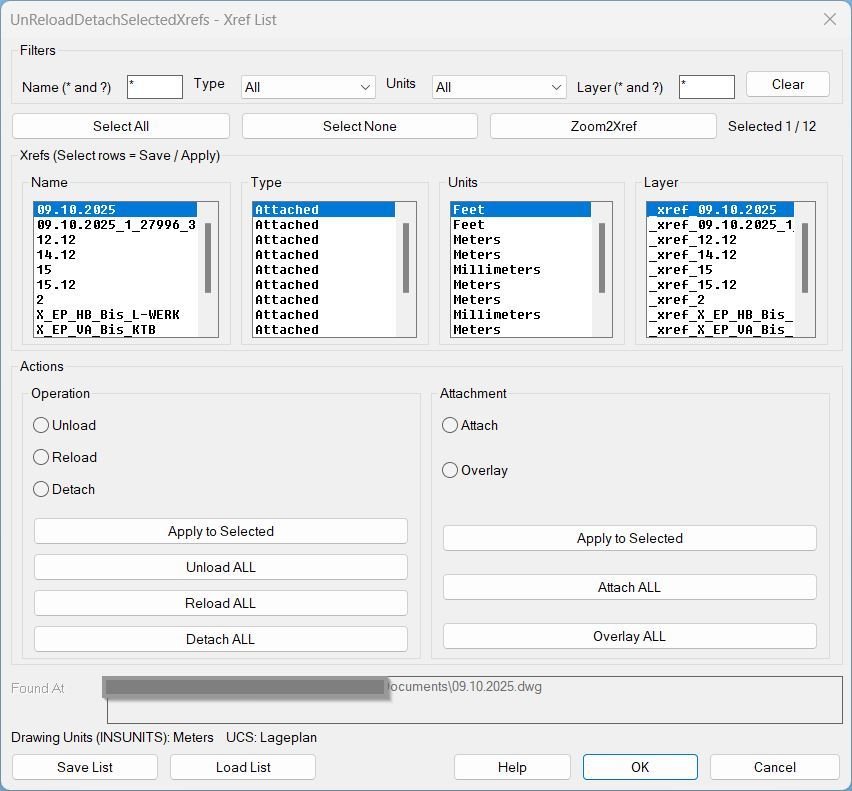
- Displayed data: Xref Name, Type (Attached/Overlay), Units (abbrev), Layer, and resolved Found At path preview for the active row.
- Safety behavior: “ALL” operations are wrapped so the user’s UCS and view are restored after execution, preventing unwanted zoom/UCS side-effects.
- Deterministic load workflow: When applying a list, each xref is processed one-at-a-time with a fixed UCS/units sequence to avoid scaling mismatches.
Helper function: (if any)
Helper function (if any):
- Xref scanning: Collects Xrefs from the block table and reads Name, Type, Units, Path, and primary insert Layer.
- Path resolve (Found At): Resolves stored/relative xref paths into absolute file paths when possible (DWGPREFIX + findfile logic).
- Selection map: Maintains per-xref selection state across filter changes and UI refreshes (default all selected).
- UCS + view wrapper: Saves and restores UCS and VIEW around disruptive commands so the user’s context is preserved for bulk actions.
- Ensure xref exists: If an xref name is missing from the drawing, attaches it from Found At using the saved Type before reloading.
- Change Type (Attach/Overlay): Converts type via detach + reattach while preserving transforms; restores layer placement afterward.
- Layer enforcement: Forces all inserts of an xref onto the layer recorded in the list file; creates the layer if it does not exist.
- Zoom2Xref: Zooms to the bounding extents of the selected xref inserts in Model space.
Functionalities:
Functionalities:
- Filter by Name: Wildcard filter using
*and?patterns. - Filter by Type: Dropdown list populated from Xref types present in the drawing (All / Attached / Overlay).
- Filter by Units: Dropdown list populated from units present in the drawing (All / mm / m / ft / …).
- Filter by Layer: Wildcard filter using
*and?patterns. - Selection control: Select All / Select None, selection counter, and multi-select list behavior used as “checkboxes.”
- Save List: Writes header HOSTINSUNITS and HOSTUCSNAME, then per selected xref writes Name|Type|FoundAt|UnitsCode|Layer.
- Load List (per xref): UCS reset to World → set drawing INSUNITS to the xref UnitsCode → attach if missing (Found At + Type) → reload → force inserts to saved Layer.
- Load List (final restore): Restores original drawing INSUNITS and UCS; keeps named UCS if present, otherwise uses a temporary UCS name for safe restore.
- Apply to Selected (Operation): Unload / Reload / Detach on selected xrefs only.
- Apply to Selected (Attachment): Attach / Overlay type conversion on selected xrefs only.
- ALL operations: Unload ALL / Reload ALL / Detach ALL / Attach ALL / Overlay ALL for all xrefs, executed with UCS+view preservation to prevent user context changes.
- Zoom2Xref: Zooms to the selected xref extents without requiring manual selection in the External References palette.
Result:
Result:
- Generates a reusable Xref list file containing drawing context and per-xref configuration: HOSTINSUNITS, HOSTUCSNAME, and Name|Type|FoundAt|UnitsCode|Layer lines.
- Re-applies Xref configuration deterministically to reduce unit-scaling and UCS-related inconsistencies during reload/attach workflows.
- Restores correct layer placement by forcing xref inserts onto the saved layer after load/reload actions.
- Preserves working context for bulk actions by restoring the original UCS and view after ALL operations complete.
Based on / Source code:
Images, animations etc.
Log in to download.
Log in
Log in
XAML code:
<ResourceDictionary
xmlns="http://schemas.microsoft.com/winfx/2006/xaml/presentation"
xmlns:x="http://schemas.microsoft.com/winfx/2006/xaml"
xmlns:src="clr-namespace:Autodesk.Windows;assembly=AdWindows">

<src:RibbonToolTip x:Key="UnReloadDetachSelectedXrefs">
<src:RibbonToolTip.ExpandedContent>
<StackPanel>
<TextBlock Background="AntiqueWhite" TextAlignment="Left">
<Bold>Function Syntax: UnReloadDetachSelectedXrefs</Bold>
<LineBreak/>
<Bold>Version: 1 Date: 18.09.2025</Bold>
<LineBreak/>
<LineBreak/>
<Hyperlink>AI+</Hyperlink>
<LineBreak/>

<Bold>Description</Bold><LineBreak/>
Tool to unload, reload, detach, or change the attachment type <Run Foreground="DarkRed">(Attach or Overlay)</Run> of external references. It shows one list with aligned <Run Foreground="DarkRed">Name</Run>, <Run Foreground="DarkRed">Type</Run>, and <Run Foreground="DarkRed">Status</Run> columns, supports wildcard filtering and multi selection, and uses an <Run Foreground="DarkRed">Apply</Run> loop so you can repeat actions quickly without closing the window.<LineBreak/>

<Bold>What the user must do</Bold><LineBreak/>
- Run <Run Foreground="DarkRed">XRS</Run> or <Run Foreground="DarkRed">XRUI</Run> to open the dialog. For quick all xref actions you may use <Run Foreground="DarkRed">XU</Run> and <Run Foreground="DarkRed">XR</Run> if available in your setup.<LineBreak/>
- In the dialog type a filter pattern using <Run Foreground="DarkRed">*</Run> and <Run Foreground="DarkRed">?</Run>, click <Run Foreground="DarkRed">Filter</Run> or <Run Foreground="DarkRed">Clear</Run>, select items in the list, choose an action, then click <Run Foreground="DarkRed">Apply</Run> or one of the <Run Foreground="DarkRed">ALL</Run> buttons.<LineBreak/>

<Bold>Commands</Bold><LineBreak/>
- <Run Foreground="DarkRed">XU</Run>  unload all xrefs in the current drawing.<LineBreak/>
- <Run Foreground="DarkRed">XR</Run>  reload all xrefs in the current drawing.<LineBreak/>
- <Run Foreground="DarkRed">XRS</Run> or <Run Foreground="DarkRed">XRUI</Run>  open the dialog for filtering and multi selecting xrefs, then apply actions.<LineBreak/>

<Bold>Dialog layout and buttons</Bold><LineBreak/>
- Filter row  edit box plus <Run Foreground="DarkRed">Filter</Run> and <Run Foreground="DarkRed">Clear</Run> to apply or reset wildcard filtering. The list updates while you type.<LineBreak/>
- List  one window with columns <Run Foreground="DarkRed">Name</Run> | <Run Foreground="DarkRed">Type</Run> | <Run Foreground="DarkRed">Status</Run>, multi selection enabled, with <Run Foreground="DarkRed">Select All</Run> and <Run Foreground="DarkRed">Select None</Run> helpers.<LineBreak/>
- Operation group  <Run Foreground="DarkRed">Unload</Run> with <Run Foreground="DarkRed">Unload ALL</Run>, <Run Foreground="DarkRed">Reload</Run> with <Run Foreground="DarkRed">Reload ALL</Run>, <Run Foreground="DarkRed">Detach</Run> with <Run Foreground="DarkRed">Detach ALL</Run>.<LineBreak/>
- Attachment group  <Run Foreground="DarkRed">Attach</Run> with <Run Foreground="DarkRed">Attach ALL</Run>, <Run Foreground="DarkRed">Overlay</Run> with <Run Foreground="DarkRed">Overlay ALL</Run>.<LineBreak/>
- Profiles  <Run Foreground="DarkRed">Save List</Run> opens a save dialog for the visible list, <Run Foreground="DarkRed">Load List</Run> reads a saved profile, <Run Foreground="DarkRed">Apply List</Run> applies it.<LineBreak/>
- Bottom row  <Run Foreground="DarkRed">Apply</Run> keeps the dialog open, <Run Foreground="DarkRed">Close</Run>, <Run Foreground="DarkRed">Help</Run> shows these notes.<LineBreak/>

<Bold>Functionalities</Bold><LineBreak/>
- Filter xrefs with <Run Foreground="DarkRed">*</Run> and <Run Foreground="DarkRed">?</Run> case insensitive. The list refreshes in real time.<LineBreak/>
- Multi select and run the chosen operation with <Run Foreground="DarkRed">Apply</Run> while staying in the loop.<LineBreak/>
- One click bulk actions  <Run Foreground="DarkRed">Unload ALL</Run>, <Run Foreground="DarkRed">Reload ALL</Run>, <Run Foreground="DarkRed">Detach ALL</Run>, <Run Foreground="DarkRed">Attach ALL</Run>, <Run Foreground="DarkRed">Overlay ALL</Run>.<LineBreak/>
- Profiles  <Run Foreground="DarkRed">Save List</Run> writes <Run Foreground="DarkRed">Name|Type|Status</Run> to a text file, <Run Foreground="DarkRed">Load List</Run> loads it, <Run Foreground="DarkRed">Apply List</Run> enforces the saved state.<LineBreak/>
- Preview of changes  after loading a list, the <Run Foreground="DarkRed">Type</Run> and <Run Foreground="DarkRed">Status</Run> columns can show <Run Foreground="DarkRed">current -> target</Run> so you see what will change.<LineBreak/>

<Bold>How it works under the hood</Bold><LineBreak/>
- Pure AutoLISP  xrefs are discovered from the BLOCK table by flag, no external COM dependency required.<LineBreak/>
- For unload reload and detach the routine calls <Run Foreground="DarkRed">-XREF</Run> with the specific xref name never wildcards.<LineBreak/>
- Changing <Run Foreground="DarkRed">Attach</Run> or <Run Foreground="DarkRed">Overlay</Run> is done by safe detach and re attach, preserving insertion point, scale, rotation, layer, and layout.<LineBreak/>
- Command echo and file dialogs are temporarily adjusted only while actions run and then restored. The window reopens after <Run Foreground="DarkRed">Apply</Run> to keep the loop stable.<LineBreak/>

<Bold>Safety notes</Bold><LineBreak/>
- <Run Foreground="Crimson">Detach</Run> and <Run Foreground="Crimson">Detach ALL</Run> permanently remove the reference from the drawing. Reattach if done by mistake.<LineBreak/>
- Actions target only the xrefs that are visible after filtering and the ones you selected when using <Run Foreground="DarkRed">Apply</Run>.<LineBreak/>

<Bold>Typical workflow</Bold><LineBreak/>
- Start <Run Foreground="DarkRed">XRS</Run> or <Run Foreground="DarkRed">XRUI</Run>.<LineBreak/>
- Type a filter such as <Run Foreground="DarkRed">X_*_Plan?</Run>, click <Run Foreground="DarkRed">Filter</Run>, then multi select matches.<LineBreak/>
- Choose <Run Foreground="DarkRed">Unload</Run>, <Run Foreground="DarkRed">Reload</Run>, or <Run Foreground="DarkRed">Detach</Run> or pick <Run Foreground="DarkRed">Attach</Run> or <Run Foreground="DarkRed">Overlay</Run>, click <Run Foreground="DarkRed">Apply</Run> to run, or use the paired <Run Foreground="DarkRed">ALL</Run> buttons for one shot bulk actions.<LineBreak/>
- Click <Run Foreground="DarkRed">Clear</Run> to reset the list or <Run Foreground="DarkRed">Close</Run> to exit.<LineBreak/>

<Bold>Saved list format</Bold><LineBreak/>
- Each line is <Run Foreground="DarkRed">Name|Type|Status</Run> or CSV <Run Foreground="DarkRed">Name,Type,Status</Run>. Example  <Run Foreground="DarkRed">X_Site,Overlay,Loaded</Run>.<LineBreak/>

<Bold>Notes</Bold><LineBreak/>
- Default column widths  <Run Foreground="DarkRed">(setq *wName* 35 *wType* 14 *wStat* 18)</Run>. Adjust these variables at the top of the LISP if you want a different layout.<LineBreak/>

</TextBlock>

<Grid>
<Image Source="UnReloadDetachSelectedXrefs_000.jpg" Stretch="Uniform"/>
</Grid>


<Grid>
<Image Source="UnReloadDetachSelectedXrefs_001.jpg" Stretch="Uniform"/>
</Grid>


</StackPanel>
</src:RibbonToolTip.ExpandedContent>
</src:RibbonToolTip>
</ResourceDictionary>
Additional info:
Learn more:
Open Website
Share this page:
Subscribe
Login
0 Comments
Oldest