
Short description
🧩 DynamicDivide is an AutoCAD AutoLISP utility that dynamically divides a LINE ARC or LWPOLYLINE into equal segments using POINT entities.
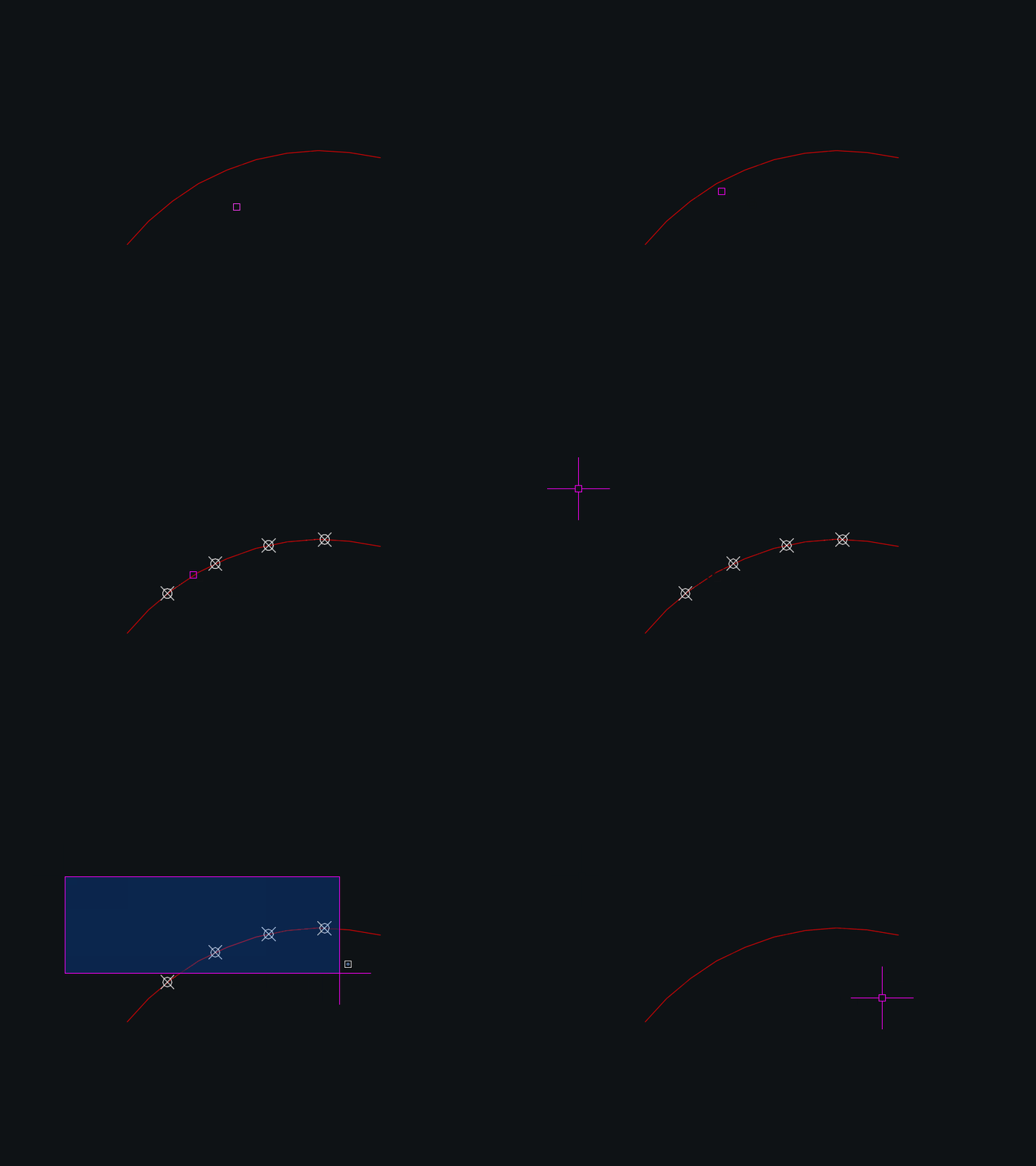
👁️ Moving the cursor over a supported object displays temporary division points before the user commits the operation.
⌨️ The number of divisions can be changed interactively with plus and minus keys or entered directly from the keyboard.
Command:
Main command: DynamicDivide
Description:
📐 The routine calculates the total curve length and divides it by the selected segment count.
👁️ Mouse movement uses temporary grpoint graphics so the user can preview the division points before clicking.
📍 A mouse click on a supported curve creates permanent AutoCAD POINT entities at the calculated intermediate distances.
➕ The plus key increases the segment count while the minus key decreases it with a minimum practical value of two.
🔢 A new segment count can also be typed and accepted with Enter or Space.
💾 The last segment count is stored through setenv under dexus:DynamicDivide and reused on the next run.
🎨 Temporary point graphics follow the current PDMODE PDSIZE and current layer color behavior.
Helper function: (if any)
vlax-curve-getDistAtParam calculates total curve length.
vlax-curve-getPointAtDist calculates every division location.
grpoint draws temporary markers using the current AutoCAD point display style.
setenv stores the last selected DynamicDivide segment count.
Functionalities:
✅ Dynamic preview – shows temporary point markers while the cursor moves over supported geometry.
✅ Equal segment division – calculates equally spaced locations from total curve length.
✅ LINE support – divides straight line entities.
✅ ARC support – divides arc entities by curve distance.
✅ LWPOLYLINE support – divides lightweight polylines by accumulated curve length.
✅ Keyboard count control – supports plus minus and direct numeric entry.
✅ Persistent count – remembers the last segment count between command runs.
✅ Point style integration – temporary markers respect AutoCAD point display settings.
✅ Undo grouping – wraps generated point creation in an AutoCAD undo group.
Result:
🎯 The result is a set of AutoCAD POINT entities positioned at equal intervals along the selected curve.
📏 The source curve remains unchanged.
Images, animations etc.
XAML code:
<ResourceDictionary
xmlns="http://schemas.microsoft.com/winfx/2006/xaml/presentation"
xmlns:x="http://schemas.microsoft.com/winfx/2006/xaml"
xmlns:src="clr-namespace:Autodesk.Windows;assembly=AdWindows">

<src:RibbonToolTip x:Key="DynamicDivide">
<src:RibbonToolTip.ExpandedContent>
<StackPanel>
<TextBlock Background="AntiqueWhite" TextAlignment="Left">
<Bold>Function Syntax: DynamicDivide</Bold>
<LineBreak/>
<Bold>Version: 1 Date: July 21, 2022, 11:26:39 AM</Bold>
<LineBreak/>
<Bold>Version: 1.0 Date: 20.06.2026 6:38:59PM</Bold>
<LineBreak/>
<Hyperlink>https://www.theswamp.org/index.php?topic=57716.0</Hyperlink>
<LineBreak/>


<Bold><Run Foreground="DodgerBlue">Description</Run></Bold><LineBreak/>
<Run Foreground="White">🧩 DynamicDivide is an AutoCAD AutoLISP utility that dynamically divides a LINE ARC or LWPOLYLINE into equal segments using POINT entities.</Run><LineBreak/>
<Run Foreground="White">👁️ Moving the cursor over a supported object displays temporary division points before the user commits the operation.</Run><LineBreak/>
<Run Foreground="White">⌨️ The number of divisions can be changed interactively with plus and minus keys or entered directly from the keyboard.</Run><LineBreak/>
<LineBreak/>
<Bold><Run Foreground="DodgerBlue">Function Syntax</Run></Bold><LineBreak/>
<Run Foreground="White">Main command: </Run><Bold><Run Foreground="Orange">DynamicDivide</Run></Bold><LineBreak/>
<LineBreak/>
<Bold><Run Foreground="DodgerBlue">SEO Optimized Overview</Run></Bold><LineBreak/>
<Run Foreground="White">📐 The routine calculates the total curve length and divides it by the selected segment count.</Run><LineBreak/>
<Run Foreground="White">👁️ Mouse movement uses temporary grpoint graphics so the user can preview the division points before clicking.</Run><LineBreak/>
<Run Foreground="White">📍 A mouse click on a supported curve creates permanent AutoCAD POINT entities at the calculated intermediate distances.</Run><LineBreak/>
<Run Foreground="White">➕ The plus key increases the segment count while the minus key decreases it with a minimum practical value of two.</Run><LineBreak/>
<Run Foreground="White">🔢 A new segment count can also be typed and accepted with Enter or Space.</Run><LineBreak/>
<Run Foreground="White">💾 The last segment count is stored through setenv under dexus:DynamicDivide and reused on the next run.</Run><LineBreak/>
<Run Foreground="White">🎨 Temporary point graphics follow the current PDMODE PDSIZE and current layer color behavior.</Run><LineBreak/>
<LineBreak/>
<Bold><Run Foreground="LimeGreen">Primary Workflow</Run></Bold><LineBreak/>
<Run Foreground="White">• Run DynamicDivide.</Run><LineBreak/>
<Run Foreground="White">• Move the cursor over a LINE ARC or LWPOLYLINE to preview equal division points.</Run><LineBreak/>
<Run Foreground="White">• Use plus or minus to adjust the number of segments or type a new value.</Run><LineBreak/>
<Run Foreground="White">• Click the required curve to create permanent POINT entities at the division locations.</Run><LineBreak/>
<Run Foreground="White">• Continue previewing and dividing additional supported curves or exit the command.</Run><LineBreak/>
<LineBreak/>
<Bold><Run Foreground="LimeGreen">Functionalities</Run></Bold><LineBreak/>
<Run Foreground="White">✅ </Run><Bold><Run Foreground="LimeGreen">Dynamic preview</Run></Bold><Run Foreground="White"> - shows temporary point markers while the cursor moves over supported geometry.</Run><LineBreak/>
<Run Foreground="White">✅ </Run><Bold><Run Foreground="LimeGreen">Equal segment division</Run></Bold><Run Foreground="White"> - calculates equally spaced locations from total curve length.</Run><LineBreak/>
<Run Foreground="White">✅ </Run><Bold><Run Foreground="LimeGreen">LINE support</Run></Bold><Run Foreground="White"> - divides straight line entities.</Run><LineBreak/>
<Run Foreground="White">✅ </Run><Bold><Run Foreground="LimeGreen">ARC support</Run></Bold><Run Foreground="White"> - divides arc entities by curve distance.</Run><LineBreak/>
<Run Foreground="White">✅ </Run><Bold><Run Foreground="LimeGreen">LWPOLYLINE support</Run></Bold><Run Foreground="White"> - divides lightweight polylines by accumulated curve length.</Run><LineBreak/>
<Run Foreground="White">✅ </Run><Bold><Run Foreground="LimeGreen">Keyboard count control</Run></Bold><Run Foreground="White"> - supports plus minus and direct numeric entry.</Run><LineBreak/>
<Run Foreground="White">✅ </Run><Bold><Run Foreground="LimeGreen">Persistent count</Run></Bold><Run Foreground="White"> - remembers the last segment count between command runs.</Run><LineBreak/>
<Run Foreground="White">✅ </Run><Bold><Run Foreground="LimeGreen">Point style integration</Run></Bold><Run Foreground="White"> - temporary markers respect AutoCAD point display settings.</Run><LineBreak/>
<Run Foreground="White">✅ </Run><Bold><Run Foreground="LimeGreen">Undo grouping</Run></Bold><Run Foreground="White"> - wraps generated point creation in an AutoCAD undo group.</Run><LineBreak/>
<LineBreak/>
<Bold><Run Foreground="DodgerBlue">Important Commands and Aspects</Run></Bold><LineBreak/>
<Run Foreground="White">🧩 vlax-curve-getDistAtParam calculates total curve length.</Run><LineBreak/>
<Run Foreground="White">🧩 vlax-curve-getPointAtDist calculates every division location.</Run><LineBreak/>
<Run Foreground="White">🧩 grpoint draws temporary markers using the current AutoCAD point display style.</Run><LineBreak/>
<Run Foreground="White">🧩 setenv stores the last selected DynamicDivide segment count.</Run><LineBreak/>
<LineBreak/>
<Bold><Run Foreground="DodgerBlue">Result</Run></Bold><LineBreak/>
<Run Foreground="White">🎯 The result is a set of AutoCAD POINT entities positioned at equal intervals along the selected curve.</Run><LineBreak/>
<Run Foreground="White">📏 The source curve remains unchanged.</Run><LineBreak/>
<LineBreak/>
<Bold><Run Foreground="DarkRed">Important Notes</Run></Bold><LineBreak/>
<Run Foreground="White">⚠️ </Run><Bold><Run Foreground="DarkRed">Only LINE ARC and LWPOLYLINE are accepted by the current object type check.</Run></Bold><LineBreak/>
<Run Foreground="White">⚠️ </Run><Bold><Run Foreground="DarkRed">The command creates intermediate division points and does not create a point at every curve endpoint.</Run></Bold><LineBreak/>
<Run Foreground="White">⚠️ </Run><Bold><Run Foreground="DarkRed">The last division count is stored in the AutoCAD environment.</Run></Bold><LineBreak/>
<LineBreak/>
<Bold><Run Foreground="Yellow">SEO Keywords</Run></Bold><LineBreak/>
<Run Foreground="Yellow">🏷️ AutoCAD, 🏷️ Civil 3D, 🏷️ AutoLISP, 🏷️ DynamicDivide, 🏷️ DIVIDE, 🏷️ Equal segments, 🏷️ POINT entities, 🏷️ Dynamic preview, 🏷️ LWPOLYLINE, 🏷️ ARC, 🏷️ LINE, 🏷️ CAD automation</Run><LineBreak/>

</TextBlock>

<Grid>
<MediaElement
 Source="Animation_000.gif"
 Stretch="Uniform"
 Visibility="Visible"/>
 </Grid>

</StackPanel>
</src:RibbonToolTip.ExpandedContent>
</src:RibbonToolTip>
</ResourceDictionary>