
Short description
Converts AutoCAD XLINE and RAY entities into finite LWPOLYLINE segments using configurable offsets and a dialog-based workflow.
Command:
Xline2Poly
Xline2Poly_DEBUG
Description:
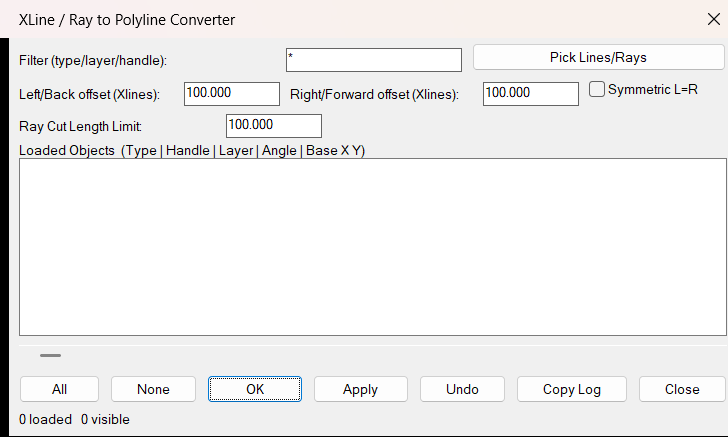
Xline2Poly is an AutoLISP utility that converts infinite XLINE entities and semi-infinite RAY entities into finite two-vertex LWPOLYLINE objects. It provides a temporary DCL interface for selecting objects, filtering by type/layer/handle, configuring conversion distances, applying symmetric offsets, copying logs, and performing undo.
The tool is useful when construction rays or xlines need to be converted into regular editable polyline geometry for documentation, trimming, quantities, or downstream CAD workflows.
Helper function: (if any)
Xline2Poly:strp, Xline2Poly:nump, Xline2Poly:lstp, and Xline2Poly:entp provide AutoLISP-safe validation.
C:Xline2Poly_DEBUG reports AutoCAD version data and validates the Xline2Poly_Settings.cfg file.
_getSettings and _saveSettings manage persistent dialog settings.
_writeDCL creates the temporary DCL dialog at runtime.
_getObjDesc builds the list display using entity type, handle, layer, angle, and base coordinates.
_updateList applies wildcard filtering and horizontal scrolling.
_process creates LWPOLYLINE entities from XLINE and RAY geometry, deletes the original entities, and manages undo.
_copyToClipboard copies the last status or conversion log.
Functionalities:
Converts selected XLINE entities into finite two-point LWPOLYLINE objects.
Converts selected RAY entities into finite LWPOLYLINE objects using a ray cut length.
Supports independent left/back and right/forward offsets for XLINE conversion.
Includes a Symmetric L=R toggle for matching offset values.
Provides a DCL interface with Pick Lines/Rays, filter, All, None, OK, Apply, Undo, Copy Log, and Close controls.
Displays each loaded object by type, handle, layer, angle, and base coordinates.
Persists dialog position, filter, scroll, offset, and ray length settings.
Temporarily suspends reactors during selection/conversion and restores them afterward.
Result:
Selected XLINE and RAY objects are replaced by finite LWPOLYLINE segments on the original layer. XLINEs use the configured left/right distances, while RAYs use the configured ray cut length.
Images, animations etc.
XAML code:
<ResourceDictionary
xmlns="http://schemas.microsoft.com/winfx/2006/xaml/presentation"
xmlns:x="http://schemas.microsoft.com/winfx/2006/xaml"
xmlns:src="clr-namespace:Autodesk.Windows;assembly=AdWindows">

<src:RibbonToolTip x:Key="Xline2Poly">
<src:RibbonToolTip.ExpandedContent>
<StackPanel>
<TextBlock Background="AntiqueWhite" TextAlignment="Left">
<Bold>Function Syntax: Xline2Poly_DEBUG / Xline2Poly</Bold>
<LineBreak/>
<Bold>Version: 1.0 Date: 13.05.2026 09:19:19</Bold>
<LineBreak/>
<Bold>Version: 1.1 Date: 20.06.2026 6:38:50PM</Bold>
<LineBreak/>
<Hyperlink>AI+https://forums.autodesk.com/t5/visual-lisp-autolisp-and-general/xline-to-polyline/td-p/5504511A</Hyperlink>
<LineBreak/>


</TextBlock>

<Grid>
<Image Source="Image_000.png" Stretch="Uniform"/>
</Grid>

</StackPanel>
</src:RibbonToolTip.ExpandedContent>
</src:RibbonToolTip>


<src:RibbonToolTip x:Key="Xline2Poly_1.0">
<src:RibbonToolTip.ExpandedContent>
<StackPanel>
<TextBlock Background="AntiqueWhite" TextAlignment="Left">
<Bold>Function Syntax: Command</Bold>
<LineBreak/>
<Bold>Version: 1.0 Date: 13.05.2026 09:19:19</Bold>
<LineBreak/>
<Hyperlink>AI+https://forums.autodesk.com/t5/visual-lisp-autolisp-and-general/xline-to-polyline/td-p/5504511A</Hyperlink>
<LineBreak/>


</TextBlock>

<Grid>
<Image Source="PNG" Stretch="Uniform"/>
</Grid>

<Grid>
<MediaElement
 Source="GIF"
 Stretch="Uniform"
 Visibility="Visible"/>
 </Grid>

</StackPanel>
</src:RibbonToolTip.ExpandedContent>
</src:RibbonToolTip>


</ResourceDictionary>