
Short description
Converts selected LINE, LWPOLYLINE, POLYLINE, ARC, and SPLINE entities into AutoCAD XLINE geometry using a DCL selection dialog.
Command:
L2XL
L2XL_DEBUG
Description:
Poly2Xline is an AutoLISP utility for converting finite AutoCAD curve geometry into construction XLINE objects. It supports LINE, LWPOLYLINE, POLYLINE, ARC, and SPLINE selections, converts every extracted segment into one XLINE, and offers a dialog-based workflow with filtering, multi-selection, undo, debug reporting, and settings persistence.
The tool is useful when design geometry needs to be converted into infinite construction/reference lines while preserving key object properties such as layer, color, linetype, linetype scale, and true color.
Helper function: (if any)
l2xl:strp, l2xl:nump, l2xl:lstp, and l2xl:entp provide AutoLISP-safe type checks.
_getSettings and _saveSettings read and write the persistent L2XL_Settings.cfg configuration file.
_getSegments extracts curve segment start/end points through the vlax-curve API.
_makeXline builds new XLINE entities with normalized direction vectors.
_processEnt converts one entity into one or more XLINE objects.
_process wraps conversion in an AutoCAD undo mark.
_getObjDesc, _updateList, and _getIndices support the DCL list, wildcard filter, and multi-selection workflow.
_copyToClipboard copies the last processing log.
C:L2XL_DEBUG creates a standalone diagnostic report for settings and AutoLISP type checks.
Functionalities:
Converts LINE entities to XLINE objects.
Converts every segment of LWPOLYLINE and old POLYLINE entities into separate XLINE objects.
Converts ARC and SPLINE geometry through curve-segment sampling based on the vlax-curve parameter range.
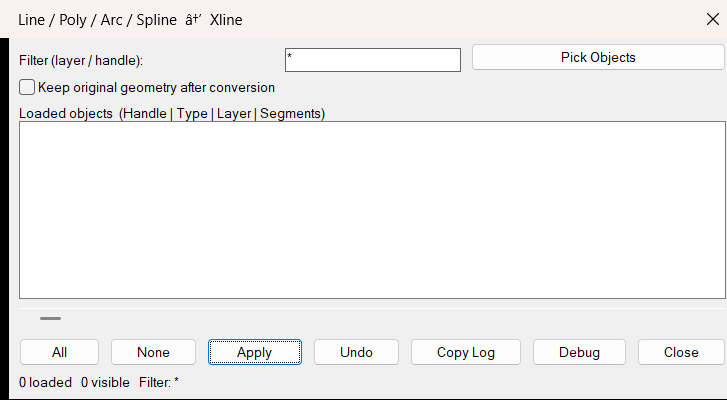
Uses a temporary DCL dialog with Pick Objects, filter field, multi-select list, All, None, Apply, Undo, Copy Log, Debug, and Close buttons.
Supports wildcard filtering by object description, including handle, type, layer, and segment count.
Persists dialog position, filter text, horizontal scroll, and the Keep original geometry option.
Optionally keeps or deletes the original source geometry after conversion.
Groups changes in a single undo mark for safer rollback.
Result:
The command creates one or more XLINE construction entities from the selected finite geometry. The output report states how many objects were converted and how many XLINE entities were created.
Images, animations etc.
XAML code:
<ResourceDictionary
xmlns="http://schemas.microsoft.com/winfx/2006/xaml/presentation"
xmlns:x="http://schemas.microsoft.com/winfx/2006/xaml"
xmlns:src="clr-namespace:Autodesk.Windows;assembly=AdWindows">

<src:RibbonToolTip x:Key="Poly2Xline">
<src:RibbonToolTip.ExpandedContent>
<StackPanel>
<TextBlock Background="AntiqueWhite" TextAlignment="Left">
<Bold>Function Syntax: L2XL_DEBUG / L2XL</Bold>
<LineBreak/>
<Bold>Version: 1.0 Date: 13.05.2026 11:10:42</Bold>
<LineBreak/>
<Bold>Version: 1.1 Date: 20.06.2026 6:38:50PM</Bold>
<LineBreak/>
<Hyperlink>N/A</Hyperlink>
<LineBreak/>


</TextBlock>

<Grid>
<Image Source="Image_000.png" Stretch="Uniform"/>
</Grid>

</StackPanel>
</src:RibbonToolTip.ExpandedContent>
</src:RibbonToolTip>


<src:RibbonToolTip x:Key="Poly2Xline_1.0">
<src:RibbonToolTip.ExpandedContent>
<StackPanel>
<TextBlock Background="AntiqueWhite" TextAlignment="Left">
<Bold>Function Syntax: Command</Bold>
<LineBreak/>
<Bold>Version: 1.0 Date: 13.05.2026 11:10:42</Bold>
<LineBreak/>
<Hyperlink>N/A</Hyperlink>
<LineBreak/>


</TextBlock>

<Grid>
<Image Source="PNG" Stretch="Uniform"/>
</Grid>

<Grid>
<MediaElement
 Source="GIF"
 Stretch="Uniform"
 Visibility="Visible"/>
 </Grid>

</StackPanel>
</src:RibbonToolTip.ExpandedContent>
</src:RibbonToolTip>


</ResourceDictionary>