
Short description
ExplodeLinetype is an AutoCAD AutoLISP text-explode utility that converts selected TEXT and MTEXT objects into editable line geometry, then assigns the result to the MISC layer with Continuous linetype and ByLayer color and lineweight.
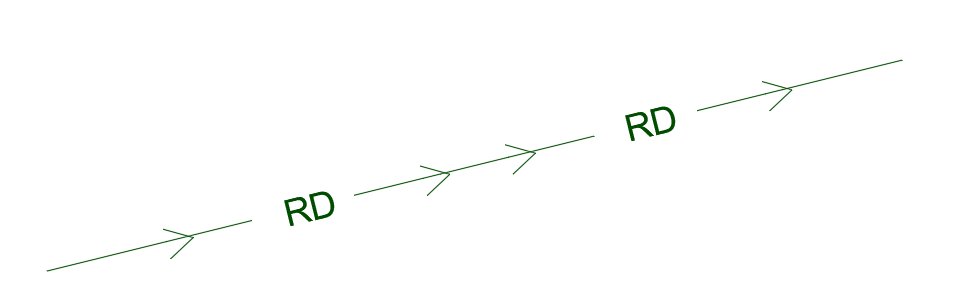
Command:
Primary command: ExplodeLinetype
Secondary command: LINEXP
Run ExplodeLinetype in the AutoCAD command line to convert selected TEXT and MTEXT into line geometry and apply the standardized MISC-layer properties. Run LINEXP to use the underlying line-explosion routine without the final CHPROP standardization step.
Description:
ExplodeLinetype provides an AutoCAD and Civil 3D AutoLISP workflow for converting selected TEXT and MTEXT objects into editable linework. The routine is based on the LINEXP modification of the Express Tools TXTEXP workflow and uses a temporary WMF export and import process to reproduce text outlines as drawing entities.
The primary ExplodeLinetype command runs LINEXP and then applies CHPROP to the previous selection set. The resulting geometry is assigned to the MISC layer, changed to Continuous linetype, and set to ByLayer color and ByLayer lineweight. This creates standardized exploded text linework suitable for drafting, plotting, export, engraving, fabrication, conversion, and workflows where font objects cannot remain as native AutoCAD text.
The underlying LINEXP routine accepts selected TEXT and MTEXT objects while excluding leader-associated text detected through ACAD_REACTORS data. It removes selected text objects from AutoCAD groups before conversion, calculates their text bounding boxes, temporarily zooms when necessary, unlocks and restores the current layer when required, mirrors the selection for WMF processing, erases the original text after a successful export, imports the temporary WMF, and mirrors the imported geometry back into place.
The command requires a plan view with a positive Z view direction. It depends on AutoCAD Express Tools functions including ACET error handling, geometry utilities, layer checks, viewport lock handling, WMF import, and selection-set filtering. The original selected text is erased when conversion succeeds and is replaced by exploded line geometry.
Helper function: (if any)
Main functions include C:ExplodeLinetype as the standardized wrapper command and C:LINEXP as the underlying text-to-line conversion routine. Internal helpers acet-txtexp-grplst and acet-txtexp-getgname identify AutoCAD groups containing selected text so those references can be removed before conversion. The routine also uses Express Tools functions such as ACET-ERROR-INIT and ACET-ERROR-RESTORE for environment recovery, ACET-GEOM-TEXTBOX for text extents, ACET-GEOM-ZOOM-FOR-SELECT and ACET-GEOM-PIXEL-UNIT for view adjustment, ACET-GEOM-VIEW-POINTS and ACET-GEOM-MIDPOINT for mirror geometry, ACET-LAYER-LOCKED for current-layer handling, ACET-CURRENTVIEWPORT-ENAME and ACET-VIEWPORT-LOCK-SET for viewport protection, ACET-WMFIN for WMF import, ACET-STR-FORMAT for status output, and BNS_SS_MOD for filtering objects on locked layers.
Functionalities:
– Runs the complete standardized workflow with the ExplodeLinetype command.
– Provides LINEXP as the underlying text-explosion command.
– Converts selected AutoCAD TEXT objects into editable line geometry.
– Converts selected AutoCAD MTEXT objects into editable line geometry.
– Excludes leader-associated text identified through ACAD_REACTORS data.
– Filters selected objects located on locked layers through the Express Tools selection-set helper.
– Detects AutoCAD groups containing selected text and removes the text members before conversion.
– Calculates text bounding boxes and expands the current view when selected objects are not fully visible.
– Temporarily unlocks a locked current layer and restores its locked state after processing.
– Temporarily unlocks a locked viewport when zoom adjustment is required and restores the viewport lock afterward.
– Mirrors selected text before WMF export and mirrors imported geometry back into its original orientation.
– Exports selected text to a temporary txtexp.wmf file.
– Erases the original selected text only after the temporary WMF file is successfully created.
– Imports the WMF representation as exploded drawing geometry.
– Restores the previous view after temporary zooming.
– Reports how many selected objects were exploded to lines.
– Assigns the resulting previous selection set to the MISC layer.
– Sets the resulting geometry color to ByLayer.
– Sets the resulting geometry linetype to Continuous.
– Sets the resulting geometry lineweight to ByLayer.
– Requires the active view to be a plan view with view direction 0,0,1.
– Loads and depends on AutoCAD Express Tools when available.
Result:
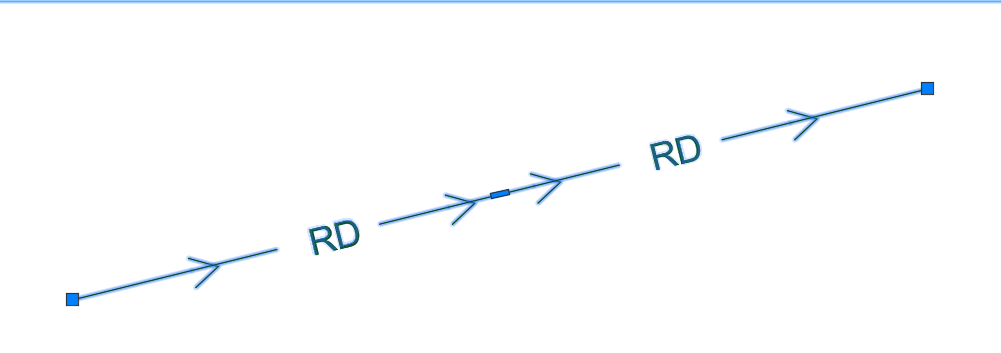
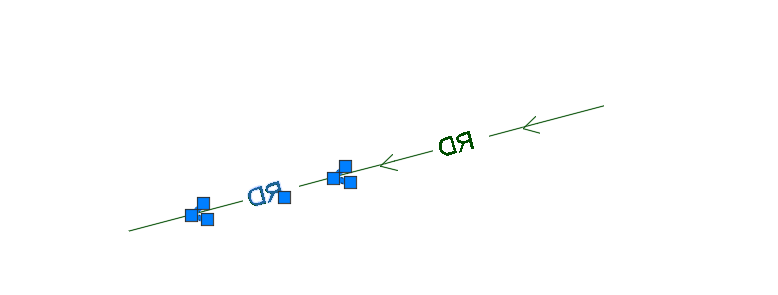
The routine replaces selected TEXT and MTEXT objects with editable exploded line geometry. When the primary ExplodeLinetype command is used, the resulting entities are standardized on layer MISC with Continuous linetype, ByLayer color, and ByLayer lineweight.
Images, animations etc.
XAML code:
<ResourceDictionary
xmlns="http://schemas.microsoft.com/winfx/2006/xaml/presentation"
xmlns:x="http://schemas.microsoft.com/winfx/2006/xaml"
xmlns:src="clr-namespace:Autodesk.Windows;assembly=AdWindows">

<src:RibbonToolTip x:Key="ExplodeLinetype">
<src:RibbonToolTip.ExpandedContent>
<StackPanel>
<TextBlock Background="AntiqueWhite" TextAlignment="Left">
<Bold>Function Syntax: ExplodeLinetype / linexp</Bold>
<LineBreak/>
<Bold>Version: 1.0 Date:03.04.2026</Bold>
<LineBreak/>
<Bold>Version: 1.0 Date: 04.04.2026 6:54:43AM</Bold>
<LineBreak/>
<Hyperlink>WEB</Hyperlink>
<LineBreak/>

<Bold><Run Foreground="DodgerBlue">🚀 ExplodeLinetype</Run></Bold><LineBreak/>
<Run Foreground="White">ExplodeLinetype is an AutoCAD and Civil 3D AutoLISP utility for converting selected TEXT and MTEXT objects into editable line geometry.</Run><LineBreak/>
<Run Foreground="LimeGreen">It standardizes the exploded result on the MISC layer with Continuous linetype, ByLayer color, and ByLayer lineweight for cleaner CAD production and export workflows.</Run><LineBreak/>
<Bold><Run Foreground="DodgerBlue">Main Commands</Run></Bold><LineBreak/>
<Run Foreground="White">🧰 Run </Run><Bold><Run Foreground="Orange">ExplodeLinetype</Run></Bold><Run Foreground="White"> to convert selected text into line geometry and apply the standardized MISC-layer properties.</Run><LineBreak/>
<Run Foreground="White">⚙️ Run </Run><Bold><Run Foreground="Orange">LINEXP</Run></Bold><Run Foreground="White"> to use the underlying text-to-line conversion routine without the final CHPROP standardization step.</Run><LineBreak/>
<Bold><Run Foreground="DodgerBlue">SEO Optimized Description</Run></Bold><LineBreak/>
<Run Foreground="White">📐 This AutoCAD text explode tool converts selected TEXT and MTEXT objects into editable linework through an Express Tools WMF export and import workflow.</Run><LineBreak/>
<Run Foreground="White">🔍 The utility supports CAD cleanup, text outline conversion, plot compatibility, engraving preparation, fabrication drawings, CNC support, font-independent exports, and workflows where native text objects must become geometry.</Run><LineBreak/>
<Run Foreground="White">🧠 It calculates text bounding boxes, adjusts the view when necessary, mirrors selected text, exports it to a temporary </Run><Bold><Run Foreground="Orange">txtexp.wmf</Run></Bold><Run Foreground="White"> file, imports the resulting geometry, and mirrors the linework back into position.</Run><LineBreak/>
<Run Foreground="White">📌 ExplodeLinetype is useful for CAD technicians, Civil 3D users, survey drafting, signage drawings, engraving layouts, laser cutting preparation, fabrication details, plotting workflows, and drawing exchange where fonts may be unavailable.</Run><LineBreak/>
<Bold><Run Foreground="LimeGreen">Functionalities</Run></Bold><LineBreak/>
<Run Foreground="White">🚀 </Run><Bold><Run Foreground="LimeGreen">Text-to-line conversion</Run></Bold><Run Foreground="White"> - converts selected AutoCAD TEXT and MTEXT objects into editable drawing geometry.</Run><LineBreak/>
<Run Foreground="White">🧩 </Run><Bold><Run Foreground="LimeGreen">Supported text objects</Run></Bold><Run Foreground="White"> - processes native </Run><Bold><Run Foreground="Orange">TEXT</Run></Bold><Run Foreground="White"> and </Run><Bold><Run Foreground="Orange">MTEXT</Run></Bold><Run Foreground="White"> entities while excluding leader-associated text detected through reactor data.</Run><LineBreak/>
<Run Foreground="White">🖼️ </Run><Bold><Run Foreground="LimeGreen">WMF conversion workflow</Run></Bold><Run Foreground="White"> - exports selected text to a temporary Windows Metafile and imports the outline representation as exploded geometry.</Run><LineBreak/>
<Run Foreground="White">🔄 </Run><Bold><Run Foreground="LimeGreen">Mirror-based placement</Run></Bold><Run Foreground="White"> - mirrors the selection before export and mirrors the imported result back to preserve the text orientation and drawing position.</Run><LineBreak/>
<Run Foreground="White">🔍 </Run><Bold><Run Foreground="LimeGreen">Automatic view adjustment</Run></Bold><Run Foreground="White"> - calculates text extents and temporarily zooms when the current view does not contain the full selected geometry.</Run><LineBreak/>
<Run Foreground="White">👥 </Run><Bold><Run Foreground="LimeGreen">Group handling</Run></Bold><Run Foreground="White"> - detects selected text inside AutoCAD groups and removes the original text members before replacement.</Run><LineBreak/>
<Run Foreground="White">🔒 </Run><Bold><Run Foreground="LimeGreen">Layer and viewport protection</Run></Bold><Run Foreground="White"> - temporarily unlocks the current layer or viewport when required and restores the previous lock state after processing.</Run><LineBreak/>
<Run Foreground="White">🧹 </Run><Bold><Run Foreground="LimeGreen">Original text replacement</Run></Bold><Run Foreground="White"> - erases the original selected text after the temporary WMF file has been created successfully.</Run><LineBreak/>
<Run Foreground="White">🗂️ </Run><Bold><Run Foreground="LimeGreen">MISC layer assignment</Run></Bold><Run Foreground="White"> - moves the final previous selection set to layer </Run><Bold><Run Foreground="Orange">MISC</Run></Bold><Run Foreground="White"> when the primary command is used.</Run><LineBreak/>
<Run Foreground="White">〰️ </Run><Bold><Run Foreground="LimeGreen">Continuous linetype</Run></Bold><Run Foreground="White"> - changes the resulting exploded geometry to the Continuous linetype.</Run><LineBreak/>
<Run Foreground="White">🎨 </Run><Bold><Run Foreground="LimeGreen">ByLayer properties</Run></Bold><Run Foreground="White"> - sets the resulting color and lineweight to ByLayer for standards-based display and plotting.</Run><LineBreak/>
<Run Foreground="White">📊 </Run><Bold><Run Foreground="LimeGreen">Processing report</Run></Bold><Run Foreground="White"> - reports how many selected objects were exploded into lines.</Run><LineBreak/>
<Run Foreground="White">🛡️ </Run><Bold><Run Foreground="LimeGreen">Environment restoration</Run></Bold><Run Foreground="White"> - uses Express Tools error initialization and restoration to recover modified AutoCAD system variables after processing.</Run><LineBreak/>
<Bold><Run Foreground="DodgerBlue">Practical Result</Run></Bold><LineBreak/>
<Run Foreground="White">✅ The result is editable exploded text geometry that no longer depends on the original font object and can be used for plotting, export, engraving, fabrication, or downstream CAD processing.</Run><LineBreak/>
<Run Foreground="LimeGreen">The primary command also standardizes the linework on the MISC layer with Continuous linetype and ByLayer display properties.</Run><LineBreak/>
<Bold><Run Foreground="DarkRed">Important Note</Run></Bold><LineBreak/>
<Run Foreground="White">This command erases the original selected text after a successful WMF export and replaces it with line geometry. The result is no longer editable as TEXT or MTEXT, so review the output and use AutoCAD undo when needed.</Run><LineBreak/>
<Run Foreground="White">The routine requires AutoCAD Express Tools and a plan view with view direction </Run><Bold><Run Foreground="Orange">0,0,1</Run></Bold><Run Foreground="White">. Leader-associated text, filtered locked-layer objects, and unsupported entity types are not converted.</Run><LineBreak/>


</TextBlock>

<Grid>
<Image Source="Image_000.png" Stretch="Uniform"/>
</Grid>

<Grid>
<Image Source="Image_001.png" Stretch="Uniform"/>
</Grid>

<Grid>
<Image Source="Image_002.png" Stretch="Uniform"/>
</Grid>

</StackPanel>
</src:RibbonToolTip.ExpandedContent>
</src:RibbonToolTip>
</ResourceDictionary>