
Short description
Entities2Layers is an AutoCAD and Civil 3D AutoLISP layer-management utility that moves dimensions, multileaders, text, and mtext objects to a selected target layer through a visual DCL dialog with scope filtering, source-layer controls, and optimized large-drawing processing.
Command:
Primary command: ENTITIES2LAYERS
Secondary command: E2L
Run ENTITIES2LAYERS or E2L in the AutoCAD command line to open the Annotation Objects to Layer dialog.
Description:
Entities2Layers v1.5.102 provides a dialog-based workflow for moving annotation objects to an existing AutoCAD layer. The tool is designed for AutoCAD and Civil 3D production drawings where dimensions, multileaders, text, and mtext objects need to be reorganized by layer without manually selecting and editing each entity.
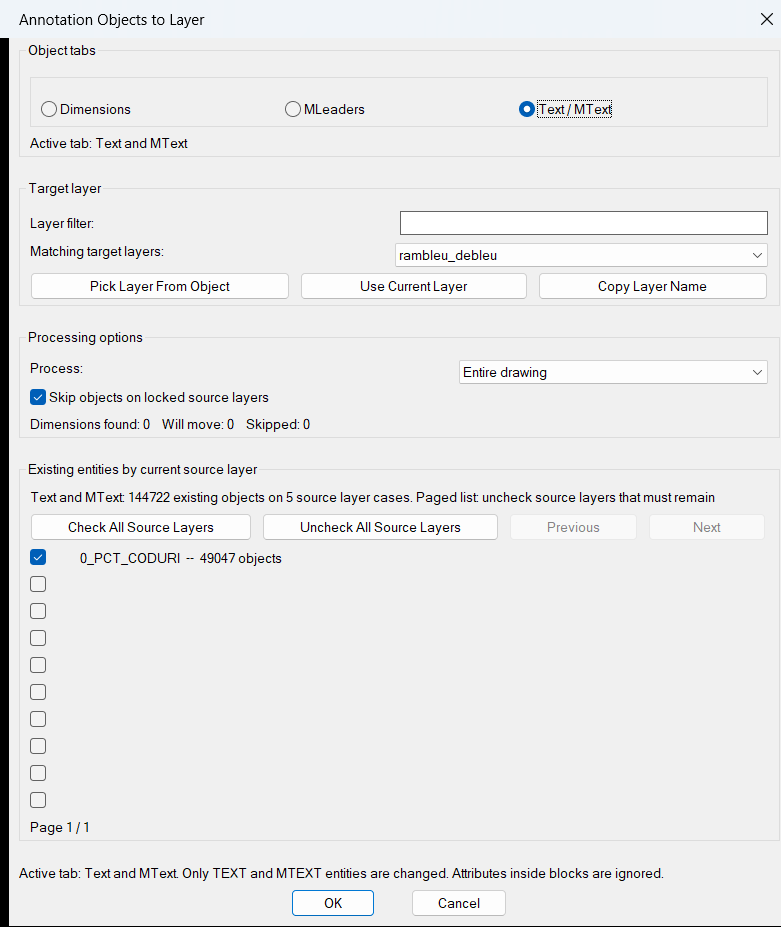
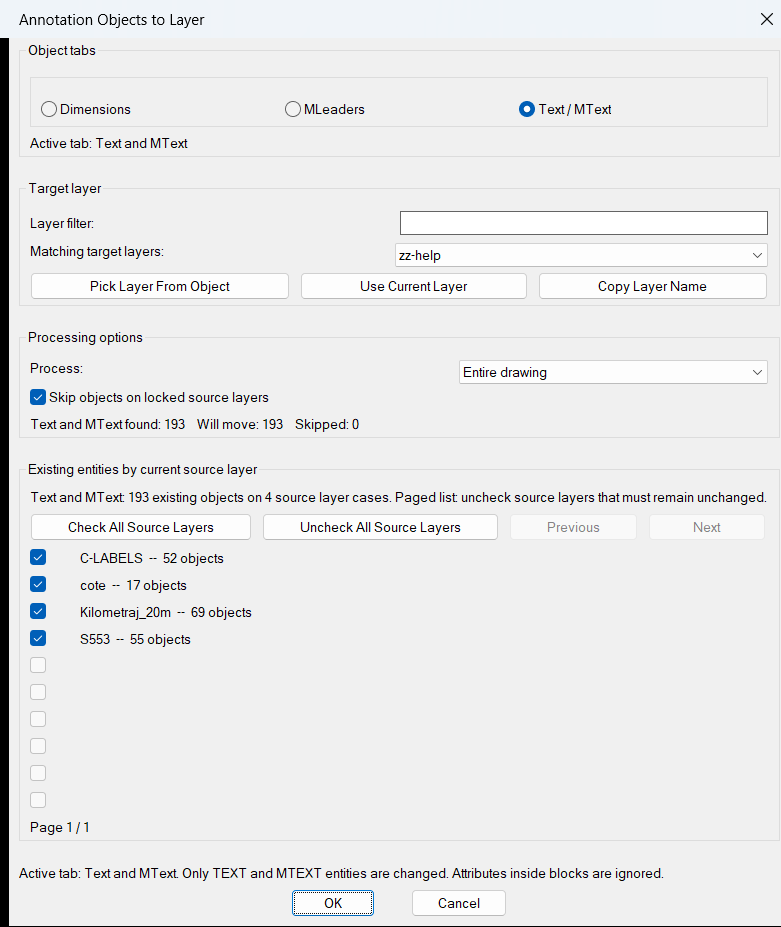
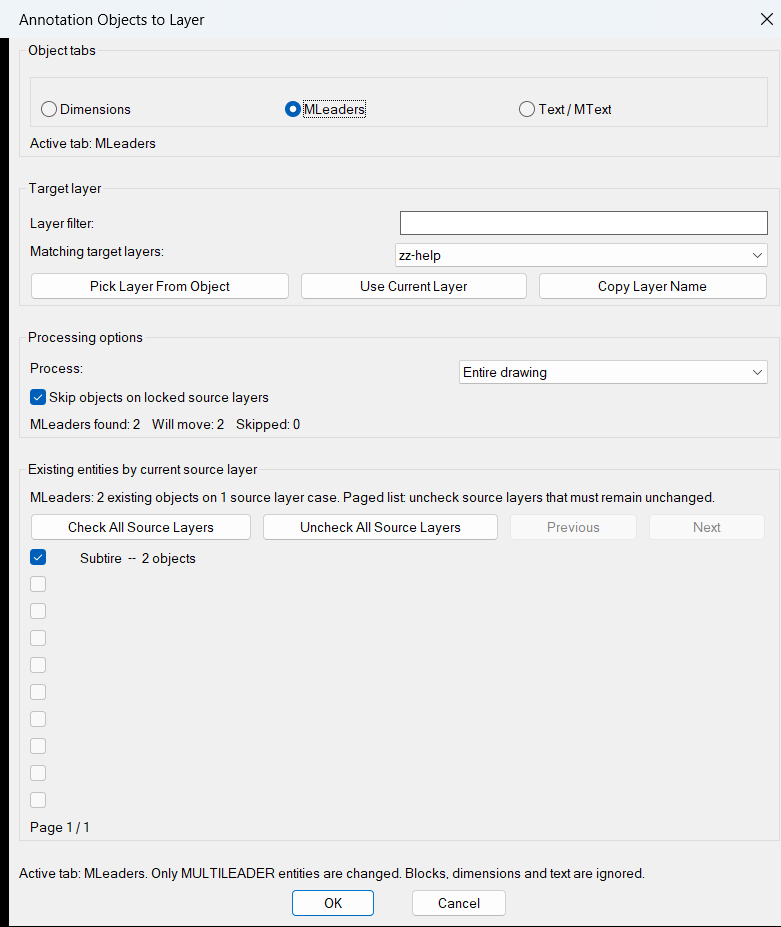
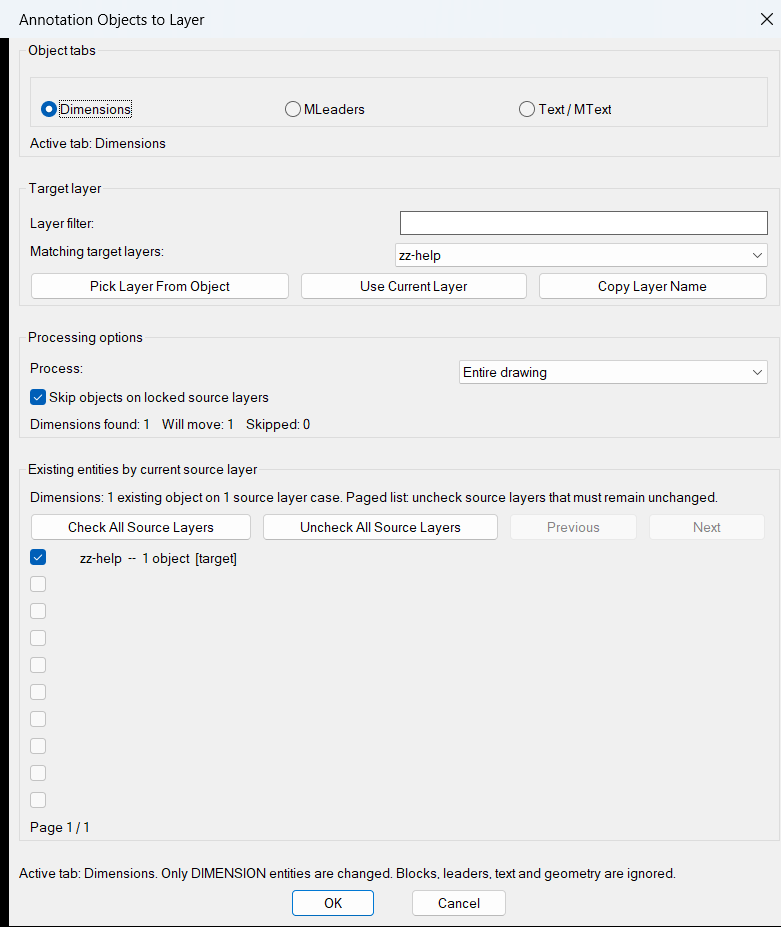
The command opens a generated DCL interface with separate Dimensions, MLeaders, and Text / MText tabs. Users can filter the target-layer list, pick a target layer from an object, use the current layer, copy the selected layer name, choose a drawing scope, skip objects on locked source layers, and enable or disable individual source layers before applying the move.
The dialog reports how many matching objects were found, how many will move, and how many will be skipped. Source-layer cases are counted and displayed in a ten-row paged checklist with locked-layer and target-layer indicators. Settings including the selected object category, target layer, layer filter, processing scope, locked-layer option, source-layer choices, and dialog position are saved to an Entities2Layers configuration file in the user application-data folder.
The current version uses an optimized sort-and-group counting pass for drawings containing large numbers of annotation entities. Live found, move, and skip totals are derived from the existing per-layer case list instead of triggering a second full drawing scan after every dialog interaction. Named, guarded source-row handlers and defensive dialog-state validation prevent a malformed row or unusual entity from closing the dialog.
Entity counting, collection, movement, initialization, and live dialog callbacks use guarded Visual LISP error handling. Unreadable or unusual entities are skipped and reported instead of terminating the command. The move operation updates DXF group code 8, refreshes each changed entity, and wraps the modifications in an AutoCAD undo mark.
Helper function: (if any)
Main helper functions include E2L:run-dialog and E2L:write-dcl for the generated DCL interface, E2L:get-all-layers and E2L:update-layer-list for target-layer discovery and filtering, E2L:count-source-cases for optimized sort-and-group source-layer counting, E2L:counts-from-cases and E2L:update-count for live totals without a duplicate entity scan, E2L:update-source-panel and E2L:update-source-row for protected paged source-layer rendering, E2L:collect-entities for final category and scope filtering, E2L:move-entities for applying layer changes, E2L:entity-in-scope-p for layout filtering, E2L:layer-locked-p and E2L:layer-xref-p for layer validation, E2L:read-cfg / E2L:write-cfg / E2L:save-state for persistent settings, E2L:CopyTextToClipboard for copying a selected layer name, and E2L:safe-call / E2L:guarded for fault-tolerant initialization and callbacks.
Functionalities:
– Opens the Annotation Objects to Layer DCL dialog with ENTITIES2LAYERS or E2L.
– Provides separate Dimensions, MLeaders, and Text / MText object tabs.
– Processes DIMENSION entities from the Dimensions tab.
– Processes MULTILEADER entities from the MLeaders tab.
– Processes TEXT and MTEXT entities from the Text / MText tab.
– Filters the target-layer popup list using user-entered text.
– Lets the user select a target layer from the list, pick a layer from an object, or use the current layer.
– Excludes xref-dependent layers from the available target-layer list.
– Copies the selected target-layer name to the Windows clipboard through PowerShell.
– Supports Entire drawing, Current layout, Model space only, and Paper space layouts scopes.
– Displays matching source layers with per-layer object counts.
– Provides a ten-row paged source-layer checklist with Previous, Next, Check All, and Uncheck All controls.
– Marks locked source layers and the selected target layer in the source-layer list.
– Lets users exclude individual source layers from processing.
– Optionally skips objects on locked source layers.
– Shows live found, will-move, skipped, locked, and disabled-source counts.
– Uses an O(n log n) sort-and-group counting pass instead of repeated association-list updates.
– Derives live totals from the current source-layer case list and avoids a second full entity scan during each dialog interaction.
– Performs the final full entity collection only after the user accepts the dialog.
– Protects each source-layer row update and stored checkbox state with named guarded handlers.
– Validates source-row limits, source-case data, and persisted dialog coordinates before using them.
– Persists the selected category, layer filter, target layer, scope, locked-layer option, source-layer states, and dialog position.
– Uses guarded callbacks and per-entity error handling so unreadable entities are skipped instead of crashing the dialog.
– Stops safely without drawing changes when dialog initialization cannot be completed.
– Changes the entity layer through DXF group code 8 and refreshes each modified entity.
– Wraps the move operation in an AutoCAD undo mark.
– Reports found, moved, skipped, locked, and failed counts at the command line.
Result:
The routine moves enabled dimensions, multileaders, text, or mtext objects from their current source layers to the selected target layer. It applies the chosen drawing scope, source-layer selections, and locked-layer rules, reports processing totals, and preserves disabled source layers and inactive annotation categories unchanged. Optimized counting and guarded row processing improve responsiveness and reliability in drawings containing large annotation sets.
Images, animations etc.
XAML code:
<ResourceDictionary
xmlns="http://schemas.microsoft.com/winfx/2006/xaml/presentation"
xmlns:x="http://schemas.microsoft.com/winfx/2006/xaml"
xmlns:src="clr-namespace:Autodesk.Windows;assembly=AdWindows">

<src:RibbonToolTip x:Key="Entities2Layers">
<src:RibbonToolTip.ExpandedContent>
<StackPanel>
<TextBlock Background="AntiqueWhite" TextAlignment="Left">
<Bold>Function Syntax: Entities2Layers / E2L</Bold>
<LineBreak/>
<Bold>Version: 1.0 Date: 01.07.2026 11:22:58</Bold>
<LineBreak/>
<Bold>Version: 1.1 Date: 01.07.2026 11:23:35AM</Bold>
<LineBreak/>
<Bold>Version: 1.2 Date: 03.07.2026 12:04:51PM</Bold>
<LineBreak/>
<Hyperlink>N/A</Hyperlink>
<LineBreak/>

<Bold><Run Foreground="DodgerBlue">🚀 Entities2Layers</Run></Bold><LineBreak/>
<Run Foreground="White">Entities2Layers is an AutoCAD and Civil 3D AutoLISP utility for moving dimensions, multileaders, text, and mtext objects to a selected target layer through a visual DCL dialog.</Run><LineBreak/>
<Run Foreground="LimeGreen">It improves CAD layer organization by replacing repetitive manual layer changes with a controlled annotation-category, drawing-scope, source-layer, and locked-layer workflow optimized for large drawings.</Run><LineBreak/>
<Bold><Run Foreground="DodgerBlue">Main Commands</Run></Bold><LineBreak/>
<Run Foreground="White">🧰 Run </Run><Bold><Run Foreground="Orange">ENTITIES2LAYERS</Run></Bold><Run Foreground="White"> to open the Annotation Objects to Layer dialog.</Run><LineBreak/>
<Run Foreground="White">⚡ Run </Run><Bold><Run Foreground="Orange">E2L</Run></Bold><Run Foreground="White"> as the shortcut command for the same workflow.</Run><LineBreak/>
<Bold><Run Foreground="DodgerBlue">SEO Optimized Description</Run></Bold><LineBreak/>
<Run Foreground="White">📐 This AutoCAD annotation layer manager lets users move dimensions, multileaders, text, or mtext objects to an existing target layer without manually editing every entity.</Run><LineBreak/>
<Run Foreground="White">🔍 The tool supports CAD standards, drawing cleanup, annotation organization, layer normalization, Civil 3D plan production, and quality-control workflows where object categories must be placed on consistent layers.</Run><LineBreak/>
<Run Foreground="White">🧠 It scans the drawing by entity type and scope, groups matching objects by current source layer, applies user-controlled source-layer exclusions, and changes the layer using DXF group code </Run><Bold><Run Foreground="Orange">8</Run></Bold><Run Foreground="White">.</Run><LineBreak/>
<Run Foreground="White">⚙️ Version </Run><Bold><Run Foreground="Orange">1.5.102</Run></Bold><Run Foreground="White"> uses optimized sort-and-group counting, avoids duplicate full-drawing scans during dialog interaction, and guards individual source-layer rows so isolated errors do not close the interface.</Run><LineBreak/>
<Run Foreground="White">📌 Entities2Layers is useful for CAD technicians, Civil 3D users, survey drafting, utility plans, construction documents, annotation cleanup, template compliance, and drawing-standard enforcement.</Run><LineBreak/>
<Bold><Run Foreground="LimeGreen">Functionalities</Run></Bold><LineBreak/>
<Run Foreground="White">🚀 </Run><Bold><Run Foreground="LimeGreen">Dialog-based workflow</Run></Bold><Run Foreground="White"> - opens a generated DCL interface for selecting the annotation category, target layer, processing scope, and source-layer rules.</Run><LineBreak/>
<Run Foreground="White">📐 </Run><Bold><Run Foreground="LimeGreen">Annotation object tabs</Run></Bold><Run Foreground="White"> - provides separate </Run><Bold><Run Foreground="Orange">Dimensions</Run></Bold><Run Foreground="White">, </Run><Bold><Run Foreground="Orange">MLeaders</Run></Bold><Run Foreground="White">, and </Run><Bold><Run Foreground="Orange">Text / MText</Run></Bold><Run Foreground="White"> processing modes.</Run><LineBreak/>
<Run Foreground="White">🧩 </Run><Bold><Run Foreground="LimeGreen">Supported entities</Run></Bold><Run Foreground="White"> - processes DIMENSION, MULTILEADER, TEXT, and MTEXT objects according to the active tab.</Run><LineBreak/>
<Run Foreground="White">🔍 </Run><Bold><Run Foreground="LimeGreen">Target-layer filtering</Run></Bold><Run Foreground="White"> - filters the available layer list and excludes xref-dependent layers from target selection.</Run><LineBreak/>
<Run Foreground="White">🎯 </Run><Bold><Run Foreground="LimeGreen">Flexible target selection</Run></Bold><Run Foreground="White"> - selects a layer from the popup list, picks a layer from an object, or uses the current AutoCAD layer.</Run><LineBreak/>
<Run Foreground="White">📋 </Run><Bold><Run Foreground="LimeGreen">Copy layer name</Run></Bold><Run Foreground="White"> - copies the selected target-layer name to the Windows clipboard through PowerShell.</Run><LineBreak/>
<Run Foreground="White">🗺️ </Run><Bold><Run Foreground="LimeGreen">Drawing scope controls</Run></Bold><Run Foreground="White"> - supports </Run><Bold><Run Foreground="Orange">Entire drawing</Run></Bold><Run Foreground="White">, </Run><Bold><Run Foreground="Orange">Current layout</Run></Bold><Run Foreground="White">, </Run><Bold><Run Foreground="Orange">Model space only</Run></Bold><Run Foreground="White">, and </Run><Bold><Run Foreground="Orange">Paper space layouts</Run></Bold><Run Foreground="White">.</Run><LineBreak/>
<Run Foreground="White">☑️ </Run><Bold><Run Foreground="LimeGreen">Source-layer checklist</Run></Bold><Run Foreground="White"> - groups matching entities by their current layer and lets users check or uncheck individual source layers before processing.</Run><LineBreak/>
<Run Foreground="White">📄 </Run><Bold><Run Foreground="LimeGreen">Paged source layers</Run></Bold><Run Foreground="White"> - displays source-layer cases in a ten-row paged list with Previous, Next, Check All, and Uncheck All controls.</Run><LineBreak/>
<Run Foreground="White">🔒 </Run><Bold><Run Foreground="LimeGreen">Locked-layer protection</Run></Bold><Run Foreground="White"> - optionally skips objects on locked source layers and identifies locked layers in the checklist.</Run><LineBreak/>
<Run Foreground="White">🔢 </Run><Bold><Run Foreground="LimeGreen">Live processing counts</Run></Bold><Run Foreground="White"> - reports objects found, objects that will move, and objects skipped because of disabled source layers or locked-layer rules.</Run><LineBreak/>
<Run Foreground="White">⚡ </Run><Bold><Run Foreground="LimeGreen">Large-drawing optimization</Run></Bold><Run Foreground="White"> - uses an O(n log n) sort-and-group pass to count source-layer cases efficiently when drawings contain many annotation objects.</Run><LineBreak/>
<Run Foreground="White">🔄 </Run><Bold><Run Foreground="LimeGreen">Single-scan dialog updates</Run></Bold><Run Foreground="White"> - derives live totals from the existing source-layer case list instead of running a second full drawing scan after each tab, scope, page, filter, or checkbox change.</Run><LineBreak/>
<Run Foreground="White">🛡️ </Run><Bold><Run Foreground="LimeGreen">Protected source rows</Run></Bold><Run Foreground="White"> - processes each visible source-layer row through a named guarded function so a malformed row is reported and skipped without closing the dialog.</Run><LineBreak/>
<Run Foreground="White">💾 </Run><Bold><Run Foreground="LimeGreen">Persistent settings</Run></Bold><Run Foreground="White"> - saves the active tab, target layer, filter, scope, locked-layer option, source-layer choices, and validated dialog position in the user application-data folder.</Run><LineBreak/>
<Run Foreground="White">🧯 </Run><Bold><Run Foreground="LimeGreen">Safe initialization</Run></Bold><Run Foreground="White"> - validates dialog state and stops safely without drawing changes when the interface cannot be initialized.</Run><LineBreak/>
<Run Foreground="White">🧠 </Run><Bold><Run Foreground="LimeGreen">Fault-tolerant entity processing</Run></Bold><Run Foreground="White"> - guards counting, collection, callbacks, and layer changes so unusual or unreadable entities are skipped and reported instead of crashing the command.</Run><LineBreak/>
<Run Foreground="White">↩️ </Run><Bold><Run Foreground="LimeGreen">Undo support</Run></Bold><Run Foreground="White"> - wraps the layer reassignment operation in an AutoCAD undo mark.</Run><LineBreak/>
<Bold><Run Foreground="DodgerBlue">Practical Result</Run></Bold><LineBreak/>
<Run Foreground="White">✅ The result is a faster AutoCAD annotation cleanup workflow that moves the enabled object category to the selected target layer while respecting drawing scope, source-layer exclusions, and locked-layer protection.</Run><LineBreak/>
<Run Foreground="LimeGreen">Optimized counting and guarded dialog processing make Entities2Layers useful for CAD standards enforcement, Civil 3D drafting support, drawing audits, and large annotation-heavy projects.</Run><LineBreak/>
<Bold><Run Foreground="DarkRed">Important Note</Run></Bold><LineBreak/>
<Run Foreground="White">This command directly changes the layer assignment of matching annotation objects. Review the active object tab, target layer, scope, and source-layer checklist before pressing OK, and use AutoCAD undo when needed.</Run><LineBreak/>
<Run Foreground="White">Attributes inside blocks, block content, general geometry, unsupported annotation types, and xref-dependent target layers are not processed.</Run><LineBreak/>


</TextBlock>

<Grid>
<Image Source="Image_000.png" Stretch="Uniform"/>
</Grid>

<Grid>
<Image Source="Image_001.png" Stretch="Uniform"/>
</Grid>

<Grid>
<Image Source="Image_002.png" Stretch="Uniform"/>
</Grid>

<Grid>
<Image Source="Image_003.png" Stretch="Uniform"/>
</Grid>


</TextBlock>
</StackPanel>
</src:RibbonToolTip.ExpandedContent>
</src:RibbonToolTip>


<src:RibbonToolTip x:Key="Entities2Layers_1.2">
<src:RibbonToolTip.ExpandedContent>
<StackPanel>
<TextBlock Background="AntiqueWhite" TextAlignment="Left">
<Bold>Function Syntax: Entities2Layers / E2L</Bold>
<LineBreak/>
<Bold>Version: 1.0 Date: 01.07.2026 11:22:58</Bold>
<LineBreak/>
<Bold>Version: 1.1 Date: 01.07.2026 11:23:35AM</Bold>
<LineBreak/>
<Bold>Version: 1.2 Date: 03.07.2026 12:04:51PM</Bold>
<LineBreak/>
<Bold>Version: 1.3 Date: 19.07.2026 6:05:25PM</Bold>
<LineBreak/>
<Hyperlink>N/A</Hyperlink>
<LineBreak/>

<Bold><Run Foreground="DodgerBlue">🚀 Entities2Layers</Run></Bold><LineBreak/>
<Run Foreground="White">Entities2Layers is an AutoCAD and Civil 3D AutoLISP utility for moving dimensions, multileaders, text, and mtext objects to a selected target layer through a visual DCL dialog.</Run><LineBreak/>
<Run Foreground="LimeGreen">It improves CAD layer organization by replacing repetitive manual layer changes with a controlled annotation-category, drawing-scope, source-layer, and locked-layer workflow optimized for large drawings.</Run><LineBreak/>
<Bold><Run Foreground="DodgerBlue">Main Commands</Run></Bold><LineBreak/>
<Run Foreground="White">🧰 Run </Run><Bold><Run Foreground="Orange">ENTITIES2LAYERS</Run></Bold><Run Foreground="White"> to open the Annotation Objects to Layer dialog.</Run><LineBreak/>
<Run Foreground="White">⚡ Run </Run><Bold><Run Foreground="Orange">E2L</Run></Bold><Run Foreground="White"> as the shortcut command for the same workflow.</Run><LineBreak/>
<Bold><Run Foreground="DodgerBlue">SEO Optimized Description</Run></Bold><LineBreak/>
<Run Foreground="White">📐 This AutoCAD annotation layer manager lets users move dimensions, multileaders, text, or mtext objects to an existing target layer without manually editing every entity.</Run><LineBreak/>
<Run Foreground="White">🔍 The tool supports CAD standards, drawing cleanup, annotation organization, layer normalization, Civil 3D plan production, and quality-control workflows where object categories must be placed on consistent layers.</Run><LineBreak/>
<Run Foreground="White">🧠 It scans the drawing by entity type and scope, groups matching objects by current source layer, applies user-controlled source-layer exclusions, and changes the layer using DXF group code </Run><Bold><Run Foreground="Orange">8</Run></Bold><Run Foreground="White">.</Run><LineBreak/>
<Run Foreground="White">⚙️ Version </Run><Bold><Run Foreground="Orange">1.5.102</Run></Bold><Run Foreground="White"> uses optimized sort-and-group counting, avoids duplicate full-drawing scans during dialog interaction, and guards individual source-layer rows so isolated errors do not close the interface.</Run><LineBreak/>
<Run Foreground="White">📌 Entities2Layers is useful for CAD technicians, Civil 3D users, survey drafting, utility plans, construction documents, annotation cleanup, template compliance, and drawing-standard enforcement.</Run><LineBreak/>
<Bold><Run Foreground="LimeGreen">Functionalities</Run></Bold><LineBreak/>
<Run Foreground="White">🚀 </Run><Bold><Run Foreground="LimeGreen">Dialog-based workflow</Run></Bold><Run Foreground="White"> - opens a generated DCL interface for selecting the annotation category, target layer, processing scope, and source-layer rules.</Run><LineBreak/>
<Run Foreground="White">📐 </Run><Bold><Run Foreground="LimeGreen">Annotation object tabs</Run></Bold><Run Foreground="White"> - provides separate </Run><Bold><Run Foreground="Orange">Dimensions</Run></Bold><Run Foreground="White">, </Run><Bold><Run Foreground="Orange">MLeaders</Run></Bold><Run Foreground="White">, and </Run><Bold><Run Foreground="Orange">Text / MText</Run></Bold><Run Foreground="White"> processing modes.</Run><LineBreak/>
<Run Foreground="White">🧩 </Run><Bold><Run Foreground="LimeGreen">Supported entities</Run></Bold><Run Foreground="White"> - processes DIMENSION, MULTILEADER, TEXT, and MTEXT objects according to the active tab.</Run><LineBreak/>
<Run Foreground="White">🔍 </Run><Bold><Run Foreground="LimeGreen">Target-layer filtering</Run></Bold><Run Foreground="White"> - filters the available layer list and excludes xref-dependent layers from target selection.</Run><LineBreak/>
<Run Foreground="White">🎯 </Run><Bold><Run Foreground="LimeGreen">Flexible target selection</Run></Bold><Run Foreground="White"> - selects a layer from the popup list, picks a layer from an object, or uses the current AutoCAD layer.</Run><LineBreak/>
<Run Foreground="White">📋 </Run><Bold><Run Foreground="LimeGreen">Copy layer name</Run></Bold><Run Foreground="White"> - copies the selected target-layer name to the Windows clipboard through PowerShell.</Run><LineBreak/>
<Run Foreground="White">🗺️ </Run><Bold><Run Foreground="LimeGreen">Drawing scope controls</Run></Bold><Run Foreground="White"> - supports </Run><Bold><Run Foreground="Orange">Entire drawing</Run></Bold><Run Foreground="White">, </Run><Bold><Run Foreground="Orange">Current layout</Run></Bold><Run Foreground="White">, </Run><Bold><Run Foreground="Orange">Model space only</Run></Bold><Run Foreground="White">, and </Run><Bold><Run Foreground="Orange">Paper space layouts</Run></Bold><Run Foreground="White">.</Run><LineBreak/>
<Run Foreground="White">☑️ </Run><Bold><Run Foreground="LimeGreen">Source-layer checklist</Run></Bold><Run Foreground="White"> - groups matching entities by their current layer and lets users check or uncheck individual source layers before processing.</Run><LineBreak/>
<Run Foreground="White">📄 </Run><Bold><Run Foreground="LimeGreen">Paged source layers</Run></Bold><Run Foreground="White"> - displays source-layer cases in a ten-row paged list with Previous, Next, Check All, and Uncheck All controls.</Run><LineBreak/>
<Run Foreground="White">🔒 </Run><Bold><Run Foreground="LimeGreen">Locked-layer protection</Run></Bold><Run Foreground="White"> - optionally skips objects on locked source layers and identifies locked layers in the checklist.</Run><LineBreak/>
<Run Foreground="White">🔢 </Run><Bold><Run Foreground="LimeGreen">Live processing counts</Run></Bold><Run Foreground="White"> - reports objects found, objects that will move, and objects skipped because of disabled source layers or locked-layer rules.</Run><LineBreak/>
<Run Foreground="White">⚡ </Run><Bold><Run Foreground="LimeGreen">Large-drawing optimization</Run></Bold><Run Foreground="White"> - uses an O(n log n) sort-and-group pass to count source-layer cases efficiently when drawings contain many annotation objects.</Run><LineBreak/>
<Run Foreground="White">🔄 </Run><Bold><Run Foreground="LimeGreen">Single-scan dialog updates</Run></Bold><Run Foreground="White"> - derives live totals from the existing source-layer case list instead of running a second full drawing scan after each tab, scope, page, filter, or checkbox change.</Run><LineBreak/>
<Run Foreground="White">🛡️ </Run><Bold><Run Foreground="LimeGreen">Protected source rows</Run></Bold><Run Foreground="White"> - processes each visible source-layer row through a named guarded function so a malformed row is reported and skipped without closing the dialog.</Run><LineBreak/>
<Run Foreground="White">💾 </Run><Bold><Run Foreground="LimeGreen">Persistent settings</Run></Bold><Run Foreground="White"> - saves the active tab, target layer, filter, scope, locked-layer option, source-layer choices, and validated dialog position in the user application-data folder.</Run><LineBreak/>
<Run Foreground="White">🧯 </Run><Bold><Run Foreground="LimeGreen">Safe initialization</Run></Bold><Run Foreground="White"> - validates dialog state and stops safely without drawing changes when the interface cannot be initialized.</Run><LineBreak/>
<Run Foreground="White">🧠 </Run><Bold><Run Foreground="LimeGreen">Fault-tolerant entity processing</Run></Bold><Run Foreground="White"> - guards counting, collection, callbacks, and layer changes so unusual or unreadable entities are skipped and reported instead of crashing the command.</Run><LineBreak/>
<Run Foreground="White">↩️ </Run><Bold><Run Foreground="LimeGreen">Undo support</Run></Bold><Run Foreground="White"> - wraps the layer reassignment operation in an AutoCAD undo mark.</Run><LineBreak/>
<Bold><Run Foreground="DodgerBlue">Practical Result</Run></Bold><LineBreak/>
<Run Foreground="White">✅ The result is a faster AutoCAD annotation cleanup workflow that moves the enabled object category to the selected target layer while respecting drawing scope, source-layer exclusions, and locked-layer protection.</Run><LineBreak/>
<Run Foreground="LimeGreen">Optimized counting and guarded dialog processing make Entities2Layers useful for CAD standards enforcement, Civil 3D drafting support, drawing audits, and large annotation-heavy projects.</Run><LineBreak/>
<Bold><Run Foreground="DarkRed">Important Note</Run></Bold><LineBreak/>
<Run Foreground="White">This command directly changes the layer assignment of matching annotation objects. Review the active object tab, target layer, scope, and source-layer checklist before pressing OK, and use AutoCAD undo when needed.</Run><LineBreak/>
<Run Foreground="White">Attributes inside blocks, block content, general geometry, unsupported annotation types, and xref-dependent target layers are not processed.</Run><LineBreak/>


</TextBlock>

<Grid>
<Image Source="Image_000.png" Stretch="Uniform"/>
</Grid>

<Grid>
<Image Source="Image_001.png" Stretch="Uniform"/>
</Grid>

<Grid>
<Image Source="Image_002.png" Stretch="Uniform"/>
</Grid>

<Grid>
<Image Source="Image_003.png" Stretch="Uniform"/>
</Grid>


</TextBlock>
</StackPanel>
</src:RibbonToolTip.ExpandedContent>
</src:RibbonToolTip>


</ResourceDictionary>