
Short description
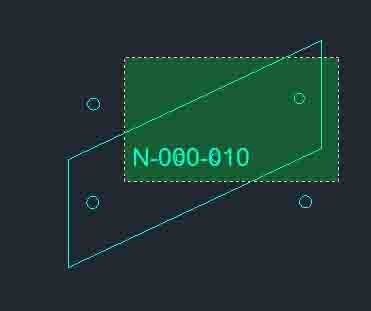
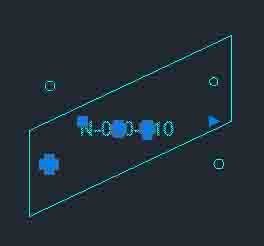
🧩 All_inside provides the WPS command for selecting drawing objects located inside selected circles and lightweight polylines.
🪟 The routine builds Window Polygon selection boundaries from each selected bounding object and combines the detected interior objects into the final selection set.
📦 After selection the user can optionally create an AutoCAD group containing the bounding objects and the objects found inside them.
Command:
Main command: WPS
Description:
⭕ For a selected circle the routine approximates the circular Window Polygon boundary with 90 points at four degree intervals.
📐 For a selected LWPOLYLINE the routine sends its DXF group 10 vertices to the AutoCAD WP selection option.
🔗 Results from multiple bounding circles and polylines are accumulated into the active selection set.
➕ The selected boundary objects themselves are added to the resulting set.
📦 The final prompt offers Yes or No for creating an AutoCAD group from the complete set.
🧭 The source comments reference CADStudio CADforum and a CADTutor discussion about selecting objects inside multiple polylines.
Helper function: (if any)
SELECT with the WP option performs the inside selection.
polar generates circle boundary points.
ssget and ssadd build and combine selection sets.
.-GROUP creates the optional final group.
Functionalities:
✅ Multiple boundary selection – accepts more than one circle or lightweight polyline.
✅ Inside object selection – uses AutoCAD Window Polygon selection to find contained objects.
✅ Circle boundary approximation – builds a 90 point polygon around each selected circle.
✅ Polyline boundary support – uses LWPOLYLINE vertices as the polygon boundary.
✅ Combined result selection – merges objects found inside all selected boundaries.
✅ Boundary inclusion – keeps the bounding circles and polylines in the final selected set.
✅ Optional group creation – offers creation of an AutoCAD group from the resulting set.
Result:
🎯 The result is one active selection set containing the chosen boundaries and objects found inside them.
📦 The user can optionally preserve the complete selection as an AutoCAD group.
Images, animations etc.
XAML code:
<ResourceDictionary
    xmlns="http://schemas.microsoft.com/winfx/2006/xaml/presentation"
    xmlns:x="http://schemas.microsoft.com/winfx/2006/xaml"
    xmlns:src="clr-namespace:Autodesk.Windows;assembly=AdWindows">

    <src:RibbonToolTip x:Key="All_inside">
        <src:RibbonToolTip.ExpandedContent>
            <StackPanel>
                <TextBlock Background="AntiqueWhite" TextAlignment="Left">
				<Bold>Function Syntax: WPS</Bold>
<LineBreak/>
<Bold>Version: 1.0 Date: 28.03.2024 2:27:36PM</Bold>
				<LineBreak/>
				<Hyperlink>https://www.cadtutor.net/forum/topic/65729-select-multiple-polylines-and-all-objectstext-within-them/</Hyperlink>
				<LineBreak/>
<Bold><Run Foreground="DodgerBlue">Description</Run></Bold><LineBreak/>
<Run Foreground="White">🧩 All_inside provides the WPS command for selecting drawing objects located inside selected circles and lightweight polylines.</Run><LineBreak/>
<Run Foreground="White">🪟 The routine builds Window Polygon selection boundaries from each selected bounding object and combines the detected interior objects into the final selection set.</Run><LineBreak/>
<Run Foreground="White">📦 After selection the user can optionally create an AutoCAD group containing the bounding objects and the objects found inside them.</Run><LineBreak/>
<LineBreak/>
<Bold><Run Foreground="DodgerBlue">Function Syntax</Run></Bold><LineBreak/>
<Run Foreground="White">Main command: </Run><Bold><Run Foreground="Orange">WPS</Run></Bold><LineBreak/>
<LineBreak/>
<Bold><Run Foreground="DodgerBlue">SEO Optimized Overview</Run></Bold><LineBreak/>
<Run Foreground="White">⭕ For a selected circle the routine approximates the circular Window Polygon boundary with 90 points at four degree intervals.</Run><LineBreak/>
<Run Foreground="White">📐 For a selected LWPOLYLINE the routine sends its DXF group 10 vertices to the AutoCAD WP selection option.</Run><LineBreak/>
<Run Foreground="White">🔗 Results from multiple bounding circles and polylines are accumulated into the active selection set.</Run><LineBreak/>
<Run Foreground="White">➕ The selected boundary objects themselves are added to the resulting set.</Run><LineBreak/>
<Run Foreground="White">📦 The final prompt offers Yes or No for creating an AutoCAD group from the complete set.</Run><LineBreak/>
<Run Foreground="White">🧭 The source comments reference CADStudio CADforum and a CADTutor discussion about selecting objects inside multiple polylines.</Run><LineBreak/>
<LineBreak/>
<Bold><Run Foreground="LimeGreen">Primary Workflow</Run></Bold><LineBreak/>
<Run Foreground="White">1. Run WPS.</Run><LineBreak/>
<Run Foreground="White">2. Select one or more bounding CIRCLE or LWPOLYLINE objects.</Run><LineBreak/>
<Run Foreground="White">3. Each boundary is translated into a Window Polygon selection.</Run><LineBreak/>
<Run Foreground="White">4. Objects located inside the boundaries are collected.</Run><LineBreak/>
<Run Foreground="White">5. The boundary objects are added to the final selection set.</Run><LineBreak/>
<Run Foreground="White">6. Choose whether the complete selection should be converted into an AutoCAD group.</Run><LineBreak/>
<LineBreak/>
<Bold><Run Foreground="LimeGreen">Functionalities</Run></Bold><LineBreak/>
<Run Foreground="White">✅ </Run><Bold><Run Foreground="LimeGreen">Multiple boundary selection</Run></Bold><Run Foreground="White"> - accepts more than one circle or lightweight polyline.</Run><LineBreak/>
<Run Foreground="White">✅ </Run><Bold><Run Foreground="LimeGreen">Inside object selection</Run></Bold><Run Foreground="White"> - uses AutoCAD Window Polygon selection to find contained objects.</Run><LineBreak/>
<Run Foreground="White">✅ </Run><Bold><Run Foreground="LimeGreen">Circle boundary approximation</Run></Bold><Run Foreground="White"> - builds a 90 point polygon around each selected circle.</Run><LineBreak/>
<Run Foreground="White">✅ </Run><Bold><Run Foreground="LimeGreen">Polyline boundary support</Run></Bold><Run Foreground="White"> - uses LWPOLYLINE vertices as the polygon boundary.</Run><LineBreak/>
<Run Foreground="White">✅ </Run><Bold><Run Foreground="LimeGreen">Combined result selection</Run></Bold><Run Foreground="White"> - merges objects found inside all selected boundaries.</Run><LineBreak/>
<Run Foreground="White">✅ </Run><Bold><Run Foreground="LimeGreen">Boundary inclusion</Run></Bold><Run Foreground="White"> - keeps the bounding circles and polylines in the final selected set.</Run><LineBreak/>
<Run Foreground="White">✅ </Run><Bold><Run Foreground="LimeGreen">Optional group creation</Run></Bold><Run Foreground="White"> - offers creation of an AutoCAD group from the resulting set.</Run><LineBreak/>
<LineBreak/>
<Bold><Run Foreground="DodgerBlue">Important Commands and Aspects</Run></Bold><LineBreak/>
<Run Foreground="White">🧩 </Run><Run Foreground="Orange">SELECT with the WP option performs the inside selection.</Run><LineBreak/>
<Run Foreground="White">🧩 </Run><Run Foreground="Orange">polar generates circle boundary points.</Run><LineBreak/>
<Run Foreground="White">🧩 </Run><Run Foreground="Orange">ssget and ssadd build and combine selection sets.</Run><LineBreak/>
<Run Foreground="White">🧩 </Run><Run Foreground="Orange">.-GROUP creates the optional final group.</Run><LineBreak/>
<LineBreak/>
<Bold><Run Foreground="DodgerBlue">Result</Run></Bold><LineBreak/>
<Run Foreground="White">🎯 The result is one active selection set containing the chosen boundaries and objects found inside them.</Run><LineBreak/>
<Run Foreground="White">📦 The user can optionally preserve the complete selection as an AutoCAD group.</Run><LineBreak/>
<LineBreak/>
<Bold><Run Foreground="DarkRed">Important Notes</Run></Bold><LineBreak/>
<Run Foreground="White">⚠️ </Run><Bold><Run Foreground="DarkRed">Only CIRCLE and LWPOLYLINE objects can be used as bounding objects by the current filter.</Run></Bold><LineBreak/>
<Run Foreground="White">⚠️ </Run><Bold><Run Foreground="DarkRed">Circle selection uses a 90 segment approximation rather than a mathematically continuous circular crossing boundary.</Run></Bold><LineBreak/>
<Run Foreground="White">⚠️ </Run><Bold><Run Foreground="DarkRed">The LWPOLYLINE workflow uses stored vertices and does not add extra tessellation points for curved bulge segments.</Run></Bold><LineBreak/>
<Run Foreground="White">⚠️ </Run><Bold><Run Foreground="DarkRed">The routine temporarily changes OSMODE and CMDECHO while processing.</Run></Bold><LineBreak/>
<LineBreak/>
<Bold><Run Foreground="Yellow">SEO Keywords</Run></Bold><LineBreak/>
<Run Foreground="Yellow">🏷️ AutoCAD, 🏷️ Civil 3D, 🏷️ AutoLISP, 🏷️ WPS, 🏷️ Select inside polyline, 🏷️ Select inside circle, 🏷️ Window Polygon, 🏷️ WP selection, 🏷️ Selection set, 🏷️ AutoCAD group, 🏷️ CAD productivity</Run><LineBreak/>

</TextBlock>

<Grid>
<Image Source="Image_000.png" Stretch="Uniform"/>
</Grid>

<Grid>
<Image Source="Image_001.png" Stretch="Uniform"/>
</Grid>


<!-- Use MediaElement for GIF (static first frame) and Image as fallback -->

</StackPanel>
        </src:RibbonToolTip.ExpandedContent>
    </src:RibbonToolTip>
</ResourceDictionary>