
Short description
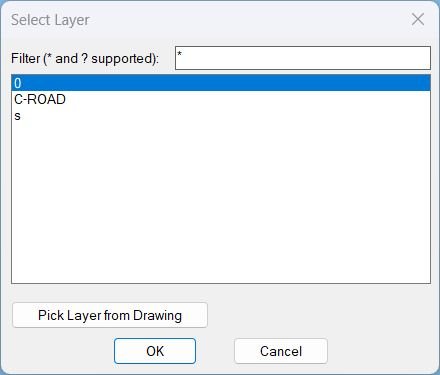
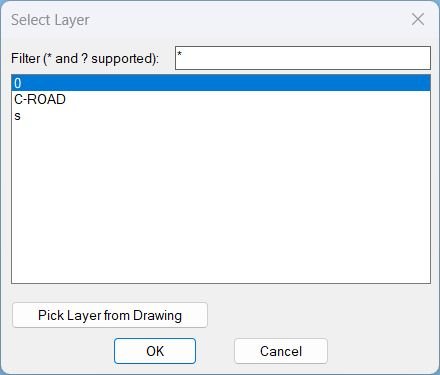
- Displays a filterable layer selection dialog and then zooms the view to the extents of all objects on the chosen layer.
- Supports picking a layer directly from a selected object in the drawing and remembers the last filter used.
Command:
- Command: Zoom2Layer
Description:
- Builds a list of layers that are visible and unfrozen, then shows a temporary DCL popup where the user can filter and select a layer.
- The filter field supports wildcards * and ? and is restored from the environment variable CHLAY-LAST-FILTER (defaults to *).
- After a layer is selected, the command gathers all entities on that layer and computes a combined bounding rectangle, then performs a window zoom to that area.
Helper function: (if any)
- LayerList-popup creates and manages the layer selection dialog and returns the chosen layer name when confirmed.
- Drawing-Visible-Layers-lst iterates layer records via tblnext and keeps only layers that are not off and not frozen by checking flag bits in group code 70.
- Update-List filters the full layer list using wcmatch against the current filter pattern and repopulates the list box.
- Highlight-Layer attempts to locate a layer inside the filtered list and sets the list box selection to it.
- Show-Dialog loads the temporary DCL file, wires dialog actions, returns the dialog exit code, and supports a special return value for the pick-from-drawing workflow.
- c:Zoom2Layer selects all entities on the chosen layer, aggregates bounding boxes via ActiveX GetBoundingBox, and executes ZoomWindow.
Functionalities:
- • Layer filtering with wildcard patterns entered in the dialog filter box.
- • Layer list scope includes only layers that are not off and not frozen (visible/unfrozen set).
- • Pick Layer from Drawing button temporarily exits the dialog so the user can select an object and adopt that object’s layer as the new filter, then reopens the dialog.
- • Persisted filter stored in CHLAY-LAST-FILTER and restored on next run.
- • Zoom-to-layer extents by collecting all objects on the selected layer and computing min/max XY bounds from each entity’s bounding box.
- • Robustness uses guarded ActiveX calls and skips entities that do not support GetBoundingBox.
Result:
- If the user confirms a layer selection, the view zooms to the combined extents of entities on that layer.
- If no objects exist on the selected layer, prints No objects found on layer for that layer.
- If objects exist but none provide a valid bounding box, prints No valid geometry to zoom to for that layer.
- If the user cancels or no layer is selected, prints No layer selected or cancelled and performs no zoom.
Images, animations etc.
Log in to download.
Log in
Log in
XAML code:
<ResourceDictionary
xmlns="http://schemas.microsoft.com/winfx/2006/xaml/presentation"
xmlns:x="http://schemas.microsoft.com/winfx/2006/xaml"
xmlns:src="clr-namespace:Autodesk.Windows;assembly=AdWindows">

<src:RibbonToolTip x:Key="Zoom2Layer">
<src:RibbonToolTip.ExpandedContent>
<StackPanel>
<TextBlock Background="AntiqueWhite" TextAlignment="Zoom2Layer">
<Bold>Function Syntax: Command</Bold>
<LineBreak/>
<Bold>Version: 1 Date: 23.12.2025</Bold>
<LineBreak/>
<LineBreak/>
<Hyperlink>AI</Hyperlink>
<LineBreak/>
<Bold>Summary Description</Bold><LineBreak/>
<Run>This program provides a layer-selection dialog and a zoom-to-layer command for AutoCAD.</Run><LineBreak/>
<Run Foreground="DarkRed">Primary command:</Run><Run> </Run><Bold><Run Foreground="DarkRed">Zoom2Layer</Run></Bold><Run> (runs the workflow end to end).</Run><LineBreak/>

<Bold>What the user will do</Bold><LineBreak/>
<Run>1. Run the command </Run><Bold><Run Foreground="DarkRed">Zoom2Layer</Run></Bold><Run>.</Run><LineBreak/>
<Run>2. In the dialog, choose a target layer from a filtered list (visible and unfrozen layers only).</Run><LineBreak/>
<Run>3. Optionally, press </Run><Bold><Run Foreground="DarkRed">Pick Layer from Drawing</Run></Bold><Run> and select an object in the drawing to auto-set the target layer.</Run><LineBreak/>
<Run>4. Click </Run><Bold><Run Foreground="DarkRed">OK</Run></Bold><Run> to zoom to all objects found on that layer, or </Run><Bold><Run Foreground="DarkRed">Cancel</Run></Bold><Run> to exit.</Run><LineBreak/>

<Bold>Dialog and selection behavior</Bold><LineBreak/>
<Run Foreground="DarkBlue">Filter field:</Run><Run> Supports wildcard patterns using </Run><Bold><Run Foreground="DarkRed"></Run></Bold><Run> and </Run><Bold><Run Foreground="DarkRed">?</Run></Bold><Run> to narrow the list of layers.</Run><LineBreak/>
<Run Foreground="DarkBlue">Layer list contents:</Run><Run> Only layers that are </Run><Bold><Run Foreground="DarkRed">not Off</Run></Bold><Run> and </Run><Bold><Run Foreground="DarkRed">not Frozen</Run></Bold><Run> are displayed.</Run><LineBreak/>
<Run Foreground="DarkBlue">Default behavior:</Run><Run> If the filter is empty, it is treated as </Run><Bold><Run Foreground="DarkRed"></Run></Bold><Run>. If the filtered list is not empty, the first item is selected by default.</Run><LineBreak/>
<Run Foreground="DarkBlue">Pick from drawing:</Run><Run> Selecting an object reads its layer (DXF group </Run><Bold><Run Foreground="DarkRed">8</Run></Bold><Run>) and uses that layer name as the current filter target.</Run><LineBreak/>
<Run Foreground="DarkBlue">Persistence:</Run><Run> The last-used filter is saved to the environment variable </Run><Bold><Run Foreground="DarkRed">CHLAY-LAST-FILTER</Run></Bold><Run> and restored on the next run.</Run><LineBreak/>

<Bold>Zoom operation</Bold><LineBreak/>
<Run Foreground="DarkGreen">Selection set:</Run><Run> The program gathers all entities on the chosen layer using a global selection (equivalent to selecting the entire drawing filtered by layer).</Run><LineBreak/>
<Run Foreground="DarkGreen">Extents calculation:</Run><Run> It computes a combined bounding window by iterating entities that support </Run><Bold><Run Foreground="DarkRed">GetBoundingBox</Run></Bold><Run> and expanding the min and max corners.</Run><LineBreak/>
<Run Foreground="DarkGreen">Zoom execution:</Run><Run> It zooms to the computed window using </Run><Bold><Run Foreground="DarkRed">ZoomWindow</Run></Bold><Run>.</Run><LineBreak/>

<Bold>Functionalities (bullet list)</Bold><LineBreak/>
<Run>• </Run><Bold><Run Foreground="DarkRed">Layer picker dialog</Run></Bold><Run> with searchable filtering using wildcard patterns.</Run><LineBreak/>
<Run>• Lists only </Run><Bold><Run Foreground="DarkRed">visible</Run></Bold><Run> and </Run><Bold><Run Foreground="DarkRed">unfrozen</Run></Bold><Run> layers for practical selection.</Run><LineBreak/>
<Run>• </Run><Bold><Run Foreground="DarkRed">Pick Layer from Drawing</Run></Bold><Run> to capture a layer name directly from a selected object.</Run><LineBreak/>
<Run>• Remembers the last filter via </Run><Bold><Run Foreground="DarkRed">CHLAY-LAST-FILTER</Run></Bold><Run> to speed up repeated use.</Run><LineBreak/>
<Run>• Finds all objects on the selected layer and </Run><Bold><Run Foreground="DarkRed">zooms to their combined extents</Run></Bold><Run>.</Run><LineBreak/>

<Bold>Outputs and edge cases</Bold><LineBreak/>
<Run>• If the user cancels or selects nothing, the command ends with the message </Run><Bold><Run Foreground="DarkRed">No layer selected or cancelled</Run></Bold><Run>.</Run><LineBreak/>
<Run>• If no objects exist on the chosen layer, it reports </Run><Bold><Run Foreground="DarkRed">No objects found on layer</Run></Bold><Run>.</Run><LineBreak/>
<Run>• If objects exist but none provide valid geometry for bounding boxes, it reports </Run><Bold><Run Foreground="DarkRed">No valid geometry to zoom to</Run></Bold><Run>.</Run><LineBreak/>

</TextBlock>

<Grid>
<Image Source="PNG" Stretch="Uniform"/>
</Grid>

<Grid>
<MediaElement
 Source="GIF"
 Stretch="Uniform"
 Visibility="Visible"/>
 </Grid>

</StackPanel>
</src:RibbonToolTip.ExpandedContent>
</src:RibbonToolTip>
</ResourceDictionary>
Additional info:
Based on / Source code:
Open Website
Share this page:
Subscribe
Login
0 Comments
Oldest