
Short description
Sort / Purpose:
Bookmark entities in the current drawing and revisit them later by name, coordinates, color, and custom remarks.
• Scope: Lets you pick TEXT, MTEXT, LINE, (LW)POLYLINE, CIRCLE, SPLINE, INSERT (blocks), stores their positions + color, and gives you a manager dialog to zoom to them, duplicate, delete, filter by type, and save/load the list per DWG.
• Goal: Act as a “bookmark manager” for important entities: details, nodes, blocks, texts, etc., so you can quickly navigate and annotate them across work sessions.
Command:
Main Command:
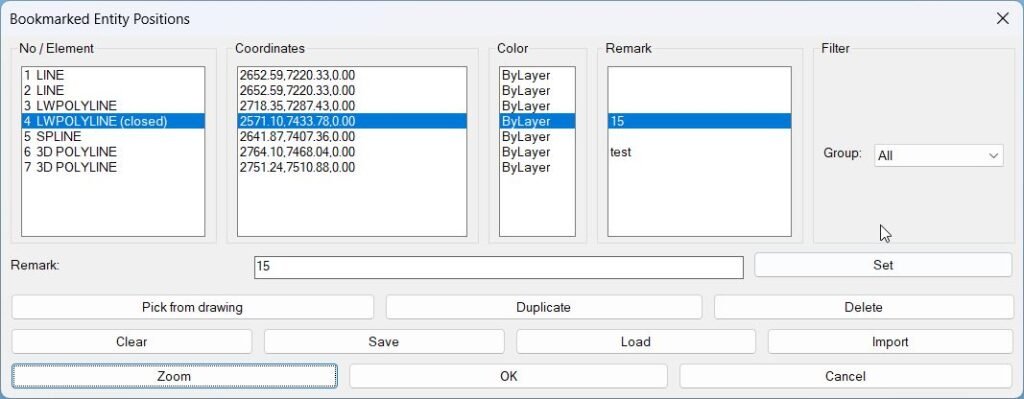
• BMEntityPos – opens the “Bookmarked Entity Positions” dialog, where you manage all stored bookmarks (pick from drawing, zoom, remark, save, load, import, filter).
Description:
Bookmark data structure:
Each bookmark is stored in
Global lists & filters: •
*bm-list* as:
(label startPt endPt colorStr handle etype remark)
• label – friendly name like “TEXT”, “LWPOLYLINE (closed)”, “BLOCK MyBlock”, etc., depending on entity type.
• startPt – a representative start / lower point:
– Lines: start point (10).
– Polylines / splines: start point from vlax-curve-getstartpoint.
– Text / blocks / circles: usually lower bound of the bounding box, fallback to insertion point.
• endPt – usually upper bound of the bounding box, used to define a zoom window.
• colorStr – color info as text:
– If TrueColor (DXF 420) exists: "TC:<integer>".
– Otherwise: ByLayer / ByBlock / ACI number.
• handle – entity handle (DXF 5) used later to find the live entity with handent.
• etype – DXF type string (“TEXT”, “MTEXT”, “LINE”, “LWPOLYLINE”, “POLYLINE”, “CIRCLE”, “SPLINE”, “INSERT”).
• remark – user-defined comment, stored as simple string.Global lists & filters: •
*bm-list* – the full bookmark collection for the current session/drawing.
• *bm-index-map* – maps visible row index in the dialog to the real index in *bm-list* (used when group-filtering so operations affect the correct entry).
• *bm-group* – current group filter: “All”, “Text”, “Lines”, “Polylines”, “Circles”, “Splines”, “Blocks”, “Other”.
• *bm-groups* – complete list of group labels, always starting with “All”. Built dynamically from current bookmark content.
Helper function: (if any)
Picking & storing bookmarks:
• Button “Pick from drawing” calls
Group / filter system: •
Dialog listboxes & synchronization: • Columns are separate list boxes: – No / Element (
Zoom to bookmark: • Button “Zoom” calls
Remarks: • The edit box “Remark” lets you attach a free-text comment to the selected bookmark. •
Duplicate / Delete / Clear: • Duplicate – inserts a copy of the selected entry immediately after it in
Save / Load / Import (per-DWG persistence): • Automatic default file path:
bm-pick-and-store which:
– Uses ssget with filter (0 . "TEXT,MTEXT,LINE,LWPOLYLINE,POLYLINE,CIRCLE,SPLINE,INSERT").
– For each entity, determines:
• Label – e.g. “TEXT”, “LWPOLYLINE (closed)”, “3D POLYLINE”, “BLOCK MyBlock”.
• Representative start/end points via bounding box or geometry.
• Color string via bm-color-string (TrueColor/aci/ByLayer/ByBlock).
• Handle and entity type.
– Creates an entry with empty remark "" and appends it to *bm-list*.Group / filter system: •
bm-entry-group maps entity type to a group name:
– TEXT/MTEXT → “Text”.
– LINE → “Lines”.
– (LW)POLYLINE → “Polylines”.
– CIRCLE → “Circles”.
– SPLINE → “Splines”.
– INSERT → “Blocks”.
– Others → “Other”.
• bm-build-groups scans *bm-list* and builds *bm-groups* = ("All" ... unique group names ...).
• The popup “Group” in the dialog is filled from *bm-groups*; changing it updates *bm-group* and refreshes the list.
• bm-pass-filter ensures only entries matching the selected group (or All) are shown.Dialog listboxes & synchronization: • Columns are separate list boxes: – No / Element (
lb_elem) – row number + label.
– Coordinates (lb_coord) – bookmark start point as “X,Y,Z” (formatted using current LUPREC).
– Color (lb_color).
– Remark (lb_rem).
• bm-update-list rebuilds these four list boxes from *bm-list* + current group filter, and rebuilds *bm-index-map* for “visible index → real index” translation.
• Selecting in any of the list boxes forces all other list boxes to the same index and runs bm-on-select (which updates the Remark edit box).Zoom to bookmark: • Button “Zoom” calls
bm-apply-zoom:
– Uses selected row in lb_elem to get visible index, then real index via *bm-index-map*, then fetches entry from *bm-list*.
– Attempts to resolve the current entity by handle using handent. If found, recomputes the bounding box for an up-to-date zoom window (even if the object has moved). If not found, falls back to stored start/end points.
– bm-make-window builds a padded window around those two points (5% margin).
– Calls bm-zoom-ll-ur, which uses vla-ZoomWindow to actually zoom the current view.Remarks: • The edit box “Remark” lets you attach a free-text comment to the selected bookmark. •
bm-update-remark-field fills the edit box when you change selection.
• Button “Set” calls bm-set-remark which:
– Reads the current remark text.
– Updates the corresponding entry in *bm-list* (using bm-replace-nth).
– Rebuilds the lists and re-selects the same visible row so the UI stays in sync.Duplicate / Delete / Clear: • Duplicate – inserts a copy of the selected entry immediately after it in
*bm-list* via bm-insert-after-nth, then refreshes the UI.
• Delete – removes the selected entry from *bm-list* via bm-remove-nth and clears the remark field.
• Clear – empties *bm-list* and *bm-index-map* in one shot and refreshes all list boxes.Save / Load / Import (per-DWG persistence): • Automatic default file path:
DWGPREFIX + (vl-filename-base DWGNAME) + "_BMEntityPos.lst".
– This means each drawing can have its own bookmark list stored right next to the DWG (same prefix, custom suffix).
• Save – bm-save-list:
– Writes *bm-list* as a single LISP-readable expression into the default file (using prin1).
– Notifies with the path on success; warns if there’s nothing to save.
• Load – bm-load-list:
– Reads from the default per-DWG file, validates that it’s a list, assigns it to *bm-list*, and updates the dialog.
• Import – bm-import-list:
– Uses getfiled to let you choose any .lst file containing a bookmark list.
– On success, replaces current *bm-list* with the imported content and updates the dialog, with a path confirmation message.
Functionalities:
Picking & storing bookmarks:
• Button “Pick from drawing” calls
Group / filter system: •
Dialog listboxes & synchronization: • Columns are separate list boxes: – No / Element (
Zoom to bookmark: • Button “Zoom” calls
Remarks: • The edit box “Remark” lets you attach a free-text comment to the selected bookmark. •
Duplicate / Delete / Clear: • Duplicate – inserts a copy of the selected entry immediately after it in
Save / Load / Import (per-DWG persistence): • Automatic default file path:
bm-pick-and-store which:
– Uses ssget with filter (0 . "TEXT,MTEXT,LINE,LWPOLYLINE,POLYLINE,CIRCLE,SPLINE,INSERT").
– For each entity, determines:
• Label – e.g. “TEXT”, “LWPOLYLINE (closed)”, “3D POLYLINE”, “BLOCK MyBlock”.
• Representative start/end points via bounding box or geometry.
• Color string via bm-color-string (TrueColor/aci/ByLayer/ByBlock).
• Handle and entity type.
– Creates an entry with empty remark "" and appends it to *bm-list*.Group / filter system: •
bm-entry-group maps entity type to a group name:
– TEXT/MTEXT → “Text”.
– LINE → “Lines”.
– (LW)POLYLINE → “Polylines”.
– CIRCLE → “Circles”.
– SPLINE → “Splines”.
– INSERT → “Blocks”.
– Others → “Other”.
• bm-build-groups scans *bm-list* and builds *bm-groups* = ("All" ... unique group names ...).
• The popup “Group” in the dialog is filled from *bm-groups*; changing it updates *bm-group* and refreshes the list.
• bm-pass-filter ensures only entries matching the selected group (or All) are shown.Dialog listboxes & synchronization: • Columns are separate list boxes: – No / Element (
lb_elem) – row number + label.
– Coordinates (lb_coord) – bookmark start point as “X,Y,Z” (formatted using current LUPREC).
– Color (lb_color).
– Remark (lb_rem).
• bm-update-list rebuilds these four list boxes from *bm-list* + current group filter, and rebuilds *bm-index-map* for “visible index → real index” translation.
• Selecting in any of the list boxes forces all other list boxes to the same index and runs bm-on-select (which updates the Remark edit box).Zoom to bookmark: • Button “Zoom” calls
bm-apply-zoom:
– Uses selected row in lb_elem to get visible index, then real index via *bm-index-map*, then fetches entry from *bm-list*.
– Attempts to resolve the current entity by handle using handent. If found, recomputes the bounding box for an up-to-date zoom window (even if the object has moved). If not found, falls back to stored start/end points.
– bm-make-window builds a padded window around those two points (5% margin).
– Calls bm-zoom-ll-ur, which uses vla-ZoomWindow to actually zoom the current view.Remarks: • The edit box “Remark” lets you attach a free-text comment to the selected bookmark. •
bm-update-remark-field fills the edit box when you change selection.
• Button “Set” calls bm-set-remark which:
– Reads the current remark text.
– Updates the corresponding entry in *bm-list* (using bm-replace-nth).
– Rebuilds the lists and re-selects the same visible row so the UI stays in sync.Duplicate / Delete / Clear: • Duplicate – inserts a copy of the selected entry immediately after it in
*bm-list* via bm-insert-after-nth, then refreshes the UI.
• Delete – removes the selected entry from *bm-list* via bm-remove-nth and clears the remark field.
• Clear – empties *bm-list* and *bm-index-map* in one shot and refreshes all list boxes.Save / Load / Import (per-DWG persistence): • Automatic default file path:
DWGPREFIX + (vl-filename-base DWGNAME) + "_BMEntityPos.lst".
– This means each drawing can have its own bookmark list stored right next to the DWG (same prefix, custom suffix).
• Save – bm-save-list:
– Writes *bm-list* as a single LISP-readable expression into the default file (using prin1).
– Notifies with the path on success; warns if there’s nothing to save.
• Load – bm-load-list:
– Reads from the default per-DWG file, validates that it’s a list, assigns it to *bm-list*, and updates the dialog.
• Import – bm-import-list:
– Uses getfiled to let you choose any .lst file containing a bookmark list.
– On success, replaces current *bm-list* with the imported content and updates the dialog, with a path confirmation message.
Result:
Result / Usage summary:
1. Run BMEntityPos.
2. Click “Pick from drawing”, select entities; they appear in the grid with number, type, coordinates, color, and remark column.
3. Optionally assign per-bookmark remarks (e.g., “Detail A – top left node”, “Valve 12”, etc.).
4. Use “Group” filter to quickly narrow down to Text, Polylines, Blocks…
5. Use “Zoom” to jump directly to the stored object; the tool tries to use the current geometry via handle so it works even if things moved.
6. Save the list (per drawing) and later “Load” or “Import” it again to restore your navigation points in future sessions.
In short, BMEntityPos is a lightweight bookmark & navigation manager for key entities in your DWG, complete with grouping, remarks, zooming, and per-file persistence.
In short, BMEntityPos is a lightweight bookmark & navigation manager for key entities in your DWG, complete with grouping, remarks, zooming, and per-file persistence.
Images, animations etc.
Log in to download.
Log in
Log in
Additional info:
Learn more:
Open Website
Share this page:
Subscribe
Login
0 Comments
Oldest