
Short description
🔍 NamedViewList is an AutoCAD AutoLISP named view manager that lists saved Named Views in a searchable DCL dialog, supports filtering, multi-select restore, zoom, delete, and double-click rename.
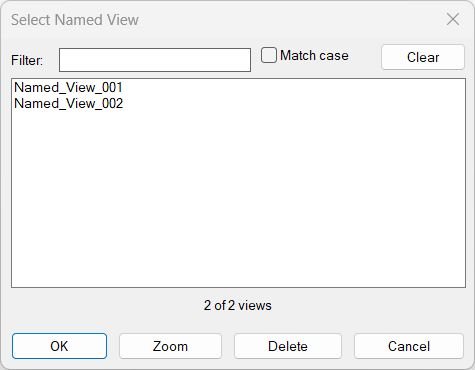
Command:
🚀 Main command: NamedViewList
🧭 Entry point: C:NamedViewList
📌 AutoCAD operations used: _-VIEW R, ._RENAME VIEW, vla-get-Views, vla-SetView, vla-delete
Description:
📘 NamedViewList is a portable AutoCAD productivity tool for managing saved Named Views directly from a custom DCL dialog. It collects all named views from the active drawing, sorts them case-insensitively, and displays them in a multi-select list with live filtering.
🔎 The tool is designed for fast view navigation and drawing setup management. Users can filter view names, toggle Match case, zoom to a selected view without closing the dialog, delete selected views in place, rename a view by double-clicking it, and restore one or more selected views after pressing OK.
🧩 This utility is useful for CAD technicians, AutoCAD users, Civil 3D production teams, BIM coordinators, and CAD managers who work with many saved views in large drawings, sheet preparation files, corridor plans, xref coordination drawings, or discipline-specific production layouts.
Helper function: (if any)
🧠 The program includes a portable helper set designed to avoid non-portable string helpers and keep the routine robust across AutoCAD environments:
– NVL-trim: trims spaces from view names and rename inputs.
– NVL-strcmp and NVL-cicmp: compare names for sorting and duplicate checks.
– NVL-sort: insertion-sort implementation for predictable view ordering.
– NVL-filter: filters view names by wildcard-style matching.
– NVL-parse-indexes: converts DCL list_box index strings into integer lists.
– NVL-del-view: deletes a Named View with ActiveX error protection.
– NVL-zoom-view: applies a Named View to the active viewport without closing the dialog.
– NVL-rename-at-index: validates and renames a selected Named View.
Functionalities:
🔍 Live filter box for narrowing Named View names in real time.
🔤 Match case toggle for case-sensitive or case-insensitive filtering.
📋 Multi-select list box for selecting one or more Named Views.
🧭 Zoom button applies the first selected view while the dialog stays open.
🗑️ Delete button removes selected views and refreshes the dialog without closing it.
📝 Double-click rename workflow with duplicate-name validation.
📊 Count label shows filtered results against the total number of views.
🔄 Clear filter button resets the search field and reloads all views.
✅ OK restores all selected views using the AutoCAD VIEW restore operation.
🧹 Error and cancellation cleanup unloads the temporary DCL and deletes the temporary dialog file.
Result:
✅ The result is a faster AutoCAD named view workflow. Users can audit, filter, rename, delete, zoom to, and restore saved views from one practical dialog instead of repeatedly using command-line view management.
Images, animations etc.
XAML code:
<ResourceDictionary
xmlns="http://schemas.microsoft.com/winfx/2006/xaml/presentation"
xmlns:x="http://schemas.microsoft.com/winfx/2006/xaml"
xmlns:src="clr-namespace:Autodesk.Windows;assembly=AdWindows">

<src:RibbonToolTip x:Key="NamedViewList">
<src:RibbonToolTip.ExpandedContent>
<StackPanel>
<TextBlock Background="AntiqueWhite" TextAlignment="Left">
<Bold>Function Syntax: NamedViewList</Bold>
<LineBreak/>
<Bold>Version: 1 Date: 20.06.2026 6:38:50PM</Bold>
<LineBreak/>
<Hyperlink>N/A</Hyperlink>
<LineBreak/>
<Bold><Run Foreground="DodgerBlue">🔍 NamedViewList - AutoCAD Named View Manager</Run></Bold><LineBreak/>
<Run Foreground="White">NamedViewList is an AutoCAD AutoLISP utility for managing saved Named Views from a searchable DCL dialog.</Run><LineBreak/>
<Run Foreground="LimeGreen">It improves AutoCAD view navigation by allowing users to filter, zoom, rename, delete, and restore named views from one practical interface.</Run><LineBreak/>
<LineBreak/>

<Bold><Run Foreground="DodgerBlue">🚀 Function Syntax</Run></Bold><LineBreak/>
<Run Foreground="White">Run </Run><Bold><Run Foreground="Orange">NamedViewList</Run></Bold><Run Foreground="White"> in the AutoCAD command line.</Run><LineBreak/>
<Run Foreground="White">Main entry point: </Run><Bold><Run Foreground="Orange">C:NamedViewList</Run></Bold><LineBreak/>
<LineBreak/>

<Bold><Run Foreground="DodgerBlue">📘 SEO Optimized Description</Run></Bold><LineBreak/>
<Run Foreground="White">This AutoCAD Named View manager lists all saved Named Views in the active drawing and displays them in a custom DCL dialog titled </Run><Bold><Run Foreground="Orange">Select Named View</Run></Bold><Run Foreground="White">.</Run><LineBreak/>
<Run Foreground="White">The tool is useful for CAD users, Civil 3D production teams, BIM coordinators, drafting technicians, and CAD managers who work with large drawings containing many saved views.</Run><LineBreak/>
<Run Foreground="White">Users can quickly search view names, use Match case filtering, zoom to a view without closing the dialog, delete selected views, rename views by double-clicking, and restore one or more views after pressing OK.</Run><LineBreak/>
<LineBreak/>

<Bold><Run Foreground="LimeGreen">🧰 Primary User Workflow</Run></Bold><LineBreak/>
<Run Foreground="White">1. Type </Run><Bold><Run Foreground="Orange">NamedViewList</Run></Bold><Run Foreground="White"> in AutoCAD.</Run><LineBreak/>
<Run Foreground="White">2. The DCL dialog opens with a filter box, Match case toggle, view list, count label, and action buttons.</Run><LineBreak/>
<Run Foreground="White">3. Type in the filter box to narrow the list of saved views in real time.</Run><LineBreak/>
<Run Foreground="White">4. Double-click a listed view to rename it in place.</Run><LineBreak/>
<Run Foreground="White">5. Use </Run><Bold><Run Foreground="Orange">Zoom</Run></Bold><Run Foreground="White"> to navigate to the first selected view while keeping the dialog open.</Run><LineBreak/>
<Run Foreground="White">6. Use </Run><Bold><Run Foreground="Orange">Delete</Run></Bold><Run Foreground="White"> to remove selected views and refresh the list immediately.</Run><LineBreak/>
<Run Foreground="White">7. Press </Run><Bold><Run Foreground="Orange">OK</Run></Bold><Run Foreground="White"> to restore all selected views, or Cancel to close without restoring.</Run><LineBreak/>
<LineBreak/>

<Bold><Run Foreground="LimeGreen">✅ Functionalities</Run></Bold><LineBreak/>
<Run Foreground="White">🔍 </Run><Bold><Run Foreground="LimeGreen">Collect and display Named Views</Run></Bold><Run Foreground="White"> - reads all saved views from the active drawing using </Run><Bold><Run Foreground="Orange">vla-get-Views</Run></Bold><Run Foreground="White"> and </Run><Bold><Run Foreground="Orange">vlax-for</Run></Bold><Run Foreground="White">.</Run><LineBreak/>
<Run Foreground="White">📊 </Run><Bold><Run Foreground="LimeGreen">Sorted view list</Run></Bold><Run Foreground="White"> - sorts view names case-insensitively with a portable insertion-sort helper.</Run><LineBreak/>
<Run Foreground="White">🔎 </Run><Bold><Run Foreground="LimeGreen">Live filtering</Run></Bold><Run Foreground="White"> - filters names with </Run><Bold><Run Foreground="Orange">wcmatch</Run></Bold><Run Foreground="White"> while the user types.</Run><LineBreak/>
<Run Foreground="White">🔤 </Run><Bold><Run Foreground="LimeGreen">Match case toggle</Run></Bold><Run Foreground="White"> - switches between case-sensitive and case-insensitive search logic.</Run><LineBreak/>
<Run Foreground="White">📋 </Run><Bold><Run Foreground="LimeGreen">Multi-select restore</Run></Bold><Run Foreground="White"> - restores all selected views after OK using </Run><Bold><Run Foreground="Orange">_-VIEW R</Run></Bold><Run Foreground="White">.</Run><LineBreak/>
<Run Foreground="White">🧭 </Run><Bold><Run Foreground="LimeGreen">Zoom without closing</Run></Bold><Run Foreground="White"> - applies the first selected view to the active viewport with </Run><Bold><Run Foreground="Orange">vla-SetView</Run></Bold><Run Foreground="White">.</Run><LineBreak/>
<Run Foreground="White">📝 </Run><Bold><Run Foreground="LimeGreen">Double-click rename</Run></Bold><Run Foreground="White"> - renames the selected view through </Run><Bold><Run Foreground="Orange">._RENAME VIEW</Run></Bold><Run Foreground="White"> and refreshes the sorted list.</Run><LineBreak/>
<Run Foreground="White">🗑️ </Run><Bold><Run Foreground="LimeGreen">In-place delete</Run></Bold><Run Foreground="White"> - deletes selected Named Views with ActiveX </Run><Bold><Run Foreground="Orange">vla-delete</Run></Bold><Run Foreground="White"> while the dialog remains open.</Run><LineBreak/>
<Run Foreground="White">🧹 </Run><Bold><Run Foreground="LimeGreen">Clear filter</Run></Bold><Run Foreground="White"> - resets the filter text and shows all views again.</Run><LineBreak/>
<Run Foreground="White">🔢 </Run><Bold><Run Foreground="LimeGreen">View count indicator</Run></Bold><Run Foreground="White"> - shows filtered count versus total count, for example 10 of 42 views.</Run><LineBreak/>
<LineBreak/>

<Bold><Run Foreground="DodgerBlue">🧠 Helper Functions</Run></Bold><LineBreak/>
<Run Foreground="White">🧩 </Run><Bold><Run Foreground="Orange">NVL-trim</Run></Bold><Run Foreground="White"> trims spaces from rename input.</Run><LineBreak/>
<Run Foreground="White">🧩 </Run><Bold><Run Foreground="Orange">NVL-strcmp</Run></Bold><Run Foreground="White"> and </Run><Bold><Run Foreground="Orange">NVL-cicmp</Run></Bold><Run Foreground="White"> compare names for sorting and duplicate detection.</Run><LineBreak/>
<Run Foreground="White">🧩 </Run><Bold><Run Foreground="Orange">NVL-sort</Run></Bold><Run Foreground="White"> sorts Named Views without relying on non-portable helpers.</Run><LineBreak/>
<Run Foreground="White">🧩 </Run><Bold><Run Foreground="Orange">NVL-filter</Run></Bold><Run Foreground="White"> filters the view list based on the current filter text.</Run><LineBreak/>
<Run Foreground="White">🧩 </Run><Bold><Run Foreground="Orange">NVL-parse-indexes</Run></Bold><Run Foreground="White"> converts DCL list box selection strings into integer indexes.</Run><LineBreak/>
<Run Foreground="White">🧩 </Run><Bold><Run Foreground="Orange">NVL-del-view</Run></Bold><Run Foreground="White"> deletes a selected view safely.</Run><LineBreak/>
<Run Foreground="White">🧩 </Run><Bold><Run Foreground="Orange">NVL-zoom-view</Run></Bold><Run Foreground="White"> applies a selected view to the active viewport.</Run><LineBreak/>
<LineBreak/>

<Bold><Run Foreground="DodgerBlue">📌 Important Commands and Operations</Run></Bold><LineBreak/>
<Run Foreground="White">🚀 Restore view: </Run><Bold><Run Foreground="Orange">_-VIEW R</Run></Bold><LineBreak/>
<Run Foreground="White">📝 Rename view: </Run><Bold><Run Foreground="Orange">._RENAME VIEW</Run></Bold><LineBreak/>
<Run Foreground="White">🗑️ Delete view: </Run><Bold><Run Foreground="Orange">vla-delete</Run></Bold><LineBreak/>
<Run Foreground="White">🧭 Zoom to view: </Run><Bold><Run Foreground="Orange">vla-SetView</Run></Bold><LineBreak/>
<Run Foreground="White">📂 Collect views: </Run><Bold><Run Foreground="Orange">vla-get-Views</Run></Bold><LineBreak/>
<LineBreak/>

<Bold><Run Foreground="DodgerBlue">🎯 Practical Result</Run></Bold><LineBreak/>
<Run Foreground="White">✅ The final result is a faster AutoCAD Named View workflow for drawing review, layout navigation, saved-view cleanup, model coordination, and production file organization.</Run><LineBreak/>
<Run Foreground="LimeGreen">NamedViewList reduces repetitive command-line work and gives the user a central dialog for filtering, zooming, renaming, deleting, and restoring saved views.</Run><LineBreak/>
<LineBreak/>

<Bold><Run Foreground="DarkRed">⚠️ Important Notes</Run></Bold><LineBreak/>
<Run Foreground="White">If no Named Views exist, the routine alerts the user and exits.</Run><LineBreak/>
<Run Foreground="White">Delete and zoom operate on the currently filtered list, so the active filter controls which views are targeted.</Run><LineBreak/>
<Run Foreground="White">Zoom applies only to the first selected view, while OK restores all selected views.</Run><LineBreak/>
<Run Foreground="White">Rename validation prevents duplicate view names by comparing names case-insensitively.</Run><LineBreak/>
<Run Foreground="White">The DCL dialog is generated temporarily with </Run><Bold><Run Foreground="Orange">vl-filename-mktemp</Run></Bold><Run Foreground="White"> and removed after the command ends.</Run><LineBreak/>


</TextBlock>

<Grid>
<Image Source="Image_000.jpg" Stretch="Uniform"/>
</Grid>

</StackPanel>
</src:RibbonToolTip.ExpandedContent>
</src:RibbonToolTip>
</ResourceDictionary>