
Short description
This AutoLISP routine lets the user rotate the current UCS around the Z axis by a user-specified angle, resets the snap angle, and optionally saves the new UCS under a custom name.
It is useful when drafting in rotated views but still wanting a clean UCS orientation for further drawing.
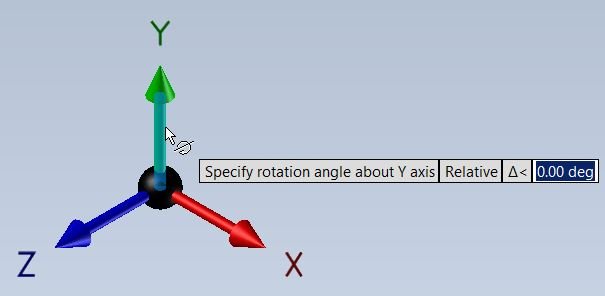
Command:
Command: C:RotateUCS
When run, it switches to World UCS first, then asks for an angle, rotates the UCS, prints the angle, and then asks whether to save the UCS with a name.
Description:
When executed, the program does the following:
• Sets the UCS to World using (command “_UCS” “_W”) so the rotation always starts from a known base.
• Resets the snap angle to 0 using (command “_snapang” 0) so the cursor/ortho aligns with the new UCS properly.
• Prompts the user: “Specify rotation angle:” and reads the angle in radians (AutoCAD default).
• Converts the angle from radians to degrees with (* angle (/ 180 pi)) because the UCS command expects degrees.
• Calls (command “_UCS” “_Z” ang1) to rotate the UCS around the Z axis by the specified angle.
• Prints a confirmation message like “Angle of UCS: 45.00” using (princ …) and (rtos …) for formatting.
• Finally asks the user for a UCS name and, if provided, saves the UCS with (command “_UCS” “_Save” ucsname).
Helper function: (if any)
Helper / important calls in the code:
• (command “_UCS” “_W”) — ensures the rotation starts from World UCS.
• (command “_snapang” 0) — resets SNAPANG so draft aids are aligned.
• (getangle …) — prompts the user for an angle in radians.
• (* angle (/ 180 pi)) — conversion from radians to degrees.
• (command “_UCS” “_Z” ang1) — rotates the UCS around Z by the given degrees.
• (command “_UCS” “_Save” ucsname) — optional UCS save under the entered name.
Functionalities:
Main Functionalities:
• Rotate UCS around Z by a user-defined angle.
• Auto-reset snap angle to 0 so the drafting angle matches the UCS.
• Start from World UCS every time to avoid cumulative rotation errors.
• Display the final angle to the user for confirmation.
• Optionally save the rotated UCS under a custom name for later reuse.
Result:
Result:
The current UCS is rotated around the Z axis by the angle the user specifies, the snap angle is aligned to it, and the user can store this UCS under a name to return to it later.
This makes it easier to draft on rotated building wings, site orientations, or non-orthogonal geometry while keeping the cursor and ortho aligned.
Log in to download.
Log in
Log in
XAML code:
<ResourceDictionary
 xmlns="http://schemas.microsoft.com/winfx/2006/xaml/presentation"
 xmlns:x="http://schemas.microsoft.com/winfx/2006/xaml"
 xmlns:src="clr-namespace:Autodesk.Windows;assembly=AdWindows">

 <src:RibbonToolTip x:Key="RotateUCS">
 <src:RibbonToolTip.ExpandedContent>
 <StackPanel>
 <TextBlock Background="AntiqueWhite" TextAlignment="Left">
<Bold>Function Syntax: RotateUCS</Bold>
<LineBreak/>
<Hyperlink>Chatgbt+https://autolisps.blogspot.com/p/rotateucs_70.html</Hyperlink>
  <LineBreak/>
<TextBlock TextWrapping="Wrap" Foreground="Black">
  <Bold>Description:</Bold><LineBreak/>
    <LineBreak/>
  This command allows the user to rotate the UCS (User Coordinate System) around the Z-axis by a specified angle and optionally save the rotated UCS with a name.
  <LineBreak/>
Rotate User Coordinate System (UCS) to the user defined angle and prompt to save the UCS.
  <LineBreak/>
</TextBlock>

<TextBlock TextWrapping="Wrap" Foreground="Black">
  <Bold>Functionalities:</Bold><LineBreak/>
  • Resets the UCS to the World Coordinate System to start fresh.<LineBreak/>
  • Resets the snap angle to 0 to avoid snapping interference.<LineBreak/>
  • Prompts the user to specify a rotation angle (in radians), then converts it to degrees.<LineBreak/>
  • Rotates the UCS around the Z-axis by the specified angle.<LineBreak/>
  • Displays the rotated UCS angle to the user.<LineBreak/>
  • Prompts the user to optionally save the new UCS with a custom name.<LineBreak/>
</TextBlock>

<TextBlock TextWrapping="Wrap" Foreground="Black">
  <Bold>Highlights:</Bold><LineBreak/>
  • Uses AutoCAD commands programmatically to manipulate UCS and snap settings.<LineBreak/>
  • Converts angle units from radians to degrees internally for command compatibility.<LineBreak/>
  • Provides flexibility to save or skip saving the rotated UCS.<LineBreak/>
</TextBlock>


</TextBlock>

 <!-- Use MediaElement for GIF (static first frame) and Image as fallback -->
<Grid>
<MediaElement
Source="ROTATE_UCS.gif"
Stretch="Uniform"
Visibility="Visible"/>
</Grid>


 </StackPanel>
 </src:RibbonToolTip.ExpandedContent>
 </src:RibbonToolTip>
</ResourceDictionary>
Additional info:
Share this page:
Subscribe
Login
0 Comments
Oldest
Categories: AutoCAD_Lips