
Short description
🗂️ ChangeLayerToCurrent is an AutoCAD AutoLISP layer reassignment tool with a dynamic DCL layer selector, filtering, pick-from-object support, and clipboard helper.
🎯 It changes multiple selected objects to a chosen layer and optionally preserves original displayed linetype, linetype scale, and lineweight/width.
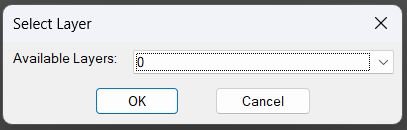
Command:
🚀 Layer change command: ChangeLayerToCurrent – opens a searchable layer selector and moves selected objects to the chosen layer
Description:
🗂️ ChangeLayerToCurrent is an SEO-friendly AutoCAD layer management tool for changing selected objects to a selected drawing layer.
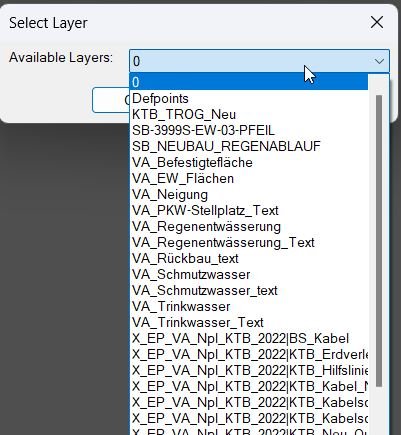
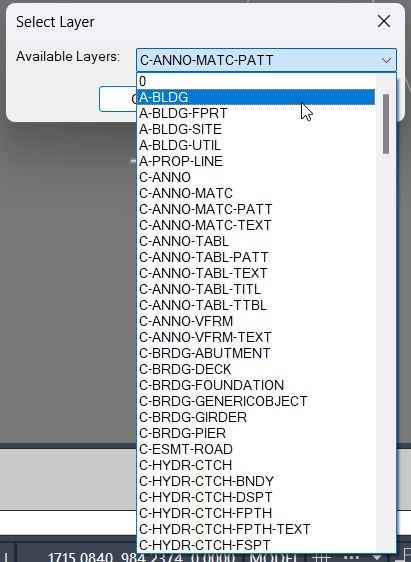
🔍 The command builds a temporary DCL dialog, lists all layers, supports a filter text box, and remembers the last selected layer and filter using environment variables.
🎯 A Pick Layer workflow lets the user select an existing object and reuse its layer as the target layer.
📋 A Copy Layer Name helper sends the chosen layer name to the Windows clipboard through PowerShell/clip logic.
🧠 The optional Keep original properties mode captures effective linetype, linetype scale, and lineweight/width before moving objects, then reapplies those values after the layer change.
Helper function: (if any)
🧩 ChangeLayerToCurrent:AddOrReplaceDxf updates entity DXF data safely for specific group codes.
🧩 ChangeLayerToCurrent:LayerLinetype resolves BYLAYER linetype from the source layer.
🧩 ChangeLayerToCurrent:LayerLineweight resolves BYLAYER lineweight from the source layer.
🧩 ChangeLayerToCurrent:GetOriginalProps captures effective visual properties before the move.
🧩 ChangeLayerToCurrent:ApplyOriginalProps reapplies captured linetype, linetype scale, and lineweight/width.
🧩 ChangeLayerToCurrent:CopySelectedLayerName writes the target layer name to the clipboard.
🧩 get-all-layers and update-layer-list populate and refresh the DCL layer selector.
Functionalities:
✅ Display all drawing layers in a DCL popup/list interface.
✅ Filter layer names with typed search text.
✅ Remember the last used layer and last filter between command runs.
✅ Pick an existing object to use its layer as the destination layer.
✅ Copy the selected layer name to the clipboard.
✅ Select multiple objects after confirming the target layer.
✅ Move selected objects to the chosen layer using CHPROP.
✅ Optionally preserve original displayed linetype, linetype scale, and lineweight/width after the layer change.
Result:
🎯 The result is faster and safer layer reassignment with fewer manual Layer dropdown actions.
📋 The optional property-preservation mode keeps object appearance stable while still moving geometry to the selected layer.
Images, animations etc.
XAML code:
<ResourceDictionary
xmlns="http://schemas.microsoft.com/winfx/2006/xaml/presentation"
xmlns:x="http://schemas.microsoft.com/winfx/2006/xaml"
xmlns:src="clr-namespace:Autodesk.Windows;assembly=AdWindows">

<src:RibbonToolTip x:Key="ChangeLayerToSelected">
<src:RibbonToolTip.ExpandedContent>
<StackPanel>
<TextBlock Background="AntiqueWhite" TextAlignment="Left">
<Bold>Function Syntax: ChangeLayerToCurrent / ChangeLayerToCurrent_Xref</Bold>
<LineBreak/>
<Bold>Version: 1 Date: 28.10.2025</Bold>
<LineBreak/>
<Bold>Version: 2 Date: 30.06.2026 10:07:57AM</Bold>
<LineBreak/>
<Hyperlink>N/A</Hyperlink>
<LineBreak/>
<Bold>Command name</Bold><LineBreak/>
<Run>ChangeLayerToCurrent (type </Run><Run Foreground="DarkRed">ChangeLayerToCurrent</Run><Run> at the AutoCAD command line)</Run><LineBreak/>
<Bold>Description</Bold><LineBreak/>
<Run>This routine lets the user choose a target layer using a </Run><Run Foreground="DarkRed">filtered dialog</Run><Run> or by </Run><Run Foreground="DarkRed">picking an object in the drawing</Run><Run> to capture its layer, and then moves a user-selected set of objects to that chosen layer using CHPROP.</Run><LineBreak/>
<Bold>User interaction</Bold><LineBreak/>
<Run>• The routine opens a dialog titled </Run><Run Foreground="DarkRed">Select Layer (Filtered)</Run><Run>.</Run><LineBreak/>
<Run>• The dialog provides:</Run><LineBreak/>
<Run>  • Edit box: </Run><Run Foreground="DarkRed">Filter by Name</Run><Run> (live filters layer list).</Run><LineBreak/>
<Run>  • Dropdown: </Run><Run Foreground="DarkRed">Matching Layers</Run><Run> (choose target layer).</Run><LineBreak/>
<Run>  • Button: </Run><Run Foreground="DarkRed">Pick Layer From Drawing</Run><Run> (select an entity to use its layer).</Run><LineBreak/>
<Run>  • OK and Cancel buttons.</Run><LineBreak/>
<Run>• After a layer is confirmed, the user is prompted to </Run><Run Foreground="DarkRed">select objects</Run><Run> to move, with multi-selection enabled.</Run><LineBreak/>
<Bold>High-level workflow</Bold><LineBreak/>
<Run>• Loads the last used target layer from </Run><Run Foreground="DarkRed">ChangeLayer_LastLayer</Run><Run>.</Run><LineBreak/>
<Run>• Loads the last used filter text from </Run><Run Foreground="DarkRed">ChangeLayer_LastFilter</Run><Run>.</Run><LineBreak/>
<Run>• Builds a list of all non-xref layers in the drawing by iterating the Layers collection and excluding names matching </Run><Run Foreground="DarkRed">*|*</Run><Run>.</Run><LineBreak/>
<Run>• Writes a temporary DCL file and enters a dialog loop.</Run><LineBreak/>
<Run>• In the dialog, it maintains a live list of matching layers based on the current filter string.</Run><LineBreak/>
<Run>• Supports an alternate selection path where the user clicks Pick Layer From Drawing and then selects an entity to capture its layer.</Run><LineBreak/>
<Run>• Persists the chosen layer and the current filter back to environment variables for next time.</Run><LineBreak/>
<Run>• After the dialog completes with OK, it prompts for object selection and moves those objects to the chosen layer using CHPROP.</Run><LineBreak/>
<Bold>Functionalities</Bold><LineBreak/>
<Run>• Displays a layer-selection dialog with a live name filter.</Run><LineBreak/>
<Run>• Excludes xref layers from the selectable list by pattern </Run><Run Foreground="DarkRed">*|*</Run><Run>.</Run><LineBreak/>
<Run>• Remembers the </Run><Run Foreground="DarkRed">last filter</Run><Run> and </Run><Run Foreground="DarkRed">last selected layer</Run><Run> across runs using getenv and setenv.</Run><LineBreak/>
<Run>• Allows choosing a target layer by:</Run><LineBreak/>
<Run>  • Selecting it from the filtered dropdown list.</Run><LineBreak/>
<Run>  • Picking an object in the drawing and using that object layer.</Run><LineBreak/>
<Run>• Moves selected entities to the chosen layer using CHPROP with the LA option.</Run><LineBreak/>
<Run>• Supports multi-selection of entities to move (window, crossing, shift-add and remove, etc.).</Run><LineBreak/>
<Bold>Dialog logic details</Bold><LineBreak/>
<Run>• The dialog is rebuilt in a loop to allow the Pick Layer From Drawing workflow without losing state.</Run><LineBreak/>
<Run>• The layer list is filtered using wildcard matching:</Run><LineBreak/>
<Run>  • It compares names using </Run><Run Foreground="DarkRed">strcase</Run><Run> and </Run><Run Foreground="DarkRed">wcmatch</Run><Run> against pattern *filter*.</Run><LineBreak/>
<Run>• Default dropdown selection priority:</Run><LineBreak/>
<Run>  • Picked layer, if set and present in the filtered list.</Run><LineBreak/>
<Run>  • Last used layer, if present in the filtered list.</Run><LineBreak/>
<Run>  • Otherwise the first entry in the filtered list.</Run><LineBreak/>
<Bold>Important commands and calls highlighted</Bold><LineBreak/>
<Run>• <Run Foreground="DarkRed">getenv</Run> and <Run Foreground="DarkRed">setenv</Run> — stores and recalls the last layer and filter text.</Run><LineBreak/>
<Run>• <Run Foreground="DarkRed">vlax-for</Run> with Layers — enumerates all layer names from the drawing.</Run><LineBreak/>
<Run>• <Run Foreground="DarkRed">wcmatch "*|*"</Run> — filters out xref layers.</Run><LineBreak/>
<Run>• <Run Foreground="DarkRed">load_dialog</Run>, <Run Foreground="DarkRed">new_dialog</Run>, <Run Foreground="DarkRed">start_dialog</Run> — runs the temporary DCL dialog.</Run><LineBreak/>
<Run>• <Run Foreground="DarkRed">action_tile</Run> — implements live filtering and captures user decisions.</Run><LineBreak/>
<Run>• <Run Foreground="DarkRed">entsel</Run> and <Run Foreground="DarkRed">assoc 8</Run> — reads the layer of a picked entity.</Run><LineBreak/>
<Run>• <Run Foreground="DarkRed">ssget</Run> — selects the objects that will be moved to the chosen layer.</Run><LineBreak/>
<Run>• <Run Foreground="DarkRed">CHPROP</Run> with LA — moves the selected objects to the chosen layer.</Run><LineBreak/>
<Bold>Outputs and messages</Bold><LineBreak/>
<Run>• If the dialog fails to load: prints </Run><Run Foreground="DarkRed">Unable to load dialog</Run><Run>.</Run><LineBreak/>
<Run>• If the user cancels: prints </Run><Run Foreground="DarkRed">Operation cancelled</Run><Run>.</Run><LineBreak/>
<Run>• If the user picks an object but its layer is not in the non-xref list: prints </Run><Run Foreground="DarkRed">Picked layer not found in list</Run><Run>.</Run><LineBreak/>
<Run>• If no objects are selected for the final move: prints </Run><Run Foreground="DarkRed">No objects selected</Run><Run>.</Run><LineBreak/>
<Run>• On success: prints that the entities were moved to the selected layer and echoes the layer name.</Run><LineBreak/>
<Bold>Operational notes and limitations</Bold><LineBreak/>
<Run>• Filtering is case-insensitive due to the use of </Run><Run Foreground="DarkRed">strcase</Run><Run> on both the layer name and filter pattern.</Run><LineBreak/>
<Run>• Xref filtering is based solely on the presence of a pipe character in the name; any non-xref layer containing a pipe will be excluded.</Run><LineBreak/>
<Run>• The routine uses AutoCAD commands for property changes; command localization or command overrides could affect behavior in some environments.</Run><LineBreak/>
<Run>• The dialog is written to a temporary file and deleted afterward; if the temp folder is not writable, the dialog cannot be created.</Run><LineBreak/>


<Bold><Run Foreground="DodgerBlue">Description</Run></Bold><LineBreak/><Run Foreground="White">🗂️ ChangeLayerToCurrent is an AutoCAD AutoLISP utility for moving selected objects to a chosen layer through a searchable DCL dialog.</Run><LineBreak/><Run Foreground="LimeGreen">🎯 It adds practical production controls such as layer filtering, pick layer from object, copy selected layer name, last-used memory, and optional visual property preservation.</Run><LineBreak/><LineBreak/>
<Bold><Run Foreground="DodgerBlue">Function Syntax</Run></Bold><LineBreak/><Run Foreground="White">Layer change command: </Run><Bold><Run Foreground="Orange">ChangeLayerToCurrent</Run></Bold><Run Foreground="White">opens a searchable layer selector and moves selected objects to the chosen layer</Run><LineBreak/><LineBreak/>
<Bold><Run Foreground="DodgerBlue">SEO Optimized Overview</Run></Bold><LineBreak/><Run Foreground="White">🗂️ ChangeLayerToCurrent is an SEO-friendly AutoCAD layer management tool for changing selected objects to a selected drawing layer.</Run><LineBreak/><Run Foreground="White">🔍 The command builds a temporary DCL dialog, lists all layers, supports a filter text box, and remembers the last selected layer and filter using environment variables.</Run><LineBreak/><Run Foreground="White">🎯 A Pick Layer workflow lets the user select an existing object and reuse its layer as the target layer.</Run><LineBreak/><Run Foreground="White">📋 A Copy Layer Name helper sends the chosen layer name to the Windows clipboard through PowerShell/clip logic.</Run><LineBreak/><Run Foreground="White">🧠 The optional Keep original properties mode captures effective linetype, linetype scale, and lineweight/width before moving objects, then reapplies those values after the layer change.</Run><LineBreak/><LineBreak/>
<Bold><Run Foreground="LimeGreen">Primary Workflow</Run></Bold><LineBreak/><Run Foreground="White">1️⃣ Run </Run><Bold><Run Foreground="Orange">ChangeLayerToCurrent</Run></Bold><Run Foreground="White"> at the AutoCAD command line.</Run><LineBreak/><Run Foreground="White">2️⃣ Filter the layer list, pick a layer manually, or use Pick Layer to read a layer from an existing object.</Run><LineBreak/><Run Foreground="White">3️⃣ Optionally enable Keep original properties before confirming the dialog.</Run><LineBreak/><Run Foreground="White">4️⃣ Select one or more objects to move to the target layer.</Run><LineBreak/><Run Foreground="White">5️⃣ Review the command-line result message confirming the layer move and preserved properties if enabled.</Run><LineBreak/><LineBreak/>
<Bold><Run Foreground="LimeGreen">Functionalities</Run></Bold><LineBreak/><Run Foreground="White">✅ Display all drawing layers in a DCL popup/list interface.</Run><LineBreak/><Run Foreground="White">✅ Filter layer names with typed search text.</Run><LineBreak/><Run Foreground="White">✅ Remember the last used layer and last filter between command runs.</Run><LineBreak/><Run Foreground="White">✅ Pick an existing object to use its layer as the destination layer.</Run><LineBreak/><Run Foreground="White">✅ Copy the selected layer name to the clipboard.</Run><LineBreak/><Run Foreground="White">✅ Select multiple objects after confirming the target layer.</Run><LineBreak/><Run Foreground="White">✅ Move selected objects to the chosen layer using CHPROP.</Run><LineBreak/><Run Foreground="White">✅ Optionally preserve original displayed linetype, linetype scale, and lineweight/width after the layer change.</Run><LineBreak/><LineBreak/>
<Bold><Run Foreground="DodgerBlue">Important Commands and Functions</Run></Bold><LineBreak/><Run Foreground="White">🧩 </Run><Bold><Run Foreground="Orange">ChangeLayerToCurrent</Run></Bold><Run Foreground="White"> - main command that opens the layer selector and applies the layer change.</Run><LineBreak/><Run Foreground="White">🧩 </Run><Bold><Run Foreground="Orange">ssget</Run></Bold><Run Foreground="White"> - collects the target objects to move after the dialog closes.</Run><LineBreak/><Run Foreground="White">🧩 </Run><Bold><Run Foreground="Orange">CHPROP</Run></Bold><Run Foreground="White"> - AutoCAD command used to change selected entities to the chosen layer.</Run><LineBreak/><Run Foreground="White">🧩 </Run><Bold><Run Foreground="Orange">entsel</Run></Bold><Run Foreground="White"> - supports picking an object to read its current layer.</Run><LineBreak/><Run Foreground="White">🧩 </Run><Bold><Run Foreground="Orange">entget / entmod</Run></Bold><Run Foreground="White"> - captures and reapplies original entity display properties.</Run><LineBreak/><Run Foreground="White">🧩 </Run><Bold><Run Foreground="Orange">PowerShell / clip</Run></Bold><Run Foreground="White"> - copies the selected layer name to the clipboard.</Run><LineBreak/><LineBreak/>
<Bold><Run Foreground="LimeGreen">Result</Run></Bold><LineBreak/><Run Foreground="White">🎯 The result is faster and safer layer reassignment with fewer manual Layer dropdown actions.</Run><LineBreak/><Run Foreground="White">📋 The optional property-preservation mode keeps object appearance stable while still moving geometry to the selected layer.</Run><LineBreak/><LineBreak/>
<Bold><Run Foreground="DarkRed">Important Notes</Run></Bold><LineBreak/><Run Foreground="White">⚠️ The command changes selected entities to the chosen layer; verify the target layer before selecting a large object set.</Run><LineBreak/><Run Foreground="White">⚠️ Property preservation is focused on linetype, linetype scale, and lineweight/width; it does not preserve every possible entity override.</Run><LineBreak/><Run Foreground="White">⚠️ The clipboard helper depends on Windows clipboard/PowerShell availability.</Run><LineBreak/><LineBreak/>
<Bold><Run Foreground="Yellow">Tags</Run></Bold><LineBreak/><Run Foreground="Yellow">🏷️ AutoCAD, 🏷️ AutoLISP, 🏷️ Civil 3D, 🏷️ Change Layer, 🏷️ Layer Selector, 🏷️ DCL Dialog, 🏷️ CAD Layer Management, 🏷️ CHPROP, 🏷️ Clipboard, 🏷️ ChangeLayerToCurrent</Run><LineBreak/>


<Bold><Run Foreground="DodgerBlue">Description</Run></Bold><LineBreak/><Run Foreground="White">🗂️ ChangeLayerToCurrent_Xref is an AutoCAD AutoLISP tool for selecting a destination layer from a DCL dialog and moving objects to it.</Run><LineBreak/><Run Foreground="LimeGreen">🎯 It is designed as a fast layer reassignment helper, especially useful when cleaning copied or xref-related geometry into local drawing layers.</Run><LineBreak/><LineBreak/>
<Bold><Run Foreground="DodgerBlue">Function Syntax</Run></Bold><LineBreak/><Run Foreground="White">Xref layer change command: </Run><Bold><Run Foreground="Orange">ChangeLayerToCurrent_Xref</Run></Bold><Run Foreground="White">selects a layer from the drawing and moves selected objects to it</Run><LineBreak/><LineBreak/>
<Bold><Run Foreground="DodgerBlue">SEO Optimized Overview</Run></Bold><LineBreak/><Run Foreground="White">🗂️ ChangeLayerToCurrent_Xref is an SEO-friendly AutoCAD layer change command for moving selected objects to a chosen drawing layer.</Run><LineBreak/><Run Foreground="White">🧰 The command reads all layer names from the active drawing through the AutoCAD Layers collection and displays them in a temporary DCL popup list.</Run><LineBreak/><Run Foreground="White">💾 The selected layer is saved with setenv so it can be preselected the next time the command runs.</Run><LineBreak/><Run Foreground="White">🎯 After the dialog closes, the routine sets CLAYER to the chosen layer and prompts the user to select objects to move.</Run><LineBreak/><Run Foreground="White">🔄 It uses AutoCAD CHPROP to assign the selected entities to the chosen destination layer.</Run><LineBreak/><LineBreak/>
<Bold><Run Foreground="LimeGreen">Primary Workflow</Run></Bold><LineBreak/><Run Foreground="White">1️⃣ Run </Run><Bold><Run Foreground="Orange">ChangeLayerToCurrent_Xref</Run></Bold><Run Foreground="White"> at the AutoCAD command line.</Run><LineBreak/><Run Foreground="White">2️⃣ Choose the target layer from the Available Layers popup list.</Run><LineBreak/><Run Foreground="White">3️⃣ Click OK to save the layer selection and make it current.</Run><LineBreak/><Run Foreground="White">4️⃣ Select the objects that should be moved to the chosen layer.</Run><LineBreak/><Run Foreground="White">5️⃣ Review the command line message confirming that the selected entities were moved.</Run><LineBreak/><LineBreak/>
<Bold><Run Foreground="LimeGreen">Functionalities</Run></Bold><LineBreak/><Run Foreground="White">✅ List all drawing layers in a simple DCL popup.</Run><LineBreak/><Run Foreground="White">✅ Remember the last selected layer between command runs.</Run><LineBreak/><Run Foreground="White">✅ Set the chosen layer as the current layer.</Run><LineBreak/><Run Foreground="White">✅ Prompt the user to select objects after layer confirmation.</Run><LineBreak/><Run Foreground="White">✅ Move the selected objects to the chosen layer using CHPROP.</Run><LineBreak/><Run Foreground="White">✅ Clean up the temporary DCL file after the dialog closes.</Run><LineBreak/><LineBreak/>
<Bold><Run Foreground="DodgerBlue">Important Commands and Functions</Run></Bold><LineBreak/><Run Foreground="White">🧩 </Run><Bold><Run Foreground="Orange">ChangeLayerToCurrent_Xref</Run></Bold><Run Foreground="White"> - main command for the DCL layer selection workflow.</Run><LineBreak/><Run Foreground="White">🧩 </Run><Bold><Run Foreground="Orange">vla-get-layers</Run></Bold><Run Foreground="White"> - reads layer names from the active AutoCAD document.</Run><LineBreak/><Run Foreground="White">🧩 </Run><Bold><Run Foreground="Orange">setenv / getenv</Run></Bold><Run Foreground="White"> - persists the last used layer.</Run><LineBreak/><Run Foreground="White">🧩 </Run><Bold><Run Foreground="Orange">setvar CLAYER</Run></Bold><Run Foreground="White"> - sets the selected layer as current.</Run><LineBreak/><Run Foreground="White">🧩 </Run><Bold><Run Foreground="Orange">ssget</Run></Bold><Run Foreground="White"> - collects the objects to change.</Run><LineBreak/><Run Foreground="White">🧩 </Run><Bold><Run Foreground="Orange">CHPROP</Run></Bold><Run Foreground="White"> - changes selected entities to the chosen layer.</Run><LineBreak/><LineBreak/>
<Bold><Run Foreground="LimeGreen">Result</Run></Bold><LineBreak/><Run Foreground="White">🎯 The result is a quick DCL-based layer reassignment workflow for moving selected AutoCAD objects to a chosen layer.</Run><LineBreak/><Run Foreground="White">🧹 It helps clean xref-related or copied geometry by moving it into controlled local drawing layers.</Run><LineBreak/><LineBreak/>
<Bold><Run Foreground="DarkRed">Important Notes</Run></Bold><LineBreak/><Run Foreground="White">⚠️ This version is simpler than the extended ChangeLayerToCurrent tool and does not include filtering or property preservation.</Run><LineBreak/><Run Foreground="White">⚠️ The command modifies selected entity layers, so confirm the selected destination layer before processing.</Run><LineBreak/><Run Foreground="White">⚠️ The selected layer is saved between sessions using an environment variable.</Run><LineBreak/><LineBreak/>
<Bold><Run Foreground="Yellow">Tags</Run></Bold><LineBreak/><Run Foreground="Yellow">🏷️ AutoCAD, 🏷️ AutoLISP, 🏷️ Civil 3D, 🏷️ Xref Cleanup, 🏷️ Change Layer, 🏷️ Layer Picker, 🏷️ CHPROP, 🏷️ DCL Dialog, 🏷️ ChangeLayerToCurrent_Xref</Run><LineBreak/>


</TextBlock>

<Grid>
<Image Source="Image_000.jpg" Stretch="Uniform"/>
</Grid>

<Grid>
<Image Source="Image_001.jpg" Stretch="Uniform"/>
</Grid>

<Grid>
<Image Source="Image_002.jpg" Stretch="Uniform"/>
</Grid>


</ResourceDictionary>