
Short description
LayoutTools manages layout tabs to batch Lock or Unlock viewports, toggle AnnON or AnnOFF, and apply Zoom Extents or Zoom Window in Paper Space across selected or displayed layouts, with status tracking stored in the DWG.
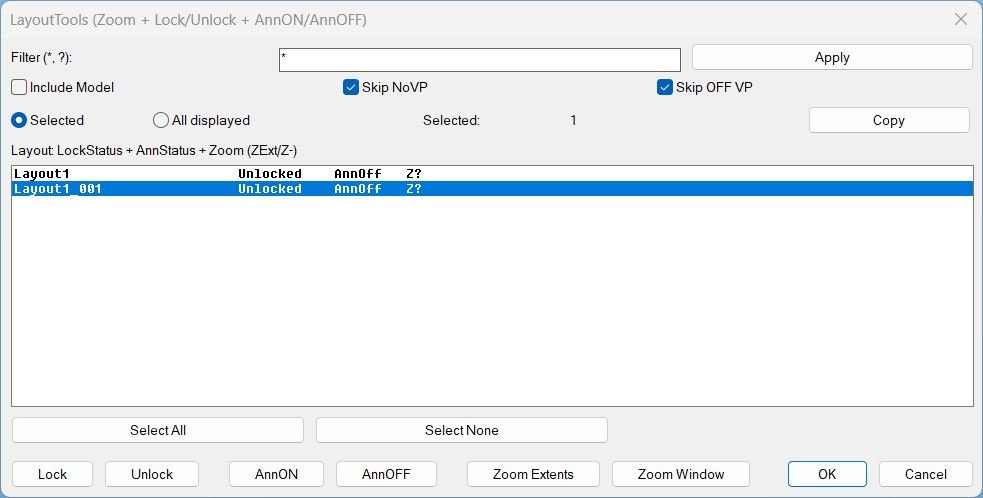
Command:
Commands and aliases
- LayoutTools opens the main dialog.
- LayoutTools is an alias that runs the same tool.
- _LayoutTools is an alias that runs the same tool.
Description:
What it does from the user perspective
- The user runs LayoutTools to open a DCL dialog listing layout tabs with status columns.
- The user filters layouts by wildcard pattern such as * and ?, and can optionally Include Model in the list.
- The user selects layouts in the list, or switches scope to All displayed to target every currently shown layout in the dialog.
- Lock and annotation actions run immediately while the dialog remains open, and the list refreshes to show updated statuses.
- Zoom actions are requested in the dialog, then executed after the dialog closes so point picking is safe for Zoom Window.
Helper function: (if any)
Key helper logic used by the tool
- QuietOn and QuietOff temporarily adjust CMDECHO and attempt NOMUTT to reduce command line noise, then restore prior values.
- Robust layout filtering uses wildcard matching and optional Model inclusion, producing the displayed list and the action targets.
- Viewport collection excludes the overall paper space viewport and can ignore viewports that are Off when Skip OFF VP is enabled.
- Annotation status caching reads ANNOALLVISIBLE per tab by switching CTAB as needed, forcing paper space, and restoring the previous environment afterward.
- Zoom status persistence stores a per layout flag in the DWG using Named Object Dictionary data with XRECORD, so the status survives reopening the drawing.
- Clipboard export copies a tab separated report using an HTMLFile clipboard approach with a PowerShell and clip fallback when required.
- Temporary DCL generation creates a unique dialog name per run, writes a temp DCL file, loads it, then cleans up the file and dialog after use.
Functionalities:
Functionalities
- Layout list and selection
- Filter layouts by pattern and refresh the list using Apply.
- Toggle Include Model to show or hide Model from the list, while actions still avoid Model for viewport operations.
- Choose targeting scope between Selected and All displayed layouts.
- Use Select All and Select None to manage multi selection quickly.
- Display per layout columns for lock state, annotation state, and zoom status.
- Viewport locking
- Lock locks paper space viewports across the target layouts using DisplayLocked.
- Unlock unlocks paper space viewports across the target layouts.
- Skip NoVP prevents actions on layouts that have no usable paper space viewports.
- Skip OFF VP ignores viewports that are turned off when applying lock changes.
- Lock status is shown as Locked, Unlocked, Mixed, NoVP, or Model.
- Annotation visibility
- AnnON sets ANNOALLVISIBLE to 1 for the target layouts.
- AnnOFF sets ANNOALLVISIBLE to 0 for the target layouts.
- Annotation state is displayed as AnnOn, AnnOff, or Ann? if it cannot be read.
- Paper space zoom
- Zoom Extents applies a paper space zoom extents in each target layout and records the status as ZExt.
- Zoom Window prompts the user for two corners, applies the same window to each target layout, and records the status as Z-.
- Zoom status is shown as ZExt, Z-, or Z? when unknown, and is persisted in the DWG.
- Clipboard reporting
- Copy exports a tab separated report of layout name, lock status, annotation status, and zoom status for the current target scope.
- Operational safeguards
- Actions are wrapped in a single undo mark per batch operation for easier rollback.
- The tool restores TILEMODE, CTAB, and MSPACE after operations that switch tabs or paper space state.
Result:
Tags
- Layouts, Viewports, Paper Space, DCL, Dialog_UI, Clipboard, Extra_AutoCAD, General_AutoCAD, Lisp
- Zoom
- Annotation
- UndoMark or Undo grouping
- Persistent DWG storage or XRecord persistence
- Wildcard filter
Images, animations etc.
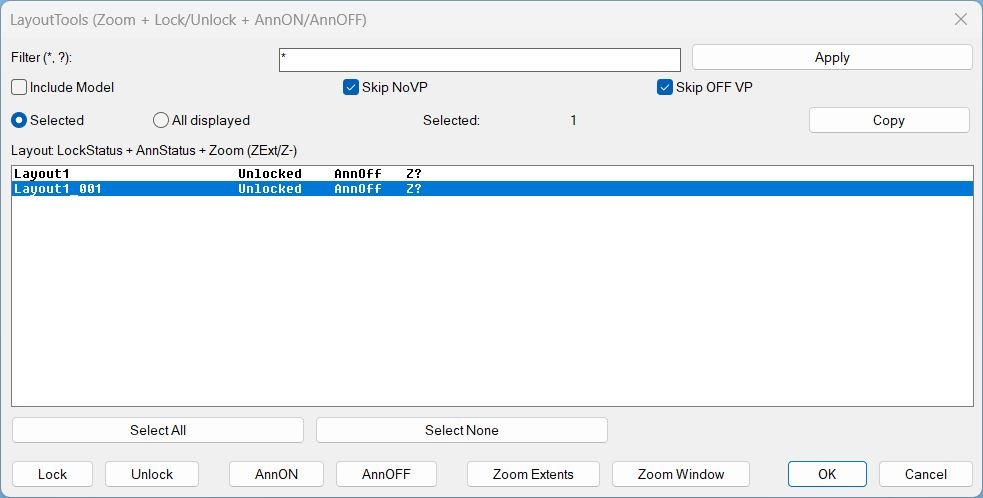
Log in to download.
Log in
Log in
XAML code:
<ResourceDictionary
xmlns="http://schemas.microsoft.com/winfx/2006/xaml/presentation"
xmlns:x="http://schemas.microsoft.com/winfx/2006/xaml"
xmlns:src="clr-namespace:Autodesk.Windows;assembly=AdWindows">

<src:RibbonToolTip x:Key="LayoutTools">
<src:RibbonToolTip.ExpandedContent>
<StackPanel>
<TextBlock Background="AntiqueWhite" TextAlignment="Left">
<Bold>Function Syntax: LayoutTools</Bold>
<LineBreak/>
<Bold>Version: 1 Date: 29.12.2025</Bold>
<LineBreak/>
<LineBreak/>
<Hyperlink>AI+</Hyperlink>
<LineBreak/>
<Bold>LayoutTools summary</Bold><LineBreak/>
This program opens a dialog that lets the user filter and select layout tabs, then apply viewport locking, annotation visibility toggles, and paper space zoom operations across the chosen layouts.<LineBreak/>

<Bold>How the user interacts with it</Bold><LineBreak/>
<Run>The user runs</Run> <Span Foreground="DarkRed"><Bold>LayoutTools</Bold></Span> <Run>(or its aliases) to open a DCL dialog.</Run><LineBreak/>
<Run>The user can filter the layout list by name using wildcard patterns such as </Run><Span Foreground="DarkRed"><Bold>*</Bold></Span><Run> and </Run><Span Foreground="DarkRed"><Bold>?</Bold></Span><Run>.</Run><LineBreak/>
<Run>The user selects one or more layouts in a multi select list, or switches scope to affect all currently displayed layouts.</Run><LineBreak/>
<Run>For </Run><Span Foreground="DarkRed"><Bold>Zoom Window</Bold></Span><Run>, the program closes the dialog first, then prompts the user to pick two corners in the drawing.</Run><LineBreak/>

<Bold>Main commands and aliases</Bold><LineBreak/>
<Run>Primary command</Run><Run>: </Run><Span Foreground="DarkRed"><Bold>LayoutTools</Bold></Span><LineBreak/>
<Run>Aliases</Run><Run>: </Run><Span Foreground="DarkRed"><Bold>LayoutTools</Bold></Span><Run>, </Run><Span Foreground="DarkRed"><Bold>_LayoutTools</Bold></Span><LineBreak/>

<Bold>Core functionalities</Bold><LineBreak/>
<Bold>Layout filtering and targeting</Bold><LineBreak/>
<ListView><LineBreak/></ListView>
<Run>• Filter layouts by wildcard pattern, default </Run><Span Foreground="DarkRed"><Bold>*</Bold></Span><Run> meaning all.</Run><LineBreak/>
<Run>• Option to </Run><Span Foreground="DarkRed"><Bold>Include Model</Bold></Span><Run> in the list, otherwise Model is excluded from actions.</Run><LineBreak/>
<Run>• Scope switch between </Run><Span Foreground="DarkRed"><Bold>Selected</Bold></Span><Run> layouts and </Run><Span Foreground="DarkRed"><Bold>All displayed</Bold></Span><Run> layouts.</Run><LineBreak/>
<Run>• The list displays per layout status columns for lock, annotation, and zoom tracking.</Run><LineBreak/>

<Bold>Viewport Lock and Unlock</Bold><LineBreak/>
<Run>• </Run><Span Foreground="DarkRed"><Bold>Lock</Bold></Span><Run> sets DisplayLocked for paper space viewports in the targeted layouts.</Run><LineBreak/>
<Run>• </Run><Span Foreground="DarkRed"><Bold>Unlock</Bold></Span><Run> clears DisplayLocked for the same viewports.</Run><LineBreak/>
<Run>• Optional rules that modify which layouts and viewports are affected.</Run><LineBreak/>
<Run>• </Run><Span Foreground="DarkRed"><Bold>Skip NoVP</Bold></Span><Run> prevents actions on layouts with no usable paper space viewports.</Run><LineBreak/>
<Run>• </Run><Span Foreground="DarkRed"><Bold>Skip OFF VP</Bold></Span><Run> excludes viewports that are turned off, when evaluating which viewports to lock or unlock.</Run><LineBreak/>
<Run>• Lock status shown per layout as </Run><Span Foreground="DarkRed"><Bold>Locked</Bold></Span><Run>, </Run><Span Foreground="DarkRed"><Bold>Unlocked</Bold></Span><Run>, </Run><Span Foreground="DarkRed"><Bold>Mixed</Bold></Span><Run>, </Run><Span Foreground="DarkRed"><Bold>NoVP</Bold></Span><Run>, or </Run><Span Foreground="DarkRed"><Bold>Model</Bold></Span><Run>.</Run><LineBreak/>

<Bold>Annotation visibility control per layout tab</Bold><LineBreak/>
<Run>• </Run><Span Foreground="DarkRed"><Bold>AnnON</Bold></Span><Run> sets </Run><Span Foreground="DarkRed"><Bold>ANNOALLVISIBLE</Bold></Span><Run> to 1 for the targeted layouts.</Run><LineBreak/>
<Run>• </Run><Span Foreground="DarkRed"><Bold>AnnOFF</Bold></Span><Run> sets </Run><Span Foreground="DarkRed"><Bold>ANNOALLVISIBLE</Bold></Span><Run> to 0 for the targeted layouts.</Run><LineBreak/>
<Run>• The tool reads and displays annotation state as </Run><Span Foreground="DarkRed"><Bold>AnnOn</Bold></Span><Run>, </Run><Span Foreground="DarkRed"><Bold>AnnOff</Bold></Span><Run>, or </Run><Span Foreground="DarkRed"><Bold>Ann?</Bold></Span><Run> when state cannot be determined.</Run><LineBreak/>
<Run>• When applying annotation changes, it temporarily switches to each tab as needed, forces paper space, applies the setting, then restores the previous environment.</Run><LineBreak/>

<Bold>Zoom operations in paper space across layouts</Bold><LineBreak/>
<Run>• </Run><Span Foreground="DarkRed"><Bold>Zoom Extents</Bold></Span><Run> applies a paper space zoom extents in each targeted layout.</Run><LineBreak/>
<Run>• </Run><Span Foreground="DarkRed"><Bold>Zoom Window</Bold></Span><Run> applies a paper space zoom window using two user picked corners, then repeats that same window for each targeted layout.</Run><LineBreak/>
<Run>• Zoom is executed using ActiveX when possible, and falls back to command line zoom if ActiveX fails.</Run><LineBreak/>
<Run>• The tool tracks zoom status per layout as </Run><Span Foreground="DarkRed"><Bold>ZExt</Bold></Span><Run>, </Run><Span Foreground="DarkRed"><Bold>Z-</Bold></Span><Run>, or </Run><Span Foreground="DarkRed"><Bold>Z?</Bold></Span><Run>.</Run><LineBreak/>
<Run>• Zoom status is persisted inside the drawing using </Run><Span Foreground="DarkRed"><Bold>Named Object Dictionary</Bold></Span><Run> storage with </Run><Span Foreground="DarkRed"><Bold>XRECORD</Bold></Span><Run>, so it survives reopen of the DWG.</Run><LineBreak/>

<Bold>Clipboard export</Bold><LineBreak/>
<Run>• </Run><Span Foreground="DarkRed"><Bold>Copy</Bold></Span><Run> copies a tab separated report for the current target scope.</Run><LineBreak/>
<Run>• Each line includes </Run><Run>layout name</Run><Run>, </Run><Run>lock status</Run><Run>, </Run><Run>annotation status</Run><Run>, </Run><Run>zoom status</Run><Run>.</Run><LineBreak/>
<Run>• Clipboard uses an HTMLFile clipboard interface first, with a PowerShell or clip fallback method if needed.</Run><LineBreak/>

<Bold>What the dialog displays</Bold><LineBreak/>
<Run>• A list of displayed layouts with fixed width formatting.</Run><LineBreak/>
<Run>• Columns per row: </Run><Span Foreground="DarkRed"><Bold>LockStatus</Bold></Span><Run>, </Run><Span Foreground="DarkRed"><Bold>AnnStatus</Bold></Span><Run>, </Run><Span Foreground="DarkRed"><Bold>Zoom</Bold></Span><Run>.</Run><LineBreak/>
<Run>• Buttons: </Run><Span Foreground="DarkRed"><Bold>Select All</Bold></Span><Run>, </Run><Span Foreground="DarkRed"><Bold>Select None</Bold></Span><Run>, </Run><Span Foreground="DarkRed"><Bold>Copy</Bold></Span><Run>, </Run><Span Foreground="DarkRed"><Bold>Lock</Bold></Span><Run>, </Run><Span Foreground="DarkRed"><Bold>Unlock</Bold></Span><Run>, </Run><Span Foreground="DarkRed"><Bold>AnnON</Bold></Span><Run>, </Run><Span Foreground="DarkRed"><Bold>AnnOFF</Bold></Span><Run>, </Run><Span Foreground="DarkRed"><Bold>Zoom Extents</Bold></Span><Run>, </Run><Span Foreground="DarkRed"><Bold>Zoom Window</Bold></Span><Run>.</Run><LineBreak/>
<Run>• A live count of selected layouts.</Run><LineBreak/>

<Bold>Important behavior and safeguards</Bold><LineBreak/>
<Run>• Actions avoid Model space by default and treat Model as not applicable for viewport operations.</Run><LineBreak/>
<Run>• Viewports of Number 1 in a layout are treated as the overall paper space viewport and are excluded from lock operations.</Run><LineBreak/>
<Run>• The tool wraps lock and zoom operations in an undo mark, allowing a single undo step for batch changes.</Run><LineBreak/>
<Run>• It uses a quiet mode by setting </Run><Span Foreground="DarkRed"><Bold>CMDECHO</Bold></Span><Run> to 0 and attempts to set </Run><Span Foreground="DarkRed"><Bold>NOMUTT</Bold></Span><Run> to reduce command noise, then restores original values.</Run><LineBreak/>
<Run>• It restores the previous </Run><Span Foreground="DarkRed"><Bold>TILEMODE</Bold></Span><Run>, </Run><Span Foreground="DarkRed"><Bold>CTAB</Bold></Span><Run>, and </Run><Span Foreground="DarkRed"><Bold>MSPACE</Bold></Span><Run> state after annotation and zoom operations.</Run><LineBreak/>

<Bold>One sentence description for quick identification</Bold><LineBreak/>
<Run>This tool provides a batch layout manager to </Run><Span Foreground="DarkRed"><Bold>Lock or Unlock viewports</Bold></Span><Run>, toggle </Run><Span Foreground="DarkRed"><Bold>ANNOALLVISIBLE</Bold></Span><Run> via </Run><Span Foreground="DarkRed"><Bold>AnnON or AnnOFF</Bold></Span><Run>, and apply </Run><Span Foreground="DarkRed"><Bold>Zoom Extents or Zoom Window</Bold></Span><Run> across selected or filtered layouts, while tracking zoom status persistently inside the DWG.</Run><LineBreak/>

</TextBlock>

<Grid>
<Image Source="PNG" Stretch="Uniform"/>
</Grid>

<Grid>
<MediaElement
 Source="GIF"
 Stretch="Uniform"
 Visibility="Visible"/>
 </Grid>

</StackPanel>
</src:RibbonToolTip.ExpandedContent>
</src:RibbonToolTip>
</ResourceDictionary>
Additional info:
Based on / Source code:
Open Website
Share this page:
Subscribe
Login
0 Comments
Oldest