
Short description
- DeleteLayerByFilter — embedded DCL layer deleter with filter + multi-select, using -LAYDEL scripted sequence with VLA fallback
- v10 change: fixes the -LAYDEL command sequence to mirror manual steps: ._-LAYDEL → _N → <name> → "" → _Y (plus localized fallback)
- Excludes Xref layers and reserved layers (0, DEFPOINTS) and reports deleted vs failed
Command:
- • DeleteLayerByFilter
- • LayDelByList
Description:
- Provides a single-file LISP with an embedded DCL dialog titled Delete Layers by Filter to find and delete multiple layers at once.
- Builds a list of candidate layers from the drawing, excluding Xref-dependent layers (names matching *|*) and excluding reserved layers 0 and DEFPOINTS.
- Supports filtering by wildcard (*, ?) or by plain text (auto-wrapped as *text*), and allows multi-select in the list box.
- Deletes selected layers primarily through Express Tools -LAYDEL using a scripted command sequence; if unavailable or unsuccessful, falls back to attempting a VLA delete as a last resort.
- Includes an additional command that deletes layers from a user-defined list variable LAYLIST using the same deletion pipeline and reporting.
Helper function: (if any)
- • DLBF-TempDclPath — generates a temp path for the dialog DCL file.
- • DLBF-WriteDcl — writes the embedded DCL string to disk and returns the path for load_dialog.
- • DLBF-GetAllLayers — enumerates drawing layers, excludes Xrefs (*|*) and reserved (0, DEFPOINTS), returns sorted list.
- • DLBF-Patternize — converts plain text into wildcard pattern (*text*) unless the user already supplied wildcard characters.
- • DLBF-FilterLayers — filters layer names by wcmatch against the pattern; empty pattern returns all candidates.
- • DLBF-Split — splits a string into tokens by delimiter character code (used to parse selection index strings).
- • DLBF-ParseIndexList — parses the list_box multi-select index string into a list of integers (space-delimited).
- • DLBF-IdxRangeStr — builds an index string "0 1 2 …" for Select All without relying on vl-number-sequence.
- • DLBF-LayDel — deletes a layer by name using ._-LAYDEL with sequence _N name "" _Y; retries with non-underscore N/Y fallback; verifies deletion by checking tblsearch.
- • DLBF-VLA-Delete — last-resort attempt to delete a layer via VLA (only succeeds when deletion is allowed).
- • DLBF-DeleteLayers — orchestrates deletion across names, blocks reserved/xref layers, counts successes, accumulates failures with reason tags.
Functionalities:
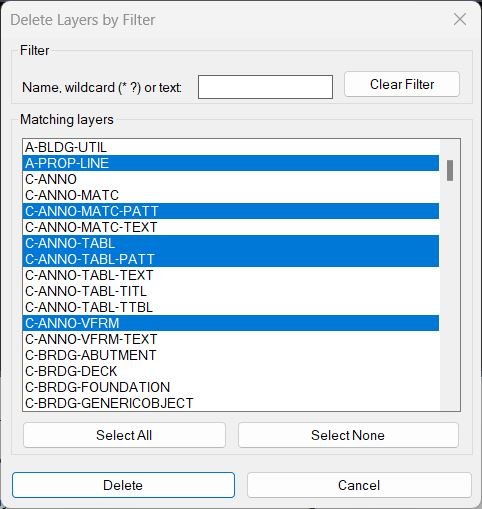
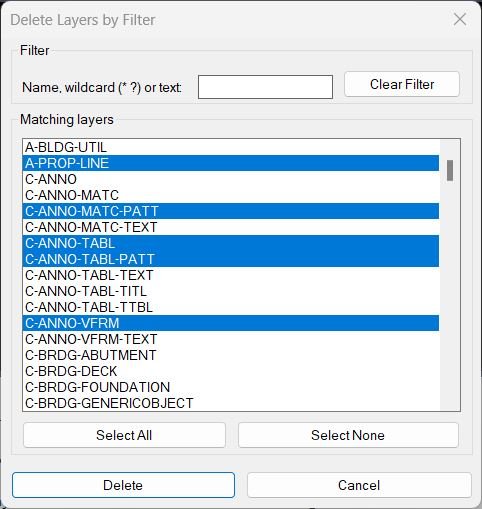
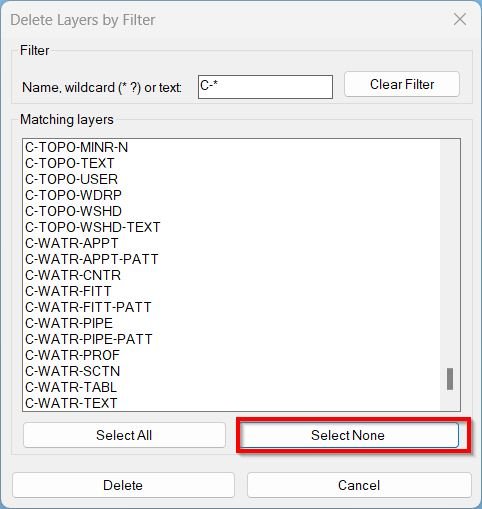
- • Embedded DCL UI — dialog includes filter edit box, multi-select list of matches, and buttons: Clear Filter, Select All, Select None, Delete, Cancel.
- • Layer candidate set — enumerates layers and excludes Xref-dependent names (*|*) and reserved layers (0, DEFPOINTS).
- • Filtering rules — empty filter shows all; wildcard filters are honored as-is; plain text is converted to *text* for “contains” matching.
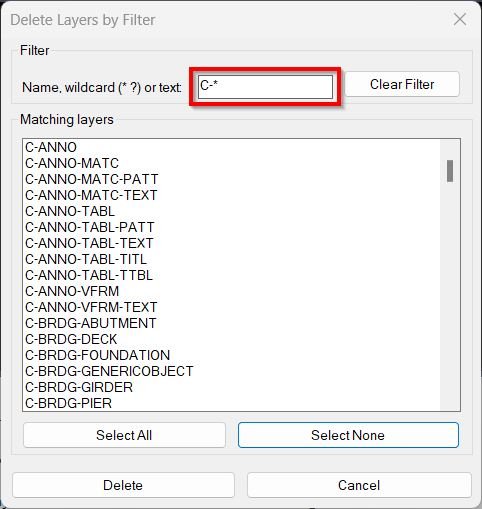
- • Live list refresh — typing in the filter edit box updates the match list immediately by repopulating lb_layers.
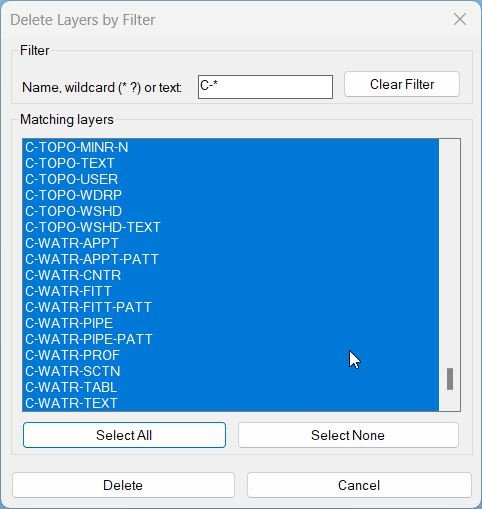
- • Select All / None — Select All sets list_box selection to the full index range string; Select None clears the selection tile string.
- • Index parsing — on Delete, reads list_box selection indices, parses them into integers, and maps indices back to layer names.
- • Primary deletion path — attempts layer removal via -LAYDEL scripted input sequence and validates success by confirming the layer no longer exists in the table.
- • Fallback deletion path — if scripted deletion fails, attempts VLA deletion of the layer object as a last resort (typically only works if layer is deletable/empty).
- • Reporting — prints how many layers were deleted and lists failed layer names (including (reserved) and (xref) annotations when applicable).
- • Alternate command: LayDelByList — deletes layers from variable LAYLIST (must be a list of names) using the same checks and deletion pipeline, then prints Deleted/Failed summary.
Result:
- Running DeleteLayerByFilter opens a filterable, multi-select list of eligible layers; selected layers are deleted using the corrected -LAYDEL scripted sequence, with a VLA fallback if necessary.
- Reserved layers (0, DEFPOINTS) and Xref layers are not deleted and are reported as failures with reason tags.
- Running LayDelByList performs the same deletion logic for a predefined list variable LAYLIST and reports deleted vs failed layers in the command line output.
Images, animations etc.
Log in to download.
Log in
Log in
XAML code:
<ResourceDictionary
xmlns="http://schemas.microsoft.com/winfx/2006/xaml/presentation"
xmlns:x="http://schemas.microsoft.com/winfx/2006/xaml"
xmlns:src="clr-namespace:Autodesk.Windows;assembly=AdWindows">

<src:RibbonToolTip x:Key="DeleteLayerByFilter">
<src:RibbonToolTip.ExpandedContent>
<StackPanel>
<TextBlock Background="AntiqueWhite" TextAlignment="Left">
<Bold>Function Syntax: DeleteLayerByFilter</Bold>
<LineBreak/>
<Bold>Version: 1 Date: 17.08.2025</Bold>
<LineBreak/>
<LineBreak/>
<Hyperlink>N/A</Hyperlink>
<LineBreak/>
<Bold>Important details and safeguards</Bold><LineBreak/>
• The dialog hides xref dependent layers and reserved layers <Run Foreground="darkred">0</Run> and <Run Foreground="darkred">Defpoints</Run>. <LineBreak/>
• Deletion is driven by Express Tools <Run Foreground="darkred">-LAYDEL</Run> which removes all objects on those layers similar to the native workflow. <LineBreak/>
• If Express Tools is not present the code attempts a normal API delete which only succeeds for empty layers. <LineBreak/>
• The command does not rename layers and does not move objects elsewhere. It deletes contents on the selected layers as part of the layer removal process. <LineBreak/>

<Bold>Why this is helpful</Bold><LineBreak/>
• Speeds up cleaning drawings by batching multiple layer deletions with a safe discoverable UI. <LineBreak/>
• Reduces repetitive command line input while keeping the exact same confirmation logic as manual <Run Foreground="darkred">-LAYDEL</Run>. <LineBreak/>

<Bold>UI elements at a glance</Bold><LineBreak/>
• <Run Foreground="darkred">Filter</Run> edit box that accepts text or wildcards. <LineBreak/>
• <Run Foreground="darkred">Matching layers</Run> list box with multi select support. <LineBreak/>
• Buttons: <Run Foreground="darkred">Clear Filter</Run> then <Run Foreground="darkred">Select All</Run> then <Run Foreground="darkred">Select None</Run> then <Run Foreground="darkred">Delete</Run> then <Run Foreground="darkred">Cancel</Run>. <LineBreak/>

<Bold>Commands provided</Bold><LineBreak/>
• <Run Foreground="darkred">DeleteLayerByFilter</Run> — opens the dialog and deletes layers selected in the UI. <LineBreak/>
• <Run Foreground="darkred">LayDelByList</Run> — deletes all layers listed in the variable <Run Foreground="darkred">LAYLIST</Run>. <LineBreak/>

<Bold>Requirements and notes</Bold><LineBreak/>
• Requires Express Tools for full functionality because <Run Foreground="darkred">-LAYDEL</Run> is part of Express Tools. <LineBreak/>
• Works in localized environments by trying underscored and plain command options for <Run Foreground="darkred">-LAYDEL</Run>. <LineBreak/>
• Use with care. Deleting layers via <Run Foreground="darkred">-LAYDEL</Run> is destructive and cannot be undone once the undo chain is broken. Consider saving a backup before use. <LineBreak/>

<Bold>Typical workflow</Bold><LineBreak/>

Type <Run Foreground="darkred">DeleteLayerByFilter</Run>. <LineBreak/>

Type a filter such as <Run Foreground="darkred">A-*</Run> then select desired layers then click <Run Foreground="darkred">Delete</Run>. <LineBreak/>

Read the command line summary to confirm how many layers were deleted and which failed if any. <LineBreak/>

<Bold>List mode example</Bold><LineBreak/>
<Run Foreground="darkred">(setq LAYLIST '("V-GENL-SURV-ANNO" "V-TOPO-BREAKLINE" "V-BSS-SURV-PT" "V-CTRL-SURV-PT"))</Run> <LineBreak/>
<Run Foreground="darkred">(LayDelByList)</Run> <LineBreak/>


</TextBlock>

<Grid>
<Image Source="DeleteLayerByFilter_003.jpg" Stretch="Uniform"/>
</Grid>
<Grid>
<Image Source="DeleteLayerByFilter_000.jpg" Stretch="Uniform"/>
</Grid>
<Grid>
<Image Source="DeleteLayerByFilter_001.jpg" Stretch="Uniform"/>
</Grid>
<Grid>
<Image Source="DeleteLayerByFilter_002.jpg" Stretch="Uniform"/>
</Grid>

<Grid>
<MediaElement
 Source="GIF"
 Stretch="Uniform"
 Visibility="Visible"/>
 </Grid>

</StackPanel>
</src:RibbonToolTip.ExpandedContent>
</src:RibbonToolTip>
</ResourceDictionary>
Additional info:
Based on / Source code:
Open Website
Leave a Reply
You must be logged in to post a comment.