
Short description
- DuplicateToSelectedLayer — duplicate selected entities onto a chosen target layer via a simple DCL layer picker, then bring the copies to front and preselect them
- Remembers the last chosen layer and defaults the dialog selection accordingly
- Uses COPY with zero displacement to create duplicates in place, then CHPROP + DRAWORDER on the new entities
Command:
- • DuplicateToSelectedLayer
Description:
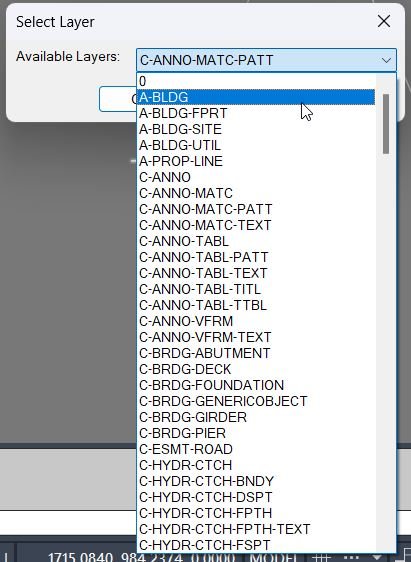
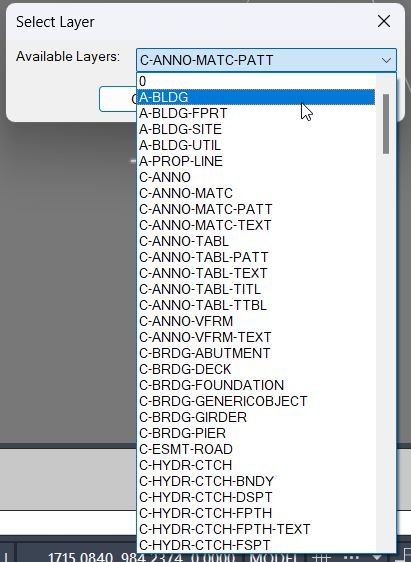
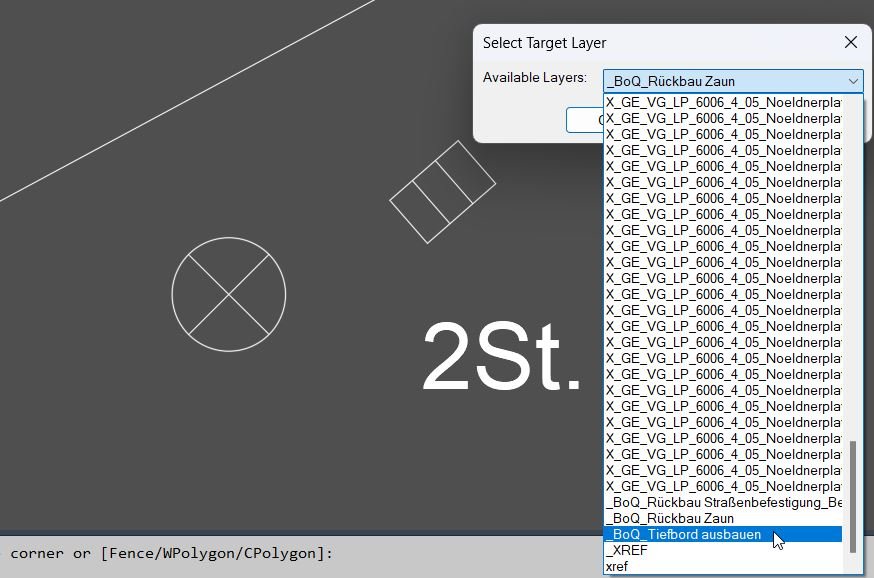
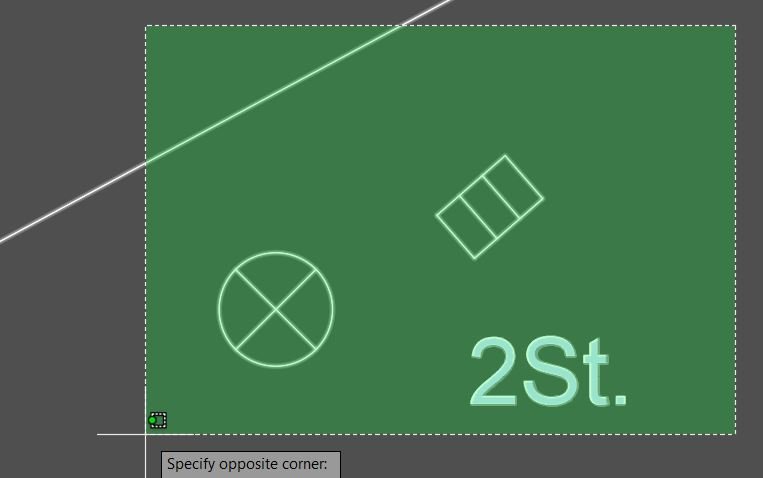
- Prompts the user to select entities to duplicate (any multi-selection method), then opens a DCL dialog to choose the target layer from a list of non-Xref layers.
- Defaults the layer selection to the last used target layer stored in DuplicateToLayer_LastLayer when it exists in the current drawing.
- On OK, temporarily switches CLAYER to the target layer, runs COPY with a base point of 0,0 and a displacement of 0,0 (duplicate-in-place), then captures the newly created entities via ssget "_P".
- Applies the target layer to the copied entities using CHPROP, brings them to the front using DRAWORDER, sets them as the current selection, and restores the original current layer.
Helper function: (if any)
- • Non-Xref layer enumeration — gathers layer names from the document’s Layers collection and excludes names matching *|*.
- • Last layer persistence — reads/writes DuplicateToLayer_LastLayer via getenv / setenv for default dialog selection.
- • ssget "_P" — retrieves the “previous selection set” after COPY to identify the newly duplicated entities for subsequent operations.
Functionalities:
- • Select source entities — prompts ssget to capture the objects to duplicate; exits with a message if none selected.
- • Build layer list — enumerates all layers, removes Xref-dependent layers (*|*), sorts alphabetically, and populates a DCL popup_list.
- • Dialog defaulting — if the stored last layer exists in the list, preselects it; otherwise defaults to the first entry.
- • Temporary DCL lifecycle — writes a temp .dcl file, loads it, runs the dialog, unloads it, and deletes the file.
- • Duplicate-in-place — saves current CLAYER, sets CLAYER to the target, then runs _.COPY with base/displacement 0,0 to create duplicates without moving them.
- • Capture new entities — uses ssget "_P" to get the copied entities produced by the COPY command.
- • Assign to target layer — runs _.CHPROP on the copied entities with property LA set to the chosen layer name.
- • Bring to front — runs _.DRAWORDER on the copied entities with option _Front to adjust display order.
- • Preselect result — calls sssetfirst to make the duplicated entities the current selection for immediate follow-on operations.
- • Restore state — restores the original current layer and prints a summary including the count of duplicated entities and the target layer name.
Result:
- The user selects entities, chooses a target layer from a dialog, and the routine duplicates the entities in place onto that layer.
- The copied entities are forced to the chosen layer, moved to the front of draw order, and left preselected for convenience.
- If the user cancels the dialog or selects nothing, nothing is changed and an informational message is printed; the last chosen layer is remembered when OK is used.
Images, animations etc.

Log in to download.
Log in
Log in
XAML code:
<ResourceDictionary
xmlns="http://schemas.microsoft.com/winfx/2006/xaml/presentation"
xmlns:x="http://schemas.microsoft.com/winfx/2006/xaml"
xmlns:src="clr-namespace:Autodesk.Windows;assembly=AdWindows">

<src:RibbonToolTip x:Key="DuplicateToSelectedLayer">
<src:RibbonToolTip.ExpandedContent>
<StackPanel>
<TextBlock Background="AntiqueWhite" TextAlignment="Left">
<Bold>Function Syntax: DuplicateToSelectedLayer</Bold>
<LineBreak/>
<Bold>Version: 1 Date: 12.07.2025</Bold>
<LineBreak/>
<LineBreak/>
<Hyperlink>N/A</Hyperlink>
<LineBreak/>
<Bold>Command name</Bold><LineBreak/>
<Run>DuplicateToSelectedLayer (type </Run><Run Foreground="DarkRed">DuplicateToSelectedLayer</Run><Run> at the AutoCAD command line)</Run><LineBreak/>
<LineBreak/>

<Bold>Description</Bold><LineBreak/>
<Run>This routine lets the user select one or more entities, choose a </Run><Run Foreground="DarkRed">target layer</Run><Run> from a dialog, then duplicates the entities onto that layer, applies draw order so the new copies are </Run><Run Foreground="DarkRed">brought to front</Run><Run>, and leaves the duplicated objects as the current selection for immediate follow-on operations.</Run><LineBreak/>
<LineBreak/>

<Bold>User interaction</Bold><LineBreak/>
<Run>• The user is prompted to </Run><Run Foreground="DarkRed">select entities to duplicate</Run><Run> using any normal selection method.</Run><LineBreak/>
<Run>• A dialog titled </Run><Run Foreground="DarkRed">Select Target Layer</Run><Run> opens with a dropdown list of available layers.</Run><LineBreak/>
<Run>• The user clicks </Run><Run Foreground="DarkRed">OK</Run><Run> to run the duplication or </Run><Run Foreground="DarkRed">Cancel</Run><Run> to exit.</Run><LineBreak/>
<LineBreak/>

<Bold>High-level workflow</Bold><LineBreak/>
<Run>• Reads the last used target layer from the environment variable </Run><Run Foreground="DarkRed">DuplicateToLayer_LastLayer</Run><Run>.</Run><LineBreak/>
<Run>• Builds a list of all drawing layers, excluding xref layers whose names match </Run><Run Foreground="DarkRed">*|*</Run><Run>.</Run><LineBreak/>
<Run>• Writes a temporary DCL file for the layer-selection dialog and loads it using </Run><Run Foreground="DarkRed">load_dialog</Run><Run> and </Run><Run Foreground="DarkRed">new_dialog</Run><Run>.</Run><LineBreak/>
<Run>• Populates the dropdown list with sorted layer names.</Run><LineBreak/>
<Run>• Sets the dropdown default selection to the last used layer when available.</Run><LineBreak/>
<Run>• On OK:</Run><LineBreak/>
<Run>  • Stores the chosen layer back to </Run><Run Foreground="DarkRed">DuplicateToLayer_LastLayer</Run><Run> for next time.</Run><LineBreak/>
<Run>  • Temporarily sets </Run><Run Foreground="DarkRed">CLAYER</Run><Run> to the chosen layer.</Run><LineBreak/>
<Run>  • Runs the AutoCAD </Run><Run Foreground="DarkRed">COPY</Run><Run> command on the selection set with zero displacement (0,0 to 0,0), producing duplicates in place.</Run><LineBreak/>
<Run>  • Retrieves the newly created entities via </Run><Run Foreground="DarkRed">ssget "_P"</Run><Run> (previous selection set).</Run><LineBreak/>
<Run>  • Forces the copied entities to the chosen layer using </Run><Run Foreground="DarkRed">CHPROP</Run><Run> with the LA option.</Run><LineBreak/>
<Run>  • Brings the copied entities to the front using </Run><Run Foreground="DarkRed">DRAWORDER</Run><Run> with Front.</Run><LineBreak/>
<Run>  • Makes the copied entities the active selection using </Run><Run Foreground="DarkRed">sssetfirst</Run><Run>.</Run><LineBreak/>
<Run>  • Restores the original current layer.</Run><LineBreak/>
<LineBreak/>

<Bold>Functionalities</Bold><LineBreak/>
<Run>• Duplicates any selected entities </Run><Run Foreground="DarkRed">in place</Run><Run> (no movement) using COPY with zero displacement.</Run><LineBreak/>
<Run>• Lets the user choose the destination layer from a dialog dropdown.</Run><LineBreak/>
<Run>• Excludes xref layers from the destination list using the name pattern </Run><Run Foreground="DarkRed">*|*</Run><Run>.</Run><LineBreak/>
<Run>• Remembers the last chosen destination layer across sessions using </Run><Run Foreground="DarkRed">getenv</Run><Run> and </Run><Run Foreground="DarkRed">setenv</Run><Run>.</Run><LineBreak/>
<Run>• Moves the duplicated entities onto the chosen layer using CHPROP.</Run><LineBreak/>
<Run>• Changes draw order so duplicates are </Run><Run Foreground="DarkRed">front-most</Run><Run>.</Run><LineBreak/>
<Run>• Leaves the duplicated entities selected for immediate follow-up editing.</Run><LineBreak/>
<LineBreak/>

<Bold>Important commands and calls highlighted</Bold><LineBreak/>
<Run>• <Run Foreground="DarkRed">ssget</Run> — collects the initial entity selection set.</Run><LineBreak/>
<Run>• <Run Foreground="DarkRed">vlax-for</Run> over Layers — enumerates layer names from the drawing.</Run><LineBreak/>
<Run>• <Run Foreground="DarkRed">wcmatch "*|*"</Run> — filters out xref layers from the target layer list.</Run><LineBreak/>
<Run>• <Run Foreground="DarkRed">getenv</Run> and <Run Foreground="DarkRed">setenv</Run> — persists the last used layer choice.</Run><LineBreak/>
<Run>• <Run Foreground="DarkRed">load_dialog</Run> and <Run Foreground="DarkRed">new_dialog</Run> — loads the temporary DCL dialog.</Run><LineBreak/>
<Run>• <Run Foreground="DarkRed">COPY</Run> — duplicates entities with zero displacement.</Run><LineBreak/>
<Run>• <Run Foreground="DarkRed">ssget "_P"</Run> — retrieves the newly copied entities as the previous selection set.</Run><LineBreak/>
<Run>• <Run Foreground="DarkRed">CHPROP</Run> with LA — assigns the new copies to the target layer.</Run><LineBreak/>
<Run>• <Run Foreground="DarkRed">DRAWORDER</Run> Front — brings duplicates to the front.</Run><LineBreak/>
<Run>• <Run Foreground="DarkRed">sssetfirst</Run> — makes the duplicated entities the active selection.</Run><LineBreak/>
<Run>• <Run Foreground="DarkRed">setvar "CLAYER"</Run> — temporarily switches and then restores the current layer.</Run><LineBreak/>
<LineBreak/>

<Bold>Outputs and messages</Bold><LineBreak/>
<Run>• If nothing is selected initially: prints </Run><Run Foreground="DarkRed">No objects selected</Run><Run>.</Run><LineBreak/>
<Run>• If the dialog cannot load: prints </Run><Run Foreground="DarkRed">Unable to load dialog</Run><Run>.</Run><LineBreak/>
<Run>• If cancelled in the dialog: prints </Run><Run Foreground="DarkRed">Operation cancelled</Run><Run>.</Run><LineBreak/>
<Run>• On success: prints the number of duplicated entities and confirms the target layer name, and indicates that the duplicates were brought to front.</Run><LineBreak/>
<LineBreak/>

<Bold>Operational notes and limitations</Bold><LineBreak/>
<Run>• The routine uses AutoCAD commands (COPY, CHPROP, DRAWORDER) rather than entmakex, so it depends on command availability and user command settings.</Run><LineBreak/>
<Run>• COPY is executed with base point 0,0 and displacement 0,0, so duplicates are created directly on top of the originals.</Run><LineBreak/>
<Run>• The copied entities are identified using </Run><Run Foreground="DarkRed">ssget "_P"</Run><Run>; if another command changes the previous selection unexpectedly, the captured set may differ.</Run><LineBreak/>
<Run>• Xref layers are excluded only by name pattern; non-xref layers containing a pipe character could also be excluded.</Run><LineBreak/>


</TextBlock>

<Grid>
<Image Source="DuplicateToSelectedLayer_001.1.jpg" Stretch="Uniform"/>
</Grid>

<Grid>
<Image Source="DuplicateToSelectedLayer_001.jpg" Stretch="Uniform"/>
</Grid>

<Grid>
<Image Source="DuplicateToSelectedLayer_002.jpg" Stretch="Uniform"/>
</Grid>

<Grid>
<Image Source="DuplicateToSelectedLayer_003.jpg" Stretch="Uniform"/>
</Grid>

<Grid>
<Image Source="DuplicateToSelectedLayer_004.jpg" Stretch="Uniform"/>
</Grid>

<Grid>
<MediaElement
 Source="GIF"
 Stretch="Uniform"
 Visibility="Visible"/>
 </Grid>

</StackPanel>
</src:RibbonToolTip.ExpandedContent>
</src:RibbonToolTip>
</ResourceDictionary>
Additional info:
Based on / Source code:
Open Website
Leave a Reply
You must be logged in to post a comment.