
Short description
- MLeaderWidthFix — normalize MTEXT / MLeader (MText-content) widths using a user-specified value with an average-width default
- Computes an average width from the current selection to propose as the default input
- Applies the chosen width to MTEXT and MLeaders that use MTEXT content; TEXT is reported as not directly settable
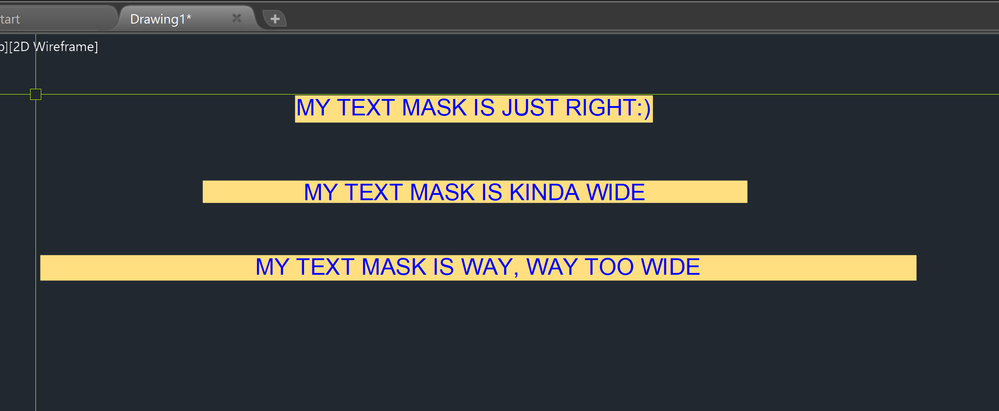
Command:
- • MLeaderWidthFix
Description:
- Selects a set of TEXT, MTEXT, and MULTILEADER entities from the current selection context.
- Calculates a “default” width by averaging widths measured across the selected objects (TEXT extents, MTEXT bounding box width, and MLeader TextWidth when it is MTEXT-based).
- Prompts the user for a new width, showing the computed average as the default value.
- Applies the new width to MTEXT objects via Width and to MTEXT-content MLeaders via TextWidth (ContentType = 2).
- For TEXT (DText), reports that width is not directly settable and skips modification.
Helper function: (if any)
- • textbox (built-in) — used to obtain TEXT extents for a width estimate from the entity’s bounding box.
- • vla-getBoundingBox — used to compute MTEXT width from lower-left / upper-right bounding box X coordinates.
- • vl-catch-all-apply — wraps property writes to avoid hard failures when setting Width or TextWidth.
- • setenv — stores the last width value as WD_LastWidth (note: the prompt default is computed from the current selection, not read back from the environment variable).
Functionalities:
- • Selection — collects entities using ssget with filter TEXT,MTEXT,MULTILEADER; prints “No valid entities selected” if none.
- • Width measurement: TEXT — uses textbox extents and computes width from X difference of the two corners; contributes to averaging.
- • Width measurement: MTEXT — reads bounding box and computes width from ur.x – ll.x; contributes to averaging.
- • Width measurement: MLeader — only includes MLeaders with ContentType = 2 (MTEXT content) and adds TextWidth to averaging.
- • Default width — sets default to total / count if count > 0; otherwise falls back to 1.0; formats as a string with 3 decimals for the prompt.
- • User input — prompts New Width <avg>:; if user presses Enter, uses the default value.
- • Apply: TEXT — prints a message indicating TEXT width is not directly settable and skips changes.
- • Apply: MTEXT — attempts to set Width to the chosen value using a protected property write.
- • Apply: MLeader (MTEXT content) — for ContentType = 2, attempts to set TextWidth to the chosen value using a protected property write.
- • Feedback — prints Applied width: with the final numeric value.
Result:
- MTEXT objects have their Width set to the user-entered value, standardizing wrapping/column width across the selection.
- MLeaders that use MTEXT content (ContentType = 2) have their TextWidth set to the same value.
- TEXT entities are left unchanged and explicitly reported as skipped because their width is not directly settable via a simple Width property in this routine.
Images, animations etc.
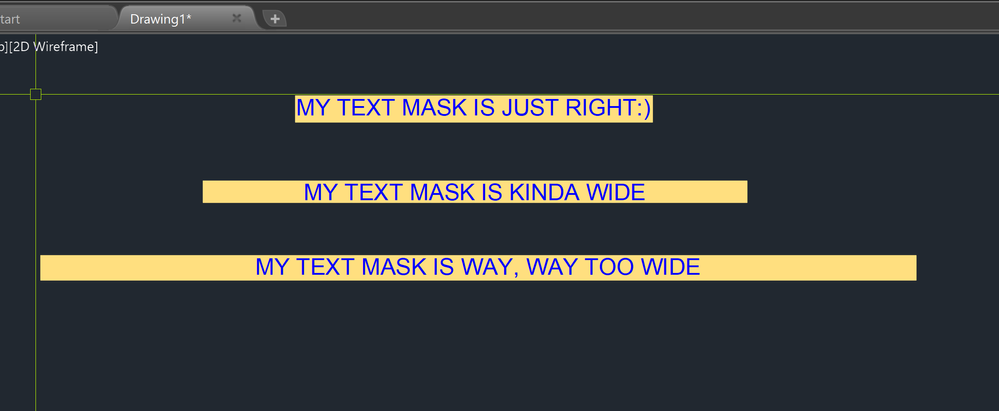
Log in to download.
Log in
Log in
XAML code:
<ResourceDictionary
xmlns="http://schemas.microsoft.com/winfx/2006/xaml/presentation"
xmlns:x="http://schemas.microsoft.com/winfx/2006/xaml"
xmlns:src="clr-namespace:Autodesk.Windows;assembly=AdWindows">

<src:RibbonToolTip x:Key="MLeaderWidthFix">
<src:RibbonToolTip.ExpandedContent>
<StackPanel>
<TextBlock Background="AntiqueWhite" TextAlignment="Left">
<Bold>Function Syntax: MLeaderWidthFix</Bold>
<LineBreak/>
<Bold>Version: 1 Date: 23.07.2025</Bold>
<LineBreak/>
<LineBreak/>
<Hyperlink>AI+https://www.cadtutor.net/forum/topic/23656-help-modiying-text-width-lisp/page/2/</Hyperlink>
<LineBreak/>
<Hyperlink>AI+https://forums.autodesk.com/t5/autocad-forum/reduce-mtext-box-width-of-multiple-mtext/td-p/8951871</Hyperlink>
<LineBreak/>
<Bold>Command name</Bold><LineBreak/>
<Run Foreground="DarkRed">MLeaderWidthFix</Run><LineBreak/>

<Bold>Purpose</Bold><LineBreak/>
This program helps standardize the text wrapping width for selected annotation objects by calculating an average width from your selection, then letting you apply a new width to all applicable objects in that selection.<LineBreak/>

<Bold>What the user must do</Bold><LineBreak/>
• Select objects on screen when prompted (the selection filter allows <Run Foreground="DarkRed">TEXT</Run>, <Run Foreground="DarkRed">MTEXT</Run>, and <Run Foreground="DarkRed">MULTILEADER</Run>).<LineBreak/>
• Enter a new width value when prompted, or press Enter to accept the suggested default.<LineBreak/>

<Bold>Selection and supported object types</Bold><LineBreak/>
• The selection is performed with <Run Foreground="DarkRed">ssget</Run> using a filter for <Run Foreground="DarkRed">TEXT, MTEXT, MULTILEADER</Run>.<LineBreak/>
• Internally it distinguishes objects by <Run Foreground="DarkRed">ObjectName</Run>:<LineBreak/>

<Run Foreground="DarkRed">AcDbText</Run> (single-line TEXT)<LineBreak/>

<Run Foreground="DarkRed">AcDbMText</Run> (multiline MTEXT)<LineBreak/>

<Run Foreground="DarkRed">AcDbMLeader</Run> (Multileader)<LineBreak/>

<Bold>Main workflow</Bold><LineBreak/>
• Loads the Visual LISP COM interface with <Run Foreground="DarkRed">vl-load-com</Run> so it can read and write object properties via ActiveX.<LineBreak/>
• Computes a default width suggestion by scanning the selection and summing widths:<LineBreak/>

For <Run Foreground="DarkRed">AcDbText</Run>: estimates width using <Run Foreground="DarkRed">textbox</Run> on the entity data.<LineBreak/>

For <Run Foreground="DarkRed">AcDbMText</Run>: measures bounding box width using <Run Foreground="DarkRed">vla-getBoundingBox</Run> and the lower-left and upper-right points.<LineBreak/>

For <Run Foreground="DarkRed">AcDbMLeader</Run>: only processes leaders whose <Run Foreground="DarkRed">ContentType</Run> is <Run Foreground="DarkRed">2</Run> (MText content) and reads width via <Run Foreground="DarkRed">TextWidth</Run>.<LineBreak/>
• Calculates the average width: <Run Foreground="DarkRed">avgwidth = total / count</Run> (fallback is <Run Foreground="DarkRed">1.0</Run> if nothing was measured).<LineBreak/>
• Prompts the user for a new width with <Run Foreground="DarkRed">getdist</Run>, showing the average as the default value.<LineBreak/>
• Stores the chosen width to an environment variable using <Run Foreground="DarkRed">setenv</Run> key <Run Foreground="DarkRed">WD_LastWidth</Run> (note: this value is stored, but this code does not read it back on the next run).<LineBreak/>
• Applies the new width to each selected object where possible:<LineBreak/>

<Run Foreground="DarkRed">AcDbMText</Run>: sets property <Run Foreground="DarkRed">Width</Run> to the chosen value (protected by <Run Foreground="DarkRed">vl-catch-all-apply</Run>).<LineBreak/>

<Run Foreground="DarkRed">AcDbMLeader</Run> with <Run Foreground="DarkRed">ContentType = 2</Run>: sets property <Run Foreground="DarkRed">TextWidth</Run> to the chosen value (protected by <Run Foreground="DarkRed">vl-catch-all-apply</Run>).<LineBreak/>

<Run Foreground="DarkRed">AcDbText</Run>: does not change width (prints a message that width is not directly settable and skips).<LineBreak/>
• Prints a completion message: <Run Foreground="DarkRed">Applied width: ...</Run><LineBreak/>

<Bold>Functionalities (bullet list)</Bold><LineBreak/>
• Filters selection to annotation-like objects: <Run Foreground="DarkRed">TEXT</Run>, <Run Foreground="DarkRed">MTEXT</Run>, <Run Foreground="DarkRed">MULTILEADER</Run>.<LineBreak/>
• Automatically derives a suggested default width based on the average width of selected items.<LineBreak/>
• Prompts for a user-defined target width with an Enter-to-accept default behavior.<LineBreak/>
• Updates width for <Run Foreground="DarkRed">MTEXT</Run> objects by setting <Run Foreground="DarkRed">Width</Run>.<LineBreak/>
• Updates width for <Run Foreground="DarkRed">MULTILEADER</Run> objects only when they contain MText content (<Run Foreground="DarkRed">ContentType = 2</Run>) by setting <Run Foreground="DarkRed">TextWidth</Run>.<LineBreak/>
• Uses error-safe property setting through <Run Foreground="DarkRed">vl-catch-all-apply</Run> to avoid hard crashes if a property cannot be written.<LineBreak/>
• Stores the last entered width in <Run Foreground="DarkRed">WD_LastWidth</Run> via <Run Foreground="DarkRed">setenv</Run> for potential reuse by other routines or future enhancements.<LineBreak/>

<Bold>Important notes and limitations</Bold><LineBreak/>
• <Run Foreground="DarkRed">TEXT</Run> objects are effectively read-only for direct width control in this routine; they are measured for the average but not modified during apply.<LineBreak/>
• <Run Foreground="DarkRed">MULTILEADER</Run> objects are only modified if they are MText-based leaders (<Run Foreground="DarkRed">ContentType = 2</Run>); leaders with block content are ignored for width changes.<LineBreak/>
• If the user selects nothing valid, the routine prints: No valid entities selected.<LineBreak/>

</TextBlock>

<Grid>
<Image Source="10-sample text and mask.PNG" Stretch="Uniform"/>
</Grid>
<Grid>
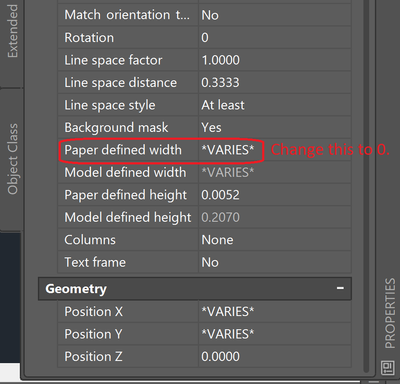
<Image Source="20-properties palette.PNG" Stretch="Uniform"/>
</Grid>
<Grid>
<MediaElement
 Source="GIF"
 Stretch="Uniform"
 Visibility="Visible"/>
 </Grid>

</StackPanel>
</src:RibbonToolTip.ExpandedContent>
</src:RibbonToolTip>
</ResourceDictionary>
Leave a Reply
You must be logged in to post a comment.