
Short description
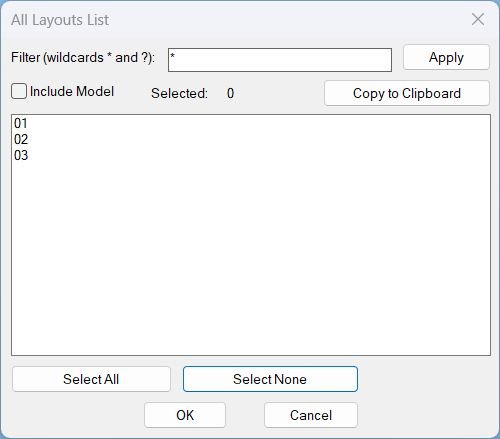
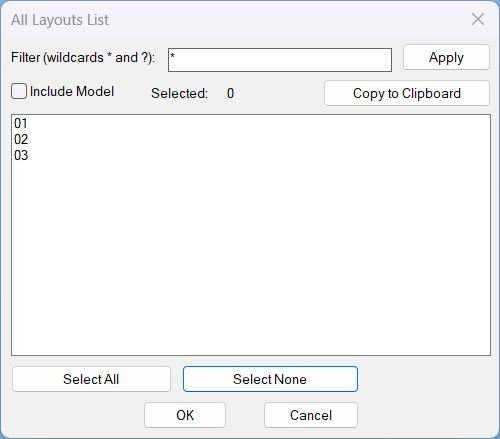
- Shows a DCL dialog listing all layouts with wildcard filtering and multi-select, then copies the selected layout names to the Windows clipboard (one per line).
- Includes optional Model tab inclusion, selection count display, and Select All or Select None shortcuts.
Command:
- Commands: ALL_LAYOUTS_LIST, All_Layouts_list
Description:
- Collects layout names from the active drawing using tab order for consistent ordering, and builds a unique DCL dialog (written to a temporary file) each run.
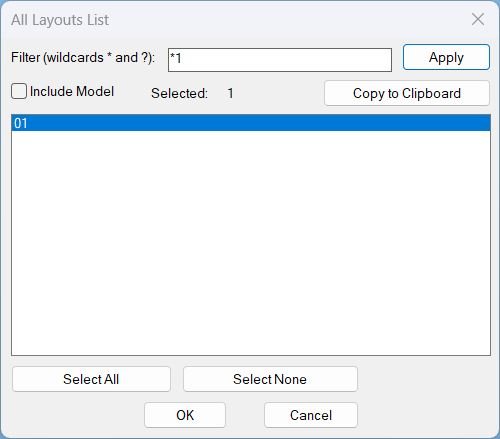
- Applies a case-insensitive wildcard filter using wcmatch with support for * and ?, and optionally excludes or includes Model.
- Displays the filtered list in a multi-select list box, maintains selection by name when rebuilding the list, and keeps a live Selected counter.
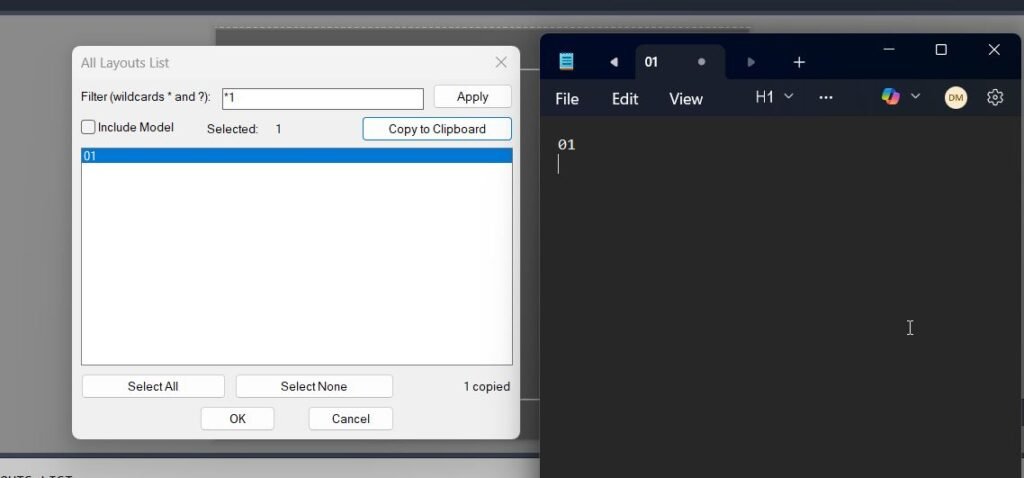
- On Copy to Clipboard, formats the selected layout names with CRLF line breaks and copies them to Windows clipboard using an MSHTML clipboard method with PowerShell and clip.exe fallbacks.
- Closes cleanly by unloading the dialog and deleting the temporary DCL file after use or on error.
Helper function: (if any)
- ALLLAY:copy-clipboard copies text to the Windows clipboard, first attempting MSHTML clipboardData and then falling back to PowerShell Set-Clipboard and clip.exe using a temp file.
- ALLLAY:parse-indexes and ALLLAY:index-string convert list box selection strings to and from index lists for multi-select handling.
- ALLLAY:get-selected-names maps selected indices to the displayed layout names safely with bounds checks.
- ALLLAY:update-count updates the selected count field based on current list selection.
- ALLLAY:select-all and ALLLAY:select-none implement Select All and Select None behavior for the filtered list.
- ALLLAY:fill-list fills the list box and reselects items by name when the list is rebuilt.
- ALLLAY:rebuild rebuilds the display list by applying the filter and Model inclusion toggle, preserving selection by name.
- ALLLAY:copy-selected assembles the selected names into a line-delimited payload, copies to clipboard, and updates a message label with the copy count.
- ALLLAY:cleanup unloads the dialog and deletes the temporary DCL file; *error* ensures cleanup on exceptions.
- ALLLAY:Run coordinates layout collection, dialog creation, UI actions, and cleanup, and the commands call this runner without recursion.
Functionalities:
- Wildcard layout filtering with an explicit Apply button that rebuilds the displayed list only.
- Optional Include Model toggle controlling whether Model appears in the list.
- Multi-select list with live selected count and selection preservation when the filter changes.
- Select All and Select None for rapid selection management.
- Copy to Clipboard that outputs one layout name per line to the Windows clipboard, with multiple copy mechanisms for robustness.
- DCL is embedded in the LSP, written to a temp file with a unique dialog name per run, then removed on exit.
Result:
- Copies the selected layout names to the Windows clipboard (CRLF separated) and reports completion in the command line and via a dialog message field.
- If nothing is selected, shows an alert requesting selection and displays Nothing selected without copying.
- If clipboard copy succeeds, prints Copied to clipboard; if it fails, prints a failure message and no clipboard update is guaranteed.
- Always unloads the dialog and deletes the temporary DCL file on close or error.
Images, animations etc.
Log in to download.
Log in
Log in
XAML code:
<ResourceDictionary
xmlns="http://schemas.microsoft.com/winfx/2006/xaml/presentation"
xmlns:x="http://schemas.microsoft.com/winfx/2006/xaml"
xmlns:src="clr-namespace:Autodesk.Windows;assembly=AdWindows">

<src:RibbonToolTip x:Key="Layouts_list">
<src:RibbonToolTip.ExpandedContent>
<StackPanel>
<TextBlock Background="AntiqueWhite" TextAlignment="Left">
<Bold>Function Syntax: Layouts_list</Bold>
<LineBreak/>
<Bold>Version: 2 Date: 24.12.2025</Bold>
<LineBreak/>
<LineBreak/>
<Hyperlink>AI+https://forums.autodesk.com/t5/visual-lisp-autolisp-and-general/retrieve-layout-names-by-order-of-which-they-sit-to-populate-in/td-p/10117384</Hyperlink>
<LineBreak/>
<Bold>All_Layouts_List (AutoLISP)</Bold><LineBreak/>
<LineBreak/>
<Bold>Description</Bold><LineBreak/>
This program opens a dialog that lists all drawing layouts in tab order, lets the user filter and multi-select them, and copies the selected layout names to the Windows clipboard (one name per line).<LineBreak/>
<LineBreak/>

<Bold>How the user runs it</Bold><LineBreak/>
• Run either command: <Bold><Run Foreground="DarkRed">ALL_LAYOUTS_LIST</Run></Bold> or <Bold><Run Foreground="DarkRed">All_Layouts_list</Run></Bold>.<LineBreak/>
• A dialog titled <Bold>All Layouts List</Bold> appears.<LineBreak/>
<LineBreak/>

<Bold>What the user does in the dialog</Bold><LineBreak/>
• Optionally type a wildcard pattern in <Bold>Filter</Bold> (supports <Bold><Run Foreground="DarkRed">*</Run></Bold> and <Bold><Run Foreground="DarkRed">?</Run></Bold>).<LineBreak/>
• Click <Bold><Run Foreground="DarkRed">Apply</Run></Bold> to rebuild the visible list using the filter.<LineBreak/>
• Toggle <Bold><Run Foreground="DarkRed">Include Model</Run></Bold> to decide whether the <Bold>MODEL</Bold> layout is included in the list.<LineBreak/>
• Multi-select layouts in the list box (the <Bold>Selected</Bold> counter updates).<LineBreak/>
• Use <Bold><Run Foreground="DarkRed">Select All</Run></Bold> or <Bold><Run Foreground="DarkRed">Select None</Run></Bold> to quickly change selection.<LineBreak/>
• Click <Bold><Run Foreground="DarkRed">Copy to Clipboard</Run></Bold> to copy selected layout names (one per line).<LineBreak/>
• Press <Bold>OK</Bold> to close, or <Bold>Cancel</Bold> to close without any special return value.<LineBreak/>
<LineBreak/>

<Bold>Functionalities</Bold><LineBreak/>
• <Bold>Layout collection</Bold>: Reads all layouts from the active drawing and sorts them by <Bold>TabOrder</Bold> so the dialog list matches the layout tab sequence.<LineBreak/>
• <Bold>Filtering</Bold>: Applies wildcard matching to layout names using the user filter (default is <Bold>*</Bold> which shows everything).<LineBreak/>
• <Bold>Model inclusion control</Bold>: When <Bold><Run Foreground="DarkRed">Include Model</Run></Bold> is off, the layout named <Bold>MODEL</Bold> is excluded from the list.<LineBreak/>
• <Bold>Multi-selection</Bold>: The list supports multi-select, and a live <Bold>Selected count</Bold> is displayed.<LineBreak/>
• <Bold>Selection utilities</Bold>: <Bold><Run Foreground="DarkRed">Select All</Run></Bold> selects every displayed item; <Bold><Run Foreground="DarkRed">Select None</Run></Bold> clears selection.<LineBreak/>
• <Bold>Copy output</Bold>: <Bold><Run Foreground="DarkRed">Copy to Clipboard</Run></Bold> sends the selected layout names to the Windows clipboard, separated by line breaks (one per line).<LineBreak/>
• <Bold>Selection preservation on rebuild</Bold>: When the list is rebuilt (Apply or Include Model change), the program tries to reselect previously selected items by name, as long as they still exist in the filtered list.<LineBreak/>
<LineBreak/>

<Bold>Important program behaviors</Bold><LineBreak/>
• The dialog definition (DCL) is <Bold>embedded</Bold> and written to a temporary file each run, with a <Bold><Run Foreground="DarkRed">unique dialog name</Run></Bold> generated from the drawing date variable so repeated runs do not collide.<LineBreak/>
• Clipboard copy uses two strategies:<LineBreak/>
• First attempt: <Bold>MSHTML</Bold> clipboardData setdata.<LineBreak/>
• Fallback: write text to a temp file then call <Bold><Run Foreground="DarkRed">PowerShell Set-Clipboard</Run></Bold> and also attempt <Bold><Run Foreground="DarkRed">clip.exe</Run></Bold> as an additional fallback path.<LineBreak/>
• If the user clicks copy with no selection, the dialog message shows <Bold>Nothing selected</Bold> and an alert prompts the user to select one or more layouts.<LineBreak/>
<LineBreak/>

<Bold>Key internal functions</Bold><LineBreak/>
• <Bold><Run Foreground="DarkRed">ALLLAY:Run</Run></Bold>: Main routine that builds the layout list, writes and loads the DCL, wires UI actions, and shows the dialog.<LineBreak/>
• <Bold><Run Foreground="DarkRed">ALLLAY:rebuild</Run></Bold>: Recomputes the displayed list based on filter and Include Model, then repopulates the list box.<LineBreak/>
• <Bold><Run Foreground="DarkRed">ALLLAY:get-selected-names</Run></Bold>: Converts selected list indexes into layout name strings.<LineBreak/>
• <Bold><Run Foreground="DarkRed">ALLLAY:copy-selected</Run></Bold>: Builds the clipboard payload (names separated by CRLF) and calls the clipboard function.<LineBreak/>
• <Bold><Run Foreground="DarkRed">ALLLAY:copy-clipboard</Run></Bold>: Performs the clipboard write using MSHTML first, then PowerShell and clip.exe fallback.<LineBreak/>
• <Bold><Run Foreground="DarkRed">ALLLAY:cleanup</Run></Bold>: Unloads the dialog and deletes the temporary DCL file.<LineBreak/>
• <Bold><Run Foreground="DarkRed">error</Run></Bold>: Ensures cleanup on unexpected errors, suppressing normal cancel and break messages.<LineBreak/>
<LineBreak/>

<Bold>Outputs</Bold><LineBreak/>
• Primary output: layout names copied into the Windows clipboard, one per line, suitable for pasting into text, spreadsheets, or CAD documentation.<LineBreak/>
• On-screen feedback: message field shows count copied (for example <Bold>3 copied</Bold>) after a successful copy.<LineBreak/>
<LineBreak/>

</TextBlock>

<Grid>
<Image Source="PNG" Stretch="Uniform"/>
</Grid>

<Grid>
<MediaElement
 Source="GIF"
 Stretch="Uniform"
 Visibility="Visible"/>
 </Grid>

</StackPanel>
</src:RibbonToolTip.ExpandedContent>
</src:RibbonToolTip>
</ResourceDictionary>
Additional info:
Based on / Source code:
Open Website
Leave a Reply
You must be logged in to post a comment.