
Copy_to_Clipboard
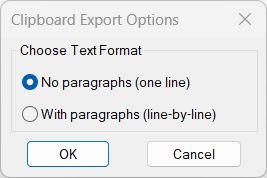
Sort / Purpose: Export cleaned text from selected drawing annotations directly to the Windows clipboard in a copy ready format. • Clipboard Export: Gathers text from TEXT, MTEXT, attributes, dimensions, multileaders, and blocks, then sends the processed result to the clipboard. • Two Output Styles: Lets you choose between one line concatenated text without paragraphs or line by line text keeping logical paragraphs. • Formatting Cleanup: Strips MText formatting codes and Unicode markers so that the clipboard content is clean, readable, and ready for pasting into external applications.Copy_to_Clipboard_Xref
Sort / Purpose: Interactively pick nested TEXT, MTEXT, DIMENSION, LEADER, and BLOCK entities, extract their text and send it to the clipboard, then clean up temporary copies. • Scope: Works on nested entities inside blocks or references using CTC3 as a “pick-through” text exporter. • Goal: Quickly grab text content from visually picked nested items, copy that text to the Windows clipboard, and automatically delete the intermediate copied entities from the drawing.Lower
Sort / Purpose: Convert selected TEXT and MTEXT entities to either all upper case or all lower case in a single operation. • Scope: Operates only on existing TEXT and MTEXT objects that you select in the drawing. • Goal: Standardize the letter case of annotations quickly for consistent drawing documentation.Multiple_text_mtext_2
Sort / Purpose: Convert multiple selected TEXT and MTEXT entities into a single MTEXT object while keeping each original line as a separate paragraph. • Scope: Works on standard text objects in the current space and merges them into one formatted MTEXT container. • Goal: Simplify editing and formatting by replacing several separate text items with one unified MTEXT that preserves visual layout and underlines.PlusMinusNumericValue
Purpose: Increment or decrement numeric values inside TEXT, MTEXT, ATTDEF, and ATTRIB strings using a dialog-driven plus/minus value and target position Scope: Works on selected text-based entities, parsing each string to find embedded numbers, then modifies one or more of those numbers according to user settings Persistence: Stores last used increment value and location in the Windows registry under HKCUSoftwarePlusMinusNumericValue for reuse across sessions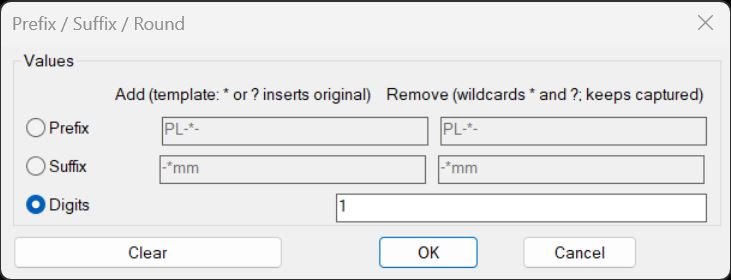
PrefixSuffixRound
Purpose: Add or remove prefixes and suffixes (with wildcard patterns) and round numeric text content for TEXT/MTEXT/ATTRIB/INSERT attributes Core idea: Use fixed-string and wildcard-based string comparisons to strip or template-rebuild text, plus optional rounding of numeric strings Persistence: Remembers last-used settings in environment variables (PSOT_*) for fast reuse across sessions and commandsRotateMtextVport
Rotate Text and Mtext in Viewport Aligns TEXT objects to viewport rotation while resetting MTEXT to horizontal orientation.Text2Multileader_00
- AM — convert selected TEXT/MTEXT into a single MLeader with combined text and preserved max width
- Sorts text by insertion point (Y order) and concatenates into one string
- Creates an MLeader by picking arrowhead and landing points, then applies TextString and TextWidth
- Deletes the original text entities after building the combined content
Upper
Short LISP to convert selected TEXT and MTEXT objects to uppercase.