
Short description
ZoomXref.lsp summary
- • Purpose: Display a dialog listing Xrefs and zoom the view to the combined bounding box of the selected Xref inserts in Model Space.
- • Key idea: LIVE wildcard filtering updates the list while typing, then ActiveX ZoomWindow zooms precisely to the Xref LL and UR corners.
Command:
Commands
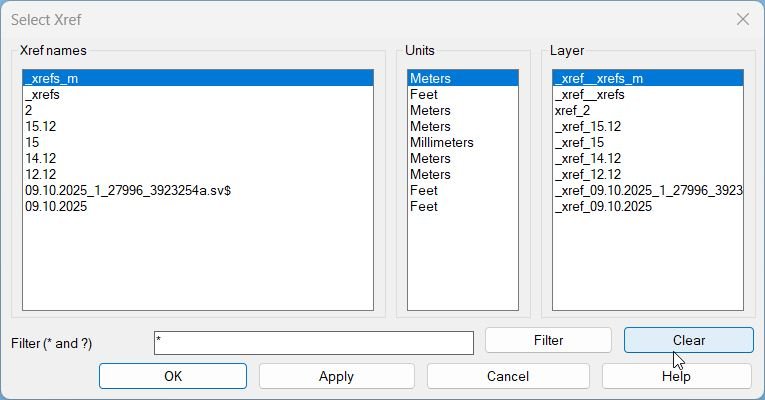
- • ZOOMXREF Opens the Xref selection dialog with live filter, Units and Layer columns, plus OK, Apply, Cancel, Help.
- • SELECTXREF Alias that runs ZOOMXREF.
- • Apply Zooms without closing the dialog.
- • OK Zooms and closes the dialog.
Description:
What it does
- • Collect Xrefs: Scans BlockTableRecords where IsXref is true and builds a list of items (Name, Units, Layer summary).
- • Dialog UI: Shows three synchronized list boxes: Xref names, Units, and Layer (read-only display columns).
- • Live filter: Filter edit box accepts * and ?, case-insensitive; list updates on every change, plus Filter and Clear buttons.
- • Layer summary: Reads layer of Model Space inserts for the Xref name; returns the layer name, Multiple if mixed, or — if none exist.
- • Zoom behavior: Selects all Model Space inserts of the chosen Xref, merges their bounding boxes, then calls ActiveX ZoomWindow using LL and UR points (no padding).
Helper function: (if any)
Helper functions used
- • zx:pair Builds a two-item cons pair (used for returning LL and UR).
- • zx:pt3 Builds a 3D point list (x y z).
- • zx:nth Safe 0-based index accessor without NTH.
- • zx:parse-int Parses digits-only integer strings (used to read list-box index).
- • zx:up ASCII uppercase for case-insensitive matching.
- • zx:wmatch Wildcard matcher supporting * and ? (case-insensitive).
- • zx:unit-str Maps AcInsertUnits enum to readable text (Meters, Feet, Unitless, etc).
- • zx:safe-get-units vla-get-Units with error trapping to avoid failures.
- • zx:ss-xref-refs ssget of INSERT entities for a block name in Model Space only.
- • zx:xref-layer-summary Computes layer display value: single layer, Multiple, or —.
- • zx:make-dcl-file Writes a temporary DCL file defining the dialog layout.
- • zx:alert-help Help dialog describing filtering, columns, and zoom behavior.
- • zx:get-xref-items Builds item triplets (name unit layer) from the drawing Blocks collection.
- • zx:filter-items Filters items by wildcard pattern while preserving order.
- • zx:ss-bbox Merges bounding boxes across a selection set into one LL and UR pair.
- • zx:zoom-ll-ur Pure ActiveX zoom via vla-ZoomWindow (no command calls).
- • zx:fill-lists Populates the three list boxes and keeps selection aligned.
- • zx:filter-apply Reads filter tile, normalizes empty to *, updates filtered list and refreshes UI.
- • zx:apply-zoom Resolves current selection, builds selection set, computes bbox, performs zoom, prints status text.
Functionalities:
Functionalities
- • Live wildcard filter: Type to filter immediately; supports * and ?; case-insensitive matching.
- • Three-column view: Xref Name, Units (from block definition), Layer (from Model Space inserts).
- • Synchronized selection: Selecting a row in any list keeps the other two lists aligned to the same index.
- • Apply without closing: Apply zooms and leaves the dialog open for repeated zooms.
- • Precise bbox zoom: Merges all Model Space inserts into one bounding box and zooms to exact LL and UR corners.
- • Robust helpers: Avoids fragile built-ins, traps units errors, and uses a custom wildcard matcher.
- • Clean teardown: Unloads dialog and deletes the temporary DCL file after closing.
Result:
Result and user-facing output
- • If no Xrefs exist: Alerts “No Xrefs found in this drawing.”
- • If selection has no Model Space inserts: Prints “No inserts of Xref “NAME” in Model Space.”
- • On successful zoom: Prints “Zoomed to Xref: NAME [Units: UNITS | Layer: LAYER]”.
- • Startup prompt: Prints guidance to run ZOOMXREF or SELECTXREF for live filtering and zoom.
Images, animations etc.
Log in to download.
Log in
Log in
Additional info:
Learn more:
Open Website
Share this page:
Subscribe
Login
0 Comments
Oldest
Categories: AutoCAD_Lips
Tags: Xrefs
Categories: AutoCAD_Lips
Tags: Xrefs