
Short description
UnReloadDetachSelectedXrefs
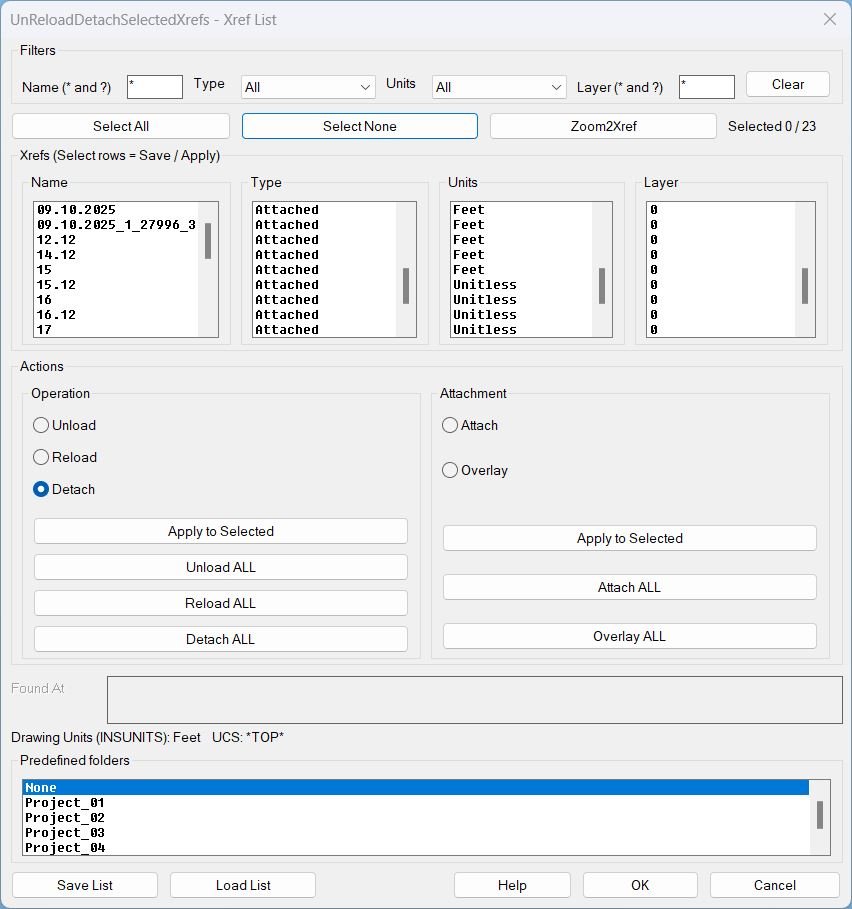
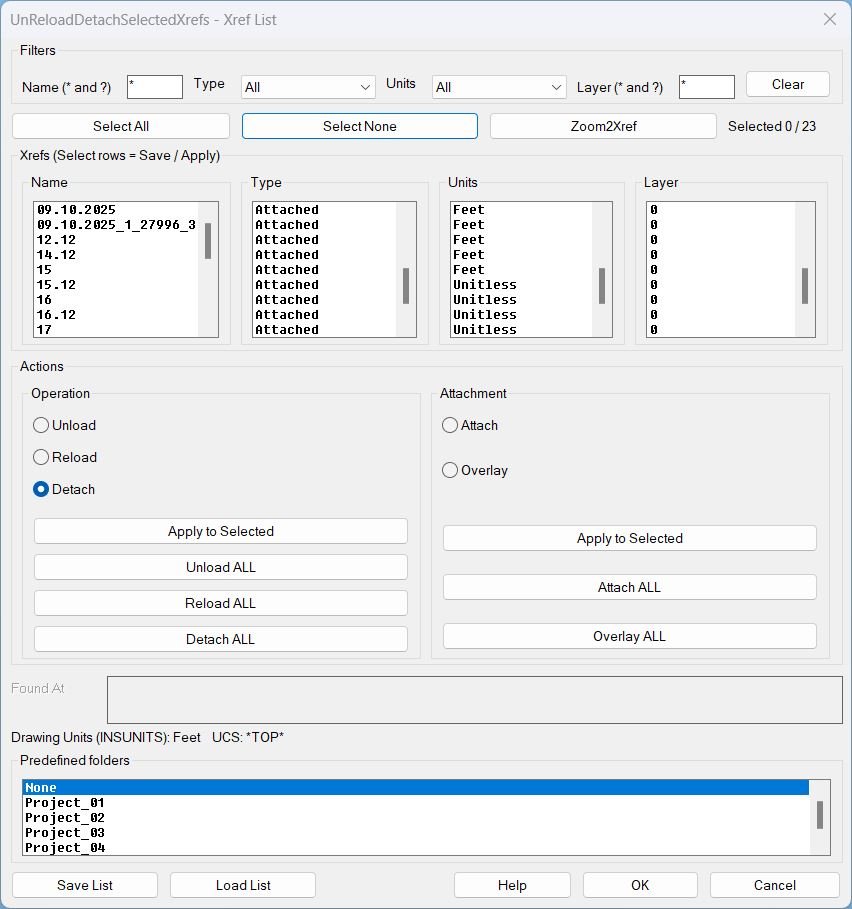
Xref management dialog for filtering, selecting, zooming, saving lists, loading lists, and batch operations on xrefs in the current drawing.
Command:
Command
UnReloadDetachSelectedXrefs
Description:
Description
This lisp scans the current drawing for xref definitions and displays them in a multi-column dialog (Name, Type, Units, Layer) with synchronized selection across columns.
It allows users to apply batch xref operations, change xref attachment type, and save or load xref lists for repeatable setups across drawings.
Predefined folder behavior
The Save List and Load List file dialogs can start in a predefined folder chosen from a scrolling list.
The predefined folder root is the user OneDrive location and the selected entry appends a relative path such as \Work\Project_01\_extra\Xref_Load_List.
The predefined folder options are: None, Project_01, Project_02, Project_03, Project_04, Project_05.
Helper function: (if any)
Helper logic and protections
- Discovery reads xrefs from the drawing Blocks table and builds the list with Name, Type (Attached or Overlay), Units, Found At, and Layer.
- Filtering supports wildcard patterns for name and layer, plus Type and Units dropdown filters.
- Selection map stores selection state by xref name and keeps it consistent while filters change.
- UCS and view preservation wraps actions to restore UCS and view after each operation.
- Layer robustness sanitizes illegal layer characters, creates missing layers, and can move all xref inserts to the stored layer.
- Zoom2Xref computes the Model Space bounding box of selected xref inserts and zooms to it without closing the dialog.
- Predefined folder resolution uses the selected list entry to set the default start directory for Save List and Load List dialogs.
Functionalities:
Functionalities
- Filter xrefs by Name wildcard, Type, Units, and Layer wildcard, then work only on the visible subset.
- Select All and Select None for the currently filtered list, with a live selected counter.
- Zoom2Xref zooms to the Model Space extents of the first selected xref insert set.
- Operations on selected using the Operation radio group and Apply to Selected: Unload, Reload, Detach.
- Operations on all using dedicated buttons: Unload ALL, Reload ALL, Detach ALL.
- Attachment type conversion using the Attachment radio group and Apply to Selected: Attach or Overlay.
- Attachment conversion on all using dedicated buttons: Attach ALL, Overlay ALL.
- Save List writes a text file containing only the selected xrefs with their key properties (Name, Type, Found At, UnitsCode, Layer) plus host metadata (INSUNITS and UCSNAME).
- Load List reads a saved list, attaches missing xrefs from Found At paths, enforces stored units during attach, reloads them, and restores host settings after completion.
- Predefined folders allow Save List and Load List dialogs to open directly in the selected project folder: None, Project_01, Project_02, Project_03, Project_04, Project_05.
Result:
Result
Running UnReloadDetachSelectedXrefs opens a dialog where the user can safely batch-manage xrefs without manually selecting drawing entities.
The user can unload, reload, or detach xrefs, convert attach type between Attached and Overlay, zoom to xref inserts, and save or load repeatable xref lists.
Saved lists are plain text and can be reused to recreate or standardize xref setups, including layer assignment and units control during attach operations.
Tags
Lisp, Xrefs, Dialog_UI, DCL, Layers, UCS, WCS, Coordinate_Systems, Model Space
Suggest relevant tags not in the above list
File_IO, Batch_Processing, Path_Management
Images, animations etc.
Log in to download.
Log in
Log in
Additional info:
Based on / Source code:
Open Website