
Short description
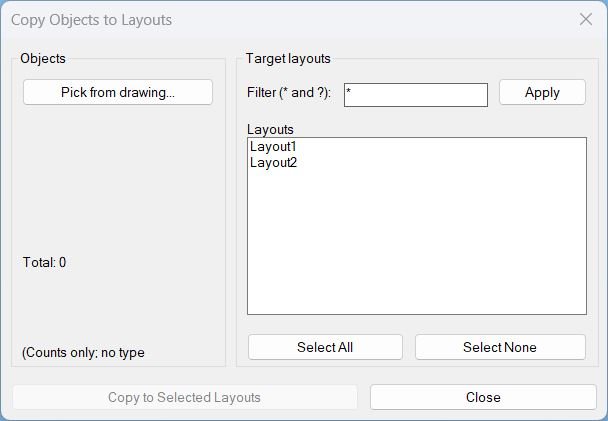
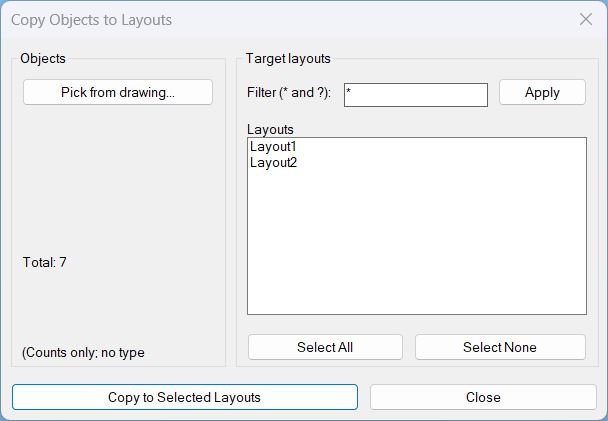
- Opens a dialog to pick objects once, then copies them to multiple selected paper-space layouts, showing only the total selected object count.
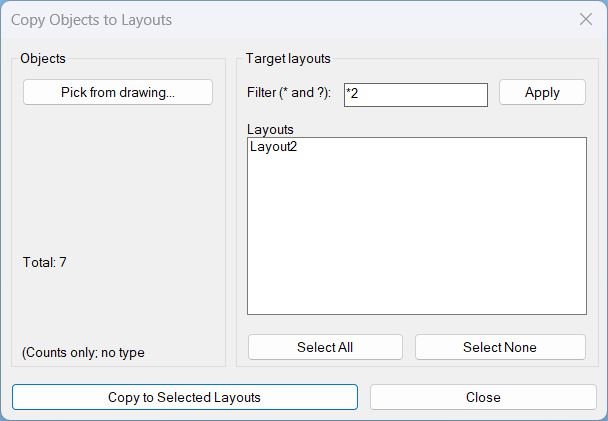
- Includes a wildcard layout filter and multi-select layout targeting with Select All and Select None actions.

Command:
- Commands: Copy2Layouts and macro-friendly alias _Copy2Layouts
Description:
- Creates a temporary DCL file each run and assigns a unique dialog name so the dialog definition cannot collide with older cached DCL definitions.
- Lets the user pick a selection set from the drawing and displays Total: N only, without any object-type breakdown.
- Lists only paper-space layouts (excludes Model) and supports filtering layout names using wildcard patterns * and ?.
- Copies selected objects to the target layouts using ActiveX CopyObjects into each destination layout’s paper-space block, wrapped in an UNDO Begin/End group for one-step rollback.
- Runs as a looped dialog workflow: Apply Filter and Pick return to the dialog, Copy completes the operation and exits on success, Close exits without changes.
Helper function: (if any)
- lc:unique-dialog-name generates a unique DCL dialog name from DATE to avoid dialog name collisions.
- lc:_dcl-text builds the DCL definition lines, including object picking, total count text, layout filter row, multi-select list, and copy/close buttons.
- lc:write-dcl writes the DCL lines to a temp .dcl file and returns the filename.
- lc:cleanup unloads the dialog and deletes the temp DCL file to prevent leftovers across runs.
- lc:get-paper-layouts returns layout names excluding Model.
- lc:parse-indexes converts the list box multi-select index string into a usable list of integers.
- lc:make-index-string builds “0 1 2 …” index strings for Select All behavior.
- lc:fill-layouts fills the layout list box and reapplies the stored index selection string.
- lc:get-ss-count returns the current selection set count, or zero if none is present.
- lc:set-copy-enabled enables or disables the Copy button based on whether the selection set contains objects.
- lc:apply-layout-filter applies wildcard filtering to the full layout list and resets selection to avoid index mismatch after filtering.
- lc:populate-dialog refreshes the dialog fields: filter text, layout list, total count, and Copy button availability.
- lc:select-all-layouts selects all layouts in the filtered list only.
- lc:select-none-layouts clears all selected target layouts in the dialog.
- lc:do-pick prompts the user to select objects and stores a valid PICKSET only if it has at least one entity.
- lc:copy-to-layouts converts selected entities into VLA objects, builds a safearray variant, and calls vla-CopyObjects into each destination layout block, skipping the current tab.
- lc:do-copy validates prerequisites (objects, filtered layouts, layout selection), maps indexes to layout names, runs the copy inside UNDO, and reports success or blocking errors.
- lc:bind-actions wires all dialog controls with action_tile handlers and uses dialog return codes to drive the reopen loop.
- c:Copy2Layouts controls the dialog lifecycle loop and ensures cleanup via a custom *error* handler; c:_Copy2Layouts provides an underscore alias for macros.
Functionalities:
- • Runtime DCL generation writes and loads a temp dialog with a unique name on each run.
- • Pick from drawing captures a selection set once and displays only Total: N in the dialog.
- • Layout filtering supports wildcard patterns * and ? and applies case-insensitive matching.
- • Multi-select target layouts copies to any subset of filtered layouts, with Select All and Select None for fast control.
- • Copy enable/disable disables the Copy button when no objects are selected to reduce invalid runs.
- • ActiveX CopyObjects copies converted VLA objects into each destination layout’s paper-space block to avoid command-based copy/paste issues.
- • UNDO grouping wraps the copy operation in UNDO Begin/End so the entire multi-layout copy can be undone in a single step.
- • Looped dialog workflow Apply Filter and Pick reopen the dialog, while a successful Copy ends the command.
Result:
- On successful copy, selected objects are duplicated into each chosen paper-space layout and a confirmation alert reports completion.
- If objects are not selected, shows No objects selected and instructs to use Pick first.
- If no layouts match the filter, shows No layouts match the current filter and does not copy.
- If no target layouts are selected, shows No target layouts selected and does not copy.
- On close or cancel, exits cleanly after unloading the dialog and deleting the temp DCL file, without copying anything.
Images, animations etc.
Log in to download.
Log in
Log in
Additional info:
Based on / Source code:
Open Website