
GoToLayout

Short description

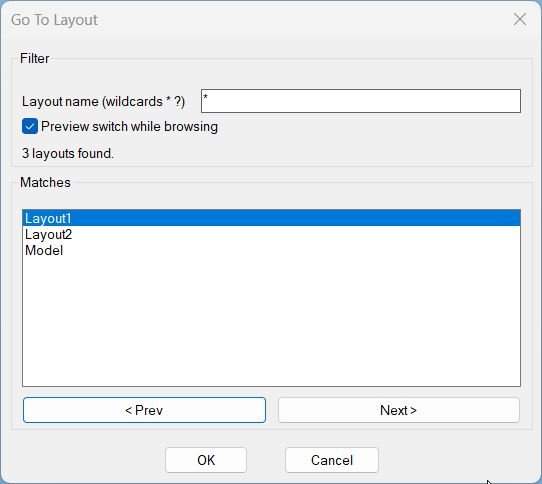
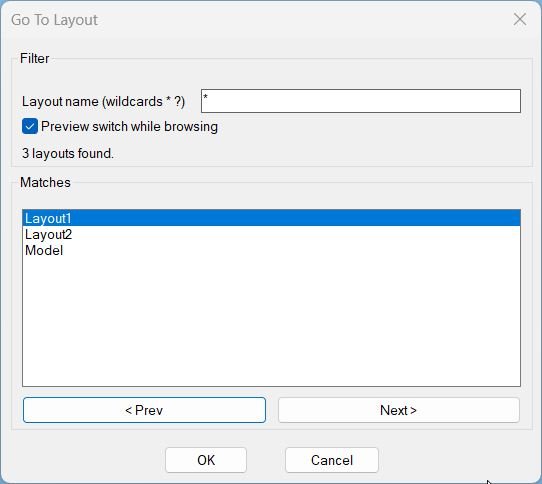
  • Opens a DCL dialog to filter layout names with wildcards and quickly switch the current tab to the selected match.
  • Includes optional preview switching while browsing and remembers the last used filter pattern across runs.
gotolayout 000

Command:

  • Command: GoToLayout

Description:

  • Builds a unique temporary DCL file each run and launches a dialog titled Go To Layout with a filter edit box and a matches list.
  • Reads available tabs from layoutlist and explicitly includes Model so both model and paper-space tabs can be targeted.
  • Filters using case-insensitive wcmatch against the user pattern, treating an empty pattern as *, and sorts matches case-insensitively for predictable navigation.
  • Provides browsing controls: selecting a list item or using < Prev and Next > updates the highlighted match, with wrap-around at the ends.
  • When Preview switch while browsing is enabled, the routine switches CTAB live as the selection changes; OK finalizes the selection, Cancel restores the original tab.

Helper function: (if any)​

  • _gtl:temp-dcl-path generates a unique temp DCL filepath in the TEMP directory for each run.
  • _gtl:write-dcl writes the dialog definition to the temp file, including filter input, preview toggle, count text, match list, and navigation buttons.
  • _gtl:layouts-raw returns layout names and adds Model so it is included in the match set.
  • _gtl:sort-ci sorts strings case-insensitively for consistent ordering.
  • _gtl:filter-layouts filters layout names using case-insensitive wcmatch; empty filter becomes *.
  • _gtl:fill-list fills the matches list box with the current filtered list.
  • gtl:_set-ctab-if-preview switches CTAB to the currently indexed match when preview is enabled.
  • gtl:update rebuilds matches when the pattern changes, updates the count label, selects the first match, and enables or disables OK and navigation depending on whether any matches exist.
  • gtl:on-list updates the current index from the list selection and triggers preview switching if enabled.
  • gtl:prev and gtl:next navigate the match list with wrap-around and trigger preview switching if enabled.
  • c:GoToLayout manages dialog lifecycle, stores the original tab, persists the last pattern, and applies or restores CTAB based on OK or Cancel.

Functionalities:

  • Wildcard filter input supporting * and ? to quickly narrow layout names.
  • Case-insensitive matching and sorting for reliable results regardless of layout name casing.
  • Preview toggle that can switch CTAB live as the user browses matches.
  • Navigation buttons < Prev and Next > with wrap-around to cycle through matches efficiently.
  • Automatic enabling and disabling of OK and navigation when zero layouts match the filter pattern.
  • Remembers the last used pattern in a global variable so subsequent runs start with the previous filter.
  • Restores the original tab on cancel or dialog close for safe browsing workflows.

Result:

  • On OK, switches CTAB to the selected layout or Model tab and prints a confirmation line.
  • If no matches exist, OK is disabled and the command prevents switching; if reached defensively, the routine restores the original tab and reports no matches.
  • On Cancel or close, restores the original tab and prints Cancelled. Original tab restored.
  • Always unloads the dialog and deletes the temporary DCL file after the dialog closes.
  • If the DCL file cannot be written or the dialog cannot be loaded, prints an error message and exits without changing tabs.

Images, animations etc.
gotolayout 000
Pixel

Additional info:

Share this page:

Page Tag: Layouts

  • GoToLayout

    Short description Opens a DCL dialog to filter layout names with wildcards and quickly switch the current tab to the selected match. Includes optional preview switching while browsing and remembers the last used filter pattern across runs. Command: Command: GoToLayout Description: Builds a unique temporary DCL file each run and launches a dialog titled Go…

  • DuplicateLayouts_00

    Short description Shows a DCL dialog to choose paper-space layouts and specify how many copies to create for each, then duplicates the selected layouts using the LAYOUT command. Provides a summary list where selected layouts and their copy counts can be reviewed and removed before running the duplication. Command: Command: DuplicateLayouts Description: Creates a temporary…

  • AnnoAllOn

    Short description Opens a DCL picker to choose Model and Layout tabs, then sets ANNOALLVISIBLE to 1 on the selected tabs. Includes quick selection controls for All and None before applying changes. Command: Command: AAON Description: Generates a temporary DCL dialog at runtime listing all tabs, including Model, with multi-select enabled. On confirmation, switches to…

  • Copy2Layouts

    Short description Opens a dialog to pick objects once, then copies them to multiple selected paper-space layouts, showing only the total selected object count. Includes a wildcard layout filter and multi-select layout targeting with Select All and Select None actions. Command: Commands: Copy2Layouts and macro-friendly alias _Copy2Layouts Description: Creates a temporary DCL file each run…

  • LayoutNum

    Short description Provides a DCL dialog to batch rename layouts using sequential numbering with optional prefix, suffix, and zero-padding, with filtering and preview. Supports in-dialog Apply and multi-level Undo without calling AutoCAD UNDO from DCL callbacks, to avoid stability issues. Command: Commands: LAYOUTNUM, _LAYOUTNUM, LayoutNum Description: Builds a unique DCL dialog definition at runtime and…

  • LockAllVp

    Short description Tags: Layouts, Paper Space, Viewports, DCL, Dialog_UI, Lisp, CAD, Clipboard Suggested tags not in list: ObjectARX, COM_Automation, Stability, Undo_Stack Command: • LOCKALLVP Open the dialog to lock or unlock viewports in selected layouts. • LockAllVp Alias command to run the same dialog workflow. • _LOCKALLVP Underscore alias for macro use. Description: This tool…

  • Zoom Extend

    Short description LZE summary LZE opens a DCL selection dialog for Layouts, then runs Zoom Extents in Paper Space on the selected layouts after the dialog closes. Key stability rule The zoom action is executed after the dialog closes to avoid UI timing issues. Command: Command LZE Runs Zoom Extents on selected layouts in Paper…

  • Zoom Window

    Short description LZW summary LZW opens a DCL selection dialog for Layouts, then prompts for a window and runs Zoom Window in Paper Space on the selected layouts after the dialog closes. Key stability rule The zoom action is executed after the dialog closes to avoid UI timing issues. Command: Command LZW Runs Zoom Window…

  • Layouts_list

    Short description Shows a DCL dialog listing all layouts with wildcard filtering and multi-select, then copies the selected layout names to the Windows clipboard (one per line). Includes optional Model tab inclusion, selection count display, and Select All or Select None shortcuts. Command: Commands: ALL_LAYOUTS_LIST, All_Layouts_list Description: Collects layout names from the active drawing using…

  • Delete Block

    Short description Comming soon … Command: Comming soon … Description: Comming soon … Helper function: (if any)​ Comming soon … Functionalities: Comming soon … Result: Comming soon … Images, animations etc. Lisp code: Expand Code ⬇ Select Code Copy Code Comming soon … Additional info: Based on / Source code: Open Website Share this page: